

Leaders who return from the holidays facing an overfull inbox, a slippery calendar, and a sprinting Q1 agenda can use AI not as a gimmick but as an organized, governed toolkit to triage work, restore focus, and accelerate execution — provided they pair speed with clear guardrails and measurable pilots.
The post-holiday rebound is predictable: delayed decisions, stacked meetings, and an urgent need to re-establish priorities. Over the last two years enterprise AI — particularly Copilot-style assistants and lightweight agents — has moved from experiment to mainstream toolset, promising time-savings on meeting prep, email triage, and cross-app synthesis. Executives at major firms openly treat these assistants as daily workflow partners, and vendor rollouts (notably Microsoft 365 Copilot) are accelerating adoption across industries.
That shift changes what leaders must do on day one back: triage with speed, delegate with precision, and govern with care. The techniques in this article synthesize practical advice (how to use AI for immediate recovery tasks), governance essentials (how to avoid data leakage and automation bias), and people strategy (how to keep teams engaged and fairly supported while scaling AI use). Where vendor claims about adoption and productivity are referenced, leaders should treat them as hypothesis-generating and verify locally with pilots and instrumentation.
However, the upside only materializes when organizations pair capability with governance, human oversight, and people strategy. Absent those, AI can amplify bad processes, leak sensitive data, and entrench inequality by rewarding early adopters while leaving others behind. Vendor case studies are directionally useful, but they are rarely sufficient evidence for large-scale procurement decisions. Independent verification and internal A/B testing are essential.
Notable trade-offs:
Source: Fast Company https://www.fastcompany.com/91461466/how-leaders-can-use-ai-to-get-back-on-track-after-the-holidays/
 Background / Overview
The post-holiday rebound is predictable: delayed decisions, stacked meetings, and an urgent need to re-establish priorities. Over the last two years enterprise AI — particularly Copilot-style assistants and lightweight agents — has moved from experiment to mainstream toolset, promising time-savings on meeting prep, email triage, and cross-app synthesis. Executives at major firms openly treat these assistants as daily workflow partners, and vendor rollouts (notably Microsoft 365 Copilot) are accelerating adoption across industries.That shift changes what leaders must do on day one back: triage with speed, delegate with precision, and govern with care. The techniques in this article synthesize practical advice (how to use AI for immediate recovery tasks), governance essentials (how to avoid data leakage and automation bias), and people strategy (how to keep teams engaged and fairly supported while scaling AI use). Where vendor claims about adoption and productivity are referenced, leaders should treat them as hypothesis-generating and verify locally with pilots and instrumentation.
Quick triage: inbox, calendar, and priorities
1) Use AI to create a rapid situational snapshot
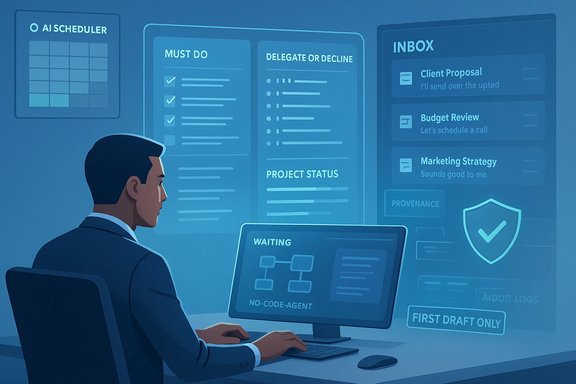
Start by asking an AI assistant to produce a concise, prioritized digest of the backlog: key unread threads, calendar conflicts, unresolved decisions, and items tagged “urgent.” This is triage — not final decision-making. Use retrieval-augmented generation (RAG) setups that limit outputs to indexed corporate documents and mailboxes to reduce hallucination risk. Leading enterprise playbooks recommend anchoring Copilot outputs to source documents and surfacing provenance for each claim.- Action: Run a two-hour “snapshot” task where AI creates:
- A 5‑item “must-handle today” list
- A 10‑item “delegate or decline” list
- A one-paragraph status rollup for each major project
2) Prioritize using the “rule of three”
Leaders regain momentum faster when they set three clear priorities for the week and resist ad-hoc additions. Use AI to map outstanding tasks to those three priorities and highlight which items are blockers vs. low-value noise. Treat the AI output as a decision-support input; require human sign-off before moving projects between priority buckets. This simple structure dramatically reduces context-switching and helps calendar triage.3) Triaging the inbox: summaries, suggested replies, and delegation recipes
AI shines at first-draft drafting and extraction. Use it to:- Summarize long threads into two-sentence briefs.
- Draft suggested replies that you edit for voice and accuracy.
- Propose delegation actions (who to assign, what to include, and a one-line rationale).
Tools and templates: prompts, agendas, and "first-draft only" discipline
1) Standardize prompts and templates
Executives who treat AI as an effective assistant use repeatable prompts and templates that the organization sanctions. Standard prompts turn ad-hoc queries into auditable, repeatable outputs that are easier to verify and measure. Some firms distribute a small set of executive prompts (e.g., anticipatory meeting prep, project status rollups) as best-practice templates to all senior leaders.- Example template types:
- Meeting prep (5-minute brief, top 3 risks, suggested questions)
- Status rollup (progress, blockers, next 2 actions)
- Email triage (urgent, delegate, archive)
2) Use AI to build agendas and run meeting hygiene
Auto-generate meeting agendas from previous meeting notes, outstanding actions, and project timelines. Attach a section in every agenda titled “What I need from this meeting” to force clarity. Use AI to append suggested time allocations so meetings stay tight and outcome-focused. Follow up by turning AI-generated notes into action items and calendar tasks that map to owners.3) Implement “first draft only” as policy
Leverage AI for speed — research, draft, outline — but require a named human editor for final outputs that are external-facing, contractual, or legally consequential. This hybrid model preserves speed while putting judgment where it belongs. The rule also creates a measurable gate for accountability.Delegation at scale: agents, copilots, and automation
1) Delegate repeatable coordination to agents
No-code and low-code agent builders enable leaders to automate repetitive coordination (scheduling, follow-ups, status pings) without writing production software. Use agents for:- Automatic meeting-minute capture + follow-up drafting
- Recurring status checks converted into consolidated reports
- Customer or vendor follow-ups that need templated responses
2) Make the AI assistant a delegation layer, not a bypass
When AI writes a follow-up, route it to the human owner for approval. This “human-in-the-loop” pattern prevents automation bias and preserves human judgment in ambiguous or reputationally sensitive cases. It also creates an implicit training loop: edit the AI outputs and the organization learns which prompts produce the strongest results.Governance and security: the non-negotiables
1) Least-privilege access and tenant isolation
Start by granting the minimal scope an assistant needs. Avoid tenant-wide or full-mailbox permissions unless there is a clear, audited use case. Vendors’ convenience options can expose IP and regulated data; enforce least-privilege and role-based access control to reduce blast radius.2) Audit logs, retention, and provenance
Record prompts, outputs, and the document sources AI used to form answers. Retain those records per your legal and compliance requirements. This logging supports audits, attack investigations, and retrospective accuracy checks. Provenance tagging reduces the risk of treating AI-generated assertions as facts.3) Human sign-off for high-risk outputs
Define risk tiers for outputs (low/medium/high). Require explicit human sign-off for medium and high-risk actions: financial commitments, legal language, hiring decisions, and public communications. This raises the bar for trust and keeps accountability clear.4) Data handling and DLP
Block or mask PII, credentials, and unreleased IP from being sent to public LLM endpoints. When possible, use enterprise models that support tenant isolation and contractual protections; where not possible, restrict model use to synthetic or anonymized datasets.People, incentives, and change management
1) Protect learning time and pair tool access with coaching
Adoption succeeds when organizations treat AI-skilling as part of the workday, not an after-hours burden. Role-based microlearning, sandboxes, and coached cohort projects yield faster capability transfer than self-paced courses. Sponsor protected practice time and pair less-experienced staff with “AI mentors.”2) Use incentives thoughtfully
Some companies find small spot rewards or team bonus pools effective to kickstart adoption in a governed sandbox. But incentives must be tied to measured outcomes (time saved, draft acceptance, error reduction) rather than raw usage counts to avoid gamification.3) Reskilling, fairness, and promotion criteria
Recognize AI-supervision and data orchestration as promotable skills. Update promotion rubrics to value human-AI collaboration, prompt expertise, and stewardship abilities. Provide funded reskilling pathways to avoid concentration of AI fluency among a privileged few.Measuring impact: pilots, KPIs, and the safe-scaling path
1) Pilot small, measure rigorously, and scale selectively
Run 6–12 week pilots with clear KPIs (hours saved per person, error rate, time to decision). Choose two to four use cases that are high-frequency, low-to-medium risk to generate early wins that are easy to measure. Successful pilots should include product owners, power users, IT/security, and L&D.2) Use instrumentation not anecdotes
Demand baseline measures before enabling AI, then measure the same tasks after deployment. Instrument prompts, edit rates, time-to-close, and error corrections. These metrics justify seat purchases and guide TCO planning. Vendor case studies are helpful for ideas, but internal A/B tests are the source of truth.3) Hard metrics to track
- Hours saved per user per week
- Percentage of drafts accepted without substantive edits
- Incidents of inaccurate or risky outputs discovered in audits
- Adoption spread across organizational cohorts (equitable diffusion)
Common risks and how to avoid them
- Hallucination and accuracy gaps. Always require provenance for factual claims and human sign-off for high-stakes outputs. Use RAG where possible to ground model responses in verified sources.
- Data leakage and compliance failures. Apply DLP, tenant isolation, and contractual model protections before enabling tools on sensitive data.
- Automation bias and deskilling. Preserve human-in-the-loop checkpoints and require justification logs for decisions influenced by AI.
- Unequal access and skill polarization. Fund role-specific training, protect learning time, and tie promotions to demonstrable applied AI skills rather than raw usage.
- Vendor lock-in and hidden costs. Treat Copilot seats, API usage, and data-residency constraints as recurring cost items in TCO calculations — pilot and negotiate audit rights.
A practical 30‑day playbook for leaders returning after holiday downtime
- Day 0–1: Sit with the AI snapshot. Ask your assistant for the “5 things I must do today,” a three-priority list for the week, and a one-paragraph status for each active project. Validate the outputs; correct any errors immediately.
- Day 1–3: Triage calendar and cancel or compress meetings that aren’t aligned to your top three priorities. Use an AI scheduler to propose protected focus blocks and resolve conflicts. Test the scheduler on a small sample calendar before wide use.
- Day 3–7: Run a focused team workshop — 90 minutes — teaching the three approved prompts and the “first-draft only” rule. Announce governance basics (least-privilege, logging, human sign-off). Protect learning time in the team’s weekly plan.
- Week 2: Launch two 6–12 week pilots (one knowledge-work use case; one operations use case). Define KPIs, appoint owners, and ensure IT sets up minimal DLP and audit logging.
- Week 3–4: Measure early outcomes: hours saved, draft acceptance rate, and one qualitative staff pulse on tool ease-of-use. Reallocate effort based on evidence and prepare a short governance playbook for scale decisions.
Critical analysis: strengths, trade-offs, and pitfalls leaders must not ignore
AI offers real advantages for leaders trying to regain momentum after holidays: consistent synthesis, rapid drafts, and automation of coordination tasks that consume executive time. When used with discipline, these tools can return hours previously buried in email and meeting minutiae back to strategic work. Rapid pilots and standardized prompts create repeatability and measurable value.However, the upside only materializes when organizations pair capability with governance, human oversight, and people strategy. Absent those, AI can amplify bad processes, leak sensitive data, and entrench inequality by rewarding early adopters while leaving others behind. Vendor case studies are directionally useful, but they are rarely sufficient evidence for large-scale procurement decisions. Independent verification and internal A/B testing are essential.
Notable trade-offs:
- Speed vs. accuracy: faster drafting increases throughput but requires editorial discipline to prevent reputational harm.
- Convenience vs. security: broad permissions accelerate automation but introduce data leakage risk.
- Adoption vs. equity: incentives can accelerate use but must be designed to diffuse skills equitably.
Final verdict: use AI to reset momentum, but govern like your license depends on it
The post-holiday reset is an ideal moment to institutionalize better work habits — clearer priorities, tighter meetings, and smarter delegation. AI can accelerate that reset when leaders treat it as an amplifier for disciplined workflows rather than a shortcut around judgment and governance. Start small, measure everything that matters, protect people while you scale, and require human judgment for anything that affects reputation, legal standing, or safety. With that balance, leaders can convert holiday lag into sustained Q1 acceleration.Source: Fast Company https://www.fastcompany.com/91461466/how-leaders-can-use-ai-to-get-back-on-track-after-the-holidays/
