

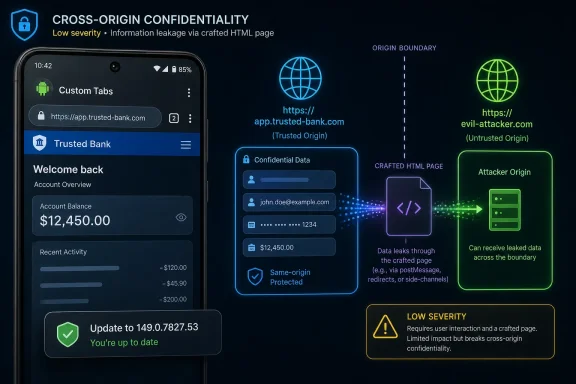
CVE-2026-11247 is a low-severity Chrome for Android vulnerability, disclosed June 4, 2026 and fixed before version 149.0.7827.53, in which insufficient policy enforcement in Custom Tabs could let a remote attacker leak cross-origin data through a crafted HTML page. The word low is doing a lot of work here. This is not the kind of Chrome bug that screams for emergency weekend patch bridges, but it is exactly the kind of browser flaw that exposes how much trust modern mobile computing places in seams most users never see. The important story is not that Custom Tabs broke once; it is that app-embedded browsing has become part of the web’s security boundary.
Chrome vulnerabilities usually arrive in two familiar flavors. There are memory corruption bugs in V8, GPU, WebRTC, or graphics stacks that raise immediate concerns about code execution. Then there are policy and UI boundary failures, less spectacular but often more revealing, because they show where the browser’s promise to isolate one site, app, or identity from another has become complicated by product convenience.
CVE-2026-11247 belongs firmly in the second group. The public description says Chrome on Android, before 149.0.7827.53, failed to enforce policy correctly in Custom Tabs, allowing a remote attacker to leak cross-origin data via crafted HTML. CISA’s ADP scoring gives it a CVSS 3.1 base score of 3.1, with network attack vector, high attack complexity, no privileges required, user interaction required, and low confidentiality impact.
That is not a catastrophic profile. It means exploitation is not assumed to be trivial, it requires the user to participate somehow, and the documented impact is limited to confidentiality rather than integrity or availability. But browser security is not judged only by the worst possible outcome of a single bug. It is judged by whether users and administrators can still trust the layers that separate one origin, one app, and one session from another.
Custom Tabs are a convenience feature with security consequences. They let Android apps open web content using Chrome’s engine and account state without dumping the user into a completely separate browser experience. That has obvious benefits for sign-in flows, payment pages, news links, OAuth-style handoffs, and in-app content. It also means the browser is not always a standalone destination; sometimes it is an embedded trust broker sitting inside someone else’s app journey.
That is the hinge on which this CVE turns. A cross-origin data leak in a conventional tab is already a problem. A cross-origin data leak in a browser surface launched by another app raises a sharper question: which party did the user think they were trusting at the moment the leak became possible?
That is the design goal. Custom Tabs are meant to be faster, more consistent, and safer than apps shipping their own embedded WebViews for every external link. Chrome brings familiar protections, shared cookies where appropriate, Safe Browsing checks, rendering hardening, and a browser-managed security model. In principle, that is better than thousands of apps improvising miniature browsers.
But centralization creates its own blast radius. When Chrome’s enforcement logic is correct, Custom Tabs are a security upgrade. When enforcement logic has a gap, the gap can affect flows that users do not mentally categorize as “web browsing” at all. A crafted page does not need to defeat Android as a whole to create harm; it only needs to exploit a mismatch between Chrome’s web guarantees and the surrounding app experience.
That is why “insufficient policy enforcement” is such a bland but consequential phrase. It suggests not a missing bounds check or a dangling pointer, but a rule that should have applied and did not. In browser terms, those rules are the constitution: same-origin policy, navigation restrictions, storage boundaries, permission prompts, content settings, and the countless small checks that prevent one context from learning too much about another.
The public record does not disclose enough technical detail to say exactly which policy failed or what category of cross-origin information could leak. That is normal for Chrome advisories immediately after release; Google often keeps bug details restricted until a majority of users have received a fix. The absence of detail is not proof of danger, but it is a reminder that defenders must act on affected versions and exploitability class, not on a complete proof-of-concept narrative.
Still, dismissing this CVE entirely would be the wrong lesson. Confidentiality-only web bugs can matter in proportion to the sensitivity of the session they touch. A leak of cross-origin data may be minor in a casual browsing context and serious in a federated login, corporate SaaS, password reset, or admin console workflow. The score describes the vulnerability in isolation, not every workflow in which affected code might appear.
The “user interaction required” part also deserves careful reading. In mobile web attacks, interaction is not necessarily exotic. Users tap links constantly in messaging apps, email clients, social feeds, QR-code flows, help-desk portals, and authentication prompts. If the exploit path requires a user to open a crafted page, that is a meaningful limiting factor, but it is not a fantasy scenario.
High attack complexity is the stronger mitigating signal. It implies the attacker likely needs more than simply hosting malicious HTML and waiting. There may be timing, state, victim context, redirect behavior, app integration, or origin-specific requirements. That lowers mass exploitation risk. It does not eliminate targeted risk against users whose mobile browser sessions carry valuable identity state.
For WindowsForum readers managing fleets, the practical conclusion is straightforward: do not panic, but do not carve Chrome for Android out of patch compliance because this one CVE says low. Mobile browsers are now identity infrastructure. If an organization treats Android as a managed endpoint platform, Chrome version drift belongs in the same hygiene conversation as OS patch level, device compliance, and phishing-resistant authentication.
The user-facing answer is simple: update Chrome on Android through Google Play and verify that the installed version is 149.0.7827.53 or later. The administrator-facing answer is more annoying: make sure your mobile device management platform is actually checking Chrome’s app version, not merely the Android security patch level. A fully patched Android OS with an outdated Chrome package can still leave this browser bug present.
The release context is also unusual because Chrome 149 was a very large security update on desktop, with hundreds of fixes and a long advisory list spanning critical, high, medium, and low issues. CVE-2026-11247 appears as one low-severity item in that broader release wave. That makes it easy to lose in the noise, especially when critical ANGLE, Network, GPU, V8, and use-after-free issues naturally command more attention.
But Android-specific Custom Tabs bugs do not map neatly onto a desktop mental model. Desktop Chrome version reporting is easy to see, and enterprise tools have years of practice inspecting installed browser builds on Windows and macOS. Android app version enforcement is more dependent on Play update behavior, managed Google Play policy, OEM constraints, user settings, and whether the device is personally owned or corporate-managed.
For unmanaged consumers, the right advice remains boring: let Play Store updates run, avoid disabling Chrome updates, and restart the browser when prompted. For enterprises, the better advice is to stop relying on vibes. If mobile access to corporate resources is allowed, Chrome version posture should be measurable.
Modern browsers have spent years hardening this boundary. Site isolation, process isolation, CORS rules, storage partitioning, cookie changes, permission gating, and anti-tracking defenses all orbit the same basic premise: the browser must know which context is allowed to see which data. Custom Tabs complicate that because the browser surface is launched by an app but still participates in web-origin rules.
A policy enforcement failure in that environment may not mean a wholesale same-origin policy bypass. Public CVE summaries are deliberately compressed and often imprecise. But even a narrow leak can undermine user expectations. If the data exposed is small, conditional, or hard to obtain, the bug stays low severity. If the exposed data can be chained with login state, redirects, app links, or user profiling, it becomes more interesting to attackers.
This is where defenders should avoid both extremes. It is not responsible to inflate every cross-origin leak into an account-takeover crisis. It is equally unwise to treat browser confidentiality bugs as academic. Attackers often assemble campaigns from small primitives: a link click here, a state leak there, an origin confusion moment elsewhere. Browser vendors patch these issues because the cumulative boundary is what matters.
For security-minded users, the broader lesson is that in-app browsers and embedded browser surfaces are not magically separate from your browser identity. If an app opens a Chrome Custom Tab, that experience may carry cookies, account state, or permissions in ways that are convenient and generally intended. Convenience is part of the threat model.
That sequence is normal in 2026’s vulnerability ecosystem, but it creates friction. Security teams ingest CVE data from multiple places: vendor advisories, NVD, CISA enrichment, commercial scanners, Linux distributions, MDM dashboards, and patch-management vendors. When one source has a score but another lacks it, or when CPE mappings arrive after the CVE is first received, dashboards can briefly disagree about whether something is known, scorable, affected, or applicable.
The “Are we missing a CPE?” prompt on NVD pages is not decorative. CPE matching is one of the least glamorous and most consequential parts of vulnerability management. If Chrome-on-Android is represented awkwardly, tools may either miss affected devices or flag irrelevant assets. Both outcomes waste time: one leaves exposure invisible, the other burns analyst attention.
CVE-2026-11247 is an especially good example because the product is Chrome, the platform is Android, and the referenced Chrome release blog is titled for desktop. The CVE description is Android-specific, while the advisory page belongs to a broader Chrome 149 release. A human can reconcile that. A brittle scanner may not.
This is why mature security operations do not blindly trust one feed. They correlate vendor-fixed versions, platform applicability, package inventory, and exploit intelligence. That sounds obvious until a low-severity CVE vanishes beneath a dashboard filter because the organization only alerts on NVD-enriched highs and criticals.
A compromised or leaky mobile browser session may not touch a Windows kernel, but it may touch the same corporate account that unlocks SharePoint, Exchange, GitHub, Azure portals, VPN enrollment, or remote desktop gateways. The endpoint boundary has moved upward into identity and session management. Browser flaws are therefore cross-platform enterprise issues even when the affected binary runs on Android.
There is also a policy lesson for organizations that standardize on Edge for desktop but allow Chrome on Android because Android’s browser ecosystem is harder to lock down or because apps rely on Chrome Custom Tabs. Browser standardization is only useful if it matches where users actually authenticate. If mobile users sign in through Chrome-powered surfaces, those surfaces need patch governance.
Microsoft shops using Intune can enforce managed app policies and compliance rules, but the granularity of browser version enforcement depends on how the environment is configured. Some organizations are excellent at Windows Update for Business rings and weak at managed Google Play app posture. CVE-2026-11247 is not the bug that will bring them down. It is the kind of bug that reveals whether their mobile patch story is real.
For smaller businesses, the practical step is less elaborate: make sure Android devices used for work receive Chrome updates automatically and avoid treating personal phones as invisible infrastructure. Bring-your-own-device policies often focus on screen locks and remote wipe. Browser version compliance deserves a seat at the table.
For a low-severity bug, withholding details can feel excessive. But Chrome vulnerabilities often affect downstream Chromium-based browsers, embedded components, and third-party integrations. Even when a specific CVE is Android-only, related implementation details may reveal adjacent weaknesses. Vendors prefer to patch first and explain later, if at all.
The result is an asymmetry that administrators have learned to live with. You rarely get a complete technical narrative on day one. You get a fixed version, a severity rating, a component name, and enough description to prioritize deployment. In this case, the prioritization answer is clear: include the update in normal expedited browser patching, but do not treat it as a confirmed exploited emergency based solely on the public record.
The Chrome 149 release also underscores a different problem: browser updates are now too large and too frequent for manual CVE-by-CVE drama. A single update can contain hundreds of security fixes across rendering, media, graphics, permissions, extensions, password handling, developer tooling, and platform integration. The operational posture has to be version-based. Either the browser is current enough, or it is not.
That may sound unsatisfying to analysts who want to rank every CVE individually. But for browsers, patch latency is often the metric that matters most. If an organization cannot move Chrome quickly for low-severity boundary bugs, it probably cannot move Chrome quickly when a high-severity V8 exploit arrives two days later.
Yet boundary bugs are attractive because they can support social engineering. A crafted HTML page is easy to deliver. A user tap is easy to obtain. The hard part is making the leak meaningful, reliable, and useful. That is likely where the high complexity comes in.
On Android, the app-to-web handoff gives attackers many lures. A malicious app can open web content. A phishing message can direct a user into a Custom Tab. A legitimate app can be abused as a context for navigation if link handling is loose. None of that proves this CVE is easily exploitable; it simply explains why Chrome’s Custom Tabs enforcement must be conservative.
The broader browser industry has learned this repeatedly. Security UI confusion, origin display quirks, permission races, storage leaks, redirect oddities, and embedded browsing inconsistencies rarely look dramatic in isolation. But attackers chain ambiguity. They win when the user cannot tell which identity, origin, app, or browser context is in control.
That is why this CVE is worth more than a one-line patch notice. It is a reminder that mobile browser security is not just sandboxing and memory safety. It is also policy choreography across apps, tabs, origins, and user expectations.
Organizations should verify mobile Chrome versions through their MDM or endpoint inventory system where possible. They should check whether managed Google Play updates are forced, deferred, or left to users. They should confirm that conditional access policies do not simply check OS version while ignoring vulnerable browser apps used for authentication.
Consumers should open the Play Store, update Chrome, and avoid assuming that Android itself has patched the browser. Chrome is an app with its own release cadence. On many devices, it updates smoothly in the background; on others, user settings, storage problems, stale Play services, or neglected devices can leave old builds behind.
Developers using Custom Tabs should also pay attention, not because they can patch Chrome directly, but because their app design affects exposure. Sensitive flows should minimize unnecessary cross-origin complexity, avoid confusing redirects, and use platform-supported authentication patterns. If an app’s security depends on users understanding subtle distinctions between native screens, WebViews, Custom Tabs, and external browsers, the design has already ceded ground.
Browser vendors will keep fixing these gaps. App developers should reduce how much harm any one gap can cause.
 The Small Chrome Bug That Lives Between Apps and the Web
Chrome vulnerabilities usually arrive in two familiar flavors. There are memory corruption bugs in V8, GPU, WebRTC, or graphics stacks that raise immediate concerns about code execution. Then there are policy and UI boundary failures, less spectacular but often more revealing, because they show where the browser’s promise to isolate one site, app, or identity from another has become complicated by product convenience.CVE-2026-11247 belongs firmly in the second group. The public description says Chrome on Android, before 149.0.7827.53, failed to enforce policy correctly in Custom Tabs, allowing a remote attacker to leak cross-origin data via crafted HTML. CISA’s ADP scoring gives it a CVSS 3.1 base score of 3.1, with network attack vector, high attack complexity, no privileges required, user interaction required, and low confidentiality impact.
That is not a catastrophic profile. It means exploitation is not assumed to be trivial, it requires the user to participate somehow, and the documented impact is limited to confidentiality rather than integrity or availability. But browser security is not judged only by the worst possible outcome of a single bug. It is judged by whether users and administrators can still trust the layers that separate one origin, one app, and one session from another.
Custom Tabs are a convenience feature with security consequences. They let Android apps open web content using Chrome’s engine and account state without dumping the user into a completely separate browser experience. That has obvious benefits for sign-in flows, payment pages, news links, OAuth-style handoffs, and in-app content. It also means the browser is not always a standalone destination; sometimes it is an embedded trust broker sitting inside someone else’s app journey.
That is the hinge on which this CVE turns. A cross-origin data leak in a conventional tab is already a problem. A cross-origin data leak in a browser surface launched by another app raises a sharper question: which party did the user think they were trusting at the moment the leak became possible?
Custom Tabs Turned Chrome Into Android’s Shared Front Door
On desktop Windows, the browser is usually an explicit decision. A user opens Chrome, Edge, Firefox, or Brave, sees the address bar, and operates within the mental model of “I am browsing the web.” On Android, that line is blurrier. A banking app, chat client, shopping app, password reset email, or news feed may open a web page in a Chrome-powered Custom Tab while preserving enough app context that the experience feels native.That is the design goal. Custom Tabs are meant to be faster, more consistent, and safer than apps shipping their own embedded WebViews for every external link. Chrome brings familiar protections, shared cookies where appropriate, Safe Browsing checks, rendering hardening, and a browser-managed security model. In principle, that is better than thousands of apps improvising miniature browsers.
But centralization creates its own blast radius. When Chrome’s enforcement logic is correct, Custom Tabs are a security upgrade. When enforcement logic has a gap, the gap can affect flows that users do not mentally categorize as “web browsing” at all. A crafted page does not need to defeat Android as a whole to create harm; it only needs to exploit a mismatch between Chrome’s web guarantees and the surrounding app experience.
That is why “insufficient policy enforcement” is such a bland but consequential phrase. It suggests not a missing bounds check or a dangling pointer, but a rule that should have applied and did not. In browser terms, those rules are the constitution: same-origin policy, navigation restrictions, storage boundaries, permission prompts, content settings, and the countless small checks that prevent one context from learning too much about another.
The public record does not disclose enough technical detail to say exactly which policy failed or what category of cross-origin information could leak. That is normal for Chrome advisories immediately after release; Google often keeps bug details restricted until a majority of users have received a fix. The absence of detail is not proof of danger, but it is a reminder that defenders must act on affected versions and exploitability class, not on a complete proof-of-concept narrative.
The Low Severity Label Is Accurate, But It Is Not a Free Pass
Security teams often struggle with low-severity browser CVEs because the operational instinct is to triage them below server-side remote code execution, VPN flaws, and exploited endpoint bugs. That instinct is rational. A CVSS 3.1 issue with high attack complexity and user interaction required should not displace a known exploited vulnerability with code execution potential.Still, dismissing this CVE entirely would be the wrong lesson. Confidentiality-only web bugs can matter in proportion to the sensitivity of the session they touch. A leak of cross-origin data may be minor in a casual browsing context and serious in a federated login, corporate SaaS, password reset, or admin console workflow. The score describes the vulnerability in isolation, not every workflow in which affected code might appear.
The “user interaction required” part also deserves careful reading. In mobile web attacks, interaction is not necessarily exotic. Users tap links constantly in messaging apps, email clients, social feeds, QR-code flows, help-desk portals, and authentication prompts. If the exploit path requires a user to open a crafted page, that is a meaningful limiting factor, but it is not a fantasy scenario.
High attack complexity is the stronger mitigating signal. It implies the attacker likely needs more than simply hosting malicious HTML and waiting. There may be timing, state, victim context, redirect behavior, app integration, or origin-specific requirements. That lowers mass exploitation risk. It does not eliminate targeted risk against users whose mobile browser sessions carry valuable identity state.
For WindowsForum readers managing fleets, the practical conclusion is straightforward: do not panic, but do not carve Chrome for Android out of patch compliance because this one CVE says low. Mobile browsers are now identity infrastructure. If an organization treats Android as a managed endpoint platform, Chrome version drift belongs in the same hygiene conversation as OS patch level, device compliance, and phishing-resistant authentication.
The Version Number Matters More Than the CVE Drama
The fixed threshold is Chrome 149.0.7827.53 for Android. The NVD change history also shows a vulnerable software configuration for Google Chrome versions up to, but excluding, 149.0.7827.53, paired with Android as the operating environment. That detail matters because vulnerability scanners and asset systems often stumble over browser CPEs, Android packaging, and channel-specific release timing.The user-facing answer is simple: update Chrome on Android through Google Play and verify that the installed version is 149.0.7827.53 or later. The administrator-facing answer is more annoying: make sure your mobile device management platform is actually checking Chrome’s app version, not merely the Android security patch level. A fully patched Android OS with an outdated Chrome package can still leave this browser bug present.
The release context is also unusual because Chrome 149 was a very large security update on desktop, with hundreds of fixes and a long advisory list spanning critical, high, medium, and low issues. CVE-2026-11247 appears as one low-severity item in that broader release wave. That makes it easy to lose in the noise, especially when critical ANGLE, Network, GPU, V8, and use-after-free issues naturally command more attention.
But Android-specific Custom Tabs bugs do not map neatly onto a desktop mental model. Desktop Chrome version reporting is easy to see, and enterprise tools have years of practice inspecting installed browser builds on Windows and macOS. Android app version enforcement is more dependent on Play update behavior, managed Google Play policy, OEM constraints, user settings, and whether the device is personally owned or corporate-managed.
For unmanaged consumers, the right advice remains boring: let Play Store updates run, avoid disabling Chrome updates, and restart the browser when prompted. For enterprises, the better advice is to stop relying on vibes. If mobile access to corporate resources is allowed, Chrome version posture should be measurable.
Cross-Origin Leaks Are Browser Bugs With Identity Consequences
The phrase “cross-origin data” sounds abstract until you remember that origin boundaries are what prevent one website from reading another website’s content. The web’s security model depends on the idea that a page from one scheme, host, and port cannot freely inspect private data from another. Without that model, logged-in web applications become involuntary data sources for malicious pages.Modern browsers have spent years hardening this boundary. Site isolation, process isolation, CORS rules, storage partitioning, cookie changes, permission gating, and anti-tracking defenses all orbit the same basic premise: the browser must know which context is allowed to see which data. Custom Tabs complicate that because the browser surface is launched by an app but still participates in web-origin rules.
A policy enforcement failure in that environment may not mean a wholesale same-origin policy bypass. Public CVE summaries are deliberately compressed and often imprecise. But even a narrow leak can undermine user expectations. If the data exposed is small, conditional, or hard to obtain, the bug stays low severity. If the exposed data can be chained with login state, redirects, app links, or user profiling, it becomes more interesting to attackers.
This is where defenders should avoid both extremes. It is not responsible to inflate every cross-origin leak into an account-takeover crisis. It is equally unwise to treat browser confidentiality bugs as academic. Attackers often assemble campaigns from small primitives: a link click here, a state leak there, an origin confusion moment elsewhere. Browser vendors patch these issues because the cumulative boundary is what matters.
For security-minded users, the broader lesson is that in-app browsers and embedded browser surfaces are not magically separate from your browser identity. If an app opens a Chrome Custom Tab, that experience may carry cookies, account state, or permissions in ways that are convenient and generally intended. Convenience is part of the threat model.
The NVD Record Shows the Vulnerability Data Pipeline Still Has Rough Edges
The NVD entry for CVE-2026-11247 is also a small case study in how vulnerability data becomes operational truth. At publication, NVD had not provided its own CVSS 4.0, CVSS 3.x, or CVSS 2.0 score, while CISA-ADP supplied the CVSS 3.1 vector and CWE mapping. NIST’s later analysis added the CPE configuration and vendor references.That sequence is normal in 2026’s vulnerability ecosystem, but it creates friction. Security teams ingest CVE data from multiple places: vendor advisories, NVD, CISA enrichment, commercial scanners, Linux distributions, MDM dashboards, and patch-management vendors. When one source has a score but another lacks it, or when CPE mappings arrive after the CVE is first received, dashboards can briefly disagree about whether something is known, scorable, affected, or applicable.
The “Are we missing a CPE?” prompt on NVD pages is not decorative. CPE matching is one of the least glamorous and most consequential parts of vulnerability management. If Chrome-on-Android is represented awkwardly, tools may either miss affected devices or flag irrelevant assets. Both outcomes waste time: one leaves exposure invisible, the other burns analyst attention.
CVE-2026-11247 is an especially good example because the product is Chrome, the platform is Android, and the referenced Chrome release blog is titled for desktop. The CVE description is Android-specific, while the advisory page belongs to a broader Chrome 149 release. A human can reconcile that. A brittle scanner may not.
This is why mature security operations do not blindly trust one feed. They correlate vendor-fixed versions, platform applicability, package inventory, and exploit intelligence. That sounds obvious until a low-severity CVE vanishes beneath a dashboard filter because the organization only alerts on NVD-enriched highs and criticals.
Windows Shops Should Care Because Chrome Is No Longer Just a Windows App
A Windows-focused audience might reasonably ask why a Chrome for Android Custom Tabs issue belongs on its radar. The answer is that Windows environments no longer stop at Windows endpoints. Microsoft 365, Entra ID, Intune, Defender, Teams, Outlook, Edge, Chrome, Android Enterprise, and iOS all sit inside the same identity perimeter.A compromised or leaky mobile browser session may not touch a Windows kernel, but it may touch the same corporate account that unlocks SharePoint, Exchange, GitHub, Azure portals, VPN enrollment, or remote desktop gateways. The endpoint boundary has moved upward into identity and session management. Browser flaws are therefore cross-platform enterprise issues even when the affected binary runs on Android.
There is also a policy lesson for organizations that standardize on Edge for desktop but allow Chrome on Android because Android’s browser ecosystem is harder to lock down or because apps rely on Chrome Custom Tabs. Browser standardization is only useful if it matches where users actually authenticate. If mobile users sign in through Chrome-powered surfaces, those surfaces need patch governance.
Microsoft shops using Intune can enforce managed app policies and compliance rules, but the granularity of browser version enforcement depends on how the environment is configured. Some organizations are excellent at Windows Update for Business rings and weak at managed Google Play app posture. CVE-2026-11247 is not the bug that will bring them down. It is the kind of bug that reveals whether their mobile patch story is real.
For smaller businesses, the practical step is less elaborate: make sure Android devices used for work receive Chrome updates automatically and avoid treating personal phones as invisible infrastructure. Bring-your-own-device policies often focus on screen locks and remote wipe. Browser version compliance deserves a seat at the table.
The Quiet Fix Says More Than the Loud Score
Google’s advisory posture here is familiar: list the CVE, component, severity, reporter, and broad release version; keep detailed bug information restricted until enough users are protected. That frustrates researchers and defenders who want to know exactly what could be leaked. It also reflects the reality of browser patching at planetary scale.For a low-severity bug, withholding details can feel excessive. But Chrome vulnerabilities often affect downstream Chromium-based browsers, embedded components, and third-party integrations. Even when a specific CVE is Android-only, related implementation details may reveal adjacent weaknesses. Vendors prefer to patch first and explain later, if at all.
The result is an asymmetry that administrators have learned to live with. You rarely get a complete technical narrative on day one. You get a fixed version, a severity rating, a component name, and enough description to prioritize deployment. In this case, the prioritization answer is clear: include the update in normal expedited browser patching, but do not treat it as a confirmed exploited emergency based solely on the public record.
The Chrome 149 release also underscores a different problem: browser updates are now too large and too frequent for manual CVE-by-CVE drama. A single update can contain hundreds of security fixes across rendering, media, graphics, permissions, extensions, password handling, developer tooling, and platform integration. The operational posture has to be version-based. Either the browser is current enough, or it is not.
That may sound unsatisfying to analysts who want to rank every CVE individually. But for browsers, patch latency is often the metric that matters most. If an organization cannot move Chrome quickly for low-severity boundary bugs, it probably cannot move Chrome quickly when a high-severity V8 exploit arrives two days later.
Attackers Do Not Need Every Boundary Failure to Be Critical
The most useful way to think about CVE-2026-11247 is as a boundary bug with limited known impact. It is not a memory-corruption code-execution flaw. It is not publicly documented as exploited in the wild. It does not appear to require privileges. It does require user interaction and carries high attack complexity. That combination justifies the low score.Yet boundary bugs are attractive because they can support social engineering. A crafted HTML page is easy to deliver. A user tap is easy to obtain. The hard part is making the leak meaningful, reliable, and useful. That is likely where the high complexity comes in.
On Android, the app-to-web handoff gives attackers many lures. A malicious app can open web content. A phishing message can direct a user into a Custom Tab. A legitimate app can be abused as a context for navigation if link handling is loose. None of that proves this CVE is easily exploitable; it simply explains why Chrome’s Custom Tabs enforcement must be conservative.
The broader browser industry has learned this repeatedly. Security UI confusion, origin display quirks, permission races, storage leaks, redirect oddities, and embedded browsing inconsistencies rarely look dramatic in isolation. But attackers chain ambiguity. They win when the user cannot tell which identity, origin, app, or browser context is in control.
That is why this CVE is worth more than a one-line patch notice. It is a reminder that mobile browser security is not just sandboxing and memory safety. It is also policy choreography across apps, tabs, origins, and user expectations.
The Patch Queue Should Treat Mobile Chrome as First-Class Infrastructure
There is no exotic remediation path here. The fix is to run Chrome for Android 149.0.7827.53 or later. The hard part is proving that every relevant device has done so.Organizations should verify mobile Chrome versions through their MDM or endpoint inventory system where possible. They should check whether managed Google Play updates are forced, deferred, or left to users. They should confirm that conditional access policies do not simply check OS version while ignoring vulnerable browser apps used for authentication.
Consumers should open the Play Store, update Chrome, and avoid assuming that Android itself has patched the browser. Chrome is an app with its own release cadence. On many devices, it updates smoothly in the background; on others, user settings, storage problems, stale Play services, or neglected devices can leave old builds behind.
Developers using Custom Tabs should also pay attention, not because they can patch Chrome directly, but because their app design affects exposure. Sensitive flows should minimize unnecessary cross-origin complexity, avoid confusing redirects, and use platform-supported authentication patterns. If an app’s security depends on users understanding subtle distinctions between native screens, WebViews, Custom Tabs, and external browsers, the design has already ceded ground.
Browser vendors will keep fixing these gaps. App developers should reduce how much harm any one gap can cause.
Chrome’s Custom Tabs Lesson Fits in Five Operational Sentences
CVE-2026-11247 is not a fire alarm, but it is a useful test of whether an organization’s browser patch process includes the mobile surfaces where users actually authenticate. The concrete response is modest: update, verify, and treat Custom Tabs as part of the browser security boundary rather than as harmless app chrome.- Chrome for Android versions before 149.0.7827.53 are the affected target described for CVE-2026-11247.
- The documented impact is a low-severity confidentiality issue involving cross-origin data leakage through crafted HTML.
- The attack profile requires user interaction and has high attack complexity, which lowers urgency but does not make the issue irrelevant.
- Administrators should verify Chrome app versions on Android devices instead of relying only on Android OS patch levels.
- The NVD and CISA-ADP record shows why vulnerability tooling should reconcile vendor advisories, CPE mappings, and platform applicability before declaring a fleet clean.
- Developers who rely on Custom Tabs should design authentication and sensitive web flows as if embedded browser boundaries can occasionally fail.
References
- Primary source: NVD / Chromium
Published: 2026-06-09T07:00:50-07:00
NVD - CVE-2026-11247
 nvd.nist.gov
- Security advisory: MSRC
Published: 2026-06-09T07:00:50-07:00
Original feed URL
Security Update Guide - Microsoft Security Response Center
 msrc.microsoft.com
- Official source: nist.gov
National Vulnerability Database
NIST maintains the National Vulnerability Database (NVD), a repository of information on software and hardware flaws that can compromise computer security. This is a key piece of the nation’s cybersecurity infrastructure.www.nist.gov - Related coverage: vuldb.com
CVE-2026-11247 Google Chrome CustomTabs cross-domain policy (ID 497865)
A weakness has been identified in Google Chrome on Android. This vulnerability appears as CVE-2026-11247. It is suggested to upgrade the affected component.vuldb.com - Related coverage: govcert.gov.hk
GovCERT.HK - Security Alert (A26-06-08): Multiple Vulnerabilities in Google Chrome
Security Alert (A26-06-08): Multiple Vulnerabilities in Google Chromewww.govcert.gov.hk
- Related coverage: labs.cloudsecurityalliance.org
NVD Enrichment Triage: Enterprise Vulnerability Programs Must Adapt
PDF documentlabs.cloudsecurityalliance.org
