

Google Chrome on Android versions before 149.0.7827.53 contained CVE-2026-11278, a Custom Tabs origin-validation flaw disclosed on June 4, 2026, that could let a local attacker leak cross-origin data through a crafted HTML page. That is the plain fact; the more interesting story is what the bug says about the modern browser as a mobile operating-system component. Chrome is no longer just the thing users open to type a URL. On Android, it is infrastructure shared by apps, identity flows, payments, sign-ins, and the messy boundary between native and web code.
Google and the Chromium project classify CVE-2026-11278 as low severity, and that label matters. This is not a remote-code-execution panic, not a sandbox escape, not a reason to imagine every Android phone on the planet being silently taken over before lunch. The published description points to an information-disclosure issue in Custom Tabs, requiring a crafted HTML page and user interaction rather than offering an attacker a clean one-click path to device compromise.
But “low” in browser security does not mean “irrelevant.” Browser bugs live in context, and the context here is Android’s Custom Tabs feature: the mechanism that lets apps open web content in a Chrome-powered surface while keeping users inside an app-like experience. It is the thing many users see when they tap a login link, payment page, support article, OAuth consent screen, help page, embedded checkout, or account-verification flow.
That is why the affected component is more interesting than the severity score. Custom Tabs are designed to combine the trust properties of Chrome with the convenience of in-app browsing. A flaw that lets cross-origin data leak is therefore not merely a bug in page rendering; it is a bug near one of the mobile platform’s most delicate seams.
The web’s same-origin policy is the quiet contract that keeps one site from casually reading another site’s data. It is one of those protections users never see until it fails, and when it fails the outcome is rarely theatrical. There may be no crash, no malware prompt, and no obvious sign of compromise — just data crossing a boundary it was never meant to cross.
That convenience comes with a trade-off. The more Chrome is embedded into app workflows, the more Chrome inherits responsibility for boundaries that used to be easier to explain. A tab inside a social app, a checkout flow inside a retailer’s app, and a sign-in page launched from a banking app can all look like app behavior to the user even when they are really browser surfaces with web-origin rules underneath.
For administrators, that distinction is not academic. Mobile device management policies, browser update cadences, app allowlists, and identity-provider recommendations all collide in this space. A vulnerability in Custom Tabs may not require uninstalling an app or changing an identity provider, but it does remind IT teams that Chrome patch levels on Android are part of their application-security posture.
For developers, the lesson is sharper. If an app relies on Custom Tabs for authentication or account linking, it is relying on browser isolation properties that must be current. The app developer may not own the browser engine, but the user will not make that distinction if the flow leaks information.
That discrepancy is not evidence that anyone is necessarily wrong. Vendor severity and CVSS scoring often answer different questions. Chromium’s label reflects project-specific judgment about exploitability, impact, component exposure, and likely abuse. CVSS attempts to express a more standardized technical profile: network attack vector, low attack complexity, no privileges required, user interaction required, unchanged scope, high confidentiality impact, and no integrity or availability impact.
Those inputs explain the tension. If the confidentiality impact is high, a medium CVSS score is plausible even when the practical exploit chain is constrained. If the attacker needs user interaction and the bug does not produce code execution, a vendor may reasonably keep the issue in the low bucket. Security teams should resist the temptation to treat one label as the “real” one and the other as noise.
The better reading is that CVE-2026-11278 is not an emergency in isolation, but it is also not a cosmetic defect. It is a confidentiality bug in a component that often handles sessions and identity-adjacent flows. That makes it a patch-management issue, not a crisis-management issue.
That does not mean every installed app can automatically exploit the issue. The public record is too thin to support that kind of claim, and the underlying Chromium issue may contain details not broadly available or not yet appropriate to disclose. Still, local-attack language should not lull defenders into ignoring the bug. Mobile platforms are full of “local” interactions that start from a user tapping a link, opening an app, scanning a code, or following a workflow that feels ordinary.
The user-interaction requirement matters. It reduces the likelihood of mass exploitation and generally keeps this in a lower urgency class than drive-by browser vulnerabilities. But user interaction is not a strong defense in consumer mobile environments. Phishing, malicious ads, deceptive app flows, and social-engineered links all live by persuading users to interact.
The more important practical question is whether the device’s Chrome build has moved past 149.0.7827.53. If it has, this specific issue should be addressed. If it has not, the risk remains part of the device’s browser surface whether the user thinks of Chrome as their default browser or merely as an invisible component that apps call behind the scenes.
When origin validation fails, the browser can become confused about who is allowed to see what. In the best case, the leaked information is minor and constrained. In the worst case, it may expose account-specific data, tokens, page contents, identifiers, or other information that helps an attacker move to a more serious stage.
The public CVE record does not say exactly what data could be leaked in CVE-2026-11278, and responsible analysis should stop short of inventing exploit details. What we can say is that the assigned weakness, CWE-346, points to origin validation: the software failing to properly verify the source of data or communication. That is the category of mistake that matters deeply in browser design.
Modern browsers are, in effect, high-speed policy engines. They render pages, execute JavaScript, isolate sites, store credentials, process payments, broker permissions, and mediate access to cameras, files, location, and identity. A small error in origin logic can matter because the browser’s entire job is to say yes and no at precisely the right moments.
In many organizations, Android phones are enrolled, partially managed, or allowed under bring-your-own-device policies. Employees use them to approve sign-ins, read email, open shared links, join meetings, and authenticate to cloud services. If Chrome on Android is stale, those workflows may be exposed even when the Windows estate is beautifully patched.
The security industry has a habit of treating mobile browser bugs as consumer problems unless they involve spyware or nation-state targeting. That is a mistake. Mobile devices are where enterprise identity often lives, and Custom Tabs are exactly the kind of glue layer that connects apps to web sessions. A leak there may not compromise the endpoint, but it can compromise assumptions.
Administrators should also remember that Android browser updates are not always as uniform as desktop updates. Google Play updates, OEM policies, enterprise controls, app-store restrictions, and user behavior can all affect patch timing. “Chrome updated somewhere” is not the same as “all managed Android devices have received and installed the fixed version.”
This creates a practical problem. Many vulnerability-management pipelines still lean heavily on NVD-enriched metadata, even though the first useful security signal often comes from the vendor, CISA enrichment, Linux distribution trackers, commercial scanners, or package maintainers. When NVD enrichment lags, organizations that wait for a fully populated record can fall behind those that treat vendor release notes as the source of operational truth.
CVE-2026-11278 is a small example of that larger shift. The public record had enough information to identify affected versions, the fixed Chrome version, the component, the general impact, the weakness class, and a CVSS interpretation from CISA-ADP. That is enough for most teams to make a patching decision, even if it is not enough to write a full exploit analysis.
The vulnerability-management world is learning to live with partial data. That is uncomfortable, but it is also realistic. CVE enrichment is a process, not an event, and the first day of a vulnerability’s public life is often messy. Mature teams increasingly need workflows that can act on incomplete but credible information without waiting for every field to be filled in.
But speed creates its own administrative burden. A single Chrome update can contain dozens or hundreds of fixes, many of which have sparse public descriptions. Security teams must decide whether to treat each CVE individually or simply enforce a current-version baseline. In practice, the latter is almost always the saner strategy for browsers.
CVE-2026-11278 illustrates why. The public details are not rich enough to support elaborate risk modeling. The fix is already bound to a Chrome version. The affected product is a fast-moving browser. The operational answer is not to debate the precise exploitability of Custom Tabs for three weeks; it is to ensure Android Chrome is current and to verify that managed devices are actually receiving updates.
This is especially true because browser bugs rarely age well. A low-severity vulnerability can become more interesting when combined with another bug, a malicious app, a clever phishing flow, or an unexpected platform behavior. Patch velocity is the defense that assumes attackers are also reading the release notes.
But outsourcing rendering is not the same as outsourcing risk. If an app launches sensitive flows through Custom Tabs, developers should understand what assumptions they are making about session state, redirect handling, deep links, intent filters, and origin boundaries. They should also monitor browser-security advisories that affect their app’s critical paths, even when the vulnerable code lives in Chrome.
Authentication deserves particular care. OAuth and OpenID Connect flows are explicitly designed around browser-mediated redirects and origin checks. If an app’s login experience depends on a browser surface, then browser correctness is part of the app’s security architecture. A Custom Tabs vulnerability may not require an app code change, but it can still affect the security of the app’s user journey.
The lesson is not to abandon Custom Tabs. The lesson is to avoid blind trust. Developers should keep embedded web flows as simple as possible, avoid unnecessary exposure of sensitive data in redirect pages, prefer well-supported authentication libraries, and test how their apps behave across browser updates and managed-device configurations.
A Windows shop may use Android devices for Microsoft Entra ID approvals, authenticator apps, mobile Outlook, Teams, mobile device management enrollment, password reset workflows, and browser-based admin access. A weakness in Android Chrome’s app-browser boundary can therefore sit adjacent to the same accounts and resources protected by Windows endpoint controls.
This is the uncomfortable reality of modern enterprise security: the weakest relevant browser may not be on the desktop. It may be on a phone used to approve a sign-in to the desktop estate. It may be in a Custom Tab opened from a collaboration app. It may be a user’s personal device that still has access to corporate email.
That does not make CVE-2026-11278 a Windows vulnerability. It makes it a reminder that Windows security teams now defend workflows, not just machines. If the workflow crosses Android, Chrome, identity providers, and cloud apps, then Chrome for Android patching belongs in the same conversation as Patch Tuesday and Edge stable-channel updates.
That mismatch is not merely annoying. It consumes human attention. A vulnerability manager may see CVE-2026-11278 on a dashboard and need to determine whether it applies to desktop Chrome, Android Chrome, a Linux Chromium package, a managed mobile fleet, or some combination of packaged browser components. The answer may depend on how the tool maps CPEs, packages, and upstream Chromium versions.
This is where asset context matters more than raw CVE ingestion. If an organization does not have managed Android devices, the risk may be limited to user-owned phones outside the formal vulnerability program. If it does have Android devices, the key data point is installed Chrome version, not the existence of a CVE record. If it packages Chromium for Linux desktops, maintainers need to track distro-specific patches separately from Android Custom Tabs behavior.
The security industry loves universal identifiers because they create a shared language. But CVEs are not magic. They are pointers to vulnerability records, and those records still require interpretation. CVE-2026-11278 is straightforward enough to patch, but not quite straightforward enough to classify blindly across every environment.
For individual users, the practical step is to update Chrome on Android through the normal app-update channel and verify that the installed version is at or beyond the fixed release. Users who rarely open the Play Store or who disable automatic updates should be especially attentive. The Chrome icon may be dormant, but Chrome components can still be invoked by other apps.
For enterprise teams, the better answer is policy rather than one-off messaging. Managed Android fleets should have a minimum acceptable Chrome version, update compliance reporting, and a process for identifying devices that fall behind. If the organization relies on mobile browser flows for identity or privileged access, stale browser versions should be treated as a meaningful exposure.
For developers, the response is to review sensitive Custom Tabs usage, not to panic. If pages exposed through Custom Tabs contain sensitive cross-origin data or complex redirect behavior, this is a useful moment to simplify, harden, and test. The patch fixes the browser bug; it does not absolve app teams from designing clean web-to-app boundaries.
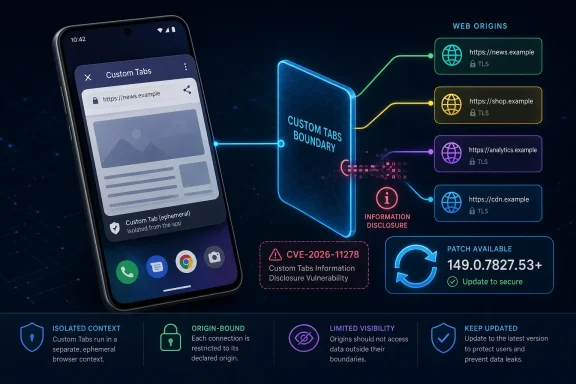 A Low-Severity Chrome Bug Lands in a High-Trust Part of Android
Google and the Chromium project classify CVE-2026-11278 as low severity, and that label matters. This is not a remote-code-execution panic, not a sandbox escape, not a reason to imagine every Android phone on the planet being silently taken over before lunch. The published description points to an information-disclosure issue in Custom Tabs, requiring a crafted HTML page and user interaction rather than offering an attacker a clean one-click path to device compromise.But “low” in browser security does not mean “irrelevant.” Browser bugs live in context, and the context here is Android’s Custom Tabs feature: the mechanism that lets apps open web content in a Chrome-powered surface while keeping users inside an app-like experience. It is the thing many users see when they tap a login link, payment page, support article, OAuth consent screen, help page, embedded checkout, or account-verification flow.
That is why the affected component is more interesting than the severity score. Custom Tabs are designed to combine the trust properties of Chrome with the convenience of in-app browsing. A flaw that lets cross-origin data leak is therefore not merely a bug in page rendering; it is a bug near one of the mobile platform’s most delicate seams.
The web’s same-origin policy is the quiet contract that keeps one site from casually reading another site’s data. It is one of those protections users never see until it fails, and when it fails the outcome is rarely theatrical. There may be no crash, no malware prompt, and no obvious sign of compromise — just data crossing a boundary it was never meant to cross.
Custom Tabs Turn Chrome Into Shared Plumbing
Custom Tabs exist because mobile apps and web services are now inseparable. Developers want users to open web content without being thrown into a full browser context, and users want pages that load quickly, remember sessions, and feel trustworthy. Chrome’s Custom Tabs answer that need by giving apps a browser-backed surface with Chrome security, Chrome cookies, Chrome rendering, and a familiar account state.That convenience comes with a trade-off. The more Chrome is embedded into app workflows, the more Chrome inherits responsibility for boundaries that used to be easier to explain. A tab inside a social app, a checkout flow inside a retailer’s app, and a sign-in page launched from a banking app can all look like app behavior to the user even when they are really browser surfaces with web-origin rules underneath.
For administrators, that distinction is not academic. Mobile device management policies, browser update cadences, app allowlists, and identity-provider recommendations all collide in this space. A vulnerability in Custom Tabs may not require uninstalling an app or changing an identity provider, but it does remind IT teams that Chrome patch levels on Android are part of their application-security posture.
For developers, the lesson is sharper. If an app relies on Custom Tabs for authentication or account linking, it is relying on browser isolation properties that must be current. The app developer may not own the browser engine, but the user will not make that distinction if the flow leaks information.
The Scoreboard Says Medium While Chromium Says Low
One of the more confusing aspects of CVE-2026-11278 is the difference between labels. Chromium’s own security severity is listed as low, while CISA’s ADP assessment assigns a CVSS 3.1 base score of 6.5, which falls into medium severity. NVD, meanwhile, had not yet provided its own full assessment at the time the record was undergoing enrichment.That discrepancy is not evidence that anyone is necessarily wrong. Vendor severity and CVSS scoring often answer different questions. Chromium’s label reflects project-specific judgment about exploitability, impact, component exposure, and likely abuse. CVSS attempts to express a more standardized technical profile: network attack vector, low attack complexity, no privileges required, user interaction required, unchanged scope, high confidentiality impact, and no integrity or availability impact.
Those inputs explain the tension. If the confidentiality impact is high, a medium CVSS score is plausible even when the practical exploit chain is constrained. If the attacker needs user interaction and the bug does not produce code execution, a vendor may reasonably keep the issue in the low bucket. Security teams should resist the temptation to treat one label as the “real” one and the other as noise.
The better reading is that CVE-2026-11278 is not an emergency in isolation, but it is also not a cosmetic defect. It is a confidentiality bug in a component that often handles sessions and identity-adjacent flows. That makes it a patch-management issue, not a crisis-management issue.
The Word “Local” Does Not Make This Harmless
The description says a local attacker could leak cross-origin data via a crafted HTML page. In old desktop-security language, “local attacker” often implied someone with access to the machine or an already-compromised account. On Android, the phrase can feel less intuitive, because the attack surface includes apps, intents, embedded browsing flows, files, and pages launched into browser-backed surfaces.That does not mean every installed app can automatically exploit the issue. The public record is too thin to support that kind of claim, and the underlying Chromium issue may contain details not broadly available or not yet appropriate to disclose. Still, local-attack language should not lull defenders into ignoring the bug. Mobile platforms are full of “local” interactions that start from a user tapping a link, opening an app, scanning a code, or following a workflow that feels ordinary.
The user-interaction requirement matters. It reduces the likelihood of mass exploitation and generally keeps this in a lower urgency class than drive-by browser vulnerabilities. But user interaction is not a strong defense in consumer mobile environments. Phishing, malicious ads, deceptive app flows, and social-engineered links all live by persuading users to interact.
The more important practical question is whether the device’s Chrome build has moved past 149.0.7827.53. If it has, this specific issue should be addressed. If it has not, the risk remains part of the device’s browser surface whether the user thinks of Chrome as their default browser or merely as an invisible component that apps call behind the scenes.
Cross-Origin Data Is the Browser’s Crown Jewel
The phrase “cross-origin data” sounds dry, but it is central to the web’s security model. An origin is the combination of scheme, host, and port that defines where web content comes from. The browser is supposed to stop one origin from reading sensitive data belonging to another, except through carefully controlled mechanisms such as CORS, postMessage, cookies with appropriate attributes, and explicit browser APIs.When origin validation fails, the browser can become confused about who is allowed to see what. In the best case, the leaked information is minor and constrained. In the worst case, it may expose account-specific data, tokens, page contents, identifiers, or other information that helps an attacker move to a more serious stage.
The public CVE record does not say exactly what data could be leaked in CVE-2026-11278, and responsible analysis should stop short of inventing exploit details. What we can say is that the assigned weakness, CWE-346, points to origin validation: the software failing to properly verify the source of data or communication. That is the category of mistake that matters deeply in browser design.
Modern browsers are, in effect, high-speed policy engines. They render pages, execute JavaScript, isolate sites, store credentials, process payments, broker permissions, and mediate access to cameras, files, location, and identity. A small error in origin logic can matter because the browser’s entire job is to say yes and no at precisely the right moments.
Android’s Browser Surface Is Bigger Than the Chrome Icon
For WindowsForum readers, the Android angle may seem like a side alley compared with desktop Chrome, Edge, or enterprise Windows patching. It is not. The same identity providers, SaaS applications, password managers, ticketing portals, collaboration suites, and admin dashboards used on Windows are increasingly accessed from Android devices. The browser surface follows the user, not the operating system boundary.In many organizations, Android phones are enrolled, partially managed, or allowed under bring-your-own-device policies. Employees use them to approve sign-ins, read email, open shared links, join meetings, and authenticate to cloud services. If Chrome on Android is stale, those workflows may be exposed even when the Windows estate is beautifully patched.
The security industry has a habit of treating mobile browser bugs as consumer problems unless they involve spyware or nation-state targeting. That is a mistake. Mobile devices are where enterprise identity often lives, and Custom Tabs are exactly the kind of glue layer that connects apps to web sessions. A leak there may not compromise the endpoint, but it can compromise assumptions.
Administrators should also remember that Android browser updates are not always as uniform as desktop updates. Google Play updates, OEM policies, enterprise controls, app-store restrictions, and user behavior can all affect patch timing. “Chrome updated somewhere” is not the same as “all managed Android devices have received and installed the fixed version.”
The NVD Enrichment Lag Is Now Part of the Story
The CVE record for CVE-2026-11278 was marked as undergoing enrichment, with NVD’s own CVSS assessment not yet provided while CISA-ADP data supplied a medium CVSS 3.1 score and CWE mapping. That status is increasingly familiar to vulnerability managers. The CVE shows up, the vendor advisory appears, third-party scanners begin flagging it, but the canonical government database record still has gaps.This creates a practical problem. Many vulnerability-management pipelines still lean heavily on NVD-enriched metadata, even though the first useful security signal often comes from the vendor, CISA enrichment, Linux distribution trackers, commercial scanners, or package maintainers. When NVD enrichment lags, organizations that wait for a fully populated record can fall behind those that treat vendor release notes as the source of operational truth.
CVE-2026-11278 is a small example of that larger shift. The public record had enough information to identify affected versions, the fixed Chrome version, the component, the general impact, the weakness class, and a CVSS interpretation from CISA-ADP. That is enough for most teams to make a patching decision, even if it is not enough to write a full exploit analysis.
The vulnerability-management world is learning to live with partial data. That is uncomfortable, but it is also realistic. CVE enrichment is a process, not an event, and the first day of a vulnerability’s public life is often messy. Mature teams increasingly need workflows that can act on incomplete but credible information without waiting for every field to be filled in.
Chrome’s Fast Patch Culture Cuts Both Ways
Chrome’s security model is built around rapid patching. Google ships frequent stable updates, Chromium moves quickly, and the browser ecosystem assumes that users and administrators will keep pace. That model has done enormous good; it has reduced the useful lifetime of many browser bugs and made silent patch delivery a normal part of computing.But speed creates its own administrative burden. A single Chrome update can contain dozens or hundreds of fixes, many of which have sparse public descriptions. Security teams must decide whether to treat each CVE individually or simply enforce a current-version baseline. In practice, the latter is almost always the saner strategy for browsers.
CVE-2026-11278 illustrates why. The public details are not rich enough to support elaborate risk modeling. The fix is already bound to a Chrome version. The affected product is a fast-moving browser. The operational answer is not to debate the precise exploitability of Custom Tabs for three weeks; it is to ensure Android Chrome is current and to verify that managed devices are actually receiving updates.
This is especially true because browser bugs rarely age well. A low-severity vulnerability can become more interesting when combined with another bug, a malicious app, a clever phishing flow, or an unexpected platform behavior. Patch velocity is the defense that assumes attackers are also reading the release notes.
Developers Should Stop Treating Embedded Web Flows as Someone Else’s Problem
App developers often reach for Custom Tabs because they are safer than embedding arbitrary web content in a WebView and more user-friendly than forcing a full context switch to the browser. That remains broadly true. Custom Tabs give developers Chrome’s security work instead of asking every app team to reinvent browser isolation badly.But outsourcing rendering is not the same as outsourcing risk. If an app launches sensitive flows through Custom Tabs, developers should understand what assumptions they are making about session state, redirect handling, deep links, intent filters, and origin boundaries. They should also monitor browser-security advisories that affect their app’s critical paths, even when the vulnerable code lives in Chrome.
Authentication deserves particular care. OAuth and OpenID Connect flows are explicitly designed around browser-mediated redirects and origin checks. If an app’s login experience depends on a browser surface, then browser correctness is part of the app’s security architecture. A Custom Tabs vulnerability may not require an app code change, but it can still affect the security of the app’s user journey.
The lesson is not to abandon Custom Tabs. The lesson is to avoid blind trust. Developers should keep embedded web flows as simple as possible, avoid unnecessary exposure of sensitive data in redirect pages, prefer well-supported authentication libraries, and test how their apps behave across browser updates and managed-device configurations.
Windows Shops Cannot Ignore the Android Half of the Identity Chain
The Windows admin’s instinct may be to ask whether this affects Chrome on Windows or Edge. The specific CVE description points to Chrome on Android and Custom Tabs, so the immediate answer is no in the narrow component sense. But the broader identity chain is rarely so neat.A Windows shop may use Android devices for Microsoft Entra ID approvals, authenticator apps, mobile Outlook, Teams, mobile device management enrollment, password reset workflows, and browser-based admin access. A weakness in Android Chrome’s app-browser boundary can therefore sit adjacent to the same accounts and resources protected by Windows endpoint controls.
This is the uncomfortable reality of modern enterprise security: the weakest relevant browser may not be on the desktop. It may be on a phone used to approve a sign-in to the desktop estate. It may be in a Custom Tab opened from a collaboration app. It may be a user’s personal device that still has access to corporate email.
That does not make CVE-2026-11278 a Windows vulnerability. It makes it a reminder that Windows security teams now defend workflows, not just machines. If the workflow crosses Android, Chrome, identity providers, and cloud apps, then Chrome for Android patching belongs in the same conversation as Patch Tuesday and Edge stable-channel updates.
Scanner Noise Will Outrun Human Understanding
By the time a CVE like this appears in NVD, it has already begun its second life inside scanners, dashboards, exposure-management tools, package trackers, and compliance reports. Some tools will flag it as medium because of the CVSS score. Others will downplay it because Chromium called it low. Some Linux distribution trackers may surface related Chromium package states even though the vulnerable component is described in Android terms.That mismatch is not merely annoying. It consumes human attention. A vulnerability manager may see CVE-2026-11278 on a dashboard and need to determine whether it applies to desktop Chrome, Android Chrome, a Linux Chromium package, a managed mobile fleet, or some combination of packaged browser components. The answer may depend on how the tool maps CPEs, packages, and upstream Chromium versions.
This is where asset context matters more than raw CVE ingestion. If an organization does not have managed Android devices, the risk may be limited to user-owned phones outside the formal vulnerability program. If it does have Android devices, the key data point is installed Chrome version, not the existence of a CVE record. If it packages Chromium for Linux desktops, maintainers need to track distro-specific patches separately from Android Custom Tabs behavior.
The security industry loves universal identifiers because they create a shared language. But CVEs are not magic. They are pointers to vulnerability records, and those records still require interpretation. CVE-2026-11278 is straightforward enough to patch, but not quite straightforward enough to classify blindly across every environment.
The Sensible Response Is Boring, Which Is the Point
There is a reason browser vendors repeat the same update advice so often that it becomes background noise. Most browser vulnerabilities are best handled by staying current, not by constructing a bespoke mitigation plan for every issue. CVE-2026-11278 fits that pattern.For individual users, the practical step is to update Chrome on Android through the normal app-update channel and verify that the installed version is at or beyond the fixed release. Users who rarely open the Play Store or who disable automatic updates should be especially attentive. The Chrome icon may be dormant, but Chrome components can still be invoked by other apps.
For enterprise teams, the better answer is policy rather than one-off messaging. Managed Android fleets should have a minimum acceptable Chrome version, update compliance reporting, and a process for identifying devices that fall behind. If the organization relies on mobile browser flows for identity or privileged access, stale browser versions should be treated as a meaningful exposure.
For developers, the response is to review sensitive Custom Tabs usage, not to panic. If pages exposed through Custom Tabs contain sensitive cross-origin data or complex redirect behavior, this is a useful moment to simplify, harden, and test. The patch fixes the browser bug; it does not absolve app teams from designing clean web-to-app boundaries.
The Custom Tabs Bug That Explains More Than It Breaks
CVE-2026-11278 is unlikely to be remembered as a defining Chrome vulnerability, but it is a useful snapshot of where browser security now lives. It sits at the intersection of Android apps, web origins, mobile identity, vulnerability scoring, and patch automation. The concrete lessons are narrower than the surrounding anxiety, but they are still worth spelling out.- Chrome on Android should be updated to 149.0.7827.53 or later to address the Custom Tabs issue described in CVE-2026-11278.
- The vulnerability is best understood as an information-disclosure flaw, not a remote-code-execution or device-takeover bug.
- The difference between Chromium’s low severity and CISA-ADP’s medium CVSS score reflects different scoring lenses rather than a simple contradiction.
- Organizations that use Android devices for identity, email, collaboration, or administrative workflows should include Chrome for Android in their patch-compliance view.
- Developers using Custom Tabs for authentication or sensitive account flows should treat browser update state as part of the security assumptions behind their apps.
- Vulnerability teams should act on credible vendor and CISA enrichment data even when NVD’s own record is still incomplete.
References
- Primary source: NVD / Chromium
Published: 2026-06-09T07:00:24-07:00
NVD - CVE-2026-11278
 nvd.nist.gov
- Security advisory: MSRC
Published: 2026-06-09T07:00:24-07:00
Original feed URL
Security Update Guide - Microsoft Security Response Center
 msrc.microsoft.com
- Related coverage: stack.watch
- Official source: nist.gov
National Vulnerability Database
NIST maintains the National Vulnerability Database (NVD), a repository of information on software and hardware flaws that can compromise computer security. This is a key piece of the nation’s cybersecurity infrastructure.www.nist.gov - Related coverage: security.snyk.io
CVE-2026-11278 in chromium | CVE-2026-11278 | Snyk
CVE-2026-11278 in chromium | CVE-2026-11278security.snyk.io - Related coverage: labs.cloudsecurityalliance.org
NVD Enrichment Triage: Enterprise Vulnerability Programs Must Adapt
PDF documentlabs.cloudsecurityalliance.org

- Related coverage: first.org
The National Vulnerability Database Ms. Tanya Brewer NVD Program Manager June 2024
PDF documentwww.first.org
