

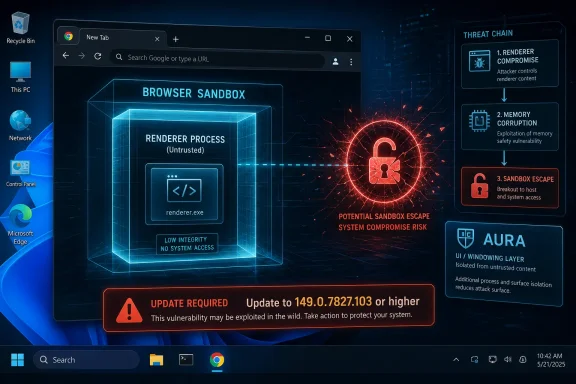
Google disclosed CVE-2026-11631 on June 8, 2026, as a critical Windows-only Chrome vulnerability in Aura that affects versions before 149.0.7827.103 and could let an attacker escape the browser sandbox after first compromising the renderer process. That short description is doing a lot of work. This is not a garden-variety “visit a bad page and lose the machine” bug in isolation, but it is exactly the sort of second-stage flaw that makes browser exploitation chains dangerous. For Windows users and administrators, the story is less about Aura as an obscure Chromium subsystem and more about how fragile the browser sandbox becomes when one memory-safety bug is paired with another.
CVE-2026-11631 sits in the uncomfortable middle ground between “critical” and “conditional.” Google’s wording says the attacker must already have compromised the renderer process, which means this bug is not necessarily the opening shot of an attack. It is the door that may open after the first door has already been forced.
That distinction matters because modern Chrome is built around the assumption that hostile web content will sometimes gain code execution in a renderer. The sandbox exists because browsers parse too much untrusted material, run too much JavaScript, and expose too many complex subsystems to pretend that renderer bugs will never happen. A renderer compromise is serious, but the sandbox is supposed to keep it boxed in.
A sandbox escape changes the character of the incident. It can turn a tab-level compromise into a broader foothold against the operating system, depending on the exploit chain, process privileges, system configuration, and whatever else the attacker can reach. That is why a bug like CVE-2026-11631 receives critical attention even though its description reads like it requires a prior win.
The Windows-only detail is also not incidental. Aura is part of Chromium’s UI and windowing infrastructure, and Chrome’s interaction with the host operating system is where abstractions meet platform reality. When that boundary goes wrong, Windows administrators inherit the risk even if the vulnerable code lives inside Google’s browser.
That makes Aura an awkward place for a use-after-free bug. Use-after-free vulnerabilities are memory-management failures in which software continues to reference an object after it has been released. In exploit terms, that can become a way to confuse the program about what data it is handling, potentially steering execution or corrupting state.
The dangerous part is not that Aura draws windows. The dangerous part is that browser UI systems often mediate between untrusted web-driven behavior, privileged browser processes, graphics, input handling, window focus, drag-and-drop, menus, surfaces, and platform APIs. A mistake there can undermine assumptions about which process is allowed to ask for what.
Google’s terse language says the attacker needs a compromised renderer before CVE-2026-11631 becomes useful. That phrasing implies the bug is more valuable as part of a chain than as a standalone exploit. In practical terms, defenders should read it as: if another vulnerability gets code running in the renderer, this one may help that attacker get out.
Those qualifiers are real, but they should not be comforting. Browser exploitation has long been a chain-building exercise. One bug gets code execution inside a constrained process; another bug escapes the sandbox; a third abuses the operating system or a privileged service; the payload then tries to persist, steal, or move laterally.
That is why the CISA-ADP CVSS 3.1 vector still lands at 8.3, with high impacts for confidentiality, integrity, and availability and a changed scope. The “changed scope” element is the giveaway: the vulnerability is meaningful because successful exploitation crosses a boundary. In security architecture, boundary crossing is often where the real damage begins.
The renderer requirement also interacts with the other Chrome vulnerabilities fixed in the same update window. Google’s desktop stable update around version 149.0.7827.102/.103 included numerous security fixes, including a separately discussed V8 flaw, CVE-2026-11645, that Google said had exploit activity in the wild. CVE-2026-11631 is not identified as exploited in the supplied record, but it arrived in the same ecosystem of browser-chain risk.
That distinction should be kept clean. There is public reporting around active exploitation of CVE-2026-11645, not a public confirmation that CVE-2026-11631 itself has been used in attacks. But defenders do not get to patch only the bug that has already been seen in the wild. Attackers read release notes too.
Chrome’s auto-update system is one of the better pieces of consumer security infrastructure on the planet, but enterprise reality is messier. Browsers may be held back by change windows, VDI images, application compatibility fears, offline networks, golden images, kiosk configurations, or endpoint management delays. In some organizations, Chrome is “auto-updating” in theory while still lagging in practice.
The version number is also important because Chrome’s user interface can make users feel current before a relaunch has completed. Downloading the update is not the same as running the patched build. Administrators should care about process restart state, not just package availability.
For managed environments, the fastest useful question is blunt: how many Windows endpoints are still running Chrome below 149.0.7827.103? The second question is whether those machines include high-value users, browser-based admin consoles, privileged help desk accounts, developers, finance teams, or users with access to sensitive SaaS applications. Browser risk is not evenly distributed across a company.
The reason is simple: the vulnerability description itself says “Google Chrome on Windows.” A Chrome CPE alone would overstate the affected surface if the flaw is not applicable to macOS or Linux. A Windows CPE alone would be absurd because Windows is not the vulnerable application. The logical combination is Chrome at the vulnerable version level running on Windows.
This is one of the places where vulnerability databases are useful but not always elegant. CPE modeling often struggles with conditions that humans express naturally: this application, only on this platform, before this build, under this configuration. The result may look like an “AND” relationship between an application CPE and an operating system CPE, because that is how the database represents the vulnerable state.
So, are we missing a CPE? Based on the supplied record, the important CPE relationship appears to be Chrome plus Windows, rather than a missing standalone Windows vulnerability. If downstream scanners fail to detect vulnerable Chrome installations on Windows, that may be an implementation issue in the scanner’s feed parsing or CPE matching, not necessarily proof that the NVD record needs another product CPE.
That said, administrators should not wait for perfect enrichment before acting. NVD had not yet provided its own CVSS score in the supplied data, while CISA-ADP had supplied a CVSS 3.1 score. Enrichment lag is normal. Patch urgency should come from the vendor advisory, severity, exploit-chain potential, and installed asset inventory, not from whether every database field has reached its final form.
Chrome has invested heavily in hardening, sandboxing, fuzzing, site isolation, exploit mitigations, and memory-safety-adjacent defenses. Yet the steady stream of use-after-free vulnerabilities is evidence of a structural problem. Massive C++ applications can reduce this class of bug, but they rarely eliminate it.
The Chromium project has been moving pieces of the web platform toward safer patterns where possible, and the broader industry has embraced memory-safe languages for new code. But browsers are not greenfield applications. They are decades of accumulated rendering engines, UI systems, graphics paths, IPC frameworks, compatibility layers, and platform-specific behavior.
Aura’s presence in this CVE is a reminder that memory safety is not only a rendering-engine issue. It is not just JavaScript, DOM, CSS, WebGL, or media codecs. The browser chrome around the page, the window manager interactions, and the “native app” scaffolding are part of the attack surface too.
That is uncomfortable for defenders because user training does little against this category. Telling people not to click suspicious links is still useful, but crafted HTML pages are not exotic. A browser memory-corruption chain can be delivered through a compromised website, malvertising path, phishing lure, watering-hole attack, or embedded content. The user’s mistake may be nothing more than opening a page that their job requires them to open.
But it also creates a high-value target: the broker, the browser process, and the platform integration layers that decide what the renderer can ask for. Sandbox escapes live in that liminal space. They are not always flashy, but they are often the difference between contained compromise and endpoint compromise.
On Windows, that boundary matters because Chrome is often the primary interface to corporate identity, documents, dashboards, management portals, password vaults, help desk tools, and remote access systems. The browser is no longer an accessory to the operating system. For many users, it is the operating system’s most exposed workload.
A successful sandbox escape does not automatically mean domain compromise. The attacker still has to deal with operating system controls, endpoint detection, privilege boundaries, user rights, credential protections, and network segmentation. But it gives the attacker room to attempt the next move from a stronger position.
This is why browser patching belongs in the same operational category as VPN, mail client, and endpoint security updates. The browser consumes hostile input all day. If it is behind, the organization is behind.
Chrome’s rapid release cadence is a blessing and a burden. It gets fixes to users quickly, but it also normalizes update fatigue. When every week brings another browser build, security teams can start treating urgent browser fixes as background noise.
CVE-2026-11631 argues against that complacency. Critical sandbox-relevant bugs should be handled as chain-enabling vulnerabilities, especially when they arrive near other serious Chrome flaws. A patch that closes a sandbox escape may not make headlines like an actively exploited zero-day, but it can remove an attacker’s second stage before the first stage is even discovered.
The hard part for IT is that browser state is slippery. A machine can have Chrome installed system-wide and per-user. It can have Edge, Brave, Vivaldi, or other Chromium-derived browsers with their own update channels and lag times. It can have old portable copies. It can have dormant user profiles that spring back to life during incident response or remote work.
WindowsForum readers know the pattern: the official fleet is patched, but the exception pile is where the incident starts. The kiosk in the lobby, the lab workstation, the forgotten VM, the jump box with a browser “just for downloads,” the executive laptop that misses maintenance windows — these are the places where browser vulnerabilities survive.
Microsoft Edge, Brave, Vivaldi, Opera, Electron-based applications, WebView2-dependent enterprise software, and embedded browser components all live somewhere in Chromium’s orbit, though not every Chrome bug lands in every downstream product in the same way. Platform-specific UI bugs may or may not map cleanly to those products depending on code paths, build flags, release timing, and vendor patches.
This is where security communication often fails. Users hear “Chrome bug” and think “I do not use Chrome.” Administrators hear “Chromium bug” and think “everything is vulnerable.” The truth is usually more tedious: each vendor has to ship its own patched build, and each organization has to know which Chromium-based applications it actually runs.
For Windows shops, Microsoft Edge deserves special attention because it is present by default and widely used even in organizations that standardize on Chrome. Edge’s update mechanism is separate, and its version state should be audited independently. The same goes for WebView2 Runtime where line-of-business applications depend on it.
CVE-2026-11631’s Windows specificity also raises a broader operational point. Cross-platform browsers are not uniformly cross-platform in their risk. A flaw in a Windows UI path may not affect Linux, while a V8 flaw may cut across all platforms. Patch management needs that nuance, but it cannot become paralysis.
This is normal. Vulnerability databases are not magic oracles; they are structured interpretations of vendor advisories, CNA submissions, public references, and analyst enrichment. They often trail the vendor’s release by hours or days, and sometimes the most useful operational signal is present before the neatest metadata is complete.
That matters because many organizations still wire their patch prioritization too tightly to database completeness. If a scanner says “NVD score pending,” a ticket may sit. If the CPE is not modeled as expected, detection may be inconsistent. If the vulnerability is not yet in a preferred dashboard, the patch may not receive the right service-level agreement.
A critical Chrome sandbox escape candidate should not wait on that bureaucracy. The vendor has described the vulnerability, the affected version threshold is known, the weakness class is known, and the platform is known. That is enough to act.
There is a separate, valid conversation about the quality of vulnerability data. Security teams need accurate CPEs, clear affected-version ranges, and reliable scoring. But in fast-moving browser security, the operational hierarchy should be vendor advisory first, fleet telemetry second, vulnerability database enrichment third.
A browser exploit chain does not need to “own the box” in the old cinematic sense to do damage. It can steal session material, tamper with browser state, manipulate authenticated workflows, or use the endpoint as a trusted stepping stone. If a sandbox escape gives the attacker more access to the local environment, the browser’s identity-rich context becomes even more dangerous.
This is especially relevant for administrators who use the same browser profile for routine browsing and privileged consoles. The industry has learned to separate admin accounts, but it has been slower to separate admin browsers. A hardened admin workstation loses some value if the browser used for privileged cloud control planes is also used to browse general web content.
Security-minded Windows users should treat browser profiles as security boundaries, even if they are imperfect ones. Separate profiles or separate browsers for admin work, password vault access, banking, personal browsing, and risky research can limit blast radius. It will not patch CVE-2026-11631, but it can reduce the consequences of the next chain.
Extensions deserve the same scrutiny. They expand the browser’s trusted computing base and sometimes retain broad access to page content. After urgent browser updates, extension hygiene is one of the most practical ways to reduce browser risk without waiting for architectural miracles.
For administrators, the work should be measurable. Endpoint management tools should report installed Chrome versions. EDR or inventory platforms should identify running browser versions where possible. Vulnerability scanners should be checked for whether they correctly model the Windows-only affected configuration.
The CPE question should become part of that validation. If a scanner misses vulnerable Chrome-on-Windows installations because it expects a different CPE pattern, compensate with direct software inventory queries. If it flags non-Windows systems for CVE-2026-11631 despite the Windows-specific description, tune the finding rather than ignoring the entire class of alert.
The highest-value patching targets are not hard to identify. Start with machines used by administrators, developers, finance staff, executives, help desk operators, and anyone with access to sensitive internal applications. Then move through the broader Windows fleet, including shared devices, kiosks, VDI pools, and systems that routinely miss reboots.
The unglamorous final step is relaunch enforcement. Browser updates that require restart are notorious for sitting half-applied while users keep dozens of tabs open. If the vulnerability is serious enough to patch, it is serious enough to force a restart window.
Attackers do not care whether a chain uses the vulnerability that received the most press. They care whether a target browser exposes enough primitives to move from web content to something more useful. A patched browser closes multiple doors at once.
This is one reason Chrome’s rapid updates can feel unsatisfying to users who want details. Google often restricts bug information until a majority of users are updated, and that is a sensible defensive trade-off. The downside is that administrators must sometimes act before they can fully explain the exploit mechanics to stakeholders.
In this case, the lack of public technical detail should not be mistaken for lack of severity. “Use after free in Aura” plus “sandbox escape” plus “Windows” plus “critical” is enough of a shape to justify urgency. Waiting for proof-of-concept code would be perverse; by the time exploit details are public, the defender’s advantage has narrowed.
There is also a lesson for vulnerability dashboards and news feeds. The actively exploited V8 flaw may dominate headlines, but quieter sandbox-adjacent issues can be just as important to remove. The patch bundle, not the press cycle, is the unit of defense.
 Chrome’s Quiet Windows Bug Is Really a Sandbox Story
CVE-2026-11631 sits in the uncomfortable middle ground between “critical” and “conditional.” Google’s wording says the attacker must already have compromised the renderer process, which means this bug is not necessarily the opening shot of an attack. It is the door that may open after the first door has already been forced.That distinction matters because modern Chrome is built around the assumption that hostile web content will sometimes gain code execution in a renderer. The sandbox exists because browsers parse too much untrusted material, run too much JavaScript, and expose too many complex subsystems to pretend that renderer bugs will never happen. A renderer compromise is serious, but the sandbox is supposed to keep it boxed in.
A sandbox escape changes the character of the incident. It can turn a tab-level compromise into a broader foothold against the operating system, depending on the exploit chain, process privileges, system configuration, and whatever else the attacker can reach. That is why a bug like CVE-2026-11631 receives critical attention even though its description reads like it requires a prior win.
The Windows-only detail is also not incidental. Aura is part of Chromium’s UI and windowing infrastructure, and Chrome’s interaction with the host operating system is where abstractions meet platform reality. When that boundary goes wrong, Windows administrators inherit the risk even if the vulnerable code lives inside Google’s browser.
Aura Is Not a Household Name, but It Sits Near a Sensitive Boundary
Most Chrome users have never heard of Aura, and many IT teams only encounter the name when a vulnerability bulletin mentions it. In Chromium terms, Aura is tied to the browser’s windowing, event, and UI stack. It is part of the machinery that helps make Chrome’s interface feel like an application rather than a pile of web pages.That makes Aura an awkward place for a use-after-free bug. Use-after-free vulnerabilities are memory-management failures in which software continues to reference an object after it has been released. In exploit terms, that can become a way to confuse the program about what data it is handling, potentially steering execution or corrupting state.
The dangerous part is not that Aura draws windows. The dangerous part is that browser UI systems often mediate between untrusted web-driven behavior, privileged browser processes, graphics, input handling, window focus, drag-and-drop, menus, surfaces, and platform APIs. A mistake there can undermine assumptions about which process is allowed to ask for what.
Google’s terse language says the attacker needs a compromised renderer before CVE-2026-11631 becomes useful. That phrasing implies the bug is more valuable as part of a chain than as a standalone exploit. In practical terms, defenders should read it as: if another vulnerability gets code running in the renderer, this one may help that attacker get out.
The Renderer Requirement Is a Warning, Not a Reassurance
It is tempting to downgrade concern when a vulnerability description includes preconditions. A remote attacker must compromise the renderer process first. The attack requires a crafted HTML page. User interaction is part of the CVSS vector. The attack complexity is listed as high.Those qualifiers are real, but they should not be comforting. Browser exploitation has long been a chain-building exercise. One bug gets code execution inside a constrained process; another bug escapes the sandbox; a third abuses the operating system or a privileged service; the payload then tries to persist, steal, or move laterally.
That is why the CISA-ADP CVSS 3.1 vector still lands at 8.3, with high impacts for confidentiality, integrity, and availability and a changed scope. The “changed scope” element is the giveaway: the vulnerability is meaningful because successful exploitation crosses a boundary. In security architecture, boundary crossing is often where the real damage begins.
The renderer requirement also interacts with the other Chrome vulnerabilities fixed in the same update window. Google’s desktop stable update around version 149.0.7827.102/.103 included numerous security fixes, including a separately discussed V8 flaw, CVE-2026-11645, that Google said had exploit activity in the wild. CVE-2026-11631 is not identified as exploited in the supplied record, but it arrived in the same ecosystem of browser-chain risk.
That distinction should be kept clean. There is public reporting around active exploitation of CVE-2026-11645, not a public confirmation that CVE-2026-11631 itself has been used in attacks. But defenders do not get to patch only the bug that has already been seen in the wild. Attackers read release notes too.
Version Numbers Matter More Than Brand Names This Week
The relevant fixed line for CVE-2026-11631 is Chrome before 149.0.7827.103 on Windows. The surrounding stable channel release also references 149.0.7827.102/.103 across desktop platforms, but this particular CVE is described as a Windows issue. That means Windows fleets should verify the actual installed Chrome build, not merely assume that automatic updating has done its job.Chrome’s auto-update system is one of the better pieces of consumer security infrastructure on the planet, but enterprise reality is messier. Browsers may be held back by change windows, VDI images, application compatibility fears, offline networks, golden images, kiosk configurations, or endpoint management delays. In some organizations, Chrome is “auto-updating” in theory while still lagging in practice.
The version number is also important because Chrome’s user interface can make users feel current before a relaunch has completed. Downloading the update is not the same as running the patched build. Administrators should care about process restart state, not just package availability.
For managed environments, the fastest useful question is blunt: how many Windows endpoints are still running Chrome below 149.0.7827.103? The second question is whether those machines include high-value users, browser-based admin consoles, privileged help desk accounts, developers, finance teams, or users with access to sensitive SaaS applications. Browser risk is not evenly distributed across a company.
The CPE Entry Looks Odd Because the Bug Is Platform-Specific
The NVD change history shown for CVE-2026-11631 adds a configuration that effectively pairs Google Chrome versions before 149.0.7827.103 with Microsoft Windows. That can look strange at first glance, especially to anyone expecting a neat product-only CPE entry for Chrome. But in this case, the Windows operating system CPE is part of expressing the affected configuration.The reason is simple: the vulnerability description itself says “Google Chrome on Windows.” A Chrome CPE alone would overstate the affected surface if the flaw is not applicable to macOS or Linux. A Windows CPE alone would be absurd because Windows is not the vulnerable application. The logical combination is Chrome at the vulnerable version level running on Windows.
This is one of the places where vulnerability databases are useful but not always elegant. CPE modeling often struggles with conditions that humans express naturally: this application, only on this platform, before this build, under this configuration. The result may look like an “AND” relationship between an application CPE and an operating system CPE, because that is how the database represents the vulnerable state.
So, are we missing a CPE? Based on the supplied record, the important CPE relationship appears to be Chrome plus Windows, rather than a missing standalone Windows vulnerability. If downstream scanners fail to detect vulnerable Chrome installations on Windows, that may be an implementation issue in the scanner’s feed parsing or CPE matching, not necessarily proof that the NVD record needs another product CPE.
That said, administrators should not wait for perfect enrichment before acting. NVD had not yet provided its own CVSS score in the supplied data, while CISA-ADP had supplied a CVSS 3.1 score. Enrichment lag is normal. Patch urgency should come from the vendor advisory, severity, exploit-chain potential, and installed asset inventory, not from whether every database field has reached its final form.
The Bug Class Keeps Returning Because C++ Keeps Remembering the Past
Use-after-free is one of the oldest and most stubborn vulnerability classes in large C and C++ codebases. It arises from a simple conceptual failure: one part of the program believes an object is gone, while another part still behaves as if it exists. In a small program, that is a crash. In a browser, it can become an exploit primitive.Chrome has invested heavily in hardening, sandboxing, fuzzing, site isolation, exploit mitigations, and memory-safety-adjacent defenses. Yet the steady stream of use-after-free vulnerabilities is evidence of a structural problem. Massive C++ applications can reduce this class of bug, but they rarely eliminate it.
The Chromium project has been moving pieces of the web platform toward safer patterns where possible, and the broader industry has embraced memory-safe languages for new code. But browsers are not greenfield applications. They are decades of accumulated rendering engines, UI systems, graphics paths, IPC frameworks, compatibility layers, and platform-specific behavior.
Aura’s presence in this CVE is a reminder that memory safety is not only a rendering-engine issue. It is not just JavaScript, DOM, CSS, WebGL, or media codecs. The browser chrome around the page, the window manager interactions, and the “native app” scaffolding are part of the attack surface too.
That is uncomfortable for defenders because user training does little against this category. Telling people not to click suspicious links is still useful, but crafted HTML pages are not exotic. A browser memory-corruption chain can be delivered through a compromised website, malvertising path, phishing lure, watering-hole attack, or embedded content. The user’s mistake may be nothing more than opening a page that their job requires them to open.
Sandbox Escapes Are Where Browser Security Becomes Endpoint Security
For years, browser vendors have treated the renderer as a hostile place by design. The renderer processes web content and is constrained so that, if compromised, it cannot freely read files, spawn processes, access devices, or take over the user session. That model is one of the great security improvements of the modern web.But it also creates a high-value target: the broker, the browser process, and the platform integration layers that decide what the renderer can ask for. Sandbox escapes live in that liminal space. They are not always flashy, but they are often the difference between contained compromise and endpoint compromise.
On Windows, that boundary matters because Chrome is often the primary interface to corporate identity, documents, dashboards, management portals, password vaults, help desk tools, and remote access systems. The browser is no longer an accessory to the operating system. For many users, it is the operating system’s most exposed workload.
A successful sandbox escape does not automatically mean domain compromise. The attacker still has to deal with operating system controls, endpoint detection, privilege boundaries, user rights, credential protections, and network segmentation. But it gives the attacker room to attempt the next move from a stronger position.
This is why browser patching belongs in the same operational category as VPN, mail client, and endpoint security updates. The browser consumes hostile input all day. If it is behind, the organization is behind.
Enterprise Patch Management Still Treats Browsers Too Casually
The consumer answer to this vulnerability is easy: update Chrome and restart it. The enterprise answer is more tedious: verify deployment, verify relaunch, verify version state, and verify that unmanaged browsers are not hiding outside the standard software inventory. The gap between those two answers is where many real-world exposures live.Chrome’s rapid release cadence is a blessing and a burden. It gets fixes to users quickly, but it also normalizes update fatigue. When every week brings another browser build, security teams can start treating urgent browser fixes as background noise.
CVE-2026-11631 argues against that complacency. Critical sandbox-relevant bugs should be handled as chain-enabling vulnerabilities, especially when they arrive near other serious Chrome flaws. A patch that closes a sandbox escape may not make headlines like an actively exploited zero-day, but it can remove an attacker’s second stage before the first stage is even discovered.
The hard part for IT is that browser state is slippery. A machine can have Chrome installed system-wide and per-user. It can have Edge, Brave, Vivaldi, or other Chromium-derived browsers with their own update channels and lag times. It can have old portable copies. It can have dormant user profiles that spring back to life during incident response or remote work.
WindowsForum readers know the pattern: the official fleet is patched, but the exception pile is where the incident starts. The kiosk in the lobby, the lab workstation, the forgotten VM, the jump box with a browser “just for downloads,” the executive laptop that misses maintenance windows — these are the places where browser vulnerabilities survive.
Chromium’s Shared Engine Makes This Bigger Than Google Chrome
The supplied CVE is for Google Chrome, and administrators should avoid automatically projecting it onto every Chromium-based product without vendor confirmation. Still, the broader lesson is unavoidable. Chromium is the substrate for a large share of the Windows browsing ecosystem.Microsoft Edge, Brave, Vivaldi, Opera, Electron-based applications, WebView2-dependent enterprise software, and embedded browser components all live somewhere in Chromium’s orbit, though not every Chrome bug lands in every downstream product in the same way. Platform-specific UI bugs may or may not map cleanly to those products depending on code paths, build flags, release timing, and vendor patches.
This is where security communication often fails. Users hear “Chrome bug” and think “I do not use Chrome.” Administrators hear “Chromium bug” and think “everything is vulnerable.” The truth is usually more tedious: each vendor has to ship its own patched build, and each organization has to know which Chromium-based applications it actually runs.
For Windows shops, Microsoft Edge deserves special attention because it is present by default and widely used even in organizations that standardize on Chrome. Edge’s update mechanism is separate, and its version state should be audited independently. The same goes for WebView2 Runtime where line-of-business applications depend on it.
CVE-2026-11631’s Windows specificity also raises a broader operational point. Cross-platform browsers are not uniformly cross-platform in their risk. A flaw in a Windows UI path may not affect Linux, while a V8 flaw may cut across all platforms. Patch management needs that nuance, but it cannot become paralysis.
NVD Lag Should Not Become Operational Lag
The supplied NVD record shows a familiar timing pattern. The CVE was received from Chrome on June 8, 2026, modified by CISA-ADP on June 9, and then enriched by NIST with affected configuration and references. NVD assessment fields for CVSS were not yet complete in the user-provided snapshot.This is normal. Vulnerability databases are not magic oracles; they are structured interpretations of vendor advisories, CNA submissions, public references, and analyst enrichment. They often trail the vendor’s release by hours or days, and sometimes the most useful operational signal is present before the neatest metadata is complete.
That matters because many organizations still wire their patch prioritization too tightly to database completeness. If a scanner says “NVD score pending,” a ticket may sit. If the CPE is not modeled as expected, detection may be inconsistent. If the vulnerability is not yet in a preferred dashboard, the patch may not receive the right service-level agreement.
A critical Chrome sandbox escape candidate should not wait on that bureaucracy. The vendor has described the vulnerability, the affected version threshold is known, the weakness class is known, and the platform is known. That is enough to act.
There is a separate, valid conversation about the quality of vulnerability data. Security teams need accurate CPEs, clear affected-version ranges, and reliable scoring. But in fast-moving browser security, the operational hierarchy should be vendor advisory first, fleet telemetry second, vulnerability database enrichment third.
The Practical Risk Is Highest Where Browsers Hold Privilege by Proxy
Most Chrome users do not run as local administrators anymore, and that is good. But browser sessions often hold privilege by proxy. Cookies, OAuth tokens, SSO sessions, synced passwords, extension permissions, device trust signals, and open admin panels can be more valuable than local admin rights in a cloud-first environment.A browser exploit chain does not need to “own the box” in the old cinematic sense to do damage. It can steal session material, tamper with browser state, manipulate authenticated workflows, or use the endpoint as a trusted stepping stone. If a sandbox escape gives the attacker more access to the local environment, the browser’s identity-rich context becomes even more dangerous.
This is especially relevant for administrators who use the same browser profile for routine browsing and privileged consoles. The industry has learned to separate admin accounts, but it has been slower to separate admin browsers. A hardened admin workstation loses some value if the browser used for privileged cloud control planes is also used to browse general web content.
Security-minded Windows users should treat browser profiles as security boundaries, even if they are imperfect ones. Separate profiles or separate browsers for admin work, password vault access, banking, personal browsing, and risky research can limit blast radius. It will not patch CVE-2026-11631, but it can reduce the consequences of the next chain.
Extensions deserve the same scrutiny. They expand the browser’s trusted computing base and sometimes retain broad access to page content. After urgent browser updates, extension hygiene is one of the most practical ways to reduce browser risk without waiting for architectural miracles.
The Patch Is Simple; Proving It Landed Is the Work
For individual users, the action is straightforward: open Chrome’s About page, let it check for updates, and relaunch until the browser reports a fixed build at or above 149.0.7827.103 on Windows. If Chrome says it is updated but still waiting to relaunch, the machine is not yet in the state defenders care about. The running process matters.For administrators, the work should be measurable. Endpoint management tools should report installed Chrome versions. EDR or inventory platforms should identify running browser versions where possible. Vulnerability scanners should be checked for whether they correctly model the Windows-only affected configuration.
The CPE question should become part of that validation. If a scanner misses vulnerable Chrome-on-Windows installations because it expects a different CPE pattern, compensate with direct software inventory queries. If it flags non-Windows systems for CVE-2026-11631 despite the Windows-specific description, tune the finding rather than ignoring the entire class of alert.
The highest-value patching targets are not hard to identify. Start with machines used by administrators, developers, finance staff, executives, help desk operators, and anyone with access to sensitive internal applications. Then move through the broader Windows fleet, including shared devices, kiosks, VDI pools, and systems that routinely miss reboots.
The unglamorous final step is relaunch enforcement. Browser updates that require restart are notorious for sitting half-applied while users keep dozens of tabs open. If the vulnerability is serious enough to patch, it is serious enough to force a restart window.
The June Chrome Train Carries More Than One Signal
CVE-2026-11631 did not arrive in isolation. The same stable-channel moment included many Chrome security fixes and public attention around CVE-2026-11645, a V8 flaw with reported exploitation in the wild. That combination should push administrators away from single-CVE tunnel vision.Attackers do not care whether a chain uses the vulnerability that received the most press. They care whether a target browser exposes enough primitives to move from web content to something more useful. A patched browser closes multiple doors at once.
This is one reason Chrome’s rapid updates can feel unsatisfying to users who want details. Google often restricts bug information until a majority of users are updated, and that is a sensible defensive trade-off. The downside is that administrators must sometimes act before they can fully explain the exploit mechanics to stakeholders.
In this case, the lack of public technical detail should not be mistaken for lack of severity. “Use after free in Aura” plus “sandbox escape” plus “Windows” plus “critical” is enough of a shape to justify urgency. Waiting for proof-of-concept code would be perverse; by the time exploit details are public, the defender’s advantage has narrowed.
There is also a lesson for vulnerability dashboards and news feeds. The actively exploited V8 flaw may dominate headlines, but quieter sandbox-adjacent issues can be just as important to remove. The patch bundle, not the press cycle, is the unit of defense.
The Windows Fleet Has Five Jobs Before This One Fades
CVE-2026-11631 is a narrow entry in a database, but the response should be broader than clicking “update” on one machine. The practical lesson is that Windows browser security now depends on version visibility, restart discipline, and a realistic understanding of Chromium’s role across the desktop estate.- Windows systems running Google Chrome below 149.0.7827.103 should be treated as exposed to CVE-2026-11631 until updated and relaunched.
- The vulnerability is best understood as a potential sandbox-escape stage after a renderer compromise, not as a standalone full-chain exploit by itself.
- The NVD CPE modeling appears to reflect the Chrome-on-Windows condition, so scanners should be validated against actual installed browser versions rather than trusted blindly.
- Administrators should check Microsoft Edge and other Chromium-based software separately, because shared engine heritage does not guarantee identical patch timing or identical exposure.
- High-value users and privileged browser workflows should be patched and restarted first, because browser compromise increasingly means identity compromise.
- Security teams should prioritize vendor-fixed browser builds even when NVD enrichment, scoring, or scanner content is still catching up.
References
- Primary source: NVD / Chromium
Published: 2026-06-15T19:13:34-07:00
NVD - CVE-2026-11631
 nvd.nist.gov
- Security advisory: MSRC
Published: 2026-06-15T19:13:34-07:00
Original feed URL
Security Update Guide - Microsoft Security Response Center
 msrc.microsoft.com
- Related coverage: radar.offseq.com
CVE-2026-11631: Use after free in Google Chrome - Live Threat Intelligence - Threat Radar | OffSeq.com
Detailed information about CVE-2026-11631: Use after free in Google Chrome affecting Google Chrome. Get real-time updates, technical details, and mitigation strradar.offseq.com
