

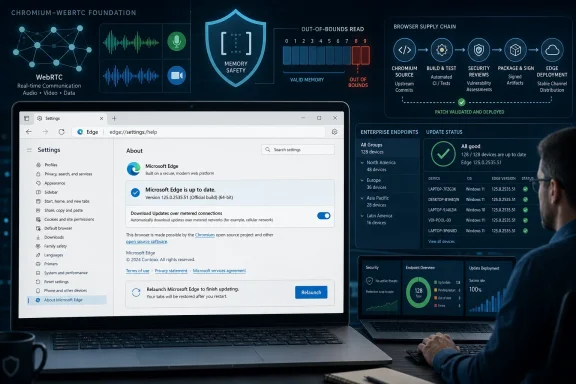
Microsoft documented CVE-2026-12461 in the Security Update Guide on June 17, 2026, because the flaw is in Chromium’s WebRTC code and Microsoft Edge is built on Chromium, meaning Edge inherited the risk until Microsoft shipped an updated browser build. The short answer is that this is not a “Google-only” problem once the vulnerable open-source component sits inside Microsoft’s browser. The more useful answer is that the modern browser security model has made vendor boundaries porous, and Microsoft’s advisory is a reminder that Edge patching belongs in the same operational lane as Windows patching. To check whether your browser is protected, open Edge, go to
The confusion around CVE-2026-12461 is understandable. The vulnerability description names Google Chrome, the bug class is in WebRTC, and the fix tracks a Chromium version number. Yet the Security Update Guide is Microsoft’s venue, and the affected product for Windows administrators is Microsoft Edge, not just Chrome.
That is the whole point of the advisory. Edge is not a separate browser engine with a Chromium compatibility layer bolted on top. Since Microsoft moved Edge to Chromium, the browser’s rendering engine, JavaScript plumbing, media stack, and large parts of its security exposure have been tied to the same upstream project that powers Chrome and several other browsers.
CVE-2026-12461 is described as an out-of-bounds read in WebRTC, a real-time communications component used for browser-based audio, video, and peer-to-peer data features. In practical terms, Microsoft is saying that Edge consumed the affected Chromium open-source code and that the latest Edge release no longer contains the vulnerable version.
That distinction matters. Microsoft is not claiming ownership of the original Chromium bug in the same way it would own a flaw in Windows kernel code or Exchange Server. It is documenting the downstream exposure of a Microsoft-shipped product.
The Security Update Guide now functions partly as a supply-chain ledger. It records not only bugs born inside Microsoft engineering but also vulnerabilities in software Microsoft packages, signs, updates, and supports. If a vulnerable Chromium component lands in Edge, Microsoft has to tell its customers when Edge is affected and when it is fixed.
That is especially important for organizations that do not manage Chrome but do manage Edge. A security team may have blocked Chrome from the enterprise desktop, standardized on Edge for policy control, and still be exposed to a Chromium WebRTC vulnerability. The browser brand changed; the upstream attack surface did not.
This is also why CVE descriptions can look oddly cross-branded. A vulnerability may be assigned by Chrome’s security process, described in terms of Google Chrome versions, and still appear in Microsoft’s ecosystem because Edge incorporates the same repaired code. That is not duplication for its own sake. It is the price of telling administrators what actually runs on their endpoints.
CVE-2026-12461 is an out-of-bounds read, which generally means code reads memory outside the area it was supposed to access. The public description says a remote attacker could potentially obtain sensitive information from process memory through a crafted HTML page, with user interaction required. That is not the same as a fully weaponized remote-code-execution chain, but it is still a web-delivered memory safety issue in a component exposed to untrusted content.
The browser sandbox is designed to contain damage, and modern Chrome and Edge have spent years hardening process isolation. But information disclosure bugs are not harmless. Memory disclosure can help attackers bypass protections, leak data, or become one stage in a larger chain where one bug sets up another.
That is why browser vendors move quickly even when a CVE does not arrive with public exploit code. A vulnerability in a desktop application used occasionally is one thing. A vulnerability reachable by rendering hostile web content in the default browser is another.
On a normal desktop, the easiest path is to open Microsoft Edge and type
The menu path is the same idea with more clicks: open Edge, choose the three-dot menu, go to Help and feedback, and select About Microsoft Edge. The page that opens is the version and update status screen. If Edge says it is up to date, that is the place to confirm the build number your organization expects.
Administrators should be careful about one common trap: downloading an update is not always the same as running the updated browser. If Edge has been patched but not restarted, the old vulnerable process can remain alive. In managed environments, “browser restart required” is often where a fast security fix turns into a lingering exposure.
Edge’s update channel also matters. Stable, Extended Stable, Beta, Dev, and Canary builds exist for different purposes, and organizations may choose slower-moving channels for predictability. That predictability has a security cost when the vulnerable component is common to the browser engine.
For most businesses, the right operational question is not “Did Microsoft publish an advisory?” but “How many endpoints are still running the vulnerable Edge build today?” Security teams should query browser versions through endpoint management tooling, not rely on user reports or the assumption that automatic updates worked everywhere.
This is where Edge’s Microsoft identity helps. Group Policy, Intune, Configuration Manager, and enterprise reporting tools can bring Edge into an existing management model more cleanly than unmanaged third-party browsers. But the advantage only exists if administrators actually monitor the browser version as a first-class security asset.
That creates a subtle but important management issue. A browser CVE may matter to line-of-business applications, sign-in dialogs, collaboration tools, help panes, and commercial software that renders web content through WebView2. If the runtime is outdated, an organization can have Chromium exposure outside the browser window.
This is one of the ways modern Windows security has become less tidy. The web platform is now an application substrate, not just a place people read pages. When a WebRTC or rendering bug lands, the question becomes broader than which browser icon is pinned to the taskbar.
Microsoft’s Security Update Guide is therefore doing more than filing a Chrome-adjacent notice. It is giving Windows administrators a signal that Chromium-derived components in the Microsoft estate need attention.
CVE-2026-12461 is a clean example of that mismatch. The vulnerability is described against Google Chrome because Chrome’s security process and Chromium’s release machinery are central to the fix. Microsoft’s exposure exists because Edge consumes Chromium OSS. The administrator’s responsibility exists because Edge runs on Windows endpoints.
That chain is not exceptional anymore. Open-source components, shared browser engines, hardware drivers, compression libraries, media parsers, and cryptographic libraries routinely appear inside products whose branding gives no obvious clue about the underlying dependency. Security advisories increasingly describe ecosystems rather than isolated products.
The right reading of Microsoft’s advisory is therefore simple: do not stop at the product name in the CVE summary. Ask whether the vulnerable code is present in the software you deploy. For Edge, Microsoft has already answered that question.
For administrators, the manual method is a diagnostic tool, not a fleet strategy. If one machine is suspect, the About page tells you what is installed. If ten thousand machines are in scope, inventory and compliance reporting should tell you which build each device is running and which devices have not restarted.
The distinction is worth making because browser security patches age quickly. A fixed version that is “rolling out” can still leave a window of exposure across unmanaged or poorly managed systems. Attackers do not need every machine to lag behind; they need enough lagging machines to make scanning and targeting worthwhile.
The healthiest endpoint programs now treat browsers more like operating systems than like ordinary apps. They have channels, baselines, emergency releases, telemetry, restart debt, and compatibility exceptions. CVE-2026-12461 is one more reminder that the browser is infrastructure.
That trade was mostly rational. Chromium brings performance, compatibility, extension support, and a massive security research ecosystem. It also means Microsoft must react to upstream browser-engine vulnerabilities at internet speed.
For users, this is usually invisible. Edge updates itself, the browser restarts, and the problem goes away. For enterprises, the invisibility can be dangerous. The fact that Chromium fixes arrive outside the old Patch Tuesday cadence means browser patching cannot wait for a monthly ritual.
The Security Update Guide entry is therefore a small administrative artifact with a large operational message. Microsoft is telling customers: this vulnerability may have been found in Chromium, but if you run Edge, you should care.
edge://settings/help, and verify that it has updated to a fixed version or later.
 Microsoft Is Not Borrowing Chrome’s Homework; It Is Shipping Chromium’s Risk
The confusion around CVE-2026-12461 is understandable. The vulnerability description names Google Chrome, the bug class is in WebRTC, and the fix tracks a Chromium version number. Yet the Security Update Guide is Microsoft’s venue, and the affected product for Windows administrators is Microsoft Edge, not just Chrome.That is the whole point of the advisory. Edge is not a separate browser engine with a Chromium compatibility layer bolted on top. Since Microsoft moved Edge to Chromium, the browser’s rendering engine, JavaScript plumbing, media stack, and large parts of its security exposure have been tied to the same upstream project that powers Chrome and several other browsers.
CVE-2026-12461 is described as an out-of-bounds read in WebRTC, a real-time communications component used for browser-based audio, video, and peer-to-peer data features. In practical terms, Microsoft is saying that Edge consumed the affected Chromium open-source code and that the latest Edge release no longer contains the vulnerable version.
That distinction matters. Microsoft is not claiming ownership of the original Chromium bug in the same way it would own a flaw in Windows kernel code or Exchange Server. It is documenting the downstream exposure of a Microsoft-shipped product.
The Security Update Guide Has Become a Supply-Chain Ledger
The old mental model of Microsoft security updates was simple: Windows had Patch Tuesday, Office had patches, and browsers were just another line item. That model no longer fits a browser built from a large, fast-moving open-source base.The Security Update Guide now functions partly as a supply-chain ledger. It records not only bugs born inside Microsoft engineering but also vulnerabilities in software Microsoft packages, signs, updates, and supports. If a vulnerable Chromium component lands in Edge, Microsoft has to tell its customers when Edge is affected and when it is fixed.
That is especially important for organizations that do not manage Chrome but do manage Edge. A security team may have blocked Chrome from the enterprise desktop, standardized on Edge for policy control, and still be exposed to a Chromium WebRTC vulnerability. The browser brand changed; the upstream attack surface did not.
This is also why CVE descriptions can look oddly cross-branded. A vulnerability may be assigned by Chrome’s security process, described in terms of Google Chrome versions, and still appear in Microsoft’s ecosystem because Edge incorporates the same repaired code. That is not duplication for its own sake. It is the price of telling administrators what actually runs on their endpoints.
WebRTC Makes “Just Visiting a Page” a Serious Attack Surface
WebRTC is one of those browser technologies that users rarely think about until it breaks a video call. It is the machinery that lets web applications handle real-time voice, video, and data channels without a traditional plugin. That usefulness is also why vulnerabilities in WebRTC are treated seriously.CVE-2026-12461 is an out-of-bounds read, which generally means code reads memory outside the area it was supposed to access. The public description says a remote attacker could potentially obtain sensitive information from process memory through a crafted HTML page, with user interaction required. That is not the same as a fully weaponized remote-code-execution chain, but it is still a web-delivered memory safety issue in a component exposed to untrusted content.
The browser sandbox is designed to contain damage, and modern Chrome and Edge have spent years hardening process isolation. But information disclosure bugs are not harmless. Memory disclosure can help attackers bypass protections, leak data, or become one stage in a larger chain where one bug sets up another.
That is why browser vendors move quickly even when a CVE does not arrive with public exploit code. A vulnerability in a desktop application used occasionally is one thing. A vulnerability reachable by rendering hostile web content in the default browser is another.
Edge’s Version Number Is the Patch Boundary That Matters
For end users, the practical question is not whether the CVE says “Chrome.” It is whether Edge has updated past the vulnerable Chromium base. Microsoft’s advisory language says the latest version of Microsoft Edge Chromium-based is no longer vulnerable, which turns version verification into the meaningful control.On a normal desktop, the easiest path is to open Microsoft Edge and type
edge://settings/help in the address bar. Edge will display the installed version and usually trigger an update check at the same time. If an update is available, the browser may download it and ask for a restart to complete installation.The menu path is the same idea with more clicks: open Edge, choose the three-dot menu, go to Help and feedback, and select About Microsoft Edge. The page that opens is the version and update status screen. If Edge says it is up to date, that is the place to confirm the build number your organization expects.
Administrators should be careful about one common trap: downloading an update is not always the same as running the updated browser. If Edge has been patched but not restarted, the old vulnerable process can remain alive. In managed environments, “browser restart required” is often where a fast security fix turns into a lingering exposure.
The Enterprise Problem Is Not Awareness; It Is Update Latency
Consumer browsers update aggressively because vendors learned that passive patching wins. Enterprise browsers live in a more complicated world. Change windows, application compatibility testing, virtual desktop pools, kiosk systems, and offline networks can all slow down an update that, on paper, should already be installed.Edge’s update channel also matters. Stable, Extended Stable, Beta, Dev, and Canary builds exist for different purposes, and organizations may choose slower-moving channels for predictability. That predictability has a security cost when the vulnerable component is common to the browser engine.
For most businesses, the right operational question is not “Did Microsoft publish an advisory?” but “How many endpoints are still running the vulnerable Edge build today?” Security teams should query browser versions through endpoint management tooling, not rely on user reports or the assumption that automatic updates worked everywhere.
This is where Edge’s Microsoft identity helps. Group Policy, Intune, Configuration Manager, and enterprise reporting tools can bring Edge into an existing management model more cleanly than unmanaged third-party browsers. But the advantage only exists if administrators actually monitor the browser version as a first-class security asset.
WebView2 Quietly Expands the Blast Radius
There is another reason Microsoft’s documentation matters: Edge is not just the visible browser. The Edge WebView2 Runtime lets Windows applications embed web content using the same Chromium-based platform. Many users may never open Edge deliberately and still run software that depends on Edge components.That creates a subtle but important management issue. A browser CVE may matter to line-of-business applications, sign-in dialogs, collaboration tools, help panes, and commercial software that renders web content through WebView2. If the runtime is outdated, an organization can have Chromium exposure outside the browser window.
This is one of the ways modern Windows security has become less tidy. The web platform is now an application substrate, not just a place people read pages. When a WebRTC or rendering bug lands, the question becomes broader than which browser icon is pinned to the taskbar.
Microsoft’s Security Update Guide is therefore doing more than filing a Chrome-adjacent notice. It is giving Windows administrators a signal that Chromium-derived components in the Microsoft estate need attention.
The Name on the CVE Is Less Important Than the Code on the Machine
CVE naming has always been a compromise between precision and readability. A vulnerability may be assigned by one vendor, fixed in an upstream project, imported by another vendor, and exploited through a third-party application. The public record rarely captures that whole dependency graph in a way that casual readers find intuitive.CVE-2026-12461 is a clean example of that mismatch. The vulnerability is described against Google Chrome because Chrome’s security process and Chromium’s release machinery are central to the fix. Microsoft’s exposure exists because Edge consumes Chromium OSS. The administrator’s responsibility exists because Edge runs on Windows endpoints.
That chain is not exceptional anymore. Open-source components, shared browser engines, hardware drivers, compression libraries, media parsers, and cryptographic libraries routinely appear inside products whose branding gives no obvious clue about the underlying dependency. Security advisories increasingly describe ecosystems rather than isolated products.
The right reading of Microsoft’s advisory is therefore simple: do not stop at the product name in the CVE summary. Ask whether the vulnerable code is present in the software you deploy. For Edge, Microsoft has already answered that question.
The Browser Version Page Is the New Patch Dialog
For Windows enthusiasts, checking the Edge version manually is straightforward. Typeedge://settings/help, wait for the update check to complete, and restart the browser if prompted. That page is the closest thing Edge has to a live patch status dialog.For administrators, the manual method is a diagnostic tool, not a fleet strategy. If one machine is suspect, the About page tells you what is installed. If ten thousand machines are in scope, inventory and compliance reporting should tell you which build each device is running and which devices have not restarted.
The distinction is worth making because browser security patches age quickly. A fixed version that is “rolling out” can still leave a window of exposure across unmanaged or poorly managed systems. Attackers do not need every machine to lag behind; they need enough lagging machines to make scanning and targeting worthwhile.
The healthiest endpoint programs now treat browsers more like operating systems than like ordinary apps. They have channels, baselines, emergency releases, telemetry, restart debt, and compatibility exceptions. CVE-2026-12461 is one more reminder that the browser is infrastructure.
Microsoft’s Advisory Is a Small Notice About a Large Dependency
There is a temptation to treat this CVE as routine because it is a high-volume category: another Chromium bug, another browser update, another short advisory. That would miss the bigger story. Microsoft’s Edge strategy gave Windows users a better standards-compatible browser, but it also tied Windows client security more tightly to Chromium’s release rhythm.That trade was mostly rational. Chromium brings performance, compatibility, extension support, and a massive security research ecosystem. It also means Microsoft must react to upstream browser-engine vulnerabilities at internet speed.
For users, this is usually invisible. Edge updates itself, the browser restarts, and the problem goes away. For enterprises, the invisibility can be dangerous. The fact that Chromium fixes arrive outside the old Patch Tuesday cadence means browser patching cannot wait for a monthly ritual.
The Security Update Guide entry is therefore a small administrative artifact with a large operational message. Microsoft is telling customers: this vulnerability may have been found in Chromium, but if you run Edge, you should care.
The Edge Check That Actually Answers the CVE
The immediate answer for CVE-2026-12461 is not complicated, but it should be precise. Open Edge’s version page, confirm the browser is current, and make sure the updated browser has restarted. If you manage devices, verify that status centrally rather than assuming automatic update coverage.- Microsoft included CVE-2026-12461 in the Security Update Guide because Edge is Chromium-based and consumed the affected open-source component.
- The vulnerability is an out-of-bounds read in WebRTC that could expose sensitive process memory through a crafted HTML page.
- The affected upstream Chrome builds were prior to the fixed Chromium/Chrome version identified for the issue, and Microsoft’s advisory indicates the latest Edge build is no longer vulnerable.
- Users can check Edge by visiting
edge://settings/helpor by opening Settings, then Help and feedback, then About Microsoft Edge. - Administrators should verify deployed Edge and WebView2 versions across the fleet and account for pending browser restarts.
- The important security boundary is the code version running on the endpoint, not whether the CVE summary says Chrome or Edge.
References
- Primary source: MSRC
Published: 2026-06-19T13:52:57-07:00
Security Update Guide - Microsoft Security Response Center
 msrc.microsoft.com
- Related coverage: vulnerability.circl.lu
Vulnerability-Lookup
Vulnerability-Lookup - Fast vulnerability lookup correlation from different sources.vulnerability.circl.lu - Official source: microsoft.com
MSRC - Microsoft Security Response Center
The Microsoft Security Response Center is part of the defender community and on the front line of security response evolution. For over twenty years, we have been engaged with security researchers working to protect customers and the broader ecosystem.www.microsoft.com
- Official source: learn.microsoft.com
Release notes for Microsoft Edge Security Updates | Microsoft Learn
Release notes for Microsoft Edge Security Updateslearn.microsoft.com - Related coverage: radar.offseq.com
CVE-2026-11096: Out of bounds read in Google Chrome - Live Threat Intelligence - Threat Radar | OffSeq.com
Detailed information about CVE-2026-11096: Out of bounds read in Google Chrome affecting Google Chrome. Get real-time updates, technical details, and mitigationradar.offseq.com - Related coverage: datacomm.com
- Related coverage: cve.mitre.org
- Related coverage: www2.gov.bc.ca
- Related coverage: buildings.honeywell.com
The purpose of this document is to identify the patches that have been delivered by Microsoft® which have been tested against Pro-Watch
PDF documentbuildings.honeywell.com
