

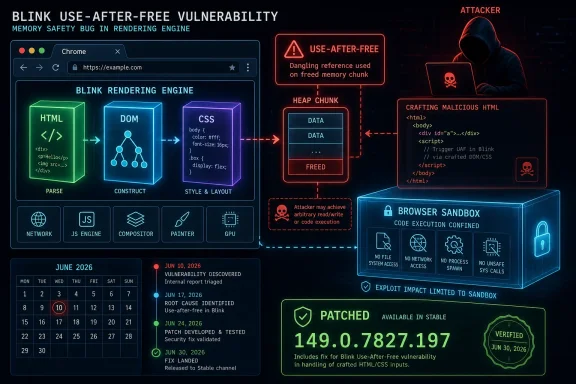
Google disclosed CVE-2026-13031 on June 24, 2026, as a high-severity use-after-free flaw in Chrome’s Blink rendering engine, fixed in desktop Chrome 149.0.7827.196/197 and capable of letting a remote attacker execute code inside Chrome’s sandbox through a crafted HTML page. That sounds like the kind of browser bug security teams have learned to triage almost by muscle memory. It should not be treated as routine. The interesting part is not just that Blink had another memory-safety defect; it is that the modern browser remains a privileged execution surface even when the exploit is “only” inside the sandbox.
CVE-2026-13031 sits in the category of vulnerability that has haunted browsers for decades: use after free. In plain terms, the browser releases a chunk of memory and later touches it again, opening the door for carefully arranged attacker-controlled data to be interpreted as something legitimate. In a renderer as large and stateful as Blink, that can be enough to turn a webpage from inert content into executable leverage.
The published description is deliberately terse, as Chrome advisories usually are while users are still patching. The flaw affects Google Chrome versions prior to 149.0.7827.197, and the attack path is a crafted HTML page requiring user interaction in the CVSS sense: the victim has to visit or open attacker-supplied content. That is not much comfort in a world where browsers are the default interface for email, collaboration suites, SaaS dashboards, admin portals, identity flows, file previews, password managers, and device enrollment.
The phrase “execute arbitrary code inside a sandbox” is doing a lot of work. It means the bug, by itself, is not described as a full host compromise. It also means an attacker who can exploit it may gain code execution in one of the most sensitive processes on a user’s machine, at the exact boundary where web content is supposed to be least trusted.
That distinction matters for defenders. A sandbox-contained exploit is not the same as kernel-level control, but it is also not a paper cut. Browser exploitation is often staged: first obtain execution in the renderer, then escape the sandbox, steal browser-accessible secrets, abuse session state, or chain into another weakness.
That combination is exactly why Blink bugs are strategically important. Attackers do not need a victim to download a mysterious executable when the target organization already allows browsers to execute complex untrusted code all day. JavaScript, WebAssembly, document parsing, graphics paths, authentication prompts, autofill surfaces, clipboard permissions, and cross-origin security rules all converge in the browser.
The modern web platform has become a quasi-operating system inside the operating system. Chrome’s sandbox is the admission that this inner OS cannot be trusted, even when built by one of the most sophisticated security teams in the industry. The sandbox is not a sign of weakness; it is the reason many browser bugs are survivable.
But sandboxes shift risk rather than eliminate it. If an attacker gets code execution in the renderer, the defender’s next question becomes what that renderer can touch, what tokens or pages are live, what other bugs are available, and whether endpoint controls notice suspicious behavior from a process that users legitimately run all day.
The user-interaction requirement should not be read as a major mitigation. In browser security, “user interaction” often means the victim loads a page. Phishing campaigns, malvertising, compromised websites, poisoned search results, fake document portals, and chat-based lure links all exist to solve exactly that problem.
The “inside a sandbox” language is more meaningful. Chrome’s process isolation model is designed to keep renderer compromises from becoming full-system compromises. An attacker who only has renderer execution may still face meaningful barriers before reading arbitrary local files, installing persistence, or moving laterally.
Still, the score captures the uncomfortable middle ground: this is not a confirmed in-the-wild zero-day in the public record, and CISA’s SSVC entry lists exploitation as “none” at the time of assessment, but the technical impact is severe enough that waiting for exploit telemetry would be the wrong move. Browser patching is not supposed to be theatrical. It is supposed to be fast.
CVE-2026-13031 was one of several memory-safety issues in the same batch. That clustering is not accidental in the broad sense. Browsers are vast C++ codebases with high-performance requirements, legacy compatibility constraints, and huge attack surfaces. Memory bugs are no longer surprising; what matters is how quickly they are found, fixed, shipped, and deployed.
This is where Chrome’s release machinery becomes part of the security story. Google can push fixes quickly, and Chrome’s auto-update model has trained many consumers to stop thinking about browser patching. That model works well for unmanaged personal machines when updates apply cleanly and users restart the browser.
Enterprise environments are messier. Admins may pin versions, stage rollouts, validate business-critical web apps, manage browser extensions, and coordinate change windows. Those operational realities are valid, but they collide with the economics of browser exploitation: once a patch is public, attackers can compare code, infer the bug class, and race against slow deployments.
That timeline is useful, but it also illustrates a trap. Security teams that wait for every database to fully converge before acting will always be behind the vendor advisory. Vulnerability management tools need CPEs, CVSS vectors, and enrichment metadata; attackers need a patch diff and a target population.
The user-facing question “are we missing a CPE here?” is exactly the sort of thing that matters for scanners and dashboards. If inventory tools fail to map the right CPE or misread the version boundary, a vulnerable browser fleet can look cleaner than it is. But the operational answer is simpler than the metadata debate: verify Chrome’s actual installed version and make sure it is at or above the fixed build.
For Windows administrators, that means checking managed Chrome versions through whatever combination of Google Admin console, enterprise reporting, endpoint management, Intune, ConfigMgr, EDR inventory, or script-based checks the organization already trusts. A vulnerability feed is a signal. The installed binary is the truth.
But a renderer compromise can still be valuable. The browser is where session cookies, federated login flows, access tokens, password autofill events, intranet applications, SaaS data, and user documents pass through in ways that are not always visible to traditional file-system monitoring. Even without a sandbox escape, code running in the browser context may be positioned to tamper with what the user sees or does next, depending on the exploit’s exact capabilities and the browser’s isolation boundaries.
The risk is sharper for privileged users. A helpdesk technician logged into an identity portal, a finance employee approving payments, a developer with access to internal dashboards, or a domain admin checking webmail can turn a browser compromise into a business-impacting incident without the attacker ever needing to drop a classic payload.
This is why browser vulnerabilities sit awkwardly between endpoint security and identity security. The browser is both an application and a session broker. Treating it like any other desktop app misses the amount of authority users now exercise through tabs.
On Windows, Chrome also competes and coexists with Edge, which is built on Chromium. This particular CVE is listed for Google Chrome, and administrators should not automatically assume the same version number or patch state applies to Edge. But Chromium vulnerabilities often matter beyond Chrome because the underlying codebase is shared across browsers and embedded web surfaces.
That does not mean every Chromium-based product is instantly vulnerable in the same way. Vendors may ship different branches, disable features, carry patches separately, or expose code paths differently. It does mean admins should check not only Chrome but also Chromium-derived browsers and applications that embed Chromium components where those products publish their own advisories.
For home users, the guidance is less glamorous but just as important. Open Chrome’s About page, let it check for updates, and relaunch. A browser that has downloaded a fix but has not restarted is still running old code.
Version drift is especially common in environments with kiosk systems, lab machines, call-center desktops, conference-room PCs, and shared workstations. These machines may not look important in an asset register, but they are often internet-facing in the behavioral sense: users browse, authenticate, open links, and access internal tools from them.
The fix for CVE-2026-13031 is therefore not merely to tell users to update. It is to measure update completion. Security teams should be asking how many Chrome installations are below 149.0.7827.197, how many have pending restarts, how many have not checked in recently, and how many unmanaged browsers exist outside the standard endpoint baseline.
This is also where browser governance pays dividends. Enterprises that treat browsers as managed infrastructure rather than user preference are in a better position to respond. Extension controls, update policies, safe browsing settings, site isolation, attack surface reduction, and identity-aware access policies all become more effective when the base browser version is not a mystery.
This is the uncomfortable reality behind each individual Chrome CVE. The browser industry knows the class of bug. The mitigations are mature. The testing infrastructure is extraordinary. And yet memory-corruption flaws still emerge because the codebase is enormous, concurrency is hard, object lifetimes are complicated, and web content is adversarial by design.
The long-term answer is memory safety, but the transition is incremental. Rust and other safer approaches can reduce new bug density in selected components, yet browser engines depend on deep stacks of existing code, platform APIs, graphics drivers, codecs, parsers, and performance-sensitive subsystems. A clean break is not how browsers evolve.
That does not make the situation hopeless. It means defenders should judge vendors not by whether they ever ship memory bugs, but by how quickly they find them, how effectively they harden exploitation paths, and how reliably they get fixes onto endpoints. On that score, the browser market has improved dramatically over the last decade, even as the attack surface has grown.
This restraint is standard practice in browser security for good reason. Once a fix is public, the difference between a vague advisory and a detailed root-cause analysis can be measured in exploit-development time. The vendor wants defenders to patch before attackers can industrialize the bug.
The downside is that administrators do not get a neat risk narrative. They may not know whether the bug is reliably exploitable, which platforms are easiest to target, whether common mitigations break the exploit, or whether any proof-of-concept exists privately. That uncertainty is frustrating, but it should not paralyze response.
For CVE-2026-13031, the available public facts are enough: remote content, crafted HTML, Blink, use-after-free, high severity, code execution inside the sandbox, fixed in Chrome 149.0.7827.197. In browser security, that is sufficient basis for urgency.
Organizations should also watch for the secondary lag among Chromium-based browsers and embedded runtimes. A Chrome advisory may be the first visible signal of a bug in shared code. Depending on vendor cadence, related products may need their own updates, and the absence of a same-day advisory should not be mistaken for proof of immunity.
For managed Windows fleets, admins should report browser version at login, enforce relaunch notifications where appropriate, and set deadlines for update completion. There is a balance to strike: too aggressive a relaunch policy can interrupt real work, but indefinite deferral is not a security strategy.
The best patching programs make the secure path boring. Users should not need to understand Blink, CVSS, CPE matching, or sandbox boundaries to be protected from a bug like this. They should simply receive the update, relaunch within a reasonable window, and move on.
But avoiding panic is not the same as lowering priority. The right response is disciplined urgency: patch promptly, verify coverage, check for lagging endpoints, and keep an eye on related Chromium advisories. The lack of known exploitation should be treated as a window, not a waiver.
The bigger lesson is that browser security is now a core part of endpoint security. The browser is not just a portal to risk; it is a platform where identity, data access, application logic, and user trust converge. A renderer bug in Blink can matter as much to the enterprise as a flaw in a VPN client or document reader.
That is why CVE-2026-13031 deserves attention beyond its line item in a long Chrome release note. It is a compact example of the modern security bargain: users get a richer web, admins get faster patch channels, vendors get more telemetry and update control, and attackers keep probing the seams between content and code.
 Chrome’s Latest Blink Bug Is a Reminder That the Web Page Is Still an Attack Surface
CVE-2026-13031 sits in the category of vulnerability that has haunted browsers for decades: use after free. In plain terms, the browser releases a chunk of memory and later touches it again, opening the door for carefully arranged attacker-controlled data to be interpreted as something legitimate. In a renderer as large and stateful as Blink, that can be enough to turn a webpage from inert content into executable leverage.The published description is deliberately terse, as Chrome advisories usually are while users are still patching. The flaw affects Google Chrome versions prior to 149.0.7827.197, and the attack path is a crafted HTML page requiring user interaction in the CVSS sense: the victim has to visit or open attacker-supplied content. That is not much comfort in a world where browsers are the default interface for email, collaboration suites, SaaS dashboards, admin portals, identity flows, file previews, password managers, and device enrollment.
The phrase “execute arbitrary code inside a sandbox” is doing a lot of work. It means the bug, by itself, is not described as a full host compromise. It also means an attacker who can exploit it may gain code execution in one of the most sensitive processes on a user’s machine, at the exact boundary where web content is supposed to be least trusted.
That distinction matters for defenders. A sandbox-contained exploit is not the same as kernel-level control, but it is also not a paper cut. Browser exploitation is often staged: first obtain execution in the renderer, then escape the sandbox, steal browser-accessible secrets, abuse session state, or chain into another weakness.
Blink Is Not Just a Rendering Engine Anymore
Calling Blink a rendering engine undersells the problem. Blink is the machinery that turns HTML, CSS, scripts, layout, input, DOM mutations, media hooks, forms, storage, and a sprawling set of web platform APIs into the thing users call “a webpage.” It is where web standards meet decades of compatibility promises and a constant stream of new capabilities.That combination is exactly why Blink bugs are strategically important. Attackers do not need a victim to download a mysterious executable when the target organization already allows browsers to execute complex untrusted code all day. JavaScript, WebAssembly, document parsing, graphics paths, authentication prompts, autofill surfaces, clipboard permissions, and cross-origin security rules all converge in the browser.
The modern web platform has become a quasi-operating system inside the operating system. Chrome’s sandbox is the admission that this inner OS cannot be trusted, even when built by one of the most sophisticated security teams in the industry. The sandbox is not a sign of weakness; it is the reason many browser bugs are survivable.
But sandboxes shift risk rather than eliminate it. If an attacker gets code execution in the renderer, the defender’s next question becomes what that renderer can touch, what tokens or pages are live, what other bugs are available, and whether endpoint controls notice suspicious behavior from a process that users legitimately run all day.
The CVSS Score Tells the Shape of the Risk, Not the Whole Story
CISA’s ADP scoring gives CVE-2026-13031 a CVSS 3.1 base score of 8.8, with network attack vector, low attack complexity, no privileges required, user interaction required, unchanged scope, and high impact across confidentiality, integrity, and availability. That is a sensible score for a browser flaw reachable by remote content and capable of code execution.The user-interaction requirement should not be read as a major mitigation. In browser security, “user interaction” often means the victim loads a page. Phishing campaigns, malvertising, compromised websites, poisoned search results, fake document portals, and chat-based lure links all exist to solve exactly that problem.
The “inside a sandbox” language is more meaningful. Chrome’s process isolation model is designed to keep renderer compromises from becoming full-system compromises. An attacker who only has renderer execution may still face meaningful barriers before reading arbitrary local files, installing persistence, or moving laterally.
Still, the score captures the uncomfortable middle ground: this is not a confirmed in-the-wild zero-day in the public record, and CISA’s SSVC entry lists exploitation as “none” at the time of assessment, but the technical impact is severe enough that waiting for exploit telemetry would be the wrong move. Browser patching is not supposed to be theatrical. It is supposed to be fast.
The Patch Landed in a Noisy Chrome Release
Google’s June 23 desktop stable-channel update moved Chrome to 149.0.7827.196/197 on Windows and macOS and 149.0.7827.196 on Linux. The release included 18 security fixes called out by Google, including critical use-after-free flaws in WebGL, another critical Blink-related out-of-bounds issue in InterestGroups, and high-severity flaws across GPU, FileSystem, Web Authentication, Bluetooth, WebView, Autofill, Passwords, DevTools, and more.CVE-2026-13031 was one of several memory-safety issues in the same batch. That clustering is not accidental in the broad sense. Browsers are vast C++ codebases with high-performance requirements, legacy compatibility constraints, and huge attack surfaces. Memory bugs are no longer surprising; what matters is how quickly they are found, fixed, shipped, and deployed.
This is where Chrome’s release machinery becomes part of the security story. Google can push fixes quickly, and Chrome’s auto-update model has trained many consumers to stop thinking about browser patching. That model works well for unmanaged personal machines when updates apply cleanly and users restart the browser.
Enterprise environments are messier. Admins may pin versions, stage rollouts, validate business-critical web apps, manage browser extensions, and coordinate change windows. Those operational realities are valid, but they collide with the economics of browser exploitation: once a patch is public, attackers can compare code, infer the bug class, and race against slow deployments.
The NVD Entry Shows Why Vulnerability Metadata Is Not the Patch Plan
The NVD entry for CVE-2026-13031 was published on June 24 and modified on June 25. At the time reflected in the record, NVD had not yet supplied its own CVSS score, while CISA’s ADP enrichment supplied the 8.8 high score and the CWE-416 classification. NIST’s change history also added the CPE configuration showing vulnerable Chrome versions before 149.0.7827.197 across Windows, Linux, and macOS.That timeline is useful, but it also illustrates a trap. Security teams that wait for every database to fully converge before acting will always be behind the vendor advisory. Vulnerability management tools need CPEs, CVSS vectors, and enrichment metadata; attackers need a patch diff and a target population.
The user-facing question “are we missing a CPE here?” is exactly the sort of thing that matters for scanners and dashboards. If inventory tools fail to map the right CPE or misread the version boundary, a vulnerable browser fleet can look cleaner than it is. But the operational answer is simpler than the metadata debate: verify Chrome’s actual installed version and make sure it is at or above the fixed build.
For Windows administrators, that means checking managed Chrome versions through whatever combination of Google Admin console, enterprise reporting, endpoint management, Intune, ConfigMgr, EDR inventory, or script-based checks the organization already trusts. A vulnerability feed is a signal. The installed binary is the truth.
“Inside the Sandbox” Is Not a Hall Pass
There is a temptation to downgrade concern when an advisory says code execution is confined to the sandbox. That is understandable; browser sandboxing is one of the great success stories of client-side security. It has forced attackers to burn more bugs, chain more primitives, and accept more detection opportunities.But a renderer compromise can still be valuable. The browser is where session cookies, federated login flows, access tokens, password autofill events, intranet applications, SaaS data, and user documents pass through in ways that are not always visible to traditional file-system monitoring. Even without a sandbox escape, code running in the browser context may be positioned to tamper with what the user sees or does next, depending on the exploit’s exact capabilities and the browser’s isolation boundaries.
The risk is sharper for privileged users. A helpdesk technician logged into an identity portal, a finance employee approving payments, a developer with access to internal dashboards, or a domain admin checking webmail can turn a browser compromise into a business-impacting incident without the attacker ever needing to drop a classic payload.
This is why browser vulnerabilities sit awkwardly between endpoint security and identity security. The browser is both an application and a session broker. Treating it like any other desktop app misses the amount of authority users now exercise through tabs.
Windows Users Should Care Even When the Bug Is Cross-Platform
The NVD configuration lists Windows, Linux, and macOS as affected operating-system contexts for the vulnerable Chrome application. The bug is in Chrome, not in Windows. Still, for WindowsForum readers, the practical blast radius is obvious: Windows remains the default desktop platform in many businesses, schools, government offices, gaming rigs, and home productivity setups.On Windows, Chrome also competes and coexists with Edge, which is built on Chromium. This particular CVE is listed for Google Chrome, and administrators should not automatically assume the same version number or patch state applies to Edge. But Chromium vulnerabilities often matter beyond Chrome because the underlying codebase is shared across browsers and embedded web surfaces.
That does not mean every Chromium-based product is instantly vulnerable in the same way. Vendors may ship different branches, disable features, carry patches separately, or expose code paths differently. It does mean admins should check not only Chrome but also Chromium-derived browsers and applications that embed Chromium components where those products publish their own advisories.
For home users, the guidance is less glamorous but just as important. Open Chrome’s About page, let it check for updates, and relaunch. A browser that has downloaded a fix but has not restarted is still running old code.
The Real Enterprise Risk Is Version Drift
Auto-update has made browsers safer, but it has also made browser risk less visible. A fully managed endpoint can still run a stale browser if update policies are misconfigured, background update services are broken, users never restart, network controls block update retrieval, or VDI images are refreshed from old gold masters. The gap between “we have auto-update” and “all active browsers are patched” is where real incidents live.Version drift is especially common in environments with kiosk systems, lab machines, call-center desktops, conference-room PCs, and shared workstations. These machines may not look important in an asset register, but they are often internet-facing in the behavioral sense: users browse, authenticate, open links, and access internal tools from them.
The fix for CVE-2026-13031 is therefore not merely to tell users to update. It is to measure update completion. Security teams should be asking how many Chrome installations are below 149.0.7827.197, how many have pending restarts, how many have not checked in recently, and how many unmanaged browsers exist outside the standard endpoint baseline.
This is also where browser governance pays dividends. Enterprises that treat browsers as managed infrastructure rather than user preference are in a better position to respond. Extension controls, update policies, safe browsing settings, site isolation, attack surface reduction, and identity-aware access policies all become more effective when the base browser version is not a mystery.
Use-After-Free Bugs Keep Winning Because Memory Safety Is a Long Migration
CVE-2026-13031’s CWE-416 classification places it in one of the most familiar and stubborn vulnerability families. Use-after-free bugs arise from the manual memory-management burden of languages like C and C++, where performance and control come with sharp edges. Chrome has invested heavily in mitigations, fuzzing, sanitizers, site isolation, sandboxing, and increasingly memory-safe components, but it cannot simply rewrite the web platform overnight.This is the uncomfortable reality behind each individual Chrome CVE. The browser industry knows the class of bug. The mitigations are mature. The testing infrastructure is extraordinary. And yet memory-corruption flaws still emerge because the codebase is enormous, concurrency is hard, object lifetimes are complicated, and web content is adversarial by design.
The long-term answer is memory safety, but the transition is incremental. Rust and other safer approaches can reduce new bug density in selected components, yet browser engines depend on deep stacks of existing code, platform APIs, graphics drivers, codecs, parsers, and performance-sensitive subsystems. A clean break is not how browsers evolve.
That does not make the situation hopeless. It means defenders should judge vendors not by whether they ever ship memory bugs, but by how quickly they find them, how effectively they harden exploitation paths, and how reliably they get fixes onto endpoints. On that score, the browser market has improved dramatically over the last decade, even as the attack surface has grown.
The Advisory’s Silence Is Part of the Defense
Google’s release notes restrict access to many bug details until a majority of users have updated. To some readers, that can feel like opacity. To exploit developers, full technical detail is a roadmap.This restraint is standard practice in browser security for good reason. Once a fix is public, the difference between a vague advisory and a detailed root-cause analysis can be measured in exploit-development time. The vendor wants defenders to patch before attackers can industrialize the bug.
The downside is that administrators do not get a neat risk narrative. They may not know whether the bug is reliably exploitable, which platforms are easiest to target, whether common mitigations break the exploit, or whether any proof-of-concept exists privately. That uncertainty is frustrating, but it should not paralyze response.
For CVE-2026-13031, the available public facts are enough: remote content, crafted HTML, Blink, use-after-free, high severity, code execution inside the sandbox, fixed in Chrome 149.0.7827.197. In browser security, that is sufficient basis for urgency.
The Patch Is Small; the Habit Is the Hard Part
The immediate remediation is straightforward: update Chrome to a fixed version and restart it. The larger operational lesson is to treat browser restarts as part of patch compliance, not user etiquette. A patched installer sitting on disk does not protect a running renderer process.Organizations should also watch for the secondary lag among Chromium-based browsers and embedded runtimes. A Chrome advisory may be the first visible signal of a bug in shared code. Depending on vendor cadence, related products may need their own updates, and the absence of a same-day advisory should not be mistaken for proof of immunity.
For managed Windows fleets, admins should report browser version at login, enforce relaunch notifications where appropriate, and set deadlines for update completion. There is a balance to strike: too aggressive a relaunch policy can interrupt real work, but indefinite deferral is not a security strategy.
The best patching programs make the secure path boring. Users should not need to understand Blink, CVSS, CPE matching, or sandbox boundaries to be protected from a bug like this. They should simply receive the update, relaunch within a reasonable window, and move on.
This One Blink CVE Says More About Browser Operations Than Browser Panic
CVE-2026-13031 is not, on the public record, a confirmed actively exploited zero-day. That distinction matters. Security coverage often flattens every browser bug into “update now” drama, and that can breed fatigue among users and admins who see high-severity Chrome advisories almost constantly.But avoiding panic is not the same as lowering priority. The right response is disciplined urgency: patch promptly, verify coverage, check for lagging endpoints, and keep an eye on related Chromium advisories. The lack of known exploitation should be treated as a window, not a waiver.
The bigger lesson is that browser security is now a core part of endpoint security. The browser is not just a portal to risk; it is a platform where identity, data access, application logic, and user trust converge. A renderer bug in Blink can matter as much to the enterprise as a flaw in a VPN client or document reader.
That is why CVE-2026-13031 deserves attention beyond its line item in a long Chrome release note. It is a compact example of the modern security bargain: users get a richer web, admins get faster patch channels, vendors get more telemetry and update control, and attackers keep probing the seams between content and code.
The Version Number Is the Story Administrators Can Act On
For all the nuance around sandboxing and exploit chains, the practical takeaways are refreshingly concrete. The fixed Chrome desktop build is the boundary that matters, and the highest-risk machines are the ones that silently failed to cross it.- Chrome versions prior to 149.0.7827.197 should be treated as vulnerable to CVE-2026-13031.
- The flaw is a high-severity Blink use-after-free that can be reached through crafted HTML and can lead to code execution inside Chrome’s sandbox.
- Public records do not currently describe confirmed exploitation in the wild, but the technical impact is high enough to justify prompt deployment.
- Windows administrators should verify installed browser versions directly rather than relying only on vulnerability-feed enrichment or CPE matching.
- A Chrome update is not complete for a running user session until the browser has restarted into the fixed build.
- Chromium-based browsers and embedded Chromium runtimes should be monitored separately through their own vendor update channels.
References
- Primary source: NVD / Chromium
Published: 2026-06-26T17:46:39-07:00
NVD - CVE-2026-13031
 nvd.nist.gov
- Security advisory: MSRC
Published: 2026-06-26T17:46:39-07:00
Original feed URL
Security Update Guide - Microsoft Security Response Center
 msrc.microsoft.com
- Related coverage: vuldb.com
CVE-2026-13026 Google Chrome Digital Credentials use after free (ID 519728)
A weakness has been identified in Google Chrome on macOS. The identification of this vulnerability is CVE-2026-13026. Upgrading the affected component is recommended.vuldb.com
