

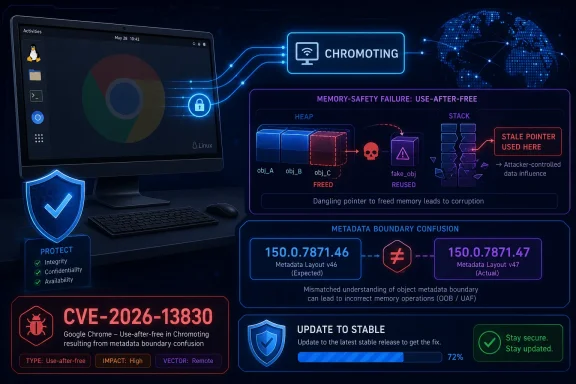
CVE-2026-13830 is a high-severity use-after-free flaw in Chrome’s Chromoting component, published by NVD on June 30, 2026, affecting Google Chrome on Linux before 150.0.7871.47 and described as allowing remote code execution through malicious network traffic. The oddity is not the bug class; Chrome has been living with memory-safety debt for years. The oddity is the metadata around it, because Google’s own Chrome release post says Linux stable moved to 150.0.7871.46, while the CVE text says Linux is vulnerable before 150.0.7871.47. That mismatch is exactly the kind of small database wrinkle that turns into a big patch-management headache.
Google’s Chrome Releases blog framed the June 30 update as the promotion of Chrome 150 to the stable channel for Windows, Mac, and Linux, with rollout over the following days and weeks. The same post lists hundreds of security fixes — 433 by Google’s count — and includes CVE-2026-13830 as a high-severity use-after-free in Chromoting, reported by Google on May 16, 2026.
That scale matters. When a browser update lands with hundreds of fixes, individual CVEs can disappear into the statistical fog. Administrators see a version bump, vulnerability scanners see a flood of new identifiers, and the public record becomes a negotiation between vendor advisory language, NVD enrichment, CISA scoring, and downstream package metadata.
CVE-2026-13830 deserves more than a shrug because it sits at an uncomfortable intersection: remote access plumbing, Linux desktop fleets, and browser memory corruption. Chromoting is the technology behind Chrome Remote Desktop. A flaw there is not the same operational story as yet another renderer bug triggered by a malicious webpage.
The published description says a remote attacker could execute arbitrary code via malicious network traffic. CISA’s ADP enrichment gives it a CVSS 3.1 score of 8.8, with adjacent-network attack vector, low complexity, no privileges, and no user interaction. NVD had not yet provided its own CVSS score at the time reflected in the submitted record.
The CVE says Chrome on Linux prior to 150.0.7871.47 is affected. Google’s release announcement, however, says Chrome 150.0.7871.46 was shipped for Linux, while Windows and Mac received 150.0.7871.46/.47. That does not automatically mean the CVE is wrong, but it does mean scanners and asset managers have to be careful before treating “Linux fixed at .47” as a simple fact.
NVD’s initial analysis added a CPE configuration using an AND relationship: Google Chrome versions up to but excluding 150.0.7871.46, combined with the Linux kernel CPE. That is a plausible attempt to express “Chrome on Linux,” but it also introduces a second version boundary that differs from the CVE’s own “prior to 150.0.7871.47” wording.
This is where CPEs show their age. They are useful for matching product inventory to vulnerability records, but they are blunt instruments when a vendor ships platform-specific builds, staggered version numbers, or channel-dependent fixes. A browser release can be one product in marketing language, three products in packaging reality, and a dozen records in vulnerability tooling.
That matters in enterprise environments because vulnerability management tools often reduce a nuanced advisory to a binary result: vulnerable or not vulnerable. If a Linux endpoint reports Chrome 150.0.7871.46 and the CVE says “fixed in .47,” the scanner may continue to raise an alert even if Google’s release post indicates .46 is the Linux stable build.
The reverse risk is also possible. If the CVE description is right and Linux truly required 150.0.7871.47 for this specific Chromoting fix, then the release post’s Linux version line would need clarification. But based on the Chrome Releases post, the safer journalistic reading is that there is a metadata inconsistency rather than proof of an unpatched Linux stable release.
That is why the “missing CPE” prompt should be read as a quality-control issue, not just a taxonomy request. The record needs alignment among the affected product statement, the platform scope, and the fixed-version boundary. Without that, defenders will spend time reconciling databases instead of verifying exposure.
A use-after-free in such a component is a classic memory-corruption failure. In plain English, software continues to use memory after it has been released, creating an opening for crashes, corruption, and potentially attacker-controlled execution flow. The CVE’s wording says arbitrary code execution is possible, which puts it in the category of bugs that defenders should patch first and debate later.
The “via malicious network traffic” phrase is especially important. It suggests the attack path is not necessarily a victim clicking a booby-trapped page. CISA’s vector also marks user interaction as not required, though its adjacent-network designation narrows the model compared with a fully internet-routable attack.
That distinction should shape response. This is not a reason to panic that every Linux Chrome desktop is instantly reachable from anywhere on the internet. It is a reason to audit where Chromoting or Chrome Remote Desktop is enabled, where remote-support policies are loose, and where Linux workstations sit on networks shared with untrusted devices.
But the tradeoff is familiar: administrators get enough information to know they must patch, but not always enough to model exploitability with confidence. In this case, the public facts say “Chromoting,” “Linux,” “use after free,” “remote code execution,” and “malicious network traffic.” That is enough to prioritize the update, but not enough to determine whether every Chrome installation without Chrome Remote Desktop configured is meaningfully exposed.
The issue tracker entry linked from the Chrome advisory is permissions-restricted, according to the NVD record. That means outsiders cannot easily inspect the underlying bug, proof-of-concept notes, or fix discussion. The absence of those details should not be mistaken for the absence of risk.
This is also why NVD and CISA enrichment matter. They become the interpretive layer between vendor disclosure and enterprise triage. When that layer contains version ambiguity, the operational consequences are immediate.
On Debian- and Ubuntu-family systems using Google’s repository, that means checking the installed
The Linux-specific wording also has implications for Chromium-based browsers. The CVE is assigned to Google Chrome, and the submitted description names Chrome on Linux. Other Chromium derivatives may or may not be affected depending on whether they include the relevant Chromoting code, how they compile it, and when they absorb upstream patches.
That is a recurring weak spot in Chromium security operations. Chrome gets the advisory. Chromium gets the code. Downstream browsers get a clock ticking over their heads. Users get a brand icon and assume it tells the whole story.
There is also a neighboring CVE in the same Chrome 150 release that names Chromoting on Windows: CVE-2026-13787, listed by Google as a critical use-after-free in Chromoting and reflected by third-party databases as affecting Chrome on Windows before 150.0.7871.47. That is a separate identifier, but it reinforces the broader point that Chromoting received serious security attention in this release.
The right enterprise move is not to isolate CVE-2026-13830 as a Linux curiosity. It is to treat the Chrome 150 stable update as a broad browser-security event and validate that every supported desktop channel has actually moved to the relevant fixed build.
Chrome’s automatic updater reduces consumer risk, but it does not eliminate enterprise lag. Deferred update policies, golden images, offline systems, VDI pools, and third-party patch tools can all keep vulnerable browser builds alive long after the headline says the fix is out.
CVE-2026-13830 shows how a small mismatch can propagate. The CVE description says Linux before 150.0.7871.47. Google’s release post says Linux stable is 150.0.7871.46. NVD’s CPE enrichment reportedly uses a range excluding 150.0.7871.46 while combining Chrome with Linux kernel as the platform condition.
None of this means defenders should ignore the vulnerability. It means defenders should separate two tasks that often get collapsed. First, patch Chrome to the latest stable version available for the platform. Second, validate whether the vulnerability record accurately represents the fixed version so that scanners do not create false positives or false negatives.
The boring work of metadata correction is not clerical. It is part of security engineering. A malformed CPE can waste analyst hours, distort compliance dashboards, and mask the difference between a machine that is truly vulnerable and one that merely offends a database rule.
The second operational fact is more subtle: teams should watch for corrections to the NVD record and vendor metadata. If the CPE range changes, vulnerability scanners may suddenly flip large numbers of Linux endpoints from vulnerable to clean, or vice versa. That is not necessarily a new exposure event; it may simply be the record catching up with the release reality.
For administrators writing tickets, the recommended phrasing should avoid overclaiming. “Update Chrome stable on Linux to the latest available Chrome 150 stable build and verify Chromoting exposure” is better than “install 150.0.7871.47 on Linux” if that exact build is not the one the Linux channel provides.
For security teams, the Chromoting angle deserves a policy review. If Chrome Remote Desktop is not approved, block or disable it through enterprise policy. If it is approved, limit who can use it, monitor remote-access patterns, and treat browser remote-access components as part of the same risk class as any other remote-management software.
 A Linux Chrome Bug Gets Buried Inside a Monster Release
Google’s Chrome Releases blog framed the June 30 update as the promotion of Chrome 150 to the stable channel for Windows, Mac, and Linux, with rollout over the following days and weeks. The same post lists hundreds of security fixes — 433 by Google’s count — and includes CVE-2026-13830 as a high-severity use-after-free in Chromoting, reported by Google on May 16, 2026.That scale matters. When a browser update lands with hundreds of fixes, individual CVEs can disappear into the statistical fog. Administrators see a version bump, vulnerability scanners see a flood of new identifiers, and the public record becomes a negotiation between vendor advisory language, NVD enrichment, CISA scoring, and downstream package metadata.
CVE-2026-13830 deserves more than a shrug because it sits at an uncomfortable intersection: remote access plumbing, Linux desktop fleets, and browser memory corruption. Chromoting is the technology behind Chrome Remote Desktop. A flaw there is not the same operational story as yet another renderer bug triggered by a malicious webpage.
The published description says a remote attacker could execute arbitrary code via malicious network traffic. CISA’s ADP enrichment gives it a CVSS 3.1 score of 8.8, with adjacent-network attack vector, low complexity, no privileges, and no user interaction. NVD had not yet provided its own CVSS score at the time reflected in the submitted record.
The Version Number Is the Real Clue
The user-facing question — “Are we missing a CPE here?” — is the right one, but it is only part of the problem. The richer issue is that the CVE’s affected-version statement appears to collide with the release-channel statement.The CVE says Chrome on Linux prior to 150.0.7871.47 is affected. Google’s release announcement, however, says Chrome 150.0.7871.46 was shipped for Linux, while Windows and Mac received 150.0.7871.46/.47. That does not automatically mean the CVE is wrong, but it does mean scanners and asset managers have to be careful before treating “Linux fixed at .47” as a simple fact.
NVD’s initial analysis added a CPE configuration using an AND relationship: Google Chrome versions up to but excluding 150.0.7871.46, combined with the Linux kernel CPE. That is a plausible attempt to express “Chrome on Linux,” but it also introduces a second version boundary that differs from the CVE’s own “prior to 150.0.7871.47” wording.
This is where CPEs show their age. They are useful for matching product inventory to vulnerability records, but they are blunt instruments when a vendor ships platform-specific builds, staggered version numbers, or channel-dependent fixes. A browser release can be one product in marketing language, three products in packaging reality, and a dozen records in vulnerability tooling.
The Missing CPE May Be Less Important Than the Wrong Boundary
If the concern is whether there should be another CPE, the short answer is: possibly, but the immediate red flag is the affected-version range. A CPE for Google Chrome constrained to Linux is reasonable. A Linux kernel CPE inside an AND configuration is a common NVD pattern for platform scoping. But if the fixed Linux build is actually 150.0.7871.46, then a rule excluding only versions before 150.0.7871.47 could falsely flag updated Linux machines.That matters in enterprise environments because vulnerability management tools often reduce a nuanced advisory to a binary result: vulnerable or not vulnerable. If a Linux endpoint reports Chrome 150.0.7871.46 and the CVE says “fixed in .47,” the scanner may continue to raise an alert even if Google’s release post indicates .46 is the Linux stable build.
The reverse risk is also possible. If the CVE description is right and Linux truly required 150.0.7871.47 for this specific Chromoting fix, then the release post’s Linux version line would need clarification. But based on the Chrome Releases post, the safer journalistic reading is that there is a metadata inconsistency rather than proof of an unpatched Linux stable release.
That is why the “missing CPE” prompt should be read as a quality-control issue, not just a taxonomy request. The record needs alignment among the affected product statement, the platform scope, and the fixed-version boundary. Without that, defenders will spend time reconciling databases instead of verifying exposure.
Chromoting Makes This More Than a Browser Tab Problem
Chromoting is not Chrome’s most visible component, but it is one of its most operationally sensitive. It underpins Chrome Remote Desktop, which many users treat as a lightweight remote-support tool and many administrators would prefer to treat as a tightly governed remote-access channel.A use-after-free in such a component is a classic memory-corruption failure. In plain English, software continues to use memory after it has been released, creating an opening for crashes, corruption, and potentially attacker-controlled execution flow. The CVE’s wording says arbitrary code execution is possible, which puts it in the category of bugs that defenders should patch first and debate later.
The “via malicious network traffic” phrase is especially important. It suggests the attack path is not necessarily a victim clicking a booby-trapped page. CISA’s vector also marks user interaction as not required, though its adjacent-network designation narrows the model compared with a fully internet-routable attack.
That distinction should shape response. This is not a reason to panic that every Linux Chrome desktop is instantly reachable from anywhere on the internet. It is a reason to audit where Chromoting or Chrome Remote Desktop is enabled, where remote-support policies are loose, and where Linux workstations sit on networks shared with untrusted devices.
Google’s Disclosure Model Leaves Administrators Reading Between the Lines
Google’s release post includes its standard warning that access to bug details and links may remain restricted until most users are updated. That is normal for Chrome security releases, and it is defensible. Publishing exploit-quality details before patch uptake would be reckless.But the tradeoff is familiar: administrators get enough information to know they must patch, but not always enough to model exploitability with confidence. In this case, the public facts say “Chromoting,” “Linux,” “use after free,” “remote code execution,” and “malicious network traffic.” That is enough to prioritize the update, but not enough to determine whether every Chrome installation without Chrome Remote Desktop configured is meaningfully exposed.
The issue tracker entry linked from the Chrome advisory is permissions-restricted, according to the NVD record. That means outsiders cannot easily inspect the underlying bug, proof-of-concept notes, or fix discussion. The absence of those details should not be mistaken for the absence of risk.
This is also why NVD and CISA enrichment matter. They become the interpretive layer between vendor disclosure and enterprise triage. When that layer contains version ambiguity, the operational consequences are immediate.
Linux Fleets Should Verify the Package, Not Just the CVE
For Linux administrators, the practical response is straightforward: verify the installed Chrome package version from the package manager and confirm it matches the vendor’s stable-channel update for the distribution in use. Do not rely solely on a scanner finding until the CVE metadata settles.On Debian- and Ubuntu-family systems using Google’s repository, that means checking the installed
google-chrome-stable package. On managed endpoints, it means confirming that your software inventory is reporting the actual browser build, not a cached application bundle, stale user profile, or container image.The Linux-specific wording also has implications for Chromium-based browsers. The CVE is assigned to Google Chrome, and the submitted description names Chrome on Linux. Other Chromium derivatives may or may not be affected depending on whether they include the relevant Chromoting code, how they compile it, and when they absorb upstream patches.
That is a recurring weak spot in Chromium security operations. Chrome gets the advisory. Chromium gets the code. Downstream browsers get a clock ticking over their heads. Users get a brand icon and assume it tells the whole story.
Windows Users Are Not the Named Target, But They Should Not Tune Out
WindowsForum readers may reasonably ask why a Linux Chrome CVE belongs on their radar. The answer is that many Windows shops are no longer Windows-only shops, and many “Windows” administrators now own browser policy across Windows, macOS, Linux, VDI, kiosks, and cloud workstations.There is also a neighboring CVE in the same Chrome 150 release that names Chromoting on Windows: CVE-2026-13787, listed by Google as a critical use-after-free in Chromoting and reflected by third-party databases as affecting Chrome on Windows before 150.0.7871.47. That is a separate identifier, but it reinforces the broader point that Chromoting received serious security attention in this release.
The right enterprise move is not to isolate CVE-2026-13830 as a Linux curiosity. It is to treat the Chrome 150 stable update as a broad browser-security event and validate that every supported desktop channel has actually moved to the relevant fixed build.
Chrome’s automatic updater reduces consumer risk, but it does not eliminate enterprise lag. Deferred update policies, golden images, offline systems, VDI pools, and third-party patch tools can all keep vulnerable browser builds alive long after the headline says the fix is out.
Vulnerability Databases Are Infrastructure, and Infrastructure Has Bugs
The CVE ecosystem is often treated as a neutral ledger: a vulnerability exists, a product is affected, a version fixes it, and scanners enforce the result. Real life is messier. Records are created by CNAs, enriched by NVD, scored by CISA, mirrored by third parties, and consumed by tools with their own assumptions.CVE-2026-13830 shows how a small mismatch can propagate. The CVE description says Linux before 150.0.7871.47. Google’s release post says Linux stable is 150.0.7871.46. NVD’s CPE enrichment reportedly uses a range excluding 150.0.7871.46 while combining Chrome with Linux kernel as the platform condition.
None of this means defenders should ignore the vulnerability. It means defenders should separate two tasks that often get collapsed. First, patch Chrome to the latest stable version available for the platform. Second, validate whether the vulnerability record accurately represents the fixed version so that scanners do not create false positives or false negatives.
The boring work of metadata correction is not clerical. It is part of security engineering. A malformed CPE can waste analyst hours, distort compliance dashboards, and mask the difference between a machine that is truly vulnerable and one that merely offends a database rule.
The Patch Priority Is Clear Even While the Metadata Is Not
The most important operational fact is still simple: Chrome 150 shipped with a massive security payload, and CVE-2026-13830 is one of the high-severity flaws in that release. If Chrome on Linux is present in your environment, it should be updated through the vendor-supported channel immediately.The second operational fact is more subtle: teams should watch for corrections to the NVD record and vendor metadata. If the CPE range changes, vulnerability scanners may suddenly flip large numbers of Linux endpoints from vulnerable to clean, or vice versa. That is not necessarily a new exposure event; it may simply be the record catching up with the release reality.
For administrators writing tickets, the recommended phrasing should avoid overclaiming. “Update Chrome stable on Linux to the latest available Chrome 150 stable build and verify Chromoting exposure” is better than “install 150.0.7871.47 on Linux” if that exact build is not the one the Linux channel provides.
For security teams, the Chromoting angle deserves a policy review. If Chrome Remote Desktop is not approved, block or disable it through enterprise policy. If it is approved, limit who can use it, monitor remote-access patterns, and treat browser remote-access components as part of the same risk class as any other remote-management software.
The Signal Inside CVE-2026-13830 Is Bigger Than One CPE
The concrete readout for CVE-2026-13830 is narrower than the noise around it, but the noise is instructive.- Chrome on Linux before the fixed Chrome 150 stable build is the affected target named in the CVE description.
- Google’s June 30 Chrome Releases post lists Linux stable as 150.0.7871.46, while the CVE text uses 150.0.7871.47 as the cutoff.
- NVD’s platform-scoped CPE enrichment may need review if its version boundary does not match the vendor’s Linux stable build.
- The vulnerability is a high-severity Chromoting use-after-free with remote-code-execution impact, so patching should not wait for metadata cleanup.
- Administrators should verify installed package versions and Chrome Remote Desktop policy rather than trusting a single scanner verdict.
- Windows-heavy shops should still treat the Chrome 150 release as relevant because browser policy and Chromium exposure rarely stop at one operating system.
References
- Primary source: NVD / Chromium
Published: 2026-07-03T07:00:23-07:00
NVD - CVE-2026-13830
 nvd.nist.gov
- Security advisory: MSRC
Published: 2026-07-03T07:00:23-07:00
Original feed URL
Security Update Guide - Microsoft Security Response Center
 msrc.microsoft.com
- Related coverage: radar.offseq.com
CVE-2026-13827: Use after free in Google Chrome - Live Threat Intelligence - Threat Radar | OffSeq.com
Detailed information about CVE-2026-13827: Use after free in Google Chrome affecting Google Chrome. Get real-time updates, technical details, and mitigation strradar.offseq.com
