

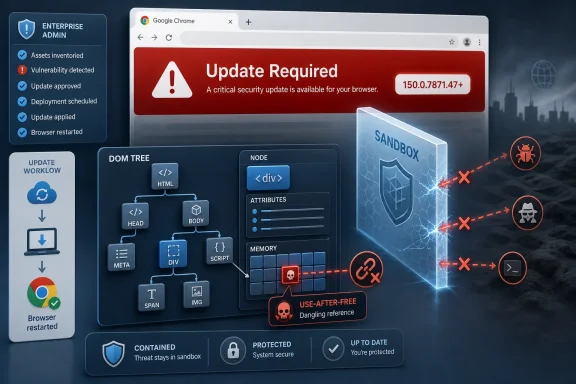
Google Chrome before version 150.0.7871.47 contains CVE-2026-13845, a high-severity use-after-free flaw in the browser’s DOM code that could let a remote attacker execute code inside Chrome’s sandbox after a user opens a crafted HTML page. The bug arrived in the National Vulnerability Database on June 30, 2026, with Chrome listed as the source and CISA’s enrichment assigning it an 8.8 CVSS 3.1 score. The practical answer for Windows users is boring but urgent: update Chrome, restart it, and make sure Chromium-based browsers in your environment are not lagging behind. The more interesting story is what this CVE says about modern browser security, where the exploit chain is often stopped not by the first patch but by the second boundary the attacker fails to cross.
CVE-2026-13845 is not described as a full system compromise, and that distinction matters. The NVD entry, based on Chrome’s submission, says the flaw allowed arbitrary code execution inside a sandbox, not outside it. That is better than a complete escape, but it is not a comfort blanket.
Chrome’s sandbox is designed to keep renderer compromise from becoming operating-system compromise. A successful exploit for a DOM memory-corruption bug can still give an attacker code execution in the renderer process, which is often the first stage of a larger attack. From there, a determined adversary looks for a second vulnerability: a sandbox escape, a broker-process weakness, a GPU bug, a kernel bug, or a misconfiguration that turns containment into inconvenience.
That is why CISA’s ADP enrichment marks the technical impact as “total” while also noting no known exploitation and no automatable exploitation in its SSVC fields. In plain English, the agency is saying this is a bug with serious theoretical consequences, but not one that has been publicly confirmed as abused in the wild as of its July 2026 update. That combination is familiar to anyone who tracks Chrome advisories: high impact, limited public detail, and an update that deserves to move quickly through fleets.
The attack path is also very ordinary, which is exactly what makes it dangerous. The vector string published by CISA requires network access, low attack complexity, no privileges, and user interaction. A victim has to open or be directed to malicious web content, but that is not a high bar in an era of compromised ad networks, poisoned search results, malicious collaboration links, and phishing kits that look like legitimate SaaS workflows.
A use-after-free bug occurs when software continues using memory after it has been released. In browser terms, that can mean an object representing part of a page is destroyed, but some code path still holds a reference to it. If an attacker can shape what occupies that freed memory next, the bug can become more than a crash; it can become controlled execution.
Chrome’s security team categorized CVE-2026-13845 as high severity, and the weakness is mapped to CWE-416, the standard bucket for use-after-free vulnerabilities. That classification is not decorative. Use-after-free bugs have a long history in browser exploitation because they sit at the intersection of complex object lifetimes, aggressive performance optimizations, and attacker-controlled input.
The modern browser is effectively an operating system for untrusted code. It parses hostile documents, decodes media, runs scripts, manages GPUs, stores credentials, synchronizes identity, renders PDFs, talks to USB devices, and mediates enterprise policy. A memory-safety bug in that environment is never “just a browser bug,” even when the first landing zone is a sandboxed process.
It is reassuring because Chrome’s security process is working at scale. Bugs are being found, assigned CVEs, restricted where necessary, fixed, and shipped. It is unsettling because the volume reminds administrators that browser patching is no longer a monthly housekeeping task; it is a continuous control plane for endpoint risk.
The version details are worth reading carefully. The NVD description says Google Chrome prior to 150.0.7871.47 is affected, while the NVD change history also shows an added configuration listing versions up to, but excluding, 150.0.7871.46. That kind of mismatch is exactly where vulnerability management teams can get tripped up if they treat a single enrichment field as gospel.
The safer operational interpretation is simple: Chrome 150.0.7871.47 or later is the fixed Windows and Mac target identified in the CVE description and public release reporting. Linux builds in the same release family may show 150.0.7871.46 in Google’s channel notation, which is why administrators should validate against the vendor advisory, their platform’s package metadata, and the browser’s own “About Chrome” page rather than relying on one version string scraped into a scanner.
The NVD change history shows a configuration that combines Google Chrome with Windows, Linux, and macOS platform CPEs. That reflects the obvious desktop scope of the Chrome advisory, but it does not fully solve the operational problem. Chrome exists as a directly installed Google product, as managed enterprise software, as a component relationship in other Chromium-based products, and as a package or snap-mediated experience on Linux distributions.
Ubuntu’s security tracker, for example, lists CVE-2026-13845 with a medium Ubuntu priority and notes that the Debian Chromium source package is called chromium-browser in Ubuntu, while also explaining that since Ubuntu 19.10 the chromium-browser package is effectively a script that installs the Chromium snap. That is a small packaging detail with big scanner consequences. A CPE-only view can miss the real patch state when the thing users launch is delivered through a distribution-specific mechanism rather than a conventional package.
There is also the Chromium downstream problem. Microsoft Edge, Brave, Vivaldi, Opera, Electron-based applications, embedded WebViews, and other Chromium consumers may share vulnerable code lineage, but they do not all share Google Chrome’s CPE identity or Google’s exact version number. A Chrome CVE is not automatically proof that every Chromium derivative is vulnerable, but it is a signal that downstream maintainers need to be watched closely.
For WindowsForum readers, this is where inventory quality matters. If your asset database says only “browser installed,” you are under-instrumented. You need product, channel, version, update source, management state, and restart status. The difference between “patched binary downloaded” and “patched browser process actually running” is the difference between a clean dashboard and a still-exploitable user session.
Enterprise environments are different. Browsers stay open for weeks. Virtual desktops get snapshotted. App control policies pin versions. Change windows delay restarts. Users live inside SaaS tabs they are afraid to close. In those conditions, a security fix can exist on disk while the vulnerable process continues running in memory.
That is why the remediation step is not merely “install Chrome 150.0.7871.47.” It is “ensure Chrome has updated to the fixed build and restarted.” Administrators should also check Extended Stable channels, managed update policies, and any device groups that intentionally defer browser updates for compatibility testing.
The same rule applies to Chromium-based browsers. Microsoft Edge has its own release cadence and advisory process, and Windows administrators should not assume that Chrome’s version number maps neatly onto Edge’s. The right control is to monitor each vendor’s release notes and confirm the patched Chromium baseline has landed in the browser actually deployed to users.
This is especially important because browser exploits are often chained. A renderer bug patched in Chrome but still present in a lagging Chromium derivative may become more attractive once attackers diff the patch. Public exploitability can increase after a fix ships, not because the vendor made users less safe, but because the patch gives researchers and adversaries a roadmap to the flaw.
Google often restricts access to bug details until a majority of users are updated, and the Chromium issue linked from the CVE requires permissions. That is normal. It protects users during the dangerous interval when defenders are patching and attackers are reverse-engineering.
The absence of public exploitation also does not mean the bug is uninteresting to attackers. It means there is no publicly confirmed exploitation in the data available through NVD and CISA at the time of the record. For an enterprise defender, that distinction should change the tone, not the action. This is not an all-hands emergency on the level of a confirmed zero-day campaign, but it is absolutely a patch-now browser vulnerability.
The highest-risk users are predictable: people who browse untrusted sites, handle external links all day, use unmanaged extensions, operate from older or policy-pinned browser builds, or work in roles attractive to targeted attackers. Journalists, finance staff, developers, administrators, help desks, government users, and anyone with privileged SaaS access should not be sitting on a vulnerable Chrome build while the organization waits for the next routine maintenance cycle.
Chrome’s sandbox is a major defense, and Windows adds its own layers: process isolation, exploit mitigations, memory protections, and endpoint detection telemetry. But layered defense does not justify patch delay. It just gives defenders more chances to catch or contain exploitation when one layer fails.
The browser also has a unique blast radius because it is user-facing by design. Administrators can harden RDP, restrict PowerShell, and segment management networks, but they cannot remove the fact that users must open web pages to do their jobs. A crafted HTML page is one of the most scalable delivery mechanisms an attacker can ask for.
That is why browser updates should be measured in hours or days, not weeks. The target should not be perfection; it should be rapid convergence. If 95 percent of endpoints are on the fixed build within 48 hours and the remainder are visible exceptions with owners, that is a mature posture. If no one can say which Chrome processes are still running vulnerable code, the organization has mistaken auto-update for governance.
On Windows, stale installation remnants can produce false positives. Multiple user-level Chrome installs can coexist with a managed machine-level install. Portable Chromium builds may sit outside standard inventory paths. Remote users may update on their own schedule unless device management enforces policy. A scanner that sees one version string may not know which browser the user actually runs.
On Linux, distribution packaging complicates the picture further. Ubuntu’s note about chromium-browser being a snap installer rather than a traditional package is a reminder that vulnerability state can live outside the package name a scanner expects. On macOS, application bundle versions, auto-update state, and user permissions can create their own wrinkles.
The right response is not to distrust scanners. It is to pair scanner output with configuration management, browser management telemetry, and direct version verification where possible. For Chrome, the browser’s own update page and enterprise reporting are often more operationally meaningful than a generic CPE match.
That is not an indictment of Chrome’s security team so much as a reminder of the scale of the problem. Browser engines are huge, performance-critical, backwards-compatible systems that process adversarial input by default. They carry decades of web compatibility expectations and must keep up with new APIs, rendering behavior, media formats, and hardware acceleration paths.
Google and the broader Chromium community have been moving pieces of the stack toward safer languages and stronger mitigations, but the transition is incremental. C++ is not disappearing from browser engines overnight. Until it does, use-after-free bugs will remain part of the browser vulnerability landscape.
For defenders, the memory-safety debate has a practical edge. The long-term answer may be safer implementation languages and architectural reduction. The short-term answer is still disciplined patching, exploit mitigation, least privilege, site isolation, extension control, and rapid response when a browser vendor ships a high-severity fix.
For organizations, the job is more layered. Chrome policies should enforce updates, restrict dangerous extension behavior, and prevent users from lingering indefinitely on unsupported builds. Endpoint tools should identify browsers that have downloaded but not activated the update. Help desks should know that “close and reopen Chrome” is not folk wisdom; it is part of completing the patch.
There is also a communications problem. Browser updates are so frequent that users tune them out. Administrators need to reserve urgency for the cases that matter, and high-severity memory-corruption flaws with remote code execution potential do matter. The message does not need drama, but it does need clarity: restart the browser today.
The CPE ambiguity should also be fed back into vulnerability management workflows. If a scanner flags “Chrome prior to 150.0.7871.46” while the CVE text says “prior to 150.0.7871.47,” do not argue in tickets for a week. Validate the vendor advisory, set the fixed target conservatively, document the exception for platform-specific builds, and move on.
 A Browser Bug That Stops at the Sandbox Is Still a Serious Bug
CVE-2026-13845 is not described as a full system compromise, and that distinction matters. The NVD entry, based on Chrome’s submission, says the flaw allowed arbitrary code execution inside a sandbox, not outside it. That is better than a complete escape, but it is not a comfort blanket.Chrome’s sandbox is designed to keep renderer compromise from becoming operating-system compromise. A successful exploit for a DOM memory-corruption bug can still give an attacker code execution in the renderer process, which is often the first stage of a larger attack. From there, a determined adversary looks for a second vulnerability: a sandbox escape, a broker-process weakness, a GPU bug, a kernel bug, or a misconfiguration that turns containment into inconvenience.
That is why CISA’s ADP enrichment marks the technical impact as “total” while also noting no known exploitation and no automatable exploitation in its SSVC fields. In plain English, the agency is saying this is a bug with serious theoretical consequences, but not one that has been publicly confirmed as abused in the wild as of its July 2026 update. That combination is familiar to anyone who tracks Chrome advisories: high impact, limited public detail, and an update that deserves to move quickly through fleets.
The attack path is also very ordinary, which is exactly what makes it dangerous. The vector string published by CISA requires network access, low attack complexity, no privileges, and user interaction. A victim has to open or be directed to malicious web content, but that is not a high bar in an era of compromised ad networks, poisoned search results, malicious collaboration links, and phishing kits that look like legitimate SaaS workflows.
The DOM Remains One of the Web’s Most Dangerous Interfaces
The DOM is where web pages become live software. It is the programmable representation of a page: nodes, attributes, events, scripts, style interactions, and a constant churn of changes triggered by modern web applications. If V8 is Chrome’s famous JavaScript engine, the DOM is one of the browser’s busiest negotiation tables between untrusted content and deeply optimized native code.A use-after-free bug occurs when software continues using memory after it has been released. In browser terms, that can mean an object representing part of a page is destroyed, but some code path still holds a reference to it. If an attacker can shape what occupies that freed memory next, the bug can become more than a crash; it can become controlled execution.
Chrome’s security team categorized CVE-2026-13845 as high severity, and the weakness is mapped to CWE-416, the standard bucket for use-after-free vulnerabilities. That classification is not decorative. Use-after-free bugs have a long history in browser exploitation because they sit at the intersection of complex object lifetimes, aggressive performance optimizations, and attacker-controlled input.
The modern browser is effectively an operating system for untrusted code. It parses hostile documents, decodes media, runs scripts, manages GPUs, stores credentials, synchronizes identity, renders PDFs, talks to USB devices, and mediates enterprise policy. A memory-safety bug in that environment is never “just a browser bug,” even when the first landing zone is a sandboxed process.
Google’s Patch Was Part of a Much Larger Security Dump
The Chrome Releases blog announced the relevant stable-channel update at the end of June, promoting Chrome 150 to stable for desktop platforms. Third-party reporting from Malwarebytes and TechRepublic described the release as unusually large, with hundreds of security fixes across Chrome channels and platforms. CVE-2026-13845 is one item in that flood, which is both reassuring and unsettling.It is reassuring because Chrome’s security process is working at scale. Bugs are being found, assigned CVEs, restricted where necessary, fixed, and shipped. It is unsettling because the volume reminds administrators that browser patching is no longer a monthly housekeeping task; it is a continuous control plane for endpoint risk.
The version details are worth reading carefully. The NVD description says Google Chrome prior to 150.0.7871.47 is affected, while the NVD change history also shows an added configuration listing versions up to, but excluding, 150.0.7871.46. That kind of mismatch is exactly where vulnerability management teams can get tripped up if they treat a single enrichment field as gospel.
The safer operational interpretation is simple: Chrome 150.0.7871.47 or later is the fixed Windows and Mac target identified in the CVE description and public release reporting. Linux builds in the same release family may show 150.0.7871.46 in Google’s channel notation, which is why administrators should validate against the vendor advisory, their platform’s package metadata, and the browser’s own “About Chrome” page rather than relying on one version string scraped into a scanner.
The CPE Question Is Not Pedantry
The user-supplied NVD record asks, “Are we missing a CPE here?” That is not a throwaway line. CPE data is the bridge between a vulnerability description and the automated tools that decide whether a device is exposed. If that bridge is wrong, incomplete, or ambiguous, scanners either miss vulnerable systems or bury teams in false positives.The NVD change history shows a configuration that combines Google Chrome with Windows, Linux, and macOS platform CPEs. That reflects the obvious desktop scope of the Chrome advisory, but it does not fully solve the operational problem. Chrome exists as a directly installed Google product, as managed enterprise software, as a component relationship in other Chromium-based products, and as a package or snap-mediated experience on Linux distributions.
Ubuntu’s security tracker, for example, lists CVE-2026-13845 with a medium Ubuntu priority and notes that the Debian Chromium source package is called chromium-browser in Ubuntu, while also explaining that since Ubuntu 19.10 the chromium-browser package is effectively a script that installs the Chromium snap. That is a small packaging detail with big scanner consequences. A CPE-only view can miss the real patch state when the thing users launch is delivered through a distribution-specific mechanism rather than a conventional package.
There is also the Chromium downstream problem. Microsoft Edge, Brave, Vivaldi, Opera, Electron-based applications, embedded WebViews, and other Chromium consumers may share vulnerable code lineage, but they do not all share Google Chrome’s CPE identity or Google’s exact version number. A Chrome CVE is not automatically proof that every Chromium derivative is vulnerable, but it is a signal that downstream maintainers need to be watched closely.
For WindowsForum readers, this is where inventory quality matters. If your asset database says only “browser installed,” you are under-instrumented. You need product, channel, version, update source, management state, and restart status. The difference between “patched binary downloaded” and “patched browser process actually running” is the difference between a clean dashboard and a still-exploitable user session.
The Version String Is a Control, Not a Trophy
Chrome’s updater has trained many users to trust the green checkmark. In unmanaged consumer environments, that is usually reasonable. Chrome updates silently, prompts for restart, and closes the window of exposure faster than the old download-and-install era ever could.Enterprise environments are different. Browsers stay open for weeks. Virtual desktops get snapshotted. App control policies pin versions. Change windows delay restarts. Users live inside SaaS tabs they are afraid to close. In those conditions, a security fix can exist on disk while the vulnerable process continues running in memory.
That is why the remediation step is not merely “install Chrome 150.0.7871.47.” It is “ensure Chrome has updated to the fixed build and restarted.” Administrators should also check Extended Stable channels, managed update policies, and any device groups that intentionally defer browser updates for compatibility testing.
The same rule applies to Chromium-based browsers. Microsoft Edge has its own release cadence and advisory process, and Windows administrators should not assume that Chrome’s version number maps neatly onto Edge’s. The right control is to monitor each vendor’s release notes and confirm the patched Chromium baseline has landed in the browser actually deployed to users.
This is especially important because browser exploits are often chained. A renderer bug patched in Chrome but still present in a lagging Chromium derivative may become more attractive once attackers diff the patch. Public exploitability can increase after a fix ships, not because the vendor made users less safe, but because the patch gives researchers and adversaries a roadmap to the flaw.
“No Known Exploitation” Is a Timestamp, Not a Verdict
CISA’s enrichment for CVE-2026-13845 says exploitation is “none.” That is useful, but it should be read as a status at a moment in time, not a promise about the future. Chrome bugs can move quickly from fixed advisory to proof-of-concept analysis, especially when the affected code area is security-sensitive and the patch can be compared against prior source.Google often restricts access to bug details until a majority of users are updated, and the Chromium issue linked from the CVE requires permissions. That is normal. It protects users during the dangerous interval when defenders are patching and attackers are reverse-engineering.
The absence of public exploitation also does not mean the bug is uninteresting to attackers. It means there is no publicly confirmed exploitation in the data available through NVD and CISA at the time of the record. For an enterprise defender, that distinction should change the tone, not the action. This is not an all-hands emergency on the level of a confirmed zero-day campaign, but it is absolutely a patch-now browser vulnerability.
The highest-risk users are predictable: people who browse untrusted sites, handle external links all day, use unmanaged extensions, operate from older or policy-pinned browser builds, or work in roles attractive to targeted attackers. Journalists, finance staff, developers, administrators, help desks, government users, and anyone with privileged SaaS access should not be sitting on a vulnerable Chrome build while the organization waits for the next routine maintenance cycle.
Windows Admins Should Treat Chrome Like Tier-Zero Userland
Windows security planning has historically centered on the operating system, Office, identity, and endpoint protection. That hierarchy is no longer sufficient. The browser is now the place where identity tokens, password managers, enterprise apps, device trust signals, and user behavior converge. It deserves the same urgency as core platform components.Chrome’s sandbox is a major defense, and Windows adds its own layers: process isolation, exploit mitigations, memory protections, and endpoint detection telemetry. But layered defense does not justify patch delay. It just gives defenders more chances to catch or contain exploitation when one layer fails.
The browser also has a unique blast radius because it is user-facing by design. Administrators can harden RDP, restrict PowerShell, and segment management networks, but they cannot remove the fact that users must open web pages to do their jobs. A crafted HTML page is one of the most scalable delivery mechanisms an attacker can ask for.
That is why browser updates should be measured in hours or days, not weeks. The target should not be perfection; it should be rapid convergence. If 95 percent of endpoints are on the fixed build within 48 hours and the remainder are visible exceptions with owners, that is a mature posture. If no one can say which Chrome processes are still running vulnerable code, the organization has mistaken auto-update for governance.
The Scanner May Be Right and Still Not Tell the Whole Truth
Vulnerability scanners are useful, but CVE-2026-13845 shows their limits. A scanner may flag Chrome based on CPE, registry keys, file versions, package metadata, or browser self-reporting. Each method can be correct in one context and misleading in another.On Windows, stale installation remnants can produce false positives. Multiple user-level Chrome installs can coexist with a managed machine-level install. Portable Chromium builds may sit outside standard inventory paths. Remote users may update on their own schedule unless device management enforces policy. A scanner that sees one version string may not know which browser the user actually runs.
On Linux, distribution packaging complicates the picture further. Ubuntu’s note about chromium-browser being a snap installer rather than a traditional package is a reminder that vulnerability state can live outside the package name a scanner expects. On macOS, application bundle versions, auto-update state, and user permissions can create their own wrinkles.
The right response is not to distrust scanners. It is to pair scanner output with configuration management, browser management telemetry, and direct version verification where possible. For Chrome, the browser’s own update page and enterprise reporting are often more operationally meaningful than a generic CPE match.
The Quiet Lesson Is Memory Safety
A use-after-free in DOM is a familiar type of bug, and that familiarity should bother us. The industry has spent years hardening allocators, adding exploit mitigations, isolating processes, fuzzing parsers, and paying bug bounties. Yet memory-lifetime errors continue to appear in the most scrutinized software on the planet.That is not an indictment of Chrome’s security team so much as a reminder of the scale of the problem. Browser engines are huge, performance-critical, backwards-compatible systems that process adversarial input by default. They carry decades of web compatibility expectations and must keep up with new APIs, rendering behavior, media formats, and hardware acceleration paths.
Google and the broader Chromium community have been moving pieces of the stack toward safer languages and stronger mitigations, but the transition is incremental. C++ is not disappearing from browser engines overnight. Until it does, use-after-free bugs will remain part of the browser vulnerability landscape.
For defenders, the memory-safety debate has a practical edge. The long-term answer may be safer implementation languages and architectural reduction. The short-term answer is still disciplined patching, exploit mitigation, least privilege, site isolation, extension control, and rapid response when a browser vendor ships a high-severity fix.
The Patch Is Straightforward; the Governance Is Not
For individual users, the fix is almost insultingly simple. Open Chrome’s settings, go to the About Chrome page, let it update, and restart the browser. If the version is 150.0.7871.47 or later on Windows or Mac, the specific Chrome exposure described in the CVE is addressed according to the public advisory data.For organizations, the job is more layered. Chrome policies should enforce updates, restrict dangerous extension behavior, and prevent users from lingering indefinitely on unsupported builds. Endpoint tools should identify browsers that have downloaded but not activated the update. Help desks should know that “close and reopen Chrome” is not folk wisdom; it is part of completing the patch.
There is also a communications problem. Browser updates are so frequent that users tune them out. Administrators need to reserve urgency for the cases that matter, and high-severity memory-corruption flaws with remote code execution potential do matter. The message does not need drama, but it does need clarity: restart the browser today.
The CPE ambiguity should also be fed back into vulnerability management workflows. If a scanner flags “Chrome prior to 150.0.7871.46” while the CVE text says “prior to 150.0.7871.47,” do not argue in tickets for a week. Validate the vendor advisory, set the fixed target conservatively, document the exception for platform-specific builds, and move on.
The Chrome 150 Fix Leaves a Few Jobs on the Desk
CVE-2026-13845 is not a reason to panic, but it is a useful stress test for browser patch discipline. The facts are concrete enough to act on, and the uncertainties are familiar enough to manage.- Chrome users on Windows and macOS should verify that they are running version 150.0.7871.47 or later and should restart the browser after updating.
- Security teams should treat the NVD and CISA data as a starting point, not as a substitute for Google’s release notes and platform-specific package information.
- Administrators should check Chromium-based browsers separately, because Google Chrome’s fixed version does not automatically prove that every downstream browser has absorbed the relevant Chromium patch.
- Vulnerability managers should watch for CPE mismatches and version-string inconsistencies, especially where Linux packaging, snaps, portable builds, or user-level installs are involved.
- The lack of known exploitation lowers the temperature, but it does not justify waiting through a normal monthly patch cycle for a remotely reachable browser memory-corruption flaw.
References
- Primary source: NVD / Chromium
Published: 2026-07-03T07:00:33-07:00
NVD - CVE-2026-13845
 nvd.nist.gov
- Security advisory: MSRC
Published: 2026-07-03T07:00:33-07:00
Original feed URL
Security Update Guide - Microsoft Security Response Center
 msrc.microsoft.com
- Related coverage: cvefeed.io
CVE-2026-13845 - Google Chrome Use-After-Free
Use after free in DOM in Google Chrome prior to 150.0.7871.47 allowed a remote attacker to execute arbitrary code inside a sandbox via a crafted HTML page. (Chromium security severity: High)cvefeed.io
