

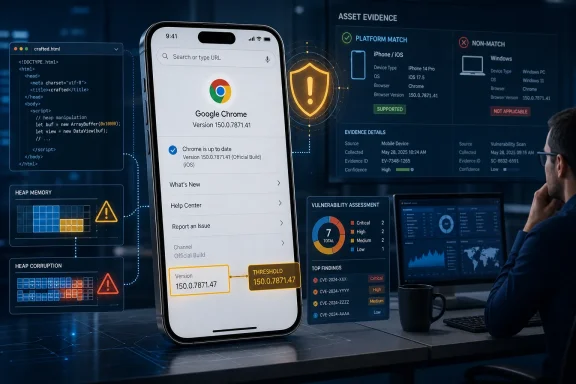
Chrome on iOS versions before 150.0.7871.47 are the affected assets identified in the supplied NVD record for CVE-2026-13915. The Chrome-sourced description says a remote attacker could use a crafted HTML page and persuade a user to perform specific interface gestures, potentially triggering heap corruption through a use-after-free flaw. Chrome rates the vulnerability Medium, while CISA-ADP contributes a CVSS 3.1 score of 8.8 HIGH.
Windows security teams should ensure that their vulnerability tools preserve the Apple operating-system condition joined to the Chrome application entry. A Windows installation should not be assigned this CVE solely because its Chrome version is numerically below the iOS remediation threshold.
The supplied record presents two different severity assessments. Chrome assigns its product security severity of Medium. CISA-ADP’s CVSS 3.1 calculation produces a base score of 8.8 and a HIGH rating.
The CISA-ADP vector describes a network-accessible vulnerability with low attack complexity, no required privileges, required user interaction, unchanged scope, and high potential effects on confidentiality, integrity, and availability. The documented attack path therefore begins with remotely delivered web content but still depends on the user engaging with the crafted page through the specified interface behavior.
The available assessments can be summarized as follows:
These fields support prompt remediation through normal vulnerability-management processes. They do not, without additional evidence, establish an active campaign or a compromise of every device running an affected version.
A use-after-free weakness occurs when software continues to use a reference to an object after the associated memory has been released. If that memory is reused, a later operation through the stale reference may read or modify data that no longer represents the expected object. For this CVE, however, reporting should remain tied to the documented outcome—potential heap corruption—rather than adding consequences that the supplied record does not identify.
CVE-2026-13915 is classified as CWE-416, Use After Free, with Chrome identified as the source of that classification in the current record. The crafted page and induced gestures are described as the conditions through which the memory-safety flaw may be reached.
The public description does not specify the required gestures, the number of actions involved, or the reliability of the trigger. It does not establish whether the relevant behavior is a tap, drag, navigation action, permission prompt, or longer interaction sequence. It also does not document exploit reliability across different iPhone models or Apple operating-system builds.
The Chromium issue listed among the record’s references is access-restricted, so its engineering details cannot be used to fill those gaps. Defenders should not invent an exploit sequence, crash signature, proof of concept, or detection indicator that is absent from the public material.
CISA-ADP’s SSVC contribution supplies useful threat context. Its exploitation value is listed as none, its automation value as no, and its technical-impact value as total. Those are point-in-time categorization fields: they support patching the affected software but do not establish that an incident has already occurred.
An affected version is evidence of exposure to the documented vulnerable condition, not evidence that the device was attacked. If an organization separately observes suspicious browser activity, it can investigate that activity under its ordinary incident-response process. The CVE number alone is not sufficient to attribute an event to this flaw.
That configuration is more specific than the Chrome product name by itself. The application entry identifies the software, while the joined operating-system condition limits the configuration represented by the record. A correct exposure determination must preserve both parts.
This distinction is especially important for Windows administrators because Chrome is deployed across several operating systems. Reading only the application CPE and version range can create an incomplete rule:
A useful validation begins with any finding assigned to a Windows endpoint. The finding should show what evidence connected that endpoint to the Apple operating-system condition. If the match consists only of the generic Chrome product name and a numerical version comparison, the evidence does not demonstrate that the asset satisfies the complete supplied configuration.
This does not prove that every Windows finding from every scanner is wrong. A tool could possess separate vendor data or later evidence that is not represented in the supplied NVD snapshot. The appropriate response is to inspect the evidence behind the finding and identify the source that establishes platform applicability.
The NVD record also lists a desktop-named vendor reference while the CVE description and affected configuration specify iOS. The reference should be reported without treating its name as an expansion of the affected platform list. The supplied record does not explain that difference, and a reference label alone does not establish Windows applicability.
The practical triage rule is therefore to use the full affected-product configuration for initial asset matching. If another responsible source later identifies an additional platform, teams can expand the affected population based on that evidence.
The CVE record does not establish which Chrome build the App Store is presenting to every account or device at a given moment. It also does not document application-update settings or guarantee that an update has already been installed. Administrators should therefore check the App Store and then inspect the version inside Chrome.
For an iPhone user:
Google’s Chrome Help documentation also describes opening the App Store, selecting the profile control, reviewing available updates, locating Chrome, and choosing Update when it is listed.
Neither the CVE data nor the supplied procedures should be used to claim that Chrome has already updated automatically. Even if a device is configured to receive application updates without manual action, remediation should be closed using the observed Chrome version rather than the update setting.
If Chrome is not shown among available updates, continue to the version check. The absence of an Update button does not, by itself, prove that the installed build has reached the CVE threshold.
Checking only the major release is insufficient. A report that says “Chrome 150” does not distinguish an earlier 150 build from 150.0.7871.47. Ticket evidence should contain the complete version string whenever the management or user interface provides it.
If the installed version remains below the boundary and the App Store is not presenting an update, keep the device in an unresolved state. Record the observed version, the time of verification, and the fact that the required update was not available through the checked account and device. Recheck through the organization’s established support or mobile-management process rather than marking the finding remediated.
Chrome supplies the core vulnerability description and its Medium product severity. The current record also associates Chrome with the CWE-416 classification. CISA-ADP supplies the displayed CVSS 3.1 vector and 8.8 HIGH score, along with the SSVC values. NVD presents those contributions and the affected-product configuration, but the supplied record does not contain an independent NVD CVSS assessment.
Accordingly, an internal report should say “CISA-ADP CVSS 3.1: 8.8 HIGH,” not “NVD score: 8.8.” It should record Chrome’s Medium severity separately rather than attempting to replace one assessment with the other.
The difference does not require administrators to choose a single label. Chrome’s rating is a product-specific assessment, while CVSS converts stated exploitability and impact characteristics into a standardized score. CISA-ADP’s vector is elevated by network reachability, low attack complexity, no required attacker privileges, and high modeled confidentiality, integrity, and availability impacts. Required user interaction remains part of that calculation.
The supplied material does not disclose Chrome’s detailed reasoning for the Medium rating. It would be speculative to attribute the rating to a particular Apple mitigation, browser sandbox property, interaction sequence, or limit on exploit reliability.
For prioritization, the defensible decision is based on four facts: the organization has Chrome on the identified Apple platform, the complete version is below the boundary, the attack requires user interaction, and CISA-ADP’s supplied assessment did not record exploitation. Those facts support prompt version-based remediation without turning the CVE into an unsupported Windows-wide emergency.
NVD’s stated configuration is the source fact: the Chrome application condition is joined to an Apple iPhone operating-system condition. The possibility that a scanner or data pipeline might flatten that relationship is WindowsForum’s operational analysis. It must be verified against the behavior and documentation of the particular product in use.
A platform could potentially create an inaccurate Windows result if it:
Administrators can determine what is happening by inspecting the evidence attached to actual findings. For every asset assigned CVE-2026-13915, review:
This evidence review has two practical benefits. First, it keeps desktop remediation queues aligned with the supplied affected configuration. Second, it helps ensure that the iPhones represented by the configuration are not lost inside a broad cross-platform Chrome finding.
The correct response to an unsupported desktop match is not to suppress the CVE globally. Suppression at the CVE level could also hide valid iPhone exposure. Instead, correct the applicability rule, asset filter, exception, or ticket routing while retaining the mobile finding.
A useful platform-validation test is:
Keeping “unknown” separate from “remediated” is important. A device that has not recently reported its application inventory has not demonstrated that it crossed the threshold. It should have an owner and a follow-up action rather than being counted automatically as safe.
Administrators should also avoid copying the iOS Chrome version boundary into policies for Microsoft Edge or other Chromium-based browsers. Shared Chromium ancestry does not establish that another product has the same affected implementation, platform scope, or fixed-version number. Each browser requires its own vendor-supported applicability determination.
The record may change. Chrome could publish additional technical details, NVD could revise the affected configuration, CISA-ADP could update its assessment, or another responsible vendor could confirm applicability to an additional product or platform. New exploitation evidence would also justify a reassessment of urgency and incident-response requirements.
Until such evidence appears, administrators should avoid expanding the CVE through inference alone. The durable control is precise asset matching: application, operating system, complete version, and current verification must agree with the source data used to create the finding. That approach remediates the documented iPhone exposure while keeping unsupported Windows matches from obscuring the assets that actually require action.
| Remediation decision | Required response |
|---|---|
| Scope | Google Chrome on Apple iPhone OS |
| Affected | Chrome versions below 150.0.7871.47 |
| Action | Update Chrome through the iPhone App Store, then verify the complete installed version |
| Closure threshold | Chrome 150.0.7871.47 or later |
| Windows findings | Review the platform evidence; a product-name and version match alone does not satisfy the supplied NVD configuration |
 A Medium Chrome Bug With High-Impact Mechanics
The supplied record presents two different severity assessments. Chrome assigns its product security severity of Medium. CISA-ADP’s CVSS 3.1 calculation produces a base score of 8.8 and a HIGH rating.The CISA-ADP vector describes a network-accessible vulnerability with low attack complexity, no required privileges, required user interaction, unchanged scope, and high potential effects on confidentiality, integrity, and availability. The documented attack path therefore begins with remotely delivered web content but still depends on the user engaging with the crafted page through the specified interface behavior.
The available assessments can be summarized as follows:
| Assessment source | Framework | Result | Operational meaning |
|---|---|---|---|
| Chrome | Vendor security severity | Medium | Chrome’s product-context rating |
| CISA-ADP | CVSS 3.1 | 8.8 HIGH | High modeled impact, with user interaction required |
| CISA-ADP | SSVC 2.0.3 | Exploitation: none; automatable: no; technical impact: total | No exploitation recorded in the supplied assessment; attack not categorized as readily automatable; potentially severe technical effect |
| NVD | NVD CVSS assessment | Not supplied | The displayed 8.8 score is a CISA-ADP contribution rather than an independent NVD calculation |
The Attack Depends on a Page, a Person and a Precise Interaction
The vulnerability description establishes a multistage path. An attacker must deliver or direct the user to a crafted HTML page, convince the user to interact with that page through specific interface gestures, and reach the vulnerable state in Chrome for iOS. The potential result is heap corruption caused by a use-after-free condition.A use-after-free weakness occurs when software continues to use a reference to an object after the associated memory has been released. If that memory is reused, a later operation through the stale reference may read or modify data that no longer represents the expected object. For this CVE, however, reporting should remain tied to the documented outcome—potential heap corruption—rather than adding consequences that the supplied record does not identify.
CVE-2026-13915 is classified as CWE-416, Use After Free, with Chrome identified as the source of that classification in the current record. The crafted page and induced gestures are described as the conditions through which the memory-safety flaw may be reached.
The public description does not specify the required gestures, the number of actions involved, or the reliability of the trigger. It does not establish whether the relevant behavior is a tap, drag, navigation action, permission prompt, or longer interaction sequence. It also does not document exploit reliability across different iPhone models or Apple operating-system builds.
The Chromium issue listed among the record’s references is access-restricted, so its engineering details cannot be used to fill those gaps. Defenders should not invent an exploit sequence, crash signature, proof of concept, or detection indicator that is absent from the public material.
CISA-ADP’s SSVC contribution supplies useful threat context. Its exploitation value is listed as none, its automation value as no, and its technical-impact value as total. Those are point-in-time categorization fields: they support patching the affected software but do not establish that an incident has already occurred.
An affected version is evidence of exposure to the documented vulnerable condition, not evidence that the device was attacked. If an organization separately observes suspicious browser activity, it can investigate that activity under its ordinary incident-response process. The CVE number alone is not sufficient to attribute an event to this flaw.
iOS Changes What “Chrome Vulnerability” Means
The central scoping fact is that the supplied NVD record identifies Chrome on iOS. Its affected-software configuration combines a Google Chrome application condition with an Apple iPhone operating-system condition and applies the vulnerable range to versions earlier than 150.0.7871.47.That configuration is more specific than the Chrome product name by itself. The application entry identifies the software, while the joined operating-system condition limits the configuration represented by the record. A correct exposure determination must preserve both parts.
This distinction is especially important for Windows administrators because Chrome is deployed across several operating systems. Reading only the application CPE and version range can create an incomplete rule:
The supplied configuration instead represents a narrower condition:Google Chrome below 150.0.7871.47
NVD states the joined platform configuration. The possibility that a particular vulnerability-management product may discard, flatten, or misinterpret that join is an operational inference, not a behavior established for every scanner. Administrators should test their own tools rather than assume that all platforms process CPE conditions in the same way.Google Chrome below 150.0.7871.47 on Apple iPhone OS
A useful validation begins with any finding assigned to a Windows endpoint. The finding should show what evidence connected that endpoint to the Apple operating-system condition. If the match consists only of the generic Chrome product name and a numerical version comparison, the evidence does not demonstrate that the asset satisfies the complete supplied configuration.
This does not prove that every Windows finding from every scanner is wrong. A tool could possess separate vendor data or later evidence that is not represented in the supplied NVD snapshot. The appropriate response is to inspect the evidence behind the finding and identify the source that establishes platform applicability.
The NVD record also lists a desktop-named vendor reference while the CVE description and affected configuration specify iOS. The reference should be reported without treating its name as an expansion of the affected platform list. The supplied record does not explain that difference, and a reference label alone does not establish Windows applicability.
The practical triage rule is therefore to use the full affected-product configuration for initial asset matching. If another responsible source later identifies an additional platform, teams can expand the affected population based on that evidence.
The Version Boundary Is Clear; Availability Must Be Checked
The remediation threshold in the supplied vulnerability record is precise: Chrome for iOS versions earlier than 150.0.7871.47 are in the affected range. Version 150.0.7871.47 is the boundary administrators should use when evaluating whether an installation remains within that range.The CVE record does not establish which Chrome build the App Store is presenting to every account or device at a given moment. It also does not document application-update settings or guarantee that an update has already been installed. Administrators should therefore check the App Store and then inspect the version inside Chrome.
Update Chrome from the App Store
Apple’s iPhone User Guide documents manual application updates through the App Store account interface. Google Chrome Help likewise directs iPhone and iPad users to update Chrome through Apple’s App Store.For an iPhone user:
- Open App Store.
- Tap the account button or profile picture at the top of the screen.
- Review the pending or available application updates shown on the account screen.
- Locate Google Chrome.
- Tap Update if the button is available.
- Allow the installation to complete before checking the browser version.
Google’s Chrome Help documentation also describes opening the App Store, selecting the profile control, reviewing available updates, locating Chrome, and choosing Update when it is listed.
Neither the CVE data nor the supplied procedures should be used to claim that Chrome has already updated automatically. Even if a device is configured to receive application updates without manual action, remediation should be closed using the observed Chrome version rather than the update setting.
If Chrome is not shown among available updates, continue to the version check. The absence of an Update button does not, by itself, prove that the installed build has reached the CVE threshold.
Check the installed Chrome version
Google Chrome Help documents the iPhone and iPad path for viewing Chrome’s application information:- Open Chrome.
- Tap More, represented by the three-dot menu.
- Tap Settings.
- Tap Google Chrome.
- Read the complete version number displayed on the screen.
Checking only the major release is insufficient. A report that says “Chrome 150” does not distinguish an earlier 150 build from 150.0.7871.47. Ticket evidence should contain the complete version string whenever the management or user interface provides it.
If the installed version remains below the boundary and the App Store is not presenting an update, keep the device in an unresolved state. Record the observed version, the time of verification, and the fact that the required update was not available through the checked account and device. Recheck through the organization’s established support or mobile-management process rather than marking the finding remediated.
Action checklist for admins
- Identify organizationally relevant iPhones on which Google Chrome is installed.
- Obtain the complete Chrome version from current mobile inventory or through Google’s documented in-app version screen.
- Flag installations below 150.0.7871.47.
- Direct affected users to the App Store account screen and have them select Update for Google Chrome when available.
- Reopen Chrome after installation and inspect More > Settings > Google Chrome.
- Close the device-level finding only after the observed version is 150.0.7871.47 or later.
- Treat missing, stale, truncated, or conflicting version information as unresolved.
- Review vulnerability-platform results for retention of the Apple iPhone operating-system condition.
- Require platform-specific evidence before accepting a finding assigned to Windows Chrome.
- Preserve the device identifier, platform, observed version, observation time, remediation result, and owner of any unresolved exception.
Source Attribution and Prioritization
The NVD page combines information from different contributors, and the source of each field should remain visible in reporting.Chrome supplies the core vulnerability description and its Medium product severity. The current record also associates Chrome with the CWE-416 classification. CISA-ADP supplies the displayed CVSS 3.1 vector and 8.8 HIGH score, along with the SSVC values. NVD presents those contributions and the affected-product configuration, but the supplied record does not contain an independent NVD CVSS assessment.
Accordingly, an internal report should say “CISA-ADP CVSS 3.1: 8.8 HIGH,” not “NVD score: 8.8.” It should record Chrome’s Medium severity separately rather than attempting to replace one assessment with the other.
The difference does not require administrators to choose a single label. Chrome’s rating is a product-specific assessment, while CVSS converts stated exploitability and impact characteristics into a standardized score. CISA-ADP’s vector is elevated by network reachability, low attack complexity, no required attacker privileges, and high modeled confidentiality, integrity, and availability impacts. Required user interaction remains part of that calculation.
The supplied material does not disclose Chrome’s detailed reasoning for the Medium rating. It would be speculative to attribute the rating to a particular Apple mitigation, browser sandbox property, interaction sequence, or limit on exploit reliability.
For prioritization, the defensible decision is based on four facts: the organization has Chrome on the identified Apple platform, the complete version is below the boundary, the attack requires user interaction, and CISA-ADP’s supplied assessment did not record exploitation. Those facts support prompt version-based remediation without turning the CVE into an unsupported Windows-wide emergency.
Record-development timeline
- Chrome-originated CVE information: The record identified Chrome on iOS, crafted HTML, required interface gestures, potential heap corruption, the use-after-free classification, and the version boundary.
- CISA-ADP enrichment: CISA-ADP contributed the CVSS 3.1 assessment and the SSVC values for exploitation, automation, and technical impact.
- NIST/NVD analysis: The affected-software representation joined the Google Chrome application condition with the Apple iPhone operating-system condition.
- Current review point: The supplied record does not contain an NVD-authored CVSS score, and the restricted Chromium issue does not provide public exploit details.
Windows Teams Should Validate Possible CPE False Positives
CVE-2026-13915 offers a practical test of vulnerability-data quality in mixed Windows and mobile environments. The relevant question is whether a security platform evaluates the complete affected configuration or reduces it to a product-and-version comparison.NVD’s stated configuration is the source fact: the Chrome application condition is joined to an Apple iPhone operating-system condition. The possibility that a scanner or data pipeline might flatten that relationship is WindowsForum’s operational analysis. It must be verified against the behavior and documentation of the particular product in use.
A platform could potentially create an inaccurate Windows result if it:
- Ingests the general Google Chrome application identifier.
- Retains the earlier-than-150.0.7871.47 version condition.
- Omits or fails to enforce the joined Apple platform condition.
- Compares the remaining rule with desktop software inventory.
Administrators can determine what is happening by inspecting the evidence attached to actual findings. For every asset assigned CVE-2026-13915, review:
- The operating system recognized by the tool.
- The installed product and complete version.
- The source of the vulnerability rule.
- The platform criteria evaluated by that rule.
- Any additional vendor advisory used to expand or narrow scope.
- The date and freshness of the asset evidence.
This evidence review has two practical benefits. First, it keeps desktop remediation queues aligned with the supplied affected configuration. Second, it helps ensure that the iPhones represented by the configuration are not lost inside a broad cross-platform Chrome finding.
The correct response to an unsupported desktop match is not to suppress the CVE globally. Suppression at the CVE level could also hide valid iPhone exposure. Instead, correct the applicability rule, asset filter, exception, or ticket routing while retaining the mobile finding.
A useful platform-validation test is:
- Query all assets assigned CVE-2026-13915.
- Group the results by operating system.
- Inspect several findings from each operating-system group.
- Confirm whether the rule includes the Apple iPhone operating-system condition.
- Route supported iPhone findings to remediation.
- Return unsupported desktop findings for applicability review.
- Document any external source used to justify an affected platform not present in the supplied NVD configuration.
Suggested finding states
| Endpoint evidence | Finding state | Administrator action |
|---|---|---|
| Chrome on iOS below 150.0.7871.47 | Affected | Update and recheck |
| Chrome on iOS at or above 150.0.7871.47 | Outside the supplied affected range | Record the version evidence and close |
| Chrome confirmed absent from the iPhone | Not applicable | Record the inventory evidence |
| Version missing, stale, incomplete, or conflicting | Unknown | Keep open and obtain current evidence |
| Windows Chrome matched only by product name and version | Applicability review | Require platform evidence before assigning remediation |
| Another authoritative source explicitly identifies Windows | Separate supported determination | Evaluate that source and its stated version guidance |
What Defenders Should Report
A concise internal advisory can state:Help desks should avoid treating the discovery of an affected version as proof of compromise. Password resets, authenticator replacement, device wiping, or account-wide session revocation should be driven by separate incident evidence, not by the CVE finding alone.CVE-2026-13915 affects Google Chrome on Apple iPhone OS at versions below 150.0.7871.47 in the supplied NVD configuration. The Chrome-sourced description says a remote attacker could use crafted HTML and induced interface gestures to potentially trigger heap corruption through a use-after-free flaw. Chrome rates the issue Medium, while CISA-ADP contributes a CVSS 3.1 score of 8.8 HIGH and lists exploitation as none, automation as no, and technical impact as total. Update Chrome through the iPhone App Store and verify version 150.0.7871.47 or later inside Chrome. Review Windows findings for evidence that the complete platform condition was evaluated.
Administrators should also avoid copying the iOS Chrome version boundary into policies for Microsoft Edge or other Chromium-based browsers. Shared Chromium ancestry does not establish that another product has the same affected implementation, platform scope, or fixed-version number. Each browser requires its own vendor-supported applicability determination.
The Forward-Looking Test Is Whether the Evidence Changes
The immediate response is measurable: identify Chrome on affected iPhones, update installations below the supplied boundary, and retain current version evidence showing that remediation succeeded. Windows findings that lack the Apple platform condition should undergo applicability review rather than automatic desktop deployment.The record may change. Chrome could publish additional technical details, NVD could revise the affected configuration, CISA-ADP could update its assessment, or another responsible vendor could confirm applicability to an additional product or platform. New exploitation evidence would also justify a reassessment of urgency and incident-response requirements.
Until such evidence appears, administrators should avoid expanding the CVE through inference alone. The durable control is precise asset matching: application, operating system, complete version, and current verification must agree with the source data used to create the finding. That approach remediates the documented iPhone exposure while keeping unsupported Windows matches from obscuring the assets that actually require action.
References
- Primary source: NVD / Chromium
Published: 2026-07-11T15:40:26-07:00
NVD - CVE-2026-13915
 nvd.nist.gov
- Security advisory: MSRC
Published: 2026-07-11T15:40:26-07:00
Original feed URL
Security Update Guide - Microsoft Security Response Center
 msrc.microsoft.com
- Official source: support.google.com

Set up Chrome for iPhone or iPad - Google Chrome Help
Google Chrome is a fast web browser available at no charge. Before you download, check if Chrome supports your operating system and you’ve met all the other system requirements. You can use Chrome wi
support.google.com
- Related coverage: chromium.googlesource.com
