

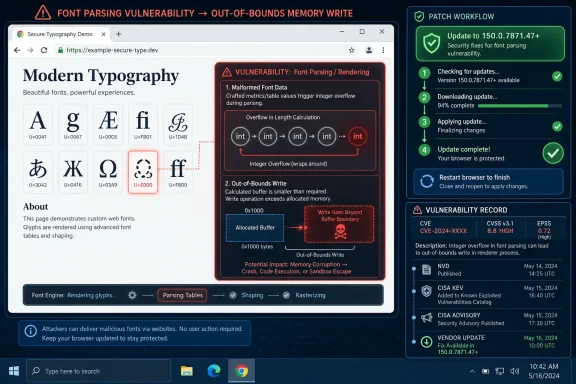
Google Chrome versions before 150.0.7871.47 are affected by CVE-2026-13938, an integer overflow in the browser’s font-handling code that can let a remote attacker trigger an out-of-bounds memory write when a user opens a crafted HTML page. The flaw landed in the National Vulnerability Database on June 30, 2026, with NIST still enriching the entry as of July 2. Google’s Chrome Releases advisory ties the fix to the Stable Channel update for desktop, while CISA’s ADP enrichment scores the bug as high impact despite Chromium’s own medium severity label. The story here is not just another Chrome CVE; it is a reminder that browser risk often hides in the quiet machinery that makes the web look normal.
CVE-2026-13938 is, on its face, a familiar kind of browser vulnerability. An integer overflow in a rendering-adjacent component leads to an out-of-bounds memory write, and the delivery mechanism is a crafted web page. That is the classic drive-by-browser shape: no phishing attachment, no local install, no macro prompt — just a page that causes the browser to process hostile input.
Chromium rates the bug as Medium, which is worth taking seriously but not worshipping. Vendor severity ratings often account for exploitability constraints, sandbox boundaries, and internal mitigations that are not visible in a CVE summary. CISA’s ADP assessment, however, gives it a CVSS 3.1 score of 8.8, with high confidentiality, integrity, and availability impact.
That mismatch is the interesting part. It does not necessarily mean Google is understating the issue or CISA is overstating it. It means the two systems are measuring different things: Chromium is grading the bug in the context of Chrome’s architecture, while CVSS is modeling the consequences if the vulnerability is successfully exercised.
For Windows users and administrators, the practical answer is simpler than the scoring debate. If Chrome is older than 150.0.7871.47, it belongs in the patch queue now.
A modern browser cannot treat fonts as decorative files. It has to parse them, measure them, transform them, cache them, and use them across different scripts, languages, zoom levels, rendering paths, and accessibility settings. A crafted page can force a browser down strange combinations of those paths, especially when web fonts and layout behavior interact.
An integer overflow is especially dangerous in that world because it often begins as bad arithmetic and ends as memory corruption. A value that looks reasonable before a multiplication, addition, or conversion can wrap around into a smaller number. If the browser then allocates memory based on that wrapped value but writes based on the original intended size, the result can be an out-of-bounds write.
That phrase — out-of-bounds memory write — is doing a lot of work. In the benign case, it crashes a tab. In the more serious case, it can become a primitive that helps an attacker corrupt browser memory in a controlled way. Chrome’s sandbox and exploit mitigations exist precisely to make that second path difficult, but “difficult” is not the same as “irrelevant.”
The CVE summary does not say this vulnerability is being exploited in the wild. CISA’s SSVC enrichment marks exploitation as “none,” and there is no public indication from Google’s advisory that this is a zero-day. That matters. It places CVE-2026-13938 in the category of patch-now-but-don’t-panic, not incident-response-fire-drill.
In this case, the CPE entry for Google Chrome appears to be present. The more important issue is that vulnerability databases often lag the vendor advisory and may display enrichment gaps while their records are being processed. NIST had not provided its own CVSS score at the time reflected in the record, while CISA’s ADP enrichment had already supplied a vector and score.
That gap matters for vulnerability management tools. Many enterprise scanners, asset platforms, and ticketing workflows depend on CPE matching to decide whether a machine is affected. If a CVE is newly published and enrichment is incomplete, the operational picture can be temporarily messy even when the patch guidance is straightforward.
The Chrome-provided affected version data also appears awkwardly phrased in the CVE record, listing 150.0.7871.47 in a structure where “less than 150.0.7871.47” is the meaningful part. That kind of schema weirdness is common in machine-readable CVE metadata. Humans should read the vendor-facing sentence: Chrome before 150.0.7871.47 is affected; 150.0.7871.47 and later contain the fix.
This is why administrators should not wait for every database to look perfect before acting. For browser vulnerabilities, the vendor release channel is the operational source of truth, and asset inventory should be checked against the fixed build number.
For unmanaged Windows machines, the normal path is simple: Chrome updates itself, and the fix arrives without ceremony. The user still may need to relaunch the browser for the new version to take effect. That final step is often the weak link, especially on systems where Chrome stays open for days with dozens of tabs.
In managed environments, the story is more complicated. Administrators may stage updates, hold back versions for compatibility testing, or rely on endpoint tools that report installed software versions without confirming the running browser process. A machine can show the patched version installed while an older browser process remains alive until restart.
That distinction is not academic. Browser vulnerabilities are exploited in running code, not inventory spreadsheets. A Chrome update that is downloaded but not active is a promise, not protection.
The minimum practical check is whether endpoints are running Chrome 150.0.7871.47 or later. For fleets, the better check is whether policy, telemetry, and restart enforcement all agree that the patched build is actually in use. In high-risk environments, a forced browser relaunch window is not overkill; it is the point at which patch management becomes risk reduction.
That does not mean every Chromium-based browser is automatically vulnerable in the same build range. Vendors backport fixes, ship on different channels, remove or modify features, and apply their own release processes. But the shared codebase means a Chrome security fix is often an early warning for the broader ecosystem.
Microsoft Edge is the obvious WindowsForum concern. Edge uses Chromium, and Microsoft typically ships security updates on its own cadence after Chromium fixes land. Administrators responsible for Windows fleets should verify Edge versions separately rather than assuming Chrome’s update status says anything about Edge.
The same goes for WebView2 Runtime. Many Windows applications use WebView2 to render web content inside desktop software, and its update behavior may be managed independently. If a business application displays remote or semi-trusted HTML through WebView2, browser engine patching becomes application security.
This is the hidden cost of Chromium’s success. Standardization has given developers a powerful, consistent platform, but it has also concentrated security attention around a shared engine. When the engine moves, the whole Windows application ecosystem has to pay attention.
The browser’s entire purpose is user interaction with untrusted content. Employees click links in email, open SaaS dashboards, search the web, use documentation sites, preview files, authenticate through portals, and move between trusted and untrusted pages all day. If the exploit path is “convince the user to visit a crafted HTML page,” the attacker’s problem is not solved, but it is not exotic either.
This is why drive-by vulnerabilities remain valuable. The attacker does not need code execution on the endpoint before the browser is touched. The browser is the initial exposure point, and the web page is the delivery container.
Chrome’s sandbox changes the attacker’s economics. A renderer compromise may still need a second vulnerability to escape into the broader system. But credential theft, session abuse, data exposure inside the browser context, and chaining opportunities can still make browser memory corruption worth pursuing.
The responsible reading of CVE-2026-13938 is therefore balanced. There is no public evidence in the provided records that attackers are actively exploiting it. But the primitive described in the CVE is serious enough that patch latency is the wrong place to save effort.
A Medium browser bug that permits an out-of-bounds write through crafted HTML can matter more than a High bug trapped behind rare configuration requirements. Conversely, a frightening CVSS score can overstate practical danger if the vulnerability is hard to reach, heavily mitigated, or limited by sandboxing. The score is a signal, not a verdict.
For administrators, the exploit shape should drive urgency. This is network-reachable in the sense that web content can deliver it, requires no privileges, and needs ordinary user browsing behavior. It affects a high-value, high-exposure application. Those characteristics justify rapid update even without confirmed exploitation.
The absence of public exploit details is also normal. Google routinely restricts bug details until most users have received the fix. That policy frustrates defenders who want technical depth, but it also reduces the chance that a patch diff instantly becomes an exploit recipe for slow-moving environments.
The uncomfortable truth is that enterprise patching often runs slower than attacker analysis. Once a stable update is public, defenders and offensive researchers are both looking at what changed. The difference is that attackers only need the laggards.
CVE-2026-13938 reinforces that point because the vulnerable component is not some obscure optional plugin. Fonts are part of the everyday rendering path. A user does not need to install anything unusual for the browser to parse font-related data from a web page.
The administrative response should be boring by design. Confirm version levels, enforce updates, restart browsers, check Chromium-derived products, and watch for vendor follow-up. If the vulnerability later receives more detailed exploitation analysis, the organizations that already patched will read that analysis with interest rather than dread.
There is also a training angle, but it should not be overstated. Telling users not to visit suspicious websites is fine as background hygiene, but it is not a control that fixes a browser memory corruption bug. The durable control is current software.
Security awareness cannot substitute for update velocity. When the exploit path is web content, every user becomes part of the attack surface whether or not they think of themselves as doing risky browsing.
Administrators should also watch the difference between “installed version” and “effective version.” Browser updates often stage themselves before restart. If users defer relaunches, the patched binary may be present without the vulnerable process disappearing from memory.
On Windows, this is where endpoint management earns its keep. Intune, Group Policy, enterprise browser management, EDR software inventory, and vulnerability scanners should converge on the same answer. If they do not, the discrepancy is worth investigating because browser version drift is a recurring source of false confidence.
For developers, the lesson is slightly different. If your application depends on embedded Chromium technology, do not assume the operating system’s browser patch posture covers you. Electron and embedded runtimes have their own update chains, and those chains often lag mainstream browser releases.
For security teams, CVE-2026-13938 is also a useful test case for alert handling. A newly published CVE with incomplete NVD scoring, vendor severity that differs from CVSS enrichment, and an affected CPE that appears after publication is exactly the sort of record that can create inconsistent prioritization. The fix is not to ignore the data; it is to understand its timing.
 A Medium Chrome Bug With High-Stakes Mechanics
CVE-2026-13938 is, on its face, a familiar kind of browser vulnerability. An integer overflow in a rendering-adjacent component leads to an out-of-bounds memory write, and the delivery mechanism is a crafted web page. That is the classic drive-by-browser shape: no phishing attachment, no local install, no macro prompt — just a page that causes the browser to process hostile input.Chromium rates the bug as Medium, which is worth taking seriously but not worshipping. Vendor severity ratings often account for exploitability constraints, sandbox boundaries, and internal mitigations that are not visible in a CVE summary. CISA’s ADP assessment, however, gives it a CVSS 3.1 score of 8.8, with high confidentiality, integrity, and availability impact.
That mismatch is the interesting part. It does not necessarily mean Google is understating the issue or CISA is overstating it. It means the two systems are measuring different things: Chromium is grading the bug in the context of Chrome’s architecture, while CVSS is modeling the consequences if the vulnerability is successfully exercised.
For Windows users and administrators, the practical answer is simpler than the scoring debate. If Chrome is older than 150.0.7871.47, it belongs in the patch queue now.
Fonts Remain One of the Web’s Oldest Attack Surfaces
Fonts feel harmless because users experience them as design. Browsers experience them as complex binary data, parsing rules, layout decisions, shaping engines, fallback behavior, and platform integration. That makes font handling one of the least glamorous but most security-relevant parts of the browser stack.A modern browser cannot treat fonts as decorative files. It has to parse them, measure them, transform them, cache them, and use them across different scripts, languages, zoom levels, rendering paths, and accessibility settings. A crafted page can force a browser down strange combinations of those paths, especially when web fonts and layout behavior interact.
An integer overflow is especially dangerous in that world because it often begins as bad arithmetic and ends as memory corruption. A value that looks reasonable before a multiplication, addition, or conversion can wrap around into a smaller number. If the browser then allocates memory based on that wrapped value but writes based on the original intended size, the result can be an out-of-bounds write.
That phrase — out-of-bounds memory write — is doing a lot of work. In the benign case, it crashes a tab. In the more serious case, it can become a primitive that helps an attacker corrupt browser memory in a controlled way. Chrome’s sandbox and exploit mitigations exist precisely to make that second path difficult, but “difficult” is not the same as “irrelevant.”
The CVE summary does not say this vulnerability is being exploited in the wild. CISA’s SSVC enrichment marks exploitation as “none,” and there is no public indication from Google’s advisory that this is a zero-day. That matters. It places CVE-2026-13938 in the category of patch-now-but-don’t-panic, not incident-response-fire-drill.
The CPE Oddity Is a Data Problem, Not a Patch Problem
The NVD record’s change history shows a Chrome CPE configuration added on July 2: Google Chrome versions up to, but excluding, 150.0.7871.47. The page also includes the familiar “Are we missing a CPE here?” language, which can look alarming if you are reading it as a definitive sign that the affected software list is incomplete.In this case, the CPE entry for Google Chrome appears to be present. The more important issue is that vulnerability databases often lag the vendor advisory and may display enrichment gaps while their records are being processed. NIST had not provided its own CVSS score at the time reflected in the record, while CISA’s ADP enrichment had already supplied a vector and score.
That gap matters for vulnerability management tools. Many enterprise scanners, asset platforms, and ticketing workflows depend on CPE matching to decide whether a machine is affected. If a CVE is newly published and enrichment is incomplete, the operational picture can be temporarily messy even when the patch guidance is straightforward.
The Chrome-provided affected version data also appears awkwardly phrased in the CVE record, listing 150.0.7871.47 in a structure where “less than 150.0.7871.47” is the meaningful part. That kind of schema weirdness is common in machine-readable CVE metadata. Humans should read the vendor-facing sentence: Chrome before 150.0.7871.47 is affected; 150.0.7871.47 and later contain the fix.
This is why administrators should not wait for every database to look perfect before acting. For browser vulnerabilities, the vendor release channel is the operational source of truth, and asset inventory should be checked against the fixed build number.
The Version Number Is the Security Boundary
Chrome’s auto-update model is one of the reasons the web is not in a permanent state of browser compromise. But auto-update is not magic. It can be delayed by enterprise policy, blocked by imaging practices, paused by user behavior, or fragmented across Chrome, Chromium-based browsers, and embedded browser components.For unmanaged Windows machines, the normal path is simple: Chrome updates itself, and the fix arrives without ceremony. The user still may need to relaunch the browser for the new version to take effect. That final step is often the weak link, especially on systems where Chrome stays open for days with dozens of tabs.
In managed environments, the story is more complicated. Administrators may stage updates, hold back versions for compatibility testing, or rely on endpoint tools that report installed software versions without confirming the running browser process. A machine can show the patched version installed while an older browser process remains alive until restart.
That distinction is not academic. Browser vulnerabilities are exploited in running code, not inventory spreadsheets. A Chrome update that is downloaded but not active is a promise, not protection.
The minimum practical check is whether endpoints are running Chrome 150.0.7871.47 or later. For fleets, the better check is whether policy, telemetry, and restart enforcement all agree that the patched build is actually in use. In high-risk environments, a forced browser relaunch window is not overkill; it is the point at which patch management becomes risk reduction.
Chromium’s Reach Makes This Bigger Than Chrome Alone
The CVE is assigned to Google Chrome, but Windows users live in a Chromium-shaped world. Microsoft Edge, Brave, Vivaldi, Opera, Electron applications, WebView2-dependent software, and other Chromium-derived products do not all move on the same clock or expose vulnerabilities in exactly the same way. Still, a Chromium font bug should make administrators look beyond the Chrome icon.That does not mean every Chromium-based browser is automatically vulnerable in the same build range. Vendors backport fixes, ship on different channels, remove or modify features, and apply their own release processes. But the shared codebase means a Chrome security fix is often an early warning for the broader ecosystem.
Microsoft Edge is the obvious WindowsForum concern. Edge uses Chromium, and Microsoft typically ships security updates on its own cadence after Chromium fixes land. Administrators responsible for Windows fleets should verify Edge versions separately rather than assuming Chrome’s update status says anything about Edge.
The same goes for WebView2 Runtime. Many Windows applications use WebView2 to render web content inside desktop software, and its update behavior may be managed independently. If a business application displays remote or semi-trusted HTML through WebView2, browser engine patching becomes application security.
This is the hidden cost of Chromium’s success. Standardization has given developers a powerful, consistent platform, but it has also concentrated security attention around a shared engine. When the engine moves, the whole Windows application ecosystem has to pay attention.
User Interaction Is Not Much Comfort When Browsing Is the Job
The CVSS vector provided by CISA includes UI:R, meaning user interaction is required. In many enterprise contexts, that sounds like a mitigating factor. In browser security, it is often close to meaningless.The browser’s entire purpose is user interaction with untrusted content. Employees click links in email, open SaaS dashboards, search the web, use documentation sites, preview files, authenticate through portals, and move between trusted and untrusted pages all day. If the exploit path is “convince the user to visit a crafted HTML page,” the attacker’s problem is not solved, but it is not exotic either.
This is why drive-by vulnerabilities remain valuable. The attacker does not need code execution on the endpoint before the browser is touched. The browser is the initial exposure point, and the web page is the delivery container.
Chrome’s sandbox changes the attacker’s economics. A renderer compromise may still need a second vulnerability to escape into the broader system. But credential theft, session abuse, data exposure inside the browser context, and chaining opportunities can still make browser memory corruption worth pursuing.
The responsible reading of CVE-2026-13938 is therefore balanced. There is no public evidence in the provided records that attackers are actively exploiting it. But the primitive described in the CVE is serious enough that patch latency is the wrong place to save effort.
Severity Labels Are Becoming Less Useful Than Exploit Shape
The tension between Chromium’s Medium severity and CISA’s High CVSS score is part of a broader problem in vulnerability communication. Security teams want one number. Real risk refuses to fit inside it.A Medium browser bug that permits an out-of-bounds write through crafted HTML can matter more than a High bug trapped behind rare configuration requirements. Conversely, a frightening CVSS score can overstate practical danger if the vulnerability is hard to reach, heavily mitigated, or limited by sandboxing. The score is a signal, not a verdict.
For administrators, the exploit shape should drive urgency. This is network-reachable in the sense that web content can deliver it, requires no privileges, and needs ordinary user browsing behavior. It affects a high-value, high-exposure application. Those characteristics justify rapid update even without confirmed exploitation.
The absence of public exploit details is also normal. Google routinely restricts bug details until most users have received the fix. That policy frustrates defenders who want technical depth, but it also reduces the chance that a patch diff instantly becomes an exploit recipe for slow-moving environments.
The uncomfortable truth is that enterprise patching often runs slower than attacker analysis. Once a stable update is public, defenders and offensive researchers are both looking at what changed. The difference is that attackers only need the laggards.
Windows Administrators Should Treat Browsers Like Tier-One Infrastructure
For years, many organizations treated browsers as userland utilities. That model is obsolete. The browser is now an identity client, document viewer, remote application platform, password-adjacent interface, development tool, and policy enforcement surface.CVE-2026-13938 reinforces that point because the vulnerable component is not some obscure optional plugin. Fonts are part of the everyday rendering path. A user does not need to install anything unusual for the browser to parse font-related data from a web page.
The administrative response should be boring by design. Confirm version levels, enforce updates, restart browsers, check Chromium-derived products, and watch for vendor follow-up. If the vulnerability later receives more detailed exploitation analysis, the organizations that already patched will read that analysis with interest rather than dread.
There is also a training angle, but it should not be overstated. Telling users not to visit suspicious websites is fine as background hygiene, but it is not a control that fixes a browser memory corruption bug. The durable control is current software.
Security awareness cannot substitute for update velocity. When the exploit path is web content, every user becomes part of the attack surface whether or not they think of themselves as doing risky browsing.
The Patch Is Simple; the Inventory Is Not
The immediate mitigation is to update Chrome to 150.0.7871.47 or later. That sentence is simple enough for home users, but the enterprise reality is inventory sprawl. Chrome may be installed per machine or per user, present on shared systems, packaged into gold images, or duplicated across test environments.Administrators should also watch the difference between “installed version” and “effective version.” Browser updates often stage themselves before restart. If users defer relaunches, the patched binary may be present without the vulnerable process disappearing from memory.
On Windows, this is where endpoint management earns its keep. Intune, Group Policy, enterprise browser management, EDR software inventory, and vulnerability scanners should converge on the same answer. If they do not, the discrepancy is worth investigating because browser version drift is a recurring source of false confidence.
For developers, the lesson is slightly different. If your application depends on embedded Chromium technology, do not assume the operating system’s browser patch posture covers you. Electron and embedded runtimes have their own update chains, and those chains often lag mainstream browser releases.
For security teams, CVE-2026-13938 is also a useful test case for alert handling. A newly published CVE with incomplete NVD scoring, vendor severity that differs from CVSS enrichment, and an affected CPE that appears after publication is exactly the sort of record that can create inconsistent prioritization. The fix is not to ignore the data; it is to understand its timing.
The Browser Patch Window Is Where This CVE Will Be Won or Lost
The concrete lessons from CVE-2026-13938 are not exotic, but they are easy to skip when a CVE looks like one item among hundreds in a Chrome release. This is a case where the operational basics matter more than speculation about exploit chains.- Chrome installations should be updated to 150.0.7871.47 or later, and administrators should confirm the running browser has actually relaunched into the patched build.
- The NVD record now includes a Google Chrome CPE configuration for versions below 150.0.7871.47, but NIST scoring was still not complete in the record provided.
- CISA’s ADP enrichment rates the issue as high severity with a CVSS 3.1 score of 8.8, while Chromium’s own advisory labels the bug Medium.
- There is no public indication in the provided records that CVE-2026-13938 is being actively exploited, and CISA’s SSVC entry lists exploitation as none.
- Windows administrators should check Chromium-based browsers and embedded runtimes separately, because Chrome’s patched state does not automatically prove the wider Chromium estate is current.
- User interaction should not be treated as a major comfort factor for browser flaws, because visiting web pages is the normal workload.
References
- Primary source: NVD / Chromium
Published: 2026-07-03T07:00:47-07:00
NVD - CVE-2026-13938
 nvd.nist.gov
- Security advisory: MSRC
Published: 2026-07-03T07:00:47-07:00
Original feed URL
Security Update Guide - Microsoft Security Response Center
 msrc.microsoft.com
- Related coverage: cvefeed.io
CVE-2026-13938 - Google Chrome Integer Overflow
Integer overflow in Fonts in Google Chrome prior to 150.0.7871.47 allowed a remote attacker to perform an out of bounds memory write via a crafted HTML page. (Chromium security severity: Medium)cvefeed.io - Related coverage: radar.offseq.com
CVE-2026-13938: Integer overflow in Google Chrome - Live Threat Intelligence - Threat Radar | OffSeq.com
Detailed information about CVE-2026-13938: Integer overflow in Google Chrome affecting Google Chrome. Get real-time updates, technical details, and mitigation sradar.offseq.com
