

Google Chrome’s CVE-2026-13999 was published by NVD on June 30, 2026, and updated July 1 to cover Chrome versions before 150.0.7871.47, after Google’s Stable Channel desktop update fixed an Extensions flaw that could let a malicious add-on spoof browser UI. The vulnerability is medium severity, but its real importance is not the score; it is the way it exposes the messy boundary between browser patching, extension trust, and vulnerability inventory. Yes, the CPE story looks incomplete at first glance, but the missing piece is less likely a second product and more likely the usual lag and ambiguity around Chrome’s platform-specific package naming.
CVE-2026-13999 is not a drive-by browser escape, and that matters. According to the NVD entry and Google’s Chrome release notes, exploitation requires convincing a user to install a malicious Chrome extension. CISA’s ADP enrichment scores it as CVSS 3.1 4.3, with user interaction required, no confidentiality impact, low integrity impact, and no availability impact.
That sounds modest, especially in a Chrome release cycle that also included far scarier memory-corruption and sandbox-related vulnerabilities. But medium severity in a browser extension component is not the same thing as harmless. Extensions sit in the narrow strip between user intent and browser authority, which is exactly where spoofing bugs become useful.
The vulnerability description says the issue is “insufficient validation of untrusted input” in Extensions. In plain English, Chrome accepted something from an extension that it should have constrained more tightly, allowing crafted extension behavior to misrepresent interface elements. That is the sort of bug that does not need kernel-level drama to matter.
For Windows admins, the threat model is familiar: a user installs the wrong extension, the browser presents something that looks more trustworthy than it is, and the attacker gets a better shot at deception. The exploit path may begin with user consent, but enterprise compromise often begins with user consent obtained under false pretenses.
So are we missing a CPE? Strictly speaking, the obvious Google Chrome application CPE appears to be present in the NVD analysis history. If the live page still says “CPEs loading” or asks whether affected software is missing, that is more likely a presentation, caching, enrichment, or synchronization issue than proof that NVD lacks the Chrome CPE altogether.
There is, however, a legitimate nuance. Google’s release notes split builds by platform: Windows and macOS received 150.0.7871.46/.47, while Linux received 150.0.7871.46. The CVE text says Chrome prior to 150.0.7871.47, and NVD’s CPE excludes 150.0.7871.47. That version boundary is easy to express for the generic Chrome product but harder to read cleanly across platform-specific packaging.
This is where scanners and vulnerability dashboards can disagree. One tool may treat Chrome generically and flag anything before 150.0.7871.47. Another may map Linux package versions differently. A third may wait for vendor OVAL, distro advisories, or package-manager metadata before showing a finding.
The practical answer is that the Chrome CPE is not missing in the NVD change record you provided. What may be missing is richer platform-specific interpretation, especially for environments that inventory Chrome through OS package data rather than through Chrome’s own version string.
Users install coupon tools, PDF helpers, grammar checkers, password utilities, meeting assistants, AI sidebar widgets, shopping plug-ins, dark-mode toggles, and developer tools. Many of those extensions request broad permissions because broad permissions are often the point. The consent dialog becomes less of a meaningful security control and more of a speed bump.
That makes UI spoofing especially awkward. The attack does not necessarily need to break the browser’s entire security model. It needs to convince the user that the thing on screen is coming from Chrome, Google, a trusted site, or a familiar workflow.
This is why the medium rating should not lull administrators into treating the issue as bookkeeping. A spoofed browser surface can be used to make phishing more convincing, permission prompts less intelligible, or account actions look routine. Integrity impact may be “low” in CVSS terms, but trust impact is harder to quantify.
Administrators need to know whether Chrome actually reached the fixed build, whether Edge or other Chromium-based browsers have corresponding fixes, and whether risky extensions are allowed to remain installed. The browser binary can be patched while the extension environment remains over-permissive.
That is not a theoretical distinction. Many organizations have spent years hardening operating systems while allowing browsers to become miniature application platforms with limited governance. Extensions can read pages, modify content, inject scripts, broker identity workflows, and interact with sensitive SaaS sessions.
CVE-2026-13999 is a useful reminder that extension control is patch management. It belongs in the same operational conversation as browser version enforcement, endpoint detection, conditional access, and phishing-resistant authentication.
That sequence is normal. It is also why vulnerability scanners can produce noisy results during the first few days after disclosure. CVE records, vendor release notes, CPE mappings, package names, and scanner plug-ins do not always mature at the same speed.
For Chrome, the problem is amplified by rapid release cadence. A single stable-channel update may include hundreds of fixes, multiple platform version numbers, withheld bug details, and staggered rollout timing. Google also commonly restricts bug details until most users are updated, which limits independent validation in the early window.
Security teams therefore should not read the first NVD version as the final word. They should treat it as one layer of evidence, then compare it against Google’s release channel, endpoint inventory, browser management telemetry, and scanner vendor advisories.
The target version for this CVE is straightforward: Chrome 150.0.7871.47 or later on affected desktop channels. If a machine reports an older build, it should be considered exposed to this specific issue. If it reports the fixed build but has not been restarted since update staging, administrators should verify the running process version rather than relying solely on installed-version inventory.
Enterprises using Google Update policies, Chrome Browser Cloud Management, Intune, Group Policy, or third-party patching should check enforcement, not merely availability. “Update available” is not the same as “update applied.” “Installed” is not always the same as “running.”
The same principle applies to incident response. If a suspicious extension was installed before the patch, updating Chrome does not answer whether the user was deceived, whether credentials were entered, or whether the extension performed other unwanted actions. Patching closes the known flaw; it does not retroactively clean the trust event.
That is why allowlisting matters more than after-the-fact panic. Organizations should decide which extensions are business-required, which are tolerated, and which are blocked. The default posture for high-risk environments should not be “anything from the store is fine.”
CVE-2026-13999 does not prove that the Chrome extension ecosystem is broken. It proves that the browser’s extension surface remains a privileged user-experience layer where validation bugs can become deception primitives. That is enough to justify tighter controls.
For consumers and small offices, the advice is less bureaucratic but just as important. Remove extensions you do not actively use. Prefer well-known publishers. Be skeptical of extensions that request broad access for narrow tasks. Treat sudden permission changes as a warning, not an inconvenience.
But proportional does not mean passive. A medium-severity Chrome extension spoofing flaw deserves quick browser updates, extension review, and clean asset inventory. It does not deserve breathless zero-day treatment unless new evidence emerges.
The best security teams will use this CVE as a trigger to check the boring controls. Are browser versions current? Are extensions governed? Are users allowed to install arbitrary add-ons? Does the vulnerability scanner understand Chrome’s actual installed version? Does the CPE mapping match what the endpoint reports?
Those questions are more useful than arguing over whether the CVSS score should be a point higher. CVSS is a sorting mechanism. It is not an operational plan.
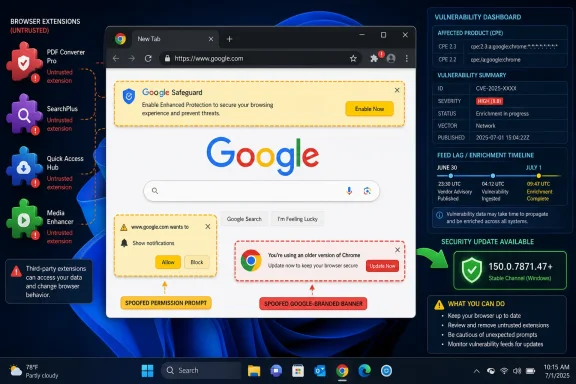 A Medium Chrome Bug Still Lands in the Middle of the Enterprise Attack Surface
CVE-2026-13999 is not a drive-by browser escape, and that matters. According to the NVD entry and Google’s Chrome release notes, exploitation requires convincing a user to install a malicious Chrome extension. CISA’s ADP enrichment scores it as CVSS 3.1 4.3, with user interaction required, no confidentiality impact, low integrity impact, and no availability impact.That sounds modest, especially in a Chrome release cycle that also included far scarier memory-corruption and sandbox-related vulnerabilities. But medium severity in a browser extension component is not the same thing as harmless. Extensions sit in the narrow strip between user intent and browser authority, which is exactly where spoofing bugs become useful.
The vulnerability description says the issue is “insufficient validation of untrusted input” in Extensions. In plain English, Chrome accepted something from an extension that it should have constrained more tightly, allowing crafted extension behavior to misrepresent interface elements. That is the sort of bug that does not need kernel-level drama to matter.
For Windows admins, the threat model is familiar: a user installs the wrong extension, the browser presents something that looks more trustworthy than it is, and the attacker gets a better shot at deception. The exploit path may begin with user consent, but enterprise compromise often begins with user consent obtained under false pretenses.
The CPE Gap Is Probably a Timing Problem, Not a Product Mystery
The user-facing oddity in the NVD record is the CPE section. NVD’s change history shows a configuration added forcpe:2.3:a:google:chrome:*:*:*:*:*:*:*:* with versions up to, but excluding, 150.0.7871.47. That is the core CPE one would expect for desktop Google Chrome.So are we missing a CPE? Strictly speaking, the obvious Google Chrome application CPE appears to be present in the NVD analysis history. If the live page still says “CPEs loading” or asks whether affected software is missing, that is more likely a presentation, caching, enrichment, or synchronization issue than proof that NVD lacks the Chrome CPE altogether.
There is, however, a legitimate nuance. Google’s release notes split builds by platform: Windows and macOS received 150.0.7871.46/.47, while Linux received 150.0.7871.46. The CVE text says Chrome prior to 150.0.7871.47, and NVD’s CPE excludes 150.0.7871.47. That version boundary is easy to express for the generic Chrome product but harder to read cleanly across platform-specific packaging.
This is where scanners and vulnerability dashboards can disagree. One tool may treat Chrome generically and flag anything before 150.0.7871.47. Another may map Linux package versions differently. A third may wait for vendor OVAL, distro advisories, or package-manager metadata before showing a finding.
The practical answer is that the Chrome CPE is not missing in the NVD change record you provided. What may be missing is richer platform-specific interpretation, especially for environments that inventory Chrome through OS package data rather than through Chrome’s own version string.
Chrome’s Extension Model Makes “User Interaction” a Softer Barrier Than It Looks
Security scoring systems treat user interaction as a mitigating factor, and they should. A vulnerability that requires a malicious extension installation is less immediately dangerous than a no-click remote code execution bug. But extension installation is also one of the most normalized security exceptions in everyday computing.Users install coupon tools, PDF helpers, grammar checkers, password utilities, meeting assistants, AI sidebar widgets, shopping plug-ins, dark-mode toggles, and developer tools. Many of those extensions request broad permissions because broad permissions are often the point. The consent dialog becomes less of a meaningful security control and more of a speed bump.
That makes UI spoofing especially awkward. The attack does not necessarily need to break the browser’s entire security model. It needs to convince the user that the thing on screen is coming from Chrome, Google, a trusted site, or a familiar workflow.
This is why the medium rating should not lull administrators into treating the issue as bookkeeping. A spoofed browser surface can be used to make phishing more convincing, permission prompts less intelligible, or account actions look routine. Integrity impact may be “low” in CVSS terms, but trust impact is harder to quantify.
Google Fixed the Browser, But Admins Still Own the Extension Estate
Google’s fix in Chrome 150.0.7871.47 is the necessary first step. For unmanaged consumers, the answer is simple: let Chrome update, restart the browser, and avoid installing dubious extensions. For managed Windows fleets, that is only part of the job.Administrators need to know whether Chrome actually reached the fixed build, whether Edge or other Chromium-based browsers have corresponding fixes, and whether risky extensions are allowed to remain installed. The browser binary can be patched while the extension environment remains over-permissive.
That is not a theoretical distinction. Many organizations have spent years hardening operating systems while allowing browsers to become miniature application platforms with limited governance. Extensions can read pages, modify content, inject scripts, broker identity workflows, and interact with sensitive SaaS sessions.
CVE-2026-13999 is a useful reminder that extension control is patch management. It belongs in the same operational conversation as browser version enforcement, endpoint detection, conditional access, and phishing-resistant authentication.
Vulnerability Feeds Still Struggle With Browser Reality
The NVD record tells a small but familiar story about modern vulnerability management. The CVE arrived from Chrome on June 30. CISA-ADP enrichment added CVSS, CWE-20, and SSVC metadata on July 1. NIST’s initial analysis later added the generic Chrome CPE and release-note references.That sequence is normal. It is also why vulnerability scanners can produce noisy results during the first few days after disclosure. CVE records, vendor release notes, CPE mappings, package names, and scanner plug-ins do not always mature at the same speed.
For Chrome, the problem is amplified by rapid release cadence. A single stable-channel update may include hundreds of fixes, multiple platform version numbers, withheld bug details, and staggered rollout timing. Google also commonly restricts bug details until most users are updated, which limits independent validation in the early window.
Security teams therefore should not read the first NVD version as the final word. They should treat it as one layer of evidence, then compare it against Google’s release channel, endpoint inventory, browser management telemetry, and scanner vendor advisories.
The Real Patch Test Is Whether Chrome Restarted
Chrome’s update mechanism is good, but it is not magic. A browser can download an update and remain vulnerable until it restarts into the new build. On Windows desktops where users keep sessions alive for days, that distinction matters.The target version for this CVE is straightforward: Chrome 150.0.7871.47 or later on affected desktop channels. If a machine reports an older build, it should be considered exposed to this specific issue. If it reports the fixed build but has not been restarted since update staging, administrators should verify the running process version rather than relying solely on installed-version inventory.
Enterprises using Google Update policies, Chrome Browser Cloud Management, Intune, Group Policy, or third-party patching should check enforcement, not merely availability. “Update available” is not the same as “update applied.” “Installed” is not always the same as “running.”
The same principle applies to incident response. If a suspicious extension was installed before the patch, updating Chrome does not answer whether the user was deceived, whether credentials were entered, or whether the extension performed other unwanted actions. Patching closes the known flaw; it does not retroactively clean the trust event.
The Extension Store Is Not a Security Boundary
Chrome Web Store review helps, but it is not a guarantee. Malicious and compromised extensions have repeatedly shown that distribution trust can decay over time. An extension may begin harmless, change ownership, add new behavior, or ship an update that users never consciously evaluate.That is why allowlisting matters more than after-the-fact panic. Organizations should decide which extensions are business-required, which are tolerated, and which are blocked. The default posture for high-risk environments should not be “anything from the store is fine.”
CVE-2026-13999 does not prove that the Chrome extension ecosystem is broken. It proves that the browser’s extension surface remains a privileged user-experience layer where validation bugs can become deception primitives. That is enough to justify tighter controls.
For consumers and small offices, the advice is less bureaucratic but just as important. Remove extensions you do not actively use. Prefer well-known publishers. Be skeptical of extensions that request broad access for narrow tasks. Treat sudden permission changes as a warning, not an inconvenience.
The Useful Reading of This CVE Is Narrow, Not Alarmist
There is no public indication in the data provided that CVE-2026-13999 is being exploited in the wild. CISA’s SSVC enrichment lists exploitation as “none,” automatable as “no,” and technical impact as “partial.” That should keep the response proportional.But proportional does not mean passive. A medium-severity Chrome extension spoofing flaw deserves quick browser updates, extension review, and clean asset inventory. It does not deserve breathless zero-day treatment unless new evidence emerges.
The best security teams will use this CVE as a trigger to check the boring controls. Are browser versions current? Are extensions governed? Are users allowed to install arbitrary add-ons? Does the vulnerability scanner understand Chrome’s actual installed version? Does the CPE mapping match what the endpoint reports?
Those questions are more useful than arguing over whether the CVSS score should be a point higher. CVSS is a sorting mechanism. It is not an operational plan.
The Chrome CPE Is There, But the Inventory Work Remains
Here is the concrete reading for WindowsForum readers managing real systems rather than abstract vulnerability records:- The NVD change history already shows the generic Google Chrome application CPE added for versions earlier than 150.0.7871.47.
- The fixed Chrome desktop build to verify for this CVE is 150.0.7871.47 or later where that build applies.
- The vulnerability requires a malicious extension installation, so extension governance is part of the mitigation rather than a side issue.
- CISA-ADP rates the issue medium with low integrity impact, required user interaction, and no known exploitation at the time of enrichment.
- If a scanner still shows missing CPE data, treat it as an enrichment or feed-lag problem unless the tool also fails to recognize the generic Google Chrome CPE.
- Administrators should confirm the running Chrome version after restart, not merely the presence of a downloaded or staged update.
References
- Primary source: NVD / Chromium
Published: 2026-07-03T07:00:35-07:00
NVD - CVE-2026-13999
 nvd.nist.gov
- Security advisory: MSRC
Published: 2026-07-03T07:00:35-07:00
Original feed URL
Security Update Guide - Microsoft Security Response Center
 msrc.microsoft.com
- Related coverage: cvefeed.io
CVE-2026-13999 - Google Chrome UI Spoofing Vulnerability
Insufficient validation of untrusted input in Extensions in Google Chrome prior to 150.0.7871.47 allowed an attacker who convinced a user to install a malicious extension to perform UI spoofing via a crafted Chrome Extension. (Chromium security severity: Medium)cvefeed.io
