

Google Chrome on Android versions earlier than 150.0.7871.47 are affected by CVE-2026-14005, a use-after-free vulnerability in the Omnibox. According to the Chrome-sourced description presented by the National Vulnerability Database, a remote attacker could use a crafted HTML page and persuade a user to perform specific interface gestures, potentially resulting in heap corruption. The public record does not describe a silent drive-by compromise, disclose the required gesture sequence, or establish code execution, sandbox escape, or complete device compromise. The direct response is nevertheless clear: update Chrome on Android to version 150.0.7871.47 or later and verify the installed version after the update.
The Chrome-sourced description identifies CVE-2026-14005 as a use-after-free vulnerability in the Omnibox. The stated attack condition combines three elements:
That narrower formulation should be preserved in security notices. Memory corruption is serious enough to justify prompt remediation without adding consequences that the record does not document.
A simplified sequence looks like this:
The associated Chromium issue is access-restricted, which limits independent public analysis of the implementation and exploit mechanics. No particular HTML element, script pattern, browser event, or gesture should be presented as the trigger without additional authoritative disclosure.
That lack of detail does not prevent remediation. Administrators already have the information needed for a measurable response: the affected platform, vulnerable version range, and correction threshold.
The record does not establish that CVE-2026-14005 affects:
The same rule applies to desktop Chrome. Security teams should not create or retain a Windows desktop Chrome finding merely because an alert contains a Chrome CVE, a high score, or a Chrome-related reference. A valid match under the supplied record requires Google Chrome, Android, and an installed version earlier than 150.0.7871.47.
A Chrome-related release reference may provide surrounding release context, but its presence does not independently establish additional platforms, severity labels, repair counts, technical outcomes, or affected versions. Those claims must come from content explicitly connected to this CVE.
CISA-ADP’s contributed vector is
These are CVSS metric selections, not a public exploit narrative. “Low attack complexity” does not prove that exploit development is easy, that exploitation is reliable across Android devices, or that working exploit code is available. “User interaction required” establishes a constraint but does not reveal how noticeable or complicated the required interaction would be.
The score’s provenance should remain visible in internal reports. Accurate wording is “CISA-ADP CVSS 3.1: 8.8 High.” Calling it simply an “NVD score” would obscure the fact that NVD displays contributed information from multiple sources.
Google’s Medium classification and CISA-ADP’s High score should not be averaged into a new severity. They assess the vulnerability through different systems. The fixed-version boundary provides the more useful operational rule: Android installations below 150.0.7871.47 require remediation.
“Exploitation: none” reports the value in that assessment. It should not be rewritten as proof that exploitation has never occurred, that no private research exists, or that the status cannot change.
“Automatable: no” is likewise a categorization field. It is consistent with the published requirement for user-interface gestures, but it does not disclose the complete reasoning behind the assessment or guarantee that an attack could never be scaled.
“Technical impact: total” should not be converted into a claim of complete Android-device compromise. CISA-ADP recorded technical impact as total, while Google labeled the issue Medium; the records assess risk differently. The supplied material does not establish that the SSVC field directly explains the difference between Google’s severity label and the CVSS score.
The practical reading is measured: the supplied assessment does not identify exploitation, but the affected versions should still be updated because a corrected release and a clear compliance threshold are available.
CISA-ADP enrichment stage — CISA-ADP contributed the 8.8 High CVSS 3.1 assessment and the SSVC values for exploitation, automation, and technical impact.
NVD and NIST analysis stage — The affected configuration was presented as Google Chrome combined with Android, helping distinguish the record from a general all-platform Chrome vulnerability.
Remediation stage — Chrome 150.0.7871.47 establishes the correction threshold. Earlier Android versions remain affected; that version and later versions fall outside the published affected range.
The record may receive additional enrichment. Later changes could add an NVD-authored assessment, clarify references, modify the affected configuration, or provide more technical context. Administrators should monitor for those changes without delaying the currently available update.
The requirement does establish that the record is not describing an automatic attack that succeeds merely because Chrome is installed. It does not establish that ordinary users would recognize the required interaction as suspicious.
Organizations should avoid turning the undisclosed gesture condition into a behavioral test for employees. General safe-browsing education remains useful, but it is not a substitute for moving the browser outside the vulnerable version range.
The same evidentiary limit applies to detection. The supplied record does not provide:
If separate evidence suggests suspicious browser activity, organizations can follow their normal incident-response procedures. Such investigation is general defensive practice, not a detector established by this CVE record.
An organization’s desktop browser inventory does not answer that question. Neither does a list of Android operating-system versions. Administrators need application-level inventory capable of identifying the installed version of package
The minimum useful inventory record includes:
Stale records require follow-up rather than assumptions. The application may have updated after the last check-in, or it may still be vulnerable. Request a current inventory refresh or direct verification from the device. Until the complete version is known, the installation should remain unverified.
Windows-focused security teams may still own the ticket even though the affected platform is Android. The important routing decision is to send remediation to the administrator responsible for Android applications, enterprise mobility management, or managed Google Play—not to close the issue after confirming that Windows desktop Chrome is current.
Deployment intent is not the same as observed installation. An update can be approved but not downloaded, downloaded but not installed, blocked by management configuration, delayed by an offline device, or absent from a stale inventory record.
A complete remediation loop should therefore include:
The established facts are narrow:
The forward-looking task is to watch for authoritative enrichment. NVD may later add an independent assessment or revise configuration information, and Google or Chromium may publish additional technical context. Any such change can be evaluated when it appears. Until then, the defensible response remains narrow and measurable: update Chrome on Android and prove that the installed version is 150.0.7871.47 or later.
| Deployment state | Platform in the record | Version condition | Operational reading |
|---|---|---|---|
| Affected | Google Chrome on Android | Earlier than 150.0.7871.47 | Update is required |
| Correction threshold reached | Google Chrome on Android | 150.0.7871.47 | Outside the published affected range |
| Newer deployment | Google Chrome on Android | Later than 150.0.7871.47 | Outside the published affected range |
| Desktop Chrome | Windows, macOS, or Linux | Not identified as affected by this record | Do not infer desktop impact from the Chrome product name alone |
| Other Chromium browsers | Any platform | No product-specific boundary supplied | Check the relevant browser vendor’s own advisory |
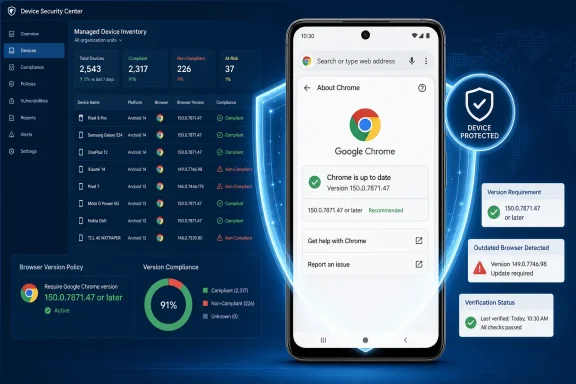 Update and verify Chrome on an Android device
- Open the Google Play Store.
- Select the profile icon.
- Select Manage apps & device.
- Open Updates available.
- Find Chrome and select Update.
- Reopen Chrome after the installation completes.
- In Chrome, select ⋮ > Settings > About Chrome.
- Confirm that the complete version is 150.0.7871.47 or later.
Verify managed Android installations
Administrators should use an operational inventory check rather than treating an enabled automatic-update setting as proof of remediation:- Export the organization’s managed Google Play or managed application inventory.
- Filter the exported records for the Android package
com.android.chrome. - Retain the device identifier, user or enrollment identifier, installed application version, and inventory observation time where those fields are available.
- Identify every installed version earlier than 150.0.7871.47.
- Update those installations through the organization’s established managed application workflow.
- Refresh or re-export the inventory after the deployment window.
- Close a finding only after the inventory or direct device verification reports 150.0.7871.47 or later.
A Browser’s Address Bar Is Also a Security Boundary
Chrome’s Omnibox combines address entry, search, suggestions, and navigation controls. On Android, those functions are tied to touch-driven interface state and transitions between web content and browser-owned controls. A memory-safety defect in that area is therefore more than a visual address-bar error.The Chrome-sourced description identifies CVE-2026-14005 as a use-after-free vulnerability in the Omnibox. The stated attack condition combines three elements:
- Remotely supplied crafted HTML.
- Specific user-interface gestures.
- Potential heap corruption if the vulnerable condition is reached.
That narrower formulation should be preserved in security notices. Memory corruption is serious enough to justify prompt remediation without adding consequences that the record does not document.
Use After Free Identifies the Memory-Safety Failure
The record maps CVE-2026-14005 to CWE-416, Use After Free. In general terms, this weakness occurs when software releases an object or memory region but later continues to access it through a stale reference.A simplified sequence looks like this:
- Chrome creates or references an object.
- The object is released.
- Some code retains a reference that should no longer be used.
- The underlying heap storage may be reassigned or otherwise changed.
- Chrome later accesses the stale reference under conditions it no longer safely represents.
The associated Chromium issue is access-restricted, which limits independent public analysis of the implementation and exploit mechanics. No particular HTML element, script pattern, browser event, or gesture should be presented as the trigger without additional authoritative disclosure.
That lack of detail does not prevent remediation. Administrators already have the information needed for a measurable response: the affected platform, vulnerable version range, and correction threshold.
The Published Scope Is Chrome on Android
The affected configuration presented by NVD identifies Google Chrome on Android before 150.0.7871.47. That platform condition matters because the generic product name “Chrome” can produce overbroad scanner findings and incorrectly routed tickets.The record does not establish that CVE-2026-14005 affects:
- Chrome on Windows.
- Chrome on macOS.
- Chrome on Linux.
- ChromeOS.
- Microsoft Edge.
- Every browser based on Chromium.
- Android itself independently of Chrome.
The same rule applies to desktop Chrome. Security teams should not create or retain a Windows desktop Chrome finding merely because an alert contains a Chrome CVE, a high score, or a Chrome-related reference. A valid match under the supplied record requires Google Chrome, Android, and an installed version earlier than 150.0.7871.47.
A Chrome-related release reference may provide surrounding release context, but its presence does not independently establish additional platforms, severity labels, repair counts, technical outcomes, or affected versions. Those claims must come from content explicitly connected to this CVE.
Google’s Medium Label and CISA-ADP’s 8.8 Score Are Separate Assessments
The record contains two severity presentations that should remain separately attributed:| Assessment source | Recorded result | Appropriate interpretation |
|---|---|---|
| Google or Chromium | Medium | Vendor severity classification |
| CISA-ADP | CVSS 3.1 score of 8.8, High | Contributed standardized severity assessment |
| NVD or NIST | No separate CVSS assessment in the supplied material | Do not relabel the CISA-ADP score as an NVD-authored score |
AV:N/AC:L/PR:N/UI:R/S:U/C:H/I:H/A:H. Under that model, the vulnerability is assessed as network-reachable, low attack complexity, requiring no prior privileges, requiring user interaction, and retaining unchanged scope. The modeled confidentiality, integrity, and availability impacts are High.These are CVSS metric selections, not a public exploit narrative. “Low attack complexity” does not prove that exploit development is easy, that exploitation is reliable across Android devices, or that working exploit code is available. “User interaction required” establishes a constraint but does not reveal how noticeable or complicated the required interaction would be.
The score’s provenance should remain visible in internal reports. Accurate wording is “CISA-ADP CVSS 3.1: 8.8 High.” Calling it simply an “NVD score” would obscure the fact that NVD displays contributed information from multiple sources.
Google’s Medium classification and CISA-ADP’s High score should not be averaged into a new severity. They assess the vulnerability through different systems. The fixed-version boundary provides the more useful operational rule: Android installations below 150.0.7871.47 require remediation.
SSVC Records No Exploitation and Total Technical Impact
CISA-ADP’s Stakeholder-Specific Vulnerability Categorization contribution records:- Exploitation: none
- Automatable: no
- Technical impact: total
“Exploitation: none” reports the value in that assessment. It should not be rewritten as proof that exploitation has never occurred, that no private research exists, or that the status cannot change.
“Automatable: no” is likewise a categorization field. It is consistent with the published requirement for user-interface gestures, but it does not disclose the complete reasoning behind the assessment or guarantee that an attack could never be scaled.
“Technical impact: total” should not be converted into a claim of complete Android-device compromise. CISA-ADP recorded technical impact as total, while Google labeled the issue Medium; the records assess risk differently. The supplied material does not establish that the SSVC field directly explains the difference between Google’s severity label and the CVSS score.
The practical reading is measured: the supplied assessment does not identify exploitation, but the affected versions should still be updated because a corrected release and a clear compliance threshold are available.
The Record Was Enriched by Multiple Sources
Modern vulnerability records combine information contributed by several organizations. For CVE-2026-14005, the useful source distinctions are:- Chrome supplied the central vulnerability description, affected product and version boundary, Omnibox component, and use-after-free classification.
- CISA-ADP supplied the contributed CVSS 3.1 score and SSVC fields.
- NVD and NIST presented and analyzed the affected configuration and associated record data.
- The linked Chromium issue remains restricted, so detailed implementation information is not publicly available through that issue.
Record timeline
Vendor contribution stage — Chrome supplied the core description, including Chrome on Android, versions before 150.0.7871.47, the Omnibox component, the crafted-page condition, the requirement for specific interface gestures, potential heap corruption, and CWE-416.CISA-ADP enrichment stage — CISA-ADP contributed the 8.8 High CVSS 3.1 assessment and the SSVC values for exploitation, automation, and technical impact.
NVD and NIST analysis stage — The affected configuration was presented as Google Chrome combined with Android, helping distinguish the record from a general all-platform Chrome vulnerability.
Remediation stage — Chrome 150.0.7871.47 establishes the correction threshold. Earlier Android versions remain affected; that version and later versions fall outside the published affected range.
The record may receive additional enrichment. Later changes could add an NVD-authored assessment, clarify references, modify the affected configuration, or provide more technical context. Administrators should monitor for those changes without delaying the currently available update.
The UI-Gesture Requirement Is a Constraint, Not a Workaround
The public description requires specific user-interface gestures, but the sequence is not disclosed. Defenders therefore cannot build reliable user guidance around avoiding a particular tap, swipe, selection, or navigation pattern.The requirement does establish that the record is not describing an automatic attack that succeeds merely because Chrome is installed. It does not establish that ordinary users would recognize the required interaction as suspicious.
Organizations should avoid turning the undisclosed gesture condition into a behavioral test for employees. General safe-browsing education remains useful, but it is not a substitute for moving the browser outside the vulnerable version range.
The same evidentiary limit applies to detection. The supplied record does not provide:
- A proof-of-concept page.
- A validated network signature.
- A distinctive URL or script pattern.
- A documented crash signature.
- A browser log event tied specifically to this CVE.
- A confirmed indicator of compromise.
- A CVE-specific configuration switch or browser policy that neutralizes the flaw.
If separate evidence suggests suspicious browser activity, organizations can follow their normal incident-response procedures. Such investigation is general defensive practice, not a detector established by this CVE record.
Mobile Application Inventory Is the Enterprise Control Point
For an individual Android user, remediation is a Play Store update followed by an in-app version check. For an enterprise, the larger task is proving that all managed installations have crossed the correction threshold.An organization’s desktop browser inventory does not answer that question. Neither does a list of Android operating-system versions. Administrators need application-level inventory capable of identifying the installed version of package
com.android.chrome.The minimum useful inventory record includes:
- Device or enrollment identity.
- Android as the platform.
- Package name
com.android.chrome. - The complete installed Chrome version.
- The time the inventory was observed.
- Remediation or exception status.
Stale records require follow-up rather than assumptions. The application may have updated after the last check-in, or it may still be vulnerable. Request a current inventory refresh or direct verification from the device. Until the complete version is known, the installation should remain unverified.
Windows-focused security teams may still own the ticket even though the affected platform is Android. The important routing decision is to send remediation to the administrator responsible for Android applications, enterprise mobility management, or managed Google Play—not to close the issue after confirming that Windows desktop Chrome is current.
Version Verification Should Define Closure
There is no need to reconstruct the restricted trigger before acting. Version compliance supplies a direct, evidence-based closure test.| Observed result | Disposition |
|---|---|
| Chrome on Android earlier than 150.0.7871.47 | Affected; update required |
| Chrome on Android 150.0.7871.47 or later | Meets the published correction threshold |
| Only the major version is known | Insufficient evidence; collect the complete version |
| Inventory is stale | Refresh inventory or verify directly |
| Chrome version cannot be collected | Keep unresolved and escalate through the organization’s normal exception process |
| Windows desktop Chrome match | Exclude unless separate authoritative evidence establishes Windows impact |
| Another Chromium browser match | Check that browser vendor’s product-specific advisory |
A complete remediation loop should therefore include:
- Discover managed Android devices with
com.android.chrome. - Compare the full installed version against 150.0.7871.47.
- Update every earlier installation.
- Refresh application inventory.
- Verify the resulting installed version.
- Follow up on failed, stale, missing, or conflicting results.
- Retain version evidence before closing the finding.
Patch the Named Product Without Expanding the Story
CVE-2026-14005 is a useful test of disciplined vulnerability management. The available information is detailed enough to support remediation but not detailed enough to support a reconstructed exploit chain.The established facts are narrow:
- The affected product is Google Chrome on Android.
- Versions earlier than 150.0.7871.47 are affected.
- The affected component is the Omnibox.
- The weakness is CWE-416, Use After Free.
- Crafted HTML and specific user-interface gestures are required.
- The documented potential result is heap corruption.
- Google labels the issue Medium.
- CISA-ADP contributed an 8.8 High CVSS 3.1 score.
- CISA-ADP recorded exploitation as none, automatable as no, and technical impact as total.
- The Chromium issue containing further detail is restricted.
- The supplied record does not establish Windows desktop Chrome as affected.
The forward-looking task is to watch for authoritative enrichment. NVD may later add an independent assessment or revise configuration information, and Google or Chromium may publish additional technical context. Any such change can be evaluated when it appears. Until then, the defensible response remains narrow and measurable: update Chrome on Android and prove that the installed version is 150.0.7871.47 or later.
What Windows admins should do now
- Check Android Chrome inventory, including managed Google Play or application-inventory records for package
com.android.chrome.- Update or require Chrome 150.0.7871.47 or later on every in-scope Android device reporting an earlier version.
- Verify the installed version through refreshed inventory or Chrome > ⋮ > Settings > About Chrome; do not close on deployment status alone.
- Do not mark Windows desktop Chrome as affected from this record alone.
- Monitor the NVD record for enrichment, including changes to affected scope, scoring, exploitation information, or vendor guidance.