

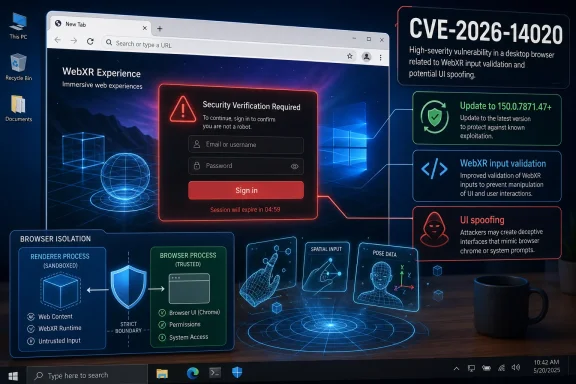
Google disclosed CVE-2026-14020 on June 30, 2026, as a medium-severity Chrome WebXR input-validation flaw fixed in desktop Chrome 150.0.7871.47, where a crafted HTML page could enable UI spoofing after an attacker had already compromised the renderer process. The National Vulnerability Database later recorded the affected Chrome configuration and CISA’s ADP enrichment assigned a CVSS 3.1 score of 4.3, reinforcing the uncomfortable truth: this is not a headline-grabbing remote-code-execution bug, but it still belongs in every serious patch queue. The bug sits at the intersection of immersive web APIs, browser sandbox assumptions, and user-interface trust — a place where “medium” can be a misleadingly calm word. For Windows users and administrators, the practical answer is simple: update Chrome, then verify that Chromium-based browsers in your environment are not lagging behind the same upstream fix.
CVE-2026-14020 is easy to underestimate because its description contains two phrases that sound reassuring: “medium” and “compromised the renderer process.” In Chrome security language, that means the WebXR flaw is not being presented as the first step in an attack chain. The attacker already needs a foothold inside the renderer, the heavily sandboxed process that handles web content.
But modern browser exploitation is rarely a single clean leap from web page to full system compromise. It is more often a chain: a memory-corruption bug, a logic flaw, a sandbox escape, a permissions trick, a UI deception, and a user action that looks legitimate at the moment it matters. CVE-2026-14020 appears to live in that middle territory, where a vulnerability may not break the browser alone but can make an existing compromise more persuasive, more durable, or more useful.
The NVD entry says the flaw is “insufficient validation of untrusted input in WebXR” and that it could allow UI spoofing through a crafted HTML page. Google’s Chrome Releases blog tied the fix to the Stable Channel update for desktop Chrome 150.0.7871.47 on June 30. CISA’s ADP enrichment, meanwhile, marked exploitation as “none,” automation as “no,” and technical impact as “partial,” which is exactly the sort of bureaucratic phrasing that can cause a real but limited risk to disappear into the noise.
That would be a mistake. UI spoofing bugs are about trust boundaries, and trust boundaries are where browsers make their money. If a browser cannot reliably separate what the site controls from what the browser controls, users can be nudged into believing the wrong thing at the wrong time.
That makes validation especially important. Traditional web pages already struggle with spoofing: fake login prompts, imitation browser warnings, full-screen overlays, counterfeit permission dialogs, and cleverly timed pop-ups have been around for decades. WebXR raises the stakes because the user is no longer merely looking at a rectangle inside a browser frame. The web experience may occupy the user’s field of view, blur familiar UI boundaries, and make browser-mediated trust cues harder to interpret.
CVE-2026-14020 does not mean WebXR is broadly broken, nor does it mean an arbitrary web page can magically seize control of Chrome’s interface. The published description is narrower: the attacker must have compromised the renderer process, and the outcome is UI spoofing rather than code execution or data theft. Still, the component matters because immersive interfaces are inherently more susceptible to confusion between content and control.
That distinction is not academic. In security, a fake button is not just a fake button if it convinces a user to grant a permission, ignore a warning, approve a sign-in, or continue through a dangerous flow. A spoofed interface can be the social-engineering layer that makes a technical exploit pay off.
That is why the phrase “who had compromised the renderer process” matters. CVE-2026-14020 is not described as a drive-by browser takeover. A remote attacker first needs another vulnerability, a malicious document path, a compromised extension, or some other route into the renderer. Only then does this WebXR validation issue become useful.
For defenders, however, “requires renderer compromise” is not the same as “safe to ignore.” Browser exploit chains are assembled out of exactly these kinds of pieces. One bug gives code execution in the renderer, another weakens a sandbox boundary, another helps confuse the user, and another opens a permission or identity path that should have remained closed.
This is why vulnerability severity can be both accurate and misleading. A CVSS 4.3 medium score correctly reflects limited direct impact: network attack vector, low attack complexity, no privileges required, user interaction required, unchanged scope, low integrity impact, and no confidentiality or availability impact. But CVSS is a snapshot of one vulnerability in isolation. Attackers do not have to use vulnerabilities in isolation.
Browser vendors have spent years tightening those boundaries. Permission prompts are shaped and positioned in specific ways. Address bars resist being hidden. Full-screen transitions show warnings. Payment and identity flows increasingly rely on browser- or OS-controlled surfaces. The browser’s interface has become a security primitive.
A WebXR spoofing bug threatens that model in a subtle way. Immersive and semi-immersive experiences complicate what the user sees, where the browser chrome appears, and how interaction is mediated. If untrusted input is insufficiently validated inside that pipeline, crafted content may be able to present something that looks more authoritative than it is.
The published CVE description does not expose the implementation detail, and Google routinely restricts access to Chromium issue reports until users have had time to update. That restraint is sensible. But even without exploit code, the class is familiar: when content can impersonate trusted UI, the browser’s protective architecture has to assume that some users will believe the impersonation.
Security outlets and vulnerability trackers quickly picked up the Chrome 150 update because it landed with a dense cluster of Chromium CVEs. Some reports counted hundreds of fixes across the release, while the Chrome Releases post is the authoritative source for the version line and individual CVE acknowledgments. As usual, Google’s advisory language stayed terse, with bug details and links restricted where disclosure might help attackers before patch adoption improves.
That creates the familiar Chrome update paradox. Users want details before they update, but the details are often withheld precisely because not enough users have updated. Enterprises want predictable change windows, but browsers are now among the most exposed application platforms in the company. The result is a recurring tension between operational calm and security urgency.
For WindowsForum readers, the important part is not whether CVE-2026-14020 is the scariest bug in Chrome 150. It probably is not. The important part is that it landed in a release line that should already be moving through managed Windows fleets, developer workstations, kiosks, VDI images, and any machine where Chrome or Chromium-derived browsers handle sensitive sessions.
NVD’s change history for CVE-2026-14020 shows that NIST added a CPE configuration for Google Chrome versions up to, but excluding, 150.0.7871.47. That is the core affected-product mapping most vulnerability tools need for Chrome itself. The entry also shows the typical dance between a CNA-supplied CVE record, NVD enrichment, and CISA ADP metadata.
The apparent oddity in the affected-version text is worth noting. The CVE record says the vulnerable product is Chrome prior to 150.0.7871.47, while the affected version object includes 150.0.7871.47 as a version marker with “lessThan” 150.0.7871.47. That is a common structured-data pattern, not a claim that 150.0.7871.47 is vulnerable. The fixed boundary is the point: anything earlier is the concern.
Where CPE can become messier is outside Google Chrome proper. Microsoft Edge, Brave, Vivaldi, Opera, Electron applications, embedded Chromium runtimes, and Linux distribution builds may all consume Chromium code on different schedules and expose different product identifiers. NVD’s Chrome CPE does not automatically prove every Chromium-based product is affected or fixed, even if the upstream component is the same.
The risk with CVE-2026-14020 is not that every unpatched browser will be instantly exploited. The risk is that organizations will patch the visible Chrome channel while forgetting all the Chromium surfaces around it. Developer tools, test browsers, automation hosts, remote support jump boxes, and browser-based kiosks often sit outside the cleanest patch-management dashboards.
Chrome’s own enterprise documentation has long emphasized update-channel choices, including Stable and Extended Stable cadences. Those options are useful, especially where browser changes can break line-of-business apps. But slower cadence is not a security exemption. If a release fixes a vulnerability in a component exposed to untrusted web content, the organization needs to know whether its chosen channel has received the fix and when endpoints will actually restart into it.
The restart point is not pedantry. Chrome can download an update and still leave old code running until the browser relaunches. In environments where users keep sessions alive for weeks, the difference between “update available” and “patched process running” is the difference that matters.
That does not mean every Chrome CVE maps one-to-one onto Edge or every Chromium derivative. Vendors may disable components, carry different patches, or ship updates on different version schedules. But when the vulnerable component is upstream Chromium code, administrators should assume they need to check downstream browser advisories rather than stop at Google’s release note.
Microsoft typically publishes Edge security updates that track Chromium fixes, and the right operational habit is to verify Edge’s current stable version separately. The same applies to Brave, Vivaldi, Opera, and any Chromium-based product in your software inventory. If the product ships WebXR support or includes the vulnerable Chromium code path, the Chrome fix is a signal to look for a vendor-specific update.
This is where consumer advice and enterprise advice diverge. Consumers can mostly say “update your browser.” Enterprises need an asset question: which browsers and embedded Chromium runtimes exist here, which are allowed to reach the internet, and which ones are outside normal patch reporting?
But security architecture is built before ubiquity, not after it. WebGL looked exotic once. WebRTC looked specialized once. GPU acceleration, camera access, microphone access, USB access, HID access, Bluetooth access, file-system access — the modern browser has steadily absorbed capabilities that used to belong to native applications. Every new capability adds another place where validation, permission, and UI boundaries have to hold.
WebXR also illustrates a broader point about browser risk. The vulnerability is not scary because everyone uses WebXR today. It is important because the browser is now a universal runtime, and even less-used components ship to enormous populations by default. Attackers do not need a feature to be popular if they can use it as one link in a chain against systems where it is present.
That is why component-level security hygiene matters. Enterprises that cannot disable unused browser features should at least understand which ones are enabled, which policies govern them, and how quickly fixes reach endpoints when a low-usage component gets a CVE.
But “no known exploitation” is not the same as “no exploitation,” and it is certainly not the same as “no need to patch.” Browser bugs often become more attractive after a patch ships because attackers can diff code, infer the flaw, and look for slow-moving targets. The post-disclosure window is exactly when patch lag becomes measurable.
Medium-severity bugs can also become useful after the fact. If a separate renderer compromise exists, a UI spoofing weakness might help create a believable prompt or trusted-looking state. If a user has to approve something, spoofing can make that approval more likely. If an attacker needs to keep a victim engaged on a crafted page, UI deception can buy time.
The right posture is proportionate urgency. This is not a reason to unplug networks or panic over every headset demo. It is a reason to make sure Chrome 150.0.7871.47 or later is actually installed and running, and to check downstream Chromium products without waiting for a monthly report to shame you into it.
For administrators, the better answer is telemetry. Query installed Chrome versions across endpoints, then separately query running browser process versions where your tooling allows it. Inventory Microsoft Edge and other Chromium-based browsers. Pay attention to persistent systems: VDI pools, conference-room PCs, digital signage, lab machines, service desks, and developer workstations that may carry multiple browser channels.
The CPE entry in NVD helps scanners detect vulnerable Google Chrome installations, but it should not be the only source of truth. Vulnerability scanners can lag behind vendor advisories, and CPE matching can miss unusual installation paths or nonstandard packages. In a browser fleet, the authoritative state is the version actually present on disk and the process actually running.
This is also a good moment to revisit WebXR and immersive-feature policies. If your organization has no use for XR features in the browser, consider whether policy controls can reduce exposure. Feature restriction is not a substitute for patching, but it can narrow the usefulness of future bugs in components your users do not need.
The concrete takeaways are narrower than the size of the Chrome 150 release might suggest:
The future of browser security is going to look increasingly like CVE-2026-14020: less about one spectacular flaw and more about the integrity of interfaces, permissions, and immersive capabilities layered on top of an already vast runtime. Chrome, Edge, and the Chromium ecosystem will keep adding APIs that make the web feel more like an operating system, and attackers will keep probing the seams where content can impersonate control. The organizations that handle this well will not be the ones that panic at every CVE; they will be the ones that can prove, quickly and boringly, which browser code is running in their fleet and why users can still trust what it puts on the screen.
 A Medium Bug With an Enterprise-Shaped Shadow
CVE-2026-14020 is easy to underestimate because its description contains two phrases that sound reassuring: “medium” and “compromised the renderer process.” In Chrome security language, that means the WebXR flaw is not being presented as the first step in an attack chain. The attacker already needs a foothold inside the renderer, the heavily sandboxed process that handles web content.But modern browser exploitation is rarely a single clean leap from web page to full system compromise. It is more often a chain: a memory-corruption bug, a logic flaw, a sandbox escape, a permissions trick, a UI deception, and a user action that looks legitimate at the moment it matters. CVE-2026-14020 appears to live in that middle territory, where a vulnerability may not break the browser alone but can make an existing compromise more persuasive, more durable, or more useful.
The NVD entry says the flaw is “insufficient validation of untrusted input in WebXR” and that it could allow UI spoofing through a crafted HTML page. Google’s Chrome Releases blog tied the fix to the Stable Channel update for desktop Chrome 150.0.7871.47 on June 30. CISA’s ADP enrichment, meanwhile, marked exploitation as “none,” automation as “no,” and technical impact as “partial,” which is exactly the sort of bureaucratic phrasing that can cause a real but limited risk to disappear into the noise.
That would be a mistake. UI spoofing bugs are about trust boundaries, and trust boundaries are where browsers make their money. If a browser cannot reliably separate what the site controls from what the browser controls, users can be nudged into believing the wrong thing at the wrong time.
WebXR Makes the Browser Feel Like a Place, Not a Window
WebXR is not just another web feature bolted onto Chrome. It is the browser’s bridge into augmented reality and virtual reality experiences, where web content can become spatial, immersive, and unusually convincing. The whole point of WebXR is to let a web page do things that ordinary pages cannot: render immersive scenes, respond to motion, and interact with headsets or XR-capable devices.That makes validation especially important. Traditional web pages already struggle with spoofing: fake login prompts, imitation browser warnings, full-screen overlays, counterfeit permission dialogs, and cleverly timed pop-ups have been around for decades. WebXR raises the stakes because the user is no longer merely looking at a rectangle inside a browser frame. The web experience may occupy the user’s field of view, blur familiar UI boundaries, and make browser-mediated trust cues harder to interpret.
CVE-2026-14020 does not mean WebXR is broadly broken, nor does it mean an arbitrary web page can magically seize control of Chrome’s interface. The published description is narrower: the attacker must have compromised the renderer process, and the outcome is UI spoofing rather than code execution or data theft. Still, the component matters because immersive interfaces are inherently more susceptible to confusion between content and control.
That distinction is not academic. In security, a fake button is not just a fake button if it convinces a user to grant a permission, ignore a warning, approve a sign-in, or continue through a dangerous flow. A spoofed interface can be the social-engineering layer that makes a technical exploit pay off.
The Renderer Requirement Is a Limitation, Not a Dismissal
Chrome’s multi-process architecture is designed around containment. Web content runs in renderer processes that are treated as hostile territory, and the browser process mediates access to more privileged operations. In theory, compromising a renderer should not immediately give an attacker the keys to the machine.That is why the phrase “who had compromised the renderer process” matters. CVE-2026-14020 is not described as a drive-by browser takeover. A remote attacker first needs another vulnerability, a malicious document path, a compromised extension, or some other route into the renderer. Only then does this WebXR validation issue become useful.
For defenders, however, “requires renderer compromise” is not the same as “safe to ignore.” Browser exploit chains are assembled out of exactly these kinds of pieces. One bug gives code execution in the renderer, another weakens a sandbox boundary, another helps confuse the user, and another opens a permission or identity path that should have remained closed.
This is why vulnerability severity can be both accurate and misleading. A CVSS 4.3 medium score correctly reflects limited direct impact: network attack vector, low attack complexity, no privileges required, user interaction required, unchanged scope, low integrity impact, and no confidentiality or availability impact. But CVSS is a snapshot of one vulnerability in isolation. Attackers do not have to use vulnerabilities in isolation.
UI Spoofing Is the Oldest Browser Trick Wearing a New Headset
The web has always had a spoofing problem because it asks users to trust visual cues. Is this lock icon real? Is this sign-in prompt from the browser or from the page? Is this payment sheet controlled by the operating system or drawn by JavaScript? Is this full-screen warning legitimate, or just a div with good typography?Browser vendors have spent years tightening those boundaries. Permission prompts are shaped and positioned in specific ways. Address bars resist being hidden. Full-screen transitions show warnings. Payment and identity flows increasingly rely on browser- or OS-controlled surfaces. The browser’s interface has become a security primitive.
A WebXR spoofing bug threatens that model in a subtle way. Immersive and semi-immersive experiences complicate what the user sees, where the browser chrome appears, and how interaction is mediated. If untrusted input is insufficiently validated inside that pipeline, crafted content may be able to present something that looks more authoritative than it is.
The published CVE description does not expose the implementation detail, and Google routinely restricts access to Chromium issue reports until users have had time to update. That restraint is sensible. But even without exploit code, the class is familiar: when content can impersonate trusted UI, the browser’s protective architecture has to assume that some users will believe the impersonation.
Chrome 150 Was Not a Small Patch Tuesday
The fix arrived in Chrome’s June 30 Stable Channel update, which moved desktop Chrome to the 150.0.7871.46 and 150.0.7871.47 line depending on platform. Google’s release notes for that update listed a large number of security fixes, with CVE-2026-14020 only one entry in a much broader security sweep. That context matters because administrators often triage browser updates by headline severity, and this release was bigger than any single CVE.Security outlets and vulnerability trackers quickly picked up the Chrome 150 update because it landed with a dense cluster of Chromium CVEs. Some reports counted hundreds of fixes across the release, while the Chrome Releases post is the authoritative source for the version line and individual CVE acknowledgments. As usual, Google’s advisory language stayed terse, with bug details and links restricted where disclosure might help attackers before patch adoption improves.
That creates the familiar Chrome update paradox. Users want details before they update, but the details are often withheld precisely because not enough users have updated. Enterprises want predictable change windows, but browsers are now among the most exposed application platforms in the company. The result is a recurring tension between operational calm and security urgency.
For WindowsForum readers, the important part is not whether CVE-2026-14020 is the scariest bug in Chrome 150. It probably is not. The important part is that it landed in a release line that should already be moving through managed Windows fleets, developer workstations, kiosks, VDI images, and any machine where Chrome or Chromium-derived browsers handle sensitive sessions.
The CPE Confusion Is a Symptom of the Vulnerability Data Machine
The user-submitted NVD text asks, “Are we missing a CPE here?” That is not a trivial database housekeeping issue. CPE mapping is how many vulnerability management systems decide whether a product in inventory is affected. If the CPE is late, incomplete, or awkwardly expressed, scanners can underreport exposure or flood teams with noisy matches.NVD’s change history for CVE-2026-14020 shows that NIST added a CPE configuration for Google Chrome versions up to, but excluding, 150.0.7871.47. That is the core affected-product mapping most vulnerability tools need for Chrome itself. The entry also shows the typical dance between a CNA-supplied CVE record, NVD enrichment, and CISA ADP metadata.
The apparent oddity in the affected-version text is worth noting. The CVE record says the vulnerable product is Chrome prior to 150.0.7871.47, while the affected version object includes 150.0.7871.47 as a version marker with “lessThan” 150.0.7871.47. That is a common structured-data pattern, not a claim that 150.0.7871.47 is vulnerable. The fixed boundary is the point: anything earlier is the concern.
Where CPE can become messier is outside Google Chrome proper. Microsoft Edge, Brave, Vivaldi, Opera, Electron applications, embedded Chromium runtimes, and Linux distribution builds may all consume Chromium code on different schedules and expose different product identifiers. NVD’s Chrome CPE does not automatically prove every Chromium-based product is affected or fixed, even if the upstream component is the same.
Windows Administrators Should Treat “Chrome” as a Fleet, Not an App
On a home PC, remediation is mundane: open Chrome, go to the About page, let the update install, and restart the browser. On a managed Windows estate, that sentence hides most of the real work. Chrome may be installed per-machine or per-user, updated by Google Update, controlled through enterprise policies, packaged through Intune, delivered through SCCM or Configuration Manager, or frozen inside a golden image that someone swears is rebuilt weekly.The risk with CVE-2026-14020 is not that every unpatched browser will be instantly exploited. The risk is that organizations will patch the visible Chrome channel while forgetting all the Chromium surfaces around it. Developer tools, test browsers, automation hosts, remote support jump boxes, and browser-based kiosks often sit outside the cleanest patch-management dashboards.
Chrome’s own enterprise documentation has long emphasized update-channel choices, including Stable and Extended Stable cadences. Those options are useful, especially where browser changes can break line-of-business apps. But slower cadence is not a security exemption. If a release fixes a vulnerability in a component exposed to untrusted web content, the organization needs to know whether its chosen channel has received the fix and when endpoints will actually restart into it.
The restart point is not pedantry. Chrome can download an update and still leave old code running until the browser relaunches. In environments where users keep sessions alive for weeks, the difference between “update available” and “patched process running” is the difference that matters.
Edge and the Chromium Family Complicate the Patch Story
Windows users do not live in a pure Chrome world. Microsoft Edge is built on Chromium, and many Windows environments standardize on Edge even when Chrome is also present. Other Chromium-based browsers may be installed by power users, bundled by vendors, or included in specialized workflows.That does not mean every Chrome CVE maps one-to-one onto Edge or every Chromium derivative. Vendors may disable components, carry different patches, or ship updates on different version schedules. But when the vulnerable component is upstream Chromium code, administrators should assume they need to check downstream browser advisories rather than stop at Google’s release note.
Microsoft typically publishes Edge security updates that track Chromium fixes, and the right operational habit is to verify Edge’s current stable version separately. The same applies to Brave, Vivaldi, Opera, and any Chromium-based product in your software inventory. If the product ships WebXR support or includes the vulnerable Chromium code path, the Chrome fix is a signal to look for a vendor-specific update.
This is where consumer advice and enterprise advice diverge. Consumers can mostly say “update your browser.” Enterprises need an asset question: which browsers and embedded Chromium runtimes exist here, which are allowed to reach the internet, and which ones are outside normal patch reporting?
WebXR Is Niche Until It Is a Default Attack Surface
It is tempting to dismiss WebXR as a niche API for headsets, demos, and a small set of immersive experiences. That view is partly fair. Most office workers are not spending their day in browser-based augmented reality. Most phishing campaigns do not need XR when a fake Microsoft 365 login page still works depressingly well.But security architecture is built before ubiquity, not after it. WebGL looked exotic once. WebRTC looked specialized once. GPU acceleration, camera access, microphone access, USB access, HID access, Bluetooth access, file-system access — the modern browser has steadily absorbed capabilities that used to belong to native applications. Every new capability adds another place where validation, permission, and UI boundaries have to hold.
WebXR also illustrates a broader point about browser risk. The vulnerability is not scary because everyone uses WebXR today. It is important because the browser is now a universal runtime, and even less-used components ship to enormous populations by default. Attackers do not need a feature to be popular if they can use it as one link in a chain against systems where it is present.
That is why component-level security hygiene matters. Enterprises that cannot disable unused browser features should at least understand which ones are enabled, which policies govern them, and how quickly fixes reach endpoints when a low-usage component gets a CVE.
The “No Known Exploitation” Line Should Calm, Not Sedate
CISA’s enrichment for CVE-2026-14020 lists exploitation as “none,” and the NVD entry does not describe active exploitation in the wild. That is meaningful. There is no public basis, from the supplied NVD record or Google’s advisory language, to claim that attackers are currently using this specific CVE in campaigns.But “no known exploitation” is not the same as “no exploitation,” and it is certainly not the same as “no need to patch.” Browser bugs often become more attractive after a patch ships because attackers can diff code, infer the flaw, and look for slow-moving targets. The post-disclosure window is exactly when patch lag becomes measurable.
Medium-severity bugs can also become useful after the fact. If a separate renderer compromise exists, a UI spoofing weakness might help create a believable prompt or trusted-looking state. If a user has to approve something, spoofing can make that approval more likely. If an attacker needs to keep a victim engaged on a crafted page, UI deception can buy time.
The right posture is proportionate urgency. This is not a reason to unplug networks or panic over every headset demo. It is a reason to make sure Chrome 150.0.7871.47 or later is actually installed and running, and to check downstream Chromium products without waiting for a monthly report to shame you into it.
The Real Fix Is Fast Verification, Not Security Theater
For individual Windows users, the verification path is still refreshingly concrete. Open Chrome’s menu, go to Help, choose About Google Chrome, and confirm the browser is on 150.0.7871.47 or later. If Chrome downloads an update, relaunch it. If the browser is managed by an organization, the About page should still show whether policy is controlling updates.For administrators, the better answer is telemetry. Query installed Chrome versions across endpoints, then separately query running browser process versions where your tooling allows it. Inventory Microsoft Edge and other Chromium-based browsers. Pay attention to persistent systems: VDI pools, conference-room PCs, digital signage, lab machines, service desks, and developer workstations that may carry multiple browser channels.
The CPE entry in NVD helps scanners detect vulnerable Google Chrome installations, but it should not be the only source of truth. Vulnerability scanners can lag behind vendor advisories, and CPE matching can miss unusual installation paths or nonstandard packages. In a browser fleet, the authoritative state is the version actually present on disk and the process actually running.
This is also a good moment to revisit WebXR and immersive-feature policies. If your organization has no use for XR features in the browser, consider whether policy controls can reduce exposure. Feature restriction is not a substitute for patching, but it can narrow the usefulness of future bugs in components your users do not need.
The Patch Lesson Hidden Inside CVE-2026-14020
CVE-2026-14020 is not the Chrome vulnerability that will dominate security conference slides, but it is the kind of vulnerability that reveals whether an organization’s browser security program is real. It touches a modern API, depends on a chained-attack assumption, affects UI trust, and requires mundane patch discipline rather than heroic incident response.The concrete takeaways are narrower than the size of the Chrome 150 release might suggest:
- Chrome versions before 150.0.7871.47 should be treated as vulnerable to CVE-2026-14020, according to the NVD record and Google’s Chrome release information.
- The flaw is a WebXR input-validation issue that could allow UI spoofing only after an attacker has already compromised the renderer process.
- CISA’s ADP enrichment rates the issue as medium severity with a CVSS 3.1 base score of 4.3 and no known exploitation recorded in its SSVC data.
- The NVD CPE mapping for Google Chrome is present, but administrators should separately verify Chromium-based browsers and embedded Chromium runtimes.
- Updating is not complete until Chrome has relaunched into the fixed version, especially on Windows systems where browser sessions may remain open for days or weeks.
- Organizations that do not need WebXR should evaluate browser policies that reduce exposure to immersive web features while still prioritizing the patch.
The future of browser security is going to look increasingly like CVE-2026-14020: less about one spectacular flaw and more about the integrity of interfaces, permissions, and immersive capabilities layered on top of an already vast runtime. Chrome, Edge, and the Chromium ecosystem will keep adding APIs that make the web feel more like an operating system, and attackers will keep probing the seams where content can impersonate control. The organizations that handle this well will not be the ones that panic at every CVE; they will be the ones that can prove, quickly and boringly, which browser code is running in their fleet and why users can still trust what it puts on the screen.
References
- Primary source: NVD / Chromium
Published: 2026-07-03T07:00:59-07:00
NVD - CVE-2026-14020
 nvd.nist.gov
- Security advisory: MSRC
Published: 2026-07-03T07:00:59-07:00
Original feed URL
Security Update Guide - Microsoft Security Response Center
 msrc.microsoft.com
- Related coverage: cvefeed.io
CVE-2026-14020 - Google Chrome WebXR UI Spoofing
Insufficient validation of untrusted input in WebXR in Google Chrome prior to 150.0.7871.47 allowed a remote attacker who had compromised the renderer process to perform UI spoofing via a crafted HTML page. (Chromium security severity: Medium)cvefeed.io
