

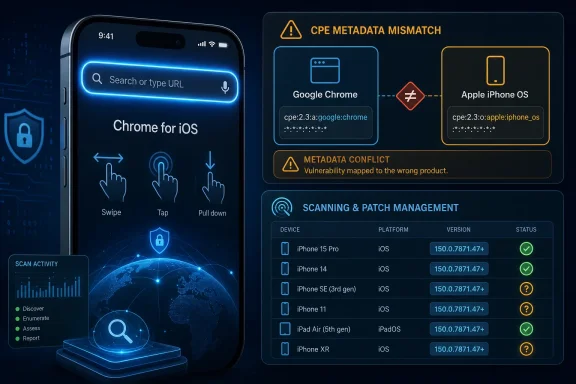
Google’s CVE-2026-14068 entry describes a Chrome for iOS Omnibox flaw fixed before version 150.0.7871.47, published by NVD on June 30, 2026 and modified on July 1, 2026 after CISA-ADP added a medium CVSS 3.1 score and CWE-79 classification. The bug is not a classic desktop Chrome emergency, but it is a useful reminder that “low” Chromium severity does not always mean low operational relevance. For administrators, the more interesting story is the metadata: NVD’s CPE configuration ties Google Chrome to Apple iPhone OS, while the affected-product text says Chrome on iOS. That mismatch is where patch management, vulnerability scanning, and mobile browser reality collide.
CVE-2026-14068 is listed as an “inappropriate implementation” in Chrome’s Omnibox, the combined address and search field that has become one of the browser’s most security-sensitive pieces of interface. According to the NVD entry sourced from Chrome, a remote attacker could exploit the flaw by convincing a user to perform specific UI gestures on a crafted HTML page, leading to arbitrary script or HTML injection — a UXSS scenario.
Google’s Chromium severity is “Low,” which is important context. This is not described as a zero-click exploit, a sandbox escape, or a remote code execution bug. CISA-ADP, however, scored it as CVSS 3.1 6.1 medium, with network attack vector, low complexity, no privileges required, user interaction required, changed scope, and low confidentiality and integrity impact.
That difference is not necessarily a contradiction. Chromium’s internal severity ratings often reflect exploitability and browser-security context, while CVSS attempts to express generic technical impact. A UI-driven UXSS bug can be low in one framework and medium in another because it needs the user to do something specific but still crosses a security boundary once the trick works.
The practical issue is that many security tools do not reason like humans. They ingest CVEs, CPEs, version ranges, and platform tags, then decide what is vulnerable. If the CPE data is too broad, too narrow, or expressed awkwardly, scanners can miss exposed assets or generate noisy findings that administrators learn to ignore.
That distinction matters for CVE-2026-14068 because the affected component is the Omnibox, not a generic Blink rendering bug. The report says the attacker must convince a user to engage in specific UI gestures, which points toward a user-interface boundary failure rather than a traditional webpage parser flaw. A crafted page is still the attack vehicle, but the vulnerable behavior appears to be in how Chrome for iOS mediates browser UI and page-controlled content.
This is why the Apple iPhone OS CPE in NVD’s configuration is both understandable and unsatisfying. It is understandable because the vulnerable Chrome build runs on iOS, and iOS is a necessary platform condition. It is unsatisfying because iOS itself is not the vulnerable product described in the CVE; Google Chrome on iOS is.
In CPE logic, that difference is everything. A vulnerability in a third-party app on iOS should not be represented in a way that implies every iPhone OS installation is vulnerable regardless of whether Chrome is installed. At the same time, a scanner needs some way to express that the vulnerable Chrome package is the iOS variant, not Chrome for Windows, macOS, Linux, or Android.
On paper, that means NVD is not simply saying iPhone OS is vulnerable. It is saying the vulnerable condition requires both Chrome and iPhone OS. In vulnerability-management terms, the problem is not the presence of the iPhone OS CPE by itself; it is whether the Chrome CPE is specific enough to distinguish Chrome for iOS from all other Chrome products.
The Chrome CPE shown is the generic application identifier for Google Chrome. That can be operationally messy. If an enterprise scanner sees
There is also a deeper ecosystem limitation here. CPE was designed for standardized product naming, but mobile app variants often blur product, platform, package identity, and vendor-controlled update channel. “Google Chrome on iOS” is a real product for users and administrators, yet the public CPE universe may not always give it a clean, distinct identifier that maps perfectly to App Store reality.
So the short answer is: maybe not a missing CPE in the strict NVD sense, but very possibly an insufficiently expressive one. A dedicated CPE for Chrome on iOS would make the affected population clearer. In its absence, the AND configuration is doing the work, and administrators should verify that their tooling actually respects it.
CVE-2026-14068 is not described as a full account-compromise primitive, and there is no public indication in the provided NVD detail that it is being exploited in the wild. CISA-ADP’s SSVC entry lists exploitation as “none,” automatable as “no,” and technical impact as “partial.” Those are all calming signals.
But the browser threat model is cumulative. A UI gesture requirement lowers exploitability, yet modern phishing and malvertising operations are built around persuading users to tap, swipe, approve, paste, or continue. A crafted page that needs a “specific UI gesture” is not harmless merely because the gesture is required.
The bigger risk is chaining. A low-severity UI or UXSS issue can become more interesting if paired with a convincing social-engineering flow, a same-origin assumption, a password-manager interaction, an enterprise SSO page, or another browser bug. Security teams do not need to panic over CVE-2026-14068, but they should not mentally file it beside cosmetic bugs either.
That matters because administrators rarely patch for one CVE at a time. A low-severity Omnibox issue on iOS may not move an emergency change board by itself. But when it arrives inside a release train that also carries higher-severity fixes, the risk calculus changes.
For WindowsForum readers, this is the familiar browser-patching problem in miniature. Chrome is now infrastructure. It is the SSO client, the SaaS runtime, the password-manager surface, the extension platform, the PDF viewer, the WebAuthn front end, and sometimes the only application users touch all day.
The result is that even iOS-specific Chrome vulnerabilities belong in the same operational conversation as desktop Chrome updates. Mobile devices are often inside the same identity perimeter as laptops. They read the same mail, open the same links, and authenticate to the same cloud applications.
A consumer with automatic App Store updates enabled probably has little to do beyond confirming Chrome is current. An enterprise with managed iPhones, delayed app updates, mobile threat defense tooling, and conditional-access policies has more to consider. The right question is not “Is this CVE scary?” but “Can we prove our managed Chrome for iOS population is at or above 150.0.7871.47?”
That proof is harder than it sounds in mixed environments. Desktop Chrome can be queried through familiar endpoint tooling, registry keys, management templates, and browser reporting. iOS app inventory depends on MDM visibility, App Store deployment state, device check-in freshness, and whether users are allowed to install unmanaged browser copies.
There is also the human factor. Mobile browsers are frequently treated as personal preference even on corporate devices. A user may use Safari by default, Chrome for work links, Edge for Microsoft 365, and an in-app browser for everything else. The vulnerability surface follows behavior, not the neat categories in the asset database.
That makes Omnibox bugs disproportionately interesting. If an attacker can confuse the boundary between page content and browser UI, or influence what a user thinks the browser is doing, the exploit does not need to be technically spectacular. It only needs to make the safe action look unsafe, or the unsafe action look routine.
Chrome has spent years tightening the browser interface against spoofing, origin confusion, deceptive prompts, and gesture abuse. The existence of another Omnibox implementation bug does not mean that effort has failed. It means the interface is now one of the most contested parts of the browser.
On mobile, the challenge is sharper. Screen space is limited, browser chrome appears and disappears, address bars collapse, gestures replace clicks, and users are conditioned to trust fluid UI transitions. A vulnerability requiring specific gestures may be less exploitable on paper, but mobile UX is already gesture-driven.
That is a fair middle ground. It does not elevate CVE-2026-14068 into the same class as a memory-corruption bug with code execution. It also resists burying the issue as harmless simply because Chromium marked it low.
The SSVC fields are more operationally useful than the headline score. “Exploitation: none” means there is no known exploitation signal in that record. “Automatable: no” suggests this is not a spray-and-pray bug that scales cleanly without user choreography. “Technical impact: partial” keeps the blast radius bounded.
Those labels should guide response rather than replace it. If you are already pushing Chrome 150 to desktop and mobile, CVE-2026-14068 rides along. If your mobile browser updates lag for weeks, this is another reason to shorten that delay.
For administrators, the version floor should become a compliance check. MDM inventory should be able to identify Chrome installs below 150.0.7871.47. Devices that cannot report app versions reliably should be treated as visibility gaps, not as clean assets.
This is also where the CPE ambiguity becomes practical. If a scanner flags desktop Chrome for CVE-2026-14068 despite the iPhone OS platform condition, that is probably a false positive. If it fails to flag Chrome for iOS because the app inventory lacks CPE normalization, that is a false negative waiting to happen.
Security teams should test both cases. A good vulnerability-management program is not just a database of findings; it is a system whose logic has to be verified against awkward CVEs like this one.
A Windows admin may manage Entra ID conditional access, Microsoft 365 sessions, Defender for Endpoint, Intune enrollment, Chrome enterprise policies, and mobile application management in the same week. The device running the vulnerable browser may be an iPhone, but the session it opens may be a Windows-backed corporate workflow.
There is also a browser-standardization angle. Many organizations standardize on Chrome across Windows, macOS, Android, and iOS because users want one sync profile and support desks want fewer browser variables. That standardization makes version drift across platforms more important, not less.
The right operational posture is therefore platform-aware but not platform-blind. Do not treat CVE-2026-14068 as a Windows desktop emergency. Do treat it as part of your browser fleet’s patch hygiene, especially if Chrome is an approved or managed mobile browser.
Each of those facts is simple. Together, they can confuse systems that expect a one-to-one relationship between product CPE and operating-system package. That is especially true when the same product name exists across desktop, mobile, managed, unmanaged, stable, beta, and extended channels.
Administrators should look at how this CVE appears in their dashboards. Is it assigned to iPhones with Chrome installed? Is it assigned to every iPhone? Is it assigned to Windows machines running Chrome? Is it absent altogether because mobile app inventory is not part of vulnerability scanning?
Those answers are more revealing than the CVE itself. A low-severity bug that exposes a high-severity visibility flaw in your process has done you a favor.
The more nuanced work is exception handling. Some users may have app updates disabled. Some devices may be stale in MDM. Some personally owned devices may access corporate resources through browser sessions that are only partially governed by app-protection policies.
This is where conditional access can be useful, but only if the signal is available. Blocking outdated mobile browsers sounds attractive until the organization discovers it cannot reliably distinguish Chrome versions on unmanaged iPhones. Policy ambition must match telemetry reality.
Security teams should also resist overcorrecting. There is no public signal here that justifies dramatic user lockouts or emergency mobile-device quarantines. A measured patch push and inventory validation are the right response.
A good program sees the platform constraint, validates affected assets, checks exploit signals, confirms version deployment, and documents why the response timeline fits the risk. That is not bureaucracy. It is how teams avoid both needless fire drills and quiet exposure.
The broader Chrome 150 context also argues for steady cadence over CVE-by-CVE panic. Browser updates are now frequent, security-heavy, and operationally consequential. Enterprises that delay them need a reason better than “we always wait,” especially when browsers sit directly in front of cloud identity and business data.
For home users, the lesson is less procedural but just as direct. Browser updates are security updates, including on iPhones. The App Store’s update mechanism is part of the security boundary now.
 The Browser Bug Is Small, but the Metadata Problem Is Not
CVE-2026-14068 is listed as an “inappropriate implementation” in Chrome’s Omnibox, the combined address and search field that has become one of the browser’s most security-sensitive pieces of interface. According to the NVD entry sourced from Chrome, a remote attacker could exploit the flaw by convincing a user to perform specific UI gestures on a crafted HTML page, leading to arbitrary script or HTML injection — a UXSS scenario.Google’s Chromium severity is “Low,” which is important context. This is not described as a zero-click exploit, a sandbox escape, or a remote code execution bug. CISA-ADP, however, scored it as CVSS 3.1 6.1 medium, with network attack vector, low complexity, no privileges required, user interaction required, changed scope, and low confidentiality and integrity impact.
That difference is not necessarily a contradiction. Chromium’s internal severity ratings often reflect exploitability and browser-security context, while CVSS attempts to express generic technical impact. A UI-driven UXSS bug can be low in one framework and medium in another because it needs the user to do something specific but still crosses a security boundary once the trick works.
The practical issue is that many security tools do not reason like humans. They ingest CVEs, CPEs, version ranges, and platform tags, then decide what is vulnerable. If the CPE data is too broad, too narrow, or expressed awkwardly, scanners can miss exposed assets or generate noisy findings that administrators learn to ignore.
Chrome on iOS Is Chrome, but It Is Also Apple’s WebKit World
Chrome on iOS occupies an odd place in the browser ecosystem. It is branded, synced, updated, and managed as Chrome, but Apple’s platform rules historically require iOS browsers to use Apple’s WebKit engine rather than Chromium’s Blink engine. That means a Chrome for iOS vulnerability may live in Google’s browser UI, synchronization layer, Omnibox behavior, or app integration rather than in the same rendering stack that desktop administrators associate with Chrome on Windows.That distinction matters for CVE-2026-14068 because the affected component is the Omnibox, not a generic Blink rendering bug. The report says the attacker must convince a user to engage in specific UI gestures, which points toward a user-interface boundary failure rather than a traditional webpage parser flaw. A crafted page is still the attack vehicle, but the vulnerable behavior appears to be in how Chrome for iOS mediates browser UI and page-controlled content.
This is why the Apple iPhone OS CPE in NVD’s configuration is both understandable and unsatisfying. It is understandable because the vulnerable Chrome build runs on iOS, and iOS is a necessary platform condition. It is unsatisfying because iOS itself is not the vulnerable product described in the CVE; Google Chrome on iOS is.
In CPE logic, that difference is everything. A vulnerability in a third-party app on iOS should not be represented in a way that implies every iPhone OS installation is vulnerable regardless of whether Chrome is installed. At the same time, a scanner needs some way to express that the vulnerable Chrome package is the iOS variant, not Chrome for Windows, macOS, Linux, or Android.
The Missing CPE May Be Less “Missing” Than Mis-modeled
The user-facing NVD prompt — “Are we missing a CPE here?” — is unusually apt for this CVE. The configuration shown in the pasted record uses an AND relationship: Google Chrome versions prior to 150.0.7871.47, plus Apple iPhone OS. That is a common way to model “this application is vulnerable only when present on this operating system.”On paper, that means NVD is not simply saying iPhone OS is vulnerable. It is saying the vulnerable condition requires both Chrome and iPhone OS. In vulnerability-management terms, the problem is not the presence of the iPhone OS CPE by itself; it is whether the Chrome CPE is specific enough to distinguish Chrome for iOS from all other Chrome products.
The Chrome CPE shown is the generic application identifier for Google Chrome. That can be operationally messy. If an enterprise scanner sees
google:chrome below 150.0.7871.47 on a Windows endpoint, the AND clause with iPhone OS should prevent a match. But not every inventory system models mobile OS and mobile apps cleanly, and not every dashboard presents CPE logic in a way that makes the platform constraint obvious.There is also a deeper ecosystem limitation here. CPE was designed for standardized product naming, but mobile app variants often blur product, platform, package identity, and vendor-controlled update channel. “Google Chrome on iOS” is a real product for users and administrators, yet the public CPE universe may not always give it a clean, distinct identifier that maps perfectly to App Store reality.
So the short answer is: maybe not a missing CPE in the strict NVD sense, but very possibly an insufficiently expressive one. A dedicated CPE for Chrome on iOS would make the affected population clearer. In its absence, the AND configuration is doing the work, and administrators should verify that their tooling actually respects it.
UXSS Is the Kind of Bug That Gets Underestimated Until It Is Chained
Universal cross-site scripting, or UXSS, is one of those bug classes that sounds less dramatic than it can be. Ordinary cross-site scripting usually means script injection in a particular website. UXSS means the browser or browser-adjacent component can cause script to execute across origins or in contexts the attacker should not control.CVE-2026-14068 is not described as a full account-compromise primitive, and there is no public indication in the provided NVD detail that it is being exploited in the wild. CISA-ADP’s SSVC entry lists exploitation as “none,” automatable as “no,” and technical impact as “partial.” Those are all calming signals.
But the browser threat model is cumulative. A UI gesture requirement lowers exploitability, yet modern phishing and malvertising operations are built around persuading users to tap, swipe, approve, paste, or continue. A crafted page that needs a “specific UI gesture” is not harmless merely because the gesture is required.
The bigger risk is chaining. A low-severity UI or UXSS issue can become more interesting if paired with a convincing social-engineering flow, a same-origin assumption, a password-manager interaction, an enterprise SSO page, or another browser bug. Security teams do not need to panic over CVE-2026-14068, but they should not mentally file it beside cosmetic bugs either.
Chrome 150 Is Doing a Lot of Security Work at Once
The version number also matters. CVE-2026-14068 is tied to Chrome before 150.0.7871.47, and Google’s late-June Chrome 150 stable-channel release has been associated with a large batch of security fixes across platforms. Several security trackers and forum reports have described Chrome 150 as a heavy patch release, with Windows and macOS builds in the 150.0.7871.46/.47 range and Linux at 150.0.7871.46.That matters because administrators rarely patch for one CVE at a time. A low-severity Omnibox issue on iOS may not move an emergency change board by itself. But when it arrives inside a release train that also carries higher-severity fixes, the risk calculus changes.
For WindowsForum readers, this is the familiar browser-patching problem in miniature. Chrome is now infrastructure. It is the SSO client, the SaaS runtime, the password-manager surface, the extension platform, the PDF viewer, the WebAuthn front end, and sometimes the only application users touch all day.
The result is that even iOS-specific Chrome vulnerabilities belong in the same operational conversation as desktop Chrome updates. Mobile devices are often inside the same identity perimeter as laptops. They read the same mail, open the same links, and authenticate to the same cloud applications.
The “Low” Label Should Not Decide the Patch Timeline
Chromium’s low severity label is valuable, but it should not be treated as the only patching signal. Severity is a judgment about a vulnerability in isolation. Exposure is a judgment about where that vulnerability sits in your environment.A consumer with automatic App Store updates enabled probably has little to do beyond confirming Chrome is current. An enterprise with managed iPhones, delayed app updates, mobile threat defense tooling, and conditional-access policies has more to consider. The right question is not “Is this CVE scary?” but “Can we prove our managed Chrome for iOS population is at or above 150.0.7871.47?”
That proof is harder than it sounds in mixed environments. Desktop Chrome can be queried through familiar endpoint tooling, registry keys, management templates, and browser reporting. iOS app inventory depends on MDM visibility, App Store deployment state, device check-in freshness, and whether users are allowed to install unmanaged browser copies.
There is also the human factor. Mobile browsers are frequently treated as personal preference even on corporate devices. A user may use Safari by default, Chrome for work links, Edge for Microsoft 365, and an in-app browser for everything else. The vulnerability surface follows behavior, not the neat categories in the asset database.
The Omnibox Remains a Prime Target Because Users Trust It
The Omnibox is not just a text field. It is the browser’s trust console. Users look there for URLs, lock icons, search suggestions, navigation history, autocomplete results, and increasingly AI-flavored answers or browser-provided actions.That makes Omnibox bugs disproportionately interesting. If an attacker can confuse the boundary between page content and browser UI, or influence what a user thinks the browser is doing, the exploit does not need to be technically spectacular. It only needs to make the safe action look unsafe, or the unsafe action look routine.
Chrome has spent years tightening the browser interface against spoofing, origin confusion, deceptive prompts, and gesture abuse. The existence of another Omnibox implementation bug does not mean that effort has failed. It means the interface is now one of the most contested parts of the browser.
On mobile, the challenge is sharper. Screen space is limited, browser chrome appears and disappears, address bars collapse, gestures replace clicks, and users are conditioned to trust fluid UI transitions. A vulnerability requiring specific gestures may be less exploitable on paper, but mobile UX is already gesture-driven.
CISA’s Medium Score Is a Nudge, Not an Alarm Bell
CISA-ADP’s CVSS 6.1 medium score gives vulnerability-management systems something concrete to ingest before NVD publishes its own assessment. The vector tells a clear story: remote network attack, low attack complexity, no privileges, user interaction required, changed scope, and limited confidentiality and integrity impact.That is a fair middle ground. It does not elevate CVE-2026-14068 into the same class as a memory-corruption bug with code execution. It also resists burying the issue as harmless simply because Chromium marked it low.
The SSVC fields are more operationally useful than the headline score. “Exploitation: none” means there is no known exploitation signal in that record. “Automatable: no” suggests this is not a spray-and-pray bug that scales cleanly without user choreography. “Technical impact: partial” keeps the blast radius bounded.
Those labels should guide response rather than replace it. If you are already pushing Chrome 150 to desktop and mobile, CVE-2026-14068 rides along. If your mobile browser updates lag for weeks, this is another reason to shorten that delay.
The Version Floor Is the Only Detail That Really Matters to Users
For end users, the advice is simple: Chrome for iOS should be updated to 150.0.7871.47 or later. The flaw affects versions before that build, according to the CVE description. Users who rely on automatic updates should still open the App Store or Chrome’s about screen if they are in a higher-risk environment.For administrators, the version floor should become a compliance check. MDM inventory should be able to identify Chrome installs below 150.0.7871.47. Devices that cannot report app versions reliably should be treated as visibility gaps, not as clean assets.
This is also where the CPE ambiguity becomes practical. If a scanner flags desktop Chrome for CVE-2026-14068 despite the iPhone OS platform condition, that is probably a false positive. If it fails to flag Chrome for iOS because the app inventory lacks CPE normalization, that is a false negative waiting to happen.
Security teams should test both cases. A good vulnerability-management program is not just a database of findings; it is a system whose logic has to be verified against awkward CVEs like this one.
Windows Shops Still Have a Stake in an iOS Chrome Bug
At first glance, a Chrome for iOS Omnibox flaw sounds outside the WindowsForum center of gravity. It is not. Windows environments are increasingly identity environments, and identity is accessed from everywhere.A Windows admin may manage Entra ID conditional access, Microsoft 365 sessions, Defender for Endpoint, Intune enrollment, Chrome enterprise policies, and mobile application management in the same week. The device running the vulnerable browser may be an iPhone, but the session it opens may be a Windows-backed corporate workflow.
There is also a browser-standardization angle. Many organizations standardize on Chrome across Windows, macOS, Android, and iOS because users want one sync profile and support desks want fewer browser variables. That standardization makes version drift across platforms more important, not less.
The right operational posture is therefore platform-aware but not platform-blind. Do not treat CVE-2026-14068 as a Windows desktop emergency. Do treat it as part of your browser fleet’s patch hygiene, especially if Chrome is an approved or managed mobile browser.
The Real Lesson Is to Audit the Assumptions Behind the Scanner
CVE-2026-14068 is a good test case for whether security tooling understands modern software distribution. The product is Google Chrome. The platform is iOS. The affected version is before 150.0.7871.47. The vulnerable behavior is in the Omnibox. The exploit path requires user interaction with crafted content.Each of those facts is simple. Together, they can confuse systems that expect a one-to-one relationship between product CPE and operating-system package. That is especially true when the same product name exists across desktop, mobile, managed, unmanaged, stable, beta, and extended channels.
Administrators should look at how this CVE appears in their dashboards. Is it assigned to iPhones with Chrome installed? Is it assigned to every iPhone? Is it assigned to Windows machines running Chrome? Is it absent altogether because mobile app inventory is not part of vulnerability scanning?
Those answers are more revealing than the CVE itself. A low-severity bug that exposes a high-severity visibility flaw in your process has done you a favor.
The Patch Is Straightforward; the Inventory Is the Hard Part
The remediation path is not exotic. Update Chrome for iOS to 150.0.7871.47 or later, ensure managed devices receive the App Store update, and verify the installed version through your MDM or endpoint inventory. If your organization does not manage Chrome on iOS, decide whether that is an intentional policy or an accidental blind spot.The more nuanced work is exception handling. Some users may have app updates disabled. Some devices may be stale in MDM. Some personally owned devices may access corporate resources through browser sessions that are only partially governed by app-protection policies.
This is where conditional access can be useful, but only if the signal is available. Blocking outdated mobile browsers sounds attractive until the organization discovers it cannot reliably distinguish Chrome versions on unmanaged iPhones. Policy ambition must match telemetry reality.
Security teams should also resist overcorrecting. There is no public signal here that justifies dramatic user lockouts or emergency mobile-device quarantines. A measured patch push and inventory validation are the right response.
This Is the Kind of CVE That Separates Mature Patch Programs from Checkbox Compliance
The least useful response to CVE-2026-14068 is to stare at the severity label and move on. The second least useful response is to treat every Chrome CVE as equally urgent. Mature patch management lives between those extremes.A good program sees the platform constraint, validates affected assets, checks exploit signals, confirms version deployment, and documents why the response timeline fits the risk. That is not bureaucracy. It is how teams avoid both needless fire drills and quiet exposure.
The broader Chrome 150 context also argues for steady cadence over CVE-by-CVE panic. Browser updates are now frequent, security-heavy, and operationally consequential. Enterprises that delay them need a reason better than “we always wait,” especially when browsers sit directly in front of cloud identity and business data.
For home users, the lesson is less procedural but just as direct. Browser updates are security updates, including on iPhones. The App Store’s update mechanism is part of the security boundary now.
The Omnibox Bug Leaves Five Practical Clues
CVE-2026-14068 is not the loudest Chrome vulnerability of the year, but it is a useful signal about browser risk, mobile fleet visibility, and the limits of vulnerability metadata. The concrete response should be calm, fast, and verifiable.- Chrome for iOS installations should be updated to version 150.0.7871.47 or later.
- The NVD configuration appears to model the issue as Google Chrome running on Apple iPhone OS, not as a standalone iOS vulnerability.
- Scanner results should be checked for both false positives on desktop Chrome and false negatives on managed iPhones.
- The user-interaction requirement lowers urgency, but it does not make a UXSS issue irrelevant in phishing-heavy environments.
- CISA-ADP’s medium score and SSVC “no known exploitation” signal support routine prioritized patching rather than emergency disruption.
- Organizations that approve Chrome on mobile devices should be able to report installed app versions with the same confidence they expect from desktop endpoints.
References
- Primary source: NVD / Chromium
Published: 2026-07-03T07:00:52-07:00
NVD - CVE-2026-14068
 nvd.nist.gov
- Security advisory: MSRC
Published: 2026-07-03T07:00:52-07:00
Original feed URL
Security Update Guide - Microsoft Security Response Center
 msrc.microsoft.com
- Related coverage: cvefeed.io
CVE-2026-14068 - Google Chrome iOS Omnibox UXSS
Inappropriate implementation in Omnibox in Google Chrome on iOS prior to 150.0.7871.47 allowed a remote attacker who convinced a user to engage in specific UI gestures to inject arbitrary scripts or HTML (UXSS) via a crafted HTML page. (Chromium security severity: Low)cvefeed.io
