

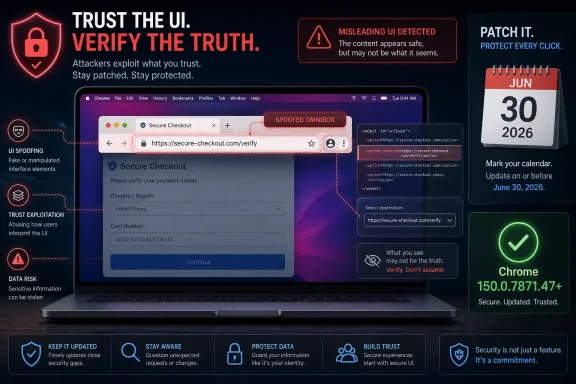
Google patched CVE-2026-14077 in Chrome 150.0.7871.47 for Mac on June 30, 2026, after documenting a low-severity flaw in the browser’s Select implementation that could let a crafted HTML page spoof the Omnibox, Chrome’s URL bar. The National Vulnerability Database published the entry the same day and later reflected CISA’s ADP scoring at 4.3, or medium, even though Chromium’s own severity label remains low. That mismatch is the story: this is not a memory-corruption monster, but it is a reminder that browser security is also about whether users can trust what the browser shows them.
The bug sits in a mundane corner of the web platform: the HTML select control, the drop-down interface almost every user has clicked without thinking. According to NVD’s description and Google’s Chrome Releases advisory, a remote attacker could use a crafted HTML page to misrepresent the contents of the Omnibox on affected Mac builds before 150.0.7871.47. In plainer English, Chrome’s most important trust indicator could be made to lie under specific conditions.
Browser vulnerabilities usually get sorted in the public imagination by how cinematic they sound. “Use after free” suggests exploit chains, sandbox escapes, and emergency patching; “incorrect security UI” sounds like a cosmetic blemish. CVE-2026-14077 belongs to the second category, but that does not make it unimportant.
The Omnibox is not merely a place to type searches. It is the browser’s identity panel, the place where users look to decide whether they are on their bank’s website, an employer’s single sign-on page, a Microsoft 365 tenant, a password manager vault, or a convincing fake. If that indicator can be spoofed, the attacker may not need to break encryption or steal cookies first; the attacker can instead make the user believe the wrong thing.
That is why CISA’s ADP enrichment gives the flaw a CVSS 3.1 score of 4.3, with network attack vector, low attack complexity, no privileges required, and required user interaction. The technical impact is limited to integrity, not confidentiality or availability. But integrity of the browser interface is a peculiar thing: once users cannot trust the interface, the security model becomes harder to explain and harder to defend.
Google’s own Chromium severity label is low, and that is a defensible engineering assessment. The bug does not appear to grant code execution, sandbox escape, or automatic compromise. But the security industry has learned the hard way that phishing is not a second-class threat simply because it uses persuasion rather than shellcode.
This distinction matters for administrators reading vulnerability dashboards. A scanner that sees a macOS CPE alongside Chrome might make the issue look like an Apple platform vulnerability. The operative fix, however, is Chrome 150.0.7871.47 or later on Mac. Updating macOS is good hygiene, but it is not the mitigation described by Google or NVD for this CVE.
Platform-specific browser bugs are common because modern browsers are not single, pure, cross-platform applications. They are stitched together from shared rendering engines, operating-system UI frameworks, GPU stacks, font systems, accessibility layers, sandboxing mechanisms, and native controls. The humble select menu can therefore behave differently on macOS than it does on Windows or Linux.
That platform specificity should also prevent overstatement. Windows admins do not need to treat CVE-2026-14077 as a Windows Chrome Omnibox spoofing bug unless new vendor information says otherwise. But Windows-heavy organizations often manage mixed fleets, and Chrome patch compliance is increasingly a cross-platform exercise rather than a Windows-only routine.
A drop-down menu is a deceptively privileged object. On macOS, form controls can involve native rendering behavior, focus changes, popovers, compositing quirks, and event timing that differ from the browser’s main document surface. If a crafted page can use those details to influence what the address bar appears to show, the result is not a classic data theft bug; it is a misrepresentation bug.
NVD maps the issue to CWE-451, “User Interface Misrepresentation of Critical Information.” That weakness class is almost purpose-built for browser UI spoofing: the system shows the user security-relevant information, but the presentation can be made misleading. In this case, the critical information is the page’s address.
This is exactly the kind of bug that can be dismissed in patch meetings because it does not sound like it burns down the endpoint. That would be a mistake. The browser’s visible identity signals are part of the authentication experience for humans, and humans remain in the loop for many attacks that succeed at scale.
That volume changes how organizations should read any single CVE in the batch. CVE-2026-14077 may be individually low severity in Chromium’s taxonomy, but the update train carrying it includes a long list of more severe memory-safety and implementation issues. Treating the Mac Omnibox spoof as the only reason to update would undersell the release.
The practical conclusion is straightforward: patch Chrome because Chrome 150’s stable update is a security release, not because every CVE in the bundle is equally frightening. Google’s disclosure cadence often puts a handful of named issues in public view while the underlying bug tracker links remain restricted. That is normal for Chrome, but it also means defenders rarely have complete exploitability detail on day one.
For managed environments, this reinforces a familiar pattern. The right question is not whether CVE-2026-14077 alone merits emergency action. The better question is whether any fleet should be running pre-150.0.7871.47 Chrome for Mac after a release that fixes hundreds of security issues.
The vector also says there is no confidentiality impact and no availability impact. That may be true for the vulnerability in isolation. The bug does not, on its face, leak secrets or crash systems. It changes what the user believes about the page.
That gap between direct technical impact and real-world attack value is why UI bugs remain tricky to score. A spoofed Omnibox may not steal a password by itself, but it can make the password prompt that follows look legitimate. It may not bypass multi-factor authentication by itself, but it can increase the success rate of a phishing flow aimed at session tokens, OAuth consent, or fake reauthentication.
The score of 4.3 should therefore be read as “not a standalone takeover bug,” not as “ignore this.” In enterprise risk terms, this is a phishing-assist vulnerability affecting a high-value user interface surface on a major browser. That is enough to justify prompt patching, especially on executive, developer, administrator, and help desk Macs.
For this CVE, the affected product described by Chrome is Google Chrome. The platform condition is Mac. A CPE model needs a way to express both, and NVD’s configuration does that through a Chrome application entry and a macOS operating-system entry. The patch action still belongs to Chrome.
If your scanner reports this against “Apple macOS” without making the Chrome dependency clear, the scanner is losing the plot. The actionable condition is a vulnerable Chrome build on macOS. The remediating version is Chrome 150.0.7871.47 or later.
This is not merely pedantry. Bad CPE interpretation creates bad operational behavior: Mac teams get tickets for an Apple OS update, browser teams assume it is not theirs, and the vulnerable Chrome binary remains in place. The fix is to normalize internally around product, platform, version, and remediation rather than blindly trusting the scanner’s top-line label.
That is why browser bugs are no longer just browser bugs. They touch identity, SaaS administration, endpoint compliance, data-loss prevention, and help desk triage. A MacBook running vulnerable Chrome may be the path into a tenant full of Windows devices.
There is also an Edge-adjacent lesson here, even if this particular CVE is described for Chrome on Mac. Chromium-based browsers share a great deal of code, but they do not all ship the same UI, platform integrations, or patch timelines. Administrators should avoid assuming that a Chrome CVE automatically maps one-to-one onto Edge, Brave, Vivaldi, or other Chromium-family browsers unless the vendor says so.
At the same time, the right muscle memory is consistent across browsers. Confirm the affected product and platform, read the vendor advisory, verify the installed version, and do not let low-severity labels delay routine browser security updates.
In managed fleets, the task is more concrete. Inventory macOS devices, find Chrome versions below 150.0.7871.47, force or prompt relaunch where appropriate, and verify after the fact. If Chrome is distributed through management tooling rather than Google’s updater, make sure the package source has advanced to the fixed version.
Security teams should also tune their messaging. Calling this “an Omnibox spoofing flaw” will make sense to browser specialists but may not land with executives or support staff. “A bug that could make Chrome’s address bar show misleading information on Mac” is more useful, and it helps explain why user vigilance alone is not a sufficient mitigation.
Users should still be reminded that browser UI can be attacked, but that message must be handled carefully. If every security advisory ends with “check the URL,” and then a URL-spoofing CVE appears, users may reasonably wonder what they are supposed to trust. The honest answer is layered defense: patched browsers, password managers that bind credentials to real origins, phishing-resistant MFA where possible, and cautious handling of unexpected login prompts.
That makes password managers more than convenience software in this scenario. They act as a second origin-checking system. If a user lands on a page that looks like a trusted service but the password manager refuses to autofill, that friction is a warning worth teaching.
Passkeys and phishing-resistant MFA can reduce risk further because they are designed around cryptographic origin binding rather than user visual inspection. They do not make UI spoofing irrelevant, because attackers can still pursue consent phishing, support scams, fake downloads, and session-theft workflows. But they reduce the value of a spoofed login page.
The broader lesson is that human-readable browser signals should not be the only thing protecting high-value accounts. CVE-2026-14077 is a modest bug, but it points directly at the limits of visual trust in a web ecosystem where attackers can make pages look like anything.
A low-severity browser UI bug can still be useful in a chain. Pair it with a convincing lure, a fake SSO screen, a malicious attachment download, or a support-themed scam, and the lack of code execution matters less. The attacker’s goal may be to harvest a token, trigger a user-approved action, or get a remote-access tool installed.
That does not mean CVE-2026-14077 should be sensationalized. There is no public indication in the NVD entry that it is being exploited in the wild, and CISA’s SSVC enrichment lists exploitation as none. It requires user interaction and has partial technical impact. Those facts should keep the response proportional.
Proportional, however, is not passive. A proportional response is to fold the fix into the normal Chrome security-update process, verify macOS coverage, and close the loop with inventory data. The organizations that struggle are the ones that let browser patching depend on user restarts and hope.
That distinction may matter in asset reporting. If your dashboard collapses 150.0.7871.46 and 150.0.7871.47 into the same “Chrome 150” bucket, it may not be granular enough for Mac remediation. Version precision is not bureaucracy; it is the difference between fixed and not fixed.
Administrators should also account for Chrome profiles and alternate installs. Developer workstations sometimes carry Chrome Stable, Beta, Canary, Chromium builds, and portable or user-local copies. A management console that sees only the default browser may miss the binary a user actually launches.
In WindowsForum terms, this is the same lesson we have learned from Windows cumulative updates, Edge releases, and Office click-to-run builds: the headline patch is not the endpoint state. The endpoint state is what the machine is actually running after install, restart, policy application, and user behavior have all had their say.
The bug sits in a mundane corner of the web platform: the HTML select control, the drop-down interface almost every user has clicked without thinking. According to NVD’s description and Google’s Chrome Releases advisory, a remote attacker could use a crafted HTML page to misrepresent the contents of the Omnibox on affected Mac builds before 150.0.7871.47. In plainer English, Chrome’s most important trust indicator could be made to lie under specific conditions.
 A Low-Severity Bug Can Still Attack the Browser’s Trust Contract
Browser vulnerabilities usually get sorted in the public imagination by how cinematic they sound. “Use after free” suggests exploit chains, sandbox escapes, and emergency patching; “incorrect security UI” sounds like a cosmetic blemish. CVE-2026-14077 belongs to the second category, but that does not make it unimportant.The Omnibox is not merely a place to type searches. It is the browser’s identity panel, the place where users look to decide whether they are on their bank’s website, an employer’s single sign-on page, a Microsoft 365 tenant, a password manager vault, or a convincing fake. If that indicator can be spoofed, the attacker may not need to break encryption or steal cookies first; the attacker can instead make the user believe the wrong thing.
That is why CISA’s ADP enrichment gives the flaw a CVSS 3.1 score of 4.3, with network attack vector, low attack complexity, no privileges required, and required user interaction. The technical impact is limited to integrity, not confidentiality or availability. But integrity of the browser interface is a peculiar thing: once users cannot trust the interface, the security model becomes harder to explain and harder to defend.
Google’s own Chromium severity label is low, and that is a defensible engineering assessment. The bug does not appear to grant code execution, sandbox escape, or automatic compromise. But the security industry has learned the hard way that phishing is not a second-class threat simply because it uses persuasion rather than shellcode.
The Mac-Only Scope Narrows the Blast Radius, Not the Lesson
CVE-2026-14077 is described as affecting Google Chrome on Mac prior to version 150.0.7871.47. NVD’s initial analysis lists the vulnerable Chrome application version range and ties it to Apple macOS as the operating-system condition. That does not mean macOS itself is the vulnerable product in the same way Chrome is; it means the exposed Chrome behavior is platform-specific.This distinction matters for administrators reading vulnerability dashboards. A scanner that sees a macOS CPE alongside Chrome might make the issue look like an Apple platform vulnerability. The operative fix, however, is Chrome 150.0.7871.47 or later on Mac. Updating macOS is good hygiene, but it is not the mitigation described by Google or NVD for this CVE.
Platform-specific browser bugs are common because modern browsers are not single, pure, cross-platform applications. They are stitched together from shared rendering engines, operating-system UI frameworks, GPU stacks, font systems, accessibility layers, sandboxing mechanisms, and native controls. The humble select menu can therefore behave differently on macOS than it does on Windows or Linux.
That platform specificity should also prevent overstatement. Windows admins do not need to treat CVE-2026-14077 as a Windows Chrome Omnibox spoofing bug unless new vendor information says otherwise. But Windows-heavy organizations often manage mixed fleets, and Chrome patch compliance is increasingly a cross-platform exercise rather than a Windows-only routine.
The Select Element Is Boring Until It Crosses Into Browser Chrome
The interesting part of this vulnerability is not that HTML has a select element. It is that a page-controlled interface element apparently interacted badly with the browser’s own security presentation. The web platform has always required a hard line between content controlled by a website and chrome controlled by the browser. CVE-2026-14077 is another entry in the long catalog of bugs where that line becomes blurry.A drop-down menu is a deceptively privileged object. On macOS, form controls can involve native rendering behavior, focus changes, popovers, compositing quirks, and event timing that differ from the browser’s main document surface. If a crafted page can use those details to influence what the address bar appears to show, the result is not a classic data theft bug; it is a misrepresentation bug.
NVD maps the issue to CWE-451, “User Interface Misrepresentation of Critical Information.” That weakness class is almost purpose-built for browser UI spoofing: the system shows the user security-relevant information, but the presentation can be made misleading. In this case, the critical information is the page’s address.
This is exactly the kind of bug that can be dismissed in patch meetings because it does not sound like it burns down the endpoint. That would be a mistake. The browser’s visible identity signals are part of the authentication experience for humans, and humans remain in the loop for many attacks that succeed at scale.
Google’s June 30 Chrome 150 Update Was Much Bigger Than This One CVE
CVE-2026-14077 arrived as part of a very large Chrome 150 stable-channel update. Google’s Chrome Releases blog said on June 30 that Chrome 150 had been promoted to stable for Windows, Mac, and Linux, with version 150.0.7871.46 for Linux and 150.0.7871.46/.47 for Windows and Mac. The same post said the update included 433 security fixes and that bug details may remain restricted until most users are patched.That volume changes how organizations should read any single CVE in the batch. CVE-2026-14077 may be individually low severity in Chromium’s taxonomy, but the update train carrying it includes a long list of more severe memory-safety and implementation issues. Treating the Mac Omnibox spoof as the only reason to update would undersell the release.
The practical conclusion is straightforward: patch Chrome because Chrome 150’s stable update is a security release, not because every CVE in the bundle is equally frightening. Google’s disclosure cadence often puts a handful of named issues in public view while the underlying bug tracker links remain restricted. That is normal for Chrome, but it also means defenders rarely have complete exploitability detail on day one.
For managed environments, this reinforces a familiar pattern. The right question is not whether CVE-2026-14077 alone merits emergency action. The better question is whether any fleet should be running pre-150.0.7871.47 Chrome for Mac after a release that fixes hundreds of security issues.
CVSS Captures the Mechanics, Not the Social Engineering
CISA’s ADP vector says the attack is network reachable, low complexity, requires no privileges, and needs user interaction. That is a compact way of saying an attacker does not need local access or an account, but does need the victim to land on or interact with crafted web content. For a browser UI spoof, that is hardly a limiting condition; getting users to open pages is the web’s default state.The vector also says there is no confidentiality impact and no availability impact. That may be true for the vulnerability in isolation. The bug does not, on its face, leak secrets or crash systems. It changes what the user believes about the page.
That gap between direct technical impact and real-world attack value is why UI bugs remain tricky to score. A spoofed Omnibox may not steal a password by itself, but it can make the password prompt that follows look legitimate. It may not bypass multi-factor authentication by itself, but it can increase the success rate of a phishing flow aimed at session tokens, OAuth consent, or fake reauthentication.
The score of 4.3 should therefore be read as “not a standalone takeover bug,” not as “ignore this.” In enterprise risk terms, this is a phishing-assist vulnerability affecting a high-value user interface surface on a major browser. That is enough to justify prompt patching, especially on executive, developer, administrator, and help desk Macs.
The CPE Detail Is Awkward but Understandable
The user-facing NVD entry includes a configuration that effectively combines Google Chrome versions before 150.0.7871.47 with Apple macOS. This is the kind of CPE modeling that often raises eyebrows because it can look as if macOS is itself the vulnerable application. In vulnerability management systems, that distinction can affect ticket routing, exception logic, and executive reporting.For this CVE, the affected product described by Chrome is Google Chrome. The platform condition is Mac. A CPE model needs a way to express both, and NVD’s configuration does that through a Chrome application entry and a macOS operating-system entry. The patch action still belongs to Chrome.
If your scanner reports this against “Apple macOS” without making the Chrome dependency clear, the scanner is losing the plot. The actionable condition is a vulnerable Chrome build on macOS. The remediating version is Chrome 150.0.7871.47 or later.
This is not merely pedantry. Bad CPE interpretation creates bad operational behavior: Mac teams get tickets for an Apple OS update, browser teams assume it is not theirs, and the vulnerable Chrome binary remains in place. The fix is to normalize internally around product, platform, version, and remediation rather than blindly trusting the scanner’s top-line label.
For WindowsForum Readers, the Windows Angle Is Fleet Reality
A Chrome-on-Mac CVE may look outside the WindowsForum comfort zone, but modern Windows shops are rarely pure Windows shops. Microsoft 365, Entra ID, Defender, Intune, Chrome Enterprise, Edge, and macOS endpoints frequently coexist in the same identity and device-management fabric. A spoofed URL bar on a Mac can still become a compromised Microsoft account, a stolen admin session, or a malicious OAuth grant inside an otherwise Windows-centric organization.That is why browser bugs are no longer just browser bugs. They touch identity, SaaS administration, endpoint compliance, data-loss prevention, and help desk triage. A MacBook running vulnerable Chrome may be the path into a tenant full of Windows devices.
There is also an Edge-adjacent lesson here, even if this particular CVE is described for Chrome on Mac. Chromium-based browsers share a great deal of code, but they do not all ship the same UI, platform integrations, or patch timelines. Administrators should avoid assuming that a Chrome CVE automatically maps one-to-one onto Edge, Brave, Vivaldi, or other Chromium-family browsers unless the vendor says so.
At the same time, the right muscle memory is consistent across browsers. Confirm the affected product and platform, read the vendor advisory, verify the installed version, and do not let low-severity labels delay routine browser security updates.
The Patch Is Simple; Proving It Landed Is the Work
For unmanaged users, the mitigation is the familiar one: update Chrome on Mac and relaunch the browser. Chrome’s auto-update machinery is generally reliable, but “over the coming days/weeks,” the phrase Google used for rollout timing in its stable-channel post, is not the same as “every endpoint is fixed today.” A browser left open for days can remain on an old build until restart.In managed fleets, the task is more concrete. Inventory macOS devices, find Chrome versions below 150.0.7871.47, force or prompt relaunch where appropriate, and verify after the fact. If Chrome is distributed through management tooling rather than Google’s updater, make sure the package source has advanced to the fixed version.
Security teams should also tune their messaging. Calling this “an Omnibox spoofing flaw” will make sense to browser specialists but may not land with executives or support staff. “A bug that could make Chrome’s address bar show misleading information on Mac” is more useful, and it helps explain why user vigilance alone is not a sufficient mitigation.
Users should still be reminded that browser UI can be attacked, but that message must be handled carefully. If every security advisory ends with “check the URL,” and then a URL-spoofing CVE appears, users may reasonably wonder what they are supposed to trust. The honest answer is layered defense: patched browsers, password managers that bind credentials to real origins, phishing-resistant MFA where possible, and cautious handling of unexpected login prompts.
Password Managers and Passkeys Blunt the Sharpest Edge
Omnibox spoofing attacks are strongest when the user is the only verifier. If the browser appears to show a trusted domain and the page asks for credentials, a user may comply. But a properly integrated password manager should not offer saved credentials to the wrong origin, even if the address bar presentation is misleading.That makes password managers more than convenience software in this scenario. They act as a second origin-checking system. If a user lands on a page that looks like a trusted service but the password manager refuses to autofill, that friction is a warning worth teaching.
Passkeys and phishing-resistant MFA can reduce risk further because they are designed around cryptographic origin binding rather than user visual inspection. They do not make UI spoofing irrelevant, because attackers can still pursue consent phishing, support scams, fake downloads, and session-theft workflows. But they reduce the value of a spoofed login page.
The broader lesson is that human-readable browser signals should not be the only thing protecting high-value accounts. CVE-2026-14077 is a modest bug, but it points directly at the limits of visual trust in a web ecosystem where attackers can make pages look like anything.
The Real Risk Is Complacency Around “Low” Browser Bugs
Security teams live under alert fatigue, and severity labels are supposed to help. Nobody can treat every low-severity CVE as a midnight incident. But browsers occupy a special category because they are both application runtime and user decision surface.A low-severity browser UI bug can still be useful in a chain. Pair it with a convincing lure, a fake SSO screen, a malicious attachment download, or a support-themed scam, and the lack of code execution matters less. The attacker’s goal may be to harvest a token, trigger a user-approved action, or get a remote-access tool installed.
That does not mean CVE-2026-14077 should be sensationalized. There is no public indication in the NVD entry that it is being exploited in the wild, and CISA’s SSVC enrichment lists exploitation as none. It requires user interaction and has partial technical impact. Those facts should keep the response proportional.
Proportional, however, is not passive. A proportional response is to fold the fix into the normal Chrome security-update process, verify macOS coverage, and close the loop with inventory data. The organizations that struggle are the ones that let browser patching depend on user restarts and hope.
The Chrome 150 Lesson for Admins Is Written in Version Numbers
The version threshold is the cleanest operational fact in the whole advisory. Chrome on Mac before 150.0.7871.47 is affected; Chrome 150.0.7871.47 or later contains the fix. Google’s stable-channel release also moved Windows and Mac to 150.0.7871.46/.47 and Linux to 150.0.7871.46, but this specific CVE’s NVD description names Mac before .47.That distinction may matter in asset reporting. If your dashboard collapses 150.0.7871.46 and 150.0.7871.47 into the same “Chrome 150” bucket, it may not be granular enough for Mac remediation. Version precision is not bureaucracy; it is the difference between fixed and not fixed.
Administrators should also account for Chrome profiles and alternate installs. Developer workstations sometimes carry Chrome Stable, Beta, Canary, Chromium builds, and portable or user-local copies. A management console that sees only the default browser may miss the binary a user actually launches.
In WindowsForum terms, this is the same lesson we have learned from Windows cumulative updates, Edge releases, and Office click-to-run builds: the headline patch is not the endpoint state. The endpoint state is what the machine is actually running after install, restart, policy application, and user behavior have all had their say.
The Useful Notes to Carry Into Patch Triage
CVE-2026-14077 is not the loudest bug in Chrome 150, but it is one of the more conceptually revealing ones. It shows how a small UI implementation issue can erode a browser trust signal that users and security training both depend on.- Chrome for Mac users should be on version 150.0.7871.47 or later to receive the fix for CVE-2026-14077.
- The vulnerability is an Omnibox spoofing issue tied to Chrome’s Select implementation, not a macOS operating-system flaw in the usual sense.
- Chromium rated the issue low severity, while CISA’s ADP enrichment scored it as CVSS 3.1 4.3 medium because it can affect UI integrity with user interaction.
- There is no public indication in NVD’s entry that the bug is being actively exploited, but phishing-assist bugs still deserve timely browser patching.
- Vulnerability-management teams should verify exact Chrome build numbers on macOS rather than relying on broad “Chrome 150” labels.
- Password managers, passkeys, and phishing-resistant MFA reduce the practical danger of URL-bar spoofing by moving trust away from visual inspection alone.
References
- Primary source: NVD / Chromium
Published: 2026-07-03T07:00:02-07:00
NVD - CVE-2026-14077
 nvd.nist.gov
- Security advisory: MSRC
Published: 2026-07-03T07:00:02-07:00
Original feed URL
Security Update Guide - Microsoft Security Response Center
 msrc.microsoft.com
- Related coverage: malwarebytes.com
Chrome needs another whopper update to fix 382 security bugs | Malwarebytes
Google released a huge update of 382 security fixes, 15 of which were rated as critical. So, it's time to update againwww.malwarebytes.com - Related coverage: edelivery.windriver.com
Wind River Linux End-April 2016 Security Bulletin
Wind River Linux End-April 2016 Security Bulletinedelivery.windriver.com
