

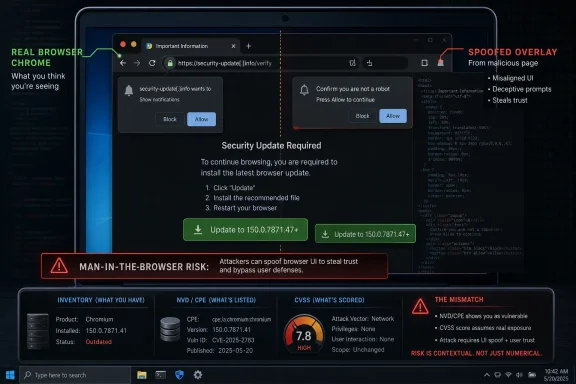
Google Chrome CVE-2026-14110 was published by NVD on June 30, 2026, after Chrome reported that versions before 150.0.7871.47 could let a remote attacker spoof browser UI through a crafted HTML page because of an inappropriate DarkMode implementation. The bug is rated low by Chromium but scored 4.3 medium under CVSS 3.1 by both NIST and CISA’s ADP enrichment. That mismatch is the story: this is not a panic-grade browser hole, but it is exactly the kind of small UI boundary failure that enterprise patching programs should not dismiss. The visible CPE entry for
The vulnerability record says the flaw sits in Chrome’s DarkMode implementation, where a crafted HTML page could cause a user-interface spoofing condition in versions before 150.0.7871.47. Google’s Chrome Releases blog tied the fix to the June 30 Stable Channel update for desktop, which moved Windows and macOS users to 150.0.7871.46/.47 and Linux users to 150.0.7871.46, according to Google’s release note and subsequent vulnerability database enrichment.
That wording matters because UI spoofing is not the same class of event as a V8 memory corruption bug, a sandbox escape, or a full remote code execution chain. The vulnerability does not claim confidentiality impact, code execution, or availability loss. It claims integrity impact: the user may be shown something that misrepresents what the browser is doing.
For home users, that sounds abstract. For security teams, it is familiar territory. Browser chrome — the address bar, permission prompts, page information panels, lock indicators, dark-mode rendering boundaries, and trusted UI surfaces — is where users decide whether a page is legitimate, whether a prompt is browser-owned, and whether a click is safe.
CVE-2026-14110 is therefore less interesting as a standalone exploit and more interesting as a reminder that visual trust is now a browser security boundary. Attackers do not always need to break the sandbox if they can persuade the user that the browser itself is asking for the next click.
The CPE shown by NVD,
There are two caveats. First, Chromium-based browsers may inherit the underlying code path if they carry the affected Chromium change, but they are not automatically covered by this specific Chrome CPE. Microsoft Edge, Brave, Vivaldi, Opera, and other Chromium-derived browsers usually receive their own advisories, version numbers, and CPE mappings when vendors publish downstream impact.
Second, Linux distribution packages may track the vulnerability separately under distro advisories. Ubuntu and Debian-style trackers often mirror Chromium CVEs into their own package ecosystems, but that does not mean NVD should necessarily add every downstream distro package to the Chrome CVE record. It means asset owners need to map the CVE through both vendor advisories and their own software inventory.
So the short answer is: no obvious Chrome CPE is missing from the NVD data as presented. The longer answer is that downstream Chromium consumers remain a separate inventory problem, and NVD’s CPE model has never been a complete substitute for vendor-aware patch management.
That is a sober score. It does not say an attacker can read files, steal cookies, crash systems, or execute arbitrary code. It says a malicious web page may be able to misrepresent browser UI in a way that affects user trust or decision-making.
Chromium’s low severity label likely reflects the same practical limitation: the attack needs a user and produces spoofing rather than direct compromise. But CVSS is doing what CVSS often does for browser UI issues: it translates “this does not pop calc” into a medium-risk condition because the web is remote, unauthenticated, and user-facing by default.
Neither label is wrong. They are optimized for different audiences. Chromium’s severity helps prioritize engineering urgency inside a massive release train. CVSS helps vulnerability managers decide whether an exposed asset with outdated Chrome needs remediation inside a compliance and risk workflow.
Modern browsers do not merely invert colors. They negotiate system theme, website CSS, forced colors, contrast modes, browser-owned UI surfaces, form controls, scrollbars, permission prompts, and site-rendered elements that intentionally resemble native interface. Somewhere inside that stack, CVE-2026-14110 found enough confusion for Chrome to treat it as a security issue.
The CWE mappings point in that direction. NIST associates the issue with improper restriction of rendered UI layers or frames, while CISA ADP maps it to user-interface misrepresentation of critical information. Those are not memory-safety categories; they are trust-boundary categories.
That distinction is important for WindowsForum readers because Windows users have lived through years of UI deception: fake update prompts, fake Defender alerts, fake CAPTCHA pages, fake Microsoft sign-in dialogs, fake browser permission requests, and tech-support scam pages designed to look operating-system native. A browser flaw that makes such fakery more convincing does not need to be dramatic to be useful.
In other words, DarkMode is only the named component. The real attack surface is the user’s ability to tell the difference between page content and browser authority.
That context matters because a single low-severity UI spoofing bug is easy to lose inside a bulk patch release. Chrome updates silently for many consumer users, but enterprise fleets, kiosk systems, lab machines, VDI images, and controlled browser channels often run behind. A bug like this becomes less about “Did Google ship a fix?” and more about “Did your managed estate actually ingest it?”
For Windows admins, the operational question is straightforward. Chrome installations below 150.0.7871.47 on Windows and macOS should be treated as needing the June 30 Stable Channel update. Linux Chrome packages should be checked against the vendor’s 150.0.7871.46 build and the distribution’s own package metadata.
Microsoft Edge deserves separate handling. Edge is Chromium-based, but Edge does not become affected merely because Chrome has a CVE entry. Admins should watch Microsoft’s Edge release notes and security update guide for the corresponding Chromium merge and Edge build, rather than forcing Chrome’s CPE onto Microsoft’s browser.
This is where vulnerability scanners can mislead. A scanner that keys only off the Chrome CPE may correctly identify Google Chrome but miss Chromium-derived browsers. A scanner that overgeneralizes may incorrectly flag products before their vendor has confirmed impact. Both failure modes create work for IT teams.
That is why low-severity UI bugs have a disproportionate place in attack chains. They are rarely the final exploit. They are the persuasion layer before the exploit, the credential prompt before the session theft, or the fake permission surface before the user grants access to something more dangerous.
CISA’s SSVC enrichment says exploitation is “none,” automatable is “no,” and technical impact is “partial.” That is reassuring, but not a free pass. “No known exploitation” is a point-in-time observation, not a durable guarantee.
For defenders, the best response is boring and effective: update Chrome, verify the deployed version, and keep user-facing browser education grounded in concrete cues. Users should be trained that web pages can mimic browser prompts, that permission requests deserve skepticism, and that the address bar remains the first place to verify context.
Chromium is not one product. It is a shared engine, a browser family tree, a vendor supply chain, and a patch-propagation race. Google Chrome may fix a bug on Monday, Microsoft Edge may absorb the relevant Chromium changes on its own cadence, Linux distributions may package Chromium differently, and embedded apps may carry stale Chromium components long after desktop browsers have moved on.
CPEs struggle with that reality. They describe products, not code lineage. They help scanners match installed software, but they do not always express whether a vulnerable component has been inherited, modified, disabled, or patched downstream.
That does not mean CPE is useless. It means CPE should be treated as an index, not a verdict. For a Chrome CVE like this one, the presence of the Google Chrome CPE answers the narrow NVD question. It does not answer whether every Chromium-based application in your environment is safe.
For managed Windows environments, the task is more procedural. Confirm the stable-channel version in endpoint management, validate scanner detection logic, and make sure stale Chrome installations on shared systems, gold images, and seldom-used admin workstations are not silently left behind.
Security teams should also avoid inflating the bug into something it is not. CVE-2026-14110 is not described as remote code execution. It is not reported as exploited in the wild. It does not appear in the Known Exploited Vulnerabilities catalog based on the submitted data.
But dismissing it because Chromium called it low severity would also be lazy. UI spoofing is one of the web’s oldest and most durable attack surfaces, and browser vendors continue to patch it because users continue to make trust decisions based on pixels.
cpe:2.3:a:google:chrome:*:*:*:*:*:*:*:* up to but excluding 150.0.7871.47 appears to be the expected one, not an obvious omission.
 A Low-Severity Chrome Bug Still Points at a High-Value Target
The vulnerability record says the flaw sits in Chrome’s DarkMode implementation, where a crafted HTML page could cause a user-interface spoofing condition in versions before 150.0.7871.47. Google’s Chrome Releases blog tied the fix to the June 30 Stable Channel update for desktop, which moved Windows and macOS users to 150.0.7871.46/.47 and Linux users to 150.0.7871.46, according to Google’s release note and subsequent vulnerability database enrichment.That wording matters because UI spoofing is not the same class of event as a V8 memory corruption bug, a sandbox escape, or a full remote code execution chain. The vulnerability does not claim confidentiality impact, code execution, or availability loss. It claims integrity impact: the user may be shown something that misrepresents what the browser is doing.
For home users, that sounds abstract. For security teams, it is familiar territory. Browser chrome — the address bar, permission prompts, page information panels, lock indicators, dark-mode rendering boundaries, and trusted UI surfaces — is where users decide whether a page is legitimate, whether a prompt is browser-owned, and whether a click is safe.
CVE-2026-14110 is therefore less interesting as a standalone exploit and more interesting as a reminder that visual trust is now a browser security boundary. Attackers do not always need to break the sandbox if they can persuade the user that the browser itself is asking for the next click.
NVD’s CPE Entry Looks Sparse Because This Is a Chrome-Specific Record
The user-submitted question — “Are we missing a CPE here?” — is the right one, because NVD entries often lag, flatten, or under-describe affected platforms. In this case, however, the visible CPE configuration appears aligned with the vulnerability statement: Google Chrome before 150.0.7871.47 is affected.The CPE shown by NVD,
cpe:2.3:a:google:chrome:*:*:*:*:*:*:*:* with versions up to but excluding 150.0.7871.47, is the conventional application-level CPE for Chrome. Since the flaw is described in Google Chrome rather than the Chromium open-source project as a separately packaged product, NVD’s use of the Google Chrome application CPE is not surprising.There are two caveats. First, Chromium-based browsers may inherit the underlying code path if they carry the affected Chromium change, but they are not automatically covered by this specific Chrome CPE. Microsoft Edge, Brave, Vivaldi, Opera, and other Chromium-derived browsers usually receive their own advisories, version numbers, and CPE mappings when vendors publish downstream impact.
Second, Linux distribution packages may track the vulnerability separately under distro advisories. Ubuntu and Debian-style trackers often mirror Chromium CVEs into their own package ecosystems, but that does not mean NVD should necessarily add every downstream distro package to the Chrome CVE record. It means asset owners need to map the CVE through both vendor advisories and their own software inventory.
So the short answer is: no obvious Chrome CPE is missing from the NVD data as presented. The longer answer is that downstream Chromium consumers remain a separate inventory problem, and NVD’s CPE model has never been a complete substitute for vendor-aware patch management.
The Severity Labels Tell Two Different Stories
Chromium marks CVE-2026-14110 as low severity. NIST and CISA ADP both assign CVSS 3.1 score 4.3, medium, with the vectorAV:N/AC:L/PR:N/UI:R/S:U/C:N/I:L/A:N. That vector says the attack is network-accessible, low complexity, requires no privileges, requires user interaction, has unchanged scope, and produces low integrity impact only.That is a sober score. It does not say an attacker can read files, steal cookies, crash systems, or execute arbitrary code. It says a malicious web page may be able to misrepresent browser UI in a way that affects user trust or decision-making.
Chromium’s low severity label likely reflects the same practical limitation: the attack needs a user and produces spoofing rather than direct compromise. But CVSS is doing what CVSS often does for browser UI issues: it translates “this does not pop calc” into a medium-risk condition because the web is remote, unauthenticated, and user-facing by default.
Neither label is wrong. They are optimized for different audiences. Chromium’s severity helps prioritize engineering urgency inside a massive release train. CVSS helps vulnerability managers decide whether an exposed asset with outdated Chrome needs remediation inside a compliance and risk workflow.
Dark Mode Is Not Just a Paint Job Anymore
Dark mode began as a preference. It has become a rendering contract.Modern browsers do not merely invert colors. They negotiate system theme, website CSS, forced colors, contrast modes, browser-owned UI surfaces, form controls, scrollbars, permission prompts, and site-rendered elements that intentionally resemble native interface. Somewhere inside that stack, CVE-2026-14110 found enough confusion for Chrome to treat it as a security issue.
The CWE mappings point in that direction. NIST associates the issue with improper restriction of rendered UI layers or frames, while CISA ADP maps it to user-interface misrepresentation of critical information. Those are not memory-safety categories; they are trust-boundary categories.
That distinction is important for WindowsForum readers because Windows users have lived through years of UI deception: fake update prompts, fake Defender alerts, fake CAPTCHA pages, fake Microsoft sign-in dialogs, fake browser permission requests, and tech-support scam pages designed to look operating-system native. A browser flaw that makes such fakery more convincing does not need to be dramatic to be useful.
In other words, DarkMode is only the named component. The real attack surface is the user’s ability to tell the difference between page content and browser authority.
The Browser Patch Train Is Moving Faster Than Human Attention
CVE-2026-14110 landed in a Chrome 150 update that security watchers described as unusually large. Malwarebytes noted that the June 30 desktop update addressed hundreds of security fixes, while Google’s own Stable Channel announcement listed the new desktop builds and the usual staged rollout language.That context matters because a single low-severity UI spoofing bug is easy to lose inside a bulk patch release. Chrome updates silently for many consumer users, but enterprise fleets, kiosk systems, lab machines, VDI images, and controlled browser channels often run behind. A bug like this becomes less about “Did Google ship a fix?” and more about “Did your managed estate actually ingest it?”
For Windows admins, the operational question is straightforward. Chrome installations below 150.0.7871.47 on Windows and macOS should be treated as needing the June 30 Stable Channel update. Linux Chrome packages should be checked against the vendor’s 150.0.7871.46 build and the distribution’s own package metadata.
Microsoft Edge deserves separate handling. Edge is Chromium-based, but Edge does not become affected merely because Chrome has a CVE entry. Admins should watch Microsoft’s Edge release notes and security update guide for the corresponding Chromium merge and Edge build, rather than forcing Chrome’s CPE onto Microsoft’s browser.
This is where vulnerability scanners can mislead. A scanner that keys only off the Chrome CPE may correctly identify Google Chrome but miss Chromium-derived browsers. A scanner that overgeneralizes may incorrectly flag products before their vendor has confirmed impact. Both failure modes create work for IT teams.
UI Spoofing Is the Attack Class That Thrives Between Patches
The uncomfortable truth is that UI spoofing often succeeds even without a CVE. Phishing kits, fake browser updates, malicious push-notification prompts, OAuth consent abuse, and credential-harvesting pages already exploit user expectations. A browser bug merely narrows the gap between fake and believable.That is why low-severity UI bugs have a disproportionate place in attack chains. They are rarely the final exploit. They are the persuasion layer before the exploit, the credential prompt before the session theft, or the fake permission surface before the user grants access to something more dangerous.
CISA’s SSVC enrichment says exploitation is “none,” automatable is “no,” and technical impact is “partial.” That is reassuring, but not a free pass. “No known exploitation” is a point-in-time observation, not a durable guarantee.
For defenders, the best response is boring and effective: update Chrome, verify the deployed version, and keep user-facing browser education grounded in concrete cues. Users should be trained that web pages can mimic browser prompts, that permission requests deserve skepticism, and that the address bar remains the first place to verify context.
The CPE Question Exposes a Bigger Inventory Weakness
The NVD record shows one Chrome CPE. That is probably sufficient for the vulnerability as assigned. But the fact that a reasonable reader has to ask whether something is missing shows the limits of CPE-driven vulnerability management in the Chromium era.Chromium is not one product. It is a shared engine, a browser family tree, a vendor supply chain, and a patch-propagation race. Google Chrome may fix a bug on Monday, Microsoft Edge may absorb the relevant Chromium changes on its own cadence, Linux distributions may package Chromium differently, and embedded apps may carry stale Chromium components long after desktop browsers have moved on.
CPEs struggle with that reality. They describe products, not code lineage. They help scanners match installed software, but they do not always express whether a vulnerable component has been inherited, modified, disabled, or patched downstream.
That does not mean CPE is useless. It means CPE should be treated as an index, not a verdict. For a Chrome CVE like this one, the presence of the Google Chrome CPE answers the narrow NVD question. It does not answer whether every Chromium-based application in your environment is safe.
The Practical Read Is Narrow, But Not Negligible
For most Windows users, the fix is simple: Chrome should be at 150.0.7871.47 or later. Chrome normally updates automatically, but the reliable manual check remains the browser’s About Chrome page, where the update process can be triggered and the browser relaunched.For managed Windows environments, the task is more procedural. Confirm the stable-channel version in endpoint management, validate scanner detection logic, and make sure stale Chrome installations on shared systems, gold images, and seldom-used admin workstations are not silently left behind.
Security teams should also avoid inflating the bug into something it is not. CVE-2026-14110 is not described as remote code execution. It is not reported as exploited in the wild. It does not appear in the Known Exploited Vulnerabilities catalog based on the submitted data.
But dismissing it because Chromium called it low severity would also be lazy. UI spoofing is one of the web’s oldest and most durable attack surfaces, and browser vendors continue to patch it because users continue to make trust decisions based on pixels.
Chrome 150’s DarkMode Fix Leaves a Clear Admin Checklist
The meaningful work here is not dramatic, but it is concrete. CVE-2026-14110 is a useful test of whether an organization can handle the quiet vulnerabilities that do not trigger executive panic but still deserve closure.- Chrome installations earlier than 150.0.7871.47 should be updated on Windows and macOS systems.
- Linux Chrome deployments should be checked against Google’s 150.0.7871.46 stable build and any distribution-specific Chromium package advisories.
- The NVD CPE entry for Google Chrome appears appropriate for the Chrome-specific vulnerability record.
- Chromium-based browsers should be tracked through their own vendor advisories rather than assumed safe or vulnerable solely from the Chrome CPE.
- The practical risk is UI deception, not direct code execution, data theft, or system crash based on the published description.
- Security teams should verify scanner results against actual browser versions because CPE matching can under-report or overgeneralize Chromium-family exposure.
References
- Primary source: NVD / Chromium
Published: 2026-07-03T07:00:38-07:00
NVD - CVE-2026-14110
 nvd.nist.gov
- Security advisory: MSRC
Published: 2026-07-03T07:00:38-07:00
Original feed URL
Security Update Guide - Microsoft Security Response Center
 msrc.microsoft.com
- Related coverage: cvefeed.io
CVE-2026-14110 - Google Chrome UI Spoofing Vulnerability
Inappropriate implementation in DarkMode in Google Chrome prior to 150.0.7871.47 allowed a remote attacker to perform UI spoofing via a crafted HTML page. (Chromium security severity: Low)cvefeed.io
