

Google logged CVE-2026-14134 on June 30, 2026, as a low-severity Chrome for Android Autofill flaw fixed before version 150.0.7871.47, where a crafted HTML page could let a remote attacker spoof part of the browser’s user interface. The National Vulnerability Database entry is still undergoing enrichment, while CISA’s automated enrichment has assigned it a medium CVSS 3.1 score of 4.3 and mapped it to UI misrepresentation. That gap between Google’s “Low” and CISA’s “Medium” is the story: not because this bug is the next emergency, but because mobile browser trust keeps being chipped away at the seams. For WindowsForum readers, the practical lesson is less “panic over Autofill” than “treat Chrome 150 as a security boundary across every platform you manage.”
CVE-2026-14134 is not a memory-corruption monster, not a sandbox escape, and not one of the critical Chrome flaws that usually justify breathless update-now headlines. According to the NVD record sourced from Chrome, the bug sits in Autofill on Chrome for Android and allows UI spoofing through a crafted HTML page in versions before 150.0.7871.47. Google’s own Chromium severity rating calls it Low.
That classification matters. A Low bug generally means limited impact, meaningful user interaction, or a narrow attack surface. CISA’s enrichment paints a slightly sterner picture, scoring it 4.3 under CVSS 3.1 with network attack vector, low complexity, no privileges required, user interaction required, no confidentiality impact, low integrity impact, and no availability impact.
The mismatch is not a contradiction so much as a reminder that security labels describe different things. Google’s severity rating reflects Chromium’s internal view of exploitability and product risk. CVSS tries to normalize the impact across vendors, asset owners, and vulnerability databases. A UI spoofing flaw can be “Low” to the browser team and still meaningful to an enterprise risk register because it attacks the interface users rely on to make decisions.
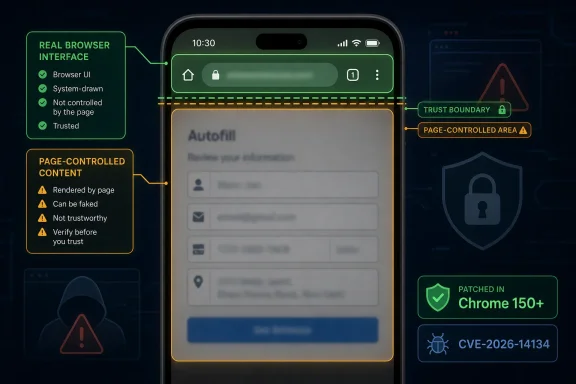
Autofill is not just a convenience feature anymore. It is a credential, payment, address, and identity assistant embedded into the most-used application on many devices. When Autofill gets involved in a web interaction, users are implicitly trusting Chrome to distinguish the browser’s own signals from the page’s content. That trust boundary is exactly where UI spoofing bugs become interesting.
For CVE-2026-14134, the public description says a crafted HTML page could trigger the issue in Chrome for Android’s Autofill implementation. The available public record does not say that attackers can steal saved passwords automatically, bypass Android permissions, or escape Chrome’s sandbox. It says integrity impact is low and user interaction is required.
That distinction should prevent overstatement. This is not a remote code execution flaw, and there is no public indication in the NVD or CISA enrichment that it is being exploited in the wild. CISA’s SSVC data marks exploitation as “none,” automatable as “no,” and technical impact as “partial.” That is the profile of a bug to patch promptly, not a bug that demands incident response by itself.
Still, UI spoofing is not harmless just because it lacks shellcode. Modern phishing succeeds by eroding the user’s ability to tell which surface is trustworthy. If a malicious page can cause Autofill-related browser UI to be misrepresented, the attack does not need to compromise Chrome outright. It can instead nudge a user into trusting the wrong prompt, misreading the source of an action, or completing a sensitive interaction under false assumptions.
This is why Autofill bugs deserve more attention than their severity labels sometimes imply. Autofill sits at the intersection of browser UI, saved secrets, and user habit. People do not scrutinize Autofill prompts like firewall logs; they tap them reflexively. Attackers love reflexes.
That is not unusual in Chrome land. Different platforms can carry different stable build numbers while sharing the same security train. For administrators, the exact lesson is simple: devices should be on Chrome 150’s fixed branch or later, not merely “some recent Chrome.” Version-checking matters because browser update cadence has become too fast, and the public CVE language is often platform-specific.
The Chrome Releases blog is the authoritative source for the release train, and Google’s June 30 update is the origin cited in the CVE record. The public issue tracker entry remains restricted or minimally informative, which is also normal for Chrome security bugs while Google waits for most users to update. That lack of detail can be frustrating for defenders, but it is part of the bargain: less exploit guidance in exchange for broader patch adoption.
On managed Windows fleets, this particular CVE may look irrelevant because the affected product text emphasizes Android. But mixed-device environments rarely have the luxury of platform purity. The same organization that manages Windows laptops through Intune, Configuration Manager, or Group Policy may also allow Android phones with Chrome into Microsoft 365, Google Workspace, SSO portals, VPN enrollment, or help-desk workflows.
That is where a “Chrome for Android” Autofill spoofing bug becomes a WindowsForum story. The compromise path might start on a phone, but the account it touches may unlock a Windows desktop session, a cloud console, a remote management tool, or a privileged mailbox. Security boundaries are no longer aligned with operating-system boundaries.
That disappearance is rational. Security teams triage by exploitability, impact, exposure, and operational cost. If a release contains critical sandbox escapes, high-severity memory bugs, and a low-severity Autofill spoofing flaw, the Autofill flaw will not be the reason most organizations accelerate deployment. It becomes one more brick in the wall.
But bundled browser updates change the practical meaning of severity. Users do not install CVE-specific patches for Chrome. They install the browser release. Once Chrome 150 is the fixed version for several hundred security issues, the debate over whether CVE-2026-14134 is Low or Medium becomes less operationally important than whether the fleet has actually crossed the version line.
This is especially true for Chrome because the browser has become an application platform, identity surface, document viewer, password mediator, PDF renderer, video stack, extension host, and enterprise policy endpoint. One update can close bugs in dozens of subsystems whose risks are not comparable. Autofill, WebRTC, GPU, DevTools, extensions, media, and networking all travel together.
The result is a strange inversion: individual CVEs may be under-documented, but the update itself is highly consequential. IT teams should resist the temptation to litigate every low-severity Chrome CVE in isolation. The better question is whether update rings, rollback policies, and compatibility testing are built to handle Chrome’s modern patch volume without turning every browser release into a miniature change-control crisis.
That evolution changes the security stakes. A browser form field is no longer just a form field if it can summon privileged data from a password store or payment profile. The page asks, but the browser decides what to offer, what to display, and how to frame the user’s consent. Any confusion in that framing benefits the attacker.
Chrome’s Autofill system is also operating in hostile territory. Web pages can be styled, layered, animated, resized, and scripted into elaborate illusions. Mobile screens are small, browser controls are compact, and context is easy to lose. The more Chrome tries to provide seamless assistance, the more it must defend the thin line between helpful interface and spoofable surface.
CVE-2026-14134 appears to live precisely in that gray zone. The public description does not suggest catastrophic data extraction. It suggests inappropriate implementation that allowed UI spoofing. In plain English: the browser let a web page create a misleading situation involving Autofill, and Google has now tightened that behavior.
For users, the advice is boring but important. If Chrome prompts for Autofill, saved credentials, or payment information in a context that feels unexpected, do not treat the prompt as proof that the page is safe. Autofill is a convenience layer, not an authenticity guarantee. The domain, app source, and transaction context still matter.
That is increasingly outdated. Android devices are enrolled in mobile device management, used for passkeys and MFA prompts, allowed into conditional access policies, and trusted for email, Teams, Slack, banking, HR portals, and device enrollment flows. A spoofing bug in mobile Chrome may not compromise a Windows machine directly, but it can influence the user action that grants access to one.
The risk is not theoretical in the broad sense, even if this CVE has no known exploitation. Attackers routinely build campaigns around the weakest trust signal in the chain. If the phone is where a user approves a login, updates a password, verifies a payment method, or accepts a device-management prompt, then the phone’s browser UI becomes part of the enterprise security perimeter.
This is where CVE-2026-14134’s “user interaction required” label cuts both ways. It reduces severity because the attack needs the user to do something. But phishing and social engineering are built on user interaction. A flaw that improves the attacker’s ability to misrepresent browser UI may be valuable even without automation.
Enterprises should not overfit policy to this one CVE. The better move is to ensure mobile Chrome update compliance is visible in the same operational dashboards as desktop browser compliance. If the Windows fleet has crisp browser patch SLAs but Android Chrome is left to user behavior and app-store timing, the organization has a blind spot dressed up as platform separation.
This staged vulnerability record is now a normal part of security operations. CVE publication, vendor advisory, NVD enrichment, CISA enrichment, exploit intelligence, scanner plugin updates, and EDR detections do not all arrive at once. During that gap, defenders are forced to make decisions with partial metadata.
For CVE-2026-14134, the partial metadata is good enough for action. The affected product and fixed version are clear enough. The attack class is clear enough. The absence of known exploitation is useful but not permanent. The missing NVD score should not delay patching because the remediation is the standard Chrome update path.
The more subtle problem is tooling. Vulnerability scanners and asset-management systems often key off NVD data, CPE mappings, and normalized severity. If the record is incomplete, some dashboards may undercount exposure or fail to match affected devices cleanly. That can create a false sense of safety precisely during the first days after disclosure.
Security teams should treat newly published browser CVEs as release-driven until the databases catch up. If Google says a Chrome build fixes a security issue, and your environment is below that build on the relevant platform, the absence of a fully enriched NVD record is not a defense. It is just latency.
That specificity matters. Edge on Windows, Edge on Android, Chrome on Android, and Chromium itself may share engine code while differing in UI layers, update schedules, feature flags, Autofill plumbing, account integration, and platform behavior. A vulnerability in Chrome’s Android Autofill implementation may not map cleanly to desktop Edge. Conversely, Chromium-level bugs can propagate quickly across browsers.
For WindowsForum readers, the operational stance should be disciplined rather than speculative. Track Chrome fixes for Chrome. Track Edge security release notes for Edge. Do not assume Edge is affected by this specific CVE unless Microsoft says so, but do not assume Chromium lineage grants immunity either.
The larger issue is browser diversity in enterprise environments. Many Windows shops standardize on Edge but still have Chrome installed for compatibility, developer workflows, testing, or user preference. Some users sign into Chrome with personal Google accounts. Others run Chrome only on mobile. Browser risk rarely respects the neat architecture diagrams in IT policy documents.
This is why inventory matters. If you cannot answer which users have Chrome on Android, which versions are installed, and whether updates are enforced, you are not managing the risk; you are hoping the Play Store does it for you. Hope is not a patch-management strategy.
A browser’s address bar, permission prompt, password manager surface, payment sheet, and Autofill suggestion are not just pixels. They are assertions of authority. They tell the user what application is speaking, what origin is involved, what action is being requested, and whether stored personal data is about to be used.
CWE-451, the weakness CISA mapped to this CVE, captures that idea: misrepresentation of critical information in a user interface. The weakness is dangerous because it turns the user into the enforcement point while corrupting the evidence the user needs to decide. That is an uncomfortable model for security teams because humans are then blamed for clicking through a scene the software helped make confusing.
Browsers have spent years hardening UI boundaries. They restrict full-screen abuse, constrain permission prompts, protect address-bar visibility, and try to prevent web content from looking too much like browser chrome. But every new convenience feature adds another surface where page content and privileged UI must coexist.
Autofill is one of the hardest surfaces to secure because it is supposed to interact with untrusted forms. It must understand page structure, predict user intent, offer useful completions, and avoid leaking or misrepresenting data. That balancing act is fertile ground for “inappropriate implementation” bugs.
On Windows and macOS, the June 30 Chrome 150 desktop release also matters because it carried a very large security payload, even if CVE-2026-14134 itself is Android-specific. Chrome’s built-in updater normally handles this through the About Chrome page and a relaunch. Managed environments can enforce update policies, target channels, and relaunch behavior.
The harder problem is verification. A browser that has downloaded an update but not restarted may still be running vulnerable code. A mobile app that shows an available update is not patched until the update is installed. A managed device that reports inventory once a day may leave teams guessing during the window when exploit code, scanners, and public chatter are all moving faster than asset telemetry.
This is where administrators should stop treating browser updates like background hygiene and start treating them like tier-one endpoint maintenance. Chrome is not a peripheral app. It is a privileged interpreter for hostile code delivered over the network. Its patch state deserves the same urgency as the operating system’s patch state, and in some attack chains, more.
The practical minimum is simple: know your installed versions, enforce automatic updates where possible, define a maximum browser-version lag, and require relaunches when security updates are pending. None of that is glamorous. All of it is more useful than arguing whether a UI spoofing bug should be Low or Medium.
But small repairs tell us where the stress lines are. Autofill continues to absorb more user trust. Mobile browser UI continues to compress critical signals into smaller spaces. Enterprise identity continues to spread across personal-feeling devices that are nevertheless part of corporate access paths. Attackers continue to exploit confusion as much as corruption.
That is why the right response is neither panic nor dismissal. Patch the affected Android Chrome builds. Use the Chrome 150 release as the operational boundary. Fold mobile browser compliance into enterprise visibility. Teach users that Autofill is not a trust seal. Then move on to the next browser update, because there will be one soon.
 A Low-Severity Bug Still Lands in a High-Trust Part of the Browser
CVE-2026-14134 is not a memory-corruption monster, not a sandbox escape, and not one of the critical Chrome flaws that usually justify breathless update-now headlines. According to the NVD record sourced from Chrome, the bug sits in Autofill on Chrome for Android and allows UI spoofing through a crafted HTML page in versions before 150.0.7871.47. Google’s own Chromium severity rating calls it Low.That classification matters. A Low bug generally means limited impact, meaningful user interaction, or a narrow attack surface. CISA’s enrichment paints a slightly sterner picture, scoring it 4.3 under CVSS 3.1 with network attack vector, low complexity, no privileges required, user interaction required, no confidentiality impact, low integrity impact, and no availability impact.
The mismatch is not a contradiction so much as a reminder that security labels describe different things. Google’s severity rating reflects Chromium’s internal view of exploitability and product risk. CVSS tries to normalize the impact across vendors, asset owners, and vulnerability databases. A UI spoofing flaw can be “Low” to the browser team and still meaningful to an enterprise risk register because it attacks the interface users rely on to make decisions.
Autofill is not just a convenience feature anymore. It is a credential, payment, address, and identity assistant embedded into the most-used application on many devices. When Autofill gets involved in a web interaction, users are implicitly trusting Chrome to distinguish the browser’s own signals from the page’s content. That trust boundary is exactly where UI spoofing bugs become interesting.
The Exploit Path Runs Through Trust, Not Code Execution
The phrase UI spoofing can sound vague, especially next to familiar vulnerability classes like use-after-free or heap buffer overflow. But in browser security, UI spoofing has a specific flavor: the attacker is not necessarily taking over the device; the attacker is convincing the user that the browser is saying something it is not. That can mean mimicking browser chrome, confusing prompt placement, or making page-controlled elements look like privileged interface.For CVE-2026-14134, the public description says a crafted HTML page could trigger the issue in Chrome for Android’s Autofill implementation. The available public record does not say that attackers can steal saved passwords automatically, bypass Android permissions, or escape Chrome’s sandbox. It says integrity impact is low and user interaction is required.
That distinction should prevent overstatement. This is not a remote code execution flaw, and there is no public indication in the NVD or CISA enrichment that it is being exploited in the wild. CISA’s SSVC data marks exploitation as “none,” automatable as “no,” and technical impact as “partial.” That is the profile of a bug to patch promptly, not a bug that demands incident response by itself.
Still, UI spoofing is not harmless just because it lacks shellcode. Modern phishing succeeds by eroding the user’s ability to tell which surface is trustworthy. If a malicious page can cause Autofill-related browser UI to be misrepresented, the attack does not need to compromise Chrome outright. It can instead nudge a user into trusting the wrong prompt, misreading the source of an action, or completing a sensitive interaction under false assumptions.
This is why Autofill bugs deserve more attention than their severity labels sometimes imply. Autofill sits at the intersection of browser UI, saved secrets, and user habit. People do not scrutinize Autofill prompts like firewall logs; they tap them reflexively. Attackers love reflexes.
Chrome 150 Is the Real Patch Boundary
The version number in this CVE is awkward at first glance. The NVD description says Chrome on Android prior to 150.0.7871.47 is affected, while contemporary reporting on Google’s June 30 Stable Channel update notes that Android moved to a later 150.0.7871.63 build. Malwarebytes, covering the same June 30 Chrome release, reported the broader update as a major one containing 382 security fixes, with Windows and macOS receiving 150.0.7871.46/.47, Linux receiving 150.0.7871.46, and Android receiving 150.0.7871.63.That is not unusual in Chrome land. Different platforms can carry different stable build numbers while sharing the same security train. For administrators, the exact lesson is simple: devices should be on Chrome 150’s fixed branch or later, not merely “some recent Chrome.” Version-checking matters because browser update cadence has become too fast, and the public CVE language is often platform-specific.
The Chrome Releases blog is the authoritative source for the release train, and Google’s June 30 update is the origin cited in the CVE record. The public issue tracker entry remains restricted or minimally informative, which is also normal for Chrome security bugs while Google waits for most users to update. That lack of detail can be frustrating for defenders, but it is part of the bargain: less exploit guidance in exchange for broader patch adoption.
On managed Windows fleets, this particular CVE may look irrelevant because the affected product text emphasizes Android. But mixed-device environments rarely have the luxury of platform purity. The same organization that manages Windows laptops through Intune, Configuration Manager, or Group Policy may also allow Android phones with Chrome into Microsoft 365, Google Workspace, SSO portals, VPN enrollment, or help-desk workflows.
That is where a “Chrome for Android” Autofill spoofing bug becomes a WindowsForum story. The compromise path might start on a phone, but the account it touches may unlock a Windows desktop session, a cloud console, a remote management tool, or a privileged mailbox. Security boundaries are no longer aligned with operating-system boundaries.
Google’s Massive June Patch Train Makes Single-CVE Triage Harder
CVE-2026-14134 arrived as part of a noisy Chrome security release. Malwarebytes counted 382 security fixes in the June 30 update, while other security roundups highlighted the presence of multiple critical vulnerabilities in the same Chrome 150 wave. In that context, a Low-severity Android Autofill UI spoofing issue can easily disappear into the advisory fog.That disappearance is rational. Security teams triage by exploitability, impact, exposure, and operational cost. If a release contains critical sandbox escapes, high-severity memory bugs, and a low-severity Autofill spoofing flaw, the Autofill flaw will not be the reason most organizations accelerate deployment. It becomes one more brick in the wall.
But bundled browser updates change the practical meaning of severity. Users do not install CVE-specific patches for Chrome. They install the browser release. Once Chrome 150 is the fixed version for several hundred security issues, the debate over whether CVE-2026-14134 is Low or Medium becomes less operationally important than whether the fleet has actually crossed the version line.
This is especially true for Chrome because the browser has become an application platform, identity surface, document viewer, password mediator, PDF renderer, video stack, extension host, and enterprise policy endpoint. One update can close bugs in dozens of subsystems whose risks are not comparable. Autofill, WebRTC, GPU, DevTools, extensions, media, and networking all travel together.
The result is a strange inversion: individual CVEs may be under-documented, but the update itself is highly consequential. IT teams should resist the temptation to litigate every low-severity Chrome CVE in isolation. The better question is whether update rings, rollback policies, and compatibility testing are built to handle Chrome’s modern patch volume without turning every browser release into a miniature change-control crisis.
Autofill Keeps Becoming a Bigger Attack Surface
Autofill started as a quality-of-life feature. It saved typing. Then it grew into a form of browser-mediated identity, handling names, addresses, phone numbers, payment details, and credentials. On mobile, where typing is slower and users are more likely to accept suggested completions, Autofill is even more central to the browsing experience.That evolution changes the security stakes. A browser form field is no longer just a form field if it can summon privileged data from a password store or payment profile. The page asks, but the browser decides what to offer, what to display, and how to frame the user’s consent. Any confusion in that framing benefits the attacker.
Chrome’s Autofill system is also operating in hostile territory. Web pages can be styled, layered, animated, resized, and scripted into elaborate illusions. Mobile screens are small, browser controls are compact, and context is easy to lose. The more Chrome tries to provide seamless assistance, the more it must defend the thin line between helpful interface and spoofable surface.
CVE-2026-14134 appears to live precisely in that gray zone. The public description does not suggest catastrophic data extraction. It suggests inappropriate implementation that allowed UI spoofing. In plain English: the browser let a web page create a misleading situation involving Autofill, and Google has now tightened that behavior.
For users, the advice is boring but important. If Chrome prompts for Autofill, saved credentials, or payment information in a context that feels unexpected, do not treat the prompt as proof that the page is safe. Autofill is a convenience layer, not an authenticity guarantee. The domain, app source, and transaction context still matter.
Android Is the Front Door Enterprises Still Underestimate
Windows administrators often think of Chrome in terms of desktop patching. They track Chrome versions on Windows endpoints, Edge’s Chromium lag, extension policy, and browser hardening baselines. Android Chrome can feel like a separate consumer problem until a user’s phone becomes the place where identity decisions happen first.That is increasingly outdated. Android devices are enrolled in mobile device management, used for passkeys and MFA prompts, allowed into conditional access policies, and trusted for email, Teams, Slack, banking, HR portals, and device enrollment flows. A spoofing bug in mobile Chrome may not compromise a Windows machine directly, but it can influence the user action that grants access to one.
The risk is not theoretical in the broad sense, even if this CVE has no known exploitation. Attackers routinely build campaigns around the weakest trust signal in the chain. If the phone is where a user approves a login, updates a password, verifies a payment method, or accepts a device-management prompt, then the phone’s browser UI becomes part of the enterprise security perimeter.
This is where CVE-2026-14134’s “user interaction required” label cuts both ways. It reduces severity because the attack needs the user to do something. But phishing and social engineering are built on user interaction. A flaw that improves the attacker’s ability to misrepresent browser UI may be valuable even without automation.
Enterprises should not overfit policy to this one CVE. The better move is to ensure mobile Chrome update compliance is visible in the same operational dashboards as desktop browser compliance. If the Windows fleet has crisp browser patch SLAs but Android Chrome is left to user behavior and app-store timing, the organization has a blind spot dressed up as platform separation.
The NVD Record Is Still Half-Built, and That Matters
The NVD entry for CVE-2026-14134 is marked as undergoing enrichment. That means NIST has not yet supplied its own CVSS vector, and the public record is still being associated with reference tags, CWE mappings, and affected-product applicability. CISA’s ADP enrichment has already added a CVSS 3.1 score, CWE-451, and SSVC information.This staged vulnerability record is now a normal part of security operations. CVE publication, vendor advisory, NVD enrichment, CISA enrichment, exploit intelligence, scanner plugin updates, and EDR detections do not all arrive at once. During that gap, defenders are forced to make decisions with partial metadata.
For CVE-2026-14134, the partial metadata is good enough for action. The affected product and fixed version are clear enough. The attack class is clear enough. The absence of known exploitation is useful but not permanent. The missing NVD score should not delay patching because the remediation is the standard Chrome update path.
The more subtle problem is tooling. Vulnerability scanners and asset-management systems often key off NVD data, CPE mappings, and normalized severity. If the record is incomplete, some dashboards may undercount exposure or fail to match affected devices cleanly. That can create a false sense of safety precisely during the first days after disclosure.
Security teams should treat newly published browser CVEs as release-driven until the databases catch up. If Google says a Chrome build fixes a security issue, and your environment is below that build on the relevant platform, the absence of a fully enriched NVD record is not a defense. It is just latency.
Microsoft Shops Should Watch Edge Without Assuming Equivalence
Because Microsoft Edge is Chromium-based, Windows administrators naturally ask whether every Chrome CVE is also an Edge CVE. The answer is often “eventually relevant,” but not automatically identical. CVE-2026-14134 is described specifically as affecting Google Chrome on Android’s Autofill implementation before 150.0.7871.47, and the public NVD affected-product statement names Google Chrome.That specificity matters. Edge on Windows, Edge on Android, Chrome on Android, and Chromium itself may share engine code while differing in UI layers, update schedules, feature flags, Autofill plumbing, account integration, and platform behavior. A vulnerability in Chrome’s Android Autofill implementation may not map cleanly to desktop Edge. Conversely, Chromium-level bugs can propagate quickly across browsers.
For WindowsForum readers, the operational stance should be disciplined rather than speculative. Track Chrome fixes for Chrome. Track Edge security release notes for Edge. Do not assume Edge is affected by this specific CVE unless Microsoft says so, but do not assume Chromium lineage grants immunity either.
The larger issue is browser diversity in enterprise environments. Many Windows shops standardize on Edge but still have Chrome installed for compatibility, developer workflows, testing, or user preference. Some users sign into Chrome with personal Google accounts. Others run Chrome only on mobile. Browser risk rarely respects the neat architecture diagrams in IT policy documents.
This is why inventory matters. If you cannot answer which users have Chrome on Android, which versions are installed, and whether updates are enforced, you are not managing the risk; you are hoping the Play Store does it for you. Hope is not a patch-management strategy.
The User Interface Has Become a Security Boundary
Security engineering used to focus heavily on preventing code execution and data exfiltration. Those still matter, obviously. But the last decade of browser and mobile security has made one thing painfully clear: the user interface itself is a boundary attackers try to cross.A browser’s address bar, permission prompt, password manager surface, payment sheet, and Autofill suggestion are not just pixels. They are assertions of authority. They tell the user what application is speaking, what origin is involved, what action is being requested, and whether stored personal data is about to be used.
CWE-451, the weakness CISA mapped to this CVE, captures that idea: misrepresentation of critical information in a user interface. The weakness is dangerous because it turns the user into the enforcement point while corrupting the evidence the user needs to decide. That is an uncomfortable model for security teams because humans are then blamed for clicking through a scene the software helped make confusing.
Browsers have spent years hardening UI boundaries. They restrict full-screen abuse, constrain permission prompts, protect address-bar visibility, and try to prevent web content from looking too much like browser chrome. But every new convenience feature adds another surface where page content and privileged UI must coexist.
Autofill is one of the hardest surfaces to secure because it is supposed to interact with untrusted forms. It must understand page structure, predict user intent, offer useful completions, and avoid leaking or misrepresenting data. That balancing act is fertile ground for “inappropriate implementation” bugs.
The Patch Is Easy; Proving It Happened Is the Work
For individual users, the fix is straightforward: update Chrome on Android through Google Play and verify that the installed version is on the fixed Chrome 150 line or later. Chrome usually updates automatically, but “usually” is not a control. Users who have disabled auto-updates, have pending Play Store updates, or run devices with delayed enterprise policies can remain behind.On Windows and macOS, the June 30 Chrome 150 desktop release also matters because it carried a very large security payload, even if CVE-2026-14134 itself is Android-specific. Chrome’s built-in updater normally handles this through the About Chrome page and a relaunch. Managed environments can enforce update policies, target channels, and relaunch behavior.
The harder problem is verification. A browser that has downloaded an update but not restarted may still be running vulnerable code. A mobile app that shows an available update is not patched until the update is installed. A managed device that reports inventory once a day may leave teams guessing during the window when exploit code, scanners, and public chatter are all moving faster than asset telemetry.
This is where administrators should stop treating browser updates like background hygiene and start treating them like tier-one endpoint maintenance. Chrome is not a peripheral app. It is a privileged interpreter for hostile code delivered over the network. Its patch state deserves the same urgency as the operating system’s patch state, and in some attack chains, more.
The practical minimum is simple: know your installed versions, enforce automatic updates where possible, define a maximum browser-version lag, and require relaunches when security updates are pending. None of that is glamorous. All of it is more useful than arguing whether a UI spoofing bug should be Low or Medium.
The Real Signal Hidden in CVE-2026-14134
CVE-2026-14134 will probably not be remembered as a defining Chrome vulnerability. It lacks the drama of a zero-day, the severity of a critical memory flaw, and the clarity of a credential-stealing bug with public exploit code. It is, by itself, a small repair in a large browser.But small repairs tell us where the stress lines are. Autofill continues to absorb more user trust. Mobile browser UI continues to compress critical signals into smaller spaces. Enterprise identity continues to spread across personal-feeling devices that are nevertheless part of corporate access paths. Attackers continue to exploit confusion as much as corruption.
That is why the right response is neither panic nor dismissal. Patch the affected Android Chrome builds. Use the Chrome 150 release as the operational boundary. Fold mobile browser compliance into enterprise visibility. Teach users that Autofill is not a trust seal. Then move on to the next browser update, because there will be one soon.
The Chrome 150 Lesson for This Particular Autofill Bug
The concrete story here is narrower than the update headlines and broader than the CVE score. CVE-2026-14134 is a limited UI spoofing flaw, but it lives inside a browser feature that users trust with identity data, and it was fixed in a release train that administrators should already be deploying.- Chrome for Android versions before the fixed Chrome 150 line are the affected target described in the public CVE record.
- The bug requires user interaction and has no public indication of active exploitation in CISA’s current enrichment data.
- Google rates the Chromium security severity as Low, while CISA’s ADP enrichment assigns a Medium 4.3 CVSS 3.1 score.
- The practical remediation is to update Chrome on Android through Google Play and verify that the installed version is no longer below the fixed build.
- Windows administrators should treat this as a mobile identity-surface issue, not merely as an Android footnote.
- The broader Chrome 150 release carried hundreds of fixes, making fleet-wide browser currency more important than single-CVE debate.
References
- Primary source: NVD / Chromium
Published: 2026-07-03T07:00:03-07:00
NVD - CVE-2026-14134
 nvd.nist.gov
- Security advisory: MSRC
Published: 2026-07-03T07:00:03-07:00
Original feed URL
Security Update Guide - Microsoft Security Response Center
 msrc.microsoft.com
- Related coverage: cvefeed.io
CVE-2026-14134 - Google Chrome Android UI Spoofing
Inappropriate implementation in Autofill in Google Chrome on Android prior to 150.0.7871.47 allowed a remote attacker to perform UI spoofing via a crafted HTML page. (Chromium security severity: Low)cvefeed.io
