

CVE-2026-14399 affects Google Chrome versions earlier than 150.0.7871.46. The Dawn flaw can expose potentially sensitive process-memory information when a user visits a crafted HTML page. Update Chrome, relaunch it, and verify version 150.0.7871.46 or later.
The corrected-version boundary is precise: Chrome builds below 150.0.7871.46 are affected, while 150.0.7871.46 and later are outside the stated affected range.
Windows users should follow this exact procedure:
For administrators, the immediate job is equally direct: identify managed Chrome installations below the threshold, deploy a current supported version, require a relaunch, and verify the resulting full version. The supplied vulnerability record does not report known exploitation, so this is a prompt patch-and-verify task rather than evidence of a fleet-wide compromise.
That description is narrow, and reporting should keep it narrow. The record does not establish arbitrary memory reading, code execution, a browser sandbox escape, password theft, cookie theft, token exposure, document disclosure, persistence, or control of Windows. It also does not identify which process-memory information may be exposed, how much can be obtained, or how predictable the result is.
Chromium classifies the vulnerability as Medium. CISA-ADP supplies a CVSS 3.1 base score of 6.5, using the vector:
That assessment describes a network attack vector, low attack complexity, no required privileges, required user interaction, unchanged scope, high potential confidentiality impact, and no stated integrity or availability impact.
The user-interaction requirement is important. The verified scenario involves a user visiting a crafted HTML page. The public record does not provide enough detail to claim that ordinary page loading alone always triggers the flaw, that no other conditions apply, or that a particular message, advertisement, compromised site, or social-engineering route is involved.
Likewise, low attack complexity is a CVSS metric, not proof that exploitation is reliable in every configuration. The record does not include a public proof of concept, trigger sequence, or technical reproduction procedure. Administrators should use the vector to understand the assessment, not to invent missing mechanics.
The distinction between Chromium’s rating and the CISA-ADP score is not a contradiction that administrators must resolve. Both identify a Medium vulnerability, while the CISA-ADP vector provides more detail about the modeled path and impact.
The strongest operational conclusion comes from the combination of fields: the vulnerability is remotely reachable through crafted HTML, requires user interaction, affects confidentiality, and has no known exploitation in the supplied SSVC record. That supports timely routine remediation without unsupported claims of an emergency or an existing breach.
The supplied material does not establish Dawn’s broader design, how it interfaces with graphics technologies, which browser security boundary contains it, or the exact role it performs when Chrome processes web content. Such details may be documented elsewhere, but they should not be presented as findings from this vulnerability record without separate sourcing.
The same limitation applies to the weakness category. The record supplies the CWE-457 name but does not explain whether this specific flaw involves a stack value, heap allocation, object field, buffer, structure, or error path. It would be speculative to select one of those possibilities and present it as the cause of CVE-2026-14399.
The Chromium issue associated with the vulnerability requires permission. That status verifies only that the issue is not publicly accessible through the linked entry. It does not, by itself, prove why access is restricted or when further details may become available.
As a result, the responsible technical summary remains short:
Version comparisons must use all four components. A management console that reports only “Chrome 150” does not provide enough information to determine whether the installation meets the remediation threshold.
Administrators should also avoid applying Chrome’s version number to unrelated products. The supplied affected-product information identifies Google Chrome. It does not establish that Microsoft Edge, every Chromium-derived browser, embedded Chromium frameworks, or other applications are affected under the same version boundary.
Shared components can justify checking other vendor advisories, but they do not justify automatically expanding a Chrome CVE to every Chromium-based product. Each vendor may use different revisions, patches, release numbering, or affected-product criteria.
CISA-ADP enrichment — CISA-ADP contributes the CVSS 3.1 score of 6.5 and the vector showing a network attack vector, low complexity, no privileges, required user interaction, unchanged scope, high confidentiality impact, and no integrity or availability impact.
SSVC assessment — The supplied SSVC data records exploitation as “none,” automatable as “no,” and technical impact as “partial.”
NVD analysis — NVD adds affected-product configuration information while supplying no independent NVD CVSS assessment in the provided record.
Exact publication and modification dates are omitted here because the supplied evidence does not adequately support the previously stated June 30, July 1, and July 2 dates. Those dates should not be restored without separate, verifiable sourcing.
CISA-ADP’s SSVC fields provide that additional operational context. They record:
“Automatable: no” means CISA-ADP did not categorize exploitation as automatable under the SSVC assessment. It does not reveal the complete set of technical prerequisites, and it should not be expanded into a detailed theory about how an attacker would select or approach victims.
“Technical impact: partial” is consistent with the bounded outcome in the public description. The vulnerability can potentially expose process-memory information, while the contributed CVSS vector assigns no direct integrity or availability impact.
Together, these assessments support a measured response. CVE-2026-14399 is not documented as an actively exploited browser zero-day or a complete endpoint compromise. It is also not a reason to leave an affected web browser unpatched when a clear remediation threshold is available.
The supplied record does not show that CVE-2026-14399:
Version-based remediation is therefore the dependable control. Security teams can determine whether an installation is below the affected-version threshold even when they cannot reproduce the flaw or inspect the restricted Chromium issue.
The absence of known exploitation also means organizations should not infer that every previously affected device requires full incident response. Running a vulnerable Chrome version establishes exposure, not evidence that the vulnerability was used against that machine.
If separate monitoring identifies suspicious activity, administrators should investigate it on its own merits. CVE-2026-14399 alone does not justify claims that credentials were stolen, sessions were compromised, or Windows must be reinstalled.
Chrome may exist in several parts of a Windows estate:
Organizations should also account for stale or incomplete telemetry. A device with no recent version result belongs in an unknown-status group, not a compliant group. “No affected version detected” is meaningful only when the inventory data is current and reports the complete application version.
A proportional rollout can use the organization’s established testing and deployment process. The record reports no known exploitation and only partial technical impact, so the evidence does not demand unsupported emergency measures. At the same time, the browser’s affected-version boundary is clear, making prolonged delay difficult to justify.
Again, the exact procedure is:
There is no official workaround in the supplied vulnerability information. The record does not establish that disabling graphics acceleration, changing experimental flags, blocking a particular web feature, clearing browser data, or avoiding one category of site prevents exploitation.
Those measures may disrupt normal use without proving that the vulnerable path is unavailable. With a corrected version boundary already identified, speculative workarounds are inferior to installing a supported version and verifying the result.
Users also do not need to change every password solely because they previously ran an affected build. The vulnerability permits potentially sensitive process-memory disclosure, but the public record does not prove that a particular user was attacked or that authentication information was exposed. Password resets and broader incident-response actions should be based on additional evidence, not the existence of the CVE alone.
The appropriate response is neither panic nor dismissal. Users should update Chrome, select Relaunch, and verify the complete version. Administrators should identify every installation below the fixed boundary and collect current post-remediation inventory.
Future analysis may add technical detail, change exploitation status, or clarify the vulnerable path. Until then, reporting should remain within the record: no invented delivery scenario, no assumed browser contents, no speculative exploit chain, and no unsupported claims about other Chromium products.
The forward-looking lesson is operational. Browser vulnerability management succeeds when organizations can turn a precise version boundary into verified endpoint state. For CVE-2026-14399, that state is straightforward: Google Chrome 150.0.7871.46 or later, confirmed after relaunch.
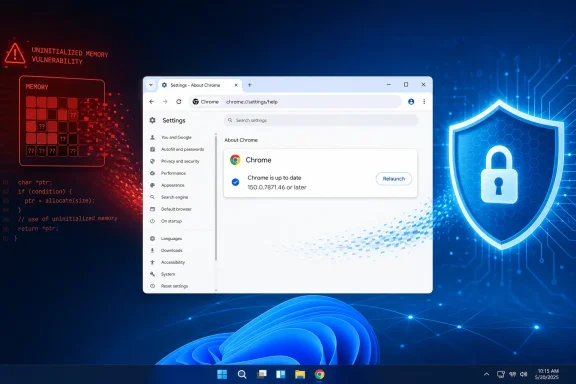 What Changed / What to Do Now
The corrected-version boundary is precise: Chrome builds below 150.0.7871.46 are affected, while 150.0.7871.46 and later are outside the stated affected range.Windows users should follow this exact procedure:
- Open Google Chrome.
- Select the Chrome menu (⋮) > Help > About Google Chrome. Alternatively, enter
chrome://settings/helpin the address bar and press Enter. - Let the available update install.
- Select Relaunch.
- Return to
chrome://settings/helpand confirm that the full displayed version is 150.0.7871.46 or later.
For administrators, the immediate job is equally direct: identify managed Chrome installations below the threshold, deploy a current supported version, require a relaunch, and verify the resulting full version. The supplied vulnerability record does not report known exploitation, so this is a prompt patch-and-verify task rather than evidence of a fleet-wide compromise.
A Medium Rating Still Requires Action
CVE-2026-14399 is identified as CWE-457, Use of Uninitialized Variable, with the title “Uninitialized Use in Dawn.” The published result is that a remote attacker can use a crafted HTML page to obtain potentially sensitive information from process memory.That description is narrow, and reporting should keep it narrow. The record does not establish arbitrary memory reading, code execution, a browser sandbox escape, password theft, cookie theft, token exposure, document disclosure, persistence, or control of Windows. It also does not identify which process-memory information may be exposed, how much can be obtained, or how predictable the result is.
Chromium classifies the vulnerability as Medium. CISA-ADP supplies a CVSS 3.1 base score of 6.5, using the vector:
CVSS:3.1/AV:N/AC:L/PR:N/UI:R/S:U/C:H/I:N/A:NThat assessment describes a network attack vector, low attack complexity, no required privileges, required user interaction, unchanged scope, high potential confidentiality impact, and no stated integrity or availability impact.
The user-interaction requirement is important. The verified scenario involves a user visiting a crafted HTML page. The public record does not provide enough detail to claim that ordinary page loading alone always triggers the flaw, that no other conditions apply, or that a particular message, advertisement, compromised site, or social-engineering route is involved.
Likewise, low attack complexity is a CVSS metric, not proof that exploitation is reliable in every configuration. The record does not include a public proof of concept, trigger sequence, or technical reproduction procedure. Administrators should use the vector to understand the assessment, not to invent missing mechanics.
Assessment summary
| Assessment source | Published result | What it supports | What it does not establish |
|---|---|---|---|
| Chromium | Medium severity | Chromium rates the vulnerability as Medium | That the issue can be ignored |
| CISA-ADP CVSS 3.1 | 6.5 Medium | Network vector, low complexity, no privileges, user interaction required, high confidentiality impact | Known exploitation or full browser compromise |
| CISA-ADP SSVC | Exploitation: none; automatable: no; technical impact: partial | The supplied assessment records no exploitation and does not classify exploitation as automatable | That future exploitation is impossible |
| NVD CVSS | No NVD-authored assessment supplied | NVD displays contributed information but has not supplied its own CVSS score | That the 6.5 score was calculated by NVD |
The strongest operational conclusion comes from the combination of fields: the vulnerability is remotely reachable through crafted HTML, requires user interaction, affects confidentiality, and has no known exploitation in the supplied SSVC record. That supports timely routine remediation without unsupported claims of an emergency or an existing breach.
The Published Technical Detail Is Limited
The affected component is named as Dawn, and the weakness is identified as uninitialized use. Those facts are sufficient to identify the vulnerability, but they do not provide a complete architectural explanation.The supplied material does not establish Dawn’s broader design, how it interfaces with graphics technologies, which browser security boundary contains it, or the exact role it performs when Chrome processes web content. Such details may be documented elsewhere, but they should not be presented as findings from this vulnerability record without separate sourcing.
The same limitation applies to the weakness category. The record supplies the CWE-457 name but does not explain whether this specific flaw involves a stack value, heap allocation, object field, buffer, structure, or error path. It would be speculative to select one of those possibilities and present it as the cause of CVE-2026-14399.
The Chromium issue associated with the vulnerability requires permission. That status verifies only that the issue is not publicly accessible through the linked entry. It does not, by itself, prove why access is restricted or when further details may become available.
As a result, the responsible technical summary remains short:
- The affected product is Google Chrome.
- The affected versions are earlier than 150.0.7871.46.
- The vulnerability is titled “Uninitialized Use in Dawn.”
- It is classified as CWE-457.
- The documented attack involves crafted HTML.
- The documented result is potentially sensitive information from process memory.
- Chromium rates it Medium.
- The public record does not provide the detailed vulnerable path.
The Fixed-Version Boundary Is the Best Control
The clearest fact in the record is the affected-version boundary. Google Chrome versions earlier than 150.0.7871.46 are affected. Version 150.0.7871.46 is excluded from the stated affected range, as are later versions.| Chrome state | Full version condition | CVE-2026-14399 status | Response |
|---|---|---|---|
| Below the threshold | Earlier than 150.0.7871.46 | Affected | Update, relaunch, and verify |
| At the threshold | Exactly 150.0.7871.46 | Outside the stated affected range | Confirm the complete version |
| Above the threshold | Later than 150.0.7871.46 | Outside the stated affected range | Maintain normal update management |
| Version unavailable | Full version not reported | Exposure unknown | Obtain current inventory before closing the issue |
Administrators should also avoid applying Chrome’s version number to unrelated products. The supplied affected-product information identifies Google Chrome. It does not establish that Microsoft Edge, every Chromium-derived browser, embedded Chromium frameworks, or other applications are affected under the same version boundary.
Shared components can justify checking other vendor advisories, but they do not justify automatically expanding a Chrome CVE to every Chromium-based product. Each vendor may use different revisions, patches, release numbering, or affected-product criteria.
Record timeline
Initial vulnerability record — CVE-2026-14399 identifies an uninitialized-use vulnerability in Dawn affecting Google Chrome before 150.0.7871.46. The documented result is disclosure of potentially sensitive information from process memory through crafted HTML.CISA-ADP enrichment — CISA-ADP contributes the CVSS 3.1 score of 6.5 and the vector showing a network attack vector, low complexity, no privileges, required user interaction, unchanged scope, high confidentiality impact, and no integrity or availability impact.
SSVC assessment — The supplied SSVC data records exploitation as “none,” automatable as “no,” and technical impact as “partial.”
NVD analysis — NVD adds affected-product configuration information while supplying no independent NVD CVSS assessment in the provided record.
Exact publication and modification dates are omitted here because the supplied evidence does not adequately support the previously stated June 30, July 1, and July 2 dates. Those dates should not be restored without separate, verifiable sourcing.
CVSS and SSVC Answer Different Questions
The 6.5 CVSS score describes the modeled technical characteristics and consequences of successful exploitation. It is useful for comparison and prioritization, but it does not report whether exploitation has occurred.CISA-ADP’s SSVC fields provide that additional operational context. They record:
- Exploitation: none
- Automatable: no
- Technical impact: partial
“Automatable: no” means CISA-ADP did not categorize exploitation as automatable under the SSVC assessment. It does not reveal the complete set of technical prerequisites, and it should not be expanded into a detailed theory about how an attacker would select or approach victims.
“Technical impact: partial” is consistent with the bounded outcome in the public description. The vulnerability can potentially expose process-memory information, while the contributed CVSS vector assigns no direct integrity or availability impact.
Together, these assessments support a measured response. CVE-2026-14399 is not documented as an actively exploited browser zero-day or a complete endpoint compromise. It is also not a reason to leave an affected web browser unpatched when a clear remediation threshold is available.
Avoid Turning Uncertainty Into a Larger Claim
Information-disclosure vulnerabilities are sometimes discussed as possible building blocks for broader attacks. That general observation should not be turned into a CVE-specific conclusion here.The supplied record does not show that CVE-2026-14399:
- Defeats memory-layout protections.
- Reads arbitrary process memory.
- Selects particular information for disclosure.
- Exposes passwords, cookies, authentication tokens, or documents.
- Crosses a browser sandbox boundary.
- Combines with another vulnerability.
- Enables code execution.
- Produces a reliable or repeatable disclosure.
- Leaves a specific Windows event, file, process, or network indicator.
Version-based remediation is therefore the dependable control. Security teams can determine whether an installation is below the affected-version threshold even when they cannot reproduce the flaw or inspect the restricted Chromium issue.
The absence of known exploitation also means organizations should not infer that every previously affected device requires full incident response. Running a vulnerable Chrome version establishes exposure, not evidence that the vulnerability was used against that machine.
If separate monitoring identifies suspicious activity, administrators should investigate it on its own merits. CVE-2026-14399 alone does not justify claims that credentials were stolen, sessions were compromised, or Windows must be reinstalled.
Enterprise Exposure Is an Inventory Problem
For managed environments, remediation depends on accurate browser-version data. An organization cannot close the issue merely because it approved an update, created a deployment policy, or targeted a device group. It needs post-action evidence showing which installations report 150.0.7871.46 or later.Chrome may exist in several parts of a Windows estate:
- Standard employee workstations.
- Per-user or system-wide application installations.
- Persistent virtual desktops.
- Kiosks and shared systems.
- Test and development machines.
- Devices that are offline or intermittently connected.
- Golden images and deployment templates.
- Systems outside the primary endpoint-management scope.
Organizations should also account for stale or incomplete telemetry. A device with no recent version result belongs in an unknown-status group, not a compliant group. “No affected version detected” is meaningful only when the inventory data is current and reports the complete application version.
A proportional rollout can use the organization’s established testing and deployment process. The record reports no known exploitation and only partial technical impact, so the evidence does not demand unsupported emergency measures. At the same time, the browser’s affected-version boundary is clear, making prolonged delay difficult to justify.
Action checklist for administrators
- Inventory Google Chrome installations using the complete four-part version.
- Flag every installation earlier than 150.0.7871.46.
- Deploy version 150.0.7871.46 or a later supported Chrome release through the approved management channel.
- Direct users to relaunch Chrome after the update is installed.
- Re-query the fleet and verify the resulting full version.
- Keep endpoints with missing or stale inventory in an unknown-status group until checked.
- Review persistent virtual desktops, kiosks, test systems, offline devices, and deployment images that may be missed by ordinary rollout groups.
- Do not mark a device compliant based only on the major version “150.”
- Check separate vendor guidance for Microsoft Edge and other Chromium-based products.
- Record exceptions with an owner and remediation deadline rather than treating an attempted deployment as completion.
Windows Users Need the Correct Version, Not a Workaround
Home and small-business users do not need registry changes, browser-profile resets, Windows reinstallation, or third-party “CVE repair” utilities. The supported response is to update Chrome through Chrome and confirm the version.Again, the exact procedure is:
- Open Chrome.
- Select (⋮) > Help > About Google Chrome, or enter
chrome://settings/help. - Let the update install.
- Select Relaunch.
- Open the About page again.
- Confirm the full version is 150.0.7871.46 or later.
There is no official workaround in the supplied vulnerability information. The record does not establish that disabling graphics acceleration, changing experimental flags, blocking a particular web feature, clearing browser data, or avoiding one category of site prevents exploitation.
Those measures may disrupt normal use without proving that the vulnerable path is unavailable. With a corrected version boundary already identified, speculative workarounds are inferior to installing a supported version and verifying the result.
Users also do not need to change every password solely because they previously ran an affected build. The vulnerability permits potentially sensitive process-memory disclosure, but the public record does not prove that a particular user was attacked or that authentication information was exposed. Password resets and broader incident-response actions should be based on additional evidence, not the existence of the CVE alone.
The Practical Lesson Is Verification
CVE-2026-14399 does not need embellishment to justify action. It affects Google Chrome before 150.0.7871.46, involves an uninitialized use in Dawn, and can expose potentially sensitive process-memory information through crafted HTML. Chromium rates it Medium, CISA-ADP scores it 6.5 with user interaction required, and the supplied SSVC assessment records no exploitation, no automatable exploitation, and partial technical impact.The appropriate response is neither panic nor dismissal. Users should update Chrome, select Relaunch, and verify the complete version. Administrators should identify every installation below the fixed boundary and collect current post-remediation inventory.
Future analysis may add technical detail, change exploitation status, or clarify the vulnerable path. Until then, reporting should remain within the record: no invented delivery scenario, no assumed browser contents, no speculative exploit chain, and no unsupported claims about other Chromium products.
The forward-looking lesson is operational. Browser vulnerability management succeeds when organizations can turn a precise version boundary into verified endpoint state. For CVE-2026-14399, that state is straightforward: Google Chrome 150.0.7871.46 or later, confirmed after relaunch.
References
- Primary source: NVD / Chromium
Published: 2026-07-11T15:37:43-07:00
NVD - CVE-2026-14399
 nvd.nist.gov
- Security advisory: MSRC
Published: 2026-07-11T15:37:43-07:00
Original feed URL
Security Update Guide - Microsoft Security Response Center
 msrc.microsoft.com
- Related coverage: chromium.org
- Related coverage: dawn.googlesource.com