

Google fixed CVE-2026-14410 at the documented Chrome version boundary of 150.0.7871.46. Google Chrome versions below that threshold are affected by a Skia implementation flaw that could allow an attacker who had already compromised the renderer process to perform UI spoofing through a crafted HTML page.
The key triage facts are compact:
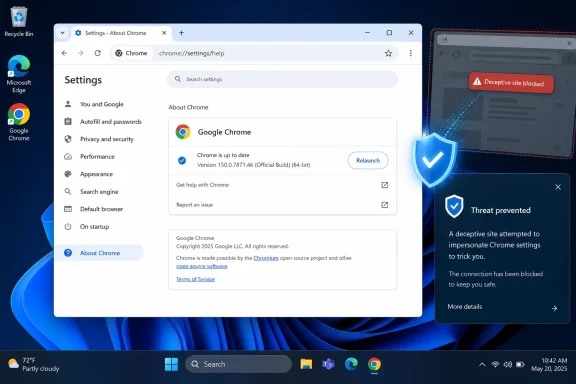
For an individual user, the remediation procedure is direct: open
CVE-2026-14410 is described as an inappropriate implementation in Skia. According to the Chrome-originated vulnerability description in the supplied record, a remote attacker who had already compromised the renderer process could use a crafted HTML page to perform UI spoofing.
The prerequisite is essential. The public description does not say that CVE-2026-14410 independently compromises a clean renderer. It describes a capability available after that compromise has already occurred. Reporting should preserve that boundary rather than shortening the issue to a generic “remote Chrome exploit.”
Chromium classified the vulnerability as Low severity. CISA-ADP separately contributed a CVSS 3.1 base score of 4.3, which falls in the Medium range. NVD displays the contributed information, but the supplied record shows that NVD had not provided its own CVSS 4.0, 3.x, or 2.0 assessment.
The difference between Low and Medium does not require administrators to choose one label and reject the other. They come from different assessment systems and should retain their original attribution.
The CISA-ADP vector is
Those metrics align with the narrow public description. The documented result is UI spoofing after renderer compromise, not data theft, browser takeover, operating-system code execution, or loss of availability. The user-interaction requirement also fits a flaw whose stated effect concerns what a victim sees and how the victim responds to it.
The vector should not be treated as a complete exploit narrative. In particular, it does not erase the separate prose requirement that the renderer must already be compromised. That prerequisite remains part of any accurate vulnerability summary, ticket title, or executive briefing.
The underlying Chromium issue is permission-restricted. That fact establishes only that public access to the issue is limited. It does not, by itself, establish why access remains restricted, how long the restriction will continue, or what undisclosed technical details the issue contains.
The supplied record does not establish that CVE-2026-14410 can spoof any particular:
The record also does not establish that CVE-2026-14410:
CISA-ADP’s SSVC value of exploitation: none should likewise be presented as a point-in-time assessment. It is not proof that exploitation is impossible or a prediction that the status cannot change. The associated automatable: no and technical impact: partial values support routine, measured browser remediation rather than an unsupported claim of a widespread emergency.
That boundary should be expressed as a direct version comparison:
A numerically later Chrome version is outside a range defined as versions before 150.0.7871.46. That does not require claiming that any specific later build was a vendor-documented Windows or macOS release for this CVE. The defensible conclusion is simply that it is later than the supplied minimum boundary.
Administrators should compare all four version components numerically. A tool should compare
The fixed threshold is more useful than release-day assumptions. The supplied record supports the affected-version boundary but does not support assigning June 30, 2026 as the Stable release date for 150.0.7871.46 in this article. It also does not support a platform-specific assertion that Linux received one build while Windows and macOS received another, or that the associated release contained 433 security fixes. Those claims are unnecessary to the remediation decision and should not be used without a permitted source that establishes them.
The measurable result is that Chrome has reopened and its Help page reports a version at or above the supplied fixed threshold.
If the page continues to display an older version, the device remains within the documented affected range. The user should retry the organization’s approved update process or contact the responsible administrator. The CVE record does not identify the cause of any particular update failure, so troubleshooting should follow established product-support and endpoint-management procedures rather than a speculative list of CVE-specific causes.
This procedure also separates Chrome remediation from Windows Update status. A fully patched Windows installation can still have an outdated third-party browser. Conversely, a Chrome version check does not prove that the operating system or other applications are current. The browser version is the relevant evidence for this specific finding.
The supplied vulnerability record does not prescribe a particular Google policy, management console, update service, relaunch rule, or reporting field. Organizations use different inventory and deployment platforms, and those platforms do not necessarily assign the same meaning to terms such as installed, downloaded, pending, active, compliant, or successful.
The required outcome is platform-neutral:
The strongest closure evidence is a current post-remediation result showing Chrome 150.0.7871.46 or later. If an organization’s endpoint platform reports only an installed application version and cannot establish whether users have reopened Chrome, administrators should recognize that visibility limit rather than claim to have verified a running process.
The supplied record does not require a specific running-process query, however. The practical minimum is to deploy the update, require users to act on any offered Relaunch control, and collect current version evidence afterward.
Several facts reduce immediate escalation pressure:
The right priority is prompt inclusion in the organization’s established browser-update cycle, followed by verification. Security teams can reserve emergency incident-response treatment for evidence that changes the situation, such as a revised exploitation assessment, a vendor warning, or confirmed malicious activity. Nothing in the supplied record supports presenting those conditions as already present.
This CVE should also remain distinct from the broader contents of any Chrome update package unless those contents are independently sourced. Administrators may have other reasons to deploy a current Chrome release, but this article’s defensible CVE-specific case is straightforward: versions below 150.0.7871.46 are affected, and versions at or above that boundary remove the documented exposure.
That distinction is why the accurate severity statement is:
That leaves Windows users and administrators with a version-control task rather than a hunt for undocumented indicators.
For users:
The forward-looking lesson is operational rather than theoretical: browser security programs are strongest when they can turn a published version boundary into verified fleet state quickly. The next Chrome vulnerability may have a different component, prerequisite, or severity, but the same questions will decide whether the response succeeds: Can users verify the running version? Can administrators identify every installation below the threshold? Can the organization prove that relaunch and post-update validation were completed?
For CVE-2026-14410, the answer is measurable. Chrome below 150.0.7871.46 remains within the documented affected range. Chrome reporting 150.0.7871.46 or later after relaunch is outside it.
The key triage facts are compact:
- Affected versions: Google Chrome before 150.0.7871.46
- Minimum fixed boundary: 150.0.7871.46
- Chromium security severity: Low
- CISA-ADP CVSS 3.1: 4.3 Medium
- CISA-ADP SSVC: exploitation none, automatable no, technical impact partial
- NVD CVSS assessment: not provided in the supplied record
- Required action: update Chrome, relaunch it if prompted, and verify that the running browser reports 150.0.7871.46 or later
For an individual user, the remediation procedure is direct: open
chrome://settings/help in Chrome, confirm that the displayed version is 150.0.7871.46 or later, select Relaunch if Chrome offers it, and return to the same page after Chrome reopens to verify the version again.
 The Low Rating and the 4.3 Medium Score Are Separate Assessments
CVE-2026-14410 is described as an inappropriate implementation in Skia. According to the Chrome-originated vulnerability description in the supplied record, a remote attacker who had already compromised the renderer process could use a crafted HTML page to perform UI spoofing.The prerequisite is essential. The public description does not say that CVE-2026-14410 independently compromises a clean renderer. It describes a capability available after that compromise has already occurred. Reporting should preserve that boundary rather than shortening the issue to a generic “remote Chrome exploit.”
Chromium classified the vulnerability as Low severity. CISA-ADP separately contributed a CVSS 3.1 base score of 4.3, which falls in the Medium range. NVD displays the contributed information, but the supplied record shows that NVD had not provided its own CVSS 4.0, 3.x, or 2.0 assessment.
| Assessment signal | Published value | Attribution | Operational reading |
|---|---|---|---|
| Chromium security severity | Low | Chromium | Vendor-originated severity for the individual Chrome defect |
| CVSS 3.1 base score | 4.3 Medium | CISA-ADP | Contributed standardized assessment of the published attack characteristics |
| NVD CVSS assessment | Not provided | NVD | NVD had not assigned its own base score in the supplied record |
| SSVC exploitation | None | CISA-ADP | The contributed assessment did not identify exploitation at that time |
| SSVC automatable | No | CISA-ADP | The issue was not categorized as automatable |
| SSVC technical impact | Partial | CISA-ADP | The modeled technical impact is limited rather than total |
The CISA-ADP vector is
CVSS:3.1/AV:N/AC:L/PR:N/UI:R/S:U/C:N/I:L/A:N. It describes a network-reachable condition with low attack complexity, no required privileges, required user interaction, unchanged scope, no direct confidentiality or availability impact, and low integrity impact.Those metrics align with the narrow public description. The documented result is UI spoofing after renderer compromise, not data theft, browser takeover, operating-system code execution, or loss of availability. The user-interaction requirement also fits a flaw whose stated effect concerns what a victim sees and how the victim responds to it.
The vector should not be treated as a complete exploit narrative. In particular, it does not erase the separate prose requirement that the renderer must already be compromised. That prerequisite remains part of any accurate vulnerability summary, ticket title, or executive briefing.
What the Public Record Establishes—and What It Does Not
The available information supports a bounded technical statement:That statement is sufficient for version-based remediation. It is not sufficient to reconstruct a proof of concept or identify the exact browser-interface information that could be misrepresented.In Google Chrome before 150.0.7871.46, an inappropriate implementation in Skia could allow a remote attacker who had already compromised the renderer process to perform UI spoofing through a crafted HTML page.
The underlying Chromium issue is permission-restricted. That fact establishes only that public access to the issue is limited. It does not, by itself, establish why access remains restricted, how long the restriction will continue, or what undisclosed technical details the issue contains.
The supplied record does not establish that CVE-2026-14410 can spoof any particular:
- Browser control or indicator
- Dialog or notification
- Authentication or account workflow
- Warning or trust signal
- Payment or transaction interface
- Permission request
- Navigation element
The record also does not establish that CVE-2026-14410:
- Provides the initial renderer compromise
- Escapes Chrome’s sandbox
- Executes code with operating-system privileges
- Reads local files or stored browser data
- Provides persistence on Windows
- Bypasses endpoint security products
- Has been chained with another named vulnerability
- Has been exploited in the wild
- Affects Microsoft Edge or every Chromium-derived browser
- Produces a CVE-specific crash, network indicator, file hash, or endpoint artifact
CISA-ADP’s SSVC value of exploitation: none should likewise be presented as a point-in-time assessment. It is not proof that exploitation is impossible or a prediction that the status cannot change. The associated automatable: no and technical impact: partial values support routine, measured browser remediation rather than an unsupported claim of a widespread emergency.
Chrome 150.0.7871.46 Is the Documented Minimum Boundary
The affected configuration in the supplied record places Google Chrome versions below 150.0.7871.46 within the vulnerable range. Version 150.0.7871.46 is therefore the documented minimum fixed boundary for CVE-2026-14410.That boundary should be expressed as a direct version comparison:
| Reported Chrome version | CVE-2026-14410 status | Required response |
|---|---|---|
| Below 150.0.7871.46 | Within the documented affected range | Update, relaunch if offered, and verify again |
| Exactly 150.0.7871.46 | Meets the documented minimum fixed boundary | Record the verified version |
| Numerically later than 150.0.7871.46 | Outside the documented affected range | Record the verified version |
| Missing, stale, or conflicting version | Unknown | Keep the finding open and investigate |
| Chrome confirmed not installed | Not applicable to that asset | Record the supporting inventory evidence |
Administrators should compare all four version components numerically. A tool should compare
150, then 0, then 7871, and finally 46, rather than treating the version as a decimal number or relying on an imprecise product label such as “Chrome 150.”The fixed threshold is more useful than release-day assumptions. The supplied record supports the affected-version boundary but does not support assigning June 30, 2026 as the Stable release date for 150.0.7871.46 in this article. It also does not support a platform-specific assertion that Linux received one build while Windows and macOS received another, or that the associated release contained 433 security fixes. Those claims are unnecessary to the remediation decision and should not be used without a permitted source that establishes them.
Exact User Procedure: Update, Relaunch, Verify
Windows users can validate the browser directly:- Open Google Chrome.
- Enter
chrome://settings/helpin the address bar. - Press Enter.
- Read the complete version displayed on the page.
- Confirm that it is 150.0.7871.46 or later.
- If Chrome offers a Relaunch button, save any necessary work and select it.
- After Chrome reopens, return to
chrome://settings/help. - Confirm again that the displayed version is 150.0.7871.46 or later.
The measurable result is that Chrome has reopened and its Help page reports a version at or above the supplied fixed threshold.
If the page continues to display an older version, the device remains within the documented affected range. The user should retry the organization’s approved update process or contact the responsible administrator. The CVE record does not identify the cause of any particular update failure, so troubleshooting should follow established product-support and endpoint-management procedures rather than a speculative list of CVE-specific causes.
This procedure also separates Chrome remediation from Windows Update status. A fully patched Windows installation can still have an outdated third-party browser. Conversely, a Chrome version check does not prove that the operating system or other applications are current. The browser version is the relevant evidence for this specific finding.
Managed Fleets Need Current Version Evidence
For managed environments, administrators should use their existing endpoint-management reporting to identify active Chrome installations below 150.0.7871.46.The supplied vulnerability record does not prescribe a particular Google policy, management console, update service, relaunch rule, or reporting field. Organizations use different inventory and deployment platforms, and those platforms do not necessarily assign the same meaning to terms such as installed, downloaded, pending, active, compliant, or successful.
The required outcome is platform-neutral:
- Identify managed endpoints on which Google Chrome is installed.
- Obtain current and trustworthy Chrome version data.
- Flag every version below 150.0.7871.46.
- Update affected installations through the organization’s established process.
- Ensure users complete any necessary Chrome relaunch.
- Collect a fresh version result after remediation.
- Keep missing, stale, offline, or conflicting records in an unknown state until they can be verified.
The strongest closure evidence is a current post-remediation result showing Chrome 150.0.7871.46 or later. If an organization’s endpoint platform reports only an installed application version and cannot establish whether users have reopened Chrome, administrators should recognize that visibility limit rather than claim to have verified a running process.
The supplied record does not require a specific running-process query, however. The practical minimum is to deploy the update, require users to act on any offered Relaunch control, and collect current version evidence afterward.
Action checklist for administrators
- Inventory managed endpoints on which Google Chrome is installed.
- Identify every reported Chrome version below 150.0.7871.46.
- Treat missing, stale, conflicting, or unverified version data as unknown, not compliant.
- Deploy a supported Chrome version at or above the fixed threshold through the existing endpoint-management process.
- Tell users to select Relaunch if Chrome offers it.
- Recheck browser-version reporting after the remediation window.
- Verify a sample of endpoints directly through
chrome://settings/helpwhen management data is ambiguous. - Record post-remediation evidence showing 150.0.7871.46 or later.
- Assign owners and follow-up actions to offline or unresolved endpoints.
- Preserve Chromium’s Low rating and CISA-ADP’s 4.3 Medium score as separate attributed assessments.
- Do not describe the 4.3 score as an NVD-authored score.
- Do not describe the vulnerability as actively exploited; the supplied SSVC assessment lists exploitation as none.
- Do not assign the CVE to Microsoft Edge or another Chromium-derived product without product-specific vendor evidence.
- Do not expand the finding into a confirmed sandbox escape, Windows takeover, credential compromise, or other unsupported outcome.
Priority: Patch Normally, Without Inflating the Threat
The supplied assessments support a normal browser-security update rather than emergency incident declarations based on this CVE alone.Several facts reduce immediate escalation pressure:
- Renderer compromise is already required.
- User interaction is required in the CISA-ADP vector.
- CISA-ADP lists exploitation as none.
- CISA-ADP lists the issue as not automatable.
- Technical impact is categorized as partial.
- Chromium rates the vulnerability Low.
- The documented direct impact is limited to UI spoofing.
The right priority is prompt inclusion in the organization’s established browser-update cycle, followed by verification. Security teams can reserve emergency incident-response treatment for evidence that changes the situation, such as a revised exploitation assessment, a vendor warning, or confirmed malicious activity. Nothing in the supplied record supports presenting those conditions as already present.
This CVE should also remain distinct from the broader contents of any Chrome update package unless those contents are independently sourced. Administrators may have other reasons to deploy a current Chrome release, but this article’s defensible CVE-specific case is straightforward: versions below 150.0.7871.46 are affected, and versions at or above that boundary remove the documented exposure.
A Short Record Timeline
A long chronology is unnecessary, but the supplied record supports two useful dates:- July 1, 2026: NVD published the CVE-2026-14410 record. This date describes the NVD publication event and should not be converted into an unsupported Chrome release date.
- July 2, 2026: The record received additional CISA-ADP and NIST enrichment, including contributed assessment and affected-configuration information.
That distinction is why the accurate severity statement is:
There is no need to repeatedly contrast the systems after that attribution has been established.Chromium rated CVE-2026-14410 Low, while CISA-ADP contributed a CVSS 3.1 score of 4.3 Medium. NVD had not provided its own CVSS assessment in the supplied record.
The WindowsForum Takeaway Is Verification, Not Speculation
CVE-2026-14410 is narrow enough to summarize without turning it into a larger exploit story. It is an inappropriate implementation in Skia that could permit UI spoofing through crafted HTML after the attacker has already compromised the Chrome renderer. The public record does not identify the spoofed interface surface, disclose the triggering technique, provide a proof of concept, or report exploitation.That leaves Windows users and administrators with a version-control task rather than a hunt for undocumented indicators.
For users:
- Open
chrome://settings/help. - Confirm Chrome is 150.0.7871.46 or later.
- Select Relaunch if offered.
- Return to the page and verify the version after Chrome reopens.
- Use existing endpoint-management reporting to find Chrome installations below the threshold.
- Deploy the update through the established process.
- Obtain fresh post-remediation version evidence.
- Keep unknown or stale devices open for follow-up.
- Avoid applying the Chrome finding automatically to other Chromium-based products.
The forward-looking lesson is operational rather than theoretical: browser security programs are strongest when they can turn a published version boundary into verified fleet state quickly. The next Chrome vulnerability may have a different component, prerequisite, or severity, but the same questions will decide whether the response succeeds: Can users verify the running version? Can administrators identify every installation below the threshold? Can the organization prove that relaunch and post-update validation were completed?
For CVE-2026-14410, the answer is measurable. Chrome below 150.0.7871.46 remains within the documented affected range. Chrome reporting 150.0.7871.46 or later after relaunch is outside it.
References
- Primary source: NVD / Chromium
Published: 2026-07-11T15:37:56-07:00
Loading…
nvd.nist.gov - Security advisory: MSRC
Published: 2026-07-11T15:37:56-07:00
Original feed URL
Loading…
msrc.microsoft.com - Related coverage: chromium.org
Site Isolation Design Document
www.chromium.org - Related coverage: chromium.googlesource.com
Loading…
chromium.googlesource.com