

Microsoft’s public record does not currently include a detailed technical advisory for CVE-2026-20941, but the operational realities and mitigation priorities are clear: this identifier is logged as an elevation‑of‑privilege issue tied to the Host Process for Windows Tasks (taskhostw/taskhostex) surface, and defenders must treat the report as a high‑priority local escalation risk while they validate vendor KB mappings and deploy fixes.
The Host Process for Windows Tasks (commonly seen as taskhostw.exe or taskhostex.exe) is a generic DLL host used by Windows to run per‑task components and DLL‑based services. Because it frequently performs filesystem operations, scheduled task payload execution, and delegated work in the context of system or service tokens, any filesystem handling, link‑resolution, or path‑confusion bug in this host can become a powerful local elevation‑of‑privilege (EoP) primitive. Recent Microsoft advisories for closely related Host Process vulnerabilities describe a recurring failure mode: improper link resolution before file access (commonly called “link‑following” or TOCTOU path confusion). Those advisories and community trackers place this class of defect firmly in the high‑urgency bucket for patching.
Microsoft’s security guidance framework also attaches a confidence or exploitability metric to recent CVE records; that metric is used to express how certain the vendor is that the issue exists and how complete the published technical details are. When Microsoft lists a CVE and maps it to an update, the entry is the canonical source for identifying the exact KB(s) and affected SKUs to remediate. In practice this means the presence of a Security Update Guide entry is the operational trigger to prioritize patching and hunting.
Operationally, this means:
Caveat: adjacent, well‑documented Host Process CVEs (for example the widely indexed CVE‑2025‑60710) demonstrate the typical pattern and impact of these issues — link‑following leading to privileged file operations and a CVSS‑weighted severity commonly reported in the High range (CVSS v3.1 ~7.8). Those prior cases provide a practical, evidence‑based model for likely exploit mechanics and defensive priorities.
Treat any detailed claims about low‑level exploitation mechanics or public proof‑of‑concepts as unverified until they are corroborated by Microsoft or multiple independent, reputable technical write‑ups. In the interim, apply the mitigations and detection guidance outlined above and verify every KB application through your patch management systems.
Appendix: quick checklist (for operational runbooks)
Source: MSRC Security Update Guide - Microsoft Security Response Center
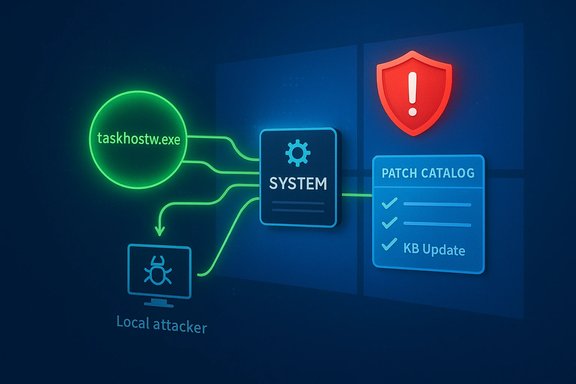 Background / Overview
The Host Process for Windows Tasks (commonly seen as taskhostw.exe or taskhostex.exe) is a generic DLL host used by Windows to run per‑task components and DLL‑based services. Because it frequently performs filesystem operations, scheduled task payload execution, and delegated work in the context of system or service tokens, any filesystem handling, link‑resolution, or path‑confusion bug in this host can become a powerful local elevation‑of‑privilege (EoP) primitive. Recent Microsoft advisories for closely related Host Process vulnerabilities describe a recurring failure mode: improper link resolution before file access (commonly called “link‑following” or TOCTOU path confusion). Those advisories and community trackers place this class of defect firmly in the high‑urgency bucket for patching.Microsoft’s security guidance framework also attaches a confidence or exploitability metric to recent CVE records; that metric is used to express how certain the vendor is that the issue exists and how complete the published technical details are. When Microsoft lists a CVE and maps it to an update, the entry is the canonical source for identifying the exact KB(s) and affected SKUs to remediate. In practice this means the presence of a Security Update Guide entry is the operational trigger to prioritize patching and hunting.
What we actually know about the Host Process EoP class
- Nature of the defect: Historically, Host Process EoP CVEs fall into a small number of technical fault classes:
- Link‑following / improper symbolic link resolution: privileged code validates a path and later opens or deletes the path without ensuring the resolved target hasn’t been changed to an attacker‑controlled object. This is a classic TOCTOU or symlink abuse pattern.
- Path confusion / directory deletion race: scheduled‑task or background cleanup logic that deletes directories using wildcard or GUID filters may inadvertently follow reparse points created by lower‑privileged users. Attackers can exploit this to cause privileged deletions or replacements.
- Insufficient ownership/permission checks: privileged code acts on files or folders without confirming ownership or atomic privileges, allowing a local user to escalate simple filesystem changes into SYSTEM‑context effects.
- Typical attacker model: A local, authenticated user or process with low privileges (for example, a normal user account, a sandboxed process, or a guest VM) can create or manipulate NTFS reparse points (symbolic links or junctions) in locations the Host Process interacts with. The attacker then triggers the Host Process to act on those targets — for instance, by invoking the scheduled task, causing the host to delete or move an attacker‑controlled target under SYSTEM privileges. The result is elevated privileges, persistent service modifications, or binary replacement.
- Exploit complexity: Historically labelled low to moderate. Creating and toggling reparse points, or winning a TOCTOU window, is a well‑understood technique and is often scriptable. That means these defects are practical for a local adversary and therefore operationally significant even when they are not network‑remote.
- Typical impact when exploited:
- Replacement or tampering of system files and service DLLs.
- Installation of persistent services or drivers under SYSTEM.
- Token manipulation and process creation as SYSTEM.
- Complete host compromise with the ability to disable local defenses and pivot laterally.
Why Microsoft’s confidence metric matters for defenders
Microsoft’s Security Update Guide entries increasingly include a short confidence / exploitability indicator that communicates two things: (1) whether the vendor has validated the issue and tied it to a patch (high confidence), and (2) how much technical detail the vendor is publishing publicly. When the vendor marks an advisory as confirmed or includes it in a cumulative update, the practical effect is that defenders should treat the CVE as real and prioritize remediation. Conversely, terse advisories can indicate the vendor is deliberately withholding exploit‑level details while patches are staged, which increases the need for rapid patch deployment and behavior‑based detection rather than relying on public PoCs.Operationally, this means:
- Treat the vendor KB mapping as the authoritative remediation mapping.
- Assume the technical primitives are credible if the CVE is present in Microsoft’s update guide.
- Don’t rely on third‑party CVE mirrors for automated patching without confirming the KB IDs in MSRC or the Update Catalog.
What is currently verifiable about CVE‑2026‑20941
At the time of writing, there is no public, vendor‑issued page or fully detailed MSRC advisory specifically for CVE‑2026‑20941 that provides low‑level exploit mechanics, IOCTLs, or patch diffs. That absence means any claim about exact in‑memory exploitation, precise file paths, or proof‑of‑concept code for CVE‑2026‑20941 is currently unverified. The prudent posture is to assume the entry is a vendor‑acknowledged EoP in the Host Process surface (based on the identifier and classification provided) while relying on Microsoft’s Update Guide and KB diffs to supply the definitive technical and remediation mapping once available.Caveat: adjacent, well‑documented Host Process CVEs (for example the widely indexed CVE‑2025‑60710) demonstrate the typical pattern and impact of these issues — link‑following leading to privileged file operations and a CVSS‑weighted severity commonly reported in the High range (CVSS v3.1 ~7.8). Those prior cases provide a practical, evidence‑based model for likely exploit mechanics and defensive priorities.
Technical anatomy — how a Host Process link‑following bug becomes SYSTEM
- Background setup
- A privileged scheduled task or background host routinely cleans, moves, or replaces files in a predictable location (for example, per‑user LocalAppData entries, cached payload directories, or scheduled task working folders). The host resolves paths and then performs the action as SYSTEM or a privileged service account.
- Attacker control
- A low‑privileged user creates a symbolic link or NTFS reparse point inside their writable profile area that resolves to a sensitive system target (e.g., a service binary or configuration file). The attacker times the reparse‑swap so that when the host runs its cleanup or maintenance action, it will follow the link.
- Privileged action
- The Host Process follows the link and performs privileged file operations (delete, replace, or write) on the attacker‑controlled target — operations that the attacker’s original account could not otherwise perform. This produces an elevation because the privileged host acts with SYSTEM authority.
- Post‑exploitation
- The attacker replaces a service DLL, installs a persistent service, or drops a payload into a location loaded by another privileged process, achieving code execution or persistent SYSTEM control.
Detection and hunting guidance
When technical disclosure is limited, defenders must rely on behavior‑centric detection rather than signatures that depend on a PoC. Prioritized signals to instrument and hunt for:- Unexpected filesystem operations performed under SYSTEM context that affect user‑writable locations (for example: SYSTEM deleting or replacing files inside a user’s LocalAppData). Correlate Service Control Manager events with per‑user file system changes.
- Anomalous process creation trees where low‑privileged processes indirectly cause SYSTEM‑context shells, PowerShell, or cmd.exe to execute. Look for unusual parent→child relationships in process telemetry.
- Reparse point creation/removal occurring in tight proximity to privileged file operations. Attackers commonly create, use, and remove symbolic links as part of exploit scripts. Monitor for rapid create/delete cycles of junctions or symlinks.
- Token‑related API usage consistent with privilege escalation (DuplicateTokenEx, SetTokenInformation, CreateProcessAsUser) and anomalous uses of service control APIs. Hunt on these API patterns and validate against known good baselines.
- Crash dumps and service faulting around Host Process instances. Exploit attempts or buggy exploit scaffolding often cause crashes; increase capture of full dumps from taskhost instances during and after the patch window.
- Immediately after vendor update: sweep for the above signals for at least 7–14 days, with higher cadence for admin workstations and jump hosts.
- Long term: integrate reparse point creation and privileged file write events into usual EDR rulesets for high‑value hosts.
Remediation and mitigation — practical checklist
- Confirm the vendor mapping:
- Use Microsoft’s Security Update Guide or Microsoft Update Catalog to map CVE‑2026‑20941 to the exact KB(s) for each installed Windows build before automating patch deployment. Vendor KBs are the authoritative source.
- Patch prioritization:
- Rank updates and deploy in this order:
- Admin workstations, jump boxes, and privileged management hosts.
- RDS/VDI hosts, build machines, developer workstations.
- Servers that process untrusted content or host scheduled tasks triggered by user context.
- If patching is delayed:
- Apply compensating controls:
- Enforce least privilege (remove unnecessary local admin rights).
- Apply application control (WDAC or AppLocker) on high‑value hosts to prevent arbitrary code execution from user profiles.
- Restrict creation of reparse points and symbolic links in sensitive paths where feasible.
- Temporarily isolate or harder network‑segment management hosts.
- Validation:
- Use configuration management and patch‑compliance tooling to confirm KB installation and required reboots. Don’t assume updates completed without verification.
- Post‑deployment monitoring:
- Run targeted hunts (token misuse, SYSTEM spawns, unexpected privileged file writes) and review endpoint telemetry for 1–2 weeks after the rollout is complete.
Risk analysis — strengths, trade‑offs and residual risks
Strengths- The Host Process EoP class is well‑understood; detection and mitigations map cleanly to filesystem and process telemetry, enabling pragmatic, behavior‑based defenses even when exploit details are withheld.
- Microsoft’s confidence metric and the Update Guide KB mapping provide a reliable, authoritative path for remediation once the vendor publishes the KB identifiers. That reduces ambiguity in large‑scale patch management.
- Vendor nondisclosure of low‑level exploit mechanics (a deliberate policy for inbox and kernel components) reduces short‑term weaponization risk but slows independent detection rule development. This increases the importance of rapid patching and behavior‑based hunting.
- Automation pitfalls: third‑party CVE aggregators sometimes misreport affected SKUs or KB numbers. Relying on those feeds without cross‑checking the MSRC Update Guide can lead to patch gaps. Validate KB IDs before mass deployment.
- Residual risk during the patch window: motivated attackers will often reverse‑engineer patch diffs to craft exploits. The highest threat period is the interval between vendor patch publication and enterprise‑wide patch completion. Prioritized patching and intensified telemetry in that window materially reduces exposure.
Practical timeline and programmatic steps for IT teams
- Within 24 hours:
- Query Microsoft’s Security Update Guide for CVE‑2026‑20941 and record the exact KB(s) for each Windows SKU in the estate. If the MSRC entry is not present or incomplete, escalate to vendor support for guidance and monitor the vendor page.
- Within 72 hours:
- Begin patch rollouts to admin and management hosts. If reboots are required, coordinate with business stakeholders for maintenance windows. Enforce temporary compensations for hosts that cannot be patched immediately.
- Within 7–14 days:
- Complete enterprise rollout, verify update presence, and execute a post‑deployment sweep for the hunting signals listed above. Record and review any anomalous artifacts; if evidence of exploitation exists, isolate affected hosts and follow incident response playbooks.
Final assessment and guidance
CVE‑2026‑20941 is cataloged as an elevation‑of‑privilege issue tied to the Host Process for Windows Tasks surface. Where a direct vendor advisory for this specific CVE is not yet publicly available in full technical detail, the enterprise response model is unchanged and urgent: treat the entry as a credible, high‑impact local escalation vector, prioritize retrieval of the vendor KB mapping, deploy the appropriate security updates to high‑value hosts without delay, and run behavior‑focused hunts for exploitation indicators while patching proceeds. Prioritize admin workstations, jump hosts and servers that accept untrusted artifacts; rely on Microsoft’s Update Guide for authoritative KB→SKU mappings; and assume the operational blast radius includes token theft, service DLL replacement, and SYSTEM‑level persistence if exploitation succeeds.Treat any detailed claims about low‑level exploitation mechanics or public proof‑of‑concepts as unverified until they are corroborated by Microsoft or multiple independent, reputable technical write‑ups. In the interim, apply the mitigations and detection guidance outlined above and verify every KB application through your patch management systems.
Appendix: quick checklist (for operational runbooks)
- Check MSRC / Update Catalog for CVE‑2026‑20941 → note KB(s).
- Patch admin/jump hosts first; then expand to RDS/VDI and remaining servers.
- Enforce WDAC/AppLocker on high‑value endpoints; remove unnecessary local admin rights.
- Hunt: reparse point activity, SYSTEM‑context writes to user paths, unusual SYSTEM process creation.
- Verify patch status and collect post‑deployment telemetry for 7–14 days.
Source: MSRC Security Update Guide - Microsoft Security Response Center
