

Microsoft’s March 2026 patch batch includes a newly catalogued Windows Graphics Device Interface (GDI) vulnerability tracked as CVE‑2026‑25190, a high‑severity code‑execution issue that Microsoft and third‑party trackers describe as a GDI “Remote Code Execution” class problem—yet the technical scoring and vendor metadata show important nuance: the flaw is rooted in an untrusted search path (CWE‑426) that enables local code execution unless mitigated by proper search‑path protections and vendor updates. (msrc.microsoft.com) (cvefeed.io)
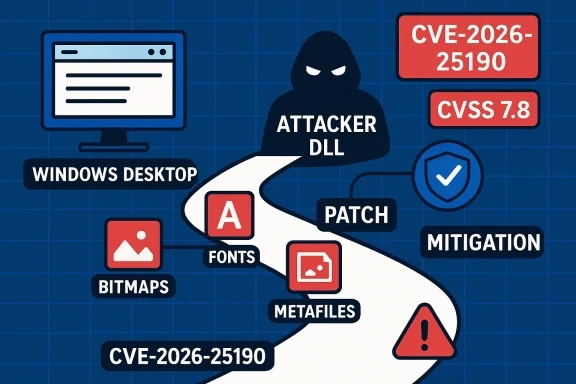
Windows GDI is the legacy graphics subsystem used widely across Windows desktop and server components to render bitmaps, fonts, metafiles, and other graphical resources. Historically, GDI and GDI+ have been a frequent target for memory‑corruption and resource‑parsing bugs that can lead to code execution when the component processes crafted images or metafiles. Recent years have seen multiple serious GDI/GDI+ issues patched in urgent cycles, illustrating that graphics parsing remains an attractive attack surfaceete attack chains when the rendering happens in server or service contexts.
On March 10, 2026, Microsoft added CVE‑2026‑25190 to its Security Update Guide; independent trackers such as CVEFeed and the Zero Day Initiative catalog the issue as high severity with a CVSS v3.1 base score of 7.8. Those sources characterize the root cause as an untrusted search path in GDI that allows an attacker to trigger local code execution; CVE trackers currently list the vulnerability as not remotely exploitable on its own in the default configuration, though several security vendors warn the issue can participate in multi‑step exploit chains. (msrc.microsoft.com) (cvefeed.io) (zerodayinitiative.com)
This article summarizes what is known and verified about CVE‑2026‑25190, analyzes the technical and operational risk, and presents prioritized, practical guidance for defenders. Where vendor or third‑party details differ, we flag the discrepancy and show how security teams should resolve ambiguity when deciding how quickly to act.
Third‑party trackers reflect Microsoft’s advisory and add interpretive data:
Why that matters: when a privileged or rendering service loads an attacker‑controlled DLL or code path, the system may execute arbitrary code in the context of the process handling the load. If that process runs with elevated rights (for example, a service or background process performing document or image rendering on behalf of other users), the impact escalates beyond a single user session. The CVSS scoring reported by trackers reflects the high potential confidentiality, integrity, and availability impact if exploitation succeeds. (cvefeed.io)
Operational translation for defenders:
GDI vulnerabilities are not new, and past incidents show the cost of under‑estimating graphics parsing bugs; treating CVE‑2026‑25190 quickly and with context‑aware urgency—patching, isolating rendering functions, and improving detection—will significantly reduce the risk of this vector being used in targeted compromises.
Source: MSRC Security Update Guide - Microsoft Security Response Center
 Background / Overview
Windows GDI is the legacy graphics subsystem used widely across Windows desktop and server components to render bitmaps, fonts, metafiles, and other graphical resources. Historically, GDI and GDI+ have been a frequent target for memory‑corruption and resource‑parsing bugs that can lead to code execution when the component processes crafted images or metafiles. Recent years have seen multiple serious GDI/GDI+ issues patched in urgent cycles, illustrating that graphics parsing remains an attractive attack surfaceete attack chains when the rendering happens in server or service contexts.On March 10, 2026, Microsoft added CVE‑2026‑25190 to its Security Update Guide; independent trackers such as CVEFeed and the Zero Day Initiative catalog the issue as high severity with a CVSS v3.1 base score of 7.8. Those sources characterize the root cause as an untrusted search path in GDI that allows an attacker to trigger local code execution; CVE trackers currently list the vulnerability as not remotely exploitable on its own in the default configuration, though several security vendors warn the issue can participate in multi‑step exploit chains. (msrc.microsoft.com) (cvefeed.io) (zerodayinitiative.com)
This article summarizes what is known and verified about CVE‑2026‑25190, analyzes the technical and operational risk, and presents prioritized, practical guidance for defenders. Where vendor or third‑party details differ, we flag the discrepancy and show how security teams should resolve ambiguity when deciding how quickly to act.
What Microsoft and trackers say
Vendor listing and metadata
Microsoft’s Security Update Guide lists CVE‑2026‑25190 with the brief descriptive label used in the Update Guide entry. The Update Guide record is the authoritative operational reference for affected builds and the official remediation packages; administrators should use the vendor record to validate CVE applicability to their environment and to obtain the correct KB numbers and update files before deploying wide updates. (msrc.microsoft.com)Third‑party trackers reflect Microsoft’s advisory and add interpretive data:
- CVEFeed reports the CWE mapping as CWE‑426: Untrusted Search Path and assigns a CVSS‑3.1 score of 7.8 (High) with vector AV:L/AC:L/PR:N/UI:R/S:U/C:H/I:H/A:H—that is, the base metrics indicate a local attack vector with required user interaction, but with high impact if successfully triggered. CVEFeed also explicitly states “Remotely Exploit: No” in its summary. (cvefeed.io)
- The Zero Day Initiative lists CVE‑2026‑25190 in its March 10, 2026 roundup as an Important/High RCE item within the Windows GDI family, stressing prioritization within the broader Patch Tuesday context. (zerodayinitiative.com)
Technical summary: root cause and attack surface
Root cause — Untrusted search path
CVE‑2026‑25190 is described as an untrusted search path weakness in the way the GDI component locates and loads auxiliary resources or modules. In practice, an untrusted search‑path problem arises when a system component attempts to locate a module, DLL, font, or other resource using an unsafe filename or relative path, allowing an attacker‑controlled file placed earlier in the search order to be loaded instead of the intended system file. The assigned CWE (CWE‑426) matches this pattern. (cvefeed.io)Why that matters: when a privileged or rendering service loads an attacker‑controlled DLL or code path, the system may execute arbitrary code in the context of the process handling the load. If that process runs with elevated rights (for example, a service or background process performing document or image rendering on behalf of other users), the impact escalates beyond a single user session. The CVSS scoring reported by trackers reflects the high potential confidentiality, integrity, and availability impact if exploitation succeeds. (cvefeed.io)
Attack prerequisites and exploitation scenarios
Current public indicators point to the following constraints and exploitation modalities:- Attack vector: local (AV:L). The immediate, base CVSS vector indicates the attacker requires local file write capability on an affected path or requires a user to interact with crafted content to produce the load condition (UI:R). This makes typical remote, unauthenticated exploitation less feasible in the canonical sense. (cvefeed.io)
- User interaction: required (UI:R). Exploits are expected to need a user to open a file, preview content, or otherwise cause GDI to resolve the untrusted path. Examples include opening a crafted image, loading a specially designed document, or triggering thumbnail generation.
- Chaining risk: Several commentators and incident threads emphasize that GDI issues can be combined with other vulnerabilities or capabilities to achieve remote compromise. A service‑side component (web server, mail preview, cloud document processor, imaging pipeline) that renders user content server‑side or in an elevated context can convert a local GDI flaw into a remotely exploitable condition. That is, if an attacker can upload crafted content to a server and cause the server to run GDI rendering logic that uses an untrusted search path, remote execution becomes realistic. The Zero Day Initiative and community reporting highlight this chain risk. (zerodayinitiative.com)
- Exploit maturity: as of the initial publication, trackers do not list a public proof‑of‑concept or confirmed in‑the‑wild exploitation for CVE‑2026‑25190. However, the severity and the class of bug (search‑path load) make it a candidate for rapid exploitation in targeted attacks, especially where server‑side rendering or automated previewing is present. (cvefeed.io)
Why the “remote” label is confusing — and how to read it
Several headlines and summaries call CVE‑2026‑25190 a “Remote Code Execution” vulnerability in GDI. Those headlines reflect a class label: historically, many GDI bugs have led to RCE outcomes and, when chained with other weaknesses, have been used remotely. But the technical scoring for this specific CVE indicates the base exploit requires local access or user interaction.Operational translation for defenders:
- Treat the CVE as high priority because of its high impact and the potential to be weaponized as part of a multi‑step remote compromise chain.
- Don’t assume it is remotely exploitable in a default configuration on its own—however, do assume it can be turned into a remote risk wherever any service performs rendering on untrusted content (thumbnailing, mail preview, web upload pipelines, DLP/AV scanners that render files, SharePoint or CMS image processing, cloud file preview services). (cvefeed.io) (zerodayinitiative.com)
Verified technical specifics (what we can confirm)
The following items are supported by multiple independent sources or by Microsoft’s advisory metadata and therefore represent high‑confidence facts:- CVE identifier and vendor entry: CVE‑2026‑25190 is published and appears in Microsoft’s Security Update Guide. (msrc.microsoft.com)
- CWE mapping: CWE‑426 (Untrusted Search Path) is associated in public trackers. (cvefeed.io)
- CVSS v3.1 base score: 7.8 (High) with vector components typically recorded as AV:L/AC:L/PR:N/UI:R/S:U/C:H/I:H/A:H in public trackers. (cvefeed.io)
- Remote exploitability: public trackers explicitly mark “Remotely Exploit: No” for the base condition; however, chaining to achieve remote exploitation is a credible risk in service contexts that perform rendering. (cvefeed.io) (zerodayinitiative.com)
- Microsoft published an advisory/patch for the vulnerability on the March 10, 2026 update cycle. Administrators should consult the vendor advisory for exact KB and build applicability before deploying. (msrc.microsoft.com)
Impact analysis — who should worry most
High‑value targets and the highest priority operational contexts are:- Mail servers and gateway appliances that generate previews or thumbnails of attachments.
- Web applications, CMS, SharePoint, and file‑sharing services that render or process user‑uploaded imagery with server‑side components running under elevated privileges.
- Virtual desktop infrastructure and remote browsing sandboxes that render user content in shared contexts.
- Endpoint users who frequently open image attachments from untrusted origins and who operate with high privileges (administrators on workstations), because successful local execution under an admin account increases post‑exploit freedom.
- Security scanning/AV appliances that perform image rendering in the product process as part of inspection workflows.
Mitigations and remediation (prioritized)
- Patch immediately where feasible
- Apply Microsoft’s patch for the affected Windows builds as published in the Security Update Guide for March 10, 2026. Prioritize servers and services that render untrusted content. The vendor advisory remains the definitive mapping of affected KBs and OS builds. (msrc.microsoft.com)
- Harden search paths and file system permissions
- Ensure system directories and application binary folders do not grant write permissions to non‑privileged users.
- For any process that performs rendering, restrict write access to directories listed in search paths and enforce Group Policy or endpoint configuration controls that prevent DLL planting and untrusted path tampering. CVE trackers explicitly recommend securing search paths and limiting directory permissions as a mitigation. (cvefeed.io)
- Disable or throttle automated rendering of untrusted content
- Temporarily disable server‑side document and image previewing/thumbnail generation for externally uploaded content if patching cannot be completed immediately.
- Where disabling is impossible, isolate the rendering process in a hardened container or unprivileged sandbox and ensure the rendering account has minimal rights.
- Apply defense‑in‑depth controls
- Enable Attack Surface Reduction rules, application control/whitelisting, and EDR protections that can detect anomalous DLL loads and post‑exploitation activity.
- Use network segmentation to limit service access and to reduce lateral movement after any local compromise.
- Audit and monitor
- Look for suspicious file creations in system directories, unexpected DLL loads from non‑standard locations, and events indicating new processes launched from web‑facing services.
- Use Sysmon (ImageLoaded event) and process creation logging to capture abnormal module loads.
- Consider short‑term compensating controls for high‑risk servers
- For mail gateways, block previews and employ sandboxed rendering; for public web uploads, validate file types strictly and run file uploads through a dedicated isolated service with constrained privileges.
Detection and hunting guidance
Below are practical signals, hunts, and detection ideas that defenders can use while rolling out patches.- Logging artifacts to collect
- Windows Security Event 4688 (Process Creation) — look for unexpected processes spawned by services that process uploads.
- Sysmon Event ID 7 (Image Loaded) — capture DLLs loaded by image/rendering processes and alert on non‑system path loads.
- File system monitoring (4663) for write events to system or application directories by non‑privileged accounts.
- Example Kusto/EDR hunt (conceptual)
- Query Sysmon ImageLoaded events where ImageLoadedPath is not under known system folders (C:\Windows\System32, C:\Windows\SysWOW64) and ParentImage corresponds to a rendering process (for example, dllhost.exe, w3wp.exe, notepad.exe, or your custom rendering service).
- Query ProcessCreate where ParentProcessName is a web server process and CommandLine references user content directories.
- Behavioral detection
- Unexpected network callbacks immediately following an image load or unusual process children under a mail/gateway processor.
oing in application directories. - Indicator sources
- Collect telemetry on DLL and module loads from EDR and cross‑reference against known good lists. Watch for modules loaded from user profile, temp, or upload directories.
Exploitability and attacker incentives
CVE‑2026‑25190 is attractive to attackers because the underlying weakness—an untrusted search path—is straightforward to misuse when local write capability or upload/render functionality is present. While the base metrics show a local vector and required user interaction, two practical realities increase the threat:- Many modern services accept user content and render it automatically (mail servers, SharePoint, CMSs). If any of those runs GDI‑based rendering in a privileged context with unsafe search paths, remote exploitation becomes tangible.
- Attackers can chain this weakness with other foothold vectors (e.g., uploaders, misconfigured file shares, compromised credentials) to escalate an initial foothold to full system compromise.
Practical patching timeline and rollout considerations
- Inventory and risk stratify: identify hosts and services that perform rendering (thumbnailing, document preview, image processing). These are priority‑one systems for patching.
- Test the patch in a staging environment focusing on:
- Compatibility with third‑party imaging libraries and any vendors that hook into GDI.
- Reboot requirements and impact on services (some updates to graphics components may require user logoff or system reboot).
- Deploy to high‑risk servers first (mail gateways, SharePoint, file‑processing services), then to endpoints in a phased manner.
- Validate post‑deployment by checking update management tooling for successful KB application and by running targeted functional tests for rendering workloads.
- Maintain a fallback/rollback plan and ensure support channels are open with vendor partners for any post‑patch compatibility anomalies.
Unverified or ambiguous claims — what to watch for
- “Remote RCE” headlines: many summaries call CVE‑2026‑25190 a remote RCE. That is shorthand for the vulnerability’s potential class, not a guarantee that it can be exploited across a network without additional factors. The CVSS vector and vendor metadata indicate a local vector and user interaction requirement in the base case; readers must interpret “remote” in context (i.e., a remote attacker can sometimes achieve RCE if they can cause privileged rendering of attacker content). Treat blanket “remote RCE” headlines accordingly and prioritize remediation based on your environment’s exposure. (cvefeed.io) (zerodayinitiative.com)
- Public proof‑of‑concept: as of this publication there is no widely‑confirmed public PoC (proof‑of‑concept exploit) indexed in mainstream trackers. That can change rapidly; if a PoC appears, threat models should be re‑evaluated immediately. Track CVEDB feeds and Microsoft’s advisory for updates. (cvefeed.io)
- Exploitation in the wild: no confirmed in‑the‑wild exploit has been reliably documented at the time of writing. Again, absence of public exploitation does not equal low risk given the pattern of GDI vulnerabilities and the possibility of targeted, private exploits. (zerodayinitiative.com)
Quick checklist for administrators (actionable)
- Immediate (within 24–72 hours)
- Identify and prionail gateways, SharePoint, CMS, DLP/AV renderers).
- Schedule emergency patching for those systems using the vendor KBs referenced in the Microsoft Security Update Guide. (msrc.microsoft.com)
- Short term (this week)
- Harden folder permissions for system and application search paths; remove write access for non‑admins.
- Disable automatic preview/thumbnailing for public upload services if feasible.
- Increase logging for process creation, module loads, and write events to system directories.
- Medium term (this month)
- Implement or tune EDR detections for unusual DLL loads and post‑exploit behaviors.
- Review and, if necessary, redesign any service that performs elevated rendering of user content to use isolated, least‑privileged rendering sandboxes.
Conclusion
CVE‑2026‑25190 is a high‑impact GDI vulnerability grounded in an untrusted search path weakness. While public scoring places the base attack vector as local with required user interaction, the potential for this flaw to be converted into a remote problem via upload+render or chaining with other vulnerabilities makes it an important patching priority—especially for servers and services that perform automated rendering of untrusted content. Defenders should rely on Microsoft’s Security Update Guide for authoritative KB and build applicability, prioritize patching of exposed rendering services, and harden search paths and file system permissions as immediate mitigations. (msrc.microsoft.com) (cvefeed.io) (zerodayinitiative.com)GDI vulnerabilities are not new, and past incidents show the cost of under‑estimating graphics parsing bugs; treating CVE‑2026‑25190 quickly and with context‑aware urgency—patching, isolating rendering functions, and improving detection—will significantly reduce the risk of this vector being used in targeted compromises.
Source: MSRC Security Update Guide - Microsoft Security Response Center
