

Microsoft has assigned CVE-2026-33111 to an information disclosure vulnerability in Copilot Chat for Microsoft Edge, placing a browser-side AI feature inside the same security-update machinery that Windows administrators already use for operating-system and application flaws. The sparse public record matters almost as much as the bug itself. This is a confirmed Microsoft vulnerability, but not yet a fully described technical case study, and that ambiguity is precisely what makes it interesting for enterprise IT.
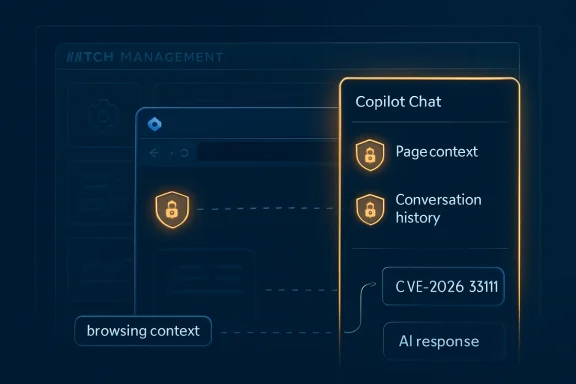
The old browser security model was built around pages, origins, cookies, downloads, and extensions. Copilot Chat in Edge complicates that model because the browser is no longer merely displaying information; it is interpreting page context, user prompts, conversation history, and work-account identity signals through an AI interface. CVE-2026-33111 is therefore not just another “information disclosure” entry to file away under Patch Tuesday hygiene. It is a reminder that AI assistants embedded in everyday clients are becoming part of the enterprise attack surface before most organizations have learned how to inventory them.
Edge has spent years trying to be more than “the Windows browser.” It is now a managed enterprise shell, a PDF viewer, a password monitor, a policy-controlled endpoint, a shopping assistant, a security surface, and increasingly a front end for Microsoft 365 Copilot Chat. That makes it useful, but it also means that a vulnerability in the Copilot sidepane is not psychologically equivalent to a flaw in a novelty toolbar.
The security boundary here is subtle. Copilot Chat in Edge can use browsing context when a user permits it, and Microsoft’s enterprise guidance frames that context-sharing as a productivity feature protected by account identity and administrative controls. But the very phrase browsing context should make security teams slow down. Context is the thing AI systems are hungry for, and context is also where confidential information tends to hide.
Traditional browser vulnerabilities often have an obvious shape. A malicious page triggers memory corruption. A crafted file escapes a sandbox. A cross-site scripting flaw steals a token. AI-assisted browsing introduces a less familiar shape: the system may disclose information not because the browser failed to parse bytes safely, but because the assistant had access to more context than the organization expected, or because a trust decision was made in a layer administrators do not routinely inspect.
That does not mean CVE-2026-33111 is a prompt-injection disaster, a sandbox escape, or a catastrophic leak. The public label does not establish that. What it does establish is that Microsoft considers the issue real enough to assign and publish a CVE, and that the affected product is Copilot Chat in Microsoft Edge. For administrators, that is already enough to move the issue out of the realm of AI hypotheticals and into change-management reality.
With a memory-corruption bug, a sparse advisory still gives defenders a familiar playbook. Patch the affected version, monitor for exploitation indicators if available, and treat exploitability ratings as a triage input. With AI-integrated features, the first-order patching motion remains the same, but the second-order question is harder: what did the product have permission to see?
That is where CVE-2026-33111 intersects with enterprise anxiety about Copilot more broadly. Microsoft has spent the last two years telling customers that Copilot experiences respect existing permissions and enterprise data protections. That is the right architectural promise, but it is not the same as saying every integration point will be flawless. A vulnerability in an AI chat surface can be low-drama technically and still high-drama administratively, because it touches the governance layer where security teams are already arguing with business units about enablement.
The report-confidence framing is useful here. A confirmed vendor CVE raises confidence that the vulnerability exists, but it does not automatically raise confidence in every third-party theory about how it works. The practical response should be neither panic nor dismissal. It should be disciplined uncertainty: accept the vendor-confirmed facts, refuse to overfit the missing details, and treat the lack of public exploit information as a reason to tighten exposure rather than a reason to wait.
The distinction matters. Hiding a toolbar icon is not the same as disabling a capability, and disabling page-context access is not the same as blocking Copilot Chat entirely. A user interface control can reduce casual exposure, but it does not necessarily define the security boundary. Enterprises that treat the Copilot button as the whole feature may discover they have managed the symptom rather than the data path.
For WindowsForum readers, the relevant comparison is not Clippy, Cortana, or even Bing Chat. The better comparison is the long history of browser extension governance. Extensions began as convenience tools, then became data-access risks, then became something mature organizations controlled through policy, allow lists, and telemetry. Copilot Chat in Edge is moving through that same arc at much higher speed and with a much more powerful data-processing engine behind it.
The difference is that browser extensions were usually optional and visibly third-party. Copilot is first-party, branded as part of Microsoft’s productivity stack, and increasingly presented as a normal way to use the browser. That creates a trust shortcut. Users assume Microsoft-native means enterprise-approved, while administrators may assume enterprise-approved means already safely scoped. CVE-2026-33111 is a small but sharp warning against both assumptions.
In an AI assistant, the phrase deserves more respect. The product’s job is to ingest information, reason over it, summarize it, transform it, and return it in a form a user can act on. If a vulnerability affects what information enters that loop, what information leaves it, or which boundary checks apply along the way, the disclosure risk can be organizational rather than merely technical.
This is why defenders should be careful with severity shorthand. A flaw that cannot execute code may still reveal confidential emails, internal documents, customer data, page contents, prompts, or conversational history depending on the architecture and exploit path. Again, CVE-2026-33111’s public record does not prove those specific outcomes. But the category is inherently sensitive because Copilot’s value proposition is proximity to useful data.
The AI security lesson is uncomfortable: the more helpful the assistant, the more consequential its failures become. A locked-down chatbot that knows nothing is not very useful. A context-aware assistant that can see the user’s browser session, work identity, and document universe is useful precisely because it sits near sensitive material. Security teams are not being asked to secure a toy. They are being asked to secure a data broker with a friendly icon.
Organizations should look closely at the Edge policies that govern Copilot availability, toolbar visibility, and page-context access. Microsoft has moved toward dedicated controls for Microsoft 365 Copilot Chat in Edge for Business, including a policy that determines whether the Copilot Chat icon appears in the toolbar for Entra ID profiles. That is a meaningful improvement over burying the feature under broader sidebar behavior, but it also means policy baselines need to be revisited.
The risk is not that Microsoft provides no controls. The risk is that many environments have controls they have not deliberately configured. In that default-state gap, users may get a feature before security teams have decided whether it belongs in regulated workflows, administrator sessions, privileged browsing profiles, incident-response workstations, or kiosk-style environments.
This is especially important because Edge profiles blur personal and work expectations in ways that can confuse users. A shield icon, a work account, and an enterprise-branded chat experience may reassure people, but reassurance is not the same as least privilege. If Copilot Chat can see page context only after consent, then user education matters. If administrators can suppress that access by policy, then policy discipline matters more.
The better question is not whether Microsoft is trustworthy in the abstract. The better question is whether your organization has decided what Copilot Chat in Edge is allowed to know. If the answer is “whatever the default settings permit,” then the organization has not made a security decision. It has accepted a product decision.
That distinction is central to modern Microsoft administration. The company’s cloud and client platforms increasingly ship capabilities first and controls alongside them, leaving customers to tune the final posture. This is not unique to Copilot, but Copilot makes the stakes more visible because the feature is designed to collapse search, reading, summarization, and action into a single conversational interface.
In regulated environments, the conversation should be even sharper. Legal teams, healthcare organizations, government contractors, schools, and financial institutions need to know whether AI browsing assistance is compatible with their data-handling rules. The presence of a CVE does not answer that question by itself. It simply gives security leaders a timely reason to force the discussion.
Administrators should treat CVE-2026-33111 as a prompt to inventory where Copilot Chat in Edge is enabled, which channels of Edge are deployed, which users are signed in with Entra profiles, and which policies govern page-context access. That inventory is not glamorous, but it is the difference between “we patched the browser” and “we understand our AI exposure.”
The most mature organizations will also separate user populations. A marketing user researching public websites does not carry the same risk profile as a domain administrator browsing internal consoles, a legal user reviewing privileged material, or a finance user working inside dashboards full of nonpublic data. Browser AI policy should not be one-size-fits-all simply because the icon is one-size-fits-all.
There is also a monitoring challenge. Traditional endpoint detection tools are better at process behavior than semantic data movement. They can tell you which executable launched, which DLL loaded, or which network endpoint was contacted. They are less naturally equipped to answer whether an AI assistant summarized the wrong page, exposed the wrong context, or retained a conversation that should not have existed.
An information disclosure flaw in a browser AI assistant may involve conventional web security, model orchestration, context assembly, authorization checks, user consent flows, service-side filtering, or some combination of those layers. The public CVE label compresses that complexity into a few words. That compression is useful for tracking but dangerous if readers mistake it for understanding.
This is why report confidence matters. We can be confident that Microsoft has acknowledged a vulnerability assigned as CVE-2026-33111 in Copilot Chat for Microsoft Edge. We should be less confident about unverified claims that go beyond the advisory unless Microsoft, a credible researcher, or reproducible technical analysis supports them. The gap between those two confidence levels is where good journalism and good security practice both live.
The same is true for exploitability. A lack of public exploit code does not mean a vulnerability is harmless. A lack of technical detail does not mean attackers know nothing. Conversely, the presence of a scary AI label does not mean every Copilot deployment is hemorrhaging secrets. Security maturity means resisting both underreaction and theater.
For Microsoft, this integration is strategic. Edge becomes more valuable when it is the best place to use Microsoft 365 Copilot Chat. Microsoft 365 becomes stickier when its AI assistant is present at the point of reading and decision-making. Windows becomes a more coherent platform when the browser, identity, admin center, and productivity suite all reinforce one another.
For customers, the same integration is both convenience and concentration risk. A single client can now mediate web access, identity, enterprise data protection, AI assistance, and administrative policy. That is elegant when it works. It is also a larger blast radius when a boundary is wrong.
The answer is not nostalgia for a simpler browser. That browser is not coming back. The answer is to treat AI features in Edge with the same seriousness once reserved for macros, browser extensions, password managers, and remote-management agents. They are productivity multipliers, and productivity multipliers deserve threat models.
That phrasing is less dramatic than the usual AI-security discourse, but it is more useful. It tells administrators what to do next. Patch the affected software. Verify the policy posture. Limit context access where it is not needed. Segment high-risk users. Watch Microsoft’s advisory for updates, especially exploitability, affected-version, and mitigation details.
Security teams should also use this moment to update their internal language. “Copilot is enabled” is too vague. “Copilot Chat in Edge is available to these users, toolbar visibility is controlled this way, page-context access is set this way, and high-risk groups are excluded or restricted” is the kind of sentence that belongs in a real governance document.
The distinction will matter more as AI features become less visible. Today, users click an icon and chat with a sidepane. Tomorrow, AI assistance will be woven into address bars, tab management, search, document viewers, dev tools, and admin portals. The earlier organizations learn to manage the underlying permissions rather than the visible buttons, the less painful that transition will be.
Source: MSRC Security Update Guide - Microsoft Security Response Center
The old browser security model was built around pages, origins, cookies, downloads, and extensions. Copilot Chat in Edge complicates that model because the browser is no longer merely displaying information; it is interpreting page context, user prompts, conversation history, and work-account identity signals through an AI interface. CVE-2026-33111 is therefore not just another “information disclosure” entry to file away under Patch Tuesday hygiene. It is a reminder that AI assistants embedded in everyday clients are becoming part of the enterprise attack surface before most organizations have learned how to inventory them.
 Microsoft’s AI Browser Moment Has Become a Security Boundary
Edge has spent years trying to be more than “the Windows browser.” It is now a managed enterprise shell, a PDF viewer, a password monitor, a policy-controlled endpoint, a shopping assistant, a security surface, and increasingly a front end for Microsoft 365 Copilot Chat. That makes it useful, but it also means that a vulnerability in the Copilot sidepane is not psychologically equivalent to a flaw in a novelty toolbar.The security boundary here is subtle. Copilot Chat in Edge can use browsing context when a user permits it, and Microsoft’s enterprise guidance frames that context-sharing as a productivity feature protected by account identity and administrative controls. But the very phrase browsing context should make security teams slow down. Context is the thing AI systems are hungry for, and context is also where confidential information tends to hide.
Traditional browser vulnerabilities often have an obvious shape. A malicious page triggers memory corruption. A crafted file escapes a sandbox. A cross-site scripting flaw steals a token. AI-assisted browsing introduces a less familiar shape: the system may disclose information not because the browser failed to parse bytes safely, but because the assistant had access to more context than the organization expected, or because a trust decision was made in a layer administrators do not routinely inspect.
That does not mean CVE-2026-33111 is a prompt-injection disaster, a sandbox escape, or a catastrophic leak. The public label does not establish that. What it does establish is that Microsoft considers the issue real enough to assign and publish a CVE, and that the affected product is Copilot Chat in Microsoft Edge. For administrators, that is already enough to move the issue out of the realm of AI hypotheticals and into change-management reality.
The Most Important Detail Is the Detail Microsoft Has Not Yet Given
The vulnerability description available to ordinary readers is thin. We know the product, the class of impact, and the vendor acknowledgement. We do not yet have a public root-cause narrative, a proof of concept, or a clear map of exactly which data could be disclosed under which conditions. That lack of detail is not unusual in coordinated vulnerability disclosure, but in AI features it has a different operational effect.With a memory-corruption bug, a sparse advisory still gives defenders a familiar playbook. Patch the affected version, monitor for exploitation indicators if available, and treat exploitability ratings as a triage input. With AI-integrated features, the first-order patching motion remains the same, but the second-order question is harder: what did the product have permission to see?
That is where CVE-2026-33111 intersects with enterprise anxiety about Copilot more broadly. Microsoft has spent the last two years telling customers that Copilot experiences respect existing permissions and enterprise data protections. That is the right architectural promise, but it is not the same as saying every integration point will be flawless. A vulnerability in an AI chat surface can be low-drama technically and still high-drama administratively, because it touches the governance layer where security teams are already arguing with business units about enablement.
The report-confidence framing is useful here. A confirmed vendor CVE raises confidence that the vulnerability exists, but it does not automatically raise confidence in every third-party theory about how it works. The practical response should be neither panic nor dismissal. It should be disciplined uncertainty: accept the vendor-confirmed facts, refuse to overfit the missing details, and treat the lack of public exploit information as a reason to tighten exposure rather than a reason to wait.
Copilot in Edge Turns Page Context Into a Managed Asset
Microsoft’s own Edge management documentation makes clear that Copilot Chat in Edge is not a single on/off experience in practice. There are controls for whether the Copilot Chat icon appears in the Edge for Business toolbar, whether Copilot is available, and whether the assistant can use page or PDF content when formulating responses. That policy surface is the real administrative battleground.The distinction matters. Hiding a toolbar icon is not the same as disabling a capability, and disabling page-context access is not the same as blocking Copilot Chat entirely. A user interface control can reduce casual exposure, but it does not necessarily define the security boundary. Enterprises that treat the Copilot button as the whole feature may discover they have managed the symptom rather than the data path.
For WindowsForum readers, the relevant comparison is not Clippy, Cortana, or even Bing Chat. The better comparison is the long history of browser extension governance. Extensions began as convenience tools, then became data-access risks, then became something mature organizations controlled through policy, allow lists, and telemetry. Copilot Chat in Edge is moving through that same arc at much higher speed and with a much more powerful data-processing engine behind it.
The difference is that browser extensions were usually optional and visibly third-party. Copilot is first-party, branded as part of Microsoft’s productivity stack, and increasingly presented as a normal way to use the browser. That creates a trust shortcut. Users assume Microsoft-native means enterprise-approved, while administrators may assume enterprise-approved means already safely scoped. CVE-2026-33111 is a small but sharp warning against both assumptions.
Information Disclosure Is the AI Era’s Most Boring Dangerous Phrase
“Information disclosure” is one of those vulnerability labels that can lull people to sleep. It does not have the kinetic thrill of remote code execution. It does not sound as immediately combustible as elevation of privilege. In a conventional endpoint bug, information disclosure might mean memory contents, file metadata, system configuration, or a token fragment that becomes useful only when chained with another flaw.In an AI assistant, the phrase deserves more respect. The product’s job is to ingest information, reason over it, summarize it, transform it, and return it in a form a user can act on. If a vulnerability affects what information enters that loop, what information leaves it, or which boundary checks apply along the way, the disclosure risk can be organizational rather than merely technical.
This is why defenders should be careful with severity shorthand. A flaw that cannot execute code may still reveal confidential emails, internal documents, customer data, page contents, prompts, or conversational history depending on the architecture and exploit path. Again, CVE-2026-33111’s public record does not prove those specific outcomes. But the category is inherently sensitive because Copilot’s value proposition is proximity to useful data.
The AI security lesson is uncomfortable: the more helpful the assistant, the more consequential its failures become. A locked-down chatbot that knows nothing is not very useful. A context-aware assistant that can see the user’s browser session, work identity, and document universe is useful precisely because it sits near sensitive material. Security teams are not being asked to secure a toy. They are being asked to secure a data broker with a friendly icon.
The Edge Policy Story Is Now a Security Story
For years, Edge policy management has felt like the kind of administrative plumbing that only desktop engineers love. ADMX templates, registry values, Intune profiles, recommended versus mandatory settings, and per-profile behavior are not the stuff of glossy AI demos. But they are exactly where the real Copilot deployment story lives.Organizations should look closely at the Edge policies that govern Copilot availability, toolbar visibility, and page-context access. Microsoft has moved toward dedicated controls for Microsoft 365 Copilot Chat in Edge for Business, including a policy that determines whether the Copilot Chat icon appears in the toolbar for Entra ID profiles. That is a meaningful improvement over burying the feature under broader sidebar behavior, but it also means policy baselines need to be revisited.
The risk is not that Microsoft provides no controls. The risk is that many environments have controls they have not deliberately configured. In that default-state gap, users may get a feature before security teams have decided whether it belongs in regulated workflows, administrator sessions, privileged browsing profiles, incident-response workstations, or kiosk-style environments.
This is especially important because Edge profiles blur personal and work expectations in ways that can confuse users. A shield icon, a work account, and an enterprise-branded chat experience may reassure people, but reassurance is not the same as least privilege. If Copilot Chat can see page context only after consent, then user education matters. If administrators can suppress that access by policy, then policy discipline matters more.
The Enterprise Problem Is Not Whether to Trust Microsoft
A predictable debate will form around CVE-2026-33111: Microsoft is pushing AI too aggressively; Microsoft is fixing issues responsibly; administrators should disable Copilot everywhere; users need these tools to stay productive. All of those positions contain some truth, and none of them is sufficient.The better question is not whether Microsoft is trustworthy in the abstract. The better question is whether your organization has decided what Copilot Chat in Edge is allowed to know. If the answer is “whatever the default settings permit,” then the organization has not made a security decision. It has accepted a product decision.
That distinction is central to modern Microsoft administration. The company’s cloud and client platforms increasingly ship capabilities first and controls alongside them, leaving customers to tune the final posture. This is not unique to Copilot, but Copilot makes the stakes more visible because the feature is designed to collapse search, reading, summarization, and action into a single conversational interface.
In regulated environments, the conversation should be even sharper. Legal teams, healthcare organizations, government contractors, schools, and financial institutions need to know whether AI browsing assistance is compatible with their data-handling rules. The presence of a CVE does not answer that question by itself. It simply gives security leaders a timely reason to force the discussion.
Patch Management Still Matters, but Exposure Management Matters More
The obvious operational advice is to update Edge and follow Microsoft’s remediation guidance as it becomes available. That advice is necessary but incomplete. A patched vulnerability removes a known defect; it does not define a durable AI governance model.Administrators should treat CVE-2026-33111 as a prompt to inventory where Copilot Chat in Edge is enabled, which channels of Edge are deployed, which users are signed in with Entra profiles, and which policies govern page-context access. That inventory is not glamorous, but it is the difference between “we patched the browser” and “we understand our AI exposure.”
The most mature organizations will also separate user populations. A marketing user researching public websites does not carry the same risk profile as a domain administrator browsing internal consoles, a legal user reviewing privileged material, or a finance user working inside dashboards full of nonpublic data. Browser AI policy should not be one-size-fits-all simply because the icon is one-size-fits-all.
There is also a monitoring challenge. Traditional endpoint detection tools are better at process behavior than semantic data movement. They can tell you which executable launched, which DLL loaded, or which network endpoint was contacted. They are less naturally equipped to answer whether an AI assistant summarized the wrong page, exposed the wrong context, or retained a conversation that should not have existed.
AI Vulnerabilities Are Forcing CVE Language to Stretch
The CVE system was born in a world where software defects generally mapped to code paths, inputs, privileges, and outputs. It still works, and it remains essential. But AI features are making its vocabulary work harder.An information disclosure flaw in a browser AI assistant may involve conventional web security, model orchestration, context assembly, authorization checks, user consent flows, service-side filtering, or some combination of those layers. The public CVE label compresses that complexity into a few words. That compression is useful for tracking but dangerous if readers mistake it for understanding.
This is why report confidence matters. We can be confident that Microsoft has acknowledged a vulnerability assigned as CVE-2026-33111 in Copilot Chat for Microsoft Edge. We should be less confident about unverified claims that go beyond the advisory unless Microsoft, a credible researcher, or reproducible technical analysis supports them. The gap between those two confidence levels is where good journalism and good security practice both live.
The same is true for exploitability. A lack of public exploit code does not mean a vulnerability is harmless. A lack of technical detail does not mean attackers know nothing. Conversely, the presence of a scary AI label does not mean every Copilot deployment is hemorrhaging secrets. Security maturity means resisting both underreaction and theater.
The Browser Is Becoming the AI Workbench
CVE-2026-33111 arrives during a broader shift in which the browser is becoming the default workbench for AI-assisted labor. Users read documents in the browser, open SaaS dashboards in the browser, authenticate to internal systems in the browser, and now ask the browser’s assistant to interpret what they are seeing. That convergence makes Edge policy a first-class security control.For Microsoft, this integration is strategic. Edge becomes more valuable when it is the best place to use Microsoft 365 Copilot Chat. Microsoft 365 becomes stickier when its AI assistant is present at the point of reading and decision-making. Windows becomes a more coherent platform when the browser, identity, admin center, and productivity suite all reinforce one another.
For customers, the same integration is both convenience and concentration risk. A single client can now mediate web access, identity, enterprise data protection, AI assistance, and administrative policy. That is elegant when it works. It is also a larger blast radius when a boundary is wrong.
The answer is not nostalgia for a simpler browser. That browser is not coming back. The answer is to treat AI features in Edge with the same seriousness once reserved for macros, browser extensions, password managers, and remote-management agents. They are productivity multipliers, and productivity multipliers deserve threat models.
The Practical Reading of CVE-2026-33111 Is Narrow but Urgent
CVE-2026-33111 should not be inflated into a claim that Copilot Chat in Edge is fundamentally unsafe. It should also not be minimized as a routine advisory that only security completists need to notice. The right reading is narrower and more urgent: a confirmed information disclosure vulnerability exists in a browser-integrated AI feature that may have access to sensitive browsing context depending on configuration and user behavior.That phrasing is less dramatic than the usual AI-security discourse, but it is more useful. It tells administrators what to do next. Patch the affected software. Verify the policy posture. Limit context access where it is not needed. Segment high-risk users. Watch Microsoft’s advisory for updates, especially exploitability, affected-version, and mitigation details.
Security teams should also use this moment to update their internal language. “Copilot is enabled” is too vague. “Copilot Chat in Edge is available to these users, toolbar visibility is controlled this way, page-context access is set this way, and high-risk groups are excluded or restricted” is the kind of sentence that belongs in a real governance document.
The distinction will matter more as AI features become less visible. Today, users click an icon and chat with a sidepane. Tomorrow, AI assistance will be woven into address bars, tab management, search, document viewers, dev tools, and admin portals. The earlier organizations learn to manage the underlying permissions rather than the visible buttons, the less painful that transition will be.
The Copilot-in-Edge Checklist Windows Admins Actually Need
The most concrete response to this CVE is not a philosophical stance on AI. It is a short, testable administrative review that turns Copilot from an assumption into a managed feature.- Confirm that Microsoft Edge is updating through your normal enterprise channel and that security updates are reaching the populations where Copilot Chat in Edge is available.
- Review whether Copilot Chat in Edge is enabled, merely hidden, or fully blocked for the user groups that handle sensitive data.
- Audit policies governing page and PDF context so the assistant cannot read browsing content in environments where that access is unnecessary or prohibited.
- Separate high-risk roles such as administrators, legal staff, finance users, and incident responders from broad default Copilot enablement.
- Document the difference between toolbar visibility, Copilot availability, and page-context access so help desks and security teams do not talk past each other.
- Revisit the policy baseline whenever Microsoft changes Edge’s Copilot controls, because the management surface is still evolving.
Source: MSRC Security Update Guide - Microsoft Security Response Center
