

The Bug Is Local, but the Risk Is Not Small
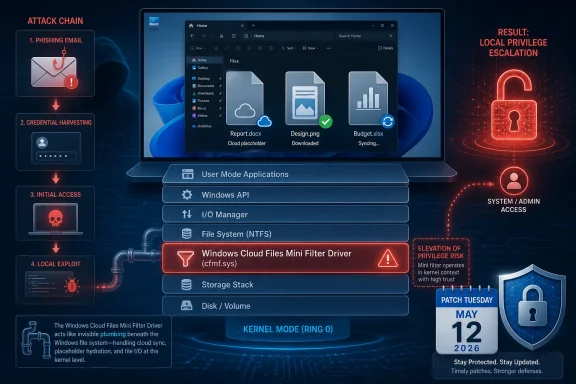
Elevation-of-privilege vulnerabilities rarely have the cinematic quality of a remote-code-execution headline. They do not usually let an anonymous attacker reach across the internet, land on a machine, and instantly take control. CVE-2026-35418 is in that quieter category: the attacker already needs some level of local access or code execution on the target system.
That caveat matters, but it should not comfort anyone too much. Modern intrusions are chains, not single events. A phishing attachment, browser exploit, stolen credential, malicious installer, exposed remote access tool, or compromised user session gets the attacker in; a local privilege escalation vulnerability helps turn that foothold into control.
This is why Windows administrators tend to treat kernel-adjacent privilege bugs seriously even when Microsoft labels them below the “drop everything” tier. If the vulnerable component runs with high trust, a flaw there can collapse the distinction between a compromised standard user account and a fully compromised endpoint. The Windows Cloud Files Mini Filter Driver sits close enough to the operating system’s file-handling machinery that any flaw in it deserves more attention than its plain-English title suggests.
The phrase “Cloud Files” may sound like a OneDrive feature, but the operating system framing is broader. Windows has spent years making cloud-backed storage feel local: files appear in Explorer, hydrate on demand, synchronize in the background, and advertise availability states without asking users to think about where the bytes physically live. That convenience depends on deep integration between shell, sync clients, file-system filters, and kernel-mode components.
Cloud Storage Became Part of the Kernel Conversation
The Windows Cloud Files Mini Filter Driver is part of the plumbing that lets cloud-backed files behave like normal files. To users, this is the magic behind files that look present on disk even when their content is not fully downloaded. To developers and administrators, it is part of a platform contract: cloud providers can integrate with Explorer and the file system without reinventing every low-level behavior themselves.
That design is useful, and it is also security-sensitive. File-system mini-filter drivers are not ornamental add-ons. They observe, modify, and participate in file operations at a level where mistakes can have consequences far beyond a single application crash.
Windows has a long history of important security fixes in drivers that sit between user activity and privileged system behavior. Print drivers, graphics drivers, storage drivers, network drivers, and file-system filters have all produced their share of hard lessons. The reason is straightforward: these components process complex input, maintain state across asynchronous operations, and operate under demanding compatibility expectations.
Cloud-file integration adds its own complications. The system has to reason about local placeholders, remote content, sync state, access permissions, reparse points, hydration, dehydration, metadata, and races between user actions and background sync operations. A vulnerability in that neighborhood may not require a novel theory of exploitation. It may simply require finding one place where Windows trusts state that an attacker can influence at the wrong time.
Microsoft’s Confidence Metric Is the Quiet Signal
The text attached to the user’s source points to a subtle but important part of Microsoft’s vulnerability language: confidence in the existence of the vulnerability and the credibility of known technical details. That metric is not a severity score, and it is not the same thing as exploitability in the wild. It is a measure of how firmly the vendor believes the vulnerability is real and how much reliable technical understanding exists.
For defenders, this is more than bureaucratic metadata. A vulnerability that is vaguely rumored but unconfirmed belongs in one category; a vulnerability acknowledged by the affected vendor belongs in another. Once Microsoft publishes an entry in the Security Update Guide, the issue is no longer just chatter from a mailing list, a proof-of-concept repository, or a third-party scanner feed.
That does not mean every detail is public. In fact, Microsoft often withholds root-cause specifics when disclosure could accelerate exploitation before patch adoption catches up. The public may get the affected component, the impact class, the broad attack requirements, and the update path, while the precise bug class remains unstated.
This creates the familiar Patch Tuesday tension. Administrators want enough information to prioritize intelligently, but not so much information that unpatched systems become easier to exploit. Attackers want the same advisory, the same binary diff, and the same hints. The difference is that defenders have change windows, maintenance boards, line-of-business app testing, and uptime constraints; attackers have patience.
“No Details” Is Not the Same as “No Danger”
The absence of public exploit code should never be mistaken for the absence of exploitability. That is especially true for Windows local privilege escalation bugs in well-known components. Once a patch is available, skilled researchers and criminal operators can compare patched and unpatched binaries, isolate the changed code path, and infer the vulnerable condition.
This process does not always produce a working exploit quickly. Some bugs are technically difficult, timing-sensitive, or constrained by modern mitigations. Others move from advisory to proof-of-concept to commodity exploitation with uncomfortable speed. The practical lesson is that the patch release itself starts a clock.
CVE-2026-35418’s component makes that clock worth watching. Cloud-file behavior is common on consumer and enterprise Windows systems alike, especially where OneDrive Known Folder Move, Microsoft 365, SharePoint synchronization, or third-party cloud providers are part of the desktop baseline. Even if only certain configurations are exposed, administrators should assume the affected code path is not exotic until proven otherwise.
The more cloud storage becomes a default part of Windows productivity, the less useful it is to think of cloud-file bugs as edge cases. The attack surface follows the workflow. If users live in synchronized folders, attackers will eventually learn to live there too.
The Patch Tuesday Problem Is Prioritization, Not Awareness
Most Windows administrators do not need to be convinced that monthly security updates matter. The hard part is deciding which updates get accelerated, which get staged, and which require compatibility testing before broad deployment. CVE-2026-35418 lands in a category that often deserves faster movement than its lack of remote entry point might suggest.
A local privilege escalation bug is especially valuable after initial compromise. Malware running as a standard user is constrained. Malware running with elevated privileges can tamper with security tools, dump credentials, install services, access other users’ data, modify protected areas, and persist more deeply.
That is why endpoint security teams often care about EoP flaws as much as perimeter teams care about RCEs. The perimeter tells you how attackers get in. Privilege escalation tells you how much damage they can do once inside.
The correct response is not panic; it is sequencing. Systems exposed to heavy user interaction, developer workstations, shared desktops, VDI pools, help-desk machines, and endpoints with synchronized corporate data should move up the queue. Servers may appear less obviously exposed to cloud-file workflows, but administrators should still evaluate whether the affected Windows component is present, enabled, or reachable through installed roles and applications.
Cloud Files Turn User Convenience Into Administrative Debt
The deeper issue behind CVE-2026-35418 is that Windows’ most convenient features increasingly depend on complex background machinery. Files On-Demand, cloud sync, shell integration, backup prompts, identity-linked storage, and cross-device continuity all make the desktop feel modern. They also make the desktop harder to reason about.
Administrators can document a traditional file server share with relative confidence. Cloud-backed local namespaces are trickier. They blur the boundary between local and remote, cached and uncached, present and placeholder, user action and background service. That ambiguity is tolerable for productivity, but it is challenging for security modeling.
Every abstraction leaks eventually. When a cloud placeholder behaves like a file, Windows has to decide which parts of the file contract are simulated and which are real. When content hydrates on demand, the system has to maintain trust across state transitions. When a sync client participates in file operations, it becomes part of a larger security story, not just a convenience app in the notification area.
This is not an argument against cloud integration. It is an argument against pretending that cloud integration is merely cosmetic. The more seamless Microsoft makes cloud-backed storage, the more its supporting drivers and services should be treated as core operating system attack surface.
Enterprise Defenders Should Look Past the CVE Title
The title “Windows Cloud Files Mini Filter Driver Elevation of Privilege Vulnerability” is accurate, but it is not very helpful for risk communication. It sounds narrow. It sounds like something that might matter only to people using a particular cloud feature. In practice, the driver sits in a layer where Windows, user profiles, sync tools, and file-system behavior intersect.
For enterprise IT, the first question is not whether every machine is equally vulnerable. It is whether the organization has enough visibility to know which machines are most exposed. That means inventorying Windows versions, update levels, sync-client deployment, OneDrive configuration, third-party cloud storage integration, and endpoint privilege models.
The second question is whether standard users can become administrators through other means. If users already have broad local admin rights, the marginal impact of a local privilege escalation flaw is different, though still not irrelevant. If the organization has done the hard work of removing local admin rights, then EoP vulnerabilities become a direct threat to that control.
The third question is detection. Exploitation of a file-system filter driver bug may not look like ordinary malware behavior at first. It may present as unusual process crashes, suspicious privilege transitions, unexpected service creation, credential-access attempts after a low-privilege process runs, or endpoint security tampering. Patch management reduces the need to detect the exploit path perfectly, which is good, because perfect detection is rarely available on day one.
Home Users Are in the Blast Radius Too
It is tempting to frame this as an enterprise issue because enterprise administrators are the people who read CVE records closely. But the Cloud Files Mini Filter Driver is also part of the consumer Windows experience. OneDrive is deeply woven into Windows 11 setup, Microsoft account sign-in, desktop backup prompts, and cross-device file access.
A home user is less likely to face a targeted chain built around CVE-2026-35418 specifically. But home users are more likely to run random installers, game mods, cracked software, malicious utilities, and phishing payloads without the layered controls an enterprise might have. A local privilege escalation bug can turn a bad download into a worse compromise.
The advice for consumers remains boring because boring advice works. Install the cumulative Windows update, restart promptly, avoid running untrusted software, and be skeptical of anything that asks for permissions it should not need. The less glamorous truth is that timely patching closes many doors attackers would otherwise chain together.
For enthusiasts, this vulnerability is also a reminder that Windows features marketed as convenience layers are not separate from system security. If Explorer, OneDrive, and the file system are working together to create a seamless cloud experience, then a flaw in that chain belongs in the same mental bucket as other operating system vulnerabilities.
The Industry Keeps Relearning the Same Driver Lesson
Driver vulnerabilities persist because drivers are where performance, compatibility, and privilege collide. They must be fast, they must support decades of expectations, and they often run with more trust than the applications that trigger their behavior. That combination is unforgiving.
Microsoft has invested heavily in platform hardening, kernel mitigations, virtualization-based security, driver signing, and memory-safety initiatives. Those investments matter. They raise the cost of exploitation and eliminate entire classes of sloppy attack paths.
But the Windows ecosystem remains enormous. Backward compatibility is a feature customers demand, and every compatibility promise preserves old assumptions somewhere. Even Microsoft-authored components can become vulnerable when they process complex state under real-world timing and compatibility pressure.
CVE-2026-35418 is therefore not an oddity. It is part of the recurring security tax on a platform that must support local apps, cloud workflows, legacy behaviors, modern sync engines, and enterprise manageability all at once. The tax can be reduced, but it cannot be wished away.
Exploitability Will Be Decided After the Patch Ships
The public advisory is only the first phase of this vulnerability’s life. The second phase begins when researchers and attackers inspect the update. Binary diffing is not magic, but it is a mature discipline, and Windows security fixes attract attention.
If the changed code path is obvious, proof-of-concept work may emerge quickly. If the bug depends on subtle timing, specific object lifetimes, or hard-to-control file-system states, exploitation may remain limited to advanced researchers. Defenders do not get to know which world they are in immediately.
That uncertainty is why the confidence metric matters. Microsoft’s acknowledgement tells administrators the vulnerability is real enough to patch. It does not tell them that exploitation is trivial, nor does it guarantee exploitation is unlikely. It says the issue exists, the vendor has enough confidence to publish guidance, and the fix should enter the organization’s update process.
Security teams should resist the urge to wait for exploit chatter before acting. By the time public exploit chatter is reliable, the patch gap may already be dangerous. The better approach is to treat this as a post-compromise accelerator and close it before it becomes part of an attacker’s standard playbook.
The Practical Move Is Faster Validation, Not Blind Deployment
There is a difference between urgency and recklessness. Windows updates still need testing, especially in environments with endpoint agents, data-loss-prevention tools, backup clients, document management systems, and cloud sync integrations. A file-system filter driver fix is exactly the kind of update administrators may want to validate against storage-heavy workflows.
But validation should be measured in days, not weeks, for high-value endpoint populations. Pilot rings should include machines that actually use cloud-file features, not just clean test VMs. If your testing fleet does not synchronize OneDrive, open SharePoint-backed folders, use Known Folder Move, or run third-party cloud storage clients, it may not meaningfully test this patch’s operational risk.
Organizations should also watch for secondary symptoms after deployment. File hydration failures, sync delays, Explorer oddities, application file-open errors, and endpoint agent conflicts are the kinds of issues that can surface when low-level file behavior changes. None of that argues against patching; it argues for patching with eyes open.
The best patch programs are not the ones that pretend updates never break anything. They are the ones that identify likely breakpoints, test representative workflows, deploy in rings, and still move fast enough that attackers do not get a long, comfortable window.
The Cloud-Files Warning Hidden in One CVE
CVE-2026-35418 should push Windows teams to review how much they rely on invisible sync infrastructure. The immediate fix is the security update, but the broader lesson is architectural. Cloud file integration is now a security boundary-adjacent feature, even if it was sold as user convenience.
That means configuration matters. Organizations should know where files are synchronized, which folders are redirected or backed up, whether personal cloud accounts are allowed on managed devices, how third-party sync clients are controlled, and what telemetry exists around suspicious file-system behavior. A vulnerability in a cloud-files driver is easier to manage when the cloud-files estate is understood.
It also means least privilege still earns its keep. Removing local admin rights does not make EoP bugs irrelevant; it makes them more attractive to attackers. But it also forces attackers to spend an exploit they might otherwise not need, creating more opportunities for prevention, detection, and patching to work.
Finally, it means endpoint hardening should not stop at the obvious applications. Browsers, Office, VPN clients, and remote access tools get the attention, but the operating system’s integration layers deserve the same discipline. The quiet components are often quiet only until a CVE gives them a headline.
The Patch Queue Should Treat This as a Foothold Multiplier
The concrete read on CVE-2026-35418 is straightforward: patch it, prioritize endpoints where cloud-backed file workflows are common, and do not wait for public exploit code to decide whether it matters. The vulnerability’s value to an attacker is not in initial access; it is in what comes next.
- CVE-2026-35418 is an elevation-of-privilege vulnerability in the Windows Cloud Files Mini Filter Driver, not a remote entry-point bug.
- The affected component matters because cloud-backed files are now part of normal Windows desktop behavior, especially in Microsoft 365 and OneDrive-heavy environments.
- Microsoft’s confidence language signals that the vulnerability is vendor-acknowledged, even if root-cause details remain limited publicly.
- Administrators should prioritize patch testing on systems that actually use cloud sync, Files On-Demand, Known Folder Move, or comparable storage integration.
- Defenders should treat the bug as a post-compromise accelerator that could help malware move from user-level execution to deeper system control.
CVE-2026-35418 is a reminder that Windows security is increasingly tied to features designed to make the operating system disappear into the background. The smoother cloud files feel to users, the more complex the machinery beneath them becomes, and the more valuable that machinery becomes to attackers. Microsoft can patch this flaw, and administrators should apply that patch quickly, but the larger direction is clear: the future Windows attack surface will be built as much from convenience layers as from traditional network services.