

Overview
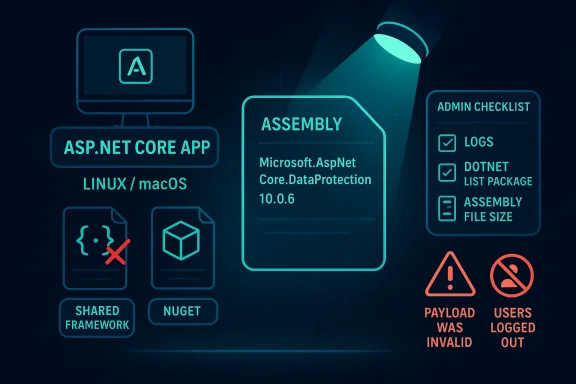
The most important thing to understand about this advisory is that package presence is not the same as runtime exposure. Microsoft’s guidance, as relayed in the advisory summary, makes clear that you are only affected if all three conditions line up: the application uses Microsoft.AspNetCore.DataProtection 10.0.6 directly or indirectly, the NuGet copy is the one actually loaded at runtime rather than the shared-framework copy, and the app runs on Linux, macOS, or another non-Windows OS. That makes this a classic modern .NET security problem: the dependency graph matters, but the deployment model matters just as much.
The second key point is that the issue is not universal across ASP.NET Core. The advisory text states that shared framework deployments are not affected when the installed ASP.NET Core shared framework version is at least as new as the referenced package, because the correct shared-framework binary is loaded instead of the NuGet one. Microsoft also says Windows deployments are not affected by default, because DataProtection uses CNG-based encryptors there, which do not contain the bug. That means the highest-risk systems are the ones that quietly drifted into self-contained or partially self-contained territory, especially in cross-platform hosting environments.
This is also a reminder that “library version” and “effective code path” are different things. A solution can show a vulnerable package in a restore graph and still be safe if the runtime loads the patched shared component. Conversely, a seemingly healthy project can still be exposed if it packages the vulnerable library directly into the application bundle. Microsoft explicitly calls out the runtime-loading distinction in the advisory summary, and that is why the verification process has to go beyond scanning the project file alone.
The advisory’s practical symptom is equally telling. Microsoft says the clearest sign of trouble is users being logged out and repeated “The payload was invalid” errors after upgrading to 10.0.6. That is a very specific operational clue, and it matters because cryptographic bugs often present as reliability failures before they become obvious security events. In other words, the bug may first look like a bad cookie rollout or a session-stability problem, not an elevation-of-privilege issue.
What makes this CVE different
Many ASP.NET Core advisories can be summarized in a sentence: patch the runtime, redeploy, move on. This one is more nuanced. Microsoft is effectively asking defenders to reason about what gets loaded, from where, and on which OS. That is a stronger dependence on environment inventory than many teams are used to, and it raises the bar for compliance reporting because “package installed” is no longer sufficient evidence of impact.
Another important distinction is that the advisory seems aimed at a relatively narrow but meaningful subset of deployments. Microsoft says older target frameworks such as net462 and netstandard2.0 with Microsoft.AspNetCore.DataProtection 10.0.0–10.0.6 are affected on all operating systems. That widens the concern beyond pure modern .NET 10 Linux/macOS deployments and into legacy compatibility scenarios that some enterprises keep around for years. Those older targets are often exactly where visibility is weakest and remediation lag is longest.
The result is a CVE that rewards precision. If you can prove the shared framework is loaded, you may be fine. If you can prove the NuGet binary is loaded on a non-Windows host, you should assume exposure until fixed. If you can only infer from package references, you are not done yet.
- Package presence alone is not enough
- Runtime binary selection is the real exposure gate
- Linux and macOS are the main affected platforms
- Windows default behavior is not the primary risk
- Legacy target frameworks widen the affected surface
How the vulnerability likely manifests
Microsoft’s short public framing and the symptom pattern suggest a bug in the DataProtection component’s cross-platform behavior rather than in an outer ASP.NET Core feature. That matters because DataProtection is deep infrastructure code: it underpins authentication cookies, session state, and other security-sensitive application flows. When something goes wrong there, the business effect can appear as mass sign-outs, broken tokens, or invalid payload handling before anyone thinks about privilege boundaries.
The advisory’s statement that users may be logged out and see repeated payload-validation errors implies that the broken path affects token or payload processing in a way that destabilizes trusted state. That is often how crypto-adjacent defects show up in practice: they do not necessarily announce themselves as “remote code execution” or “data theft,” but they create conditions that can be chained, abused, or at minimum used to degrade security controls. Microsoft classifies the issue as an elevation-of-privilege vulnerability, which tells us the consequence is more serious than a routine reliability bug.
The non-Windows emphasis is also telling. Microsoft notes that on Windows, the default CNG-based encryptors avoid the buggy code path. That strongly suggests the vulnerability lives in a code path that is exercised by the NuGet implementation on Linux/macOS or by managed algorithms explicitly selected on Windows. In practice, the risk becomes highest when teams have cross-platform portability requirements and therefore rely on packaged implementations instead of the shared framework’s guarded path.
Why DataProtection is security-critical
DataProtection is not a convenience library. It is a foundation layer for application trust, and subtle bugs there can undermine everything built on top of it. If cookies, tickets, or payloads become invalid unexpectedly, that is operational pain; if the bug also creates a path to privilege escalation, then it becomes a security governance problem.
That is why the advisory’s symptom of repeated “payload was invalid” errors matters. It is not just a sign that the software is unhappy; it is a clue that a protected state boundary may be failing consistently under a specific deployment topology. Teams should treat that as a red flag, especially if the behavior started immediately after moving to 10.0.6.
The broader lesson is that cryptographic and token-handling code belongs in the highest-confidence part of the stack. When these libraries are implemented differently across platform targets or packaging modes, the same application can behave safely in one environment and unsafely in another.
- DataProtection supports session and trust boundaries
- Invalid payload errors can be the earliest visible symptom
- Cross-platform divergence increases risk
- Crypto failures often masquerade as application instability
- Operational symptoms deserve security triage
Who is actually affected
Microsoft’s advisory is unusually specific about affected configurations. You are affected if your application uses Microsoft.AspNetCore.DataProtection 10.0.6 from NuGet, the NuGet copy is actually loaded at runtime, and the app runs on Linux, macOS, or another non-Windows OS. That means a lot of developers who see the package in their dependency tree may still not be vulnerable if the shared framework supplies the runtime assembly instead.
The advisory also says shared framework deployments are not affected when the installed ASP.NET Core shared framework is versioned at least as high as the package reference. That means framework-dependent apps that track the installed runtime properly are generally in the safer category. This is exactly the kind of detail that can save enterprises from unnecessary emergency change windows, provided they can prove what was loaded.
Windows deserves separate treatment. Microsoft says Windows deployments are not affected by default because the DataProtection stack uses CNG-based encryptors there, which bypass the vulnerable code path. The exception is important, though: if a Windows deployment explicitly opts into managed algorithms via UseCustomCryptographicAlgorithms, it becomes affected as well. That kind of conditional exposure is easy to miss in large estates where platform defaults were overridden years ago for compatibility or compliance reasons.
Special cases that widen the scope
The advisory also calls out older target frameworks. Microsoft says a smaller population running net462 or netstandard2.0 with Microsoft.AspNetCore.DataProtection 10.0.0–10.0.6 is affected on all operating systems. That is the sort of edge case many organizations ignore until a vulnerability forces a reconciliation project.
This matters because older compatibility targets are common in enterprise integration layers, vendor-adjacent products, and long-lived internal services. Those systems often remain on the books because the business cost of rewriting them is higher than the perceived patch burden. Vulnerabilities like this expose the hidden cost of that choice.
The takeaway is simple: if your deployment is cross-platform, self-contained, legacy-targeted, or uses custom cryptographic algorithms, you should assume you need a real inventory check rather than a casual package scan.
- Self-contained apps deserve special scrutiny
- Framework-dependent apps are usually safer
- Custom Windows algorithms change the risk profile
- Legacy targets can be affected across OSes
- Inventory accuracy is essential
How to determine whether the vulnerable binary was loaded
Microsoft’s guidance makes the runtime question the central one. The first place to look is your application logs, because the advisory says the clearest symptom after upgrading to 10.0.6 is repeated “The payload was invalid” errors alongside session logout behavior. If those errors began after the upgrade and correlate with Linux or macOS deployments, that is a strong indicator that the NuGet copy may be involved.
The second step is to inspect the project file and restore graph. Microsoft says to look for a PackageReference to Microsoft.AspNetCore.DataProtection 10.0.6 in the .csproj file, or in another package that depends on it, such as Microsoft.AspNetCore.DataProtection.StackExchangeRedis. It also suggests running dotnet list package to view resolved package versions. That tells you whether the package is present, but not whether it actually won the runtime load decision.
The third step is to inspect the binary on disk. Microsoft’s advisory says the technical details section explains how to distinguish the affected NuGet binary from the correct shared-framework binary by file size. That is an unusually practical tip, because file size is often the fastest way to tell whether a deployment picked up the packaged library instead of the framework-provided one. If you have both on disk, and the wrong one is the one getting loaded, you have a concrete exposure problem.
A practical verification sequence
- Check application logs for repeated payload-validation failures.
- Confirm whether
Microsoft.AspNetCore.DataProtection 10.0.6appears in project or transitive dependencies. - Determine whether the app is framework-dependent or self-contained.
- Verify which assembly was actually loaded at runtime.
- Compare the on-disk binary against the advisory’s file-size guidance.
- Reconcile the result against the hosting OS and framework version.
That sequence is useful because it separates potential exposure from actual exposure. A package reference alone is a lead. A loaded vulnerable binary on a non-Windows host is the event.
The most common mistake here is to stop after dependency enumeration. That is understandable, but incomplete. Microsoft’s own wording makes runtime loading the key factor, and the advisory is a good reminder that modern application security often depends on packaging behavior as much as source-code content.
- Logs can reveal the bug before scanners do
- Restore graphs show presence, not runtime use
- Self-contained deployments require binary verification
- File size can help distinguish binaries
- Runtime proof beats inferred exposure
Shared framework versus NuGet deployment
This advisory is a textbook example of why .NET deployment model matters so much. In a framework-dependent app, the installed shared framework can supply the runtime assembly, which may mean the vulnerable NuGet version is present on disk but never exercised. In a self-contained deployment, the application bundle brings its own copy, so the packaging decision directly affects exposure.
That distinction is more than academic. It affects incident response, patch validation, and release engineering. If you operate a large fleet, two servers running the “same” app can differ materially depending on whether one was built self-contained for portability and another depends on the system-wide runtime. One may be safe because the host’s shared framework is newer; the other may remain vulnerable until the application itself is rebuilt.
There is also a lifecycle angle. Teams sometimes move to self-contained publishing to reduce runtime dependency issues, improve portability, or simplify container images. That can be a good engineering tradeoff, but it shifts patch responsibility into the application release stream. Vulnerabilities like CVE-2026-40372 show the downside: the runtime is no longer guaranteed to shield you.
Why this matters to containerized workloads
Container users should pay special attention because many Linux ASP.NET Core deployments are packaged into images that effectively behave like self-contained artifacts. If the image includes the vulnerable library and the app loads it directly, then even a fully patched host does not help. The container is only as safe as the bits baked into it.
That is why the right question is not “is the host patched?” but “which DataProtection assembly is the app using inside this image or process?” In a containerized estate, that may require image rebuilds, pipeline validation, and redeployment rather than host patching alone.
For enterprises, the operational implication is that vulnerability remediation may be split across image build teams, platform teams, and application owners. That creates coordination friction, so this is a good candidate for a cross-team remediation checklist.
- Framework-dependent apps may inherit safety from the host
- Self-contained apps must be rebuilt
- Containers can freeze vulnerable libraries inside images
- Deployment style changes remediation ownership
- The host patch level may be irrelevant in some cases
Why Linux and macOS are the main concern
Microsoft’s advisory explicitly says the affected deployment pattern is on Linux, macOS, or another non-Windows OS. That immediately narrows the practical focus of the response and makes sense technically, because Windows defaults use CNG-based encryptors that do not contain the bug. The result is a vulnerability that is cross-platform in code lineage, but not equally cross-platform in real-world exposure.
For Linux and macOS shops, this is a reminder that “.NET is one platform” is a comforting simplification. The runtime behavior depends on the host OS, the deployment style, and the packaging choice. That means security teams need to build platform-aware patch logic, not just framework-version logic.
The broader enterprise implication is that heterogeneous fleets are more fragile than they appear. If your CI/CD system builds the same app for Windows and Linux, you cannot assume the same package graph implies the same risk. This is especially true if the Windows side is protected by CNG defaults while the Linux side uses the NuGet code path. The security delta may be entirely hidden until a CVE exposes it.
Cross-platform parity is not absolute
Developers often expect their code to behave identically across platforms once it compiles and tests pass. Security advisories like this one are a reminder that platform parity can stop at the runtime boundary. The same API call can be backed by different implementations with different vulnerabilities.
That is not a flaw in cross-platform design so much as a fact of life. Different cryptographic backends and runtime integrations have different attack surfaces, and the defense has to account for that. In practical terms, any team that values portability should also value runtime inventory.
The upside is that the affected surface here is at least bounded by host platform and deployment mode. That gives defenders a fighting chance to prioritize accurately instead of treating the whole .NET estate as equally exposed.
- Linux/macOS are the primary concern
- Windows defaults bypass the bug
- Cross-platform code can still diverge at runtime
- Platform-specific inventory is essential
- Operational triage should separate host and app risk
Legacy frameworks and compatibility targets
Microsoft’s note about net462 and netstandard2.0 is easy to overlook, but it may be one of the most operationally important lines in the advisory. Those targets live in long-tail enterprise environments where compatibility, vendor support, and incremental migration often matter more than feature velocity. If those applications use Microsoft.AspNetCore.DataProtection 10.0.0–10.0.6, they are in scope regardless of OS.
That broadens the problem beyond modern ASP.NET Core web apps. It reaches into compatibility layers, shared libraries, and older components that may be deployed inside larger systems. Many teams have a false sense of safety around older target frameworks because they assume “legacy” also means “isolated.” In reality, legacy code often sits in the most business-critical paths.
The lesson is uncomfortable but familiar: older frameworks can accumulate risk not because they are old, but because they are hard to see. When a CVE affects a compatibility target, the fix is often slower simply because teams need to rediscover where that code still exists. The advisory’s explicit mention of these targets is therefore a gift to defenders, not just a warning.
Why compatibility debt matters
Compatibility debt is the habit of carrying forward old targets because changing them is expensive. That may be rational in the short term, but it creates a vulnerability-management tax. Every additional year that a target framework remains in circulation makes it more likely that a future CVE will surprise you.
In this case, the compatibility note means responders should not assume the issue is limited to greenfield .NET 10 services. They should look for shared libraries, wrappers, and integration packages that may pull in DataProtection as a transitive dependency. That is the sort of issue where the real inventory is spread across teams, repositories, and deployment artifacts.
- Legacy targets can still be in scope
- Compatibility code often hides in critical paths
- Transitive dependencies matter
- Old frameworks increase inventory complexity
- Migration debt becomes security debt
Enterprise response priorities
For enterprises, the immediate response should be focused and evidence-based. The advisory already provides enough information to build a triage matrix: platform, deployment model, package version, runtime load path, and symptom presence. That means you can prioritize the systems most likely to be actually exposed rather than broad-brushing the whole estate.
First, identify all applications with Microsoft.AspNetCore.DataProtection 10.0.6 in their dependency graphs. Second, separate those into framework-dependent and self-contained deployments. Third, identify which of the self-contained or non-Windows deployments actually load the NuGet copy at runtime. Fourth, correlate those with the logged symptom pattern. That sequence reduces noise and gets patching teams pointed at the right machines first.
You should also treat this as a configuration governance issue, not just a patch issue. If your estate relies on custom algorithms via UseCustomCryptographicAlgorithms, that is a risk modifier worth documenting immediately. Likewise, if you have older target frameworks in production, they should be queued for review even if they are not part of the main ASP.NET Core 10 modernization program.
A sensible response checklist
- Inventory all DataProtection 10.0.6 references.
- Map runtime hosting mode for each application.
- Confirm whether the NuGet or shared-framework binary is loaded.
- Flag Linux, macOS, and other non-Windows deployments first.
- Review custom cryptographic algorithm usage on Windows.
- Check for net462 and netstandard2.0 compatibility targets.
- Validate whether users are seeing logout and payload-validation symptoms.
The operational goal is not to patch blindly. It is to isolate true exposure, then remove it with the smallest safe change. That is especially important in authentication-related libraries, where a rushed fix can break login flows and create a second incident.
- Start with inventory, not assumptions
- Prioritize non-Windows runtime loads
- Treat custom algorithms as a risk amplifier
- Do not ignore legacy compatibility targets
- Balance security response with service stability
Consumer and developer impact
For consumers, the direct impact is likely to be invisible except for the annoyance of frequent sign-outs or broken sessions. Most end users will never know the underlying issue is CVE-2026-40372; they will just see that an app became unreliable after an upgrade. That is why the advisory matters even outside the security team: the same defect that destabilizes a login system can erode user trust very quickly.
For developers, the impact is more immediate and more actionable. They have to decide whether the app is self-contained, whether the NuGet copy is loaded, whether the shared framework version is sufficiently recent, and whether custom cryptographic algorithms are in play. That is a more involved diagnosis than a standard package update, but it is also a good example of mature dependency hygiene.
There is a hidden cost here as well. Every time a cryptographic or session-handling bug forces a production rollback, teams become more cautious about framework upgrades. That can slow modernization if the organization lacks a reliable verification process. In that sense, the best defense against this class of issue is not just patch discipline, but deployment transparency.
Why developers should care even if users do not
Developers are the ones who can prevent the next incident by understanding how their builds resolve assemblies. The distinction between a NuGet package present in the project and a NuGet package actually loaded at runtime is a detail that matters more and more as .NET deployments become more modular.
This is also a reminder that observability needs to include security-relevant runtime metadata. If your logging can tell you which assembly version was loaded, you are better positioned to answer advisory questions quickly. If it cannot, you may spend critical time guessing.
- Consumers see the symptom, not the CVE
- Developers control the deployment pattern
- Runtime transparency reduces response time
- Authentication instability hurts trust
- Preventing confusion is part of security
Strengths and Opportunities
The strongest part of Microsoft’s advisory is that it gives defenders a clear decision tree instead of a vague warning. The affected conditions are narrow enough to be testable, and the guidance about logs, package references, runtime loading, and binary size makes this much easier to triage than a generic “update your app” notice. That clarity creates a real opportunity for teams to improve their .NET inventory discipline while fixing the issue.
It also gives enterprises a chance to sharpen their deployment governance. If the only way to answer the question confidently is to inspect runtime behavior, then that is a strong signal to improve build metadata, artifact tracking, and assembly provenance. A good vulnerability response should leave the environment easier to reason about than it was before.
- Clear affected-conditions checklist
- Useful symptom guidance
- Practical runtime-validation path
- Opportunity to improve inventory discipline
- Chance to document custom crypto exceptions
- Good forcing function for build transparency
Risks and Concerns
The biggest risk is false reassurance. Teams that see the package reference and assume they are vulnerable may overreact, while teams that assume “Windows defaults” apply everywhere may underreact. The real danger is that a runtime-loaded NuGet binary on Linux or macOS could slip through because the project looked fine on paper.
Another concern is that authentication-related breakage can cascade. If DataProtection is unstable, users get logged out, sessions fail, and operators may be tempted to roll back or suppress symptoms before the security issue is fully understood. That can hide exposure and delay remediation. This is exactly the kind of bug that gets misclassified as an application glitch.
There is also the familiar enterprise problem of drift. Self-contained deployments, transitive dependencies, and older target frameworks all increase the odds that some corners of the estate remain vulnerable longer than the central platform team expects. That is the uncomfortable truth of modern .NET security: what you think you ship is not always what the runtime uses.
- False reassurance is a major danger
- Login instability can obscure security impact
- Deployment drift extends exposure windows
- Custom crypto can create hidden exceptions
- Legacy targets are easy to miss
- Runtime behavior may differ from build intent
Looking Ahead
The immediate watch item is whether Microsoft provides additional tooling or sharper remediation guidance for determining which assembly was loaded at runtime. The advisory already points in that direction by emphasizing symptoms, package references, and binary-size inspection, but teams with large estates will benefit from anything that makes runtime verification easier and more automatable. If this becomes a recurring pattern, stronger assembly provenance tracking may become a standard expectation in .NET incident response.
The second thing to watch is whether downstream package maintainers and platform teams update their own guidance to make the shared-framework versus NuGet distinction more visible. That will matter especially for containerized and self-contained deployments, where the default assumption is often wrong unless someone has audited the final image. The more tooling vendors can surface this data automatically, the less likely teams are to miss exposure during the next patch cycle.
The third thing to watch is the broader security lesson Microsoft is reinforcing here: deployment topology is part of the threat model. That is true for ASP.NET Core, for cryptographic libraries, and for any application stack that can swap implementations based on host OS or packaging mode. The organizations that will handle this best are the ones that already know not just what code they run, but how that code is bound into the runtime at execution time.
- Watch for better runtime-verification tooling
- Expect downstream packaging guidance to evolve
- Container and self-contained workflows need extra scrutiny
- Assembly provenance will matter more over time
- Topology-aware patching is becoming the norm
CVE-2026-40372 is not a headline-grabbing exploit in the usual sense, but it is exactly the sort of vulnerability that separates mature application security programs from merely busy ones. If your team can prove which binary is loaded, which host is running it, and whether the deployment is framework-dependent or self-contained, you will answer this advisory quickly and correctly. If you cannot, this is a good moment to fix that blind spot before the next cryptographic or runtime issue turns it into a production problem.