

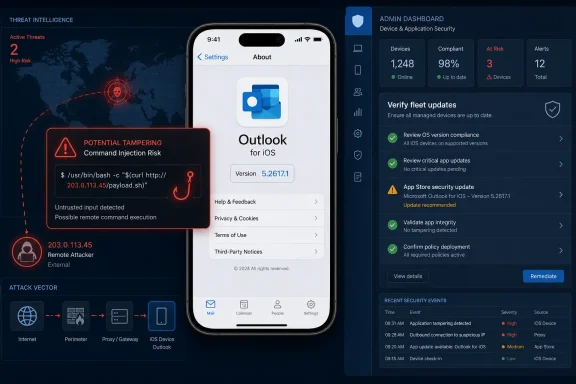
Microsoft disclosed CVE-2026-42893 on May 12, 2026, as an Important-rated tampering vulnerability affecting Microsoft Outlook for iOS, with a fixed build listed as 5.2617.1 and customer action required through the App Store security update. The more interesting story is not merely that Outlook on iPhone needs another patch. It is that Microsoft’s own advisory metadata points to a command-injection flaw, a confirmed report, and a strangely mismatched executive summary that names M365 Copilot instead of Outlook for iOS. For administrators, that combination turns a mobile app update into a governance problem: trust the fix, but verify the fleet.
CVE-2026-42893 lands in the familiar rhythm of Microsoft’s monthly security disclosures, but it does not look like a routine desktop Outlook issue. The affected product is Microsoft Outlook for iOS, the impact is tampering, and Microsoft assigns it a CVSS 3.1 base score of 7.4, which puts it in the awkward middle ground between “patch it promptly” and “do not panic.”
That middle ground is where many enterprise mobile risks live. Outlook for iOS is not just an email client; in many organizations, it is the front door to Exchange Online, Microsoft 365 identity, calendar data, file previews, Teams links, shared mailboxes, and conditional access policy. A flaw in that client may not compromise Windows endpoints directly, but it can still become part of the chain that reaches users, workflows, and data integrity.
Microsoft’s scoring tells us a lot about the shape of the issue. The attack vector is network, attack complexity is low, privileges are not required, and user interaction is required. In plain English: Microsoft is describing a remotely reachable condition that does not require an attacker to already have an account, but does require the target user to do something.
That user-action requirement is the caveat defenders will be tempted to overread. A vulnerability that needs user interaction is not automatically tame. Email, calendar invites, links, mobile notifications, and embedded content are all user-interaction machines, and Outlook exists precisely to persuade users to open, tap, preview, forward, and respond.
That mismatch matters because Microsoft’s Security Update Guide is not a blog post with decorative prose. It is machine-readable infrastructure for vulnerability management, compliance dashboards, risk scoring, and patch prioritization. When the product field says one thing and the summary says another, security teams are left deciding whether they are seeing a documentation error, a shared component issue, or a disclosure artifact from Microsoft’s internal vulnerability pipeline.
The safest reading is conservative. Treat Outlook for iOS as affected because the product table says so, the fixed build is an Outlook for iOS build, and the download route is the App Store listing for Microsoft Outlook. Treat the M365 Copilot reference as either a metadata error or an unresolved clue, not as a reason to defer the Outlook update.
This is not pedantry. Modern Microsoft 365 applications share authentication libraries, rendering components, service integrations, cloud-backed features, and AI-adjacent surfaces. A naming inconsistency may be harmless, but it also reflects the reality that “the app” users see is often a container for several Microsoft services stitched together behind the scenes.
In older security folklore, command injection evokes shell prompts, web servers, and catastrophic remote code execution. On a mobile client, the practical path may be narrower, constrained by iOS sandboxing, app permissions, and Microsoft’s own service architecture. But the key word in Microsoft’s impact rating is tampering, not confidentiality or availability.
That distinction is important. The CVSS vector lists no confidentiality impact and no availability impact, but a high integrity impact. Microsoft is not primarily warning that attackers can read mailboxes or knock the app offline; it is warning that successful exploitation could allow modification of something that should not be modifiable.
For users, integrity failures can be more subtle than data theft. A message, link, command, workflow, preference, generated output, or transaction context can be altered in a way that changes what the user trusts. In a mobile Outlook environment, where users often make quick decisions from a small screen, tampering risk is particularly uncomfortable.
The absence of confidentiality impact also should not be treated as a guarantee that sensitive workflows are safe. Vulnerability scoring is a model, not a complete incident narrative. If an attacker can alter what a user sees or what a client sends, downstream consequences may still include credential exposure, fraudulent approvals, or misdirected business activity.
They should not become an excuse for delay. The report confidence is confirmed, which means Microsoft is not publishing a vague theoretical warning. The company is saying that the vulnerability exists with enough certainty to ship an official fix and require customer action.
This is the uncomfortable asymmetry of patch management. Attackers can wait for advisories, compare updated and unupdated builds, and focus on organizations with slow mobile update pipelines. Defenders, meanwhile, must convert a vendor bulletin into a real-world compliance state across personally owned iPhones, corporate-managed devices, shared executive phones, and users who ignore App Store updates for weeks.
Mobile apps are often the soft underbelly of otherwise mature patch programs. Windows Update, Intune compliance policies, Defender signals, and endpoint management dashboards have trained administrators to think in operating-system and desktop-application terms. App Store-delivered security fixes live in a blurrier world where version drift is common and visibility depends on enrollment model.
Microsoft’s advisory lists the fixed build as 5.2617.1. That is the number administrators should care about. If a device is running Outlook for iOS below that build, the organizational answer should not be “the user probably has automatic updates enabled.” It should be “we can prove the app is current, or we have a control to force the issue.”
Conditional Access makes that clear. If a user’s iPhone can satisfy policy, open corporate mail, receive MFA prompts, preview attachments, join Teams meetings, and act on business workflows, then the device is participating in the enterprise trust fabric. A vulnerability in the app that mediates those actions belongs in the same risk conversation as desktop Office, Edge, or Teams.
The CVSS scope value is changed, which is another hint that the impact may cross a boundary beyond the vulnerable component itself. In vulnerability scoring, changed scope generally means exploitation can affect resources governed by a different security authority. That language is dry, but it maps well to Microsoft 365’s modern architecture, where a mobile client, cloud service, identity platform, and user workflow are not neatly separable.
This is why a mobile Outlook vulnerability deserves attention from WindowsForum readers. It may not be a Windows bug, but it is absolutely a Microsoft ecosystem bug. Windows shops do not get to opt out of iOS risk when their executives, sales teams, engineers, and admins all read corporate mail on iPhones.
The same logic applies to incident response. If suspicious mail activity, strange user actions, or anomalous mobile client behavior appears around the disclosure window, defenders should not limit their review to desktop Outlook. Mobile client versions, sign-in logs, device compliance state, and app protection policy status belong in the investigation.
That opacity is partly intentional. Vendors avoid publishing exploit recipes, especially before patches are widely deployed. But the result is that administrators must translate sparse metadata into policy, and that translation can vary wildly by organization.
A consumer can simply update Outlook from the App Store and move on. An enterprise cannot be quite so casual. It has to ask whether App Store updates are automatic, whether Microsoft Intune is enforcing minimum app versions, whether unenrolled devices are allowed to access corporate mail, and whether app protection policies can compensate for unmanaged hardware.
The advisory’s “customer action required” field is doing more work than it may first appear. Microsoft is not saying the fix is purely server-side or invisible to users. It is saying customers must get the updated iOS app onto devices.
That should shape the response. A security team that only tracks Windows cumulative updates will miss this. A team that only emails users to “please update your apps” will probably miss some of it. The right answer is measurement: identify devices with Outlook for iOS, verify build 5.2617.1 or later, and create pressure where the update has not landed.
App stores are excellent distribution systems, but they are not automatically compliance systems. A user may disable automatic updates, postpone them because of low battery, avoid Wi-Fi, use an older device, or run an app version that remains stale until opened. In bring-your-own-device environments, IT may have limited authority to inspect or force the installed version.
Managed environments have better options. Intune app protection policies, mobile application management, device compliance checks, and conditional access can all help. But those controls must be configured with intent; they do not magically infer that a specific CVE has made a specific app build unacceptable.
Security teams should also remember the human factor. Outlook is one of those apps users consider infrastructure, not software. They notice when it stops working, but they rarely think about its version number. If the organization needs action from users, the message must be specific: update Microsoft Outlook for iOS to the latest version, and do not assume that updating iOS itself updates Outlook.
This distinction is especially important because many users conflate operating-system patches with app patches. Apple may deliver an iOS update on one cadence, while Microsoft ships Outlook through the App Store on another. A fully patched iPhone can still run an outdated Microsoft app.
Confirmed does not mean actively exploited. It does not mean weaponized exploit code is circulating. It means Microsoft has enough confidence in the technical reality of the flaw to acknowledge it and ship a fix.
That distinction is useful for prioritization. If exploit maturity is unproven but report confidence is confirmed, the risk is not hypothetical; the uncertainty is about attacker adoption. In a widely deployed communications app, attacker adoption can change quickly once patches reveal where to look.
The temporal score of 6.4 reflects that nuance. The base score says the vulnerability’s inherent properties are serious enough to merit an Important rating. The temporal score says the current exploit landscape and available remediation reduce urgency somewhat. Administrators should read that as “patch on the normal security clock,” not “wait for proof of exploitation.”
For high-risk users, the clock should be shorter. Executives, finance staff, legal teams, help desk personnel, administrators, and anyone likely to receive targeted phishing should be first in line for version verification. A tampering issue that requires user interaction becomes more relevant when the user is a valuable target and the attacker can craft believable lures.
That is not a cheap shot at Microsoft’s documentation team. It is a structural problem for the industry. Security advisories were easier to reason about when a product was a product, a patch was a patch, and the vulnerable component lived on a disk under a recognizable name. Microsoft 365 increasingly blurs those lines.
Outlook is no longer merely Outlook. It is a client for Exchange, a launcher for Teams meetings, a handler for cloud attachments, a surface for Loop components, a participant in identity enforcement, and increasingly a host or gateway for AI-assisted features. When a vulnerability description mentions command injection and tampering, the exact boundary of concern becomes harder to draw.
That complexity should push defenders toward outcome-based controls. Instead of asking only “which product is named in the CVE,” teams should ask which users, devices, clients, services, and workflows could participate in the exploit path. The product table gives the immediate patch target, but the architecture determines the blast radius.
It should also push Microsoft toward cleaner advisory language. Security teams can handle bad news. What they struggle with is ambiguous news that has to be converted into board reporting, ticket queues, and compliance evidence by lunchtime.
A mature response does not require drama. It requires inventory, version enforcement, and a short feedback loop. If those pieces are already in place, this advisory is a routine task. If they are not, the organization has learned something valuable before a more dangerous mobile-client flaw arrives.
The fix version gives defenders an unusually clean compliance target. Outlook for iOS 5.2617.1 is the line. Everything older should be treated as needing attention, and unmanaged devices accessing corporate mail should be part of the conversation rather than an exception hidden behind convenience.
The response also should account for user education, but education should not be the primary control. Telling users not to click suspicious things is not a sufficient mitigation for a vulnerability in an email client that requires user interaction. Users interact with email because that is their job.
The better posture is layered: patched app, managed access, conditional controls, logging, and rapid revocation when a device falls out of compliance. That is not glamorous security work. It is the operational plumbing that determines whether vendor patches actually reduce risk.
Source: MSRC Security Update Guide - Microsoft Security Response Center
 Microsoft’s Small Mobile Patch Carries a Bigger Signal
CVE-2026-42893 lands in the familiar rhythm of Microsoft’s monthly security disclosures, but it does not look like a routine desktop Outlook issue. The affected product is Microsoft Outlook for iOS, the impact is tampering, and Microsoft assigns it a CVSS 3.1 base score of 7.4, which puts it in the awkward middle ground between “patch it promptly” and “do not panic.”That middle ground is where many enterprise mobile risks live. Outlook for iOS is not just an email client; in many organizations, it is the front door to Exchange Online, Microsoft 365 identity, calendar data, file previews, Teams links, shared mailboxes, and conditional access policy. A flaw in that client may not compromise Windows endpoints directly, but it can still become part of the chain that reaches users, workflows, and data integrity.
Microsoft’s scoring tells us a lot about the shape of the issue. The attack vector is network, attack complexity is low, privileges are not required, and user interaction is required. In plain English: Microsoft is describing a remotely reachable condition that does not require an attacker to already have an account, but does require the target user to do something.
That user-action requirement is the caveat defenders will be tempted to overread. A vulnerability that needs user interaction is not automatically tame. Email, calendar invites, links, mobile notifications, and embedded content are all user-interaction machines, and Outlook exists precisely to persuade users to open, tap, preview, forward, and respond.
The Advisory Says Outlook, but the Summary Says Copilot
The oddest part of the advisory is the executive summary. While the title and security update table identify the issue as a Microsoft Outlook for iOS tampering vulnerability, the summary says that improper neutralization of special elements used in a command, or command injection, in M365 Copilot allows an unauthorized attacker to perform tampering over a network.That mismatch matters because Microsoft’s Security Update Guide is not a blog post with decorative prose. It is machine-readable infrastructure for vulnerability management, compliance dashboards, risk scoring, and patch prioritization. When the product field says one thing and the summary says another, security teams are left deciding whether they are seeing a documentation error, a shared component issue, or a disclosure artifact from Microsoft’s internal vulnerability pipeline.
The safest reading is conservative. Treat Outlook for iOS as affected because the product table says so, the fixed build is an Outlook for iOS build, and the download route is the App Store listing for Microsoft Outlook. Treat the M365 Copilot reference as either a metadata error or an unresolved clue, not as a reason to defer the Outlook update.
This is not pedantry. Modern Microsoft 365 applications share authentication libraries, rendering components, service integrations, cloud-backed features, and AI-adjacent surfaces. A naming inconsistency may be harmless, but it also reflects the reality that “the app” users see is often a container for several Microsoft services stitched together behind the scenes.
Command Injection Is an Integrity Problem Before It Is a Headline
The listed weakness is CWE-77: improper neutralization of special elements used in a command. That is the formal language for a class of bugs where attacker-controlled input can influence a command that should have remained under the application’s control.In older security folklore, command injection evokes shell prompts, web servers, and catastrophic remote code execution. On a mobile client, the practical path may be narrower, constrained by iOS sandboxing, app permissions, and Microsoft’s own service architecture. But the key word in Microsoft’s impact rating is tampering, not confidentiality or availability.
That distinction is important. The CVSS vector lists no confidentiality impact and no availability impact, but a high integrity impact. Microsoft is not primarily warning that attackers can read mailboxes or knock the app offline; it is warning that successful exploitation could allow modification of something that should not be modifiable.
For users, integrity failures can be more subtle than data theft. A message, link, command, workflow, preference, generated output, or transaction context can be altered in a way that changes what the user trusts. In a mobile Outlook environment, where users often make quick decisions from a small screen, tampering risk is particularly uncomfortable.
The absence of confidentiality impact also should not be treated as a guarantee that sensitive workflows are safe. Vulnerability scoring is a model, not a complete incident narrative. If an attacker can alter what a user sees or what a client sends, downstream consequences may still include credential exposure, fraudulent approvals, or misdirected business activity.
“Exploitation Less Likely” Is Not “Ignore Until Later”
Microsoft says the vulnerability was not publicly disclosed and had not been exploited at the time of publication. It also rates exploitation as less likely, and the CVSS temporal metrics list exploit code maturity as unproven. Those are reassuring data points, and they should prevent needless alarm.They should not become an excuse for delay. The report confidence is confirmed, which means Microsoft is not publishing a vague theoretical warning. The company is saying that the vulnerability exists with enough certainty to ship an official fix and require customer action.
This is the uncomfortable asymmetry of patch management. Attackers can wait for advisories, compare updated and unupdated builds, and focus on organizations with slow mobile update pipelines. Defenders, meanwhile, must convert a vendor bulletin into a real-world compliance state across personally owned iPhones, corporate-managed devices, shared executive phones, and users who ignore App Store updates for weeks.
Mobile apps are often the soft underbelly of otherwise mature patch programs. Windows Update, Intune compliance policies, Defender signals, and endpoint management dashboards have trained administrators to think in operating-system and desktop-application terms. App Store-delivered security fixes live in a blurrier world where version drift is common and visibility depends on enrollment model.
Microsoft’s advisory lists the fixed build as 5.2617.1. That is the number administrators should care about. If a device is running Outlook for iOS below that build, the organizational answer should not be “the user probably has automatic updates enabled.” It should be “we can prove the app is current, or we have a control to force the issue.”
The iPhone Is Now Part of the Microsoft Perimeter
For years, Windows administrators could treat iOS as a separate estate: important, but not quite part of the core Microsoft security perimeter. That fiction is harder to maintain in 2026. Outlook for iOS is often a managed Microsoft endpoint in everything but operating-system ownership.Conditional Access makes that clear. If a user’s iPhone can satisfy policy, open corporate mail, receive MFA prompts, preview attachments, join Teams meetings, and act on business workflows, then the device is participating in the enterprise trust fabric. A vulnerability in the app that mediates those actions belongs in the same risk conversation as desktop Office, Edge, or Teams.
The CVSS scope value is changed, which is another hint that the impact may cross a boundary beyond the vulnerable component itself. In vulnerability scoring, changed scope generally means exploitation can affect resources governed by a different security authority. That language is dry, but it maps well to Microsoft 365’s modern architecture, where a mobile client, cloud service, identity platform, and user workflow are not neatly separable.
This is why a mobile Outlook vulnerability deserves attention from WindowsForum readers. It may not be a Windows bug, but it is absolutely a Microsoft ecosystem bug. Windows shops do not get to opt out of iOS risk when their executives, sales teams, engineers, and admins all read corporate mail on iPhones.
The same logic applies to incident response. If suspicious mail activity, strange user actions, or anomalous mobile client behavior appears around the disclosure window, defenders should not limit their review to desktop Outlook. Mobile client versions, sign-in logs, device compliance state, and app protection policy status belong in the investigation.
Microsoft’s Disclosure Style Leaves Administrators Doing Translation Work
The Security Update Guide is built to be precise, but precision and clarity are not always the same thing. CVE-2026-42893 gives defenders a CVSS vector, a weakness classification, a fixed build, and an exploitability assessment. It does not give a scenario detailed enough to explain what a user might do, what an attacker might send, or what object might be tampered with.That opacity is partly intentional. Vendors avoid publishing exploit recipes, especially before patches are widely deployed. But the result is that administrators must translate sparse metadata into policy, and that translation can vary wildly by organization.
A consumer can simply update Outlook from the App Store and move on. An enterprise cannot be quite so casual. It has to ask whether App Store updates are automatic, whether Microsoft Intune is enforcing minimum app versions, whether unenrolled devices are allowed to access corporate mail, and whether app protection policies can compensate for unmanaged hardware.
The advisory’s “customer action required” field is doing more work than it may first appear. Microsoft is not saying the fix is purely server-side or invisible to users. It is saying customers must get the updated iOS app onto devices.
That should shape the response. A security team that only tracks Windows cumulative updates will miss this. A team that only emails users to “please update your apps” will probably miss some of it. The right answer is measurement: identify devices with Outlook for iOS, verify build 5.2617.1 or later, and create pressure where the update has not landed.
The App Store Fix Is Simple; the Enterprise Proof Is Not
The fix path is straightforward because Microsoft points users to the App Store security update for Outlook for iOS. That simplicity is good news for consumers and small businesses. It also creates a false sense of closure for large organizations.App stores are excellent distribution systems, but they are not automatically compliance systems. A user may disable automatic updates, postpone them because of low battery, avoid Wi-Fi, use an older device, or run an app version that remains stale until opened. In bring-your-own-device environments, IT may have limited authority to inspect or force the installed version.
Managed environments have better options. Intune app protection policies, mobile application management, device compliance checks, and conditional access can all help. But those controls must be configured with intent; they do not magically infer that a specific CVE has made a specific app build unacceptable.
Security teams should also remember the human factor. Outlook is one of those apps users consider infrastructure, not software. They notice when it stops working, but they rarely think about its version number. If the organization needs action from users, the message must be specific: update Microsoft Outlook for iOS to the latest version, and do not assume that updating iOS itself updates Outlook.
This distinction is especially important because many users conflate operating-system patches with app patches. Apple may deliver an iOS update on one cadence, while Microsoft ships Outlook through the App Store on another. A fully patched iPhone can still run an outdated Microsoft app.
Confirmed Report Confidence Changes the Patch Priority
The user-provided description highlights the CVSS report confidence metric, and in this case it is the quiet reason the advisory should not be dismissed. Microsoft marks report confidence as confirmed. That means the vulnerability is not merely suspected, inferred from incomplete research, or published as a placeholder.Confirmed does not mean actively exploited. It does not mean weaponized exploit code is circulating. It means Microsoft has enough confidence in the technical reality of the flaw to acknowledge it and ship a fix.
That distinction is useful for prioritization. If exploit maturity is unproven but report confidence is confirmed, the risk is not hypothetical; the uncertainty is about attacker adoption. In a widely deployed communications app, attacker adoption can change quickly once patches reveal where to look.
The temporal score of 6.4 reflects that nuance. The base score says the vulnerability’s inherent properties are serious enough to merit an Important rating. The temporal score says the current exploit landscape and available remediation reduce urgency somewhat. Administrators should read that as “patch on the normal security clock,” not “wait for proof of exploitation.”
For high-risk users, the clock should be shorter. Executives, finance staff, legal teams, help desk personnel, administrators, and anyone likely to receive targeted phishing should be first in line for version verification. A tampering issue that requires user interaction becomes more relevant when the user is a valuable target and the attacker can craft believable lures.
The Copilot Reference Is a Warning About Microsoft 365 Complexity
The M365 Copilot wording in the executive summary may eventually be corrected as a documentation error. Even if it is, the slip is revealing. Microsoft’s product universe is now so interconnected that a vulnerability page can point to a mobile mail client while its prose invokes an AI service.That is not a cheap shot at Microsoft’s documentation team. It is a structural problem for the industry. Security advisories were easier to reason about when a product was a product, a patch was a patch, and the vulnerable component lived on a disk under a recognizable name. Microsoft 365 increasingly blurs those lines.
Outlook is no longer merely Outlook. It is a client for Exchange, a launcher for Teams meetings, a handler for cloud attachments, a surface for Loop components, a participant in identity enforcement, and increasingly a host or gateway for AI-assisted features. When a vulnerability description mentions command injection and tampering, the exact boundary of concern becomes harder to draw.
That complexity should push defenders toward outcome-based controls. Instead of asking only “which product is named in the CVE,” teams should ask which users, devices, clients, services, and workflows could participate in the exploit path. The product table gives the immediate patch target, but the architecture determines the blast radius.
It should also push Microsoft toward cleaner advisory language. Security teams can handle bad news. What they struggle with is ambiguous news that has to be converted into board reporting, ticket queues, and compliance evidence by lunchtime.
The Real Test Is Whether Mobile Patching Has Become Operational
CVE-2026-42893 is not likely to become the defining vulnerability of the year. Microsoft says exploitation is less likely, no public disclosure existed at publication, and there was no known exploitation. But it is a useful test of whether an organization’s mobile patching process is real or aspirational.A mature response does not require drama. It requires inventory, version enforcement, and a short feedback loop. If those pieces are already in place, this advisory is a routine task. If they are not, the organization has learned something valuable before a more dangerous mobile-client flaw arrives.
The fix version gives defenders an unusually clean compliance target. Outlook for iOS 5.2617.1 is the line. Everything older should be treated as needing attention, and unmanaged devices accessing corporate mail should be part of the conversation rather than an exception hidden behind convenience.
The response also should account for user education, but education should not be the primary control. Telling users not to click suspicious things is not a sufficient mitigation for a vulnerability in an email client that requires user interaction. Users interact with email because that is their job.
The better posture is layered: patched app, managed access, conditional controls, logging, and rapid revocation when a device falls out of compliance. That is not glamorous security work. It is the operational plumbing that determines whether vendor patches actually reduce risk.
The Outlook iOS Patch Draws a Line Administrators Can Measure
The practical lesson from CVE-2026-42893 is that mobile application security can no longer sit outside the Patch Tuesday muscle memory. This one is specific enough to act on and ambiguous enough to reward careful reading.- Microsoft released CVE-2026-42893 on May 12, 2026, for Microsoft Outlook for iOS, with tampering impact and Important severity.
- The advisory lists CVSS 3.1 base score 7.4 and temporal score 6.4, with network attack vector, low complexity, no privileges required, and user interaction required.
- Microsoft says the vulnerability was not publicly disclosed or exploited at publication time, and rates exploitation as less likely.
- The weakness is command injection, and Microsoft marks report confidence as confirmed, which makes this a real patching issue rather than a speculative warning.
- The fixed Outlook for iOS build is 5.2617.1, and customer action is required through the App Store update path.
- The advisory’s reference to M365 Copilot in the executive summary conflicts with the Outlook for iOS product listing, so administrators should patch Outlook now while watching for any Microsoft clarification.
Source: MSRC Security Update Guide - Microsoft Security Response Center
