

Microsoft has listed CVE-2026-42896 as a Windows DWM Core Library elevation-of-privilege vulnerability in its Security Update Guide, tying the flaw to the Desktop Window Manager component that every modern Windows desktop session depends on. The sparse public entry matters because DWM bugs rarely exist in isolation from the rest of the Windows attack chain. They are not usually the first click, the poisoned document, or the exposed server port. They are what an attacker reaches for after that first foothold, when “local user” is no longer enough.
The Desktop Window Manager is one of those Windows components most users only notice when it misbehaves. It composites windows, drives visual effects, and sits in the path between applications, graphics drivers, sessions, and the user-facing shell. Its job is to make modern Windows feel seamless; its risk is that seamlessness requires privileged, always-on mediation of things ordinary apps are constantly asking the system to draw, resize, animate, and present.
That makes a DWM Core Library elevation-of-privilege vulnerability a familiar kind of Windows problem: local, post-compromise, and potentially decisive. An attacker generally needs some way to run code on the machine first. But once that hurdle is cleared, a local privilege escalation can turn a contained foothold into a far more dangerous position.
For home users, that distinction can sound academic. For defenders, it is the difference between malware running as a standard user and malware gaining the rights needed to disable protections, dump credentials, tamper with system settings, or stage persistence that survives cleanup. The exploit chain is the story, not the individual CVE card.
For CVE-2026-42896, the important fact is that Microsoft has published the vulnerability in its own Security Update Guide. That is not the same as a public exploit, a full root-cause analysis, or a proof-of-concept release. It is, however, materially different from a vague third-party claim circulating without vendor confirmation.
This is where patch management often gets tripped up. A thin advisory can feel less urgent than a richly documented one, because there is less to read and fewer scary details to quote. But thinness can also be a defensive choice. Vendors often withhold exploit mechanics precisely because the affected code is widespread and the fix needs time to land across unmanaged laptops, enterprise fleets, servers, virtual desktops, and third-party environments built on Windows.
The confidence signal cuts both ways. It tells defenders that the vulnerability is not imaginary. It also tells attackers that a useful bug class exists in a component with a long history of privilege-boundary relevance.
That is why DWM vulnerabilities deserve attention even when they are not marked as wormable or remotely exploitable. They reduce the value of Windows’ compartmentalization. Standard users, app containers, browser sandboxes, and least-privilege policies all assume that local privilege boundaries remain meaningful under pressure.
A local-only vulnerability can still be enterprise-critical if it is reliable, broadly applicable, and easy to chain. The attacker does not need every link in the chain to be spectacular. They need one path from initial access to durable control.
This is also why administrators should resist the temptation to prioritize only internet-facing RCEs. Those must be patched aggressively, of course. But a mature patch program also closes the privilege-escalation bugs that turn one compromised account into a compromised machine.
That history does not prove that CVE-2026-42896 is exploited, identical in root cause, or equally severe. It does establish that DWM is not an obscure corner of the platform where bugs rarely matter. It is a recurring local-privilege attack surface in the Windows client and server ecosystem.
For security teams, recurrence changes the mental model. A one-off bug can be treated as a patch item. A recurring bug class in a core component becomes a reason to examine exposure assumptions, telemetry, application control, and endpoint hardening.
Microsoft has spent years hardening Windows around exploit mitigations, virtualization-based security, driver signing, protected processes, and increasingly strict default configurations. Yet the same strategic truth remains: the enormous compatibility surface of Windows is part of both its value and its risk. Components that must support decades of applications, drivers, display paths, and user-session behaviors are difficult to make perfectly inert.
A vulnerability with local attack vector and low privileges required may score below a remote, unauthenticated server bug. But if the local bug is reliable and affects every Windows workstation in the organization, it can be strategically valuable. In a ransomware intrusion, for example, the most important vulnerability is not always the one that opened the door. It may be the one that allowed the attacker to move from a user context into a position where credential theft and defense evasion became possible.
The report-confidence language in the user-provided description is especially relevant here. Defenders should not confuse limited public detail with low operational relevance. A vendor-confirmed local EoP in a ubiquitous Windows component is not noise simply because the advisory is brief.
The right response is proportional, not panicked. Patch it through normal security-update channels, move faster on high-risk endpoints, and watch for follow-on reporting that clarifies exploitability. Treat the missing details as uncertainty to manage, not as permission to ignore.
That has advantages. It simplifies the answer to “am I patched?” and reduces the weird archaeology of selectively installed hotfixes. It also means a single DWM EoP entry becomes part of a larger operational bet involving printing, authentication, VPN clients, graphics drivers, line-of-business software, remote access tooling, and endpoint security agents.
For workstations, the argument for faster deployment is strong. DWM is a desktop-session component, and the machines most exposed to phishing, downloads, browsers, collaboration tools, and untrusted files are precisely the machines most likely to benefit from closing a local escalation path quickly. User endpoints are where initial access and local privilege escalation most often meet.
For servers, the answer is more nuanced. Server Core installations, remote desktop hosts, GPU-enabled workloads, jump boxes, VDI infrastructure, and management workstations all deserve careful attention. Even where the visible desktop is minimized, Windows components and servicing baselines can still bring the affected code into scope depending on version and configuration.
The worst patch plan is the one that waits for exploit code before beginning compatibility testing. By the time proof-of-concept code is public, the window for calm validation has already narrowed.
The executive laptop, the developer workstation, the help-desk machine, the shared kiosk, and the remote employee’s desktop are all plausible staging grounds. They are full of browsers, chat clients, file sync agents, archives, documents, plug-ins, drivers, and user behavior. They are also where least privilege is supposed to reduce blast radius.
A local EoP bug attacks that assumption. If a user clicks the wrong attachment or installs the wrong tool, the difference between standard-user rights and elevated rights may determine whether the incident is irritating or serious. This is why endpoint privilege management and patching are not separate disciplines. They reinforce or undermine each other.
Organizations that still run users as local administrators get less protection from fixing a local privilege-escalation bug, because they have already given away much of the privilege boundary. Organizations that enforce standard-user operation have more to lose if they delay the patch, because the boundary is a meaningful part of their defense.
For CVE-2026-42896, the absence of widely visible technical detail should push teams toward disciplined patch flow rather than speculative reverse engineering. If Microsoft’s advisory does not describe active exploitation, that is useful. If it does not publish exploit mechanics, that is also useful. Neither condition eliminates the need to deploy the fix.
The better question is whether the affected systems sit in places where a local privilege escalation would materially worsen an intrusion. On Windows endpoints, the answer is usually yes. On administrative jump hosts, developer machines, and RDP-heavy environments, it is emphatically yes.
There is also a monitoring angle. Local privilege escalation often leaves fewer obvious network traces than remote exploitation. Defenders should pay attention to unexpected child processes from user-facing apps, abnormal token use, sudden service creation, tampering with endpoint protection, suspicious scheduled tasks, and privilege transitions that do not match normal administrative workflows.
That is not laziness. It is part legal restraint, part operational efficiency, and part exploit prevention. Publishing a detailed bug path before a meaningful share of the Windows ecosystem has updated would help attackers as much as defenders.
The tradeoff is that defenders must make decisions with incomplete detail. That is uncomfortable, but it is the normal state of vulnerability management. Waiting for perfect information is itself a decision, and usually not a good one.
This is where confidence metrics matter. A vendor-confirmed vulnerability with sparse mechanics should be treated differently from an unconfirmed report with a dramatic write-up. The former belongs in the patch queue. The latter belongs in the intelligence queue until corroborated.
A DWM Core Library flaw is not the kind of vulnerability that only matters to the newest Windows UI. Older supported Windows builds, server editions, and long-lived enterprise images often remain in scope for monthly security fixes. The exact affected-build list must come from Microsoft’s update metadata, but the broader operational reality is clear: mixed estates make patch confidence harder.
Windows 11 24H2 and 25H2-era systems may be on one validation track, Windows 10 extended-security environments on another, Windows Server 2019 or 2022 on another, and Server 2025 yet another. Add VDI pools, golden images, offline devices, and vendor-managed appliances, and a single CVE becomes an inventory test.
The organizations that handle this well are not necessarily the ones that patch everything instantly. They are the ones that know what they have, know which systems are most exposed, and can prove update status without relying on wishful reporting.
Graphics, windowing, and session-management components sit close to trust boundaries. They process inputs from applications that may be less trusted than the system components rendering or brokering them. They interact with drivers, memory objects, handles, surfaces, and cross-process communication. That is a lot of complexity in a place attackers can often reach after getting code execution as a normal user.
This pattern is not unique to Microsoft. Modern operating systems have repeatedly discovered that the user interface is not a soft target merely because it looks visual. Window managers, compositors, font parsers, GPU drivers, clipboard services, accessibility frameworks, and image codecs have all been fertile ground for bugs because they transform untrusted or semi-trusted inputs into privileged behavior.
Windows has hardened many of these paths, but DWM remains a high-value surface because it is present, active, and difficult to remove from the normal desktop experience. Attackers prefer surfaces they can count on.
The first ring should include representative Windows client hardware, especially systems with common GPU drivers, display configurations, docking stations, remote-access agents, and endpoint security tools. DWM-related fixes may not visibly affect most users, but graphics-adjacent changes are exactly the sort of thing that can expose brittle driver stacks or odd enterprise builds.
The second ring should include higher-risk user populations: IT administrators, help-desk staff, developers, finance users, executives, and anyone with access to sensitive systems. These machines are attractive targets because they combine human exposure with valuable credentials.
The third ring should mop up breadth. The danger in local EoP vulnerabilities is not only the crown-jewel server. It is the unglamorous endpoint that becomes a bridge into the rest of the network.
A vendor-confirmed CVE with limited details occupies a particular spot on that gradient. It is reliable enough to act on, incomplete enough to discourage amateur exploit speculation, and potentially useful enough for attackers to begin diffing patches once updates ship. That is the uncomfortable middle ground where most real patch decisions happen.
Security teams should train themselves to read advisories this way. The absence of a public exploit is not the same as the absence of risk. The absence of root-cause detail is not the same as uncertainty that the bug exists. The existence of a CVE is not the same as evidence of active compromise.
Good vulnerability management lives in those distinctions. Bad vulnerability management collapses them into vibes.
A DWM EoP patch is more valuable in an environment where standard-user boundaries are intact. If the attacker’s initial code already runs as administrator, the escalation step is less necessary. If users operate with constrained rights, the vulnerability becomes a meaningful bypass of a meaningful control.
That does not make patching optional in admin-heavy environments. It means those environments are carrying two risks at once: the specific CVE and the structural weakness that makes local compromise more damaging. Patching closes one door. Least privilege reduces the number of doors that matter.
The same is true for application control, attack surface reduction rules, controlled folder access, credential guard, endpoint detection, and segmentation. None of these controls makes a DWM vulnerability irrelevant. Together, they make exploitation less useful, less reliable, or less silent.
The immediate operational conclusions are straightforward.
Source: MSRC Security Update Guide - Microsoft Security Response Center
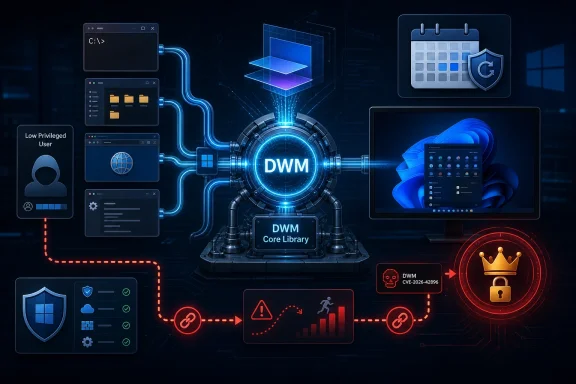 DWM Is Plumbing, Which Is Exactly Why Attackers Care
The Desktop Window Manager is one of those Windows components most users only notice when it misbehaves. It composites windows, drives visual effects, and sits in the path between applications, graphics drivers, sessions, and the user-facing shell. Its job is to make modern Windows feel seamless; its risk is that seamlessness requires privileged, always-on mediation of things ordinary apps are constantly asking the system to draw, resize, animate, and present.That makes a DWM Core Library elevation-of-privilege vulnerability a familiar kind of Windows problem: local, post-compromise, and potentially decisive. An attacker generally needs some way to run code on the machine first. But once that hurdle is cleared, a local privilege escalation can turn a contained foothold into a far more dangerous position.
For home users, that distinction can sound academic. For defenders, it is the difference between malware running as a standard user and malware gaining the rights needed to disable protections, dump credentials, tamper with system settings, or stage persistence that survives cleanup. The exploit chain is the story, not the individual CVE card.
The Public Record Says “Real,” But Not “Open Book”
The text accompanying the vulnerability points to a confidence metric that is easy to overlook and easy to misuse. It measures how confident the industry should be that a vulnerability exists and how credible the known technical details are. In plainer English: is this a rumor, an inferred bug, a partially described issue, or a vendor-acknowledged flaw?For CVE-2026-42896, the important fact is that Microsoft has published the vulnerability in its own Security Update Guide. That is not the same as a public exploit, a full root-cause analysis, or a proof-of-concept release. It is, however, materially different from a vague third-party claim circulating without vendor confirmation.
This is where patch management often gets tripped up. A thin advisory can feel less urgent than a richly documented one, because there is less to read and fewer scary details to quote. But thinness can also be a defensive choice. Vendors often withhold exploit mechanics precisely because the affected code is widespread and the fix needs time to land across unmanaged laptops, enterprise fleets, servers, virtual desktops, and third-party environments built on Windows.
The confidence signal cuts both ways. It tells defenders that the vulnerability is not imaginary. It also tells attackers that a useful bug class exists in a component with a long history of privilege-boundary relevance.
Elevation of Privilege Is the Quiet Middle of the Kill Chain
Remote code execution gets the headlines because it sounds like magic: attacker over there, code running over here. Elevation of privilege is less cinematic, but it is frequently what makes the first compromise count. A phished user, a malicious installer, a browser escape, a poisoned archive, or a compromised developer tool may only provide low-privilege execution at first. A local EoP bug is the bridge from access to control.That is why DWM vulnerabilities deserve attention even when they are not marked as wormable or remotely exploitable. They reduce the value of Windows’ compartmentalization. Standard users, app containers, browser sandboxes, and least-privilege policies all assume that local privilege boundaries remain meaningful under pressure.
A local-only vulnerability can still be enterprise-critical if it is reliable, broadly applicable, and easy to chain. The attacker does not need every link in the chain to be spectacular. They need one path from initial access to durable control.
This is also why administrators should resist the temptation to prioritize only internet-facing RCEs. Those must be patched aggressively, of course. But a mature patch program also closes the privilege-escalation bugs that turn one compromised account into a compromised machine.
DWM’s History Makes This More Than a One-Off
The DWM Core Library has appeared repeatedly in Microsoft vulnerability disclosures over recent years, including high-severity elevation-of-privilege issues. Some previous DWM flaws have been described as memory-corruption bugs, including heap-based buffer overflows and use-after-free conditions. At least one recent DWM vulnerability, CVE-2024-30051, became notable because it was reported as exploited in the wild.That history does not prove that CVE-2026-42896 is exploited, identical in root cause, or equally severe. It does establish that DWM is not an obscure corner of the platform where bugs rarely matter. It is a recurring local-privilege attack surface in the Windows client and server ecosystem.
For security teams, recurrence changes the mental model. A one-off bug can be treated as a patch item. A recurring bug class in a core component becomes a reason to examine exposure assumptions, telemetry, application control, and endpoint hardening.
Microsoft has spent years hardening Windows around exploit mitigations, virtualization-based security, driver signing, protected processes, and increasingly strict default configurations. Yet the same strategic truth remains: the enormous compatibility surface of Windows is part of both its value and its risk. Components that must support decades of applications, drivers, display paths, and user-session behaviors are difficult to make perfectly inert.
The CVSS Number Is Not the Whole Risk Story
Windows local privilege-escalation flaws often land in the “important” or “high” band rather than the apocalyptic end of the scoring scale. That can lead to a dangerous shorthand: high means later, critical means now. Real-world attackers do not follow that taxonomy.A vulnerability with local attack vector and low privileges required may score below a remote, unauthenticated server bug. But if the local bug is reliable and affects every Windows workstation in the organization, it can be strategically valuable. In a ransomware intrusion, for example, the most important vulnerability is not always the one that opened the door. It may be the one that allowed the attacker to move from a user context into a position where credential theft and defense evasion became possible.
The report-confidence language in the user-provided description is especially relevant here. Defenders should not confuse limited public detail with low operational relevance. A vendor-confirmed local EoP in a ubiquitous Windows component is not noise simply because the advisory is brief.
The right response is proportional, not panicked. Patch it through normal security-update channels, move faster on high-risk endpoints, and watch for follow-on reporting that clarifies exploitability. Treat the missing details as uncertainty to manage, not as permission to ignore.
Patch Tuesday Turns Ambiguity Into an Operations Problem
The practical question for sysadmins is not whether DWM is interesting. It is how to deploy a fix without breaking the business. Windows security updates increasingly arrive as cumulative packages, which means remediating one CVE often means taking the entire month’s client or server update payload.That has advantages. It simplifies the answer to “am I patched?” and reduces the weird archaeology of selectively installed hotfixes. It also means a single DWM EoP entry becomes part of a larger operational bet involving printing, authentication, VPN clients, graphics drivers, line-of-business software, remote access tooling, and endpoint security agents.
For workstations, the argument for faster deployment is strong. DWM is a desktop-session component, and the machines most exposed to phishing, downloads, browsers, collaboration tools, and untrusted files are precisely the machines most likely to benefit from closing a local escalation path quickly. User endpoints are where initial access and local privilege escalation most often meet.
For servers, the answer is more nuanced. Server Core installations, remote desktop hosts, GPU-enabled workloads, jump boxes, VDI infrastructure, and management workstations all deserve careful attention. Even where the visible desktop is minimized, Windows components and servicing baselines can still bring the affected code into scope depending on version and configuration.
The worst patch plan is the one that waits for exploit code before beginning compatibility testing. By the time proof-of-concept code is public, the window for calm validation has already narrowed.
The Enterprise Risk Is Concentrated on the Machines People Actually Use
Security teams like to rank assets by business criticality, and they should. Domain controllers, identity infrastructure, database servers, and externally exposed systems matter enormously. But a DWM elevation-of-privilege vulnerability reminds us that Windows risk is often born on ordinary endpoints.The executive laptop, the developer workstation, the help-desk machine, the shared kiosk, and the remote employee’s desktop are all plausible staging grounds. They are full of browsers, chat clients, file sync agents, archives, documents, plug-ins, drivers, and user behavior. They are also where least privilege is supposed to reduce blast radius.
A local EoP bug attacks that assumption. If a user clicks the wrong attachment or installs the wrong tool, the difference between standard-user rights and elevated rights may determine whether the incident is irritating or serious. This is why endpoint privilege management and patching are not separate disciplines. They reinforce or undermine each other.
Organizations that still run users as local administrators get less protection from fixing a local privilege-escalation bug, because they have already given away much of the privilege boundary. Organizations that enforce standard-user operation have more to lose if they delay the patch, because the boundary is a meaningful part of their defense.
The Defender’s Job Is to Reduce the Chain, Not Predict the Exploit
There is a persistent urge in vulnerability management to ask whether a bug is “being exploited yet.” That is a valid question, but it is a poor stopping point. Exploitation status is a lagging indicator, and public exploitation is only what defenders know about.For CVE-2026-42896, the absence of widely visible technical detail should push teams toward disciplined patch flow rather than speculative reverse engineering. If Microsoft’s advisory does not describe active exploitation, that is useful. If it does not publish exploit mechanics, that is also useful. Neither condition eliminates the need to deploy the fix.
The better question is whether the affected systems sit in places where a local privilege escalation would materially worsen an intrusion. On Windows endpoints, the answer is usually yes. On administrative jump hosts, developer machines, and RDP-heavy environments, it is emphatically yes.
There is also a monitoring angle. Local privilege escalation often leaves fewer obvious network traces than remote exploitation. Defenders should pay attention to unexpected child processes from user-facing apps, abnormal token use, sudden service creation, tampering with endpoint protection, suspicious scheduled tasks, and privilege transitions that do not match normal administrative workflows.
Microsoft’s Sparse Advisories Force Defenders to Read Between the Lines
Microsoft’s Security Update Guide is built for structured vulnerability management, not narrative explanation. It tells administrators what exists, what products are affected, what severity Microsoft assigns, and what updates apply. It rarely gives the kind of root-cause walk-through that security researchers and reverse engineers would prefer.That is not laziness. It is part legal restraint, part operational efficiency, and part exploit prevention. Publishing a detailed bug path before a meaningful share of the Windows ecosystem has updated would help attackers as much as defenders.
The tradeoff is that defenders must make decisions with incomplete detail. That is uncomfortable, but it is the normal state of vulnerability management. Waiting for perfect information is itself a decision, and usually not a good one.
This is where confidence metrics matter. A vendor-confirmed vulnerability with sparse mechanics should be treated differently from an unconfirmed report with a dramatic write-up. The former belongs in the patch queue. The latter belongs in the intelligence queue until corroborated.
Windows 10’s Long Goodbye Makes Every Servicing Decision Messier
The Windows ecosystem in 2026 is still carrying the aftershocks of Windows 10’s mainstream lifecycle ending in October 2025. Many organizations have migrated aggressively to Windows 11, but many others remain in extended-support arrangements, specialized environments, or upgrade backlogs. That split complicates security operations.A DWM Core Library flaw is not the kind of vulnerability that only matters to the newest Windows UI. Older supported Windows builds, server editions, and long-lived enterprise images often remain in scope for monthly security fixes. The exact affected-build list must come from Microsoft’s update metadata, but the broader operational reality is clear: mixed estates make patch confidence harder.
Windows 11 24H2 and 25H2-era systems may be on one validation track, Windows 10 extended-security environments on another, Windows Server 2019 or 2022 on another, and Server 2025 yet another. Add VDI pools, golden images, offline devices, and vendor-managed appliances, and a single CVE becomes an inventory test.
The organizations that handle this well are not necessarily the ones that patch everything instantly. They are the ones that know what they have, know which systems are most exposed, and can prove update status without relying on wishful reporting.
The Graphics Stack Is a Privilege Boundary Wearing a User Interface
It is tempting to think of the Windows graphics stack as cosmetic infrastructure. DWM makes the desktop look modern, so it feels like a presentation layer. In security terms, it is more serious than that.Graphics, windowing, and session-management components sit close to trust boundaries. They process inputs from applications that may be less trusted than the system components rendering or brokering them. They interact with drivers, memory objects, handles, surfaces, and cross-process communication. That is a lot of complexity in a place attackers can often reach after getting code execution as a normal user.
This pattern is not unique to Microsoft. Modern operating systems have repeatedly discovered that the user interface is not a soft target merely because it looks visual. Window managers, compositors, font parsers, GPU drivers, clipboard services, accessibility frameworks, and image codecs have all been fertile ground for bugs because they transform untrusted or semi-trusted inputs into privileged behavior.
Windows has hardened many of these paths, but DWM remains a high-value surface because it is present, active, and difficult to remove from the normal desktop experience. Attackers prefer surfaces they can count on.
The Smart Response Is Boring, Fast, and Verifiable
For administrators, CVE-2026-42896 should not trigger theatrical incident-room behavior by itself. It should trigger the machinery of a competent Windows security program. That means confirming affected products, mapping the relevant cumulative updates, testing quickly, deploying in rings, and verifying installation with something better than hope.The first ring should include representative Windows client hardware, especially systems with common GPU drivers, display configurations, docking stations, remote-access agents, and endpoint security tools. DWM-related fixes may not visibly affect most users, but graphics-adjacent changes are exactly the sort of thing that can expose brittle driver stacks or odd enterprise builds.
The second ring should include higher-risk user populations: IT administrators, help-desk staff, developers, finance users, executives, and anyone with access to sensitive systems. These machines are attractive targets because they combine human exposure with valuable credentials.
The third ring should mop up breadth. The danger in local EoP vulnerabilities is not only the crown-jewel server. It is the unglamorous endpoint that becomes a bridge into the rest of the network.
The Lesson Hidden in the Confidence Metric
The user-provided metric text is dry, but it points to a deeper problem in modern security communication. Vulnerability intelligence is not a binary switch between “known” and “unknown.” It is a gradient of confidence, credibility, specificity, and operational usefulness.A vendor-confirmed CVE with limited details occupies a particular spot on that gradient. It is reliable enough to act on, incomplete enough to discourage amateur exploit speculation, and potentially useful enough for attackers to begin diffing patches once updates ship. That is the uncomfortable middle ground where most real patch decisions happen.
Security teams should train themselves to read advisories this way. The absence of a public exploit is not the same as the absence of risk. The absence of root-cause detail is not the same as uncertainty that the bug exists. The existence of a CVE is not the same as evidence of active compromise.
Good vulnerability management lives in those distinctions. Bad vulnerability management collapses them into vibes.
The DWM Patch Belongs in the Same Conversation as Least Privilege
One reason local privilege escalation bugs persist as attacker favorites is that enterprises still struggle with least privilege. Users get local admin because an application demands it, a vendor recommends it, a legacy workflow assumes it, or the help desk lacks a better support model. Over time, exceptions become normal.A DWM EoP patch is more valuable in an environment where standard-user boundaries are intact. If the attacker’s initial code already runs as administrator, the escalation step is less necessary. If users operate with constrained rights, the vulnerability becomes a meaningful bypass of a meaningful control.
That does not make patching optional in admin-heavy environments. It means those environments are carrying two risks at once: the specific CVE and the structural weakness that makes local compromise more damaging. Patching closes one door. Least privilege reduces the number of doors that matter.
The same is true for application control, attack surface reduction rules, controlled folder access, credential guard, endpoint detection, and segmentation. None of these controls makes a DWM vulnerability irrelevant. Together, they make exploitation less useful, less reliable, or less silent.
The Patch Queue Should Treat CVE-2026-42896 as a Chain Breaker
CVE-2026-42896 is not best understood as a standalone catastrophe. It is a chain breaker: the kind of bug defenders patch to interrupt the attacker’s path from foothold to authority. That makes it less glamorous than a remote wormable flaw and more important than its advisory length might suggest.The immediate operational conclusions are straightforward.
- Microsoft’s listing of CVE-2026-42896 makes this a vendor-acknowledged Windows DWM Core Library elevation-of-privilege issue, not merely an unverified rumor.
- The limited public technical detail should not be read as low risk; it more likely reflects normal disclosure restraint around a broadly deployed Windows component.
- Workstations, administrator machines, developer endpoints, VDI hosts, and RDP-heavy environments should receive priority because local code execution is more plausible there.
- The fix should be handled through normal Windows security-update deployment rings, with extra validation on graphics-driver-heavy or highly customized endpoint images.
- Defenders should monitor for suspicious privilege transitions, endpoint-protection tampering, service creation, scheduled-task abuse, and abnormal child processes from user-facing applications.
- Least privilege makes this patch matter more, not less, because it preserves the boundary that local elevation bugs are designed to cross.
Source: MSRC Security Update Guide - Microsoft Security Response Center
