

Microsoft’s June 9, 2026 advisory for CVE-2026-44823 says security updates for Microsoft Office LTSC for Mac 2021, Office LTSC for Mac 2024, and Microsoft 365 for Mac are not yet immediately available, even though the Excel flaw is already listed across affected Office products. That is the plain answer, and it is the part Mac administrators should not miss. This is not a case where “Microsoft 365” automatically means every platform receives the fix at the same moment. The uncomfortable story is that Office’s unified branding still hides a fragmented patch reality.
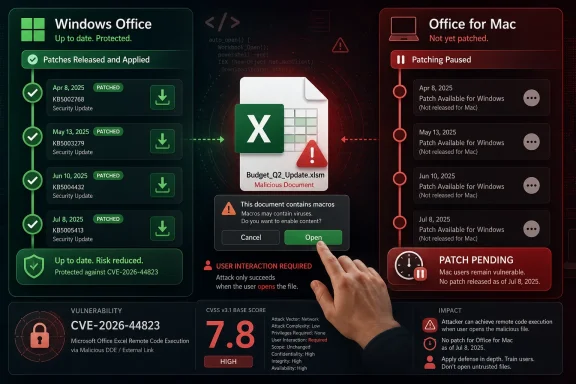
CVE-2026-44823 landed in Microsoft’s Security Update Guide on June 9, 2026 as a Microsoft Excel remote code execution vulnerability with an “Important” severity rating and a CVSS 3.1 base score of 7.8. Microsoft describes the bug as an integer underflow issue in Excel that can allow an unauthorized attacker to execute code locally.
That wording sounds contradictory only if we read “remote code execution” as “network worm.” Microsoft is using the conventional Office-threat meaning: the attacker is remote from the victim, but the victim’s machine performs the dangerous local action after opening a malicious document. The advisory says user interaction is required, and Microsoft explicitly states that an attacker would need to send a malicious Office file and persuade the user to open it.
For Windows administrators, the update picture is comparatively straightforward. The advisory lists security update paths for Excel 2016, Office 2019, Office LTSC 2021, Office LTSC 2024, Microsoft 365 Apps for Enterprise, and Office Online Server. For the Mac side, however, the listed rows for Office LTSC for Mac 2021, Office LTSC for Mac 2024, and Microsoft 365 for Mac have no article, no download, and no fixed build number at publication.
That absence is not an accidental omission buried in a table. Microsoft’s own FAQ spells it out: the Mac updates are not immediately available and will be released as soon as possible, with customers to be notified through a future revision to the CVE information. In other words, the vulnerability is public, the affected Mac products are named, but the Mac remediation is still pending.
That combination matters because it puts the vulnerability squarely in the oldest and most reliable Office threat model: malicious files delivered through email, chat, compromised storage, or a trusted business workflow. Excel remains a high-value target precisely because spreadsheets are business objects. People open them because finance, HR, sales, procurement, and operations make them part of daily work.
Microsoft also says the Preview Pane is not an attack vector for this vulnerability. That narrows the exposure somewhat: simply previewing the document in a supported preview surface is not described as the trigger. But it does not erase the risk, because the real-world path for Excel exploitation has always been social trust, workflow pressure, and document familiarity.
The Mac delay therefore deserves attention not because this vulnerability is an instant internet-scale disaster, but because the mitigation window is uneven. Windows and Office Online Server environments can move into patch deployment. Mac fleets must instead rely, at least temporarily, on exposure reduction and user behavior controls.
The affected Mac products include both perpetual LTSC editions and the subscription Office family. That is important because many administrators mentally separate “LTSC” from “Microsoft 365” when thinking about servicing cadence. In this advisory, both Mac branches are in the same holding pattern.
For enterprises that manage mixed Windows and macOS estates, this creates a messaging problem as much as a technical one. A security team may be able to tell Windows users that a fix exists and deployment is underway. The same team must tell Mac users something more conditional: the product is affected, the update is expected, but the current advisory does not yet provide the build that resolves it.
That conditional state is where operational mistakes happen. Some teams will assume Microsoft AutoUpdate has already handled the Mac side because Microsoft 365 is installed. Others will assume the absence of a Mac package means the product is unaffected. The advisory says neither. The affected Mac products are listed, and the fix is pending.
They should not invite complacency. A 7.8 CVSS score with high confidentiality, integrity, and availability impact is still serious. If exploitation succeeds, the attacker’s code runs on the victim’s machine in the context available to the compromised process and user environment.
The phrase “exploitation less likely” also has a shelf life. It describes Microsoft’s assessment at publication, not a permanent guarantee. Once a CVE is public and patches exist for some platforms, attackers can begin the familiar process of diffing, probing, and weaponizing the vulnerable behavior.
That is why the Mac delay matters in practice. A staggered release can create a period where defenders know enough to worry, attackers know enough to investigate, and one set of customers cannot yet apply the definitive vendor fix. That is not unusual in software security, but it is always uncomfortable.
That starts with communications. Users do not need a lecture on CVSS scoring, but they do need to know that Excel attachments and shared spreadsheets deserve extra caution while the Mac fix is pending. Security teams should be precise: the risk is not ordinary spreadsheet editing, but opening untrusted or unexpected Office files.
Mail and collaboration controls matter more during a patch gap. Organizations should lean on attachment detonation, Safe Links and Safe Attachments where available, file quarantine policies, and restrictions on external sharing. If Excel files arrive from unfamiliar senders, newly registered domains, or unsolicited business lures, they should be treated as higher-risk objects until the Mac update lands.
Device management teams should also inventory affected Mac installations now rather than waiting for the revision. When the fix appears, the difference between knowing your exposed population and discovering it under pressure can be the difference between a controlled rollout and a scramble.
It is not. The Mac row is separate, and for Microsoft 365 for Mac the advisory lists no article, no download, and no fixed build number at publication. The FAQ reinforces that the Mac update is not immediately available.
This distinction is especially important for organizations using compliance dashboards that abstract away platform detail. A tenant-wide view may show Microsoft 365 Apps update compliance improving as Windows endpoints patch, while Mac endpoints remain in a vulnerable-but-unfixed state. The dashboard can become technically accurate and operationally misleading at the same time.
A mature response should split reporting by platform and product family. Windows Office, Office Online Server, Office LTSC for Windows, Office LTSC for Mac, and Microsoft 365 for Mac are not interchangeable buckets for this CVE. The remediation status differs, and so should the internal reporting.
Excel is unusually useful to attackers because spreadsheets often arrive from outside the organization and still look legitimate. Invoices, order forms, price sheets, shipping documents, budget trackers, payroll exports, partner reports, and audit worksheets all travel as spreadsheet files. A malicious workbook does not need to look strange to be dangerous; it needs to look routine.
Mac users can be especially exposed to false confidence here. Many assume that Office malware is still primarily a Windows problem, or that macOS application sandboxing changes the threat calculus enough to make Office document bugs less urgent. Those assumptions are weaker than they used to be. Office for Mac is a major productivity platform, and attackers follow documents, identities, and data rather than operating-system mythology.
The right posture is not to overstate the bug. Microsoft has not said this is exploited in the wild, and user interaction is required. But the right posture is also not to dismiss it. A malicious Excel file remains one of the most plausible ways to turn a software flaw into a real incident.
This is where the modern Office estate shows its complexity. There are MSI-era products, Click-to-Run products, perpetual LTSC products, subscription products, server products, Windows clients, and Mac clients. Microsoft can brand them coherently, but servicing remains a matrix.
For IT teams, that means Patch Tuesday cannot be treated as a single binary event. The relevant question is not “Did Microsoft release the Office update?” It is “Did Microsoft release the update for this product, on this platform, in the channel this device actually uses?”
That nuance is tedious, but it is not optional. The Mac rows in the advisory show why. A product can be affected, announced, and still waiting for a fix. A compliance process that does not preserve those distinctions will produce the wrong comfort.
A better response is risk-based and temporary. Focus on untrusted sources, external senders, unusual file origins, and high-risk users. Finance, executives, HR, legal, procurement, and anyone who routinely opens third-party spreadsheets should receive the clearest guidance.
Security teams should also watch for suspicious Excel process behavior. Spawning command shells, scripting engines, unusual child processes, unexpected network connections, or file writes outside normal document locations should be treated as investigation triggers. That is useful even when the specific CVE exploit technique remains undisclosed.
The absence of a Mac patch does not mean defenders are helpless. It means the control stack shifts for a while from remediation to prevention, detection, and user friction. That is less satisfying than a build number, but it is still real defense.
The order of operations should be planned now. First, identify the affected Macs. Second, confirm Microsoft AutoUpdate policy and update channel behavior. Third, decide whether high-risk groups should receive the update immediately once published rather than waiting for a normal maintenance window.
For managed Mac fleets, this is also a test of update enforcement. If users can defer Office updates indefinitely, a “released” patch can still translate into a long exposure tail. If administrators cannot easily verify Office build numbers, they may be unable to prove remediation after the fix appears.
The advisory’s current state is therefore a warning about process maturity. The organizations that already know how to track Office for Mac versions will handle this as a short-lived exception. The organizations that have treated Mac Office as a self-updating black box may discover that “Microsoft 365” is not a patch-management strategy.
 Microsoft Ships the Advisory Before the Mac Patch
CVE-2026-44823 landed in Microsoft’s Security Update Guide on June 9, 2026 as a Microsoft Excel remote code execution vulnerability with an “Important” severity rating and a CVSS 3.1 base score of 7.8. Microsoft describes the bug as an integer underflow issue in Excel that can allow an unauthorized attacker to execute code locally.That wording sounds contradictory only if we read “remote code execution” as “network worm.” Microsoft is using the conventional Office-threat meaning: the attacker is remote from the victim, but the victim’s machine performs the dangerous local action after opening a malicious document. The advisory says user interaction is required, and Microsoft explicitly states that an attacker would need to send a malicious Office file and persuade the user to open it.
For Windows administrators, the update picture is comparatively straightforward. The advisory lists security update paths for Excel 2016, Office 2019, Office LTSC 2021, Office LTSC 2024, Microsoft 365 Apps for Enterprise, and Office Online Server. For the Mac side, however, the listed rows for Office LTSC for Mac 2021, Office LTSC for Mac 2024, and Microsoft 365 for Mac have no article, no download, and no fixed build number at publication.
That absence is not an accidental omission buried in a table. Microsoft’s own FAQ spells it out: the Mac updates are not immediately available and will be released as soon as possible, with customers to be notified through a future revision to the CVE information. In other words, the vulnerability is public, the affected Mac products are named, but the Mac remediation is still pending.
The RCE Label Is Less Dramatic Than the Patch Gap
The headline phrase “remote code execution” tends to light up dashboards, inboxes, and executive escalation chains. In this case, the exploit path is document-driven rather than network-facing. The attack vector is local, attack complexity is low, privileges are not required, and user interaction is required.That combination matters because it puts the vulnerability squarely in the oldest and most reliable Office threat model: malicious files delivered through email, chat, compromised storage, or a trusted business workflow. Excel remains a high-value target precisely because spreadsheets are business objects. People open them because finance, HR, sales, procurement, and operations make them part of daily work.
Microsoft also says the Preview Pane is not an attack vector for this vulnerability. That narrows the exposure somewhat: simply previewing the document in a supported preview surface is not described as the trigger. But it does not erase the risk, because the real-world path for Excel exploitation has always been social trust, workflow pressure, and document familiarity.
The Mac delay therefore deserves attention not because this vulnerability is an instant internet-scale disaster, but because the mitigation window is uneven. Windows and Office Online Server environments can move into patch deployment. Mac fleets must instead rely, at least temporarily, on exposure reduction and user behavior controls.
Office for Mac Remains the Edge Case in a Microsoft 365 World
Microsoft has spent years selling Office as a service, and for good reason. The Click-to-Run servicing model, Microsoft 365 Apps update channels, and cloud-connected management tools have made Office patching less like annual software maintenance and more like routine hygiene. But CVE-2026-44823 is a reminder that the service story is still uneven across platforms.The affected Mac products include both perpetual LTSC editions and the subscription Office family. That is important because many administrators mentally separate “LTSC” from “Microsoft 365” when thinking about servicing cadence. In this advisory, both Mac branches are in the same holding pattern.
For enterprises that manage mixed Windows and macOS estates, this creates a messaging problem as much as a technical one. A security team may be able to tell Windows users that a fix exists and deployment is underway. The same team must tell Mac users something more conditional: the product is affected, the update is expected, but the current advisory does not yet provide the build that resolves it.
That conditional state is where operational mistakes happen. Some teams will assume Microsoft AutoUpdate has already handled the Mac side because Microsoft 365 is installed. Others will assume the absence of a Mac package means the product is unaffected. The advisory says neither. The affected Mac products are listed, and the fix is pending.
“Important” Is Not a Synonym for Optional
Microsoft rates CVE-2026-44823 as Important, not Critical, and says exploitation is less likely at the time of publication. The vulnerability was not publicly disclosed and was not known to be exploited when Microsoft published the advisory. Those are meaningful signals, and they should prevent panic.They should not invite complacency. A 7.8 CVSS score with high confidentiality, integrity, and availability impact is still serious. If exploitation succeeds, the attacker’s code runs on the victim’s machine in the context available to the compromised process and user environment.
The phrase “exploitation less likely” also has a shelf life. It describes Microsoft’s assessment at publication, not a permanent guarantee. Once a CVE is public and patches exist for some platforms, attackers can begin the familiar process of diffing, probing, and weaponizing the vulnerable behavior.
That is why the Mac delay matters in practice. A staggered release can create a period where defenders know enough to worry, attackers know enough to investigate, and one set of customers cannot yet apply the definitive vendor fix. That is not unusual in software security, but it is always uncomfortable.
Mac Admins Need a Holding Pattern, Not Wishful Thinking
Until Microsoft revises the CVE with Mac update availability, the practical answer is not to hunt for a build number that does not exist in the advisory. The practical answer is to reduce the odds that a malicious Excel file reaches a user, opens successfully, and gets the chance to execute the vulnerable path.That starts with communications. Users do not need a lecture on CVSS scoring, but they do need to know that Excel attachments and shared spreadsheets deserve extra caution while the Mac fix is pending. Security teams should be precise: the risk is not ordinary spreadsheet editing, but opening untrusted or unexpected Office files.
Mail and collaboration controls matter more during a patch gap. Organizations should lean on attachment detonation, Safe Links and Safe Attachments where available, file quarantine policies, and restrictions on external sharing. If Excel files arrive from unfamiliar senders, newly registered domains, or unsolicited business lures, they should be treated as higher-risk objects until the Mac update lands.
Device management teams should also inventory affected Mac installations now rather than waiting for the revision. When the fix appears, the difference between knowing your exposed population and discovering it under pressure can be the difference between a controlled rollout and a scramble.
The Windows Rows Are Not a Comfort Blanket for Mac Fleets
The advisory’s security update table is dense, and that density can mislead. There are fixed build references and update mechanisms for several Windows Office products, including Microsoft 365 Apps for Enterprise and Office LTSC editions. It is easy to see “Microsoft 365 Apps” and assume the Mac subscription client is covered by the same servicing note.It is not. The Mac row is separate, and for Microsoft 365 for Mac the advisory lists no article, no download, and no fixed build number at publication. The FAQ reinforces that the Mac update is not immediately available.
This distinction is especially important for organizations using compliance dashboards that abstract away platform detail. A tenant-wide view may show Microsoft 365 Apps update compliance improving as Windows endpoints patch, while Mac endpoints remain in a vulnerable-but-unfixed state. The dashboard can become technically accurate and operationally misleading at the same time.
A mature response should split reporting by platform and product family. Windows Office, Office Online Server, Office LTSC for Windows, Office LTSC for Mac, and Microsoft 365 for Mac are not interchangeable buckets for this CVE. The remediation status differs, and so should the internal reporting.
The Real Risk Is the Familiar Spreadsheet
The attack path Microsoft describes is not exotic. An attacker sends a malicious Office file and convinces a user to open it. That is the same social engineering playbook that has kept Office vulnerabilities relevant for decades.Excel is unusually useful to attackers because spreadsheets often arrive from outside the organization and still look legitimate. Invoices, order forms, price sheets, shipping documents, budget trackers, payroll exports, partner reports, and audit worksheets all travel as spreadsheet files. A malicious workbook does not need to look strange to be dangerous; it needs to look routine.
Mac users can be especially exposed to false confidence here. Many assume that Office malware is still primarily a Windows problem, or that macOS application sandboxing changes the threat calculus enough to make Office document bugs less urgent. Those assumptions are weaker than they used to be. Office for Mac is a major productivity platform, and attackers follow documents, identities, and data rather than operating-system mythology.
The right posture is not to overstate the bug. Microsoft has not said this is exploited in the wild, and user interaction is required. But the right posture is also not to dismiss it. A malicious Excel file remains one of the most plausible ways to turn a software flaw into a real incident.
The June 9 Advisory Leaves Administrators With a Split-Brain Patch Cycle
The most frustrating part of CVE-2026-44823 is not that a vulnerability exists in Excel. That is normal software reality. The frustrating part is the split-brain patch cycle: Microsoft can publish a broad advisory across Office while one of the major platform families waits for its corresponding fix.This is where the modern Office estate shows its complexity. There are MSI-era products, Click-to-Run products, perpetual LTSC products, subscription products, server products, Windows clients, and Mac clients. Microsoft can brand them coherently, but servicing remains a matrix.
For IT teams, that means Patch Tuesday cannot be treated as a single binary event. The relevant question is not “Did Microsoft release the Office update?” It is “Did Microsoft release the update for this product, on this platform, in the channel this device actually uses?”
That nuance is tedious, but it is not optional. The Mac rows in the advisory show why. A product can be affected, announced, and still waiting for a fix. A compliance process that does not preserve those distinctions will produce the wrong comfort.
The Mac Delay Should Trigger Monitoring, Not Theater
There is always a temptation to respond to a pending patch with dramatic restrictions: block every spreadsheet, quarantine entire workflows, or send companywide warnings that teach users to ignore the next warning. Most organizations will not be able to stop Excel files from moving, and many would hurt the business trying.A better response is risk-based and temporary. Focus on untrusted sources, external senders, unusual file origins, and high-risk users. Finance, executives, HR, legal, procurement, and anyone who routinely opens third-party spreadsheets should receive the clearest guidance.
Security teams should also watch for suspicious Excel process behavior. Spawning command shells, scripting engines, unusual child processes, unexpected network connections, or file writes outside normal document locations should be treated as investigation triggers. That is useful even when the specific CVE exploit technique remains undisclosed.
The absence of a Mac patch does not mean defenders are helpless. It means the control stack shifts for a while from remediation to prevention, detection, and user friction. That is less satisfying than a build number, but it is still real defense.
Microsoft’s Revision Will Be the Moment That Matters
Microsoft says customers will be notified through a revision to the CVE information when the Mac updates are available. That makes the CVE page itself the authoritative trigger for changing status from “pending” to “patch now.” Administrators should watch for a new revision entry, new Mac release notes, and fixed build numbers for Office LTSC for Mac 2021, Office LTSC for Mac 2024, and Microsoft 365 for Mac.The order of operations should be planned now. First, identify the affected Macs. Second, confirm Microsoft AutoUpdate policy and update channel behavior. Third, decide whether high-risk groups should receive the update immediately once published rather than waiting for a normal maintenance window.
For managed Mac fleets, this is also a test of update enforcement. If users can defer Office updates indefinitely, a “released” patch can still translate into a long exposure tail. If administrators cannot easily verify Office build numbers, they may be unable to prove remediation after the fix appears.
The advisory’s current state is therefore a warning about process maturity. The organizations that already know how to track Office for Mac versions will handle this as a short-lived exception. The organizations that have treated Mac Office as a self-updating black box may discover that “Microsoft 365” is not a patch-management strategy.
The Mac Rows Are the Story Hidden in the Table
The concrete guidance from this advisory is narrower than the scary headline and broader than a simple “patch now.” CVE-2026-44823 is a serious Excel flaw, but Microsoft’s publication status leaves Mac customers in a waiting period.- Microsoft published CVE-2026-44823 on June 9, 2026 as an Important Microsoft Excel remote code execution vulnerability with a CVSS 3.1 base score of 7.8.
- The vulnerability requires user interaction, and Microsoft says an attacker would need to persuade a user to open a malicious Office file.
- Microsoft says the Preview Pane is not an attack vector for this vulnerability.
- Security updates for Office LTSC for Mac 2021, Office LTSC for Mac 2024, and Microsoft 365 for Mac are not immediately available at publication.
- Windows Office and Office Online Server entries have available update paths, so administrators should avoid treating all Office platforms as having the same remediation status.
- Mac administrators should monitor Microsoft’s CVE revision history and Office for Mac release information, then deploy the fixed build as soon as it is published.
References
- Primary source: MSRC
Published: 2026-06-09T07:00:00-07:00
Security Update Guide - Microsoft Security Response Center
 msrc.microsoft.com
