

Microsoft’s “Important” Label Still Leaves Plenty of Room for Damage
CVE-2026-44817 lands in that awkward middle zone of Microsoft security advisories: not “Critical,” not known to be exploited, and not remotely reachable over the network in the classical server-side sense. That combination can invite complacency. It should not.
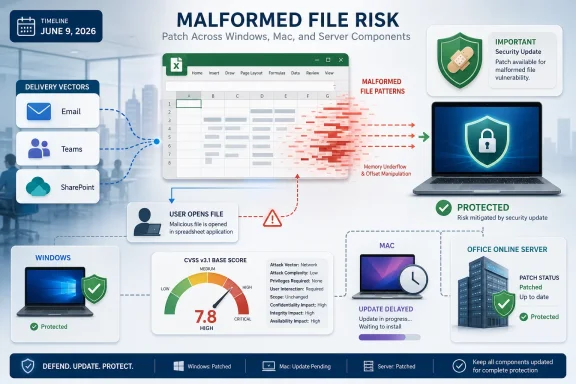
Microsoft describes the issue as an integer underflow, also known as wraparound, in Microsoft Office Excel that could allow an unauthorized attacker to execute code locally. The vulnerability is assigned a CVSS 3.1 base score of 7.8, with high impact ratings for confidentiality, integrity, and availability. In plainer terms, if exploitation succeeds, the attacker is not merely causing Excel to crash; the scoring assumes a serious compromise of the affected user context.
The advisory also carries a useful contradiction that is not really a contradiction at all. Microsoft calls it remote code execution, yet the CVSS attack vector is local. That means the attacker can be remote, but the malicious code path is triggered on the victim’s machine, most plausibly when the victim opens a crafted Office file.
That distinction matters for patch triage. A network wormable vulnerability in a domain controller and a malicious Excel workbook are not the same operational emergency. But phishing, file sharing, cloud collaboration, and outsourced business workflows have spent the last twenty years proving that “requires opening a file” is not much of a comfort.
The Spreadsheet Is Still the Enterprise’s Soft Underbelly
Excel has a privileged place in business computing because it is both a document format and a work environment. It is used for finance models, inventory sheets, incident trackers, HR exports, billing reconciliations, lab data, shipping manifests, and the thousand informal databases that keep organizations moving. That ubiquity makes an Excel parser bug more interesting to attackers than its severity label might suggest.
The attack scenario Microsoft describes is familiar: an attacker sends a malicious Office file and convinces a user to open it. Nothing in the advisory suggests the Preview Pane is enough to trigger the bug, and Microsoft explicitly says Preview Pane is not an attack vector. That is a meaningful limit, especially for organizations that preview attachments in Outlook or File Explorer as part of triage.
Still, the practical attack surface remains large. Many business processes normalize receiving spreadsheets from outsiders. Procurement teams get price lists, finance teams get invoices, recruiters get candidate trackers, sales teams get customer exports, and support teams get logs or reproduction data in whatever format a customer happens to send.
Security teams often focus on macros because macros are visible, policy-controllable, and historically abused. CVE-2026-44817 is a reminder that the more fundamental risk is not necessarily scripting; it is the application’s ability to parse attacker-supplied structure. A malicious workbook does not need to ask politely for macro permission if the vulnerability lives in how Excel handles the file itself.
“Local” Is Doing More Work Than Users Think
The word local in a CVSS vector can be misleading for non-specialists. It does not mean the attacker needs to sit at the victim’s keyboard. It means exploitation happens through local processing on the target system rather than by sending packets directly to a listening network service.
Microsoft’s own explanation is unusually helpful here. The attacker or victim needs to execute code from the local machine, and the attacker must convince the user to open the malicious file. That places user interaction at the center of the exploit chain, but it does not make the vulnerability hypothetical.
In modern enterprise environments, the boundary between remote and local has blurred. A file can arrive by email, Teams, SharePoint, OneDrive, Slack, a customer portal, a ticketing system, or a browser download. Once the user opens it, the parsing and execution context are local, but the attacker’s delivery and control were remote.
This is why document vulnerabilities remain so persistent. They bypass the clean mental model of “exposed services are dangerous, desktop applications are internal.” Desktop applications are exposed every time a user accepts a file from outside the organization.
A Confirmed Bug With No Known Exploit Is Still a Race
Microsoft lists the report confidence for CVE-2026-44817 as confirmed. That means the vendor acknowledges the vulnerability exists, and the technical details are considered credible enough for official scoring and remediation. At the same time, Microsoft’s exploitability table says the vulnerability was not publicly disclosed, was not known to be exploited, and exploitation was assessed as unlikely at original publication.
That combination is the normal state of many Patch Tuesday issues. It is not a guarantee that attackers will ignore the bug. It is a snapshot taken at publication time.
The exploit code maturity metric is listed as unproven, which indicates Microsoft is not aware of public exploit code or working attacks. But attackers routinely reverse-engineer Office patches, compare vulnerable and fixed builds, and look for paths from parser flaw to controlled execution. The lower the attack complexity, the more attractive that exercise becomes.
CVE-2026-44817 is scored with low attack complexity and no privileges required. Those are the metrics that should catch an administrator’s eye. The user must open a malicious file, yes, but the attacker does not need an account on the target machine and does not need exotic environmental conditions once the file is opened.
The Integer Underflow Clue Points to Parser Territory
Microsoft’s summary identifies the root class as an integer underflow, while the weakness entry points to type confusion. Those labels are terse, but they sketch a familiar shape for memory-safety bugs in document processing code. File formats contain lengths, offsets, record types, indexes, counts, and nested structures. When software mishandles the arithmetic or the type assumptions around those structures, carefully crafted input can turn a document into a control-flow problem.
An integer underflow occurs when a calculation produces a value lower than the minimum representable value for its type and wraps around. In parsing code, that can corrupt assumptions about buffer sizes, offsets, or object relationships. Type confusion, meanwhile, typically means software treats a resource or object as though it were a different kind of resource or object than it actually is.
Microsoft does not publish exploit mechanics in the advisory, and that restraint is appropriate. But the broad category is enough to explain why this is more than a nuisance crash. Office file formats are rich, backward-compatible, and full of historical complexity. Rich parsers offer attackers many places to hide malformed state.
This is also why old advice about “just don’t enable macros” is incomplete. Macro restrictions are important, but they defend against one class of user-enabled execution. Parser vulnerabilities attack the machinery that opens the file in the first place.
The Mac Gap Is the Most Operationally Awkward Detail
The most notable wrinkle in Microsoft’s advisory is not the CVSS score. It is the update availability note for Mac users. Microsoft says updates for Microsoft Office LTSC for Mac 2021, Office LTSC for Mac 2024, and Microsoft 365 for Mac are not immediately available and will be released as soon as possible, with customers notified by a revision to the CVE information.
That matters because the affected product list includes those Mac editions, but the security update table shows no download, article, or fixed build number for them at publication time. Windows Click-to-Run and MSI-era Office channels have a more straightforward path. Mac administrators are left in the less comfortable position of having a confirmed issue without an immediately listed fix.
For mixed Windows and macOS fleets, this is exactly where vulnerability management becomes more than checking a box. A dashboard may show the CVE as remediated on Windows endpoints while the Mac side remains pending. If those Macs handle untrusted spreadsheets — and in executive, finance, legal, and marketing departments they often do — the exposure is not academic.
There is no need to invent drama. Microsoft has said the Mac updates are coming. But until they are available and deployed, administrators should treat Mac Office as a separate remediation track, not as an afterthought hidden under the broader Office label.
Office Online Server Makes This More Than a Desktop Story
CVE-2026-44817 also affects Office Online Server, with Microsoft listing a security update and a fixed build number for that product. That expands the audience beyond desktop endpoint teams. Any organization still running Office Online Server for browser-based viewing and editing of Office documents needs to bring server owners into the conversation.
Office Online Server often sits in collaboration workflows, SharePoint-related architectures, or internal document services. Its job is to process Office content on behalf of users. That makes document parsing vulnerabilities especially relevant because the server may encounter files uploaded by users, partners, or automated workflows.
The advisory still frames exploitation around user interaction, and it does not describe a zero-click server compromise. Administrators should not overstate the threat model. But they should not ignore a server-side Office component simply because the vulnerability has “Excel” in the name.
The Office ecosystem is not a single application anymore. It is a mesh of desktop apps, cloud-delivered builds, Mac clients, web viewers, and server components. A spreadsheet bug can therefore cross team boundaries: endpoint engineering, messaging security, SharePoint administration, macOS management, and vulnerability operations all have a piece of the response.
Patch Tuesday Rewards the Boring Teams
The fix path is predictable for most Windows Office deployments. Microsoft 365 Apps for enterprise and Click-to-Run Office releases update through Microsoft’s servicing channels, while Excel 2016 receives a specific security update tied to KB5002877 and build 16.0.5556.1001. Office Online Server receives KB5002875 and build 16.0.10417.20137.
That is the unglamorous part of security that still wins. If your organization has healthy Office update rings, telemetry, and compliance reporting, CVE-2026-44817 should become another measured rollout. If Office patching is ad hoc, blocked by legacy add-ins, or invisible because endpoints drift between update channels, this kind of vulnerability becomes harder than it needs to be.
Enterprises should resist the temptation to treat “exploitation unlikely” as “patch when convenient.” That phrase is an assessment at publication, not a permanent property of the bug. Once a patch exists, attackers can study it. Once attackers understand the patched logic, the window of safe ignorance starts to close.
The best response is boring by design. Confirm affected products, deploy available updates, watch for revised Mac guidance, and make sure Office Online Server is not sitting outside the normal patch cadence. The organizations that do this well rarely get headlines, which is exactly the point.
User Interaction Is a Control Point, Not a Reassurance
Because exploitation requires a user to open a malicious Office file, security teams should look again at the path those files take through the environment. This is not about telling users to “be careful,” the least measurable control in enterprise security. It is about reducing the number of moments where a user’s curiosity or workload becomes the final security boundary.
Protected View, attachment detonation, file reputation, mail filtering, web download controls, and endpoint detection all matter here. So does the mundane business process work of asking why a department accepts spreadsheets from arbitrary external senders and whether those files can be routed through safer workflows.
Attackers do not need every recipient to open a document. They need one. A vulnerability with required user interaction remains useful when the target population is large, busy, and trained by business culture to open spreadsheets quickly.
There is also a subtle risk in the phrase “malicious Office file.” Users do not experience files as malicious. They experience them as quarter-end forecasts, invoice disputes, supplier catalogs, payroll corrections, and audit requests. The social engineering is not bolted onto the exploit; it is the delivery mechanism that makes the exploit viable.
The Preview Pane Carve-Out Narrows the Blast Radius
Microsoft’s note that Preview Pane is not an attack vector is worth calling out because it changes the handling guidance. Preview-based exploitation can turn passive inspection into risk. Here, Microsoft says the victim must open the malicious file.
That gives defenders a clearer line. It means mail gateways and collaboration systems can still preview or inspect files without that specific mechanism being called out as vulnerable in the advisory. It also means user behavior, file execution policy, and endpoint controls remain central.
But the carve-out should not be stretched too far. “Preview Pane is not an attack vector” is not the same as “the file is safe until macros are enabled” or “cloud storage neutralizes the risk.” The danger begins when Excel processes the crafted content in the vulnerable code path.
For Windows enthusiasts and home users, the practical advice is simple: apply Office updates and be skeptical of unexpected spreadsheets. For IT pros, the advice is broader: verify that the update actually lands across every Office channel and architecture in use. A 64-bit Microsoft 365 Apps install, a lingering 32-bit Office 2019 deployment, an Excel 2016 workstation, and a Mac LTSC client do not necessarily remediate in the same way.
The Advisory’s Quiet Message Is About Confidence
The user-supplied excerpt focuses on the CVSS report confidence metric, and in this case that metric is doing real work. Microsoft marks CVE-2026-44817 as confirmed. That tells defenders the vulnerability is not rumor, speculation, or a placeholder for future research. It is acknowledged by the vendor and accompanied by official fixes for at least the Windows and server products listed.
Confirmed does not mean exploited. It does not mean exploit code is circulating. It does not mean every affected system is equally exposed. But it does mean vulnerability management teams can stop debating whether the issue exists and start dealing with deployment realities.
That difference matters in large organizations. Security teams are constantly sorting through noisy CVE feeds, incomplete third-party advisories, scanner false positives, and vendor updates that change after publication. A confirmed Microsoft advisory with a low-complexity, no-privileges-required Office parsing bug deserves a cleaner path through triage.
The more interesting uncertainty sits elsewhere: Mac update timing, real-world exploit development, and how quickly organizations can validate Office patch compliance. Those are operational uncertainties, not doubts about the bug’s existence.
Excel’s Security Problem Is Also Its Business Value
It is easy to dunk on Office vulnerabilities because they sound like old news. Malicious documents have been a staple of intrusion campaigns for decades. Excel, Word, PowerPoint, and their surrounding automation ecosystem have all been abused repeatedly.
But the reason these vulnerabilities matter is the same reason Office remains entrenched. Excel is not a niche app. It is a universal business runtime, an analysis tool, a reporting surface, a data exchange format, and in many organizations an unofficial application platform. Removing it from business workflows is not realistic.
That reality changes how defenders should think. The goal is not to imagine a spreadsheet-free enterprise. The goal is to make spreadsheet handling resilient: patched clients, hardened defaults, safer opening paths, constrained scripting, external sender warnings, file detonation where appropriate, and enough telemetry to know when Office is behaving strangely.
CVE-2026-44817 is therefore less a freak event than a maintenance reminder. Complex file formats and complex parsers produce vulnerabilities. When those parsers sit on nearly every corporate desktop, even “Important” flaws deserve attention.
The Patch Is Available, but the Story Is Not Over
Security updates are available for several affected Microsoft Office and Office Online Server products, but the advisory’s Mac note keeps this from being a clean close-the-ticket event. Administrators should monitor for a revision to the CVE page and verify Mac build availability once Microsoft publishes the update. Until then, policy and user guidance may have to carry more weight for Mac endpoints that regularly handle external Excel files.
For Windows clients, the next step is compliance verification. It is not enough to assume Microsoft 365 Apps updated because the channel usually updates. Check build levels, confirm update rings have completed, and look for endpoints paused, offline, or pinned to old versions for compatibility reasons.
For Office Online Server, the patch should be treated as infrastructure maintenance, not desktop hygiene. Collaboration servers often accumulate change-control friction because they sit between multiple business owners. That makes them exactly the sort of component where an “Important” document-processing flaw can linger.
The advisory also credits IceSword Lab and Vulnerability Research Institute, another sign that this arrived through coordinated disclosure rather than public firefighting. That is the best-case version of vulnerability handling: researcher finds bug, vendor confirms, patches ship, defenders deploy before mass exploitation. The weak link is almost always the final verb.
The Spreadsheet Patch Cycle Comes Down to These Choices
The practical response to CVE-2026-44817 is not complicated, but it does require discipline across products, platforms, and update channels. The organizations most likely to handle this well are the ones that already know where Office is installed and which builds are actually running.
- Microsoft published CVE-2026-44817 on June 9, 2026, as an Important-rated Excel remote code execution vulnerability with a CVSS 3.1 base score of 7.8.
- Exploitation requires user interaction, specifically convincing a victim to open a malicious Office file, and Microsoft says the Preview Pane is not an attack vector.
- Microsoft says the vulnerability was not publicly disclosed, was not known to be exploited at publication, and was assessed as exploitation unlikely.
- The issue is confirmed, low complexity, and requires no attacker privileges, which makes patching more urgent than the “unlikely” label may suggest.
- Windows Office and Office Online Server fixes are listed, while Microsoft says Mac Office updates for affected LTSC and Microsoft 365 editions are not immediately available and will follow in a later revision.
- Administrators should verify actual Office build compliance rather than relying on assumptions about automatic updating.
CVE-2026-44817 is unlikely to be remembered as the loudest vulnerability of the year, and that may be the point: most security work is not about spectacular zero-days but about closing credible, well-scored flaws before attackers operationalize them. Excel remains too central to business to treat its parser bugs as routine noise, and Microsoft’s advisory gives defenders enough information to act without panic. The next test is whether organizations can patch the easy parts, track the delayed Mac fixes, and keep document security from becoming yet another place where “requires user interaction” becomes an excuse for waiting.