

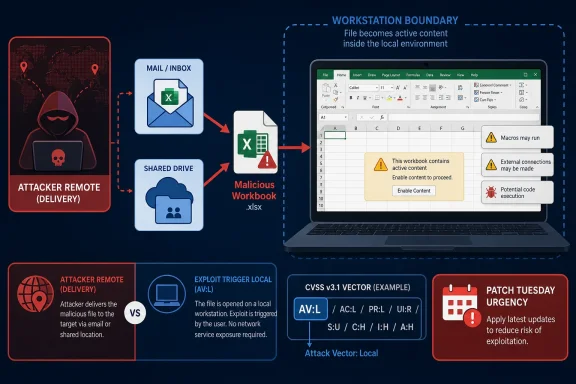
Microsoft’s CVE-2026-45469 describes a Microsoft Excel remote code execution vulnerability in which the CVSS attack vector is local because exploitation requires code to run on the target machine, typically after a user opens or executes attacker-supplied content. The apparent contradiction is not a clerical error so much as a language collision between security taxonomy and everyday reading. In Microsoft’s usage, “remote” describes the attacker’s position, not necessarily the mechanics of the final exploit step. That distinction matters because it changes how defenders should think about exposure, user interaction, and patch urgency.
The phrase “Remote Code Execution” has become one of the most overloaded labels in vulnerability reporting. To many administrators, it implies a network-reachable service, no user interaction, and an attacker sending packets from across the internet until code runs. That is one kind of RCE, and usually the most frightening kind.
Office vulnerabilities often live in a different category. A malicious workbook can arrive by email, chat, download, cloud share, or compromised business workflow, but the vulnerable parsing or execution path may still be triggered only when Excel processes the file locally. The attacker is remote in the social and delivery sense; the exploit fires on the victim’s endpoint.
That is why a CVSS vector can say
This distinction is easy to dismiss as pedantry until it shows up in patch triage. A local attack vector does not mean “low priority” when the vulnerable application is Excel and the delivery mechanism is a spreadsheet — one of the most trusted file formats in corporate life.
That is the heart of the confusion around CVE-2026-45469. The exploit may be initiated by a malicious file created by someone outside the organization. But once the file is opened or processed, the vulnerable code path is inside Excel on the user’s workstation. From CVSS’s perspective, the decisive step is local.
This is not unique to Excel. Document readers, media parsers, archive tools, developer utilities, and endpoint agents often receive “remote code execution” titles even when exploitation depends on a local user opening hostile content. The code execution is remote in consequence and attacker origin, but local in trigger.
Microsoft’s own explanation makes the point plainly: the word “remote” refers to the location of the attacker, while the actual exploitation occurs locally. In other words, this is closer to arbitrary code execution through attacker-controlled content than to a wormable network service flaw.
A server-side RCE might be reachable over TCP. An Excel RCE is reachable through human process. The spreadsheet lands in an inbox, procurement portal, ticket attachment, Teams chat, shared drive, or vendor handoff. The endpoint becomes the boundary where trust is tested.
This is why Office exploitation has remained attractive for decades. Attackers do not need to scan the internet if they can place a malicious document in front of the right person. The “local” part of the vector often depends on the victim doing something ordinary, not reckless.
That reality should temper how administrators read
CVSS separates those concerns more rigorously. Attack vector, privileges required, user interaction, scope, and impact are scored as separate dimensions. A vulnerability can require user interaction and still have severe confidentiality, integrity, and availability consequences once triggered.
This is why RCE titles can look inconsistent with vectors. A flaw can be locally triggered, require a malicious file, and still allow code execution under the current user’s privileges. If that user has access to sensitive files, network shares, browser sessions, tokens, or administrative tools, the blast radius can be significant.
The industry has never fully resolved this terminology problem. “Arbitrary Code Execution” is often more precise for cases like this, because it avoids implying network reachability. But RCE has become the headline term for “attacker gets code running,” and vendors have little incentive to invent more nuanced labels that fewer people recognize.
That does not make the issue harmless. It does mean defenders can focus their assumptions more carefully. The likely exposure revolves around opening or otherwise processing the malicious workbook in Excel, rather than merely selecting it in File Explorer or Outlook preview.
For IT teams, that distinction affects user guidance. “Do not open unexpected Excel files” is more relevant than “do not preview messages,” at least based on the advisory information available. It also affects detection logic, because process creation or suspicious child processes from Excel become more important than passive file presence alone.
The absence of Preview Pane exploitation also matters for risk communication. Panic thrives on ambiguity. If a vulnerability requires an actual open action, users and help desks should be told that clearly — without soft-pedaling the danger of weaponized documents.
Attackers have become very good at making malicious documents look routine. Invoices, remittance notices, HR forms, shipping manifests, audit workpapers, procurement sheets, and partner reports all create plausible reasons to open Excel files. The better the lure aligns with a user’s job, the less “interaction required” reduces real-world risk.
Excel is particularly exposed because spreadsheets often move between organizations. Finance, operations, logistics, sales, insurance, legal, and manufacturing teams exchange them constantly. The format carries implicit legitimacy because people expect spreadsheets to be editable, formula-rich, and occasionally messy.
That does not mean CVE-2026-45469 is necessarily being exploited in the wild. It does mean the class of vulnerability belongs in a threat model where user-assisted execution is a common path, not an edge case.
The meaningful question is what combination of conditions the advisory describes. If exploitation requires no privileges, low complexity, and user interaction, the risk profile is still serious for a widely deployed productivity app. If successful exploitation gives high confidentiality, integrity, and availability impact, the business consequence can be severe even without network-level reachability.
In practice, Office RCEs should usually sit high in workstation patch queues. They affect the machines where users handle untrusted content, authenticate to services, browse internal resources, and access sensitive data. A compromised workstation may not be a domain controller, but it can be a beachhead.
There is also a practical patch-management issue. Excel is present across fleets in different forms: Microsoft 365 Apps, volume-licensed Office, Office LTSC, and older supported editions. Asset inventory matters because the vulnerable surface may not map cleanly to a single Windows Update compliance dashboard.
Protected View, Mark of the Web, attachment handling, attack surface reduction rules, macro policies, and endpoint detection all exist because Office files are active content containers. Excel is not a passive table viewer. It is a programmable environment with deep integration into Windows and enterprise data flows.
The challenge is that business users often need to open spreadsheets from outside the organization. A blanket prohibition is unrealistic. The better approach is layered friction: block high-risk behaviors, isolate unknown files, preserve internet-origin markings, and monitor Excel when it behaves like a launcher instead of a spreadsheet editor.
Attack surface reduction rules are particularly relevant in this class of threat. Preventing Office applications from creating child processes, launching executable content, or abusing script interpreters can limit the damage of successful exploitation. These controls can be noisy if deployed carelessly, but they map directly to the post-exploitation behaviors defenders care about.
From there, the playbook is familiar. The attacker can attempt persistence, credential theft, lateral movement, data discovery, and command-and-control. The initial exploit path may be a file open event, but the incident can quickly become an enterprise compromise.
This is why the term “local” can be misleading for non-specialists. Local describes how the vulnerable component is reached, not how far the attacker can go afterward. Once code runs in the user context, the machine’s network position, privileges, cached credentials, and available applications define the next stage.
For defenders, the practical response is to think in chains. The vulnerability is one link. Delivery, user execution, payload behavior, privilege context, endpoint controls, and lateral movement opportunities are the rest of the chain.
A more precise title might say “Microsoft Excel Arbitrary Code Execution Vulnerability” or “Microsoft Excel File-Parsing Code Execution Vulnerability.” Those labels would better signal that exploitation depends on local processing of malicious content. But they would also break with a familiar taxonomy that many patch systems, dashboards, and executives already understand.
The result is a compromise that satisfies vulnerability classification but frustrates plain-English comprehension. Security professionals can decode it. End users and managers often cannot.
That gap matters during Patch Tuesday cycles. The people approving emergency maintenance windows may not read CVSS vectors. They read impact labels. If those labels sound more or less urgent than the technical conditions justify, patch decisions can drift in either direction.
That framing helps avoid two bad interpretations. The first is overstatement: assuming this is a no-click, network-reachable Excel flaw. The second is understatement: assuming local attack vector means the attacker already needs access to the machine. Neither reading captures the likely document-based risk.
Help desks and security teams should communicate in user-centered language. The danger is opening untrusted Excel files before systems are patched. The safer behavior is to treat unexpected spreadsheets as executable content, not as harmless documents.
For administrators, the message is equally direct. Patch affected Office installations, verify update coverage across product channels, and watch for suspicious Excel behavior. A local vector does not remove the need for urgency when the vulnerable application is a common entry point for external content.
 Microsoft’s Wording Is Awkward, but the Risk Is Real
The phrase “Remote Code Execution” has become one of the most overloaded labels in vulnerability reporting. To many administrators, it implies a network-reachable service, no user interaction, and an attacker sending packets from across the internet until code runs. That is one kind of RCE, and usually the most frightening kind.Office vulnerabilities often live in a different category. A malicious workbook can arrive by email, chat, download, cloud share, or compromised business workflow, but the vulnerable parsing or execution path may still be triggered only when Excel processes the file locally. The attacker is remote in the social and delivery sense; the exploit fires on the victim’s endpoint.
That is why a CVSS vector can say
AV:L while the title says “Remote Code Execution.” CVSS is scoring the attack path required at the vulnerable component. The title is describing the impact class and attacker posture in Microsoft’s broader advisory language.This distinction is easy to dismiss as pedantry until it shows up in patch triage. A local attack vector does not mean “low priority” when the vulnerable application is Excel and the delivery mechanism is a spreadsheet — one of the most trusted file formats in corporate life.
CVSS Measures the Exploit Step, Not the Entire Campaign
CVSS is narrower than many readers assume. Its attack vector metric asks how the vulnerability is exploited at the point of technical contact. If the flaw requires local execution, local file handling, or an action on the victim’s machine, it can receiveAV:L even if the attacker never physically touches the system.That is the heart of the confusion around CVE-2026-45469. The exploit may be initiated by a malicious file created by someone outside the organization. But once the file is opened or processed, the vulnerable code path is inside Excel on the user’s workstation. From CVSS’s perspective, the decisive step is local.
This is not unique to Excel. Document readers, media parsers, archive tools, developer utilities, and endpoint agents often receive “remote code execution” titles even when exploitation depends on a local user opening hostile content. The code execution is remote in consequence and attacker origin, but local in trigger.
Microsoft’s own explanation makes the point plainly: the word “remote” refers to the location of the attacker, while the actual exploitation occurs locally. In other words, this is closer to arbitrary code execution through attacker-controlled content than to a wormable network service flaw.
The Spreadsheet Is the Network Boundary Now
For enterprise defenders, Excel is not just a desktop application. It is a workflow engine, reporting layer, data exchange format, automation surface, and archive of institutional memory. That makes Excel vulnerabilities unusually sensitive even when CVSS says the attack vector is local.A server-side RCE might be reachable over TCP. An Excel RCE is reachable through human process. The spreadsheet lands in an inbox, procurement portal, ticket attachment, Teams chat, shared drive, or vendor handoff. The endpoint becomes the boundary where trust is tested.
This is why Office exploitation has remained attractive for decades. Attackers do not need to scan the internet if they can place a malicious document in front of the right person. The “local” part of the vector often depends on the victim doing something ordinary, not reckless.
That reality should temper how administrators read
AV:L. Local does not mean obscure. It means the attacker needs a route to get content executed or opened on the victim’s device. In a modern workplace, those routes are abundant.“Remote Code Execution” Is an Impact Label Wearing an Access Label’s Clothes
The deeper problem is that vulnerability titles often mix two different ideas: where the attacker is and what happens if exploitation succeeds. “Remote Code Execution” sounds like an access condition, but in many vendor advisories it functions as an impact category. The bad outcome is that attacker-controlled code can run.CVSS separates those concerns more rigorously. Attack vector, privileges required, user interaction, scope, and impact are scored as separate dimensions. A vulnerability can require user interaction and still have severe confidentiality, integrity, and availability consequences once triggered.
This is why RCE titles can look inconsistent with vectors. A flaw can be locally triggered, require a malicious file, and still allow code execution under the current user’s privileges. If that user has access to sensitive files, network shares, browser sessions, tokens, or administrative tools, the blast radius can be significant.
The industry has never fully resolved this terminology problem. “Arbitrary Code Execution” is often more precise for cases like this, because it avoids implying network reachability. But RCE has become the headline term for “attacker gets code running,” and vendors have little incentive to invent more nuanced labels that fewer people recognize.
The Preview Pane Detail Narrows One Common Fear
One practical detail in Microsoft’s advisory language is especially important: the Preview Pane is not listed as an attack vector. That means the known exploitation scenario is not simply viewing the file in a preview surface and triggering the vulnerability without opening it.That does not make the issue harmless. It does mean defenders can focus their assumptions more carefully. The likely exposure revolves around opening or otherwise processing the malicious workbook in Excel, rather than merely selecting it in File Explorer or Outlook preview.
For IT teams, that distinction affects user guidance. “Do not open unexpected Excel files” is more relevant than “do not preview messages,” at least based on the advisory information available. It also affects detection logic, because process creation or suspicious child processes from Excel become more important than passive file presence alone.
The absence of Preview Pane exploitation also matters for risk communication. Panic thrives on ambiguity. If a vulnerability requires an actual open action, users and help desks should be told that clearly — without soft-pedaling the danger of weaponized documents.
User Interaction Is Not a Comfort Blanket
Security teams sometimes downgrade document-based vulnerabilities because they require user interaction. That is a mistake. User interaction is not a rare condition in business software; it is the normal operating model.Attackers have become very good at making malicious documents look routine. Invoices, remittance notices, HR forms, shipping manifests, audit workpapers, procurement sheets, and partner reports all create plausible reasons to open Excel files. The better the lure aligns with a user’s job, the less “interaction required” reduces real-world risk.
Excel is particularly exposed because spreadsheets often move between organizations. Finance, operations, logistics, sales, insurance, legal, and manufacturing teams exchange them constantly. The format carries implicit legitimacy because people expect spreadsheets to be editable, formula-rich, and occasionally messy.
That does not mean CVE-2026-45469 is necessarily being exploited in the wild. It does mean the class of vulnerability belongs in a threat model where user-assisted execution is a common path, not an edge case.
Patch Triage Should Read the Whole Vector
Administrators should resist the temptation to triage from the title alone. “Remote Code Execution” sounds critical by default, whileAV:L can sound less urgent by default. Neither shorthand is enough.The meaningful question is what combination of conditions the advisory describes. If exploitation requires no privileges, low complexity, and user interaction, the risk profile is still serious for a widely deployed productivity app. If successful exploitation gives high confidentiality, integrity, and availability impact, the business consequence can be severe even without network-level reachability.
In practice, Office RCEs should usually sit high in workstation patch queues. They affect the machines where users handle untrusted content, authenticate to services, browse internal resources, and access sensitive data. A compromised workstation may not be a domain controller, but it can be a beachhead.
There is also a practical patch-management issue. Excel is present across fleets in different forms: Microsoft 365 Apps, volume-licensed Office, Office LTSC, and older supported editions. Asset inventory matters because the vulnerable surface may not map cleanly to a single Windows Update compliance dashboard.
The Real Control Plane Is File Trust
Patching is the first answer, but not the only answer. Document-based code execution bugs are a reminder that file trust is a security boundary — even if Windows and Office have spent years trying to make that boundary more visible.Protected View, Mark of the Web, attachment handling, attack surface reduction rules, macro policies, and endpoint detection all exist because Office files are active content containers. Excel is not a passive table viewer. It is a programmable environment with deep integration into Windows and enterprise data flows.
The challenge is that business users often need to open spreadsheets from outside the organization. A blanket prohibition is unrealistic. The better approach is layered friction: block high-risk behaviors, isolate unknown files, preserve internet-origin markings, and monitor Excel when it behaves like a launcher instead of a spreadsheet editor.
Attack surface reduction rules are particularly relevant in this class of threat. Preventing Office applications from creating child processes, launching executable content, or abusing script interpreters can limit the damage of successful exploitation. These controls can be noisy if deployed carelessly, but they map directly to the post-exploitation behaviors defenders care about.
Local Execution Still Has Remote Consequences
The local-versus-remote distinction should not obscure the attacker’s goal. If a malicious workbook causes Excel to run attacker-controlled code, the attacker may gain the same foothold they would have sought through a more obviously remote vulnerability.From there, the playbook is familiar. The attacker can attempt persistence, credential theft, lateral movement, data discovery, and command-and-control. The initial exploit path may be a file open event, but the incident can quickly become an enterprise compromise.
This is why the term “local” can be misleading for non-specialists. Local describes how the vulnerable component is reached, not how far the attacker can go afterward. Once code runs in the user context, the machine’s network position, privileges, cached credentials, and available applications define the next stage.
For defenders, the practical response is to think in chains. The vulnerability is one link. Delivery, user execution, payload behavior, privilege context, endpoint controls, and lateral movement opportunities are the rest of the chain.
Microsoft’s Naming Habit Creates a Communication Tax
Microsoft is not alone in using RCE broadly, but its advisories are highly visible, and that makes the terminology matter. When a title says “Remote Code Execution” and the vector saysAV:L, administrators have to spend extra time explaining why both statements can be true. That is a communication tax imposed on already overloaded security teams.A more precise title might say “Microsoft Excel Arbitrary Code Execution Vulnerability” or “Microsoft Excel File-Parsing Code Execution Vulnerability.” Those labels would better signal that exploitation depends on local processing of malicious content. But they would also break with a familiar taxonomy that many patch systems, dashboards, and executives already understand.
The result is a compromise that satisfies vulnerability classification but frustrates plain-English comprehension. Security professionals can decode it. End users and managers often cannot.
That gap matters during Patch Tuesday cycles. The people approving emergency maintenance windows may not read CVSS vectors. They read impact labels. If those labels sound more or less urgent than the technical conditions justify, patch decisions can drift in either direction.
How Windows Shops Should Explain This One
The cleanest explanation is short: this is not a contradiction. The attacker can be remote, the malicious file can arrive remotely, and the final exploit can still require local execution in Excel. CVSS records that final technical requirement as local.That framing helps avoid two bad interpretations. The first is overstatement: assuming this is a no-click, network-reachable Excel flaw. The second is understatement: assuming local attack vector means the attacker already needs access to the machine. Neither reading captures the likely document-based risk.
Help desks and security teams should communicate in user-centered language. The danger is opening untrusted Excel files before systems are patched. The safer behavior is to treat unexpected spreadsheets as executable content, not as harmless documents.
For administrators, the message is equally direct. Patch affected Office installations, verify update coverage across product channels, and watch for suspicious Excel behavior. A local vector does not remove the need for urgency when the vulnerable application is a common entry point for external content.
The Patch Note Says “Local,” but the Spreadsheet Arrives From Somewhere Else
The useful lesson from CVE-2026-45469 is not that Microsoft used the wrong word. It is that defenders need to read vulnerability language at two levels: the formal scoring level and the operational attack level. The former tells you how CVSS models the exploit; the latter tells you how an adversary might actually get it in front of a user.- The CVSS
AV:Lmetric means exploitation requires code or content to be processed locally on the victim’s machine. - The “Remote Code Execution” title refers to attacker-controlled code execution initiated by a remote attacker, not necessarily a network-reachable service.
- The practical attack scenario is likely malicious Excel content opened or executed by a user, rather than a direct packet-to-process exploit.
- The absence of Preview Pane exploitation narrows the known trigger path but does not eliminate the risk from opening hostile workbooks.
- The right response is to patch Excel promptly, preserve Office hardening controls, and monitor for suspicious child processes or payload behavior from Office applications.
References
- Primary source: MSRC
Published: 2026-06-09T07:00:00-07:00
Security Update Guide - Microsoft Security Response Center
 msrc.microsoft.com
- Related coverage: bleepingcomputer.com
- Official source: microsoft.com
CVE-2026-31431: Copy Fail vulnerability enables Linux root privilege escalation across cloud environments | Microsoft Security Blog
A high-severity Linux vulnerability, “Copy Fail” (CVE-2026-31431), enables root privilege escalation across cloud environments and Kubernetes workloads. With a working exploit already in the wild, organizations should act quickly to detect, mitigate, and reduce risk.www.microsoft.com - Related coverage: threats.kaspersky.com
Kaspersky Threats — KLA90842
threats.kaspersky.com
