

Microsoft disclosed CVE-2026-45461 on June 9, 2026 as a Critical Microsoft Office remote code execution vulnerability, even though its CVSS vector lists the attack vector as local because exploitation depends on code being run on the victim’s machine. That wording is not a contradiction so much as a collision between two security vocabularies: Microsoft’s impact category describes who can cause code to run, while CVSS attack vector describes the technical path to the vulnerable component. The practical result is familiar to anyone who has defended Office: a hostile file, preview, or local parsing path can still be an RCE risk even when the network is not the direct attack surface. For administrators, the lesson is blunt: do not let the “local” vector lull you into treating this as a mere workstation oddity.
The phrase “remote code execution” has always carried a little ambiguity. In everyday security shorthand, it often means an attacker on the internet can send packets to a service and make it run arbitrary code. In Microsoft advisories, however, the category frequently means something broader: an attacker who is not already sitting at the keyboard may be able to cause code of their choosing to execute on the target system.
That distinction matters for CVE-2026-45461 because the vulnerability is in Microsoft Office, not in a listening network daemon. Microsoft describes the underlying issue as a heap-based buffer overflow in Office that can allow an unauthorized attacker to execute code locally. The CVSS vector is therefore local:
The phrase that resolves the apparent contradiction is Microsoft’s own FAQ language: “Remote” refers to the location of the attacker, while the exploit activity occurs locally. In other words, the attacker may be remote from the machine, but the vulnerable code path is exercised by a local application, local process, local document handler, or local preview mechanism.
That may sound like hair-splitting, but it is the same line defenders have lived with for decades. A malicious document emailed from another country can lead to code execution on a local machine. The exploit does not need to arrive as a network packet aimed at port 443 to be operationally remote.
That is why Office vulnerabilities often look strange on first read. The attacker can be remote in the real-world attack scenario, but the vulnerable code is triggered when Office, a file handler, a preview component, or another local process touches attacker-supplied content. CVSS records that as a local path because Office is parsing something on the machine rather than accepting exploit traffic as a network service.
This is also why “local” does not automatically mean “low risk.” A local privilege escalation vulnerability may require an attacker to already have a foothold. A local Office parsing vulnerability may require only that a file be delivered into a workflow where Office processes it. Those are very different operational realities, even if both can carry
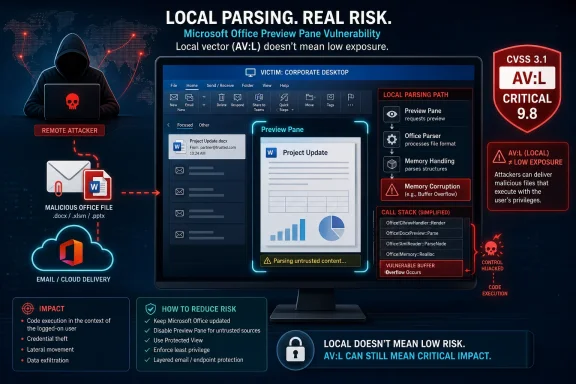
CVE-2026-45461 makes the point especially sharply because Microsoft’s scoring says user interaction is not required. The advisory also says the Preview Pane is an attack vector. That combination is the part administrators should notice: if previewing content can trigger the vulnerable path, the gap between “remote attacker” and “local execution” becomes uncomfortably small.
For years, Microsoft’s Office security story has been a long fight to reduce the danger of documents as executable containers. Macro blocking, Protected View, Mark of the Web, OLE mitigations, file block policies, and attack surface reduction rules all exist because documents are not inert objects. They are structured inputs for a very large application stack.
CVE-2026-45461 fits that model. Microsoft identifies the weakness as use-after-free and describes the executive summary in terms of code execution on the local machine. The problem is not that a remote attacker can necessarily open a socket and take over Office. The problem is that the attacker may be able to craft content that causes Office, running locally under the user’s context, to cross the line from parsing data into executing code.
That is why the old distinction between “local” and “remote” becomes less comforting in document-driven software. In the endpoint era, code execution is often local at the final step. The attacker’s distance is measured by delivery chain, not by whether the vulnerable function is listening on the network.
That changes the risk profile. A vulnerability that requires a user to open a malicious Office document is serious. A vulnerability that may be reachable through preview is often more serious because previewing is casual, routine, and easy to overlook in training. Users do not think of preview as execution; defenders know better.
The CVSS vector lists user interaction as none, which may appear surprising for a document-centric vulnerability. The likely interpretation is that exploitation can be triggered without a separate user action beyond the vulnerable system encountering the crafted content through a supported path. Microsoft’s advisory does not publish exploit details, and it rates exploitation as less likely at publication, but the preview angle is enough to justify urgency.
That is also where the “remote” label becomes defensible. If an attacker can send or place a crafted document where Office or an Office-related handler processes it locally, the attacker’s remoteness is not theoretical. The exploit chain still ends on the victim’s machine, but the initiating adversary remains outside the system.
That scoring tells a simple story. Successful exploitation could allow code execution with serious consequences for the affected system. The attacker needs no privileges. Attack complexity is low. Scope is unchanged, meaning the impact remains within the same security authority rather than jumping boundaries, but the damage inside that boundary can still be severe.
The exploitability assessment is more measured. Microsoft says the vulnerability was not publicly disclosed and not exploited at the time of publication, and rates exploitation as less likely. That does not make it a patch-at-leisure issue; it means defenders have a window before public proof-of-concept code or active exploitation changes the calculus.
There is a familiar pattern here. Office RCEs often start as carefully worded Patch Tuesday entries and later become more interesting once researchers diff patches, identify the vulnerable code path, and build reliable triggers. “Less likely” is not “impossible.” It is a point-in-time judgment.
For Office 2016, Microsoft lists a specific security update and build number. For Click-to-Run products such as Microsoft 365 Apps and Office LTSC, the patch path runs through the Office update channel. For Mac and Android, Microsoft says the security updates are not immediately available and will be released as soon as possible, with the CVE to be revised when they arrive.
That last point deserves attention in mixed fleets. A Windows admin with Microsoft 365 Apps may be able to remediate through normal Office update controls. A Mac admin may need to track the CVE revision and verify that the fixed build has actually landed. Mobile Office is often managed with a different toolchain entirely, and unmanaged personal devices may sit outside the usual compliance dashboards.
This is where the modern Office estate punishes assumptions. A vulnerability can be disclosed on one date, patched immediately for some product lines, and still awaiting updates for others. Security teams should treat “Office is patched” as a device-and-channel-specific statement, not a universal claim.
CVSS vectors, on the other hand, are precise but not intuitive.
Microsoft’s FAQ tries to bridge that gap by explaining that the exploit is sometimes better thought of as arbitrary code execution. That is probably the cleaner mental model. The central fact is not that the exploit is “remote” in the socket sense. The central fact is that attacker-controlled code may run on the victim’s machine.
The industry could stand to be more disciplined here. “Remote attacker-triggered local code execution” would be more accurate, but it is too clumsy for advisory titles. So we are left with a vocabulary that works for experts who already know the convention and confuses everyone else at exactly the moment they are trying to prioritize patches.
That combination points to a layered response. Patch Office where fixes exist. Verify the exact update channel and build, especially for Microsoft 365 Apps and LTSC installations. Track Mac and Android revisions separately if those platforms exist in the environment. Revisit preview behavior and attachment handling for high-risk groups.
The defensive controls around Office matter here because patch deployment can lag. Attack surface reduction rules, Protected View, Mark of the Web enforcement, attachment detonation, email filtering, and endpoint detection are not substitutes for a fix, but they can reduce exposure while update rings move. The exact control mix will vary by organization, but the principle does not: Office content should be treated as active input, not passive paperwork.
Home users should take the simpler version of the same advice. Let Office update automatically, do not disable security prompts to make a document “work,” and be cautious with unexpected attachments or files shared through cloud links. The difference between local and remote is less important than whether your machine is running the fixed code.
 Microsoft’s Title Is About Consequence, Not Cable Distance
The phrase “remote code execution” has always carried a little ambiguity. In everyday security shorthand, it often means an attacker on the internet can send packets to a service and make it run arbitrary code. In Microsoft advisories, however, the category frequently means something broader: an attacker who is not already sitting at the keyboard may be able to cause code of their choosing to execute on the target system.That distinction matters for CVE-2026-45461 because the vulnerability is in Microsoft Office, not in a listening network daemon. Microsoft describes the underlying issue as a heap-based buffer overflow in Office that can allow an unauthorized attacker to execute code locally. The CVSS vector is therefore local:
AV:L, with low attack complexity, no privileges required, no user interaction required, unchanged scope, and high impact to confidentiality, integrity, and availability.The phrase that resolves the apparent contradiction is Microsoft’s own FAQ language: “Remote” refers to the location of the attacker, while the exploit activity occurs locally. In other words, the attacker may be remote from the machine, but the vulnerable code path is exercised by a local application, local process, local document handler, or local preview mechanism.
That may sound like hair-splitting, but it is the same line defenders have lived with for decades. A malicious document emailed from another country can lead to code execution on a local machine. The exploit does not need to arrive as a network packet aimed at port 443 to be operationally remote.
CVSS Measures the Path, Not the Phishing Campaign
CVSS is trying to answer a narrower question than a marketing-style vulnerability title. The Attack Vector metric asks how exploitation reaches the vulnerable component. If the vulnerable component is not bound to the network stack, or if exploitation requires local read, write, or execute capabilities, the vector can be local even when the adversary is nowhere near the endpoint.That is why Office vulnerabilities often look strange on first read. The attacker can be remote in the real-world attack scenario, but the vulnerable code is triggered when Office, a file handler, a preview component, or another local process touches attacker-supplied content. CVSS records that as a local path because Office is parsing something on the machine rather than accepting exploit traffic as a network service.
This is also why “local” does not automatically mean “low risk.” A local privilege escalation vulnerability may require an attacker to already have a foothold. A local Office parsing vulnerability may require only that a file be delivered into a workflow where Office processes it. Those are very different operational realities, even if both can carry
AV:L.CVE-2026-45461 makes the point especially sharply because Microsoft’s scoring says user interaction is not required. The advisory also says the Preview Pane is an attack vector. That combination is the part administrators should notice: if previewing content can trigger the vulnerable path, the gap between “remote attacker” and “local execution” becomes uncomfortably small.
Office Remains the Place Where Local Becomes Remote
Office is not a network service in the classic sense, but it is one of the most exposed codebases in an enterprise. It processes files from email, cloud storage, Teams conversations, web downloads, line-of-business portals, document management systems, and archives passed between companies. That makes its attack surface socially remote even when the parser runs locally.For years, Microsoft’s Office security story has been a long fight to reduce the danger of documents as executable containers. Macro blocking, Protected View, Mark of the Web, OLE mitigations, file block policies, and attack surface reduction rules all exist because documents are not inert objects. They are structured inputs for a very large application stack.
CVE-2026-45461 fits that model. Microsoft identifies the weakness as use-after-free and describes the executive summary in terms of code execution on the local machine. The problem is not that a remote attacker can necessarily open a socket and take over Office. The problem is that the attacker may be able to craft content that causes Office, running locally under the user’s context, to cross the line from parsing data into executing code.
That is why the old distinction between “local” and “remote” becomes less comforting in document-driven software. In the endpoint era, code execution is often local at the final step. The attacker’s distance is measured by delivery chain, not by whether the vulnerable function is listening on the network.
The Preview Pane Detail Is the Real Alarm Bell
If there is one line in Microsoft’s advisory that deserves more attention than the wording of the title, it is the confirmation that the Preview Pane is an attack vector. Preview handlers are productivity features, but from a security perspective they are automated parsers sitting in the path of user curiosity. The whole point is to inspect content before the user fully opens it.That changes the risk profile. A vulnerability that requires a user to open a malicious Office document is serious. A vulnerability that may be reachable through preview is often more serious because previewing is casual, routine, and easy to overlook in training. Users do not think of preview as execution; defenders know better.
The CVSS vector lists user interaction as none, which may appear surprising for a document-centric vulnerability. The likely interpretation is that exploitation can be triggered without a separate user action beyond the vulnerable system encountering the crafted content through a supported path. Microsoft’s advisory does not publish exploit details, and it rates exploitation as less likely at publication, but the preview angle is enough to justify urgency.
That is also where the “remote” label becomes defensible. If an attacker can send or place a crafted document where Office or an Office-related handler processes it locally, the attacker’s remoteness is not theoretical. The exploit chain still ends on the victim’s machine, but the initiating adversary remains outside the system.
Critical Severity Does Not Require Internet-Facing Office
The severity rating is another place where readers can get tripped up. Critical does not mean the vulnerable component is internet-facing. It means Microsoft believes the possible impact and exploit conditions justify the highest class of response. For CVE-2026-45461, the CVSS base score is 8.4, with high confidentiality, integrity, and availability impact.That scoring tells a simple story. Successful exploitation could allow code execution with serious consequences for the affected system. The attacker needs no privileges. Attack complexity is low. Scope is unchanged, meaning the impact remains within the same security authority rather than jumping boundaries, but the damage inside that boundary can still be severe.
The exploitability assessment is more measured. Microsoft says the vulnerability was not publicly disclosed and not exploited at the time of publication, and rates exploitation as less likely. That does not make it a patch-at-leisure issue; it means defenders have a window before public proof-of-concept code or active exploitation changes the calculus.
There is a familiar pattern here. Office RCEs often start as carefully worded Patch Tuesday entries and later become more interesting once researchers diff patches, identify the vulnerable code path, and build reliable triggers. “Less likely” is not “impossible.” It is a point-in-time judgment.
The Patch Story Is Uneven Across Office Platforms
The advisory covers a wide Office estate: Microsoft 365 Apps for Enterprise, Office 2016, Office 2019, Office LTSC 2021, Office LTSC 2024, Office for Mac, and Office for Android. That breadth is a reminder that Office is no longer one product in one servicing channel. It is a family of desktop, subscription, perpetual, mobile, and Mac builds moving on different clocks.For Office 2016, Microsoft lists a specific security update and build number. For Click-to-Run products such as Microsoft 365 Apps and Office LTSC, the patch path runs through the Office update channel. For Mac and Android, Microsoft says the security updates are not immediately available and will be released as soon as possible, with the CVE to be revised when they arrive.
That last point deserves attention in mixed fleets. A Windows admin with Microsoft 365 Apps may be able to remediate through normal Office update controls. A Mac admin may need to track the CVE revision and verify that the fixed build has actually landed. Mobile Office is often managed with a different toolchain entirely, and unmanaged personal devices may sit outside the usual compliance dashboards.
This is where the modern Office estate punishes assumptions. A vulnerability can be disclosed on one date, patched immediately for some product lines, and still awaiting updates for others. Security teams should treat “Office is patched” as a device-and-channel-specific statement, not a universal claim.
The Naming Problem Is Bigger Than This CVE
CVE-2026-45461 is a good example of a broader communication problem in vulnerability management. Security titles are optimized for fast triage, but they often collapse several concepts into a few words. “Remote Code Execution” is useful because it tells defenders the impact category is severe. It is misleading if readers interpret it only as “network exploitable.”CVSS vectors, on the other hand, are precise but not intuitive.
AV:L is technically meaningful, yet it can obscure real-world delivery. A local vector Office bug may be exploited by a remote adversary through a document sent over email. A network vector bug may be unreachable in a well-segmented environment. Neither label alone tells the whole operational story.Microsoft’s FAQ tries to bridge that gap by explaining that the exploit is sometimes better thought of as arbitrary code execution. That is probably the cleaner mental model. The central fact is not that the exploit is “remote” in the socket sense. The central fact is that attacker-controlled code may run on the victim’s machine.
The industry could stand to be more disciplined here. “Remote attacker-triggered local code execution” would be more accurate, but it is too clumsy for advisory titles. So we are left with a vocabulary that works for experts who already know the convention and confuses everyone else at exactly the moment they are trying to prioritize patches.
Administrators Should Read the Vector as a Workflow Map
For IT pros, the right response is not to argue with the title but to translate the vector into workflow risk.AV:L means the exploit path depends on local processing. PR:N means the attacker does not need an account. UI:N and Preview Pane support mean the normal “don’t open suspicious attachments” line is not enough. High CIA impact means the result can be system-compromising, not merely a crash.That combination points to a layered response. Patch Office where fixes exist. Verify the exact update channel and build, especially for Microsoft 365 Apps and LTSC installations. Track Mac and Android revisions separately if those platforms exist in the environment. Revisit preview behavior and attachment handling for high-risk groups.
The defensive controls around Office matter here because patch deployment can lag. Attack surface reduction rules, Protected View, Mark of the Web enforcement, attachment detonation, email filtering, and endpoint detection are not substitutes for a fix, but they can reduce exposure while update rings move. The exact control mix will vary by organization, but the principle does not: Office content should be treated as active input, not passive paperwork.
Home users should take the simpler version of the same advice. Let Office update automatically, do not disable security prompts to make a document “work,” and be cautious with unexpected attachments or files shared through cloud links. The difference between local and remote is less important than whether your machine is running the fixed code.
The Office RCE That Looks Local on Paper Still Demands Remote-Threat Discipline
The most concrete reading of CVE-2026-45461 is not complicated once the terminology is untangled.- Microsoft released CVE-2026-45461 on June 9, 2026 as a Critical Microsoft Office remote code execution vulnerability.
- The CVSS vector lists
AV:Lbecause exploitation reaches the vulnerable Office component through local processing rather than a directly exposed network service. - Microsoft’s “Remote” wording refers to the attacker’s position, while the code execution occurs on the victim’s local machine.
- The Preview Pane being an attack vector makes the advisory more operationally important than a simple “open a malicious document” scenario.
- Microsoft reported no public disclosure or exploitation at publication and assessed exploitation as less likely, but that can change after patch analysis.
- Administrators should verify fixed Office builds by product, platform, and update channel, especially because Mac and Android updates were not immediately available at disclosure.
References
- Primary source: MSRC
Published: 2026-06-09T07:00:00-07:00
Security Update Guide - Microsoft Security Response Center
 msrc.microsoft.com
