

Microsoft’s CVE-2026-45460 advisory says the security updates for Microsoft Office LTSC for Mac 2021, Office LTSC for Mac 2024, and Microsoft 365 for Mac are not immediately available as of June 9, 2026, and will be released later through a CVE revision. That is the practical answer for Mac administrators looking at this Office information disclosure bug today. The more important story is not merely that a patch is late, but that Microsoft’s security-update machinery still treats Mac Office as a trailing edge in moments when customers most need certainty.
The language in Microsoft’s advisory is familiar enough to be easy to skim past: updates are “not immediately available,” will arrive “as soon as possible,” and customers will be notified when the CVE entry is revised. For a consumer, that may read like a temporary inconvenience. For an enterprise administrator, it is a change-control problem with a vulnerability identifier attached.
CVE-2026-45460 is classified as a Microsoft Office information disclosure vulnerability. Information disclosure bugs rarely have the theatrical quality of remote code execution flaws, but they matter because they can expose data an attacker should not be able to see. In Office, that can mean documents, metadata, rendered content, embedded objects, or contextual information that helps an attacker move from curiosity to compromise.
The affected Mac products named in the advisory are not obscure leftovers. Office LTSC for Mac 2021 and 2024 sit in organizations that prefer predictable, perpetual-license software. Microsoft 365 for Mac sits in the mainstream subscription channel that many users assume is always first in line for security servicing. Seeing all three grouped under a “not immediately available” notice undermines that assumption.
The Windows side of Office security updates is often treated as the default battlefield, especially on Patch Tuesday. But modern enterprise fleets are mixed, and many Mac endpoints are not decorative exceptions. They belong to executives, developers, designers, legal staff, and other users who often handle high-value documents. A Mac-specific delay is therefore not a Mac-only footnote; it is a gap in the document-security perimeter.
For security teams, that creates an awkward middle state. The vulnerability exists in the official record, the affected products are named, and the mitigation most organizations prefer — patching — is unavailable for a subset of users. This is where a simple advisory turns into a risk-management exercise.
The first challenge is inventory. Administrators need to know which Macs are running Office LTSC 2021, Office LTSC 2024, or Microsoft 365 Apps for Mac, and which users are opening externally sourced documents. The second challenge is timing. Without a released package, there is no update deadline to enforce, no compliance baseline to measure, and no clean closure point for the ticket.
The third challenge is communication. “Microsoft has disclosed a vulnerability, but the fix for your platform is not out yet” is a difficult message to send to users and executives. It sounds both alarming and inconclusive, which is precisely why many organizations under-communicate these situations until an update appears.
That instinct is understandable, but it is risky. If users believe Office is fully patched because Windows updates landed elsewhere in the organization, they may not understand why Mac Office requires different handling. Patch availability is not the same thing as vulnerability awareness, and this advisory makes that distinction painfully clear.
Office for Mac is not merely Office for Windows with a different icon set. It has its own packaging, update channels, dependencies, testing requirements, and macOS integration points. Those differences can make patch timing diverge, especially when a vulnerability touches shared Office logic but requires separate validation on macOS.
That is not an excuse so much as an explanation. Apple’s platform rules, sandboxing expectations, notarization requirements, and application bundle model create a different release environment from Windows. Microsoft has to ship updates that do not break core productivity workflows on a platform where many organizations also manage software through Jamf, Intune, Munki, Kandji, or other device-management tools.
Still, the user does not experience any of that complexity. The user sees Word, Excel, PowerPoint, Outlook, and OneNote. The attacker sees document-handling code. The administrator sees an advisory that says the fix is not yet available.
That gap between engineering reality and operational expectation is where trust gets strained. Microsoft wants customers to believe the cloud-era Office estate is centrally manageable and rapidly serviceable. But when a vulnerability advisory tells Mac customers to wait, the old platform hierarchy reappears.
That is the wrong lesson for Office. Office documents are containers of business context: contract terms, financial models, legal strategy, personnel data, customer lists, merger planning, macros, embedded links, tracked changes, comments, and metadata. A bug that discloses information from that environment can be valuable even if it does not run code.
Information disclosure can also be a stepping stone. Attackers prize anything that helps them tailor phishing, bypass security controls, understand internal naming conventions, or identify valuable accounts. The line between “information exposure” and “compromise enablement” is often thinner than vulnerability labels suggest.
For Mac-heavy organizations, the delayed update changes the defensive posture. The absence of a patch does not automatically mean active exploitation is occurring, and Microsoft’s advisory language should not be inflated beyond what it says. But it does mean the normal remediation path is blocked until Microsoft revises the CVE with available updates.
That makes compensating controls more important. Administrators should tighten document-handling guidance, reinforce protections around untrusted files, ensure Microsoft AutoUpdate is functioning, and monitor Microsoft’s security update guide for revision. None of that is as satisfying as installing a patch, but waiting passively is not a security strategy.
When LTSC security updates lag, the value proposition gets uncomfortable. Perpetual-license Office is supposed to give organizations a predictable, supported baseline. If that baseline is named in a CVE but the fix is delayed, customers are left with the least attractive combination: old-school deployment responsibility plus cloud-era advisory uncertainty.
Office LTSC 2021 is also closer to the end of its support life than Office LTSC 2024, which raises an additional planning issue. Organizations that delayed migration because the suite still worked may now face another reminder that “supported” does not always mean “equally served at the same moment.” Support windows matter, but so does the practical cadence of fixes.
Office LTSC 2024 should be a safer long-term landing zone, but its presence in the same advisory note shows that this is not merely a legacy-version issue. The newer Mac LTSC release is also waiting. That suggests the bottleneck is not simply age, but the Mac release path for this vulnerability.
Microsoft 365 for Mac adds a different wrinkle. Subscription customers often assume they are on the most responsive servicing model Microsoft offers. In many cases they are. Here, however, the advisory places Microsoft 365 for Mac alongside LTSC for Mac in the waiting room, which means subscription status alone does not eliminate platform-specific delay.
The immediate task is to define the affected population. That means querying endpoint-management tools for Office installation type, version, update channel, and last successful Microsoft AutoUpdate check-in. If your Mac fleet is split between Microsoft 365 Apps and LTSC licensing, do not assume one query catches both.
Next comes exposure reduction. Users who routinely process outside documents — finance, HR, legal, procurement, support, sales operations, and executive assistants — should be treated as higher priority. A vulnerability in Office matters most where untrusted Office files meet sensitive local or cloud-connected data.
Administrators should also verify that Microsoft AutoUpdate is healthy. A delayed patch today becomes a deployment failure tomorrow if the update mechanism is broken, blocked, or misconfigured. The day Microsoft revises the CVE is not the day to discover that half the fleet has not checked in for months.
Finally, security teams should prepare detection and reporting logic now. Once Microsoft publishes the update, organizations will need to prove which devices received it. That means version baselines, smart groups, compliance policies, and help-desk scripts should be staged before the release appears.
“Not immediately available” is technically clear but operationally incomplete. It does not tell administrators whether the delay is expected to last hours, days, or longer. It does not describe whether any temporary mitigation is recommended for Mac users. It does not say whether the risk profile differs between LTSC and Microsoft 365 for Mac.
To be fair, Microsoft may not have all of those answers ready when an advisory ships. Premature specificity can be worse than honest ambiguity. But ambiguity still has a cost, and that cost is paid by IT departments trying to brief leadership, prioritize tickets, and decide whether to restrict document workflows.
A better advisory would separate the facts more explicitly. It would state that the Mac updates are pending, identify whether Microsoft is aware of exploitation if that status is known, describe any user-action guidance short of patching, and commit to updating the CVE entry when packages are published. Some of that may already be represented in structured fields elsewhere in the advisory, but administrators should not need to decode the page like a tax form.
This is not a call for alarmism. It is a call for security communication that matches the reality of mixed-platform fleets. Mac Office is not an edge case, and delayed fixes should be framed with enough operational detail for customers to make decisions.
A Mac user opening an Office document may be connected to the same tenant, the same file libraries, the same conditional access policies, and the same sensitive business data as a Windows user. If an Office vulnerability leaks information on macOS, the impact can flow through Microsoft 365 services and organizational workflows that Windows administrators also own.
There is also the executive-device problem. In many companies, Macs are overrepresented among senior leadership, engineering, design, marketing, and external-facing teams. Those users may have broad access, high-value communications, and a steady stream of documents from outside the organization.
Security programs that treat Mac endpoints as a special exception often discover too late that attackers do not share that taxonomy. The attacker cares about access and data, not whether the vulnerable client is managed by the Windows endpoint team or the Apple platform team.
For WindowsForum readers, the lesson is straightforward: Office security is no longer just a Windows patching story. If your Microsoft environment includes Macs, Office for Mac belongs in the same vulnerability-management conversation as Windows, Exchange, SharePoint, Teams, and browsers.
That is how unresolved exposure becomes background noise. The organization thinks it is tracking the issue because someone saw the advisory. But unless there is a scheduled check for revisions, a defined owner, and a post-release deployment plan, the vulnerability can linger after the fix finally appears.
Mac software updates are especially prone to this problem because many organizations have uneven visibility compared with Windows. Some Macs are fully managed and tightly monitored. Others are loosely supervised, user-administered, or handled through a separate IT workflow. Office licensing can also vary across departments and acquisition eras.
The delayed CVE update should therefore become a process test. Can the organization identify affected Macs? Can it notify the right users? Can it detect when Microsoft publishes the update? Can it deploy or enforce the patched version quickly afterward? If the answer to any of those questions is no, CVE-2026-45460 is exposing more than an Office flaw.
That is the uncomfortable but useful part of these advisories. They reveal the difference between nominal support and actual readiness. A patch that does not exist yet cannot be installed, but an organization can still prepare to move fast when it does.
Security teams should avoid vague warnings that train users to ignore everything. The message should be specific: be cautious with unexpected Office documents, verify senders through a separate channel when files are unusual or urgent, and avoid opening documents that ask for unnecessary interaction. If a workflow allows previewing or converting documents in a safer environment, use it.
Administrators should also look at adjacent controls. Defender for Office, Safe Attachments, endpoint protection, email filtering, cloud-app governance, and data-loss prevention policies may reduce exposure even when the Office client itself is waiting for a fix. None of these controls should be described as a replacement for the pending update, but layered defenses matter during patch gaps.
For highly sensitive teams, temporary restrictions may be justified. That could mean routing suspicious documents through a sandboxed review process, requiring browser-based Office viewing where appropriate, or tightening rules for external sharing. These are business decisions as much as technical ones, and they should be scaled to the organization’s risk.
The worst answer is to tell users nothing. Silence creates the false impression that there is no issue, and then IT has to explain the risk only after the patch ships. A short, practical advisory to affected Mac users is better than a perfect memo that arrives too late.
Once the update is published, the first job is to confirm the exact fixed builds and affected product mappings. Office for Mac versioning can be deceptively simple at the app level and more complicated across suites, channels, and licensing models. Administrators should avoid assuming that a single app update proves the entire suite is remediated unless Microsoft’s release notes support that conclusion.
The second job is deployment. Microsoft AutoUpdate may handle many endpoints, but managed environments often need policy enforcement, user prompts, deadline controls, or scripted validation. Macs that are asleep, off-network, traveling, or rarely rebooted can miss update windows.
The third job is evidence. Security teams will need to show that the vulnerable population was reduced to an acceptable level. That means reporting not just “update available,” but “update installed,” ideally tied to device identity, user ownership, and last check-in time.
The final job is cleanup. Any temporary restrictions or communications should be revisited after deployment. Controls added in haste have a way of becoming permanent clutter unless someone owns their removal.
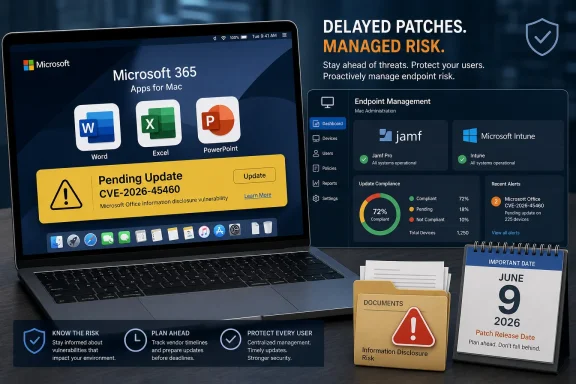 Microsoft’s Mac Office Patch Gap Is the Story Hidden in the Advisory
The language in Microsoft’s advisory is familiar enough to be easy to skim past: updates are “not immediately available,” will arrive “as soon as possible,” and customers will be notified when the CVE entry is revised. For a consumer, that may read like a temporary inconvenience. For an enterprise administrator, it is a change-control problem with a vulnerability identifier attached.CVE-2026-45460 is classified as a Microsoft Office information disclosure vulnerability. Information disclosure bugs rarely have the theatrical quality of remote code execution flaws, but they matter because they can expose data an attacker should not be able to see. In Office, that can mean documents, metadata, rendered content, embedded objects, or contextual information that helps an attacker move from curiosity to compromise.
The affected Mac products named in the advisory are not obscure leftovers. Office LTSC for Mac 2021 and 2024 sit in organizations that prefer predictable, perpetual-license software. Microsoft 365 for Mac sits in the mainstream subscription channel that many users assume is always first in line for security servicing. Seeing all three grouped under a “not immediately available” notice undermines that assumption.
The Windows side of Office security updates is often treated as the default battlefield, especially on Patch Tuesday. But modern enterprise fleets are mixed, and many Mac endpoints are not decorative exceptions. They belong to executives, developers, designers, legal staff, and other users who often handle high-value documents. A Mac-specific delay is therefore not a Mac-only footnote; it is a gap in the document-security perimeter.
“Not Immediately Available” Is a Small Phrase With Operational Consequences
Microsoft’s wording does not say the Mac updates are canceled, disputed, or optional. It says they are not ready yet. That distinction matters because it implies Microsoft has identified the vulnerable product set but cannot yet provide the fix for part of it.For security teams, that creates an awkward middle state. The vulnerability exists in the official record, the affected products are named, and the mitigation most organizations prefer — patching — is unavailable for a subset of users. This is where a simple advisory turns into a risk-management exercise.
The first challenge is inventory. Administrators need to know which Macs are running Office LTSC 2021, Office LTSC 2024, or Microsoft 365 Apps for Mac, and which users are opening externally sourced documents. The second challenge is timing. Without a released package, there is no update deadline to enforce, no compliance baseline to measure, and no clean closure point for the ticket.
The third challenge is communication. “Microsoft has disclosed a vulnerability, but the fix for your platform is not out yet” is a difficult message to send to users and executives. It sounds both alarming and inconclusive, which is precisely why many organizations under-communicate these situations until an update appears.
That instinct is understandable, but it is risky. If users believe Office is fully patched because Windows updates landed elsewhere in the organization, they may not understand why Mac Office requires different handling. Patch availability is not the same thing as vulnerability awareness, and this advisory makes that distinction painfully clear.
The Mac Channel Still Lives on a Different Security Clock
Microsoft has spent years making Office feel like a service rather than a boxed suite. Microsoft 365 in particular encourages the expectation that features and fixes flow continuously. Yet security advisories like this remind administrators that release engineering still has platform-specific seams.Office for Mac is not merely Office for Windows with a different icon set. It has its own packaging, update channels, dependencies, testing requirements, and macOS integration points. Those differences can make patch timing diverge, especially when a vulnerability touches shared Office logic but requires separate validation on macOS.
That is not an excuse so much as an explanation. Apple’s platform rules, sandboxing expectations, notarization requirements, and application bundle model create a different release environment from Windows. Microsoft has to ship updates that do not break core productivity workflows on a platform where many organizations also manage software through Jamf, Intune, Munki, Kandji, or other device-management tools.
Still, the user does not experience any of that complexity. The user sees Word, Excel, PowerPoint, Outlook, and OneNote. The attacker sees document-handling code. The administrator sees an advisory that says the fix is not yet available.
That gap between engineering reality and operational expectation is where trust gets strained. Microsoft wants customers to believe the cloud-era Office estate is centrally manageable and rapidly serviceable. But when a vulnerability advisory tells Mac customers to wait, the old platform hierarchy reappears.
Information Disclosure Bugs Deserve More Respect Than They Get
There is a tendency to rank vulnerabilities by drama. Remote code execution gets the sirens. Elevation of privilege gets serious attention. Information disclosure often gets a quieter reception, as though leaked data is only a problem after some other exploit has done the real work.That is the wrong lesson for Office. Office documents are containers of business context: contract terms, financial models, legal strategy, personnel data, customer lists, merger planning, macros, embedded links, tracked changes, comments, and metadata. A bug that discloses information from that environment can be valuable even if it does not run code.
Information disclosure can also be a stepping stone. Attackers prize anything that helps them tailor phishing, bypass security controls, understand internal naming conventions, or identify valuable accounts. The line between “information exposure” and “compromise enablement” is often thinner than vulnerability labels suggest.
For Mac-heavy organizations, the delayed update changes the defensive posture. The absence of a patch does not automatically mean active exploitation is occurring, and Microsoft’s advisory language should not be inflated beyond what it says. But it does mean the normal remediation path is blocked until Microsoft revises the CVE with available updates.
That makes compensating controls more important. Administrators should tighten document-handling guidance, reinforce protections around untrusted files, ensure Microsoft AutoUpdate is functioning, and monitor Microsoft’s security update guide for revision. None of that is as satisfying as installing a patch, but waiting passively is not a security strategy.
The LTSC Angle Makes the Delay More Painful
The inclusion of Office LTSC for Mac 2021 and 2024 is especially significant because LTSC customers tend to choose that channel for stability. They do not want rapid feature churn. They do want security fixes. That is the bargain.When LTSC security updates lag, the value proposition gets uncomfortable. Perpetual-license Office is supposed to give organizations a predictable, supported baseline. If that baseline is named in a CVE but the fix is delayed, customers are left with the least attractive combination: old-school deployment responsibility plus cloud-era advisory uncertainty.
Office LTSC 2021 is also closer to the end of its support life than Office LTSC 2024, which raises an additional planning issue. Organizations that delayed migration because the suite still worked may now face another reminder that “supported” does not always mean “equally served at the same moment.” Support windows matter, but so does the practical cadence of fixes.
Office LTSC 2024 should be a safer long-term landing zone, but its presence in the same advisory note shows that this is not merely a legacy-version issue. The newer Mac LTSC release is also waiting. That suggests the bottleneck is not simply age, but the Mac release path for this vulnerability.
Microsoft 365 for Mac adds a different wrinkle. Subscription customers often assume they are on the most responsive servicing model Microsoft offers. In many cases they are. Here, however, the advisory places Microsoft 365 for Mac alongside LTSC for Mac in the waiting room, which means subscription status alone does not eliminate platform-specific delay.
The Admin Playbook Starts Before the Patch Exists
The temptation in situations like this is to bookmark the advisory and wait for Microsoft to publish the missing builds. That may be reasonable for a home user with low exposure. It is not enough for an organization with managed Macs and sensitive documents.The immediate task is to define the affected population. That means querying endpoint-management tools for Office installation type, version, update channel, and last successful Microsoft AutoUpdate check-in. If your Mac fleet is split between Microsoft 365 Apps and LTSC licensing, do not assume one query catches both.
Next comes exposure reduction. Users who routinely process outside documents — finance, HR, legal, procurement, support, sales operations, and executive assistants — should be treated as higher priority. A vulnerability in Office matters most where untrusted Office files meet sensitive local or cloud-connected data.
Administrators should also verify that Microsoft AutoUpdate is healthy. A delayed patch today becomes a deployment failure tomorrow if the update mechanism is broken, blocked, or misconfigured. The day Microsoft revises the CVE is not the day to discover that half the fleet has not checked in for months.
Finally, security teams should prepare detection and reporting logic now. Once Microsoft publishes the update, organizations will need to prove which devices received it. That means version baselines, smart groups, compliance policies, and help-desk scripts should be staged before the release appears.
Microsoft’s Advisory Model Still Asks Customers to Do Too Much Interpretation
The Security Update Guide is useful, but it often speaks in compressed vendor language. That makes sense for scale; Microsoft publishes and revises a vast number of advisories across products. But the burden of interpretation lands heavily on customers.“Not immediately available” is technically clear but operationally incomplete. It does not tell administrators whether the delay is expected to last hours, days, or longer. It does not describe whether any temporary mitigation is recommended for Mac users. It does not say whether the risk profile differs between LTSC and Microsoft 365 for Mac.
To be fair, Microsoft may not have all of those answers ready when an advisory ships. Premature specificity can be worse than honest ambiguity. But ambiguity still has a cost, and that cost is paid by IT departments trying to brief leadership, prioritize tickets, and decide whether to restrict document workflows.
A better advisory would separate the facts more explicitly. It would state that the Mac updates are pending, identify whether Microsoft is aware of exploitation if that status is known, describe any user-action guidance short of patching, and commit to updating the CVE entry when packages are published. Some of that may already be represented in structured fields elsewhere in the advisory, but administrators should not need to decode the page like a tax form.
This is not a call for alarmism. It is a call for security communication that matches the reality of mixed-platform fleets. Mac Office is not an edge case, and delayed fixes should be framed with enough operational detail for customers to make decisions.
Windows Shops Should Still Care About a Mac Office Delay
It is easy for Windows-first administrators to see this as someone else’s problem. That is a mistake. The modern Microsoft estate is not neatly divided by operating system; it is tied together by identity, email, SharePoint, OneDrive, Teams, Defender, Purview, and Entra ID.A Mac user opening an Office document may be connected to the same tenant, the same file libraries, the same conditional access policies, and the same sensitive business data as a Windows user. If an Office vulnerability leaks information on macOS, the impact can flow through Microsoft 365 services and organizational workflows that Windows administrators also own.
There is also the executive-device problem. In many companies, Macs are overrepresented among senior leadership, engineering, design, marketing, and external-facing teams. Those users may have broad access, high-value communications, and a steady stream of documents from outside the organization.
Security programs that treat Mac endpoints as a special exception often discover too late that attackers do not share that taxonomy. The attacker cares about access and data, not whether the vulnerable client is managed by the Windows endpoint team or the Apple platform team.
For WindowsForum readers, the lesson is straightforward: Office security is no longer just a Windows patching story. If your Microsoft environment includes Macs, Office for Mac belongs in the same vulnerability-management conversation as Windows, Exchange, SharePoint, Teams, and browsers.
The Real Risk Is the Waiting Period Becoming Invisible
Delayed patches are not unusual in large software ecosystems. What makes them dangerous is not always the delay itself, but the way the delay disappears from operational view. A CVE is published, a ticket is opened, no patch is available, and then attention moves to the next fire.That is how unresolved exposure becomes background noise. The organization thinks it is tracking the issue because someone saw the advisory. But unless there is a scheduled check for revisions, a defined owner, and a post-release deployment plan, the vulnerability can linger after the fix finally appears.
Mac software updates are especially prone to this problem because many organizations have uneven visibility compared with Windows. Some Macs are fully managed and tightly monitored. Others are loosely supervised, user-administered, or handled through a separate IT workflow. Office licensing can also vary across departments and acquisition eras.
The delayed CVE update should therefore become a process test. Can the organization identify affected Macs? Can it notify the right users? Can it detect when Microsoft publishes the update? Can it deploy or enforce the patched version quickly afterward? If the answer to any of those questions is no, CVE-2026-45460 is exposing more than an Office flaw.
That is the uncomfortable but useful part of these advisories. They reveal the difference between nominal support and actual readiness. A patch that does not exist yet cannot be installed, but an organization can still prepare to move fast when it does.
The Mac Office Users Who Should Be Most Careful This Week
Until Microsoft publishes the missing updates, the highest-risk users are those who handle untrusted or externally supplied Office files. That includes attachments from unknown senders, documents downloaded from third-party portals, shared files from newly invited collaborators, and files that arrive through personal messaging channels before being pulled into work.Security teams should avoid vague warnings that train users to ignore everything. The message should be specific: be cautious with unexpected Office documents, verify senders through a separate channel when files are unusual or urgent, and avoid opening documents that ask for unnecessary interaction. If a workflow allows previewing or converting documents in a safer environment, use it.
Administrators should also look at adjacent controls. Defender for Office, Safe Attachments, endpoint protection, email filtering, cloud-app governance, and data-loss prevention policies may reduce exposure even when the Office client itself is waiting for a fix. None of these controls should be described as a replacement for the pending update, but layered defenses matter during patch gaps.
For highly sensitive teams, temporary restrictions may be justified. That could mean routing suspicious documents through a sandboxed review process, requiring browser-based Office viewing where appropriate, or tightening rules for external sharing. These are business decisions as much as technical ones, and they should be scaled to the organization’s risk.
The worst answer is to tell users nothing. Silence creates the false impression that there is no issue, and then IT has to explain the risk only after the patch ships. A short, practical advisory to affected Mac users is better than a perfect memo that arrives too late.
The CVE Revision Will Be the Starting Gun, Not the Finish Line
Microsoft says customers will be notified through a revision to the CVE information when the Mac updates become available. That revision is the moment administrators should be waiting for, but it will not solve the problem by itself. It will merely start the deployment phase.Once the update is published, the first job is to confirm the exact fixed builds and affected product mappings. Office for Mac versioning can be deceptively simple at the app level and more complicated across suites, channels, and licensing models. Administrators should avoid assuming that a single app update proves the entire suite is remediated unless Microsoft’s release notes support that conclusion.
The second job is deployment. Microsoft AutoUpdate may handle many endpoints, but managed environments often need policy enforcement, user prompts, deadline controls, or scripted validation. Macs that are asleep, off-network, traveling, or rarely rebooted can miss update windows.
The third job is evidence. Security teams will need to show that the vulnerable population was reduced to an acceptable level. That means reporting not just “update available,” but “update installed,” ideally tied to device identity, user ownership, and last check-in time.
The final job is cleanup. Any temporary restrictions or communications should be revisited after deployment. Controls added in haste have a way of becoming permanent clutter unless someone owns their removal.
The Practical Read From a One-Line Microsoft Delay
For now, the action is less glamorous than the headline. Microsoft has not yet made the Mac security updates available for the named Office products, and organizations should treat that as an active tracking item rather than a closed Patch Tuesday task. The advisory’s promise of a future revision is useful only if someone is watching for it.- The Microsoft Office LTSC for Mac 2021 update for CVE-2026-45460 is not immediately available as of June 9, 2026.
- The Microsoft Office LTSC for Mac 2024 update for CVE-2026-45460 is also not immediately available as of June 9, 2026.
- The Microsoft 365 for Mac update for CVE-2026-45460 is likewise pending and is expected to be announced through a revision to the CVE entry.
- Administrators should identify affected Mac endpoints now, especially systems used to open external Office documents.
- Security teams should prepare deployment and compliance checks before Microsoft publishes the revised advisory.
- Users should be reminded to treat unexpected Office documents cautiously until the relevant Mac updates are released and installed.
References
- Primary source: MSRC
Published: 2026-06-09T07:00:00-07:00
Security Update Guide - Microsoft Security Response Center
 msrc.microsoft.com
- Official source: learn.microsoft.com
Release notes for Office for Mac - Office release notes | Microsoft Learn
Provides IT Pros with release notes for Office for Mac releases for Microsoft 365 Apps subscriberslearn.microsoft.com - Related coverage: tomsguide.com
Macs exposed to zero-day flaw after Microsoft Office update | Tom's Guide
Patch Tuesday updates leave Office for Mac users exposedwww.tomsguide.com - Related coverage: vulnerability.circl.lu
Vulnerability-Lookup
Vulnerability-Lookup - Fast vulnerability lookup correlation from different sources.vulnerability.circl.lu - Related coverage: bleepingcomputer.com
- Related coverage: office-watch.com
Three new Office Security Patches You Should Not Ignore
Microsoft has quietly patched three vulnerabilities in Office that deserve more attention than they usually get. Two of them can be triggered just by looking atoffice-watch.com
- Related coverage: techradar.com
Worrying Microsoft Office security flaw patched - update now or risk hackers accessing your files | TechRadar
Microsoft forced to issue an emergency patchwww.techradar.com - Related coverage: cvedetails.com
- Related coverage: securityvulnerability.io
CVE-2026-33115 : Use After Free Vulnerability in Microsoft Office Word
A critical vulnerability in Microsoft Word enables unauthorized local code execution. Learn more about CVE-2026-33115 and its impact.securityvulnerability.io
