

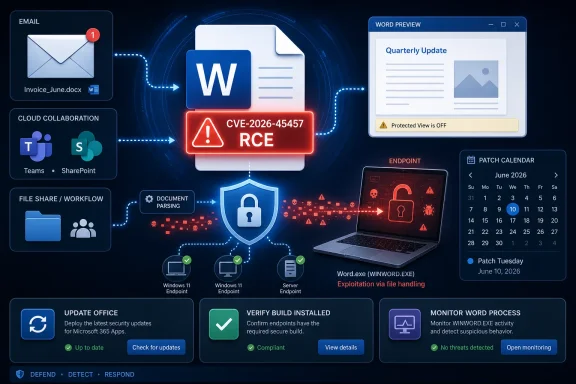
Microsoft Word Is Still One of the Most Valuable Attack Surfaces in Windows
The modern Windows security story often revolves around cloud identity, browser isolation, endpoint detection, and kernel hardening. Yet the humble Office document remains stubbornly relevant because it sits where people, process, and trust collide. A Word file can arrive by email, Teams, SharePoint, OneDrive, a help-desk ticket, a legal discovery package, or an HR onboarding workflow.
That is why a Microsoft Word remote code execution vulnerability should never be treated as “just another Office bug.” Word is not merely a productivity app; it is a parser for complex, externally supplied content. Every parser is a bargain: users get rich documents, templates, embedded objects, compatibility layers, and decades of file-format history, while defenders inherit an enormous amount of code that must safely interpret hostile input.
Remote code execution is the category that focuses administrators’ attention because it implies a route from crafted content to attacker-controlled behavior. The word “remote” can be misunderstood in Office advisories, however. It does not always mean a wormable network service listening on a port. In the Office world, it often means the attacker can be somewhere else while the victim’s machine performs the dangerous act locally by opening, previewing, or otherwise processing a file.
That distinction is not pedantry. It is the difference between a firewall problem and a workflow problem. If exploitation depends on convincing a user or automated system to handle a document, the blast radius lives in mail filtering, attachment policy, protected view behavior, endpoint patch level, and user privilege—not merely in perimeter exposure.
The Confidence Metric Is the Quiet Part of the Advisory
The text attached to CVE-2026-45457 describes a metric that measures confidence in the existence of the vulnerability and the credibility of known technical details. That may sound like scoring bureaucracy, but it is one of the more useful clues in vulnerability management. It tells defenders how much daylight exists between “someone says there is a flaw” and “the vendor, researchers, and technical record agree on what is broken.”
In practice, confidence shapes urgency in two directions. A vulnerability acknowledged by the affected vendor is more likely to be real, actionable, and worth prioritizing. At the same time, a vulnerability with sparse public detail may be harder for attackers to weaponize immediately, although that advantage can evaporate once patches ship and researchers begin comparing changed binaries.
That is the uncomfortable bargain of Patch Tuesday. Microsoft’s update gives defenders a fix, but it also tells attackers where to look. Even when Microsoft withholds root-cause detail, patch diffing can reveal the contours of the bug to anyone with the time, tooling, and incentive to reverse-engineer the update.
For Word vulnerabilities, the gap between advisory and exploit can be especially narrow if the flaw sits in a file parser or document conversion path. Attackers do not need to understand every branch of Word’s codebase. They need one reliable malformed structure that turns a document from inert content into an execution path.
“Remote Code Execution” Does Not Mean “No User Required”
Security headlines often compress too much into three letters: RCE. The phrase carries weight because it suggests the attacker can cause code to run outside the intended boundary. But for desktop applications, the user interaction field is often where the practical risk is decided.
A Word RCE may require a victim to open a malicious file. It may be reachable through preview behavior. It may involve embedded content, legacy compatibility components, or interactions with Office’s protected modes. Without full public technical detail, defenders should avoid pretending to know the precise chain—but they should also avoid minimizing the class.
The lesson from years of Office exploitation is that “requires user interaction” is not a comfort blanket. Enterprises are designed around users interacting with documents all day. Finance opens invoices. Legal opens contracts. HR opens résumés. Executives open board materials. Support staff open attachments from strangers because that is literally the job.
This is why Office vulnerabilities are so useful in phishing operations. The attacker does not need to defeat a hardened public-facing server if a crafted document can ride into the organization inside a plausible business process. The exploit path is social as much as technical, and that makes it harder to stamp out with a single control.
Word’s Legacy Is Both Its Strength and Its Liability
Microsoft Word’s file compatibility is a marvel of engineering and a permanent security tax. The application has to handle new cloud-era formats while preserving support for older documents, templates, embedded objects, rendering behaviors, and enterprise workflows built over decades. Every compatibility promise increases the amount of input Word must parse correctly.
This is not unique to Microsoft. Any dominant document platform becomes a museum of edge cases. The difference is scale. Word is deployed across consumer PCs, small businesses, regulated enterprises, government agencies, schools, and managed virtual desktops. A bug that would be niche in a smaller product becomes strategically important because Word is everywhere.
Microsoft has spent years adding mitigations around this reality. Protected View, file-block settings, macro restrictions, attack surface reduction rules, Office cloud policy, Defender integration, and safer defaults have all made drive-by document exploitation harder than it once was. But mitigations are not magic; they are layers. A new vulnerability asks whether those layers are properly configured, current, and actually present on the systems that matter.
The old security model assumed that dangerous documents announced themselves with obvious macro warnings. The modern model has to assume that the danger may be in parsing itself. That is a more difficult message for users because there may be no “enable content” button to avoid and no visible sign that a file is hostile.
The Real Risk Lives in the Patch Gap
For most WindowsForum readers, the immediate question is not whether CVE-2026-45457 will become the next famous exploit. It is whether their machines and tenants will close the patch gap before attackers learn enough to make the bug operational. That gap is where routine vulnerabilities become incidents.
Consumer Microsoft 365 installations usually receive Office updates with little drama, but “usually” hides a lot of local variance. Apps may be left open for days. Update channels differ. Some users disable automatic updates while troubleshooting. Some systems run older perpetual Office builds. Some machines are offline, domain-joined, frozen in golden images, or managed by tools that lag behind Microsoft’s release cadence.
Enterprises face a different version of the same problem. They test updates because broken Office behavior can halt real work. They stage rollouts because change management exists for a reason. They maintain exceptions because business units run add-ins, templates, document automation, or line-of-business integrations that are fragile. Attackers understand this. The first week after disclosure is not the only dangerous period; the second and third weeks often reveal which organizations could not move quickly.
This is where administrators should resist the temptation to treat Office patches as secondary to Windows cumulative updates. Word is a front door for untrusted content. If the vulnerability is fixed in a Microsoft 365 Apps update, a Click-to-Run servicing channel, or a standalone Office security update, that update deserves the same operational discipline as an OS fix.
Preview Panes and Content Pipelines Deserve More Suspicion
One of the recurring lessons from Office security advisories is that opening a file is not always the only risky event. Preview panes, indexing, conversion services, document management systems, and automated malware detonation environments can all process content before a human decides whether to trust it. That is why administrators should think beyond the desktop icon.
Outlook preview behavior has long occupied a gray zone in user training. Many users believe they are safe if they do not double-click an attachment. That may be true for many threats, but it is not a principle to build policy around. If a vulnerability can be triggered by preview or parsing, then “I didn’t open it” becomes a less useful defense.
The same logic applies to back-end document workflows. A file uploaded to a portal may be scanned, indexed, converted to PDF, thumbnailed, or passed through data-loss-prevention tooling. Those systems need patching and isolation too. A Word vulnerability is not only about Word on a user’s laptop; it can be about any component that invokes Office libraries or document rendering paths.
Security teams should use CVE-2026-45457 as an excuse to revisit assumptions about where Word documents are processed. The answer is often broader than expected. The more invisible the processing, the easier it is to forget during emergency patch planning.
Attackers Prefer Boring Reliability Over Novelty
There is a tendency in security coverage to reserve alarm for zero-days, nation-state campaigns, and vulnerabilities with public proof-of-concept code. That instinct is understandable but incomplete. Attackers often prefer boring, recently patched vulnerabilities because they are cheaper to operationalize and more likely to work against lagging environments.
Office bugs fit that model neatly. A crafted document can be delivered through commodity phishing infrastructure. The lure can be customized cheaply. The payload can be swapped. The exploit can be held back for higher-value targets while lower-sophistication crews rely on older Office flaws against unpatched systems.
The economics matter. Once Microsoft publishes an advisory and a fix, defenders begin racing against an attacker market that is very good at turning patch information into exploit hypotheses. Not every CVE becomes a weapon. But enough do that the sane default is to patch first and debate fame later.
That is especially true for vulnerabilities in widely deployed client software. A server-side flaw may require scanning for exposed targets. A Word flaw can be sprayed into inboxes, narrowed toward specific departments, or embedded in a business compromise campaign. The distribution channel already exists.
Home Users Should Not Need to Become Vulnerability Analysts
For individual Windows users, the right response is refreshingly unglamorous: update Office, restart the apps, and be cautious with unexpected documents. The problem is that Microsoft’s product ecosystem can make “update Office” mean different things depending on how Office was installed. Microsoft 365 Apps, Office LTSC, older perpetual versions, Store-delivered components, and managed enterprise builds do not always present the same user experience.
The average user should not be expected to parse CVSS vectors or exploitability metrics. If Word is installed, it should be on a supported version and configured to update automatically. If the installed Office version no longer receives security updates, the risk is not theoretical. Unsupported productivity software is a long-lived foothold for document-borne attacks.
Windows enthusiasts often focus on the OS build number, but Office build numbers deserve similar attention. A fully patched Windows 11 machine with stale Office components is not fully patched in any practical sense. The operating system can provide guardrails, but Word still has to safely handle the document placed in front of it.
The best consumer advice remains simple: let Microsoft 365 update, close and reopen Office apps when prompted, avoid opening unexpected attachments, and treat document requests that create urgency as suspicious. That will not stop every exploit chain, but it removes the easy wins attackers count on.
Administrators Need Evidence, Not Hope
Enterprise IT cannot manage CVE-2026-45457 with vibes. The necessary question is not “Did we approve the update?” but “Which machines have the fixed Office build installed and active?” Those are different questions, and the second one is the one that matters.
Inventory should include Microsoft 365 Apps update channels, Office LTSC or perpetual installations, virtual desktop images, remote app hosts, shared workstations, and systems used by high-risk departments. Security teams should also check whether Office applications have been restarted after updates were staged. A patch that is downloaded but not loaded into the running application is an accounting entry, not protection.
Defenders should also revisit attack surface reduction rules and Office hardening policies. Blocking Office child processes, restricting executable content from email and webmail, disabling risky legacy behaviors, and enforcing Protected View for internet-origin files are not substitutes for patching. They are the seatbelts that matter when patching is incomplete.
The challenge is political as much as technical. Business units often resist Office hardening because it breaks old workflows. CVE-2026-45457 gives security teams a timely argument: if a workflow requires weakening document protections, then the business is accepting a document-borne execution risk, not merely asking for convenience.
Microsoft’s Sparse Advisories Force Defenders to Read Between the Lines
Microsoft’s Security Update Guide is designed for operational clarity, not narrative richness. It tells administrators what is affected, how severe Microsoft believes the issue is, what updates exist, and what broad exploitation conditions apply. It rarely gives the kind of root-cause detail researchers want on day one.
That restraint is defensible. Publishing exploit-friendly technical detail before the ecosystem has patched would be reckless. But the tradeoff is that defenders must make prioritization decisions with incomplete information. The confidence metric becomes part of that decision, as does the product category, attack vector, user interaction requirement, exploitability assessment, and whether Microsoft reports public disclosure or active exploitation.
For Word vulnerabilities, ambiguity should not lead to paralysis. The affected product is common. The content type is easily delivered. The user workflows are hard to lock down. Even if exploitation is not known to be active, the practical exposure is broad enough to justify quick movement.
This is the part of vulnerability management that never fits neatly in a dashboard. A medium-detail advisory for a ubiquitous document parser may deserve more attention than a technically scarier bug in a narrowly deployed component. Context beats raw score.
The Patch Is Only the First Control
Once updates are moving, organizations should treat CVE-2026-45457 as a prompt to inspect the document attack chain end to end. Mail gateways should be filtering suspicious attachments and detonating documents in isolated environments. Endpoint protection should be watching Office process behavior, especially child process creation, script interpreter launches, and unusual network activity following document handling.
Identity controls matter too. Many document-borne attacks are not trying to detonate ransomware immediately. They aim to steal tokens, establish persistence, harvest credentials, or land a loader that can be used later. Least privilege, strong authentication, conditional access, and rapid containment can turn a successful exploit from a domain-wide incident into a workstation rebuild.
Backups and recovery planning remain relevant because Office exploitation is often an initial access story. If a malicious document leads to payload execution, the next stages may involve lateral movement or extortion. The Word CVE is the door; the incident response plan determines how far an intruder can walk once inside.
The boring controls are boring because they work. Patch, restrict, monitor, segment, and rehearse. There is no clever replacement for doing the fundamentals before a phishing campaign tests them.
The June Advisory Should Change Patch-Tuesday Muscle Memory
Patch Tuesday has become routine, and routine is both useful and dangerous. It creates predictable maintenance windows, but it can also dull attention. A Word RCE should interrupt that complacency because it sits close to the everyday behavior of users.
Administrators should not wait for exploit chatter to decide that document-handling bugs matter. By the time a working exploit is circulating, the organizations still debating rollout windows are already behind. A better model is to classify Office RCEs as high-operational-priority by default, then downgrade only when there is a strong reason.
This does not mean reckless deployment into fragile environments. It means faster validation, clearer exception tracking, and compensating controls for systems that cannot be updated immediately. If a department needs two weeks to test a Word update, it should also accept stricter attachment handling during those two weeks.
The most mature shops will use this advisory to measure their own latency. How long from Microsoft publication to update availability? How long to pilot? How long to broad deployment? How many endpoints miss the first wave? Those numbers are more valuable than any abstract severity debate.
The Practical Reading of CVE-2026-45457 Is Narrow but Urgent
CVE-2026-45457 does not need mythmaking. Based on Microsoft’s naming and placement in the Security Update Guide, it is a Microsoft Word remote code execution vulnerability that belongs in the Office patch queue immediately. The available public framing emphasizes confidence in the vulnerability and the credibility of known technical details, which is exactly the kind of signal defenders should fold into prioritization.
The right response is not panic. Panic produces theater: blocking all documents, flooding users with vague warnings, or treating every CVE as an existential crisis. The right response is disciplined urgency: identify affected Office installations, deploy the relevant updates, confirm installation, and tighten document-handling controls while the patch reaches the edges.
For WindowsForum’s audience, the important distinction is between curiosity and action. Researchers can wait for root-cause detail. Attackers can hunt for a diff. Administrators do not need either to know that a Word RCE deserves attention.
This Word Bug Rewards the Teams That Already Know Their Office Estate
The concrete lessons from CVE-2026-45457 are less about one advisory than about the state of Office security hygiene across Windows environments. The organizations that fare best will be the ones that already know where Word is installed, how it updates, and which business processes expose it to untrusted files.
- Microsoft has identified CVE-2026-45457 as a Microsoft Word remote code execution vulnerability, which makes Office patch status a first-order security concern rather than an afterthought.
- The confidence framing matters because vendor acknowledgement and credible technical detail increase the case for prompt remediation, even when root-cause details remain limited.
- Remote code execution in Word should be understood through document workflows, including email attachments, previews, shared drives, portals, and automated processing systems.
- User interaction requirements do not make Office vulnerabilities harmless, because modern businesses require users to interact with untrusted documents constantly.
- Administrators should verify fixed Office builds on endpoints and shared systems instead of assuming that update approval equals update completion.
- Organizations that cannot patch immediately should harden Office behavior, restrict risky attachment paths, and monitor Word process activity more aggressively until updates land.
CVE-2026-45457 is a reminder that Windows security is not only about the kernel, the browser, or the cloud control plane; it is also about the document someone opens between meetings because the workday demands it. Microsoft can ship the fix, but the real defense depends on how quickly Windows shops close the patch gap, how honestly they map their document workflows, and how much friction they are willing to add before the next crafted file arrives.