

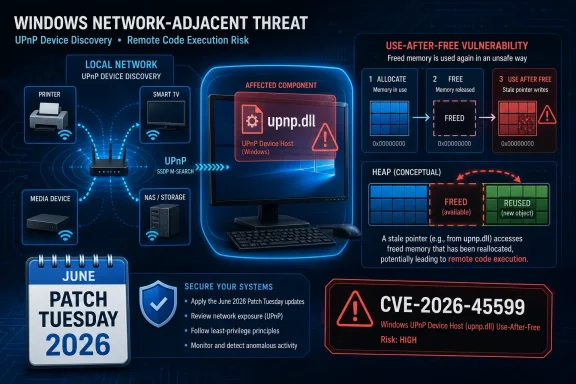
upnp.dll, with an 8.1 CVSS score and patches released through the June Patch Tuesday security updates. The bug is not the loudest item in Microsoft’s enormous June security drop, but it sits in exactly the kind of Windows component administrators have learned to treat with suspicion: network-adjacent, legacy-friendly, and easy to forget until it matters. The immediate lesson is simple enough—patch Windows—but the larger lesson is about how much risk still lives in the “it just works” machinery of local device discovery.
UPnP Is Still the Kind of Convenience Windows Pays For Later
Universal Plug and Play has always been a bargain with the network. It lets devices discover each other, advertise capabilities, and make local services feel less like infrastructure and more like household electricity. Printers appear. Media devices announce themselves. Routers, consoles, smart TVs, and Windows PCs negotiate their presence with minimal ceremony.
That convenience is precisely why UPnP has spent years making security teams uncomfortable. A protocol family designed around trust, broadcast discovery, and low-friction interoperability does not age gracefully in networks filled with unmanaged endpoints, cheap IoT gear, guest Wi-Fi, and flat office segments. CVE-2026-45599 is a Windows vulnerability, not a generic indictment of the whole UPnP ecosystem, but the architectural backdrop matters.
Microsoft’s description points to a use-after-free condition in Universal Plug and Play. In plain English, that class of bug means software continues using memory after it has already been released, creating an opening for corruption, crashes, or, in the worst cases, attacker-controlled execution. The “remote code execution” label is the part that makes administrators stop scrolling.
The important caveat is that this is not being presented as a wormable internet apocalypse. Microsoft rates it high rather than critical, and the available public information does not describe active exploitation. But high-severity Windows RCE bugs in network-facing or network-reachable components are exactly the sort of issue that should move quickly through enterprise patch queues, especially when the affected code is tied to automatic discovery rather than a business application with a visible owner.
The June Patch Tuesday Flood Makes This Bug Easy to Miss
June 2026 Patch Tuesday was a volume event. Microsoft addressed roughly 200 vulnerabilities, including dozens of remote code execution issues and several publicly disclosed zero-days. In a release that large, attention naturally flows toward the spectacular: critical DHCP, Kerberos, Hyper-V, Office, Remote Desktop, and HTTP.sys items crowd the dashboard.
That is the danger for CVE-2026-45599. It is “only” important in Microsoft’s severity language, but it is an RCE in a Windows networking component. In a month with too many red boxes, some organizations will triage by headline severity alone and leave high-scoring important vulnerabilities for later maintenance windows.
That strategy can be rational when a bug requires local access, user interaction, or a rare configuration. It is less comfortable when the affected service speaks the language of local network discovery. The CVSS 8.1 score says Microsoft and the scoring model see meaningful exploitation constraints, but not enough to make this a routine hardening footnote.
The presence of a sibling UPnP Device Host RCE, CVE-2026-45635, in the same update cycle also matters. Two related issues in the same component do not automatically imply an exploit chain or a shared root cause, but they do suggest the UPnP code path received serious scrutiny. For defenders, that usually means the safest assumption is that researchers and attackers will now be staring at the patch diff too.
“Remote” Does Not Always Mean “Across the Internet”
The phrase remote code execution has been flattened by years of panic marketing. In Windows advisories, “remote” can mean many things: a crafted file opened from a share, an unauthenticated packet over the network, a malicious server responding to a client, or a local subnet attack that never crosses a firewall. The exploitability details matter as much as the category.
For CVE-2026-45599, the component name points administrators toward local network exposure rather than browser-era drive-by compromise. UPnP is typically a local discovery technology. That does not make the bug harmless; it means the attacker model likely begins with proximity to the same network segment, a compromised internal host, or a foothold on a device that can speak to Windows machines where UPnP-related services are reachable.
That distinction is important for home users too. A typical home network is full of unmanaged devices that rarely receive firmware updates. If a compromised camera, router, NAS box, or streaming device can interact with Windows discovery services, the comforting boundary between “inside” and “outside” becomes thinner than most people imagine.
For enterprises, the risk is more operational than cinematic. Flat VLANs, permissive workstation-to-workstation traffic, and legacy discovery exceptions can turn a theoretically constrained vulnerability into a practical lateral-movement opportunity. The vulnerability may not be internet-exposed, but a modern attacker usually wants to move inside the network after the first compromise anyway.
Report Confidence Is Not a Decorative Metric
The text attached to Microsoft’s advisory explains a metric that security teams often read too quickly: confidence in the existence of the vulnerability and in the public technical details. This is not the same as severity, exploitability, or business risk. It is a measure of how solid the public record is.
For CVE-2026-45599, Microsoft’s own acknowledgement is the key signal. When a vendor patches and publishes a CVE, defenders no longer need to debate whether the bug exists. The uncertainty shifts from “is this real?” to “how hard is it to exploit, and how fast will attackers learn enough?”
That second question is where confidence becomes a double-edged instrument. A confirmed vulnerability gives defenders a reliable basis for action, but it also gives attackers a target for reverse engineering. Once patches ship, the vulnerable and fixed binaries can be compared. Even sparse advisories can become useful when paired with diffing, crash analysis, and knowledge of the affected component.
This is why “few public details” should not be confused with “low urgency.” Sometimes secrecy buys defenders time. Sometimes it only means the first public exploit will arrive from someone who did the homework quietly. The right response is not panic; it is disciplined patching, exposure reduction, and monitoring for weird network behavior around the affected service.
The Old Windows Services Problem Has Not Gone Away
Windows has spent the last decade becoming more locked down, more cloud-managed, and more aggressively serviced. Yet a modern Windows installation still carries a long tail of services built to make local networks friendlier. Device discovery, file sharing, name resolution, media streaming, printer discovery, remote assistance, and compatibility plumbing all create attack surface.
UPnP Device Host belongs to that world. Its job is not glamorous. It is infrastructure glue. That makes it exactly the kind of component that can sit enabled for years because nothing appears broken, nobody owns it, and removing it might inconvenience a user with a printer or media device.
Security hardening often fails at this layer because organizations focus on marquee controls while leaving convenience protocols untouched. Endpoint detection gets renewed. Conditional access gets tuned. Phishing simulations get scheduled. Meanwhile, internal network segmentation remains aspirational, workstation-to-workstation traffic remains permissive, and discovery protocols continue operating because they are nobody’s quarterly objective.
CVE-2026-45599 should be read as another reminder that the mundane parts of Windows deserve the same asset-management discipline as the obvious crown jewels. The service nobody talks about can still be the one that turns an ordinary compromised endpoint into a broader incident.
Home Users Should Patch, but They Should Also Look at the Network Around the PC
For home users, the practical answer is straightforward: install the June 2026 Windows security updates. If Windows Update is working normally, this should arrive through the standard cumulative update path. The average user does not need to reverse engineer UPnP or make registry changes based on a single CVE.
But home networks have changed. The Windows PC is no longer surrounded only by a printer and a router. It may share a subnet with doorbells, baby monitors, smart plugs, TVs, NAS appliances, game consoles, tablets, and devices from vendors whose update policy is more optimistic than real.
That matters because local-network bugs are only as contained as the local network is trustworthy. A compromised IoT device is still an internal device. A guest phone on Wi-Fi is still on a network path unless isolation is enabled. A router with UPnP enabled for internet gateway functions may be making its own questionable choices in parallel.
The realistic advice is boring but useful: patch Windows, update router firmware, retire abandoned IoT devices, and use guest networks for hardware that does not need to talk to PCs. Security is often less about one heroic setting than about reducing the number of strange machines that can whisper to each other.
Enterprise IT Should Treat UPnP as an Exposure Question, Not Just a Patch Question
In managed environments, the first task is still patch deployment. Windows 10, Windows 11, and supported Windows Server builds touched by the June updates need to move through rings with the usual urgency for high-severity RCE. The absence of known exploitation should influence sequencing, not become an excuse for drift.
The second task is determining whether UPnP-related services are needed at all. Many enterprise desktops do not require consumer-style device discovery. Some environments disable UPnP Device Host and related discovery features through baseline hardening, while others leave defaults in place because the risk never rose high enough to justify user complaints.
That conversation should happen explicitly. If a business unit depends on discovery for conference-room devices, lab equipment, imaging workflows, or legacy peripherals, document it and segment it. If no one can name a reason the service is needed, that is evidence too.
Network controls are equally important. Blocking unnecessary lateral traffic between workstations limits the blast radius of vulnerabilities that require local-network reachability. Endpoint firewalls, VLAN design, NAC policies, and zero-trust segmentation can turn a scary network bug into a much less useful attacker primitive.
Patch Diffing Will Decide How Quiet This Stays
The public advisory gives defenders enough to act, but not enough to deeply model exploitation. That gap will not last. Once Microsoft ships binaries, researchers can compare old and new versions of upnp.dll and related code paths to infer what changed.
This is standard practice now. Patch Tuesday is not just a defensive release; it is also a research starting gun. Security vendors, exploit developers, and criminal groups all have access to the same patches. The difference is speed, skill, and intent.
Use-after-free vulnerabilities are especially attractive because they sit in a familiar exploitation category. Modern Windows mitigations make exploitation harder than it was in the Windows XP era, but “harder” is not the same as “impossible.” Attackers do not need universal reliability if they can aim at a specific fleet configuration, build number, or service state.
That is why administrators should avoid waiting for proof-of-concept code before acting. By the time a clean exploit appears in public, the quiet period has already ended. The most valuable patch window is often the one before the exploit is fully explained.
Microsoft’s Severity Language Still Requires Human Judgment
Microsoft’s “Important” rating can lull people into false proportionality. In many organizations, “Critical” means emergency change board and “Important” means next cycle. That policy is administratively tidy, but it is not always technically wise.
Severity ratings compress too much into one word. They account for impact, exploitability assumptions, and sometimes product context, but they do not know your network. They do not know whether your desktops sit on flat subnets, whether your call-center PCs share space with unmanaged devices, or whether your hospital imaging equipment requires discovery protocols nobody has audited since 2018.
A high CVSS score attached to a Windows RCE in a network-discovery component should trigger local analysis. That does not mean every shop must declare an incident-level emergency. It means the patch should not disappear behind flashier June vulnerabilities simply because the Microsoft label is not “Critical.”
The better model is risk-based triage with environmental modifiers. If UPnP is disabled and workstation isolation is strong, the risk falls. If UPnP is broadly enabled across a flat network with unmanaged devices, the risk rises. The same CVE can mean different operational urgency in different places.
The Windows Discovery Layer Deserves a Fresh Baseline
One useful outcome from CVE-2026-45599 would be a broader review of Windows discovery services. Not a panic-driven disablement spree, but a sober inventory of what is enabled, why it is enabled, and which networks are allowed to use it. Discovery protocols often survive because they are convenient at setup time and invisible afterward.
Security baselines have improved, but the lived reality of Windows administration is messy. Printers, scanners, lab devices, signage systems, conference-room hardware, and line-of-business oddities all produce exceptions. Those exceptions become permanent unless someone forces a review.
The best organizations will use this advisory as a test of their hygiene. Can they identify systems where UPnP Device Host is running? Can they distinguish laptops from servers? Can they see whether endpoint firewall policy blocks unsolicited local traffic? Can they patch quickly without breaking business workflows?
Those questions matter more than the CVE’s publicity cycle. A single vulnerability comes and goes. The unmanaged discovery layer remains.
The June UPnP Bug Is a Small Window Into a Bigger Windows Risk
CVE-2026-45599 is not the only serious vulnerability in Microsoft’s June 2026 security release, and it may not become the one attackers care about most. Its value is that it exposes a familiar defensive blind spot: legacy-friendly Windows networking features that remain enabled because they make environments easier to use and harder to reason about.
- Microsoft patched CVE-2026-45599 on June 9, 2026, as part of the June Patch Tuesday release.
- The vulnerability affects Windows Universal Plug and Play code in
upnp.dlland is described as a use-after-free remote code execution flaw. - The CVSS score of 8.1 and Microsoft’s “Important” severity rating place it below the loudest critical bugs, but still high enough to merit prompt action.
- The most realistic concern is local-network or post-compromise reachability rather than a proven internet-scale worm scenario.
- Administrators should patch supported Windows systems, verify whether UPnP Device Host is needed, and reduce unnecessary workstation-to-workstation exposure.
- The lack of public exploit detail should be treated as temporary, because patch diffing can turn sparse advisories into usable attacker knowledge.
The Windows security story in 2026 is not that Microsoft keeps finding bugs; it is that the operating system’s broad compatibility promise keeps producing places for bugs to matter. CVE-2026-45599 may end up as a quiet Patch Tuesday entry rather than a famous exploit name, but the defensive lesson is durable: patch the flaw, then ask why so much local discovery traffic was trusted in the first place.