

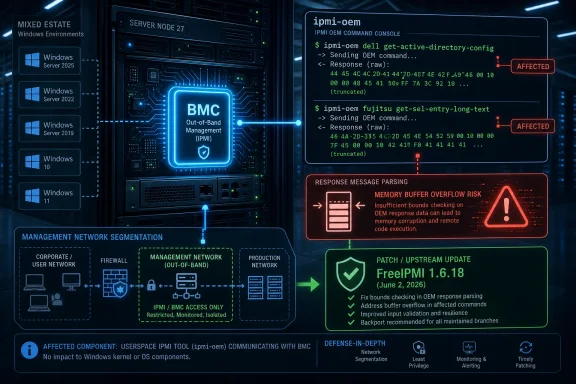
ipmi-oem command’s handling of certain Dell and Fujitsu OEM response messages. The bug is not a Windows vulnerability in the traditional Patch Tuesday sense, but it belongs on WindowsForum because it lives in the hardware-management layer many mixed Windows and Linux estates quietly depend on. Its real lesson is that the server management plane is still too often treated as plumbing until it becomes the outage.
The affected subcommands are narrow: ipmi-oem dell get-active-directory-config and ipmi-oem fujitsu get-sel-entry-long-text. But narrow does not mean trivial. In infrastructure security, “rarely used” is often another way of saying “rarely tested, poorly monitored, and executed with assumptions nobody has revisited since the rack was installed.”
The Vulnerability Sits in the Tooling, Not the Server OS
FreeIPMI is a suite of tools for talking to IPMI-capable systems, usually from Linux or Unix-like environments. Administrators use it for the unglamorous work that keeps servers manageable: reading sensors, checking chassis state, querying management controllers, and remotely cycling power when a machine has stopped responding to everything else.
CVE-2026-50031 concerns ipmi-oem, the FreeIPMI client for vendor-specific IPMI commands. That distinction matters. IPMI itself is the long-lived management interface, while OEM extensions are the vendor-defined commands that let Dell, Fujitsu, and others expose extra knobs and data beyond the base specification.
The flaw is described as exploitable buffer overflows in response-message handling. In plain English, the client asks a management controller for data, receives a response, and mishandles that response in a way that can overflow memory. The vulnerable code path is not a daemon listening on every Windows desktop; it is an administrative client used in the course of managing hardware.
That is exactly why the bug may be underestimated. Security teams have become better at inventorying web servers, VPN appliances, endpoint agents, and cloud control planes. The tools that sysadmins run from jump boxes, automation hosts, monitoring nodes, and rescue environments still occupy a fuzzier part of the map.
IPMI Remains the Network Behind the Network
IPMI is one of those technologies that never really leaves the data center. It sits below the operating system, tied to the baseboard management controller, and provides out-of-band access when the host OS is down, wedged, reinstalling, or otherwise unreachable. If you have ever power-cycled a hung server without walking to the rack, you have benefited from this class of management technology.
That convenience comes with a familiar bargain. Anything that can restart a server, read low-level health data, or interact with management-controller firmware is sensitive even when the specific bug is “only” a denial-of-service issue. The management plane is not just another network segment; it is the machinery that decides whether the rest of the network can be recovered.
The affected FreeIPMI commands illustrate the awkwardness of this layer. One command retrieves Dell Active Directory configuration information. Another retrieves long text associated with Fujitsu system event log entries. Neither sounds like an obvious blockbuster exploit path, yet both require trusting a remote management endpoint to return well-formed data.
That trust boundary is the story. The management controller is not merely a passive sensor; it is a remote peer supplying input to administrative software. If that input can be malformed, spoofed, corrupted, or generated by a compromised controller, the client’s parser becomes part of the attack surface.
The Severity Debate Is Less Interesting Than the Failure Mode
Different vulnerability databases and vendors may surface different severity labels for CVE-2026-50031, with public descriptions emphasizing availability impact. That is not unusual for open-source package advisories moving through multiple ecosystems. The practical reading is simpler: before FreeIPMI 1.6.18, certain ipmi-oem response paths could be abused to crash or otherwise disrupt the tool.
For many environments, that will not be a fleet-wide emergency. The vulnerable commands are specific, and exploitation appears tied to response handling rather than a universally exposed service. If no one uses those OEM commands, the immediate risk is lower.
But availability bugs in administrative tooling have a habit of appearing at the worst possible time. You do not usually run obscure OEM queries during a calm Tuesday afternoon because everything is healthy. You run them when a server is misbehaving, a vendor escalation asks for logs, a monitoring workflow scrapes hardware state, or an automation script is gathering evidence after an incident.
A denial-of-service vulnerability in such a tool can therefore have an asymmetric operational impact. The exploit might not bring down the server being managed, but it can blind or disrupt the person or process trying to understand that server. In a large estate, crashing a management workflow repeatedly can be enough to slow triage, delay recovery, or break automated health checks.
The Microsoft Angle Is About Supply Chain Visibility
The source material here comes through Microsoft’s Security Update Guide, which can surprise readers because FreeIPMI is not a Microsoft product in the way Windows, Edge, Exchange, or Defender are. That surprise is useful. Modern vulnerability management no longer maps cleanly to vendor logos.
Windows shops routinely depend on Linux appliances, management containers, backup servers, monitoring collectors, storage controllers, and firmware tooling. A Windows Server cluster may be managed from a Linux jump host. A Hyper-V or Azure Stack-adjacent environment may still rely on BMC access for bare-metal recovery. A mostly Microsoft estate can still have FreeIPMI in the operational chain.
Microsoft surfacing a CVE like this does not transform it into a Windows kernel flaw. It does, however, reflect the broader reality of enterprise exposure: defenders care about the components that affect their infrastructure, not just the components shipped on the desktop image.
That matters for forum readers because it is easy to draw the wrong boundary. If your vulnerability process begins and ends with Windows Update compliance, this one will pass by unnoticed. If your process includes Linux package inventory, management hosts, vendor tooling, and the scripts used by infrastructure teams, it becomes an ordinary patch-and-verify item.
The OEM Command Surface Is Where Old Assumptions Go to Die
Vendor-specific IPMI commands exist because base specifications rarely capture every feature hardware makers want to expose. That is understandable. It is also where parsing code can become brittle, because each vendor extension adds its own message format, edge cases, response lengths, and historical quirks.
The two affected subcommands are telling. Dell Active Directory configuration and Fujitsu long SEL text both involve structured or variable-length information. Variable-length response data is exactly the kind of thing that punishes lazy bounds checking and optimistic buffer assumptions.
This is not a moral failing unique to FreeIPMI. It is a recurring pattern across management stacks: parsers for proprietary or semi-proprietary responses spend years in relatively low-traffic corners of the codebase, then become security-relevant when someone audits them, fuzzes them, or hits them with unexpected device behavior.
The bigger issue is that administrators tend to regard hardware-management data as boring and therefore safe. Sensor readings, directory settings, and event-log strings do not feel like attacker-controlled input. But once software crosses a network boundary and consumes a response, that response must be treated like any other untrusted data.
Why Windows Administrators Should Still Care
A Windows administrator might reasonably ask why a FreeIPMI client bug deserves attention alongside Windows Update, Defender platform versions, and Group Policy headaches. The answer is that server operations are rarely pure Windows or pure Linux anymore. They are layered.
Consider the ordinary enterprise pattern. Windows workloads run on physical servers. Those servers have BMCs. The BMCs sit on a management network. A Linux-based monitoring server polls hardware status. A vendor script or open-source tool pulls event logs. An automation account can power-cycle hosts or collect diagnostics. None of that is “Windows” in a narrow sense, but all of it affects whether Windows services stay available.
That is especially true in smaller IT departments where one admin workstation or one shared management VM accumulates tools over the years. FreeIPMI may have been installed to troubleshoot a single vendor issue, then left in place. Scripts may call it indirectly. Documentation may mention it only in an old runbook.
Security programs often fail at these seams. They patch the domain controllers and forget the management appliance. They harden the Windows servers and leave the out-of-band network flat. They track endpoint software versions but not the command-line utilities used by the infrastructure team.
Exploitability Depends on Control of the Conversation
The advisory language says the buffer overflows are on response messages, which places attention on who can influence those responses. The most obvious case is a malicious or compromised BMC answering an ipmi-oem request. Another possibility is a network-positioned attacker able to interfere with management traffic, depending on configuration and transport security.
That distinction should keep the panic level grounded. This is not the same as a wormable unauthenticated flaw in a ubiquitous Windows service. The attacker needs a plausible path to deliver malicious response data to the vulnerable client code. In many environments, that path may require prior access to the management network or compromise of a device that is already deeply trusted.
But that is not a reason to dismiss it. IPMI networks are frequently treated as trusted islands, and trusted islands have a long record of becoming attacker highways after the first foothold. Once an adversary reaches the management plane, the consequences are rarely confined to one host.
There is also a subtler risk: incident responders and administrators may point diagnostic tools at exactly the systems an attacker has already tampered with. If a compromised management controller can crash the tool used to interrogate it, the attacker gains a small but valuable defensive advantage. It may not be remote code execution, but it is friction at the moment defenders can least afford it.
The Patch Is Straightforward; the Inventory Is Not
The upstream fix is FreeIPMI 1.6.18. For source-built deployments, that answer is clean. For enterprise distributions, the answer is more complicated because package names, backports, and vendor advisories do not always line up neatly with upstream version numbers.
This is where admins need to avoid the common version-number trap. A distribution may ship an older-looking FreeIPMI version with a security patch backported. Conversely, a scanner may flag a package because the upstream description says “before 1.6.18,” while the vendor has not yet published a fixed build for that channel. The right answer is to check the distribution’s advisory state, not merely compare strings.
The operational task starts with finding where FreeIPMI is installed. That may include monitoring hosts, HPC clusters, bare-metal provisioning servers, lab systems, recovery environments, and admin jump boxes. It may also include containers or scripts that bundle tooling in less visible ways.
Then comes the harder question: who actually uses ipmi-oem, and for which vendors? If the affected Dell and Fujitsu subcommands are never used, the urgency changes. If they are part of monitoring or inventory jobs, patching becomes more pressing because the vulnerable path is exercised automatically.
Management Networks Need More Than Patch Notes
CVE-2026-50031 is a useful reminder that patching tools is necessary but insufficient. IPMI and BMC access should be isolated, authenticated, monitored, and treated as high-value infrastructure. If a compromised or malicious management endpoint can feed dangerous input to admin clients, reducing who can talk to that endpoint matters.
Segmentation is the boring control that keeps paying rent. Management interfaces should not be reachable from general user networks, ordinary server VLANs, or convenience VPN pools. Access should flow through hardened jump hosts with logging, limited credentials, and a clear operational purpose.
Credential hygiene matters as much as topology. IPMI deployments have historically suffered from default credentials, shared accounts, stale vendor passwords, and overbroad access. A bug in a client parser is easier to exploit when attackers can authenticate to the management interface or impersonate a device on a permissive network.
Logging is the third leg. If ipmi-oem commands are rarely used, their execution should be visible. A sudden burst of OEM queries against management controllers is not normal background noise in most organizations. Even when the tool is legitimate, its use can be a strong signal during troubleshooting or intrusion analysis.
Open Source Gets the Blame, But Hardware Culture Shares It
It would be easy to frame this as another open-source memory safety bug, and technically that is part of the story. C and C++ parsing code has produced decades of buffer overflows, and administrative utilities are not magically exempt. Bounds checks are not glamorous, but they are security engineering.
Yet the deeper problem is the culture around hardware-management interfaces. IPMI was built for control and availability first, and its security reputation has long been complicated. Vendors extended it. Operators exposed it. Tooling grew around it. Then the industry spent years rediscovering that anything with power over the hardware must be treated as a privileged attack surface.
FreeIPMI is valuable precisely because it gives administrators an open, scriptable way to manage this world. The answer is not to abandon such tools in favor of opaque vendor binaries. The answer is to patch them, test them, isolate their networks, and stop pretending the management plane is outside the security program.
There is an uncomfortable irony here. The same tooling that improves operational resilience can become a weak point if its inputs are trusted too casually. That does not make the tooling bad. It makes the environment real.
The Scanner Result Will Be Noisier Than the Risk
Many organizations will first encounter CVE-2026-50031 as a scanner finding. Some will see a high or medium label and escalate immediately. Others will suppress it because FreeIPMI is “just a command-line tool.” Both reactions can be wrong.
The right triage path is contextual. Is FreeIPMI installed? Is the installed package patched by the distribution? Is ipmi-oem used at all? Are the affected Dell or Fujitsu subcommands used? Can untrusted or compromised management endpoints respond to those commands? Is the management network segmented from attacker-accessible networks?
Those questions turn a generic CVE into an operational decision. A lab system with FreeIPMI installed but no access to relevant hardware is a different risk from a production monitoring host polling a fleet of servers. A locked-down jump box on an isolated management network is different from an old admin VM reachable by too many users.
Security teams should also watch for package naming confusion. Advisories and scanners may associate the vulnerability with FreeIPMI subpackages, daemons, or distribution-specific package names. The vulnerable functionality is in ipmi-oem; the remediation may arrive through a broader FreeIPMI package update.
The WindowsForum Angle Is the Mixed Estate Nobody Admits To
WindowsForum readers know this pattern better than most. A supposedly Windows-only environment has a Linux-based backup appliance. A VMware or Hyper-V cluster has out-of-band cards managed through vendor tools. A storage array has its own firmware management stack. A monitoring server runs a decade’s worth of scripts written by people who have since moved on.
CVE-2026-50031 lives in that mixed estate. It is not headline-grabbing in the way a Windows remote code execution flaw is, but it touches the operational layer that decides whether admins can see, diagnose, and recover systems. That is why it deserves attention out of proportion to its narrow command surface.
For Windows administrators, the practical move is not to become FreeIPMI experts overnight. It is to ask whether the organization’s asset inventory includes the non-Windows tools used to manage Windows-dependent hardware. If the answer is no, this CVE is less a fire alarm than a flashlight.
The same logic applies to MSPs and consultants. Client environments often contain inherited management networks with unclear ownership. A FreeIPMI finding may be the first visible clue that a broader hardware-management review is overdue.
The Real Fix Is Knowing Who Talks to the BMC
The immediate remediation is simple enough: update FreeIPMI through the appropriate vendor or distribution channel, or move to 1.6.18 or later where that is how the environment consumes upstream releases. The better remediation is to understand and constrain the path between administrative clients and management controllers.
That means treating BMC-facing tooling as privileged software. It should be patched with the same seriousness as backup software, hypervisor management tools, and remote-access clients. It should run from known hosts, under known accounts, and with logs that survive the individual admin session.
It also means reviewing old automation. If a script calls ipmi-oem for Dell or Fujitsu hardware, the script should be tested after patching. If the script runs from cron, a monitoring agent, or a configuration-management job, the vulnerable code path may be more active than anyone remembered.
Finally, it means resisting the false comfort of “internal only.” The management network is internal until it is not. Once an attacker lands on a host with routing, credentials, or packet position, every internal trust assumption becomes an exploit precondition waiting to be satisfied.
The Few Decisions That Matter This Week
CVE-2026-50031 is not a reason to halt the data center, but it is a good reason to audit the quiet tooling around it. The affected code path is specific, the fix is available upstream, and the broader security lesson is familiar: low-level management utilities deserve first-class inventory and patch discipline.
- Organizations running FreeIPMI before 1.6.18 should check their distribution advisories or upstream packages for the security fix.
- Teams should determine whether
ipmi-oem dell get-active-directory-configoripmi-oem fujitsu get-sel-entry-long-textappears in scripts, monitoring jobs, runbooks, or manual support procedures. - Windows-centric shops should include Linux-based management hosts, jump boxes, monitoring servers, and provisioning environments in their vulnerability scope.
- Management-controller networks should be isolated from ordinary user and server traffic, with access limited to hardened administrative systems.
- Scanner findings should be triaged against actual command usage and vendor package status rather than dismissed because FreeIPMI is “not a Windows component.”
- Incident-response teams should remember that tools used to query compromised or suspicious hardware can themselves become part of the attack surface.
CVE-2026-50031 will probably not be the vulnerability that defines 2026, and that is exactly why it is useful. The industry does not usually fail because one obscure OEM command crashes; it fails because dozens of such assumptions accumulate below the dashboard until the management plane becomes the soft underbelly of an otherwise well-patched estate. The next sensible step is not drama, but discipline: patch the tool, map the management path, and stop treating the hardware control layer as someone else’s problem.