

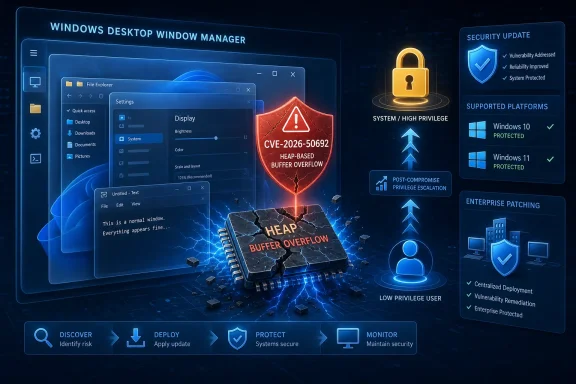
Detailed in Microsoft’s Security Update Guide and subsequently published in the National Vulnerability Database, the vulnerability is a heap-based buffer overflow in Desktop Window Manager, commonly known as DWM. An attacker must already be authenticated and able to run code locally, but successful exploitation could provide substantially greater control over the affected machine without requiring user interaction.
Microsoft has not reported active exploitation or public disclosure of CVE-2026-50692. That distinction matters: this is not one of the zero-days driving the July Patch Tuesday headlines, but it remains a valuable post-compromise vulnerability for attackers who have obtained an initial foothold through phishing, stolen credentials, a malicious application, or another security flaw.
A Local Bug With System-Wide Consequences
Desktop Window Manager is the Windows component responsible for composing the graphical desktop. It manages the visual output of application windows, desktop effects, thumbnails, transparency, and other elements that users encounter throughout an interactive Windows session.
Microsoft describes CVE-2026-50692 as a heap-based buffer overflow. This class of memory-safety error occurs when a program writes beyond the bounds of an allocated region in heap memory, potentially corrupting adjacent data. Depending on the surrounding code and available mitigations, that corruption may cause a crash or be shaped into a path for executing attacker-controlled operations.
The CVSS vector indicates that exploitation is local, requires low privileges, has low attack complexity, and needs no action from another user. Microsoft also assigns high potential impact to confidentiality, integrity, and availability, with a changed security scope. In practical terms, the attacker begins from a restricted account or process but may be able to cross a security boundary and operate with privileges that the original context did not possess.
That makes the vulnerability more relevant to enterprise defense than the phrase “local attack” sometimes suggests. Local privilege escalation is commonly the second step of an intrusion rather than the first: malware lands with ordinary user rights, exploits a Windows component, and then attempts to disable security controls, access other users’ data, steal credentials, establish persistence, or move laterally.
CISA’s initial SSVC assessment records no known exploitation and says the vulnerability is not readily automatable, while assigning it a total potential technical impact. This supports a measured response rather than emergency isolation, but it does not support leaving the update for an indefinite maintenance cycle.
The Fix Reaches Across Windows Generations
Microsoft’s affected-product data covers Windows releases spanning multiple servicing generations. Both full installations and Server Core installations are included where applicable, showing that exposure does not depend on running a conventional graphical server desktop.
Affected products include:
- Windows 10 versions 1607, 1809, 21H2, and 22H2 are affected on the architectures listed by Microsoft.
- Windows 11 versions 24H2, 25H2, and 26H1 are affected on x64 and Arm64 systems.
- Windows Server 2016, Windows Server 2019, Windows Server 2022, and Windows Server 2025 are affected.
- Server Core installations of Windows Server 2016, 2019, and 2025 are also included in Microsoft’s published product data.
The fixed build thresholds provide a direct way to check whether a machine has moved beyond the vulnerable range. Windows 11 24H2 systems should be on build 26100.8875 or later, while Windows 11 25H2 systems should reach build 26200.8875 or later. Windows 11 26H1 is fixed at build 28000.2269 or later.
For Windows 10, the relevant fixed builds are 14393.9339 for version 1607, 17763.9020 for version 1809, 19044.7548 for version 21H2, and 19045.7548 for version 22H2. Some of these branches remain in use under enterprise or specialized servicing arrangements even where the corresponding consumer edition has reached the end of general support.
The server thresholds are build 14393.9339 for Windows Server 2016, 17763.9020 for Windows Server 2019, 20348.5386 for Windows Server 2022, and 26100.33158 for Windows Server 2025. Administrators should verify the installed OS build rather than assuming that a successful-looking update scan means every endpoint has received the July cumulative update.
The build can be checked by running winver, using Get-ComputerInfo in PowerShell, or querying fleet inventory through Microsoft Intune, Configuration Manager, Windows Update for Business reporting, or an endpoint-management platform. Vulnerability scanners may need time to ingest Microsoft’s newly published applicability data, so the installed build remains the most immediate confirmation.
Confidence Is High, Exploit Detail Is Still Limited
The existence of CVE-2026-50692 is not speculative. Microsoft is the assigning authority, has identified the affected component and weakness category, has published product ranges, and has delivered corrected builds. The National Vulnerability Database also records Microsoft as the source and classifies the weakness as CWE-122, Heap-based Buffer Overflow.
What remains limited is the public technical detail needed to reproduce the bug. Microsoft’s advisory does not provide the vulnerable function, triggering input, proof-of-concept code, or a step-by-step exploitation path. No public exploit is identified in the initial records, and there is no indication that attackers were using the flaw before the July 14 release.
That places the vulnerability at a relatively clear point on the confidence spectrum: confirmed vulnerability, credible impact, incomplete exploitation details. Defenders can act with confidence because affected versions and fixed builds are known, while would-be attackers have less public guidance than they would for a vulnerability accompanied by a researcher write-up or proof of concept.
The window may not stay that way. Once cumulative updates are available, researchers and attackers can compare patched and unpatched DWM binaries to identify the changed code. Memory-corruption vulnerabilities can require substantial exploit-development work, but patch analysis removes some of the uncertainty about where to look.
Patch Priority Depends on Who Can Run Code
CVE-2026-50692 does not appear to justify treating every vulnerable device as already compromised. It does justify keeping the July cumulative updates inside the normal expedited security-update cycle, particularly on multi-user systems, developer workstations, virtual desktop infrastructure, administrative jump boxes, and servers where lower-privileged accounts can execute software.
Organizations should first deploy the appropriate July 2026 cumulative update to a representative validation group, monitor application and graphics-related behavior, and then expand deployment according to their established rings. Systems that cannot be updated promptly should be subject to tighter application control, reduced interactive logon access, endpoint detection monitoring, and scrutiny of unexpected child processes or privilege changes.
There is no published configuration switch that removes the vulnerable DWM code while preserving normal Windows operation. Disabling visual effects or avoiding particular desktop features should not be treated as a substitute for installing the security update, especially because Microsoft has not disclosed the precise trigger.
For home and small-business users, the practical response is simpler: install the July 2026 Windows security update, restart the machine, and confirm that the build number meets or exceeds Microsoft’s fixed threshold. For enterprise IT, CVE-2026-50692 is a reminder that the most consequential stage of an intrusion may occur after the attacker is already inside—making timely remediation of local privilege-escalation bugs an essential part of limiting the damage from that first foothold.
References
- CVE-2026-50692 Desktop Window Manager Elevation of Privilege Vulnerability MSRC · 2026-07-14T07:00:00-07:00