

AV:L because exploitation occurs through Excel on the victim’s machine rather than through a network-facing Excel service.
Published by the Microsoft Security Response Center on July 14, 2026, the flaw carries a CVSS base score of 7.8. Microsoft describes the underlying defect as a use-after-free memory-safety issue in Microsoft Office Excel, while the National Vulnerability Database records the vector as CVSS:3.1/AV:L/AC:L/PR:N/UI:R/S:U/C:H/I:H/A:H.
The apparent conflict between “remote code execution” and “local attack vector” is therefore one of terminology, not contradictory vulnerability data. Remote describes where the attacker can be located and the resulting ability to execute code on another person’s computer; AV:L describes how the vulnerable component must be reached during exploitation.
The File Can Arrive Remotely Even When the Exploit Runs Locally
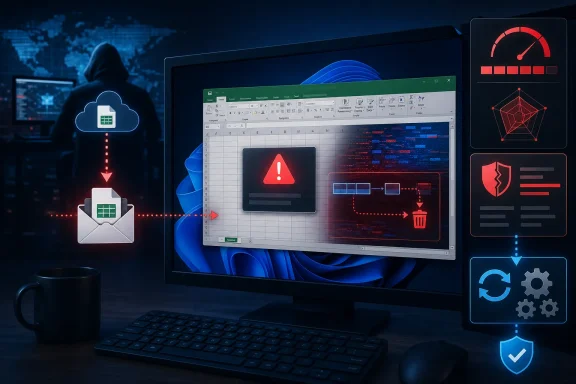
A plausible attack begins away from the target system. An attacker could reportedly prepare malicious Excel content and distribute it through email, a collaboration platform, a compromised website, cloud storage, or another file-delivery channel.
That delivery step does not make the CVSS attack vector “network.” Excel is not being compromised because an unauthenticated attacker sent a specially crafted protocol request directly to a listening service. Instead, the file must reach the computer and be opened or otherwise processed in the local Excel application.
Microsoft’s advisory explains that an attacker or victim must execute code from the local machine to exploit the vulnerability. In practical terms, the victim’s action causes Excel to encounter the malicious data and trigger the use-after-free condition.
This distinction becomes clearer when compared with a conventional network vulnerability. If a vulnerable service listened on TCP or UDP and could be exploited directly across the internet, AV:N would normally be appropriate. CVE-2026-54131 instead depends on a local application consuming attacker-controlled content, so Microsoft assigned AV:L.
The attacker does not necessarily require physical access, an interactive login, or an existing foothold on the Windows PC. The PR:N component indicates that no prior privileges are required, while UI:R records the need for user interaction.
That combination is common in malicious-document attacks:
- The attacker does not need an account on the target computer.
- The attacker can deliver the document from another location.
- The victim must take an action that causes Excel to process the content.
- Successful exploitation can execute code in the victim’s local security context.
Calling this arbitrary code execution, or ACE, can be less confusing because it emphasizes the technical result without implying that the vulnerable component is remotely reachable over the network. Microsoft nevertheless uses “remote code execution” as its impact classification for many client-side document vulnerabilities that can be initiated by a remote adversary.
A Use-After-Free Bug Raises the Stakes Beyond an Excel Crash
Microsoft identifies CVE-2026-54131 as CWE-416, or use after free. This class of vulnerability occurs when software continues using memory after that memory has been released, potentially allowing attacker-controlled data to influence an invalid object or pointer.
A failed exploitation attempt may simply crash Excel. A successful one could redirect execution into attacker-selected code, producing the high confidentiality, integrity, and availability impact values in Microsoft’s CVSS assessment.
The complete vector is significant:
CVSS:3.1/AV:L/AC:L/PR:N/UI:R/S:U/C:H/I:H/A:H
AC:L means Microsoft does not identify specialized, difficult-to-create conditions outside the attacker’s control. PR:N means the attacker needs no existing privileges, and UI:R confirms that a separate user must participate in the attack.
The three high impact ratings indicate that successful exploitation could expose data, modify files or system state, and disrupt affected resources. S:U, or scope unchanged, means the compromised component and affected resources remain within the same security authority rather than crossing a formal privilege boundary recognized by CVSS.
That does not mean exploitation automatically grants SYSTEM or administrator privileges. Code launched through a client-side Office vulnerability will ordinarily be constrained by the permissions of the account running Excel unless the attacker combines it with another vulnerability or abuses permissions already available to that user.
This is why running Office under a standard user account remains useful defense in depth. It does not prevent Excel exploitation, but it can limit what the resulting process can modify without another elevation step.
Microsoft’s Affected-Product List Extends Beyond Windows Desktops
The CVE record identifies current Microsoft 365 and perpetual-license Office releases among the affected products. Microsoft’s submitted data covers Microsoft 365 Apps for enterprise, Office 2019, Office LTSC 2021, and Office LTSC 2024 on 32-bit and x64 Windows systems.
Mac editions are also represented. The affected records include Microsoft 365 for Mac, Office LTSC for Mac 2021, and Office LTSC for Mac 2024, with version 16.111.26071215 serving as the fixed-version threshold in the published CVE data.
Office Online Server is affected below version 16.0.10417.20175. Administrators operating that product should not assume that ordinary Microsoft 365 desktop update controls cover the server deployment.
Microsoft’s July 2026 Office security release provides the corresponding update channel for supported products. Organizations should use the Security Update Guide and their normal Microsoft 365 Apps, Office LTSC, Mac, or Office Online Server servicing process to determine the exact package required for each installation.
The distinction matters because Office estates are often mixed. An organization may have Click-to-Run Microsoft 365 Apps on user PCs, Office LTSC on isolated workstations, Office for Mac on executive devices, and Office Online Server supporting browser-based document workflows. A single Windows Update compliance figure may not prove that every affected Excel deployment has been remediated.
Patch Deployment Matters More Than the “Remote” Label
For defenders, the practical conclusion is straightforward: AV:L should not be interpreted as “safe from remote attackers.” A phishing operator can remain in another country while still exploiting a locally triggered Excel vulnerability through a document sent to the victim.
Email filtering, Microsoft Defender protections, Protected View, Mark of the Web handling, application control, and restrictions on untrusted Office content can reduce exposure. None should be treated as a permanent substitute for installing Microsoft’s July 14 updates, particularly because files can arrive through trusted collaboration accounts, internal shares, or previously compromised systems.
Administrators should inventory affected Microsoft 365 Apps, Office 2019, Office LTSC 2021, Office LTSC 2024, Mac, and Office Online Server installations; verify that updates completed successfully; and investigate machines that continue reporting older builds. Users should avoid opening unexpected spreadsheets, even when the message appears to come from a known contact.
CVE-2026-54131 is “remote code execution” because a remote adversary can ultimately cause code to run on the victim’s computer. It is AV:L because the decisive exploitation step occurs when local Excel code processes the malicious content. Remote attacker and local attack vector can both be accurate at the same time.