

CVE-2026-55058 is a high-severity Microsoft Excel vulnerability that can let an attacker run code after a user opens a malicious file, despite its CVSS attack vector being marked as local. Microsoft published the flaw on July 14, 2026, with a CVSS 3.1 score of 7.8 and included fixes in July’s Office security updates.
The apparent contradiction comes from two security terms describing different parts of the attack. Remote code execution describes where the attacker can originate, while AV:L describes where exploitation is completed. An attacker can deliver a weaponized workbook from another system, but Excel must process that file on the victim’s local device.
As Microsoft explains in its Security Update Guide, “remote” in the vulnerability title refers to the attacker’s location. The exploit itself runs locally when the victim or another local process opens the crafted content, making arbitrary code execution an equally useful description of the eventual impact.
CVE-2026-55058 is an out-of-bounds read vulnerability in Microsoft Excel, classified as CWE-125. Microsoft’s CVE record says an unauthorized attacker can exploit the flaw to execute code locally, potentially gaining the ability to access data, modify files, install software, or perform other actions permitted by the affected Excel process.
The CVSS vector is:
Each component helps define the likely attack chain:
That is different from a network-vector vulnerability marked
Client-side applications such as Excel, Word, browsers, media players, and document readers routinely receive RCE classifications when remotely supplied content can cause code execution. The attacker may be hundreds of miles away, but the vulnerable parser and malicious input meet on the victim’s machine.
The
Microsoft’s wording also avoids implying that an attacker must already have interactive access to the computer.
This distinction matters when administrators prioritize alerts. Email filtering, attachment sandboxing, Protected View, endpoint detection, and restrictions on content from untrusted sources can all reduce exposure, but they do not replace the security update. A crafted file that passes those layers, arrives through an approved collaboration channel, or is copied from removable media can still reach Excel.
For Excel 2016, versions earlier than
Microsoft 365 Apps normally receives fixes through Click-to-Run servicing, while Office 2016 and other MSI-based installations can require separately managed security updates. Enterprises using Configuration Manager, Microsoft Intune, servicing profiles, WSUS-linked Office deployment arrangements, or third-party patch systems should check both installation state and application build after deployment.
Mac administrators should confirm that Microsoft 365 for Mac and supported Office LTSC for Mac installations have reached version
Office Online Server deserves separate attention because it is often managed on a different cadence from desktop Office. Administrators should inventory server installations and follow Microsoft’s supported update procedure rather than assuming that workstation patch policies cover the server product.
The practical defenses are familiar but consequential. Organizations should deploy Microsoft’s July 14 Office fixes, verify the resulting versions, and investigate systems that remain on unsupported or unmanaged Office installations. Mail gateways and collaboration services should continue treating unexpected spreadsheets as potentially executable content rather than harmless business records.
Users should be particularly cautious with workbooks delivered as invoices, payroll documents, financial reports, shipping notices, or urgent account reconciliations. Protected View and Mark of the Web provide useful friction, but security teams should not depend on a warning prompt surviving every delivery route or on every employee recognizing a convincing lure.
There is no inconsistency between the RCE title and the local CVSS vector. The attacker can operate remotely, the malicious file can arrive remotely, and the resulting code execution can give the attacker control—yet Excel still triggers the vulnerability locally. For administrators, that terminology should not dilute the response: update every affected Excel and Office installation, then confirm that the patched builds are actually running.
The apparent contradiction comes from two security terms describing different parts of the attack. Remote code execution describes where the attacker can originate, while AV:L describes where exploitation is completed. An attacker can deliver a weaponized workbook from another system, but Excel must process that file on the victim’s local device.
As Microsoft explains in its Security Update Guide, “remote” in the vulnerability title refers to the attacker’s location. The exploit itself runs locally when the victim or another local process opens the crafted content, making arbitrary code execution an equally useful description of the eventual impact.
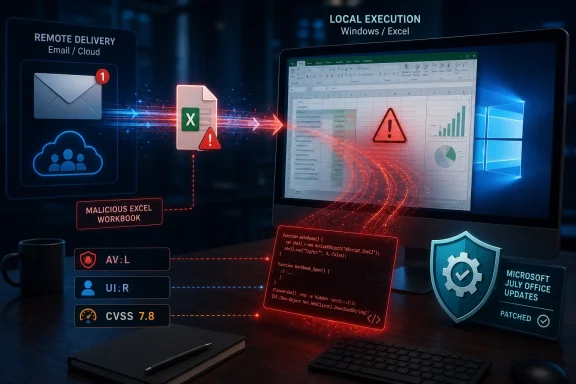 A Malicious Workbook Bridges Remote Delivery and Local Execution
CVE-2026-55058 is an out-of-bounds read vulnerability in Microsoft Excel, classified as CWE-125. Microsoft’s CVE record says an unauthorized attacker can exploit the flaw to execute code locally, potentially gaining the ability to access data, modify files, install software, or perform other actions permitted by the affected Excel process.The CVSS vector is:
CVSS:3.1/AV:L/AC:L/PR:N/UI:R/S:U/C:H/I:H/A:HEach component helps define the likely attack chain:
- The attacker needs a file or other malicious content to reach the target system because the attack vector is local.
- Exploitation has low complexity and does not depend on unusual conditions once the vulnerable content is processed.
- The attacker does not need an existing account or privileges on the target.
- User interaction is required, typically involving the opening of malicious Excel content.
- Successful exploitation can have a high impact on confidentiality, integrity, and availability.
That is different from a network-vector vulnerability marked
AV:N. A network flaw can generally be reached through a network-accessible service or protocol without first arranging for exploit code to execute or malicious content to be processed locally. CVE-2026-55058 does not receive that classification merely because the dangerous workbook can be downloaded from the internet.“Remote” Does Not Mean “No User Interaction”
Remote code execution is frequently treated as shorthand for the most dangerous server vulnerabilities: an attacker sends network traffic to an exposed service and immediately gains code execution. That is only one form of RCE.Client-side applications such as Excel, Word, browsers, media players, and document readers routinely receive RCE classifications when remotely supplied content can cause code execution. The attacker may be hundreds of miles away, but the vulnerable parser and malicious input meet on the victim’s machine.
The
UI:R portion of CVE-2026-55058’s score is therefore important. Microsoft is not describing an unauthenticated, interaction-free route into every computer running Excel. A victim must perform an action, or the file must otherwise be processed in a context capable of reaching the vulnerable Excel code.Microsoft’s wording also avoids implying that an attacker must already have interactive access to the computer.
AV:L does not automatically mean that a criminal needs to sit at the keyboard, sign in through Remote Desktop, or have malware installed beforehand. It means the vulnerable operation occurs through a local execution path rather than directly across an exposed network interface.This distinction matters when administrators prioritize alerts. Email filtering, attachment sandboxing, Protected View, endpoint detection, and restrictions on content from untrusted sources can all reduce exposure, but they do not replace the security update. A crafted file that passes those layers, arrives through an approved collaboration channel, or is copied from removable media can still reach Excel.
Microsoft’s July Fix Covers Perpetual and Subscription Office
The CVE record lists a broad range of affected Microsoft Office products. These include Microsoft 365 Apps for enterprise, Excel 2016, Office 2019, Office LTSC 2021, Office LTSC 2024, Office for Mac editions, and Office Online Server.For Excel 2016, versions earlier than
16.0.5561.1001 are listed as affected. Office Online Server installations earlier than 16.0.10417.20175 are also included in the published CVE data. Microsoft 365 and newer perpetual Office releases use their respective servicing channels, so administrators should verify update compliance through Microsoft’s Office security-release information rather than relying only on a single universal build number.Microsoft 365 Apps normally receives fixes through Click-to-Run servicing, while Office 2016 and other MSI-based installations can require separately managed security updates. Enterprises using Configuration Manager, Microsoft Intune, servicing profiles, WSUS-linked Office deployment arrangements, or third-party patch systems should check both installation state and application build after deployment.
Mac administrators should confirm that Microsoft 365 for Mac and supported Office LTSC for Mac installations have reached version
16.111.26071215 or later. Merely confirming that macOS itself is current does not establish that Office has received Microsoft’s application-level fix.Office Online Server deserves separate attention because it is often managed on a different cadence from desktop Office. Administrators should inventory server installations and follow Microsoft’s supported update procedure rather than assuming that workstation patch policies cover the server product.
File-Based Attacks Still Depend on Trust
CVE-2026-55058 reinforces why document vulnerabilities remain useful to attackers even when they require a click. Spreadsheets are routinely exchanged among finance teams, suppliers, customers, auditors, and executives, giving malicious Excel files a credible route into tightly controlled environments.The practical defenses are familiar but consequential. Organizations should deploy Microsoft’s July 14 Office fixes, verify the resulting versions, and investigate systems that remain on unsupported or unmanaged Office installations. Mail gateways and collaboration services should continue treating unexpected spreadsheets as potentially executable content rather than harmless business records.
Users should be particularly cautious with workbooks delivered as invoices, payroll documents, financial reports, shipping notices, or urgent account reconciliations. Protected View and Mark of the Web provide useful friction, but security teams should not depend on a warning prompt surviving every delivery route or on every employee recognizing a convincing lure.
There is no inconsistency between the RCE title and the local CVSS vector. The attacker can operate remotely, the malicious file can arrive remotely, and the resulting code execution can give the attacker control—yet Excel still triggers the vulnerability locally. For administrators, that terminology should not dilute the response: update every affected Excel and Office installation, then confirm that the patched builds are actually running.
References
- Primary source: MSRC
Published: 2026-07-14T07:00:00-07:00
Security Update Guide - Microsoft Security Response Center
 msrc.microsoft.com
- Official source: support.microsoft.com
Description of the security update for Excel 2016: August 12, 2025 (KB5002758) | Microsoft Support
Description of the security update for Excel 2016: August 12, 2025 (KB5002758)support.microsoft.com - Related coverage: techradar.com
An ancient Microsoft Excel security flaw could let hackers hijack your entire system, so patch now | TechRadar
CISA is warning about ongoing exploitation of a 2008 bugwww.techradar.com
