

CVE-2026-55137 is an Important-rated Microsoft Excel remote code execution vulnerability with a CVSS 3.1 score of 7.8, even though its attack vector is classified as local. That apparent contradiction comes from two security terms measuring different things: remote code execution describes where the attacker may originate, while CVSS’s Local attack vector describes where the vulnerable processing and final exploitation occur.
Detailed in Microsoft’s July 14, 2026 security advisory, the flaw is a heap-based buffer overflow tracked as CWE-122. A successful attack could let an unauthorized attacker run arbitrary code with the privileges of the user who opens or processes a malicious Excel file.
The practical distinction is important. CVE-2026-55137 is not a network-service vulnerability that an attacker can trigger by sending packets directly to an exposed Windows computer. It instead requires a user or another local process to make Excel handle attacker-controlled content.
Microsoft’s title uses “remote” in the broader vulnerability-impact sense. The attacker can be somewhere else, create a malicious workbook, and deliver it through email, a download, cloud storage, a collaboration platform, or another file-sharing channel. The attacker does not necessarily need an existing account or interactive session on the victim’s computer.
CVSS’s Attack Vector metric asks a narrower technical question: how close must the attacker or malicious input be to the vulnerable component when exploitation takes place? For CVE-2026-55137, Microsoft assigned
The complete CVSS 3.1 vector is
The
A typical attack chain could therefore look like this:
That terminology avoids implying that Excel is listening for unauthenticated commands over the internet. In this case, “remote code execution” should not be read as “zero-click exploitation over the network.” It means an attacker who is not physically or interactively present on the computer can still arrange for malicious code to execute there.
Once exploitation succeeds, the resulting code normally runs in the security context of the affected application and user. A user operating without administrative rights may constrain the immediate damage, while a user with elevated privileges could expose more of the system. Even without administrator access, arbitrary code execution can be sufficient to steal documents, modify user-accessible data, establish persistence, or deploy additional malware.
The heap-based buffer overflow classification also explains the high impact ratings. Improper bounds handling can allow specially crafted data to overwrite memory used by Excel, potentially redirecting program execution. Microsoft has not published exploit code or the low-level workbook structures involved, which is standard practice for a newly patched Office vulnerability.
The National Vulnerability Database reproduces Microsoft’s description of the issue as a heap-based buffer overflow that allows an unauthorized attacker to execute code locally. At the time of publication, NVD had not completed its independent enrichment of the record and displayed Microsoft’s CNA score rather than a separate NIST assessment.
Microsoft’s original assessment did not indicate that CVE-2026-55137 was publicly disclosed or being actively exploited. The Zero Day Initiative’s July 2026 security update review likewise listed the vulnerability as Important, with neither public disclosure nor observed exploitation reported at release.
That status should not be interpreted as evidence that the flaw is harmless or unlikely ever to be weaponized. Office files remain convenient delivery vehicles because they fit into routine business workflows, and patches can give researchers and attackers enough information to begin comparing vulnerable and corrected builds.
Mac installations are also represented, including Microsoft 365 for Mac and Office LTSC for Mac 2021 and 2024. Microsoft identifies version 16.111.26071215 as the relevant corrected boundary for the affected Mac branches.
Office Online Server is affected as well, with Microsoft’s CVE data identifying versions earlier than 16.0.10417.20175 as vulnerable. That entry deserves separate attention from administrators because Office Online Server follows a different servicing and deployment process from desktop Microsoft 365 Apps.
For MSI-based Excel 2016 installations, Microsoft’s July Office update catalog lists KB5002886 as the July 14 security update. The corrected Excel 2016 version boundary recorded for CVE-2026-55137 is 16.0.5561.1001.
Microsoft 365 Apps and Click-to-Run Office releases should receive fixes through their configured update channels. Administrators should verify the installed build rather than assuming that Windows Update alone has brought every Office installation current, particularly where update channels, deployment rings, or management policies defer Office servicing.
Until updates are fully deployed, standard Office-file controls remain useful layers of defense. Email filtering, attachment detonation, Mark of the Web enforcement, Protected View, endpoint detection, and restricting unnecessary administrative rights can reduce exposure or limit the consequences of exploitation. None should be treated as a permanent substitute for the corrected Excel build.
Security teams should also avoid translating
The useful takeaway is precise: CVE-2026-55137 is not a remotely reachable Excel service flaw, but it can still give a remote attacker code execution after a victim opens crafted content. Enterprises now need to confirm that Excel 2016 has reached at least 16.0.5561.1001, Mac Office has reached 16.111.26071215, Office Online Server has reached 16.0.10417.20175, and managed Microsoft 365 Apps have received the July 2026 security release.
Detailed in Microsoft’s July 14, 2026 security advisory, the flaw is a heap-based buffer overflow tracked as CWE-122. A successful attack could let an unauthorized attacker run arbitrary code with the privileges of the user who opens or processes a malicious Excel file.
The practical distinction is important. CVE-2026-55137 is not a network-service vulnerability that an attacker can trigger by sending packets directly to an exposed Windows computer. It instead requires a user or another local process to make Excel handle attacker-controlled content.
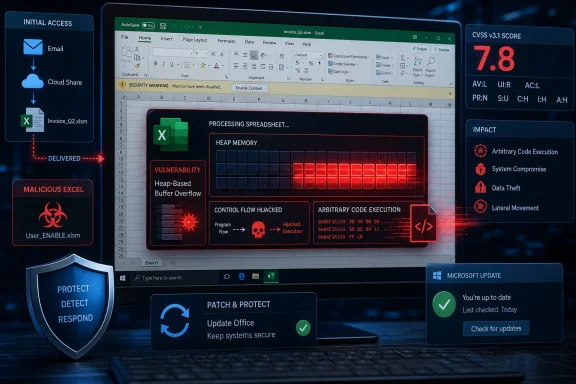 Remote Delivery Does Not Make the Attack Vector Network-Based
Microsoft’s title uses “remote” in the broader vulnerability-impact sense. The attacker can be somewhere else, create a malicious workbook, and deliver it through email, a download, cloud storage, a collaboration platform, or another file-sharing channel. The attacker does not necessarily need an existing account or interactive session on the victim’s computer.CVSS’s Attack Vector metric asks a narrower technical question: how close must the attacker or malicious input be to the vulnerable component when exploitation takes place? For CVE-2026-55137, Microsoft assigned
AV:L because Excel must process the content on the affected system. The vulnerability is not directly exposed through a remotely reachable Excel network service.The complete CVSS 3.1 vector is
AV:L/AC:L/PR:N/UI:R/S:U/C:H/I:H/A:H. That translates into a local attack vector, low attack complexity, no privileges required, required user interaction, an unchanged security scope, and potentially high impact to confidentiality, integrity, and availability.The
UI:R component is particularly significant. It indicates that exploitation depends on a user taking an action, such as opening a malicious workbook. Merely being connected to the same network as an attacker is not enough under Microsoft’s published assessment.A typical attack chain could therefore look like this:
- An attacker prepares an Excel file designed to trigger the heap-based buffer overflow.
- The file is delivered from a remote location through phishing, a shared folder, cloud storage, or another distribution mechanism.
- A user opens the file in an affected Excel version.
- Excel processes the malformed content locally, triggering memory corruption and allowing attacker-controlled code to run.
“Arbitrary Code Execution” Is the Clearer Mental Model
Microsoft explicitly notes that “remote” in the vulnerability title refers to the attacker’s location. The company also says this category is sometimes described as arbitrary code execution, or ACE, because the decisive security impact is the attacker’s ability to execute chosen code.That terminology avoids implying that Excel is listening for unauthenticated commands over the internet. In this case, “remote code execution” should not be read as “zero-click exploitation over the network.” It means an attacker who is not physically or interactively present on the computer can still arrange for malicious code to execute there.
Once exploitation succeeds, the resulting code normally runs in the security context of the affected application and user. A user operating without administrative rights may constrain the immediate damage, while a user with elevated privileges could expose more of the system. Even without administrator access, arbitrary code execution can be sufficient to steal documents, modify user-accessible data, establish persistence, or deploy additional malware.
The heap-based buffer overflow classification also explains the high impact ratings. Improper bounds handling can allow specially crafted data to overwrite memory used by Excel, potentially redirecting program execution. Microsoft has not published exploit code or the low-level workbook structures involved, which is standard practice for a newly patched Office vulnerability.
The Score Reflects User Interaction, Not a Minor Impact
CVE-2026-55137 carries a 7.8 CVSS base score and an Important severity rating. The score is reduced by the local attack-vector classification and the need for user interaction, but the consequences after successful exploitation are rated high across confidentiality, integrity, and availability.The National Vulnerability Database reproduces Microsoft’s description of the issue as a heap-based buffer overflow that allows an unauthorized attacker to execute code locally. At the time of publication, NVD had not completed its independent enrichment of the record and displayed Microsoft’s CNA score rather than a separate NIST assessment.
Microsoft’s original assessment did not indicate that CVE-2026-55137 was publicly disclosed or being actively exploited. The Zero Day Initiative’s July 2026 security update review likewise listed the vulnerability as Important, with neither public disclosure nor observed exploitation reported at release.
That status should not be interpreted as evidence that the flaw is harmless or unlikely ever to be weaponized. Office files remain convenient delivery vehicles because they fit into routine business workflows, and patches can give researchers and attackers enough information to begin comparing vulnerable and corrected builds.
Excel 2016, Microsoft 365 and LTSC Releases Are Affected
Microsoft’s affected-product data covers a broad portion of the supported Office estate. It includes Microsoft 365 Apps for Enterprise on 32-bit and 64-bit Windows, Microsoft Office 2019, Office LTSC 2021, Office LTSC 2024, and Excel 2016.Mac installations are also represented, including Microsoft 365 for Mac and Office LTSC for Mac 2021 and 2024. Microsoft identifies version 16.111.26071215 as the relevant corrected boundary for the affected Mac branches.
Office Online Server is affected as well, with Microsoft’s CVE data identifying versions earlier than 16.0.10417.20175 as vulnerable. That entry deserves separate attention from administrators because Office Online Server follows a different servicing and deployment process from desktop Microsoft 365 Apps.
For MSI-based Excel 2016 installations, Microsoft’s July Office update catalog lists KB5002886 as the July 14 security update. The corrected Excel 2016 version boundary recorded for CVE-2026-55137 is 16.0.5561.1001.
Microsoft 365 Apps and Click-to-Run Office releases should receive fixes through their configured update channels. Administrators should verify the installed build rather than assuming that Windows Update alone has brought every Office installation current, particularly where update channels, deployment rings, or management policies defer Office servicing.
Patch Deployment Is the Primary Control
The direct response is to install Microsoft’s July 14, 2026 Office security updates across every affected branch. Organizations should inventory both 32-bit and 64-bit deployments, include Mac installations, and check Office Online Server separately.Until updates are fully deployed, standard Office-file controls remain useful layers of defense. Email filtering, attachment detonation, Mark of the Web enforcement, Protected View, endpoint detection, and restricting unnecessary administrative rights can reduce exposure or limit the consequences of exploitation. None should be treated as a permanent substitute for the corrected Excel build.
Security teams should also avoid translating
AV:L into “an attacker already needs local access.” For CVE-2026-55137, the attacker can remain remote throughout the operation; it is the malicious file and its processing that arrive on the local machine.The useful takeaway is precise: CVE-2026-55137 is not a remotely reachable Excel service flaw, but it can still give a remote attacker code execution after a victim opens crafted content. Enterprises now need to confirm that Excel 2016 has reached at least 16.0.5561.1001, Mac Office has reached 16.111.26071215, Office Online Server has reached 16.0.10417.20175, and managed Microsoft 365 Apps have received the July 2026 security release.
References
- Primary source: MSRC
Published: 2026-07-14T07:00:00-07:00
Security Update Guide - Microsoft Security Response Center
 msrc.microsoft.com
