

CVE-2026-55947 is an Important-rated Microsoft Excel remote code execution vulnerability, but its CVSS vector begins with
Microsoft published the vulnerability on July 14, 2026, as part of its July Patch Tuesday release. Detailed in the Microsoft Security Response Center advisory, the flaw is a heap-based buffer overflow that can let an unauthorized attacker run code through a vulnerable copy of Excel. Microsoft assigned it a CVSS 3.1 score of 7.8, or High, with the vector
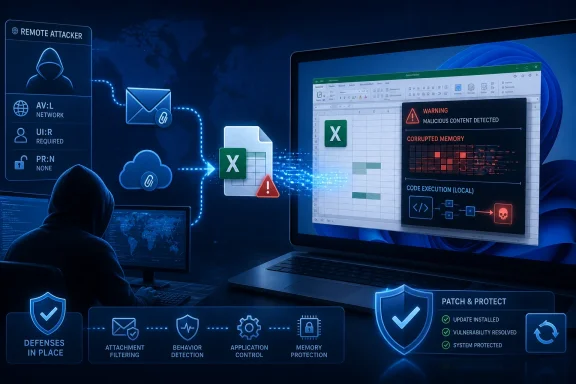
The practical attack scenario is familiar: an attacker located elsewhere sends or hosts a malicious workbook, but the victim must open or otherwise process that file on the affected machine. The exploit therefore arrives remotely while its decisive execution step occurs locally inside Excel.
In a vulnerability title, remote code execution often evokes an internet-facing service that accepts a packet and immediately runs attacker-controlled code. That is one form of RCE, but it is not the only one.
Microsoft also uses the classification for client-side file-processing vulnerabilities. An attacker can create a malicious Excel document, distribute it through email, a download, cloud storage, a collaboration platform, or another delivery mechanism, and wait for a user to open it. The attacker does not need to be sitting at the Windows or Mac computer, even though Excel must process the weaponized content locally.
MSRC explains this distinction directly in its advisory. The word remote refers to the attacker’s location, while the actual exploitation takes place on the victim’s local machine. Microsoft notes that this class of issue may also be described as arbitrary code execution, or ACE.
The
That makes CVE-2026-55947 materially different from a flaw in Remote Desktop Services, SMB, HTTP.sys, or another listening service where specially crafted network traffic can reach vulnerable code without first becoming a local file or object. Both categories can culminate in attacker-controlled code execution, but they take different routes to reach that point.
If exploitation succeeds, the resulting code generally operates with the rights of the user running Excel. A standard user account limits the immediate authority available to the malicious process, while a user operating with administrative privileges gives the attacker a more powerful starting position. Endpoint protections and application controls may still interrupt later stages, but they do not change the underlying RCE classification.
CVE-2026-55947 is also identified as CWE-122, a heap-based buffer overflow. Such flaws arise when software writes more data into a heap allocation than that allocation can safely hold, potentially corrupting adjacent memory. Carefully shaped input can sometimes turn that memory corruption into control over program execution rather than merely crashing Excel.
For editions maintained through Microsoft’s Office servicing channels, administrators should use their normal deployment tools to verify that the July 2026 Office security updates have reached managed devices. This includes checking update compliance rather than assuming that Windows Update, Configuration Manager, Intune, or the Microsoft 365 Apps update channel completed installation everywhere.
The published affected-version data gives several concrete boundaries. Excel 2016 builds earlier than
Those numbers matter in environments with delayed deployment rings, frozen virtual desktop images, nonpersistent sessions, or devices that spend long periods away from corporate management. Microsoft 365 Apps may update automatically, but automatic servicing is not the same as verified installation.
Office Online Server also deserves separate inventory attention. A vulnerability involving document processing is not necessarily confined to desktops because server-side Office components can parse uploaded or rendered content. Administrators should identify the precise affected product and apply the corresponding Microsoft release rather than treating this solely as an Excel workstation update.
Microsoft classified exploitation as less likely, according to the July 2026 Patch Tuesday listing compiled by BleepingComputer, and no public disclosure or active exploitation was identified at release. CISA’s initial SSVC data likewise recorded no known exploitation, while assessing the potential technical impact as total. Those indicators affect prioritization, but they do not make malicious spreadsheets safe to handle.
For enterprise defenders, however, malicious-document attacks remain operationally credible because Excel files are routine business objects. Finance departments, procurement teams, analysts, and administrators regularly exchange spreadsheets with outside organizations, making an unexpected workbook less conspicuous than an executable attachment.
Email filtering, Protected View, Microsoft Defender for Office 365, attack surface reduction rules, application control, and least-privilege user accounts provide useful layers around the patch. None should be treated as a permanent substitute for updating Excel, particularly because security controls can be weakened by trusted locations, user overrides, exclusions, or established internal file-sharing workflows.
The apparent disagreement between the title and
Administrators should deploy the July 14, 2026 Office updates, confirm the installed Excel and Office Online Server versions, and continue treating unsolicited workbooks as executable-risk content. The attacker can remain remote; only the vulnerable copy of Excel and the final user interaction need to be local.
AV:L—a combination that appears contradictory until the two labels are separated. “Remote code execution” describes where the attacker may be relative to the victim, while “local” describes where the vulnerable Excel process must execute the exploit.Microsoft published the vulnerability on July 14, 2026, as part of its July Patch Tuesday release. Detailed in the Microsoft Security Response Center advisory, the flaw is a heap-based buffer overflow that can let an unauthorized attacker run code through a vulnerable copy of Excel. Microsoft assigned it a CVSS 3.1 score of 7.8, or High, with the vector
CVSS:3.1/AV:L/AC:L/PR:N/UI:R/S:U/C:H/I:H/A:H.The practical attack scenario is familiar: an attacker located elsewhere sends or hosts a malicious workbook, but the victim must open or otherwise process that file on the affected machine. The exploit therefore arrives remotely while its decisive execution step occurs locally inside Excel.
 “Remote” Does Not Mean Network-Reachable
In a vulnerability title, remote code execution often evokes an internet-facing service that accepts a packet and immediately runs attacker-controlled code. That is one form of RCE, but it is not the only one.Microsoft also uses the classification for client-side file-processing vulnerabilities. An attacker can create a malicious Excel document, distribute it through email, a download, cloud storage, a collaboration platform, or another delivery mechanism, and wait for a user to open it. The attacker does not need to be sitting at the Windows or Mac computer, even though Excel must process the weaponized content locally.
MSRC explains this distinction directly in its advisory. The word remote refers to the attacker’s location, while the actual exploitation takes place on the victim’s local machine. Microsoft notes that this class of issue may also be described as arbitrary code execution, or ACE.
The
AV:L metric is consequently not saying that an attacker requires physical access, an interactive logon, or an existing local account. It says that exploitation does not cross a network boundary directly into the vulnerable component. Excel must be running on the target system and must encounter the malicious input there.That makes CVE-2026-55947 materially different from a flaw in Remote Desktop Services, SMB, HTTP.sys, or another listening service where specially crafted network traffic can reach vulnerable code without first becoming a local file or object. Both categories can culminate in attacker-controlled code execution, but they take different routes to reach that point.
The CVSS Vector Shows a Document-Borne Attack
The remaining CVSS fields clarify the expected attack chain. Microsoft’s vector specifies low attack complexity, no privileges required, and required user interaction:AV:Lmeans the vulnerable Excel component is exploited through an action performed on the local system.AC:Lmeans Microsoft does not identify substantial conditions outside the attacker’s control that must align for exploitation.PR:Nmeans the attacker does not need an account or privileges on the target before attempting the attack.UI:Rmeans another person must perform an action, typically involving the malicious document.S:Uindicates that successful exploitation remains within Excel’s existing security authority rather than crossing into a separately governed security scope.C:H/I:H/A:Hreflects potentially high impact to confidentiality, integrity, and availability.
PR:N and UI:R is particularly important. An attacker may start with no access to the target machine, but exploitation still depends on persuading a user to interact with attacker-controlled content. That is a common pattern for Office vulnerabilities distributed through phishing and malicious downloads.If exploitation succeeds, the resulting code generally operates with the rights of the user running Excel. A standard user account limits the immediate authority available to the malicious process, while a user operating with administrative privileges gives the attacker a more powerful starting position. Endpoint protections and application controls may still interrupt later stages, but they do not change the underlying RCE classification.
CVE-2026-55947 is also identified as CWE-122, a heap-based buffer overflow. Such flaws arise when software writes more data into a heap allocation than that allocation can safely hold, potentially corrupting adjacent memory. Carefully shaped input can sometimes turn that memory corruption into control over program execution rather than merely crashing Excel.
The Patch Reaches Windows, Mac, and Office Online Server
The affected-product record is broader than one retail Excel release. It covers Microsoft 365 Apps for Enterprise on 32-bit and x64 Windows systems, Excel 2016, Office 2019, Office LTSC 2021, Office LTSC 2024, Microsoft 365 for Mac, Office LTSC for Mac 2021 and 2024, and Office Online Server.For editions maintained through Microsoft’s Office servicing channels, administrators should use their normal deployment tools to verify that the July 2026 Office security updates have reached managed devices. This includes checking update compliance rather than assuming that Windows Update, Configuration Manager, Intune, or the Microsoft 365 Apps update channel completed installation everywhere.
The published affected-version data gives several concrete boundaries. Excel 2016 builds earlier than
16.0.5561.1001 are listed as affected. The affected Mac editions require version 16.111.26071215 or later, while Office Online Server must reach at least 16.0.10417.20175.Those numbers matter in environments with delayed deployment rings, frozen virtual desktop images, nonpersistent sessions, or devices that spend long periods away from corporate management. Microsoft 365 Apps may update automatically, but automatic servicing is not the same as verified installation.
Office Online Server also deserves separate inventory attention. A vulnerability involving document processing is not necessarily confined to desktops because server-side Office components can parse uploaded or rendered content. Administrators should identify the precise affected product and apply the corresponding Microsoft release rather than treating this solely as an Excel workstation update.
Microsoft classified exploitation as less likely, according to the July 2026 Patch Tuesday listing compiled by BleepingComputer, and no public disclosure or active exploitation was identified at release. CISA’s initial SSVC data likewise recorded no known exploitation, while assessing the potential technical impact as total. Those indicators affect prioritization, but they do not make malicious spreadsheets safe to handle.
User Interaction Lowers Urgency, Not Impact
CVE-2026-55947 is rated Important rather than Critical, despite the potential for complete compromise of data available to the affected user. The need for user interaction and the local CVSS attack vector help explain that rating.For enterprise defenders, however, malicious-document attacks remain operationally credible because Excel files are routine business objects. Finance departments, procurement teams, analysts, and administrators regularly exchange spreadsheets with outside organizations, making an unexpected workbook less conspicuous than an executable attachment.
Email filtering, Protected View, Microsoft Defender for Office 365, attack surface reduction rules, application control, and least-privilege user accounts provide useful layers around the patch. None should be treated as a permanent substitute for updating Excel, particularly because security controls can be weakened by trusted locations, user overrides, exclusions, or established internal file-sharing workflows.
The apparent disagreement between the title and
AV:L is therefore mainly a terminology problem. CVE-2026-55947 is not described as a zero-click, network-reachable Excel service vulnerability. It is a remotely initiated, locally triggered code-execution flaw in which attacker-controlled spreadsheet content reaches Excel and a user action allows the vulnerable application to process it.Administrators should deploy the July 14, 2026 Office updates, confirm the installed Excel and Office Online Server versions, and continue treating unsolicited workbooks as executable-risk content. The attacker can remain remote; only the vulnerable copy of Excel and the final user interaction need to be local.
References
- Primary source: MSRC
Published: 2026-07-14T07:00:00-07:00
Security Update Guide - Microsoft Security Response Center
 msrc.microsoft.com
- Official source: support.microsoft.com
Description of the security update for Excel 2016: July 8, 2025 (KB5002749) | Microsoft Support
Description of the security update for Excel 2016: July 8, 2025 (KB5002749)support.microsoft.com - Related coverage: techradar.com
This 'fascinating' Microsoft Excel security flaw teams up spreadsheets and Copilot Agent to steal data | TechRadar
There's more than one way to skin an Excel tablewww.techradar.com
