

Microsoft’s July 14 security updates fix CVE-2026-56187, an elevation-of-privilege flaw in the Windows MIDI Service Module affecting current Windows 11 releases. The vulnerability is tracked as Important with a CVSS 3.1 score of 7.0, and Microsoft’s advisory indicates that an authorized local attacker could use it to elevate privileges.
For administrators, the immediate action is straightforward: deploy the July 2026 cumulative updates to supported Windows 11 endpoints. Microsoft’s update documentation ties the fix to Windows 11 24H2 and 25H2 through KB5101650, bringing those releases to OS Builds 26100.8875 and 26200.8875, respectively. Windows 11 26H1 receives the correction in KB5101649, OS Build 28000.2525.
Microsoft published the advisory on July 14, 2026, as part of its monthly security release. The company’s Security Update Guide lists the issue as an elevation-of-privilege vulnerability in the Windows MIDI Service Module; vulnerability databases mirroring Microsoft’s record describe it as a use-after-free condition. That class of memory-safety bug occurs when software continues to access memory after it has been released, potentially giving a locally running process a path to execute code in a more privileged security context.
The key limitation matters: this is not a remotely exploitable, unauthenticated entry point. The available CVSS data characterizes the attack vector as local and requires low privileges, with no user interaction. In practical incident-response terms, it is more likely to be useful after an attacker has already obtained a foothold through malware, a malicious local application, a compromised standard user account, or another initial-access technique.
MIDI may sound like a niche concern reserved for musicians, audio workstations, and vintage hardware, but Windows multimedia components are still installed broadly across consumer and business PCs. The Windows MIDI Service Module exists in the operating system’s audio and device stack; an organization does not need to run a digital audio workstation for a local service vulnerability to deserve patch-management attention.
The more useful way to assess CVE-2026-56187 is not to ask whether an endpoint has a MIDI keyboard attached. The important questions are whether the system is exposed to untrusted code and whether an attacker could turn an ordinary user-level execution context into one with substantially greater control over Windows.
According to the July 2026 Patch Tuesday analysis published by Trend Micro’s Zero Day Initiative, CVE-2026-56187 is one of three Windows MIDI Service Module elevation-of-privilege fixes released this month. The other two are CVE-2026-50342, rated 8.8, and CVE-2026-56183, rated 7.0. Grouping multiple privilege-escalation fixes in the same component changes the operational picture: even where no active exploitation is known, organizations should treat the affected Windows update as a meaningful hardening release rather than a cosmetic monthly refresh.
Microsoft’s exploitability assessment for CVE-2026-56187 says the flaw was not publicly disclosed before patch availability and was not known to be exploited in the wild at publication. That reduces the case for emergency out-of-band deployment, but it is not a reason to defer the update through a normal multi-week patch cycle. Public patch analysis can quickly narrow the gap between disclosure and practical exploitation, especially for local elevation-of-privilege bugs that fit well into malware operators’ existing toolchains.
For managed fleets, that makes compliance validation relatively clean. Administrators using Microsoft Intune, Windows Update for Business, WSUS, Configuration Manager, or an RMM platform should verify that the relevant July cumulative update has installed successfully and that device inventory reports the expected build number. A device merely showing a July installation date is not sufficient evidence if an update was rolled back, failed during servicing, or remains pending reboot.
Microsoft says KB5101650 is available through Windows Update, Windows Update for Business, WSUS, and the Microsoft Update Catalog. The same is true for KB5101649 on Windows 11 26H1. As always with cumulative updates, organizations that have already installed earlier releases will receive only the delta needed to reach the new build.
There is a lifecycle wrinkle for 24H2 deployments. Microsoft’s KB5101650 release notes state that Windows 11 24H2 Home and Pro editions reach end of updates on October 13, 2026, while Enterprise and Education editions remain supported until October 12, 2027. July’s patch should therefore also prompt a version-planning review for unmanaged consumer devices and small-business fleets still on 24H2 Home or Pro.
That is an old and specialized part of the Windows networking model, so most organizations will never notice the change. But enterprises with legacy endpoint agents, security products, bespoke networking software, or industrial software stacks should not dismiss it. Microsoft has published separate guidance under KB5106257 for the third-party TDI transport issue, and the support article applies across a wide span of Windows client and Server versions.
The sensible deployment sequence is familiar:
Organizations should therefore resist the temptation to create a custom “MIDI disablement” control without a vendor-supported mitigation. Removing local administrator rights, enforcing application control, maintaining Defender or another endpoint protection platform, and limiting untrusted software execution can reduce the chance that an attacker reaches the local code-execution stage. None of those controls, however, replaces installing the fixed cumulative update.
CVE-2026-56187 is best understood as a patch-now, monitor-normally issue. It has no reported active exploitation and needs local authenticated access, but it also sits in a component receiving multiple privilege-escalation fixes this month. For Windows 11 24H2, 25H2, and 26H1 systems, the concrete finish line is simple: get July’s cumulative update installed, reboot, and verify the patched build.
For administrators, the immediate action is straightforward: deploy the July 2026 cumulative updates to supported Windows 11 endpoints. Microsoft’s update documentation ties the fix to Windows 11 24H2 and 25H2 through KB5101650, bringing those releases to OS Builds 26100.8875 and 26200.8875, respectively. Windows 11 26H1 receives the correction in KB5101649, OS Build 28000.2525.
Microsoft published the advisory on July 14, 2026, as part of its monthly security release. The company’s Security Update Guide lists the issue as an elevation-of-privilege vulnerability in the Windows MIDI Service Module; vulnerability databases mirroring Microsoft’s record describe it as a use-after-free condition. That class of memory-safety bug occurs when software continues to access memory after it has been released, potentially giving a locally running process a path to execute code in a more privileged security context.
The key limitation matters: this is not a remotely exploitable, unauthenticated entry point. The available CVSS data characterizes the attack vector as local and requires low privileges, with no user interaction. In practical incident-response terms, it is more likely to be useful after an attacker has already obtained a foothold through malware, a malicious local application, a compromised standard user account, or another initial-access technique.
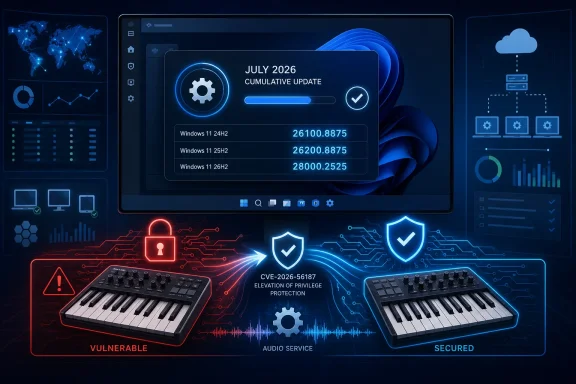 A MIDI component becomes part of the post-compromise chain
MIDI may sound like a niche concern reserved for musicians, audio workstations, and vintage hardware, but Windows multimedia components are still installed broadly across consumer and business PCs. The Windows MIDI Service Module exists in the operating system’s audio and device stack; an organization does not need to run a digital audio workstation for a local service vulnerability to deserve patch-management attention.The more useful way to assess CVE-2026-56187 is not to ask whether an endpoint has a MIDI keyboard attached. The important questions are whether the system is exposed to untrusted code and whether an attacker could turn an ordinary user-level execution context into one with substantially greater control over Windows.
According to the July 2026 Patch Tuesday analysis published by Trend Micro’s Zero Day Initiative, CVE-2026-56187 is one of three Windows MIDI Service Module elevation-of-privilege fixes released this month. The other two are CVE-2026-50342, rated 8.8, and CVE-2026-56183, rated 7.0. Grouping multiple privilege-escalation fixes in the same component changes the operational picture: even where no active exploitation is known, organizations should treat the affected Windows update as a meaningful hardening release rather than a cosmetic monthly refresh.
Microsoft’s exploitability assessment for CVE-2026-56187 says the flaw was not publicly disclosed before patch availability and was not known to be exploited in the wild at publication. That reduces the case for emergency out-of-band deployment, but it is not a reason to defer the update through a normal multi-week patch cycle. Public patch analysis can quickly narrow the gap between disclosure and practical exploitation, especially for local elevation-of-privilege bugs that fit well into malware operators’ existing toolchains.
The fixed builds are the inventory line to watch
The affected version ranges published alongside the advisory identify Windows 11 24H2, 25H2, and 26H1 on both x64 and ARM64 hardware. Microsoft’s July 14 cumulative updates move each branch past the vulnerable build ceiling:| Windows release | July 14, 2026 cumulative update | Patched OS build |
|---|---|---|
| Windows 11, version 24H2 | KB5101650 | 26100.8875 |
| Windows 11, version 25H2 | KB5101650 | 26200.8875 |
| Windows 11, version 26H1 | KB5101649 | 28000.2525 |
Microsoft says KB5101650 is available through Windows Update, Windows Update for Business, WSUS, and the Microsoft Update Catalog. The same is true for KB5101649 on Windows 11 26H1. As always with cumulative updates, organizations that have already installed earlier releases will receive only the delta needed to reach the new build.
There is a lifecycle wrinkle for 24H2 deployments. Microsoft’s KB5101650 release notes state that Windows 11 24H2 Home and Pro editions reach end of updates on October 13, 2026, while Enterprise and Education editions remain supported until October 12, 2027. July’s patch should therefore also prompt a version-planning review for unmanaged consumer devices and small-business fleets still on 24H2 Home or Pro.
Test the July package as a package, not as a single CVE
CVE-2026-56187 does not arrive as an isolated hotfix. It is delivered through the broader July cumulative update, which includes security fixes and a number of platform changes. Microsoft’s release notes flag an especially relevant compatibility consideration: Windows security updates released on or after July 14 enforce Transport Driver Interface registration requirements, and applications using sockets over unregistered third-party TDI transports may stop working.That is an old and specialized part of the Windows networking model, so most organizations will never notice the change. But enterprises with legacy endpoint agents, security products, bespoke networking software, or industrial software stacks should not dismiss it. Microsoft has published separate guidance under KB5106257 for the third-party TDI transport issue, and the support article applies across a wide span of Windows client and Server versions.
The sensible deployment sequence is familiar:
- Pilot KB5101650 or KB5101649 on representative systems, including machines with endpoint protection, VPN clients, audio drivers, and any specialized networking software.
- Confirm post-restart build numbers rather than relying solely on update-installation success messages.
- Prioritize systems where standard users can execute downloaded software, where shared workstations are common, or where local compromise would present a material lateral-movement risk.
- Investigate endpoints that remain below Build 26100.8875, 26200.8875, or 28000.2525 after the deployment window.
No workaround changes the patch priority
Microsoft’s advisory does not list a mitigation or workaround for CVE-2026-56187. That is typical for a flaw embedded in an operating-system module: disabling a service indiscriminately can cause supportability or functionality problems while failing to address every applicable code path.Organizations should therefore resist the temptation to create a custom “MIDI disablement” control without a vendor-supported mitigation. Removing local administrator rights, enforcing application control, maintaining Defender or another endpoint protection platform, and limiting untrusted software execution can reduce the chance that an attacker reaches the local code-execution stage. None of those controls, however, replaces installing the fixed cumulative update.
CVE-2026-56187 is best understood as a patch-now, monitor-normally issue. It has no reported active exploitation and needs local authenticated access, but it also sits in a component receiving multiple privilege-escalation fixes this month. For Windows 11 24H2, 25H2, and 26H1 systems, the concrete finish line is simple: get July’s cumulative update installed, reboot, and verify the patched build.
References
- Primary source: MSRC
Published: 2026-07-14T07:00:00-07:00
Security Update Guide - Microsoft Security Response Center
 msrc.microsoft.com
- Official source: learn.microsoft.com
