

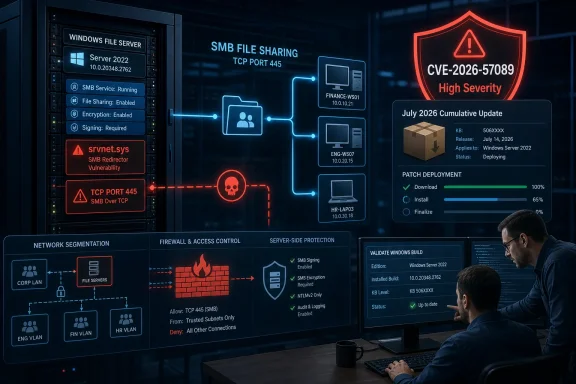
srvnet.sys. The flaw is a use-after-free memory-safety issue that Microsoft says could allow an unauthorized attacker to execute code over a network, making it a priority patch for Windows servers and any endpoint that accepts SMB connections.Microsoft assigned the issue a CVSS 3.1 score of 7.5, rated High. The National Vulnerability Database, which has ingested Microsoft’s record but has not yet completed its own enrichment, identifies the weakness as CWE-416: Use After Free. The important qualification is in Microsoft’s CVSS vector: exploitation is network-based and requires no privileges, but it is rated high complexity and requires user interaction.
That combination makes CVE-2026-57089 materially different from the self-propagating SMB disasters administrators remember. It is not currently scored as a simple, unauthenticated, no-click wormable condition. But it is still a code-execution bug in a kernel-facing network component used by the Windows SMB server stack, and it affects a long list of supported client and server releases. Apply the July cumulative update rather than treating this as a desktop-only issue.
The Patch Floor Is the Practical Indicator
Microsoft’s affected-product record shows that the vulnerability spans Windows 10, Windows 11, and Windows Server, including Server Core installations. The fixed build numbers provide a direct way to validate remediation in environments where update reporting is delayed or where administrators service offline images.
For commonly deployed releases, the July 14 updates establish these minimum build levels:
| Platform | Fixed build | July 14 update |
|---|---|---|
| Windows 11 24H2 and 25H2 | 26100.8875 / 26200.8870 | KB5101650 |
| Windows Server 2025 | 26100.33158 | KB5099536 |
| Windows Server 2022 | 20348.5386 | KB5099540 |
| Windows Server 2019 and Windows 10 Enterprise LTSC 2019 | 17763.9020 | KB5099538 |
| Windows Server 2016 and Windows 10 LTSB 2016 | 14393.9339 | KB5099535 |
| Windows 10 21H2 and 22H2 under applicable servicing | 19044.7548 / 19045.7548 | KB5099539 |
Microsoft also lists Windows Server 2012 and Windows Server 2012 R2 as affected, including their Server Core variants, with fixed builds 9200.26226 and 9600.23291 respectively. Organizations maintaining those systems should verify their applicable servicing arrangement and ensure that their July security rollup or monthly quality update carries the corrected srvnet.sys component.
For estate-wide validation, do not infer safety merely because a device successfully installed an update this month. Check the installed cumulative-update KB or the OS build directly. That distinction matters most for WSUS-managed systems, paused rings, disconnected servers, gold images, and virtual machines restored from older templates.
“Over a Network” Does Not Mean “No Click”
The advisory’s wording can sound contradictory: remote code execution “over a network,” yet a CVSS vector that includes user interaction. Both can be true.
The vulnerable code sits in the SMB server transport path, meaning the attacker’s input reaches the target through network communication rather than through a locally run application. Microsoft’s UI:R rating, however, indicates that a successful attack scenario requires an action by a user other than the attacker. Microsoft has not publicly described that interaction requirement or released exploit mechanics, so administrators should resist filling in the blanks with assumptions about a malicious shared folder, a coerced connection, or a particular application workflow.
The score also assigns Attack Complexity as High. That is not a reason to defer patching; it is a reminder that CVSS is an estimate of exploit preconditions, not a promise that adversaries will ignore the target. Security teams should prioritize by exposure: a file server reachable from broad internal networks, a remote-access environment with SMB paths crossing trust boundaries, or a workstation population that routinely browses or opens resources from untrusted systems deserves faster attention than an isolated lab machine.
As of July 15, neither Microsoft’s published CVE record nor the NVD entry describes public exploitation, a proof of concept, or a known exploit chain. The NVD record remains marked “Awaiting Enrichment,” and its data originates from Microsoft. That is useful context, but it should not be confused with a clean bill of health: the absence of a public exploit statement is not evidence that one cannot emerge after Patch Tuesday binaries are examined.
srvnet.sys Keeps the Server Side in Scope
The filename in this advisory is significant. srvnet.sys is part of Windows’ server-side networking support for SMB, not the familiar srv2.sys or mrxsmb client-side components administrators may encounter when diagnosing file-sharing failures. The practical exposure question is therefore whether a system is acting as, or can act as, an SMB server and whether other devices can reach it.
That includes obvious infrastructure such as file servers, domain-adjacent application servers, Hyper-V hosts with administrative shares, management jump boxes, and Windows Server Core deployments. It can also include ordinary Windows endpoints when file and printer sharing, administrative shares, remote management workflows, or third-party software create a need for inbound SMB.
Microsoft’s cumulative-update notes for Windows 11, Windows Server 2022, Windows Server 2025, Server 2019, and Server 2016 all place this fix in the July security package. The same releases include a separate networking hardening change around third-party TDI transports. That compatibility change can affect applications using sockets over unregistered third-party TDI transports, so it should be tested independently; it is not a documented workaround for CVE-2026-57089.
The July release notes say Microsoft is not currently aware of issues for several of the affected packages, but broad deployment still needs the usual safeguards. Servers with BitLocker configurations outside Microsoft’s recommended policy settings, for example, may require recovery-key entry after the Server 2022 update. That is a deployment consideration, not a reason to leave an SMB-facing code-execution vulnerability unpatched.
Patch First, Then Reduce Unnecessary SMB Reachability
For most organizations, the response should be straightforward: expedite the appropriate July cumulative updates, reboot where required, and confirm the resulting build numbers. In parallel, use this advisory to verify that the SMB attack surface actually matches business need.
- Ensure TCP 445 is not exposed to the public internet and is tightly filtered between network segments where SMB is unnecessary.
- Restrict SMB access through host firewalls and network controls to known management, application, and file-service paths.
- Review shared folders, administrative-share access, and accounts with rights to connect to sensitive systems through SMB.
- Use endpoint detection telemetry to investigate unusual SMB connection patterns, repeated failed negotiations, or unexpected access to administrative shares.
- Update base images, recovery media, and deployment task sequences so new servers do not begin life below the July patch floor.
Disabling all SMB services across the board is rarely a sensible emergency response, particularly in environments that depend on file services, clustering, management tooling, or Windows authentication workflows. Segmentation and exposure reduction are valuable compensating controls, but they do not replace the vendor fix for a flaw in the transport driver.
The next signal to watch is whether Microsoft updates the advisory with exploitability information, revised severity data, or mitigation guidance after broader analysis of the July patch set. Until then, CVE-2026-57089 should be handled as a high-severity SMB server patching item: not a confirmed worm, not a theoretical bug, and not one to leave behind in the next maintenance window.