

Microsoft’s CVE-2026-57977 advisory describes a Microsoft Edge Chromium-based spoofing vulnerability in which successful exploitation can let attacker-controlled JavaScript read some browser information associated with the vulnerable URL and transmit it to the attacker. That is what the CVSS confidentiality rating of C:L means here: not a total browser takeover, not arbitrary file theft, and not full credential dumping, but a limited information-disclosure impact tied to the page or URL context being abused. The uncomfortable part is that “limited” does not mean “harmless,” because browsers are where identity, sessions, redirects, tokens, and user trust all collide.
Microsoft Security Response Center classifies CVE-2026-57977 as a spoofing vulnerability in Microsoft Edge, Chromium-based, and the user-provided MSRC text says exploitation can allow malicious JavaScript to read information associated with the vulnerable URL. In plain English, the attacker is not merely making something look wrong; the attacker may be able to cause script to run in a context where it can see data it should not see.
That is why the CVSS vector includes confidentiality impact. CVSS does not reserve confidentiality loss only for dramatic leaks such as documents, passwords, or full profile databases. A “low” confidentiality impact means the bug can expose some restricted information, but not enough to qualify as a broad or catastrophic disclosure.
For this vulnerability, the important phrase is “associated with the vulnerable URL.” That points to a web-context problem rather than a whole-device problem. The malicious JavaScript is not being described as reading your Windows files, dumping all Edge saved passwords, or scanning your entire browsing history. It is being described as reading information available in the affected browser/page context and sending it away.
For CVE-2026-57977, that could mean page-related data, URL-associated content, tokens or parameters exposed in the vulnerable context, or other browser-visible information reachable by the malicious script. The exact data depends on the affected implementation and how the vulnerable URL is structured. If the vulnerable page includes sensitive state in the URL, page content, redirects, fragments, or client-side variables, the practical impact rises.
This is why browser vulnerabilities are tricky to explain with neat severity labels. A “low” confidentiality finding on a generic test page may be boring. The same class of issue on a login flow, admin console, SSO redirect, internal dashboard, or support portal can become much more consequential.
The browser security model normally keeps origins and contexts separated. A script from one place should not be able to casually read protected information from another context. When a vulnerability lets attacker-controlled script operate where trusted page data is available, the attacker does not need malware on the endpoint. The browser itself becomes the collection point.
That also explains the likely user-interaction angle. These attacks usually depend on luring a user to a crafted link, malicious page, compromised site, or attacker-controlled flow. The victim’s browser is doing what browsers do: parsing URLs, rendering content, executing JavaScript, and enforcing security boundaries. The vulnerability is that one of those boundaries is not holding properly.
The more accurate reading is narrower: under the right conditions, malicious JavaScript can read information tied to the vulnerable URL context and exfiltrate it. That information may be minor, or it may be useful in a broader attack. The danger is situational.
If the exposed data includes a one-time token, a reset link parameter, an internal identifier, an OAuth or SSO artifact, or page content from a privileged workflow, the attacker may be able to chain that disclosure into phishing, session abuse, account recovery attacks, or targeted social engineering. If the exposed data is merely cosmetic or already public, the practical risk is lower.
In this case, the confidentiality note makes the advisory more specific. The issue is not only that a user may see misleading content. It is that attacker-controlled JavaScript may read browser-held information associated with the vulnerable URL. That is a meaningful browser security failure even if the overall CVSS confidentiality score remains low.
The distinction matters for administrators. A pure UI spoof might be mitigated mostly through user awareness and patching. A script-readable information disclosure should be treated as a patching priority for users who handle privileged portals, cloud admin consoles, internal web apps, finance systems, or identity workflows in Edge.
For IT teams, the real question is not whether C:L sounds scary. The real question is where Edge is used as the front door to sensitive web applications. In many Microsoft-heavy environments, Edge is the browser for Entra ID sign-ins, Microsoft 365 admin work, Intune, Azure portals, internal line-of-business apps, and privileged help-desk tools. A browser-context leak in those workflows deserves more attention than the same bug on a kiosk used only for public browsing.
The fix is also refreshingly ordinary: update Edge. Chromium-based browsers receive frequent security updates, and Edge’s rapid update channel is designed for exactly this kind of issue. Enterprises that delay browser updates for compatibility testing should make sure Edge security updates are not trapped behind the same slow cadence as quarterly desktop image changes.
For CVE-2026-57977, the boundary appears to be the vulnerable URL context. That makes the vulnerability more precise, not irrelevant. The attacker’s prize is whatever the browser exposes there.
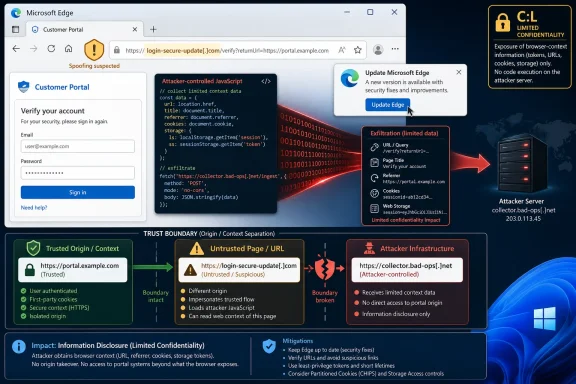 The “Spoofing” Label Understates the Real Browser Risk
Microsoft Security Response Center classifies CVE-2026-57977 as a spoofing vulnerability in Microsoft Edge, Chromium-based, and the user-provided MSRC text says exploitation can allow malicious JavaScript to read information associated with the vulnerable URL. In plain English, the attacker is not merely making something look wrong; the attacker may be able to cause script to run in a context where it can see data it should not see.That is why the CVSS vector includes confidentiality impact. CVSS does not reserve confidentiality loss only for dramatic leaks such as documents, passwords, or full profile databases. A “low” confidentiality impact means the bug can expose some restricted information, but not enough to qualify as a broad or catastrophic disclosure.
For this vulnerability, the important phrase is “associated with the vulnerable URL.” That points to a web-context problem rather than a whole-device problem. The malicious JavaScript is not being described as reading your Windows files, dumping all Edge saved passwords, or scanning your entire browsing history. It is being described as reading information available in the affected browser/page context and sending it away.
C:L Means the Leak Is Narrow, Not Imaginary
In CVSS terms, C:L means there is some loss of confidentiality. The attacker gains access to information that should have remained unavailable, but the scope or sensitivity of that information is limited.For CVE-2026-57977, that could mean page-related data, URL-associated content, tokens or parameters exposed in the vulnerable context, or other browser-visible information reachable by the malicious script. The exact data depends on the affected implementation and how the vulnerable URL is structured. If the vulnerable page includes sensitive state in the URL, page content, redirects, fragments, or client-side variables, the practical impact rises.
This is why browser vulnerabilities are tricky to explain with neat severity labels. A “low” confidentiality finding on a generic test page may be boring. The same class of issue on a login flow, admin console, SSO redirect, internal dashboard, or support portal can become much more consequential.
The Malicious JavaScript Is the Boundary Break
The key mechanism is JavaScript execution. The advisory language says information in the victim’s browser associated with the vulnerable URL can be read by malicious JavaScript and sent to the attacker. That sounds much closer to a client-side injection or cross-site scripting-style failure than to a purely visual spoof.The browser security model normally keeps origins and contexts separated. A script from one place should not be able to casually read protected information from another context. When a vulnerability lets attacker-controlled script operate where trusted page data is available, the attacker does not need malware on the endpoint. The browser itself becomes the collection point.
That also explains the likely user-interaction angle. These attacks usually depend on luring a user to a crafted link, malicious page, compromised site, or attacker-controlled flow. The victim’s browser is doing what browsers do: parsing URLs, rendering content, executing JavaScript, and enforcing security boundaries. The vulnerability is that one of those boundaries is not holding properly.
This Is Not the Same as Full Account Compromise
It is important not to overstate the MSRC language. C:L does not mean the attacker automatically gets every cookie, every credential, or every page the victim has open. It does not mean remote code execution on Windows. It does not mean the attacker can install software or persist after Edge closes.The more accurate reading is narrower: under the right conditions, malicious JavaScript can read information tied to the vulnerable URL context and exfiltrate it. That information may be minor, or it may be useful in a broader attack. The danger is situational.
If the exposed data includes a one-time token, a reset link parameter, an internal identifier, an OAuth or SSO artifact, or page content from a privileged workflow, the attacker may be able to chain that disclosure into phishing, session abuse, account recovery attacks, or targeted social engineering. If the exposed data is merely cosmetic or already public, the practical risk is lower.
Why Microsoft Still Calls It Spoofing
The “spoofing” category can be confusing because people often read it as “fake address bar” or “fake website.” Microsoft uses spoofing more broadly for vulnerabilities that let an attacker misrepresent trust, identity, origin, or content in a way that can deceive the user or browser.In this case, the confidentiality note makes the advisory more specific. The issue is not only that a user may see misleading content. It is that attacker-controlled JavaScript may read browser-held information associated with the vulnerable URL. That is a meaningful browser security failure even if the overall CVSS confidentiality score remains low.
The distinction matters for administrators. A pure UI spoof might be mitigated mostly through user awareness and patching. A script-readable information disclosure should be treated as a patching priority for users who handle privileged portals, cloud admin consoles, internal web apps, finance systems, or identity workflows in Edge.
The Practical Meaning for Windows Users and Admins
For everyday users, the risk is most likely triggered through a malicious link or page. The safest assumption is that an attacker would need to get the victim to open something crafted for the bug. That makes phishing, malicious ads, compromised websites, and messaging apps plausible delivery paths.For IT teams, the real question is not whether C:L sounds scary. The real question is where Edge is used as the front door to sensitive web applications. In many Microsoft-heavy environments, Edge is the browser for Entra ID sign-ins, Microsoft 365 admin work, Intune, Azure portals, internal line-of-business apps, and privileged help-desk tools. A browser-context leak in those workflows deserves more attention than the same bug on a kiosk used only for public browsing.
The fix is also refreshingly ordinary: update Edge. Chromium-based browsers receive frequent security updates, and Edge’s rapid update channel is designed for exactly this kind of issue. Enterprises that delay browser updates for compatibility testing should make sure Edge security updates are not trapped behind the same slow cadence as quarterly desktop image changes.
The Real Lesson Is to Stop Reading “Low” as “No”
Security scoring systems are useful because they compress complex bugs into comparable metrics. They are also dangerous because teams begin treating the shorthand as the reality. C:L is not a dismissal. It is a warning that confidentiality is affected, but in a bounded way.For CVE-2026-57977, the boundary appears to be the vulnerable URL context. That makes the vulnerability more precise, not irrelevant. The attacker’s prize is whatever the browser exposes there.
The Patch Decision Should Follow the Browser’s Job
The most concrete reading of Microsoft’s advisory is this:- This vulnerability can allow malicious JavaScript to read some information connected to the vulnerable URL in the victim’s Edge browser.
- The CVSS C:L rating means the confidentiality loss is limited rather than total.
- The advisory does not imply arbitrary access to Windows files, saved passwords, or the entire browser profile.
- The risk becomes more serious when the vulnerable URL context contains tokens, session-related data, identity-flow details, or sensitive page content.
- The appropriate response is to update Microsoft Edge promptly and avoid treating “low confidentiality impact” as “safe to ignore.”
References
- Primary source: MSRC
Published: 2026-07-03T07:00:00-07:00
Security Update Guide - Microsoft Security Response Center
 msrc.microsoft.com
- Official source: microsoft.com
MSRC - Microsoft Security Response Center
The Microsoft Security Response Center is part of the defender community and on the front line of security response evolution. For over twenty years, we have been engaged with security researchers working to protect customers and the broader ecosystem.www.microsoft.com
- Related coverage: sentinelone.com
CVE-2026-33118: Microsoft Edge Chromium Spoofing Vulnerability
CVE-2026-33118 is a spoofing vulnerability in Microsoft Edge Chromium. Learn about its impact, affected versions, and mitigation methods.www.sentinelone.com
- Related coverage: dbugs.ptsecurity.com
CVE-2026-45495 — DoS in Microsoft Edge | dbugs
Details on CVE-2026-45495: DoS in Microsoft Edge. Includes CVSS score, affected versions, and references.dbugs.ptsecurity.com - Related coverage: www2.gov.bc.ca
- Related coverage: hs-44635071.f.hubspotemail.net
