On June 9, 2026, Microsoft’s Security Update Guide entry for CVE-2026-45455 described a Microsoft Excel information disclosure vulnerability whose CVSS impact metrics indicate limited confidentiality loss, with no direct integrity or availability impact if exploitation succeeds. That wording is easy to underread because it sounds less dramatic than remote code execution. It should not be dismissed, however, because Excel remains one of the most trusted file formats inside businesses, and “some sensitive information” can be enough to move an attacker from curiosity to compromise.
The key to CVE-2026-45455 is the CVSS triad: confidentiality, integrity, and availability. In plain English, Microsoft is saying the bug may let an attacker see information they should not be able to see, but it does not by itself let them alter that information or knock the affected resource offline.
That distinction matters. A vulnerability with
The other two metrics narrow the blast radius.
So the practical reading is this: CVE-2026-45455 is a read-risk bug, not a write-risk or outage-risk bug. That still leaves plenty of room for harm.
In CVSS terms,
For Excel, that distinction is especially important because spreadsheets often serve as unofficial databases. They hold budgets, payroll extracts, customer lists, pricing models, authentication-adjacent notes, hidden tabs, and operational data that never should have become semi-structured business infrastructure but did anyway.
A limited disclosure from a spreadsheet workflow can still be useful to an attacker. Even a small amount of exposed data can reveal names, paths, internal conventions, document structure, or business context. Information disclosure vulnerabilities often matter less because of what they reveal alone and more because of what they make easier next.
That matters for incident response. If CVE-2026-45455 is exploited as described by the CVSS impact metrics, the primary concern is exposure, not tampering. Administrators should not infer from this entry alone that workbook contents were altered, formulas were poisoned, or files were weaponized after opening.
But absence of integrity impact is not the same as absence of operational consequence. An attacker who reads sensitive information may later use it to craft more convincing phishing, target privileged users, identify internal systems, or bypass weak process controls. The first vulnerability may not change anything; the second-stage attack might.
This is where CVSS can be both useful and misleading. It tells us what the vulnerability directly enables. It does not fully describe what an adversary can do after learning something valuable.
For users, that means the danger may be invisible. There may be no obvious failure, no frozen workbook, no application crash, and no broken file to warn that something went wrong. Information disclosure bugs are often quiet because the attacker’s objective is to observe, not disrupt.
For defenders, this makes telemetry and patch management more important than user reports. If exploitation does not degrade the experience, waiting for complaints is the wrong model. The system can behave normally while confidentiality has already been compromised.
That is one reason Office vulnerabilities remain stubbornly relevant in enterprise security. Users understand when Excel crashes. They rarely understand when Excel has exposed something it should not have exposed.
That trust is the opportunity. If a vulnerability requires opening a crafted file, previewing content, interacting with a workbook, or processing spreadsheet data in a particular way, the attacker is not starting from zero. They are exploiting a workflow that already exists.
The danger is not that CVE-2026-45455 necessarily hands over the kingdom. Based on the described metrics, it does not. The danger is that it may leak enough to turn a generic attack into a specific one.
A leaked path, username, document property, internal value, or partial business record can be fuel. Attackers assemble campaigns from scraps. Defenders tend to think in databases; attackers often think in clues.
Excel usually does. That pushes the patching conversation toward practical exposure. Systems that process spreadsheets from outside parties deserve faster attention than isolated machines with limited document exchange.
For enterprise administrators, the first concern should be Microsoft 365 Apps, Office LTSC, Office 2021, Office 2024, Excel 2016, and any supported Office channel listed as affected in Microsoft’s advisory. The exact update path depends on product generation and servicing channel, but the policy is simple: apply the relevant Office security update through the normal Microsoft update mechanism.
Security teams should also avoid treating
That is why exploitability depends on more than the CVSS impact fields. The confidentiality, integrity, and availability metrics tell us the result of successful exploitation. Other CVSS fields describe how the attacker gets there, including attack vector, complexity, privileges, and user interaction.
For CVE-2026-45455, the user’s quoted MSRC text answers only the impact part. It says what happens after success: limited disclosure, no modification, no outage. It does not, by itself, tell us whether exploitation requires opening a malicious workbook, previewing a file, visiting a location, or meeting some other condition.
This is the practical lesson for WindowsForum readers: do not collapse the entire CVE into the CIA letters. They are important, but they are only one part of the scoring story.
A spreadsheet containing public inventory numbers is different from one containing acquisition planning, employee data, customer identifiers, or finance forecasts. The vulnerability’s technical score may be the same, but the business impact changes with the data being handled.
That is why organizations should map this kind of bug to usage patterns. Who opens external Excel files? Which departments receive spreadsheet attachments from vendors or customers? Which workbooks contain regulated data? Which systems automatically process Office documents?
Those questions often matter more than the CVE label. An information disclosure vulnerability in a product used casually is one thing. The same class of bug in the middle of finance, HR, or customer operations is another.
That should lead to a measured response. This is not being described as a destructive Excel flaw. It is not being described as a ransomware-style availability event. It is not being described as a spreadsheet tampering bug.
But it is still a confidentiality bug in a product that routinely handles confidential material. That makes it relevant to security teams, administrators, compliance owners, and anyone who handles workbooks from untrusted sources.
The best short answer is this: successful exploitation could leak limited sensitive information, but it should not let the attacker edit that information or prevent legitimate users from accessing it.
That is the tension that makes Office security hard. Excel is everywhere, and it is routinely used at trust boundaries. People open spreadsheets from partners, customers, job applicants, auditors, suppliers, and internal teams without thinking of Excel as an attack surface.
The best mitigation remains boring and effective: install the relevant Microsoft Office security update, keep Microsoft 365 Apps on a supported update channel, and reduce the habit of opening unexpected workbooks from unknown sources. Protected View, attachment scanning, email filtering, and least-privilege user configurations still matter because they make exploitation paths less convenient.
The vulnerability does not need panic. It does need patching.
The safer interpretation is not to overstate the bug, but also not to trivialize it. CVE-2026-45455 is limited by Microsoft’s own impact description, yet it touches Excel, a program that often sits close to sensitive operational data. That combination deserves disciplined patching rather than alarm.
For Windows users and IT pros, the concrete reading is simple:
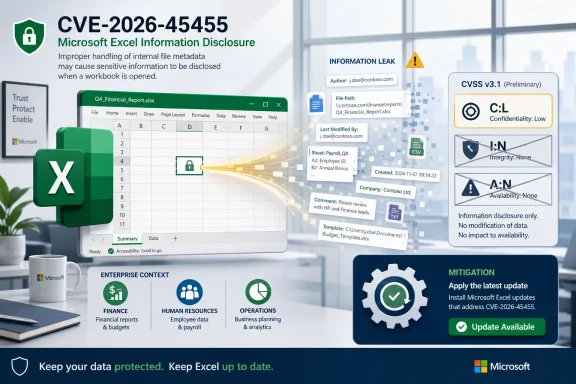 Microsoft Is Describing a Leak, Not a Takeover
The key to CVE-2026-45455 is the CVSS triad: confidentiality, integrity, and availability. In plain English, Microsoft is saying the bug may let an attacker see information they should not be able to see, but it does not by itself let them alter that information or knock the affected resource offline.That distinction matters. A vulnerability with
C:L is not a total data spill; it is a limited disclosure. The attacker may obtain a subset of sensitive information exposed through the vulnerable behavior, but the CVSS score does not claim that all files, all workbook contents, or the whole system become visible.The other two metrics narrow the blast radius.
I:N means the vulnerability does not provide a path to modify data, tamper with workbook contents, change formulas, or rewrite files. A:N means the bug is not expected to crash the service, deny access, or make the resource unavailable.So the practical reading is this: CVE-2026-45455 is a read-risk bug, not a write-risk or outage-risk bug. That still leaves plenty of room for harm.
“Low Confidentiality” Does Not Mean “No Confidentiality”
Security scoring language can make real-world risk sound bureaucratic. “Some loss of confidentiality” is one of those phrases that seems engineered to calm everyone down, but it should be read narrowly rather than casually.In CVSS terms,
C:L means the attacker gains access to information, but the disclosure is constrained. It may involve limited data from the impacted component, metadata, fragments of content, environmental details, or other information that should have remained private. The metric does not say the attacker gets everything.For Excel, that distinction is especially important because spreadsheets often serve as unofficial databases. They hold budgets, payroll extracts, customer lists, pricing models, authentication-adjacent notes, hidden tabs, and operational data that never should have become semi-structured business infrastructure but did anyway.
A limited disclosure from a spreadsheet workflow can still be useful to an attacker. Even a small amount of exposed data can reveal names, paths, internal conventions, document structure, or business context. Information disclosure vulnerabilities often matter less because of what they reveal alone and more because of what they make easier next.
The Missing Integrity Impact Is a Real Boundary
TheI:N metric is not decorative. It means Microsoft is not characterizing this vulnerability as one that allows the attacker to change the disclosed information or modify the affected component through the same flaw.That matters for incident response. If CVE-2026-45455 is exploited as described by the CVSS impact metrics, the primary concern is exposure, not tampering. Administrators should not infer from this entry alone that workbook contents were altered, formulas were poisoned, or files were weaponized after opening.
But absence of integrity impact is not the same as absence of operational consequence. An attacker who reads sensitive information may later use it to craft more convincing phishing, target privileged users, identify internal systems, or bypass weak process controls. The first vulnerability may not change anything; the second-stage attack might.
This is where CVSS can be both useful and misleading. It tells us what the vulnerability directly enables. It does not fully describe what an adversary can do after learning something valuable.
The Availability Metric Says Excel Should Keep Working
TheA:N metric says successful exploitation is not expected to reduce availability. The attacker is not being credited with a denial-of-service outcome, and the vulnerability is not being scored as a way to crash, lock, or exhaust the impacted component.For users, that means the danger may be invisible. There may be no obvious failure, no frozen workbook, no application crash, and no broken file to warn that something went wrong. Information disclosure bugs are often quiet because the attacker’s objective is to observe, not disrupt.
For defenders, this makes telemetry and patch management more important than user reports. If exploitation does not degrade the experience, waiting for complaints is the wrong model. The system can behave normally while confidentiality has already been compromised.
That is one reason Office vulnerabilities remain stubbornly relevant in enterprise security. Users understand when Excel crashes. They rarely understand when Excel has exposed something it should not have exposed.
Excel Is Still a Security Boundary in Disguise
Microsoft Excel is often treated as a productivity tool, but in many organizations it functions as a transport layer for sensitive business data. Workbooks move between finance, HR, sales, legal, vendors, auditors, and executives with a level of trust that few other file types enjoy.That trust is the opportunity. If a vulnerability requires opening a crafted file, previewing content, interacting with a workbook, or processing spreadsheet data in a particular way, the attacker is not starting from zero. They are exploiting a workflow that already exists.
The danger is not that CVE-2026-45455 necessarily hands over the kingdom. Based on the described metrics, it does not. The danger is that it may leak enough to turn a generic attack into a specific one.
A leaked path, username, document property, internal value, or partial business record can be fuel. Attackers assemble campaigns from scraps. Defenders tend to think in databases; attackers often think in clues.
Patch Triage Should Follow Exposure, Not Drama
Information disclosure vulnerabilities frequently lose attention to remote code execution and privilege escalation bugs. That is understandable but not always wise. The right question is not whether the CVE sounds dramatic; it is whether the affected product sits near sensitive data and frequent external input.Excel usually does. That pushes the patching conversation toward practical exposure. Systems that process spreadsheets from outside parties deserve faster attention than isolated machines with limited document exchange.
For enterprise administrators, the first concern should be Microsoft 365 Apps, Office LTSC, Office 2021, Office 2024, Excel 2016, and any supported Office channel listed as affected in Microsoft’s advisory. The exact update path depends on product generation and servicing channel, but the policy is simple: apply the relevant Office security update through the normal Microsoft update mechanism.
Security teams should also avoid treating
C:L as a reason to skip validation. A limited disclosure vulnerability in a heavily used business application is still a disclosure vulnerability. The patch may not be an all-hands emergency, but it belongs in the regular security update cycle, with priority raised for users who handle sensitive workbooks or external attachments.The User Action Question Still Matters
Many Office vulnerabilities are shaped by user interaction, and Excel bugs often live in the uncomfortable space between “local” and “remote” risk. A malicious workbook may arrive by email, chat, file share, ticket attachment, or cloud storage link. The attacker may not need direct access to the endpoint if the user can be induced to process the file.That is why exploitability depends on more than the CVSS impact fields. The confidentiality, integrity, and availability metrics tell us the result of successful exploitation. Other CVSS fields describe how the attacker gets there, including attack vector, complexity, privileges, and user interaction.
For CVE-2026-45455, the user’s quoted MSRC text answers only the impact part. It says what happens after success: limited disclosure, no modification, no outage. It does not, by itself, tell us whether exploitation requires opening a malicious workbook, previewing a file, visiting a location, or meeting some other condition.
This is the practical lesson for WindowsForum readers: do not collapse the entire CVE into the CIA letters. They are important, but they are only one part of the scoring story.
A Small Leak Can Become a Bigger Incident
The most important word in Microsoft’s description is “some.” It is meant to bound the impact, but it also hides the uncertainty that defenders actually care about. Some sensitive information might be harmless in one environment and highly valuable in another.A spreadsheet containing public inventory numbers is different from one containing acquisition planning, employee data, customer identifiers, or finance forecasts. The vulnerability’s technical score may be the same, but the business impact changes with the data being handled.
That is why organizations should map this kind of bug to usage patterns. Who opens external Excel files? Which departments receive spreadsheet attachments from vendors or customers? Which workbooks contain regulated data? Which systems automatically process Office documents?
Those questions often matter more than the CVE label. An information disclosure vulnerability in a product used casually is one thing. The same class of bug in the middle of finance, HR, or customer operations is another.
The Real Meaning of C:L, I:N, and A:N
The CVSS shorthand is terse, but the operational meaning is straightforward.C:L means the attacker may see a limited amount of sensitive information. I:N means the attacker cannot directly change the affected data through this vulnerability. A:N means the attacker cannot directly disrupt access to the affected resource through this vulnerability.That should lead to a measured response. This is not being described as a destructive Excel flaw. It is not being described as a ransomware-style availability event. It is not being described as a spreadsheet tampering bug.
But it is still a confidentiality bug in a product that routinely handles confidential material. That makes it relevant to security teams, administrators, compliance owners, and anyone who handles workbooks from untrusted sources.
The best short answer is this: successful exploitation could leak limited sensitive information, but it should not let the attacker edit that information or prevent legitimate users from accessing it.
The Excel Risk Is Narrow, But the Workflow Is Wide
Administrators should read CVE-2026-45455 as a bounded vulnerability in a widely exposed workflow. The technical impact is narrow. The deployment surface is not.That is the tension that makes Office security hard. Excel is everywhere, and it is routinely used at trust boundaries. People open spreadsheets from partners, customers, job applicants, auditors, suppliers, and internal teams without thinking of Excel as an attack surface.
The best mitigation remains boring and effective: install the relevant Microsoft Office security update, keep Microsoft 365 Apps on a supported update channel, and reduce the habit of opening unexpected workbooks from unknown sources. Protected View, attachment scanning, email filtering, and least-privilege user configurations still matter because they make exploitation paths less convenient.
The vulnerability does not need panic. It does need patching.
The Patch-Tuesday Lesson Hidden in One CVSS Letter
A singleL in a CVSS vector can change the mood of a security advisory. It moves a bug out of the “everything is exposed” category and into the more ambiguous world of partial disclosure. That is precisely where many organizations make bad triage decisions.The safer interpretation is not to overstate the bug, but also not to trivialize it. CVE-2026-45455 is limited by Microsoft’s own impact description, yet it touches Excel, a program that often sits close to sensitive operational data. That combination deserves disciplined patching rather than alarm.
For Windows users and IT pros, the concrete reading is simple:
- Successful exploitation could expose only a limited subset of sensitive information from the impacted component.
- The vulnerability is not scored as allowing the attacker to modify the disclosed information.
- The vulnerability is not scored as allowing the attacker to deny access to the affected resource.
- The business risk depends heavily on what kinds of Excel files the affected users open or process.
- Systems and users that handle external or sensitive spreadsheets should receive the relevant Office security update promptly.
References
- Primary source: MSRC
Published: 2026-06-09T07:00:00-07:00
Security Update Guide - Microsoft Security Response Center
 msrc.microsoft.com
- Related coverage: datacomm.com
- Related coverage: rapid7.com
Rapid7 Vulnerability Database
Rapid7's VulnDB is curated repository of vetted computer software exploits and exploitable vulnerabilities.www.rapid7.com - Related coverage: thehackerwire.com
CVE-2026-32188 - High Vulnerability - TheHackerWire
TheHackerWire - Your daily source for cybersecurity news, CVE alerts, hacking tutorials, and security tool reviews. Stay ahead of cyber threats.www.thehackerwire.com - Related coverage: bleepingcomputer.com
- Related coverage: thewindowsupdate.com