

An attacker could exploit CVE-2026-58278 over the network by hosting a specially crafted website, luring a Microsoft Edge user to visit it through email, messaging, or an attachment, and relying on user interaction because Microsoft says the attacker cannot force the target to view the content. That small phrase — user interaction required — is doing a lot of work in Microsoft’s advisory. It keeps this Edge spoofing flaw out of the wormable-nightmare category, but it does not make the bug harmless. In browser security, “convince the user to click” is not a mitigating circumstance so much as the oldest delivery mechanism on the Internet.
Microsoft Security Response Center describes CVE-2026-58278 as a Microsoft Edge Chromium-based spoofing vulnerability, published on July 3, 2026, with exploitation possible over the network. The advisory language supplied by Microsoft is familiar: an attacker can host crafted web content, but must persuade the user to view it.
That distinction matters. “Network” in the CVSS sense does not mean the attacker can directly reach into a Windows machine and trigger the bug without the user. It means the vulnerable component can be attacked remotely across a network boundary, typically through web content loaded by the browser.
For Edge, that almost always collapses into a practical chain: send a link, embed a lure in a message, disguise the destination, or attach something that causes the user to open a browser-rendered path. The exploit begins on the attacker’s infrastructure, but the decisive moment happens on the victim’s screen.
That is why this class of vulnerability is awkward for defenders. It is not a remote code execution bug that screams for emergency isolation, yet it lives in the browser, the one application most users are trained to feed with untrusted content all day.
What the attacker cannot do, according to Microsoft’s own wording, is force the user to view the page. That limitation is important because it separates CVE-2026-58278 from fully automatic drive-by conditions where merely being reachable on the network is enough. But it should not be overstated.
Modern phishing operations are built precisely around persuading users to open things. Attackers do not need a zero-click exploit if a payroll notice, shipping alert, shared document, QR code, or help-desk impersonation gets the click done for them.
The “Network” attack vector therefore describes reachability, not inevitability. A remote attacker can stage the content anywhere the victim’s browser can reach it, but exploitation still depends on the victim crossing that last line.
In the browser, trust signals are the product. The address bar, permission prompts, tab identity, certificate warnings, download UI, authentication flows, and site boundaries are all part of the security model. If a flaw lets an attacker misrepresent any of those signals, the browser becomes an accomplice in the con.
Microsoft’s short advisory does not spell out the exact UI or protocol behavior involved in CVE-2026-58278, and that restraint is normal while patches are rolling out. But the exploit description tells us enough to understand the likely operational pattern: crafted web content is used to create a misleading browser-mediated experience, and the user is pushed into making a decision under false assumptions.
That is the quiet danger of spoofing vulnerabilities. They may not directly install malware, but they can make the user hand over credentials, authorize access, approve a permission, download a payload, or trust a forged workflow.
But user interaction is not rare. It is the normal operating condition of enterprise browsers. Users open links in email, Teams, Slack, help-desk tickets, SaaS dashboards, vendor portals, and customer documents constantly.
The more cloud-first the organization, the more browser-first the attack surface. Edge is not merely a web browser in many Windows estates; it is the front door to Microsoft 365, Entra ID sign-ins, admin portals, internal web apps, identity provider redirects, and security tooling.
That changes the risk calculation. A spoofing bug in the browser can become more consequential when the browser is the place where users make identity and authorization decisions.
Microsoft’s Edge security release notes on Microsoft Learn routinely emphasize that Edge updates incorporate Chromium project security fixes, while also carrying Edge-specific fixes. CVE-2026-58278 is presented by MSRC as a Microsoft Edge Chromium-based issue, which places it in that hybrid territory: Chromium engine beneath, Microsoft browser product and integration layer above.
That matters for administrators because Edge is deeply integrated into Windows management. Updates may arrive through Edge’s own updater, Microsoft Update, enterprise deployment tools, or managed browser policies depending on the environment. The browser is fast-moving, but enterprise change control often is not.
The practical lesson is blunt: treating Edge as a passive Windows component is out of date. It is an application with its own security cadence, and spoofing flaws are exactly the kind of issue that can sit in the gap between “the OS is patched” and “the browser is actually current.”
From there, the attacker’s goal would depend on what the spoofing flaw permits. It might be used to make a malicious page appear more trustworthy, disguise a hostile destination, mislead the user about origin or context, or support a broader credential-harvesting flow.
The boringness is the point. Users are most vulnerable when the browser appears to confirm the attacker’s story. If Edge itself can be made to show misleading trust cues, the usual advice — “check the address bar,” “look for the prompt,” “make sure it is the right site” — becomes weaker.
That is why defenders should not reduce this to “don’t click suspicious links.” Suspicious links are easy to warn about after the fact. Effective lures are designed not to look suspicious in the moment.
The second defense is skepticism toward unexpected links, especially those that ask for sign-in, payment, file download, browser permission, or identity verification. That advice is old, but spoofing flaws make it newly relevant because the browser may not display the world as clearly as users expect.
Users should also be wary of attachments that are merely wrappers for web navigation. A PDF, Office document, calendar invite, or compressed file can be part of the lure even if the actual exploit content lives on a website.
The point is not panic. CVE-2026-58278 requires the user to view attacker-controlled content. But every day’s browsing session is a long sequence of decisions about remote content, and attackers only need one convincing prompt.
The first control is inventory. Security teams need to know which Edge versions are deployed, which update channels are in use, and which devices are lagging behind. The second is enforcement: managed update policies should close the window between Microsoft’s release and user protection.
The third is telemetry. Web proxy logs, endpoint detection, DNS filtering, and identity logs can help identify users who visited known malicious infrastructure, but only if those systems are already wired together. Spoofing vulnerabilities often do their damage in the narrow space between a click and a credential submission.
Finally, administrators should revisit browser hardening policies. Restricting risky extensions, controlling downloads, tightening permission prompts, isolating untrusted sites, and using Microsoft Defender SmartScreen or equivalent reputation services will not magically neutralize every spoofing flaw. But layered friction matters when the exploit chain depends on a user being successfully steered through a false interface.
In this case, the advisory language tells us the attack vector, the need for crafted web content, and the requirement for user action. It does not fully describe the spoofed surface, the exact trust boundary, or the post-exploitation outcome an attacker would most likely pursue.
That gap forces defenders to reason from class behavior. A spoofing vulnerability in Edge is not automatically catastrophic, but neither is it merely cosmetic. The browser is where trust, identity, and user intent meet, and any bug that bends that meeting point deserves timely attention.
The lack of public exploitation details should not be mistaken for lack of exploitability. It means Microsoft is giving customers time to patch before the vulnerability is easier to reproduce.
That makes the vulnerability remote in the way most browser attacks are remote: not by directly assaulting a listening service, but by turning the user’s own browsing session into the delivery channel. The network carries the bait, the browser renders the trap, and the user supplies the final transition.
For WindowsForum readers, that distinction is worth preserving. Network-exploitable does not mean unavoidable, and user-assisted does not mean unserious. CVE-2026-58278 lives between those poles.
CVE-2026-58278 should be handled as a timely Edge patch, not a reason for alarmist theater. But it is also a reminder that the browser has become the operating system’s most exposed trust interface, and the next spoofing bug will arrive into the same world of email lures, cloud logins, and users trained to click through their workday.
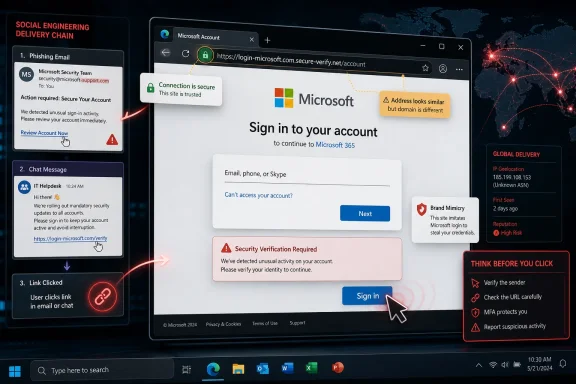 Microsoft’s Network Vector Is Really a Social Engineering Story
Microsoft Security Response Center describes CVE-2026-58278 as a Microsoft Edge Chromium-based spoofing vulnerability, published on July 3, 2026, with exploitation possible over the network. The advisory language supplied by Microsoft is familiar: an attacker can host crafted web content, but must persuade the user to view it.That distinction matters. “Network” in the CVSS sense does not mean the attacker can directly reach into a Windows machine and trigger the bug without the user. It means the vulnerable component can be attacked remotely across a network boundary, typically through web content loaded by the browser.
For Edge, that almost always collapses into a practical chain: send a link, embed a lure in a message, disguise the destination, or attach something that causes the user to open a browser-rendered path. The exploit begins on the attacker’s infrastructure, but the decisive moment happens on the victim’s screen.
That is why this class of vulnerability is awkward for defenders. It is not a remote code execution bug that screams for emergency isolation, yet it lives in the browser, the one application most users are trained to feed with untrusted content all day.
The Attacker Does Not Need to Break In If the Browser Walks Over
The exploit scenario Microsoft outlines is straightforward. The attacker prepares a website designed to trigger the vulnerability in Edge, then gets the user to visit it. The lure could be an email, an instant message, a forum post, a malicious advertisement, a compromised legitimate site, or an attachment that nudges the user toward attacker-controlled content.What the attacker cannot do, according to Microsoft’s own wording, is force the user to view the page. That limitation is important because it separates CVE-2026-58278 from fully automatic drive-by conditions where merely being reachable on the network is enough. But it should not be overstated.
Modern phishing operations are built precisely around persuading users to open things. Attackers do not need a zero-click exploit if a payroll notice, shipping alert, shared document, QR code, or help-desk impersonation gets the click done for them.
The “Network” attack vector therefore describes reachability, not inevitability. A remote attacker can stage the content anywhere the victim’s browser can reach it, but exploitation still depends on the victim crossing that last line.
Spoofing Bugs Attack Trust Before They Attack Systems
The word “spoofing” tends to sound less dramatic than remote code execution or privilege escalation. That can be misleading. A spoofing vulnerability is often about making a user or system believe something false: that a page is from a trusted origin, that a prompt belongs to the browser, that content is safer than it is, or that a navigation state means something it does not.In the browser, trust signals are the product. The address bar, permission prompts, tab identity, certificate warnings, download UI, authentication flows, and site boundaries are all part of the security model. If a flaw lets an attacker misrepresent any of those signals, the browser becomes an accomplice in the con.
Microsoft’s short advisory does not spell out the exact UI or protocol behavior involved in CVE-2026-58278, and that restraint is normal while patches are rolling out. But the exploit description tells us enough to understand the likely operational pattern: crafted web content is used to create a misleading browser-mediated experience, and the user is pushed into making a decision under false assumptions.
That is the quiet danger of spoofing vulnerabilities. They may not directly install malware, but they can make the user hand over credentials, authorize access, approve a permission, download a payload, or trust a forged workflow.
“User Interaction Required” Is a Boundary, Not a Comfort Blanket
Security teams often triage advisories by looking for three flags: remote exploitability, no privileges required, and no user interaction. CVE-2026-58278 appears to miss that last, most alarming checkbox. That will lower its priority in some environments, especially when patch queues are already crowded.But user interaction is not rare. It is the normal operating condition of enterprise browsers. Users open links in email, Teams, Slack, help-desk tickets, SaaS dashboards, vendor portals, and customer documents constantly.
The more cloud-first the organization, the more browser-first the attack surface. Edge is not merely a web browser in many Windows estates; it is the front door to Microsoft 365, Entra ID sign-ins, admin portals, internal web apps, identity provider redirects, and security tooling.
That changes the risk calculation. A spoofing bug in the browser can become more consequential when the browser is the place where users make identity and authorization decisions.
Edge’s Chromium Base Cuts Both Ways
Microsoft Edge’s Chromium foundation gives it a security architecture shaped by Google’s browser ecosystem: sandboxing, site isolation, rapid release channels, and a huge vulnerability research community. That is generally good news for users. It also means Edge inherits the velocity and complexity of Chromium-era browser security.Microsoft’s Edge security release notes on Microsoft Learn routinely emphasize that Edge updates incorporate Chromium project security fixes, while also carrying Edge-specific fixes. CVE-2026-58278 is presented by MSRC as a Microsoft Edge Chromium-based issue, which places it in that hybrid territory: Chromium engine beneath, Microsoft browser product and integration layer above.
That matters for administrators because Edge is deeply integrated into Windows management. Updates may arrive through Edge’s own updater, Microsoft Update, enterprise deployment tools, or managed browser policies depending on the environment. The browser is fast-moving, but enterprise change control often is not.
The practical lesson is blunt: treating Edge as a passive Windows component is out of date. It is an application with its own security cadence, and spoofing flaws are exactly the kind of issue that can sit in the gap between “the OS is patched” and “the browser is actually current.”
The Real-World Exploit Chain Is Boring, Which Is Why It Works
A plausible CVE-2026-58278 attack would not need cinematic malware tradecraft. It could start with a message that looks like a document-sharing notification, a benefits update, a supplier invoice, or a security alert. The link sends the user to attacker-controlled content that is crafted to exercise the Edge vulnerability.From there, the attacker’s goal would depend on what the spoofing flaw permits. It might be used to make a malicious page appear more trustworthy, disguise a hostile destination, mislead the user about origin or context, or support a broader credential-harvesting flow.
The boringness is the point. Users are most vulnerable when the browser appears to confirm the attacker’s story. If Edge itself can be made to show misleading trust cues, the usual advice — “check the address bar,” “look for the prompt,” “make sure it is the right site” — becomes weaker.
That is why defenders should not reduce this to “don’t click suspicious links.” Suspicious links are easy to warn about after the fact. Effective lures are designed not to look suspicious in the moment.
For Home Users, the Fix Is Updating Before Curiosity Wins
For individual Windows users, the response is uncomplicated: update Edge promptly and restart the browser. Browser updates often download quietly, but they do not always fully take effect until the browser restarts. A machine that sleeps for days with dozens of tabs open can remain exposed longer than the user realizes.The second defense is skepticism toward unexpected links, especially those that ask for sign-in, payment, file download, browser permission, or identity verification. That advice is old, but spoofing flaws make it newly relevant because the browser may not display the world as clearly as users expect.
Users should also be wary of attachments that are merely wrappers for web navigation. A PDF, Office document, calendar invite, or compressed file can be part of the lure even if the actual exploit content lives on a website.
The point is not panic. CVE-2026-58278 requires the user to view attacker-controlled content. But every day’s browsing session is a long sequence of decisions about remote content, and attackers only need one convincing prompt.
For IT, Browser Patch Latency Is Now Identity Risk
Enterprise administrators should treat this as a browser patching and phishing-resilience problem rather than a classic perimeter problem. Blocking inbound traffic will not address a flaw that activates when a user’s browser reaches out to the attacker’s page. The traffic is outbound web traffic, which most organizations allow by design.The first control is inventory. Security teams need to know which Edge versions are deployed, which update channels are in use, and which devices are lagging behind. The second is enforcement: managed update policies should close the window between Microsoft’s release and user protection.
The third is telemetry. Web proxy logs, endpoint detection, DNS filtering, and identity logs can help identify users who visited known malicious infrastructure, but only if those systems are already wired together. Spoofing vulnerabilities often do their damage in the narrow space between a click and a credential submission.
Finally, administrators should revisit browser hardening policies. Restricting risky extensions, controlling downloads, tightening permission prompts, isolating untrusted sites, and using Microsoft Defender SmartScreen or equivalent reputation services will not magically neutralize every spoofing flaw. But layered friction matters when the exploit chain depends on a user being successfully steered through a false interface.
Microsoft’s Sparse Advisory Is Normal, But It Leaves Defenders Guessing
MSRC advisories frequently disclose enough to drive patching without publishing a cookbook for exploitation. That is a defensible balance. The problem is that sparse language can make medium-severity browser bugs look interchangeable, when their real-world consequences vary widely.In this case, the advisory language tells us the attack vector, the need for crafted web content, and the requirement for user action. It does not fully describe the spoofed surface, the exact trust boundary, or the post-exploitation outcome an attacker would most likely pursue.
That gap forces defenders to reason from class behavior. A spoofing vulnerability in Edge is not automatically catastrophic, but neither is it merely cosmetic. The browser is where trust, identity, and user intent meet, and any bug that bends that meeting point deserves timely attention.
The lack of public exploitation details should not be mistaken for lack of exploitability. It means Microsoft is giving customers time to patch before the vulnerability is easier to reproduce.
The Lesson Hidden in the Attack Vector
The useful way to read Microsoft’s “Network” exploit scenario is not as a protocol diagram but as a warning about the modern endpoint. The attacker does not need local access, does not need an account, and does not need to be on the same LAN. The attacker needs a reachable web page and a convincing reason for the user to open it.That makes the vulnerability remote in the way most browser attacks are remote: not by directly assaulting a listening service, but by turning the user’s own browsing session into the delivery channel. The network carries the bait, the browser renders the trap, and the user supplies the final transition.
For WindowsForum readers, that distinction is worth preserving. Network-exploitable does not mean unavoidable, and user-assisted does not mean unserious. CVE-2026-58278 lives between those poles.
The Edge Advisory Leaves a Practical Checklist Behind
CVE-2026-58278 is not a mystery in operational terms, even if Microsoft has not published the exploit mechanics. It is a browser spoofing flaw with a remote delivery path and a human trigger, which means the response should be fast, practical, and boring.- Users should update Microsoft Edge and restart the browser so the fixed build is actually running.
- Administrators should verify Edge version compliance rather than assuming Windows patch status covers the browser.
- Security teams should treat suspicious links, document lures, and unexpected sign-in prompts as plausible delivery paths for this class of flaw.
- Organizations should monitor outbound web access and identity events for signs that users were steered to attacker-controlled infrastructure.
- Training should emphasize that browser trust indicators can be part of the attack surface, not merely a defense.
CVE-2026-58278 should be handled as a timely Edge patch, not a reason for alarmist theater. But it is also a reminder that the browser has become the operating system’s most exposed trust interface, and the next spoofing bug will arrive into the same world of email lures, cloud logins, and users trained to click through their workday.
References
- Primary source: MSRC
Published: 2026-07-03T07:00:00-07:00
Security Update Guide - Microsoft Security Response Center
 msrc.microsoft.com
- Related coverage: securityvulnerability.io
CVE-2026-58278 : Server-Side Request Forgery Vulnerability in Microsoft Edge by Microsoft
Learn about a server-side request forgery vulnerability in Microsoft Edge (Chromium-based) and how it affects user security. CVE-2026-58278.securityvulnerability.io - Official source: learn.microsoft.com
Release notes for Microsoft Edge Security Updates | Microsoft Learn
Release notes for Microsoft Edge Security Updateslearn.microsoft.com - Related coverage: datacomm.com
- Related coverage: www2.gov.bc.ca
- Official source: microsoft.com
MSRC - Microsoft Security Response Center
The Microsoft Security Response Center is part of the defender community and on the front line of security response evolution. For over twenty years, we have been engaged with security researchers working to protect customers and the broader ecosystem.www.microsoft.com
- Related coverage: hivepro.com
- Related coverage: buildings.honeywell.com
The purpose of this document is to identify the patches that have been delivered by Microsoft® which have been tested against Pro-Watch
PDF documentbuildings.honeywell.com
