

Microsoft disclosed CVE-2026-58282 as a spoofing vulnerability in Chromium-based Microsoft Edge through the Microsoft Security Response Center, placing the issue in the browser-security lane where user trust, interface accuracy, and fast update adoption matter more than dramatic remote-code-execution headlines. The advisory’s most important signal is not that Edge suddenly became unsafe; it is that the browser’s promise to tell users where they are and what they are interacting with needed a repair. For Windows users and administrators, that makes this a patch-management story disguised as a phishing story. The vulnerability-confidence language attached to the entry also points to a larger truth: modern browser advisories increasingly communicate certainty and operational risk without giving attackers a recipe.
Spoofing vulnerabilities rarely get the same attention as memory corruption bugs, sandbox escapes, or full remote code execution chains. They do not usually scream “wormable,” and they often require a user to click, look, approve, or believe something that is not quite true. That can make them sound minor until one remembers that the modern browser is, above all else, a trust machine.
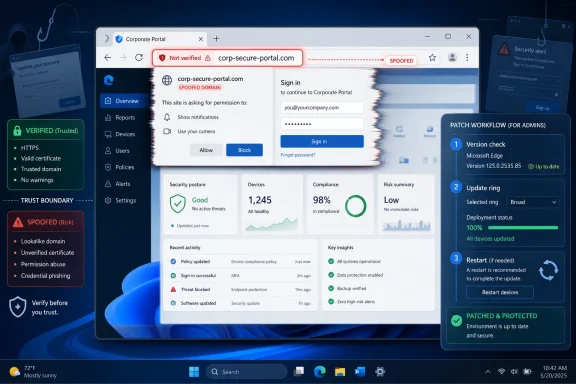
Edge’s job is not simply to render HTML quickly. It is to mediate identity: the address bar, permission prompts, authentication windows, certificate indicators, download warnings, installed web apps, enterprise sign-in pages, and the subtle chrome around a page all tell users whether they are dealing with Microsoft 365, a bank, an internal admin portal, or a counterfeit. A spoofing vulnerability is an attack on that mediation layer.
Microsoft’s Security Update Guide classifies CVE-2026-58282 as a Microsoft Edge Chromium-based spoofing vulnerability. The public material does not need to expose exploit mechanics to be useful. In fact, the advisory’s restraint is part of the security model: confirm the bug, tell defenders what product is affected, publish the remediation path, and avoid handing phishers a polished storyboard.
That restraint frustrates researchers and administrators who want to know exactly what broke. But it also reflects the awkward balance of browser disclosure in 2026. The more visual and interaction-based a flaw is, the easier it can be to reproduce once the trick is described plainly.
That is why browser spoofing bugs remain stubbornly relevant even after years of hardening. Browsers have isolated renderer processes, tightened extension APIs, adopted site isolation, added stronger download warnings, and made certificate failures more visible. Yet the web remains full of ambiguous surfaces: pop-ups that look like system dialogs, single sign-on flows that cross domains, PWA windows with minimal browser chrome, QR-code sign-ins, passkey prompts, captive portals, and identity pages embedded in enterprise workflows.
Chromium-based Edge inherits both the strengths and the attack surface of Chromium. Microsoft ships its own browser features, enterprise controls, Microsoft account integration, Defender SmartScreen plumbing, and Windows integration on top of a shared engine. That makes Edge both a Chromium browser and a Microsoft platform endpoint. A spoofing bug in that environment can sit at the seam between web content and trusted browser UI.
The practical concern is not that every spoofing CVE becomes a mass-exploitation event. Most do not. The concern is that spoofing flaws age badly in environments where attackers already rely on social engineering. A clever login lure that also abuses a browser UI weakness can turn a merely suspicious page into a convincing one.
Those questions are not the same. A severe vulnerability with murky evidence can be difficult to prioritize, while a moderate vulnerability confirmed by the vendor may deserve immediate routine patching because the uncertainty is gone. CVE-2026-58282 belongs in the latter conversation: the vendor has acknowledged the class of issue, assigned a CVE, and published it through the official Microsoft channel.
The metric also hints at attacker knowledge. If only the existence of a flaw is public, attackers may have to reverse-engineer patches or rediscover the trigger. If technical details are available through research, issue trackers, proof-of-concept code, or patch diffs, the barrier falls. A vendor-confirmed browser spoofing issue with limited public detail is therefore not harmless; it is a race in which defenders get a head start.
For enterprises, that distinction matters. Patch queues are full of scary names, inflated scores, and duplicate scanner findings. A confidence signal helps separate “possible exposure inferred by a tool” from “confirmed vulnerability in a product we run every day.”
The blessing is speed. Browser vendors can ship fixes outside the traditional Windows monthly rhythm, and Edge can absorb Chromium security work quickly. This is essential because the browser is one of the most exposed applications on any Windows machine. It is where email links land, where SaaS consoles run, where password managers appear, and where identity sessions persist.
The burden is fleet reality. Edge may update automatically for consumers, but enterprises often run managed update rings, deferred rollouts, application compatibility testing, virtual desktop images, kiosk builds, and offline systems. A browser CVE can be “fixed” in the vendor ecosystem while still existing on thousands of endpoints that have not yet restarted or crossed a maintenance window.
Extended Stable helps organizations slow feature churn, but it does not remove the obligation to take security fixes. Microsoft’s Edge channel guidance makes clear that Extended Stable is meant to preserve security servicing while reducing the frequency of feature updates. That matters for CVE-2026-58282 because spoofing fixes are exactly the kind of browser patch that should not wait for a quarterly desktop refresh.
Consider the ordinary enterprise browser session. A user clicks a Teams message, lands on a Microsoft 365 login page, approves a conditional-access prompt, opens a SharePoint document, authorizes a third-party app, and maybe downloads a file. Each step depends on visual trust. If a spoofing flaw distorts that trust boundary, the attacker does not need to defeat cryptography; the attacker needs the user to believe the browser is saying something it is not.
That is why spoofing flaws matter even when the CVSS score is not eye-watering. They live in the same ecosystem as adversary-in-the-middle phishing kits, fake OAuth consent screens, session-token theft, and help-desk social engineering. The vulnerability is not necessarily the whole attack. It may be the polish that makes an existing attack work better.
This is also why administrators should resist the temptation to rank CVE-2026-58282 purely by severity label. Severity is a useful sorting mechanism, not a substitute for environmental judgment. In an organization where Edge is the default browser, Microsoft 365 is the identity hub, and users frequently approve web-based prompts, a spoofing fix deserves attention.
But there is a defensible reason for this minimalism. Spoofing bugs are frequently demonstration-sensitive. A few sentences explaining the exact UI confusion, the required timing, or the affected interaction surface can turn an advisory into a phishing playbook. Microsoft is not alone in being cautious here; browser vendors routinely delay detailed bug discussion until patches have propagated.
The downside is operational ambiguity. Security teams must decide whether to issue user warnings, accelerate browser updates, disable a feature, or simply rely on normal patch cadence. Without exploit details, the default answer should be conservative but not theatrical: verify versions, close update gaps, and reinforce user caution around unexpected authentication and permission prompts.
The advisory’s confidence framing helps here. It tells defenders that this is not rumor, but it does not imply a known active campaign unless Microsoft says so. That distinction should shape the response. Treat it as confirmed and patchable, not as proof that every strange login page seen this week was exploiting CVE-2026-58282.
Edge sits at a crossroads of corporate identity, cloud apps, local files, password storage, WebView2 dependencies, and Windows-integrated features. A flaw in Edge is not merely a flaw in one application; it can affect the experience of signing into work, approving device access, managing Azure or Microsoft 365, and launching web apps pinned like native software. The browser has become part of the operating environment.
That is particularly true on managed Windows 11 systems where Edge is deeply integrated into Microsoft’s enterprise story. Edge for Business profiles, policy controls, Defender integrations, and Microsoft Entra sign-in flows all make the browser a managed security surface. A spoofing vulnerability in that context is not just about a fake website. It is about whether the managed browser can reliably distinguish trusted experience from attacker-controlled content.
Administrators should therefore treat browser updates with the same seriousness they bring to endpoint detection agents and VPN clients. If Edge is allowed to lag, the organization is leaving a high-frequency attack surface behind the rest of its patch program.
That last point is important. Browser updates often require a restart of the browser, and some users keep sessions alive for days. A machine can have the update staged but not fully active in every running process. For virtual desktops, persistent kiosk sessions, and shared workstations, the gap between “available” and “actually running” can be wider than policy dashboards suggest.
Enterprises should also pay attention to WebView2 Runtime servicing. While CVE-2026-58282 is identified as an Edge vulnerability, many Windows applications rely on Microsoft’s Chromium-based WebView2 runtime to render web content inside desktop apps. Not every browser CVE maps directly to WebView2 exposure, but the shared engine reality means security teams should avoid treating Edge as a standalone island.
For consumers, the advice is simpler: let Edge update, restart it, and be suspicious of pages that pressure immediate login, payment, MFA approval, or file download. That advice sounds generic because spoofing is generic by design. The attack works by making the abnormal look normal.
The mistake is to treat spoofing as “just phishing” and dump the whole burden on users. If the browser misrepresents critical information, users are being asked to make decisions with corrupted evidence. That is a product-security issue first and a human-awareness issue second. Microsoft’s job is to fix the interface boundary; the organization’s job is to deploy the fix and reduce exposure to similar tricks.
Practical controls still matter. Passwordless authentication can reduce the value of stolen passwords, but it does not eliminate consent phishing or session theft. Conditional access can block some suspicious sign-ins, but it may not help if a user is tricked inside a legitimate session. Browser isolation, SmartScreen, DNS filtering, and safe-link rewriting can reduce contact with known malicious infrastructure, but they cannot guarantee that a fresh spoofing lure will be blocked.
The layered answer is boring because it is correct. Keep Edge current, harden identity, monitor anomalous sign-ins, limit OAuth consent where possible, and make sure help desks do not normalize urgent out-of-band login requests. CVE-2026-58282 is one entry, but the defensive pattern is broader.
For administrators and Windows enthusiasts, the concrete lessons are straightforward:
 Microsoft’s Small Edge Advisory Carries a Bigger Browser-Trust Problem
Spoofing vulnerabilities rarely get the same attention as memory corruption bugs, sandbox escapes, or full remote code execution chains. They do not usually scream “wormable,” and they often require a user to click, look, approve, or believe something that is not quite true. That can make them sound minor until one remembers that the modern browser is, above all else, a trust machine.Edge’s job is not simply to render HTML quickly. It is to mediate identity: the address bar, permission prompts, authentication windows, certificate indicators, download warnings, installed web apps, enterprise sign-in pages, and the subtle chrome around a page all tell users whether they are dealing with Microsoft 365, a bank, an internal admin portal, or a counterfeit. A spoofing vulnerability is an attack on that mediation layer.
Microsoft’s Security Update Guide classifies CVE-2026-58282 as a Microsoft Edge Chromium-based spoofing vulnerability. The public material does not need to expose exploit mechanics to be useful. In fact, the advisory’s restraint is part of the security model: confirm the bug, tell defenders what product is affected, publish the remediation path, and avoid handing phishers a polished storyboard.
That restraint frustrates researchers and administrators who want to know exactly what broke. But it also reflects the awkward balance of browser disclosure in 2026. The more visual and interaction-based a flaw is, the easier it can be to reproduce once the trick is described plainly.
Spoofing Is the Quiet Failure Mode of the Web Platform
A spoofing flaw does not need to steal memory to steal trust. If an attacker can make a malicious page look as though it belongs to a legitimate origin, or make a browser prompt appear to mean something safer than it actually means, the attacker may not need a deeper exploit at all. The human is the escalation path.That is why browser spoofing bugs remain stubbornly relevant even after years of hardening. Browsers have isolated renderer processes, tightened extension APIs, adopted site isolation, added stronger download warnings, and made certificate failures more visible. Yet the web remains full of ambiguous surfaces: pop-ups that look like system dialogs, single sign-on flows that cross domains, PWA windows with minimal browser chrome, QR-code sign-ins, passkey prompts, captive portals, and identity pages embedded in enterprise workflows.
Chromium-based Edge inherits both the strengths and the attack surface of Chromium. Microsoft ships its own browser features, enterprise controls, Microsoft account integration, Defender SmartScreen plumbing, and Windows integration on top of a shared engine. That makes Edge both a Chromium browser and a Microsoft platform endpoint. A spoofing bug in that environment can sit at the seam between web content and trusted browser UI.
The practical concern is not that every spoofing CVE becomes a mass-exploitation event. Most do not. The concern is that spoofing flaws age badly in environments where attackers already rely on social engineering. A clever login lure that also abuses a browser UI weakness can turn a merely suspicious page into a convincing one.
The Vulnerability-Confidence Metric Is Doing More Work Than It Seems
The text supplied with the advisory describes a metric that measures confidence in the existence of a vulnerability and the credibility of known technical details. That sounds bureaucratic, but it is actually useful. Security teams often confuse two different questions: “How bad would exploitation be?” and “How sure are we that the bug exists and is understood?”Those questions are not the same. A severe vulnerability with murky evidence can be difficult to prioritize, while a moderate vulnerability confirmed by the vendor may deserve immediate routine patching because the uncertainty is gone. CVE-2026-58282 belongs in the latter conversation: the vendor has acknowledged the class of issue, assigned a CVE, and published it through the official Microsoft channel.
The metric also hints at attacker knowledge. If only the existence of a flaw is public, attackers may have to reverse-engineer patches or rediscover the trigger. If technical details are available through research, issue trackers, proof-of-concept code, or patch diffs, the barrier falls. A vendor-confirmed browser spoofing issue with limited public detail is therefore not harmless; it is a race in which defenders get a head start.
For enterprises, that distinction matters. Patch queues are full of scary names, inflated scores, and duplicate scanner findings. A confidence signal helps separate “possible exposure inferred by a tool” from “confirmed vulnerability in a product we run every day.”
Edge’s Chromium Base Makes the Patch Story Faster and Messier
Microsoft Edge now lives on a browser release treadmill that is separate from Windows feature releases. Microsoft’s own Edge documentation says the browser follows a modern lifecycle model, with security and servicing updates available on supported current channels, and it describes Stable and Extended Stable cadences for organizations that need different levels of change control. That cadence is a blessing and a burden.The blessing is speed. Browser vendors can ship fixes outside the traditional Windows monthly rhythm, and Edge can absorb Chromium security work quickly. This is essential because the browser is one of the most exposed applications on any Windows machine. It is where email links land, where SaaS consoles run, where password managers appear, and where identity sessions persist.
The burden is fleet reality. Edge may update automatically for consumers, but enterprises often run managed update rings, deferred rollouts, application compatibility testing, virtual desktop images, kiosk builds, and offline systems. A browser CVE can be “fixed” in the vendor ecosystem while still existing on thousands of endpoints that have not yet restarted or crossed a maintenance window.
Extended Stable helps organizations slow feature churn, but it does not remove the obligation to take security fixes. Microsoft’s Edge channel guidance makes clear that Extended Stable is meant to preserve security servicing while reducing the frequency of feature updates. That matters for CVE-2026-58282 because spoofing fixes are exactly the kind of browser patch that should not wait for a quarterly desktop refresh.
The Real Risk Is Not the CVE Alone but the Campaign It Could Enable
No serious defender should describe every spoofing vulnerability as a catastrophe. That would be lazy and, worse, it would make security warnings less credible. CVE-2026-58282 should instead be treated as a force multiplier for scams, credential theft, and workflow deception.Consider the ordinary enterprise browser session. A user clicks a Teams message, lands on a Microsoft 365 login page, approves a conditional-access prompt, opens a SharePoint document, authorizes a third-party app, and maybe downloads a file. Each step depends on visual trust. If a spoofing flaw distorts that trust boundary, the attacker does not need to defeat cryptography; the attacker needs the user to believe the browser is saying something it is not.
That is why spoofing flaws matter even when the CVSS score is not eye-watering. They live in the same ecosystem as adversary-in-the-middle phishing kits, fake OAuth consent screens, session-token theft, and help-desk social engineering. The vulnerability is not necessarily the whole attack. It may be the polish that makes an existing attack work better.
This is also why administrators should resist the temptation to rank CVE-2026-58282 purely by severity label. Severity is a useful sorting mechanism, not a substitute for environmental judgment. In an organization where Edge is the default browser, Microsoft 365 is the identity hub, and users frequently approve web-based prompts, a spoofing fix deserves attention.
Microsoft’s Disclosure Style Protects Users but Leaves Admins Reading Between the Lines
The MSRC model often gives defenders enough to act but not enough to satisfy curiosity. That is especially true for browser bugs. A short advisory can feel thin when a vulnerability scanner flags thousands of devices and executives ask whether the company is exposed.But there is a defensible reason for this minimalism. Spoofing bugs are frequently demonstration-sensitive. A few sentences explaining the exact UI confusion, the required timing, or the affected interaction surface can turn an advisory into a phishing playbook. Microsoft is not alone in being cautious here; browser vendors routinely delay detailed bug discussion until patches have propagated.
The downside is operational ambiguity. Security teams must decide whether to issue user warnings, accelerate browser updates, disable a feature, or simply rely on normal patch cadence. Without exploit details, the default answer should be conservative but not theatrical: verify versions, close update gaps, and reinforce user caution around unexpected authentication and permission prompts.
The advisory’s confidence framing helps here. It tells defenders that this is not rumor, but it does not imply a known active campaign unless Microsoft says so. That distinction should shape the response. Treat it as confirmed and patchable, not as proof that every strange login page seen this week was exploiting CVE-2026-58282.
The Windows Endpoint Is Now a Browser Endpoint
For years, Windows security conversations centered on the operating system: kernel bugs, SMB flaws, print spooler issues, Active Directory abuse, and Office document macros. Those still matter. But for many users, the browser is now the most privileged daily interface they touch.Edge sits at a crossroads of corporate identity, cloud apps, local files, password storage, WebView2 dependencies, and Windows-integrated features. A flaw in Edge is not merely a flaw in one application; it can affect the experience of signing into work, approving device access, managing Azure or Microsoft 365, and launching web apps pinned like native software. The browser has become part of the operating environment.
That is particularly true on managed Windows 11 systems where Edge is deeply integrated into Microsoft’s enterprise story. Edge for Business profiles, policy controls, Defender integrations, and Microsoft Entra sign-in flows all make the browser a managed security surface. A spoofing vulnerability in that context is not just about a fake website. It is about whether the managed browser can reliably distinguish trusted experience from attacker-controlled content.
Administrators should therefore treat browser updates with the same seriousness they bring to endpoint detection agents and VPN clients. If Edge is allowed to lag, the organization is leaving a high-frequency attack surface behind the rest of its patch program.
Version Verification Beats Advisory Anxiety
The most useful response to CVE-2026-58282 is not speculation about the exploit. It is version verification. On individual machines, users can check Edge’s built-in update page and allow the browser to fetch and apply available updates. In managed environments, administrators should confirm deployment through their chosen tooling rather than assume automatic updates have completed.That last point is important. Browser updates often require a restart of the browser, and some users keep sessions alive for days. A machine can have the update staged but not fully active in every running process. For virtual desktops, persistent kiosk sessions, and shared workstations, the gap between “available” and “actually running” can be wider than policy dashboards suggest.
Enterprises should also pay attention to WebView2 Runtime servicing. While CVE-2026-58282 is identified as an Edge vulnerability, many Windows applications rely on Microsoft’s Chromium-based WebView2 runtime to render web content inside desktop apps. Not every browser CVE maps directly to WebView2 exposure, but the shared engine reality means security teams should avoid treating Edge as a standalone island.
For consumers, the advice is simpler: let Edge update, restart it, and be suspicious of pages that pressure immediate login, payment, MFA approval, or file download. That advice sounds generic because spoofing is generic by design. The attack works by making the abnormal look normal.
Security Teams Should Patch the Browser and the Habit
A spoofing advisory is a reminder that patching software and training users are not competing strategies. They cover different failure modes. The patch removes a known weakness in the browser; user education reduces the chance that a future visual trick succeeds before a patch exists.The mistake is to treat spoofing as “just phishing” and dump the whole burden on users. If the browser misrepresents critical information, users are being asked to make decisions with corrupted evidence. That is a product-security issue first and a human-awareness issue second. Microsoft’s job is to fix the interface boundary; the organization’s job is to deploy the fix and reduce exposure to similar tricks.
Practical controls still matter. Passwordless authentication can reduce the value of stolen passwords, but it does not eliminate consent phishing or session theft. Conditional access can block some suspicious sign-ins, but it may not help if a user is tricked inside a legitimate session. Browser isolation, SmartScreen, DNS filtering, and safe-link rewriting can reduce contact with known malicious infrastructure, but they cannot guarantee that a fresh spoofing lure will be blocked.
The layered answer is boring because it is correct. Keep Edge current, harden identity, monitor anomalous sign-ins, limit OAuth consent where possible, and make sure help desks do not normalize urgent out-of-band login requests. CVE-2026-58282 is one entry, but the defensive pattern is broader.
The Edge Fix That Matters Is the One Actually Running
CVE-2026-58282 will not be remembered as the biggest Microsoft security event of 2026 unless later evidence shows active exploitation or a particularly clever abuse path. Its importance is more ordinary and more durable: it shows how much of Windows security now depends on fast-moving browser code and subtle user-interface guarantees.For administrators and Windows enthusiasts, the concrete lessons are straightforward:
- Microsoft has acknowledged CVE-2026-58282 as a Chromium-based Microsoft Edge spoofing vulnerability through the Security Update Guide.
- The vulnerability-confidence framing means defenders should treat the issue as confirmed, even if public technical detail remains limited.
- Spoofing bugs matter because they can strengthen phishing, credential-theft, consent-abuse, and social-engineering campaigns.
- Edge updates should be verified by installed and running version, not assumed from policy intent or update availability.
- Managed environments using Stable or Extended Stable still need timely security servicing, because slower feature cadence is not a license to defer browser security fixes.
- User training should reinforce skepticism around unexpected login, permission, MFA, and download prompts, but it should not replace patch deployment.
References
- Primary source: MSRC
Published: 2026-07-03T07:00:00-07:00
Security Update Guide - Microsoft Security Response Center
 msrc.microsoft.com
- Related coverage: securityvulnerability.io
CVE-2026-33118 : Spoofing Vulnerability in Microsoft Edge by Microsoft
Discover the Microsoft Edge spoofing vulnerability affecting users. Learn how to protect against CVE-2026-33118.securityvulnerability.io - Related coverage: datacomm.com
- Related coverage: sentinelone.com
CVE-2026-33118: Microsoft Edge Chromium Spoofing Vulnerability
CVE-2026-33118 is a spoofing vulnerability in Microsoft Edge Chromium. Learn about its impact, affected versions, and mitigation methods.www.sentinelone.com
- Related coverage: windowsforum.com
CVE-2026-2322 Explained: Patch Status in Edge Chromium and UI Spoofing | Windows Forum
Chromium’s CVE-2026-2322 is showing up in Microsoft’s Security Update Guide because Microsoft Edge (the Chromium‑based browser) consumes Chromium’s...windowsforum.com - Related coverage: www2.gov.bc.ca
- Related coverage: hivepro.com
- Related coverage: manuals.supernaeyeglass.com
- Related coverage: buildings.honeywell.com
The purpose of this document is to identify the patches that have been delivered by Microsoft® which have been tested against Pro-Watch
PDF documentbuildings.honeywell.com
