

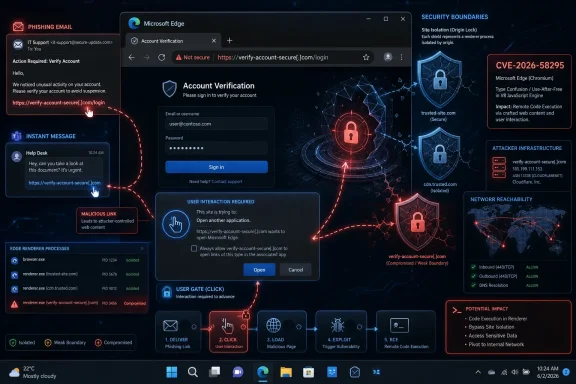
An attacker could exploit CVE-2026-58295 over the network by luring a Microsoft Edge user to an attacker-controlled, specially crafted website that triggers a Chromium-based Edge security feature bypass, with the practical delivery usually arriving through email, instant messaging, or a malicious attachment. Microsoft’s Security Response Center describes this as a network-reachable issue, but not one where the attacker can simply push exploitation onto a machine without the user crossing the browser’s threshold. That distinction matters: this is not wormable browser magic; it is the familiar, uncomfortable middle ground where modern browser security depends on both patched code and human behavior. The risk is that “just don’t click” remains a weak enterprise control when browsers are now the operating system’s front door.
CVE-2026-58295 is classified by Microsoft as a Microsoft Edge, Chromium-based, security feature bypass vulnerability. The phrase sounds narrower than remote code execution, and in some environments it will be triaged that way. That would be a mistake.
A security feature bypass is often a failure of the browser’s promise rather than a failure of its rendering engine alone. Edge is expected to enforce rules around site isolation, origin boundaries, file handling, identity prompts, sandboxing, user consent, and other invisible guardrails that keep web content from becoming system content. When one of those guardrails fails, the attacker may not need to own the whole browser in one move; they may only need to make Edge trust something it should distrust.
Microsoft’s own scenario is blunt: the attacker hosts crafted web content and convinces the victim to view it. That is the network vector in plain English. The payload lives on a remote site, but the trigger is a browsing action.
This is why the “Network” label can be misleading to non-specialists. In CVSS language, network reachability means the attack can be carried out remotely over a network path. It does not necessarily mean the attacker can exploit every vulnerable endpoint automatically, without persuasion, browsing, redirection, or a secondary social-engineering step.
That makes CVE-2026-58295 a browser vulnerability with a phishing-shaped front end. The attacker’s goal is to move the user from a trusted context into an attacker-controlled one. A link in a Teams message, a fake invoice notification, a compromised supplier email, a QR code in a PDF, or a “view secure document” landing page all fit the pattern.
The attacker does not need to force the user’s machine to connect to the malicious site. They need to make the click feel ordinary. In corporate environments, that is not a theoretical bar; it is Tuesday morning.
This is the recurring problem with browser bugs in 2026. Enterprise security teams have made enormous progress blocking executables, macros, and obvious malware attachments. Attackers have responded by moving more of the early-stage action into the browser, where opening a link remains normal business behavior.
But user interaction is not a strong safety margin when the required action is simply viewing a webpage. Users view webpages constantly, often from links they did not personally verify, in workflows that reward speed over suspicion. The attacker does not need administrator credentials, lateral movement, or physical access to begin the attempt; they need a plausible pretext.
That pretext can be especially convincing when the malicious content is hosted on compromised infrastructure rather than an obviously suspicious domain. A link from a hijacked vendor account or a legitimate marketing platform can defeat many of the mental shortcuts users rely on. By the time Edge is asked to process the crafted content, the social engineering has already done its job.
This is why defenders should read “user interaction required” as a prioritization signal, not a dismissal. It reduces the probability of mass autonomous exploitation. It does not eliminate targeted exploitation, help-desk impersonation, business-email compromise, or watering-hole scenarios.
The downside is that Chromium-family vulnerabilities have a large audience. Attackers who understand Chrome-class browser internals can often reason quickly about Edge-class impact, especially when the vulnerable component sits in shared code or in Microsoft’s Chromium integration layer. Even when a bug is Edge-specific, the browser’s architecture and attack surface are familiar territory.
CVE-2026-58295 has been described in public vulnerability databases as involving type confusion, mapped to incompatible access to a resource. That is the sort of low-level language that should make administrators careful about over-interpreting the label “security feature bypass.” Type confusion flaws can range from contained logic errors to memory-safety problems that become useful primitives in a larger chain.
Microsoft’s public entry, as summarized in its Security Update Guide, is more conservative: it tells defenders the vulnerability can be exploited over the network via crafted web content and user action. That is enough for patch prioritization. It is not enough to reverse-engineer the bug, and that is by design.
That uncertainty is part of the risk. A browser security feature is rarely valuable in isolation; it is valuable because it interrupts chains. If an attacker can bypass one layer, they may combine it with another bug, a credential-harvesting page, a malicious extension prompt, or a file-delivery trick. The bypass may be the hinge that turns a nuisance into an intrusion.
For Windows users, Edge is also more than a browser icon on the taskbar. It is tied into WebView2 applications, enterprise identity flows, PDF handling, SharePoint workflows, Microsoft 365 links, and single sign-on behavior. A vulnerability in Edge’s security boundary therefore touches more daily workflows than “web browsing” suggests.
For administrators, the question is not only whether users prefer Edge. The question is where Edge components are invoked implicitly. If line-of-business apps rely on embedded web views or managed browser policies, a browser security update becomes part of endpoint hygiene, not a consumer-app patch.
There may be no dramatic file download. There may be no obvious malware prompt. Depending on the bypass, the visible result could be a normal-looking page, a failed load, a redirect, or a login lure that completes the attacker’s goal after the browser’s protective assumptions have already been weakened.
That is why web-delivered vulnerabilities are difficult to explain to users. “Do not open suspicious attachments” is simple. “Do not view a webpage that may contain crafted content capable of bypassing a browser security feature under conditions Microsoft has not fully disclosed” is not a training message; it is a patch-management requirement pretending to be user education.
The better user-facing guidance is narrower: be suspicious of unexpected links that ask you to authenticate, download, approve, or view sensitive documents. But the real mitigation belongs elsewhere. The browser needs to be updated before the user is asked to be perfect.
But Edge’s update model exists because the browser is exposed to hostile input by design. A browser that does not rapidly process untrusted code from the internet is not a browser. Delaying browser security updates therefore carries a different risk profile than delaying a feature update to a desktop utility.
Microsoft’s Edge Stable Channel was already listing version 150.0.4078.x releases around the time this CVE appeared, and public vulnerability mirrors identify versions before 150.0.4078.48 as affected. Administrators should verify against Microsoft’s own Security Update Guide and Edge release notes rather than relying on third-party mirrors for final applicability. The operational target is simple: make sure managed Edge installations have received the fixed build Microsoft associates with this advisory.
The hard part is measurement. It is not enough to assume Windows Update handled it. Edge can be updated through EdgeUpdate, enterprise deployment tools, configuration management platforms, or packaged offline installers. If your inventory cannot tell you which Edge build is installed across endpoints, CVE-2026-58295 is also a visibility test.
That does not mean every Edge bypass leads to domain compromise. It means defenders should not evaluate browser vulnerabilities solely by whether they drop malware. A bypass that exposes data, weakens origin assumptions, or helps a phishing flow defeat a browser warning can still create a meaningful breach path.
Conditional access, phishing-resistant authentication, device compliance checks, and least-privilege admin models all reduce the payoff. So do modern endpoint detection tools that monitor suspicious browser child processes, token theft patterns, and unusual network flows. But those controls are compensating layers, not substitutes for patching the browser.
The uncomfortable truth is that browser security has become identity security. Once the browser is where the user authenticates, approves, reads, signs, and administers, a browser boundary failure becomes a business boundary failure.
That matters for incident response. If an organization later discovers exposure to CVE-2026-58295, the logs to examine are not only endpoint version inventories. Investigators should also look at email security telemetry, URL detonation results, proxy logs, DNS queries, browser history where legally and operationally appropriate, and identity events around suspicious sessions.
The most useful question is not “Did anyone click?” It is “Did any vulnerable Edge client load attacker-controlled content during the exposure window?” That is harder to answer, but closer to the real risk.
This also affects tabletop exercises. A browser bypass delivered through a link will not always produce a neat malware alert. The first observable sign may be an unusual sign-in, an OAuth grant, an unexpected file access, or a user report about a strange document portal. Treating browser exploitation as a purely endpoint event misses the cloud trail.
Edge normally updates in the background, but the browser still needs to close and relaunch to complete many updates. Users who leave browsers open for weeks may remain exposed longer than they think. Checking the About Microsoft Edge page is still one of the simplest ways to force the issue.
The social-engineering guidance remains familiar because the attacks remain familiar. Unexpected messages that create urgency, ask for sign-in, claim a document is waiting, or redirect through multiple pages deserve suspicion. That is not because users can reliably detect exploit pages, but because reducing visits to attacker-controlled pages reduces exposure to browser bugs generally.
Still, the burden should not be placed mainly on end users. The web is too complex and business communication too link-heavy for “be careful” to function as a primary defense. Browser patching is the control that scales.
The browser now changes too quickly and carries too much security responsibility to be treated as an accessory. Edge policies, update rings, rollback plans, and compatibility testing should be part of routine endpoint operations. The organizations that can move Edge security updates quickly without breaking business workflows have an advantage attackers can feel.
Extended Stable channels can be useful, but they are not an excuse to ignore emergency or security-driven updates. The point of a managed channel is controlled reliability, not indefinite delay. If a fixed Edge build is available for the relevant channel, the question becomes how fast the organization can validate and deploy it.
There is also a communications lesson. Telling users “do not click suspicious links” after a browser CVE is not wrong, but it is incomplete. A better internal advisory says the organization is updating Edge, explains that malicious websites may be used for exploitation, and reminds users to report unexpected authentication prompts or document links. That frames users as sensors, not scapegoats.
 Microsoft’s Edge Warning Is Really About the Browser as a Trust Boundary
CVE-2026-58295 is classified by Microsoft as a Microsoft Edge, Chromium-based, security feature bypass vulnerability. The phrase sounds narrower than remote code execution, and in some environments it will be triaged that way. That would be a mistake.A security feature bypass is often a failure of the browser’s promise rather than a failure of its rendering engine alone. Edge is expected to enforce rules around site isolation, origin boundaries, file handling, identity prompts, sandboxing, user consent, and other invisible guardrails that keep web content from becoming system content. When one of those guardrails fails, the attacker may not need to own the whole browser in one move; they may only need to make Edge trust something it should distrust.
Microsoft’s own scenario is blunt: the attacker hosts crafted web content and convinces the victim to view it. That is the network vector in plain English. The payload lives on a remote site, but the trigger is a browsing action.
This is why the “Network” label can be misleading to non-specialists. In CVSS language, network reachability means the attack can be carried out remotely over a network path. It does not necessarily mean the attacker can exploit every vulnerable endpoint automatically, without persuasion, browsing, redirection, or a secondary social-engineering step.
The Exploit Chain Starts Before Edge Parses the Page
The most important part of the attack is not necessarily the JavaScript, the malformed object, or the browser internals. It is the delivery channel. Microsoft’s guidance says the attacker would typically entice the target through email or instant message, or by getting the user to open an attachment sent through email.That makes CVE-2026-58295 a browser vulnerability with a phishing-shaped front end. The attacker’s goal is to move the user from a trusted context into an attacker-controlled one. A link in a Teams message, a fake invoice notification, a compromised supplier email, a QR code in a PDF, or a “view secure document” landing page all fit the pattern.
The attacker does not need to force the user’s machine to connect to the malicious site. They need to make the click feel ordinary. In corporate environments, that is not a theoretical bar; it is Tuesday morning.
This is the recurring problem with browser bugs in 2026. Enterprise security teams have made enormous progress blocking executables, macros, and obvious malware attachments. Attackers have responded by moving more of the early-stage action into the browser, where opening a link remains normal business behavior.
“User Interaction Required” Is Not a Comfort Blanket
Microsoft’s scenario emphasizes that an attacker has no way to force a user to view attacker-controlled content. That is technically meaningful and operationally useful. It means defenders should not treat this as the same class of threat as an unauthenticated service bug exposed directly to the internet.But user interaction is not a strong safety margin when the required action is simply viewing a webpage. Users view webpages constantly, often from links they did not personally verify, in workflows that reward speed over suspicion. The attacker does not need administrator credentials, lateral movement, or physical access to begin the attempt; they need a plausible pretext.
That pretext can be especially convincing when the malicious content is hosted on compromised infrastructure rather than an obviously suspicious domain. A link from a hijacked vendor account or a legitimate marketing platform can defeat many of the mental shortcuts users rely on. By the time Edge is asked to process the crafted content, the social engineering has already done its job.
This is why defenders should read “user interaction required” as a prioritization signal, not a dismissal. It reduces the probability of mass autonomous exploitation. It does not eliminate targeted exploitation, help-desk impersonation, business-email compromise, or watering-hole scenarios.
The Chromium Factor Cuts Both Ways
Because Edge is Chromium-based, its security story is tied to a massive, fast-moving browser ecosystem. That is generally good news. Chromium receives intense scrutiny from Google, Microsoft, independent researchers, and offensive security teams; vulnerabilities are found, patched, and shipped at a tempo that old browser platforms could not match.The downside is that Chromium-family vulnerabilities have a large audience. Attackers who understand Chrome-class browser internals can often reason quickly about Edge-class impact, especially when the vulnerable component sits in shared code or in Microsoft’s Chromium integration layer. Even when a bug is Edge-specific, the browser’s architecture and attack surface are familiar territory.
CVE-2026-58295 has been described in public vulnerability databases as involving type confusion, mapped to incompatible access to a resource. That is the sort of low-level language that should make administrators careful about over-interpreting the label “security feature bypass.” Type confusion flaws can range from contained logic errors to memory-safety problems that become useful primitives in a larger chain.
Microsoft’s public entry, as summarized in its Security Update Guide, is more conservative: it tells defenders the vulnerability can be exploited over the network via crafted web content and user action. That is enough for patch prioritization. It is not enough to reverse-engineer the bug, and that is by design.
The Attack Is Remote, but the Blast Radius Depends on the Bypass
Not every security feature bypass has the same consequence. Some bypass a warning prompt. Some weaken site isolation. Some allow access to data that should have remained fenced off. Some make a later exploit more reliable.That uncertainty is part of the risk. A browser security feature is rarely valuable in isolation; it is valuable because it interrupts chains. If an attacker can bypass one layer, they may combine it with another bug, a credential-harvesting page, a malicious extension prompt, or a file-delivery trick. The bypass may be the hinge that turns a nuisance into an intrusion.
For Windows users, Edge is also more than a browser icon on the taskbar. It is tied into WebView2 applications, enterprise identity flows, PDF handling, SharePoint workflows, Microsoft 365 links, and single sign-on behavior. A vulnerability in Edge’s security boundary therefore touches more daily workflows than “web browsing” suggests.
For administrators, the question is not only whether users prefer Edge. The question is where Edge components are invoked implicitly. If line-of-business apps rely on embedded web views or managed browser policies, a browser security update becomes part of endpoint hygiene, not a consumer-app patch.
The Practical Exploit Scenario Is Boring, Which Is Why It Works
A plausible attack chain would look mundane. The attacker registers or compromises a domain, builds a page designed to trigger the Edge vulnerability, and sends a message crafted around a business process: payroll, shipping, HR, procurement, legal review, or account verification. The victim clicks, Edge loads the content, and the vulnerability is exercised inside the browser context.There may be no dramatic file download. There may be no obvious malware prompt. Depending on the bypass, the visible result could be a normal-looking page, a failed load, a redirect, or a login lure that completes the attacker’s goal after the browser’s protective assumptions have already been weakened.
That is why web-delivered vulnerabilities are difficult to explain to users. “Do not open suspicious attachments” is simple. “Do not view a webpage that may contain crafted content capable of bypassing a browser security feature under conditions Microsoft has not fully disclosed” is not a training message; it is a patch-management requirement pretending to be user education.
The better user-facing guidance is narrower: be suspicious of unexpected links that ask you to authenticate, download, approve, or view sensitive documents. But the real mitigation belongs elsewhere. The browser needs to be updated before the user is asked to be perfect.
Edge Update Discipline Is the Real Control
For most home users, Edge updates itself. For enterprises, the answer is more complicated because update channels, rings, compatibility testing, and change freezes all create friction. That friction is understandable, especially in environments where browser updates can break legacy web apps or embedded workflows.But Edge’s update model exists because the browser is exposed to hostile input by design. A browser that does not rapidly process untrusted code from the internet is not a browser. Delaying browser security updates therefore carries a different risk profile than delaying a feature update to a desktop utility.
Microsoft’s Edge Stable Channel was already listing version 150.0.4078.x releases around the time this CVE appeared, and public vulnerability mirrors identify versions before 150.0.4078.48 as affected. Administrators should verify against Microsoft’s own Security Update Guide and Edge release notes rather than relying on third-party mirrors for final applicability. The operational target is simple: make sure managed Edge installations have received the fixed build Microsoft associates with this advisory.
The hard part is measurement. It is not enough to assume Windows Update handled it. Edge can be updated through EdgeUpdate, enterprise deployment tools, configuration management platforms, or packaged offline installers. If your inventory cannot tell you which Edge build is installed across endpoints, CVE-2026-58295 is also a visibility test.
Security Feature Bypasses Punish Flat Trust
Security feature bypasses often become more dangerous in environments that already over-trust browser sessions. If a user’s browser is the gateway to email, files, password vaults, SaaS admin consoles, internal dashboards, and privileged workflows, weakening the browser’s security model can have consequences far beyond the local endpoint.That does not mean every Edge bypass leads to domain compromise. It means defenders should not evaluate browser vulnerabilities solely by whether they drop malware. A bypass that exposes data, weakens origin assumptions, or helps a phishing flow defeat a browser warning can still create a meaningful breach path.
Conditional access, phishing-resistant authentication, device compliance checks, and least-privilege admin models all reduce the payoff. So do modern endpoint detection tools that monitor suspicious browser child processes, token theft patterns, and unusual network flows. But those controls are compensating layers, not substitutes for patching the browser.
The uncomfortable truth is that browser security has become identity security. Once the browser is where the user authenticates, approves, reads, signs, and administers, a browser boundary failure becomes a business boundary failure.
The Social Engineering Layer Is Part of the Vulnerability’s Reality
Microsoft’s advisory language does not accuse users of being careless. It acknowledges how exploitation actually happens. Attackers persuade; browsers parse; security features either hold or fail.That matters for incident response. If an organization later discovers exposure to CVE-2026-58295, the logs to examine are not only endpoint version inventories. Investigators should also look at email security telemetry, URL detonation results, proxy logs, DNS queries, browser history where legally and operationally appropriate, and identity events around suspicious sessions.
The most useful question is not “Did anyone click?” It is “Did any vulnerable Edge client load attacker-controlled content during the exposure window?” That is harder to answer, but closer to the real risk.
This also affects tabletop exercises. A browser bypass delivered through a link will not always produce a neat malware alert. The first observable sign may be an unusual sign-in, an OAuth grant, an unexpected file access, or a user report about a strange document portal. Treating browser exploitation as a purely endpoint event misses the cloud trail.
Home Users Should Patch, Then Stop Treating Links as Harmless
For individual Windows users, the advice is blessedly shorter. Update Edge, restart it, and do not assume that avoiding downloads is enough. A malicious webpage can be the attack surface.Edge normally updates in the background, but the browser still needs to close and relaunch to complete many updates. Users who leave browsers open for weeks may remain exposed longer than they think. Checking the About Microsoft Edge page is still one of the simplest ways to force the issue.
The social-engineering guidance remains familiar because the attacks remain familiar. Unexpected messages that create urgency, ask for sign-in, claim a document is waiting, or redirect through multiple pages deserve suspicion. That is not because users can reliably detect exploit pages, but because reducing visits to attacker-controlled pages reduces exposure to browser bugs generally.
Still, the burden should not be placed mainly on end users. The web is too complex and business communication too link-heavy for “be careful” to function as a primary defense. Browser patching is the control that scales.
Enterprise IT Gets a Patch Test Disguised as a Phishing Test
For sysadmins, CVE-2026-58295 lands in the category of vulnerabilities that reveal whether browser management is mature. Organizations often know their Windows build numbers, Office patch state, and server exposure better than their browser channel drift. That gap is increasingly indefensible.The browser now changes too quickly and carries too much security responsibility to be treated as an accessory. Edge policies, update rings, rollback plans, and compatibility testing should be part of routine endpoint operations. The organizations that can move Edge security updates quickly without breaking business workflows have an advantage attackers can feel.
Extended Stable channels can be useful, but they are not an excuse to ignore emergency or security-driven updates. The point of a managed channel is controlled reliability, not indefinite delay. If a fixed Edge build is available for the relevant channel, the question becomes how fast the organization can validate and deploy it.
There is also a communications lesson. Telling users “do not click suspicious links” after a browser CVE is not wrong, but it is incomplete. A better internal advisory says the organization is updating Edge, explains that malicious websites may be used for exploitation, and reminds users to report unexpected authentication prompts or document links. That frames users as sensors, not scapegoats.
This Edge Bug Leaves Defenders With a Narrow but Concrete Job
The useful reading of CVE-2026-58295 is neither panic nor dismissal. It is a reminder that network-exploitable browser bugs often arrive through ordinary user behavior and ordinary business channels. The right response is to shrink the vulnerable population quickly and reduce the chance that crafted content reaches it.- Organizations should verify Edge build numbers against Microsoft’s Security Update Guide and release documentation, not merely assume automatic updates have completed.
- Administrators should prioritize endpoints where Edge is used for Microsoft 365, privileged SaaS access, administrative portals, or embedded WebView2-heavy business applications.
- Security teams should treat email, messaging, proxy, DNS, and identity logs as relevant evidence if they investigate possible exposure.
- Users should be told that viewing a malicious webpage can be enough to trigger browser exploitation, even when no download or macro is involved.
- Enterprises should use this advisory to test whether their browser update process is as measurable and enforceable as their Windows patch process.
References
- Primary source: MSRC
Published: 2026-07-03T07:00:00-07:00
Security Update Guide - Microsoft Security Response Center
 msrc.microsoft.com
- Related coverage: securityvulnerability.io
CVE-2026-58295 : Type Confusion Vulnerability in Microsoft Edge by Microsoft
Discover the resource access vulnerability in Microsoft Edge affecting Chromium-based browsers. Learn about CVE-2026-58295.securityvulnerability.io - Official source: microsoft.com
MSRC - Microsoft Security Response Center
The Microsoft Security Response Center is part of the defender community and on the front line of security response evolution. For over twenty years, we have been engaged with security researchers working to protect customers and the broader ecosystem.www.microsoft.com
- Related coverage: threats.kaspersky.com
Kaspersky Threats — KLA83531
threats.kaspersky.com
- Related coverage: thewindowsupdate.com
- Related coverage: absolute.com

- Related coverage: buildings.honeywell.com
The purpose of this document is to identify the patches that have been delivered by Microsoft® which have been tested against Pro-Watch
PDF documentbuildings.honeywell.com
- Official source: learn.microsoft.com
Microsoft Edge release notes for Stable Channel | Microsoft Learn
Microsoft Edge release note for the Stable Channellearn.microsoft.com - Official source: developer.microsoft.com

Microsoft Edge WebDriver | Microsoft Edge Developer
developer.microsoft.com
- Related coverage: techspot.com
Microsoft Edge Download Free - 150.0.4078.48 | TechSpot
Download Microsoft Edge - Edge browser lets you enjoy extended battery life and get to what you are looking for quickly.www.techspot.com - Official source: catalog.update.microsoft.com
- Related coverage: www2.gov.bc.ca
- Related coverage: aha.org
h isac tlp white microsoft edge addresses exploited zero day vulnerability cve 2024 7971 8 23 2024
PDF documentwww.aha.org