

Microsoft disclosed CVE-2026-58522 on July 3, 2026, as an Important information disclosure vulnerability in Microsoft Edge for Android, fixed in Edge version 150.0.4078.48 and described by Microsoft’s Security Update Guide as a relative path traversal issue allowing local disclosure of sensitive browser information. The interesting part is not that Edge for Android had a flaw; modern browsers always do. The interesting part is how much risk hides inside the word local when the affected component is a browser that routinely brokers trust between websites, JavaScript, URLs, cookies, files, and user identity.
Microsoft’s own advisory gives defenders enough to act, but not enough to relax. The company says the issue was not publicly disclosed and had not been exploited when published, and it rates exploitation as unlikely. Yet the CVSS vector also says no privileges are required, no user interaction is required, attack complexity is low, and confidentiality impact is high. That combination is exactly why mobile browser bugs deserve more than a shrug from enterprise IT.
The MSRC entry for CVE-2026-58522 is concise, almost antiseptic: relative path traversal in Microsoft Edge for Android can let an unauthorized attacker disclose information locally. Microsoft assigns the vulnerability a CVSS 3.1 base score of 6.8 and a temporal score of 5.9, which keeps it below the panic tier but well above the “patch when convenient” bin for managed mobile fleets.
The phrase “information disclosure” often undersells browser risk. In server software, information disclosure may mean a configuration file leaks or a directory listing becomes visible. In a mobile browser, the disclosed information can sit much closer to a user’s real working life: browser state, data associated with a vulnerable URL, session-adjacent content, or sensitive information exposed to malicious JavaScript.
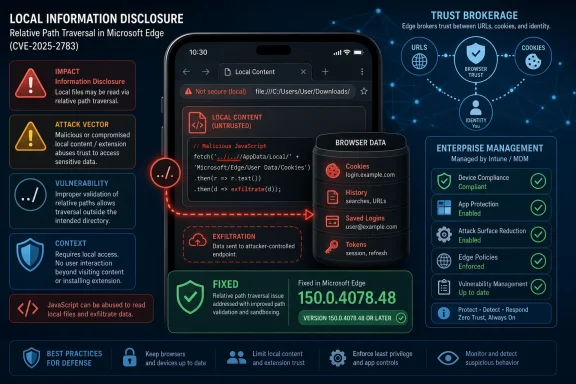
Microsoft’s FAQ is unusually revealing on that point. The company says information in the victim’s browser associated with the vulnerable URL can be read by malicious JavaScript code and sent to the attacker. That is not remote code execution, and it is not a full device compromise. But it is still the kind of boundary failure that can turn a browser from a trust broker into a courier.
The advisory also lists the weakness as CWE-23, relative path traversal. In plain English, that means some component may be tricked into resolving a path somewhere it should not, usually by using relative path elements or crafted resource references. In a browser context, the danger is less about the old caricature of “download a file called secrets.txt” and more about one origin, URL, or local browser context gaining visibility into something it should not be able to read.
For mobile browsers, the distinction can get muddy fast. A browser is a network-facing application that also manages local state, local files, app-specific storage, authentication flows, cached resources, URL handlers, and handoffs between apps. A vulnerability that is “local” in scoring can still be reachable through attacker-controlled content or scripted conditions once the victim’s browser is placed into the right state.
Microsoft’s own vector says user interaction is not required. That is a critical detail. Many browser flaws require the victim to click a link, open a file, scan a QR code, or visit a malicious page. Here, Microsoft’s scoring says exploitation does not require a separate user action beyond the conditions assumed for the vulnerable component. That does not automatically mean the bug is wormable or easily exploitable in the wild, but it does mean defenders should resist mentally downgrading it simply because the attack vector is not “network.”
The privileges-required metric is also set to none. In practice, that means an attacker does not need an account, a device login, or preexisting access to Edge’s settings or files to carry out the attack as modeled by Microsoft. For a mobile browser used to reach Microsoft 365, SaaS dashboards, intranet portals, identity providers, and admin panels, that is enough to make the bug operationally interesting.
Report confidence is often overlooked because it does not sound as dramatic as exploit maturity. But the two metrics tell different stories. Exploit maturity asks whether exploit code or in-the-wild attacks are known. Report confidence asks whether the vulnerability itself is real and technically credible.
For CVE-2026-58522, those two signals split in the way defenders see all the time. Microsoft says exploit code maturity is unproven and exploitation is unlikely, while also saying report confidence is confirmed. That is the uncomfortable middle ground: no public proof-of-concept, no known active exploitation, but a real flaw with an official fix.
That should shape response. This is not a drop-everything emergency like an actively exploited browser zero-day. It is also not advisory noise. The correct reaction is targeted urgency: verify Edge for Android update coverage, push the fixed release through managed channels, and treat unmanaged Android browsers as a blind spot rather than an acceptable exception.
The mobile browser often sits at the awkward intersection of personal device, corporate identity, and cloud application. A user may authenticate to Outlook Web, approve an MFA flow, access SharePoint, open a Teams link, read a protected document, and then browse the public web from the same application family. Even where app protection policies are in place, the browser remains one of the most exposed user-facing interpreters of untrusted content.
That is why information disclosure flaws in browsers deserve special scrutiny. The browser is not just another app; it is a parser for the internet, a credential-adjacent workspace, and an integration layer for sign-in flows. If malicious JavaScript can read information associated with a vulnerable URL and send it away, administrators have to think in terms of identity context, not just app version.
This is doubly true for Android, where device diversity and update timing are perennial challenges. Google Play can update Edge quickly on many devices, but enterprise reality is messier. Some devices are enrolled, some are personally owned, some are governed by work profiles, and some are merely “allowed” because the business needs them. A fixed browser version only helps once it is actually installed.
In Edge for Android, Microsoft does not publish the vulnerable code path in the advisory. That restraint is normal for security updates, particularly when public exploitation is not known. What Microsoft does provide is the weakness category, the information disclosure impact, the malicious JavaScript scenario, and the fixed version.
That is enough to infer the defensive posture, but not enough to reconstruct the exploit. Administrators should avoid both extremes: pretending the advisory proves a catastrophic compromise path, or dismissing it because the root cause is summarized in one line. The useful middle position is that a browser-enforced boundary around URL-associated information failed in a way Microsoft considered Important.
The acknowledgement credits Kugelblitz with Microsoft, suggesting coordinated reporting rather than public disclosure. That matters for timing. Coordinated disclosure usually means defenders get a patch before exploit details become broadly available. It also means the best window to patch is before researchers, attackers, and exploit brokers begin diffing the fixed build against the vulnerable one.
But exploitability ratings are snapshots, not guarantees. They are made at publication time, under the vendor’s view of available exploit information, likely attack conditions, and patch availability. Once a fix ships, attackers can compare versions, review changed code where available, inspect behavior, and hunt for the exact boundary that moved.
That is especially relevant for Chromium-based browsers. Microsoft Edge shares much of its foundation with Chromium, while also adding Microsoft-specific features, services, UI, sync behavior, enterprise controls, and mobile integrations. A vulnerability may live in Microsoft’s Edge-specific Android code, in Chromium-derived components, or in the glue that binds browser features to platform behavior. The advisory’s title and affected product point to Edge for Android, but not to the precise layer.
The fixed Edge version is 150.0.4078.48, based on Chromium 150.0.7871.47, according to Microsoft’s advisory. That version detail is the practical anchor. Whether the flaw is elegant or mundane, theoretical or easily weaponized, the remediation question for IT is brutally simple: are Android devices running the fixed Edge build or later?
If Edge is deployed through Microsoft Intune or another enterprise mobility management platform, administrators should check app version reporting and compliance policies rather than assuming automatic updates have landed. Android app updates can be delayed by user settings, device state, battery policies, network restrictions, managed Google Play behavior, or simple neglect. A vulnerability fixed on July 3 can remain present for days or weeks on devices that rarely open the Play Store or sit outside strict management.
The risk is also not limited to organizations that standardize on Edge. Many Microsoft shops allow multiple browsers on mobile devices, but rely on Edge for work-profile browsing, app protection, conditional access, or compatibility with Microsoft 365 experiences. If Edge is installed but not actively monitored, it can become a security-relevant app that nobody owns.
Administrators should also consider how Edge interacts with identity and data-loss prevention policies. If users access privileged portals from mobile browsers, the vulnerability’s information disclosure angle should be weighed against the sensitivity of those sessions. The right answer may be a standard app update push in most environments and a more assertive compliance gate in high-risk ones.
Still, the case is a useful test of mobile vulnerability management maturity. Windows administrators have built rituals around Patch Tuesday, cumulative updates, servicing stacks, rollback policies, and known issues. Mobile browser patching often lacks that muscle memory, even when the same users and the same corporate identities are involved.
The best organizations will not treat this as an isolated Edge blip. They will use it to ask whether they can answer basic questions quickly. Which Android devices have Edge installed? Which are running 150.0.4078.48 or later? Which users access sensitive SaaS or admin portals through Edge? Which devices are unmanaged but still allowed into corporate identity flows?
Those questions matter because mobile browsers increasingly inherit desktop-browser risk without desktop-style management rigor. The device is smaller, the update channel is different, and the user may own it, but the attacker’s prize is often the same: sensitive data, authenticated context, and a path from web content to enterprise trust.
The company says sensitive information could be disclosed. It says malicious JavaScript could read information in the victim’s browser associated with the vulnerable URL and send it to an attacker. It says the weakness is relative path traversal. It says the fix is available in Edge 150.0.4078.48. Those facts are sufficient for operational action.
What Microsoft does not say is also important. The advisory does not claim full device compromise. It does not claim remote code execution. It does not say attackers can steal every credential on the device. It does not say exploitation has been observed in the wild. Good security reporting should not fill those gaps with drama.
The better argument is narrower and stronger: a confirmed, no-privileges, low-complexity information disclosure bug in a mobile browser used for enterprise identity and web access should be patched promptly, even when exploitation is currently considered unlikely. That is not alarmism. That is basic hygiene for an app category that increasingly functions as a front door to the business.
Microsoft’s own advisory gives defenders enough to act, but not enough to relax. The company says the issue was not publicly disclosed and had not been exploited when published, and it rates exploitation as unlikely. Yet the CVSS vector also says no privileges are required, no user interaction is required, attack complexity is low, and confidentiality impact is high. That combination is exactly why mobile browser bugs deserve more than a shrug from enterprise IT.
 Microsoft Calls It Important, but the CVSS Details Do the Talking
The MSRC entry for CVE-2026-58522 is concise, almost antiseptic: relative path traversal in Microsoft Edge for Android can let an unauthorized attacker disclose information locally. Microsoft assigns the vulnerability a CVSS 3.1 base score of 6.8 and a temporal score of 5.9, which keeps it below the panic tier but well above the “patch when convenient” bin for managed mobile fleets.The phrase “information disclosure” often undersells browser risk. In server software, information disclosure may mean a configuration file leaks or a directory listing becomes visible. In a mobile browser, the disclosed information can sit much closer to a user’s real working life: browser state, data associated with a vulnerable URL, session-adjacent content, or sensitive information exposed to malicious JavaScript.
Microsoft’s FAQ is unusually revealing on that point. The company says information in the victim’s browser associated with the vulnerable URL can be read by malicious JavaScript code and sent to the attacker. That is not remote code execution, and it is not a full device compromise. But it is still the kind of boundary failure that can turn a browser from a trust broker into a courier.
The advisory also lists the weakness as CWE-23, relative path traversal. In plain English, that means some component may be tricked into resolving a path somewhere it should not, usually by using relative path elements or crafted resource references. In a browser context, the danger is less about the old caricature of “download a file called secrets.txt” and more about one origin, URL, or local browser context gaining visibility into something it should not be able to read.
The Word “Local” Is Doing Too Much Work
Microsoft’s CVSS vector marks the attack vector as local, which will tempt some administrators to deprioritize the fix. That would be a mistake. “Local” in CVSS does not necessarily mean the attacker is holding the phone; it means the vulnerable component is not directly exploited over the network stack in the classic remote-service sense.For mobile browsers, the distinction can get muddy fast. A browser is a network-facing application that also manages local state, local files, app-specific storage, authentication flows, cached resources, URL handlers, and handoffs between apps. A vulnerability that is “local” in scoring can still be reachable through attacker-controlled content or scripted conditions once the victim’s browser is placed into the right state.
Microsoft’s own vector says user interaction is not required. That is a critical detail. Many browser flaws require the victim to click a link, open a file, scan a QR code, or visit a malicious page. Here, Microsoft’s scoring says exploitation does not require a separate user action beyond the conditions assumed for the vulnerable component. That does not automatically mean the bug is wormable or easily exploitable in the wild, but it does mean defenders should resist mentally downgrading it simply because the attack vector is not “network.”
The privileges-required metric is also set to none. In practice, that means an attacker does not need an account, a device login, or preexisting access to Edge’s settings or files to carry out the attack as modeled by Microsoft. For a mobile browser used to reach Microsoft 365, SaaS dashboards, intranet portals, identity providers, and admin panels, that is enough to make the bug operationally interesting.
Report Confidence Is the Quiet Alarm Bell
The user-provided excerpt focuses on CVSS report confidence, and in this case Microsoft marks the vulnerability as confirmed. That matters. A confirmed vulnerability is not a rumor, not a speculative class of issue, and not merely a theoretical undesirable behavior. It is a vendor-acknowledged flaw with enough detail or reproducibility for Microsoft to stand behind the advisory.Report confidence is often overlooked because it does not sound as dramatic as exploit maturity. But the two metrics tell different stories. Exploit maturity asks whether exploit code or in-the-wild attacks are known. Report confidence asks whether the vulnerability itself is real and technically credible.
For CVE-2026-58522, those two signals split in the way defenders see all the time. Microsoft says exploit code maturity is unproven and exploitation is unlikely, while also saying report confidence is confirmed. That is the uncomfortable middle ground: no public proof-of-concept, no known active exploitation, but a real flaw with an official fix.
That should shape response. This is not a drop-everything emergency like an actively exploited browser zero-day. It is also not advisory noise. The correct reaction is targeted urgency: verify Edge for Android update coverage, push the fixed release through managed channels, and treat unmanaged Android browsers as a blind spot rather than an acceptable exception.
The Android Browser Is Now an Enterprise Endpoint
There was a time when “Edge for Android” would have sounded like a consumer footnote to Windows administrators. That time is gone. Mobile browsers are now part of the enterprise control plane, especially in organizations that rely on Microsoft Entra ID, conditional access, Microsoft 365, Defender, Intune, and browser-based SaaS management consoles.The mobile browser often sits at the awkward intersection of personal device, corporate identity, and cloud application. A user may authenticate to Outlook Web, approve an MFA flow, access SharePoint, open a Teams link, read a protected document, and then browse the public web from the same application family. Even where app protection policies are in place, the browser remains one of the most exposed user-facing interpreters of untrusted content.
That is why information disclosure flaws in browsers deserve special scrutiny. The browser is not just another app; it is a parser for the internet, a credential-adjacent workspace, and an integration layer for sign-in flows. If malicious JavaScript can read information associated with a vulnerable URL and send it away, administrators have to think in terms of identity context, not just app version.
This is doubly true for Android, where device diversity and update timing are perennial challenges. Google Play can update Edge quickly on many devices, but enterprise reality is messier. Some devices are enrolled, some are personally owned, some are governed by work profiles, and some are merely “allowed” because the business needs them. A fixed browser version only helps once it is actually installed.
A Path Traversal Bug Sounds Old-Fashioned Until It Hits a Browser
Relative path traversal is one of the oldest classes of software weakness, but old classes do not imply old risk. Path traversal bugs keep returning because modern applications keep composing file paths, URLs, resource loaders, cache keys, and virtualized storage boundaries in new ways. The browser is especially fertile ground because it must translate user-visible web addresses into internal requests while enforcing strict same-origin and isolation rules.In Edge for Android, Microsoft does not publish the vulnerable code path in the advisory. That restraint is normal for security updates, particularly when public exploitation is not known. What Microsoft does provide is the weakness category, the information disclosure impact, the malicious JavaScript scenario, and the fixed version.
That is enough to infer the defensive posture, but not enough to reconstruct the exploit. Administrators should avoid both extremes: pretending the advisory proves a catastrophic compromise path, or dismissing it because the root cause is summarized in one line. The useful middle position is that a browser-enforced boundary around URL-associated information failed in a way Microsoft considered Important.
The acknowledgement credits Kugelblitz with Microsoft, suggesting coordinated reporting rather than public disclosure. That matters for timing. Coordinated disclosure usually means defenders get a patch before exploit details become broadly available. It also means the best window to patch is before researchers, attackers, and exploit brokers begin diffing the fixed build against the vulnerable one.
“Exploitation Unlikely” Is Not “Exploit Impossible”
Microsoft’s exploitability assessment says exploitation is unlikely, and the advisory states that the vulnerability was not publicly disclosed or exploited at publication. Those are important calming signals. They mean this is not, based on Microsoft’s information, an ongoing emergency campaign against Edge for Android users.But exploitability ratings are snapshots, not guarantees. They are made at publication time, under the vendor’s view of available exploit information, likely attack conditions, and patch availability. Once a fix ships, attackers can compare versions, review changed code where available, inspect behavior, and hunt for the exact boundary that moved.
That is especially relevant for Chromium-based browsers. Microsoft Edge shares much of its foundation with Chromium, while also adding Microsoft-specific features, services, UI, sync behavior, enterprise controls, and mobile integrations. A vulnerability may live in Microsoft’s Edge-specific Android code, in Chromium-derived components, or in the glue that binds browser features to platform behavior. The advisory’s title and affected product point to Edge for Android, but not to the precise layer.
The fixed Edge version is 150.0.4078.48, based on Chromium 150.0.7871.47, according to Microsoft’s advisory. That version detail is the practical anchor. Whether the flaw is elegant or mundane, theoretical or easily weaponized, the remediation question for IT is brutally simple: are Android devices running the fixed Edge build or later?
The Patch Path Runs Through Play Store Reality and MDM Discipline
For consumers, the remediation is mostly straightforward: update Microsoft Edge from the Google Play Store and confirm the installed version. For enterprise administrators, the answer depends on whether Edge for Android is managed, required, merely permitted, or invisible.If Edge is deployed through Microsoft Intune or another enterprise mobility management platform, administrators should check app version reporting and compliance policies rather than assuming automatic updates have landed. Android app updates can be delayed by user settings, device state, battery policies, network restrictions, managed Google Play behavior, or simple neglect. A vulnerability fixed on July 3 can remain present for days or weeks on devices that rarely open the Play Store or sit outside strict management.
The risk is also not limited to organizations that standardize on Edge. Many Microsoft shops allow multiple browsers on mobile devices, but rely on Edge for work-profile browsing, app protection, conditional access, or compatibility with Microsoft 365 experiences. If Edge is installed but not actively monitored, it can become a security-relevant app that nobody owns.
Administrators should also consider how Edge interacts with identity and data-loss prevention policies. If users access privileged portals from mobile browsers, the vulnerability’s information disclosure angle should be weighed against the sensitivity of those sessions. The right answer may be a standard app update push in most environments and a more assertive compliance gate in high-risk ones.
The Enterprise Lesson Is Inventory, Not Panic
CVE-2026-58522 is not the kind of vulnerability that should send CISOs into an emergency bridge call on its own. Microsoft did not report active exploitation, did not mark it publicly disclosed, and assessed exploitation as unlikely. It is an Important vulnerability, not a Critical one.Still, the case is a useful test of mobile vulnerability management maturity. Windows administrators have built rituals around Patch Tuesday, cumulative updates, servicing stacks, rollback policies, and known issues. Mobile browser patching often lacks that muscle memory, even when the same users and the same corporate identities are involved.
The best organizations will not treat this as an isolated Edge blip. They will use it to ask whether they can answer basic questions quickly. Which Android devices have Edge installed? Which are running 150.0.4078.48 or later? Which users access sensitive SaaS or admin portals through Edge? Which devices are unmanaged but still allowed into corporate identity flows?
Those questions matter because mobile browsers increasingly inherit desktop-browser risk without desktop-style management rigor. The device is smaller, the update channel is different, and the user may own it, but the attacker’s prize is often the same: sensitive data, authenticated context, and a path from web content to enterprise trust.
Microsoft’s Sparse Advisory Leaves Room for Sensible Restraint
Security vendors and vulnerability databases often inflate browser bugs into generic danger. This advisory does not need that treatment. Microsoft’s own language is specific enough to support a measured response and sparse enough to discourage exploit speculation.The company says sensitive information could be disclosed. It says malicious JavaScript could read information in the victim’s browser associated with the vulnerable URL and send it to an attacker. It says the weakness is relative path traversal. It says the fix is available in Edge 150.0.4078.48. Those facts are sufficient for operational action.
What Microsoft does not say is also important. The advisory does not claim full device compromise. It does not claim remote code execution. It does not say attackers can steal every credential on the device. It does not say exploitation has been observed in the wild. Good security reporting should not fill those gaps with drama.
The better argument is narrower and stronger: a confirmed, no-privileges, low-complexity information disclosure bug in a mobile browser used for enterprise identity and web access should be patched promptly, even when exploitation is currently considered unlikely. That is not alarmism. That is basic hygiene for an app category that increasingly functions as a front door to the business.
The Fixed Build Is the Line Administrators Should Draw
The practical story is short, but it is not trivial. CVE-2026-58522 is a real, confirmed Edge for Android flaw with a vendor fix, and the safest administrative posture is to make the fixed version the minimum acceptable version wherever Edge participates in work access.- Microsoft published CVE-2026-58522 on July 3, 2026, for Microsoft Edge for Android and rated it Important.
- The fixed Edge version listed by Microsoft is 150.0.4078.48, based on Chromium 150.0.7871.47.
- Microsoft describes the root weakness as CWE-23 relative path traversal and the impact as information disclosure.
- Microsoft says the issue was not publicly disclosed and not exploited when published, with exploitation assessed as unlikely.
- The CVSS details still warrant attention because they list low attack complexity, no privileges required, no user interaction required, high confidentiality impact, and confirmed report confidence.
- Enterprise teams should verify actual Android app versions through their management tools rather than assuming automatic updates have already completed.
References
- Primary source: MSRC
Published: 2026-07-03T07:00:00-07:00
Security Update Guide - Microsoft Security Response Center
 msrc.microsoft.com
