

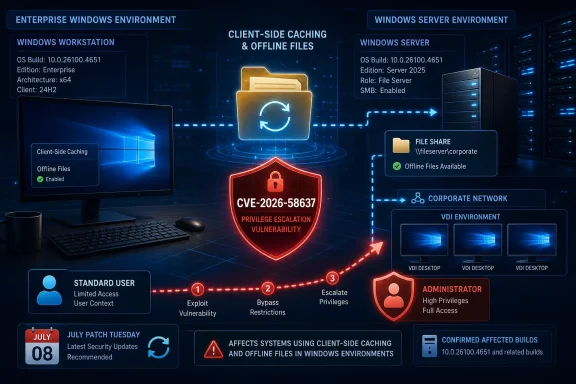
Microsoft published the advisory on July 14 as part of its July 2026 Patch Tuesday release. The National Vulnerability Database describes the defect as a use-after-free memory-management vulnerability, tracked as CWE-416, in the CSC Service. Microsoft’s CVSS 3.1 rating is 7.0, or High, with a local attack vector, low privileges required, no user interaction, and high potential impact to confidentiality, integrity, and availability.
That combination matters. This is not a network worm or a phishing-driven remote-code-execution bug. It is a post-compromise privilege-escalation issue: an attacker needs a foothold and a valid account first. But once an attacker is running code as a standard user, a successful local escalation can turn a limited intrusion into administrative control of the device.
Offline Files Is the Exposure Point
Client-Side Caching is the Windows component behind Offline Files, a feature that keeps copies of network-hosted files locally available when a user is disconnected from the corporate network. It has long been relevant in branch offices, mobile-user scenarios, redirected-folder deployments, and some legacy file-server configurations.
The feature is less visible in modern cloud-first Windows deployments, where OneDrive and SharePoint synchronization frequently fill the “offline access” role. It nevertheless remains present across a broad swath of supported Windows releases, including Windows 10, Windows 11, and Windows Server. Organizations should not assume that merely avoiding a visible Offline Files workflow removes the need to patch; the vendor’s affected-product list is the practical authority.
Microsoft’s advisory lists affected Windows 10 releases including version 1607, version 1809, version 21H2, and version 22H2. It also covers Windows 11 version 24H2, version 25H2, and version 26H1, plus Windows Server 2012, Windows Server 2012 R2, Windows Server 2016, Windows Server 2019, Windows Server 2022, and Windows Server 2025, including Server Core installations where applicable.
For current Windows 11 24H2 and 25H2 machines, the July cumulative update is KB5101650, which advances the relevant builds to 26100.8875 and 26200.8875. Microsoft’s support documentation says the update is available through Windows Update, Windows Update for Business, Windows Server Update Services, and the Microsoft Update Catalog.
A Confirmed Bug, Not a Confirmed Exploit Campaign
The supplied advisory language around confidence deserves a careful reading. The record’s remediation level and report confidence indicate Microsoft has confirmed the vulnerability and issued a fix. The technical diagnosis is also unusually specific for a freshly released bulletin: a use-after-free condition in the CSC Service.
At the same time, publicly available data does not indicate known exploitation in the wild. CISA’s stakeholder-specific vulnerability categorization currently marks exploitation as none and automation as no, while assessing the technical impact of successful exploitation as total. That is a useful distinction for defenders: the flaw is real, the potential result is serious, but there is no public signal that it has become a broadly weaponized or easily automated attack path.
The high attack-complexity rating is similarly worth retaining in patch-prioritization conversations. It suggests reliable exploitation requires conditions beyond simply launching a generic tool. That should not become a reason to defer the update. Local privilege escalation vulnerabilities commonly become more valuable when paired with application exploits, malicious installers, compromised standard-user accounts, or remote-access footholds.
In other words, CVE-2026-58637 is unlikely to be the first move in an intrusion. It can be an especially consequential second move.
The Build Numbers Are the Fastest Compliance Check
For IT teams, checking the installed OS build is often more dependable than trying to infer exposure from a feature’s configuration. Microsoft’s vulnerability metadata identifies the first fixed builds for the affected families.
- Windows 11 24H2 is fixed at build 26100.8875, while Windows 11 25H2 receives the corresponding July servicing release at build 26200.8875.
- Windows Server 2025 is fixed at build 26100.33158, and Windows Server 2022 at build 20348.5386.
- Windows Server 2019 and Windows 10 version 1809 are fixed at build 17763.9020, while Windows Server 2016 and Windows 10 version 1607 are fixed at build 14393.9339.
- Windows 10 version 21H2 and 22H2 require builds 19044.7548 and 19045.7548, respectively.
- Windows Server 2012 and 2012 R2 require their July extended-security servicing releases, reaching builds 9200.26226 and 9600.23291.
Administrators can verify the installed build through winver, Settings, endpoint-management inventory, or standard configuration-management queries. In environments that stage monthly updates, the most useful deployment rule is straightforward: approve the July 14, 2026 cumulative update for every supported Windows branch identified in Microsoft’s advisory, then validate the resulting build rather than relying solely on a successful deployment status.
Microsoft’s July release notes for KB5101650 say the company is not currently aware of known issues with the Windows 11 update. That is encouraging, but it should not replace normal pilot-ring testing, particularly in estates still using Folder Redirection, SMB file shares, Offline Files, or unusual line-of-business integrations around local and network file synchronization.
Priority Should Follow Local Access Risk
CVE-2026-58637 should move near the front of the queue for multi-user Windows environments, shared devices, servers that host interactive sessions, VDI pools, and systems where developers, contractors, or help-desk users have standard local accounts. Those are the places where “low privileges required” is not a theoretical prerequisite but a normal operating condition.
The flaw also deserves attention where endpoint compromise is already assumed in the threat model. Security teams investigating malware, suspicious remote-management activity, browser exploitation, or credential theft should ensure July updates are applied before treating an affected host as safely constrained to a standard-user context.
For systems that cannot immediately receive the cumulative update, disabling Offline Files may reduce exposure only where CSC is genuinely unused and the operational consequences are understood. It is not a substitute for patching, and it can break offline access expectations, synchronization behavior, and user workflows. Microsoft has published a security update, not a configuration-only remedy.
BleepingComputer’s broader July Patch Tuesday coverage places CVE-2026-58637 among the month’s Important Windows vulnerabilities, but its local and high-complexity conditions make it a case for disciplined remediation rather than alarmism. The practical takeaway is clear: deploy the July 14 cumulative updates, confirm the corrected build numbers, and treat any unpatched CSC-capable Windows system with local standard-user access as a potential privilege-escalation opportunity until it is brought current.