

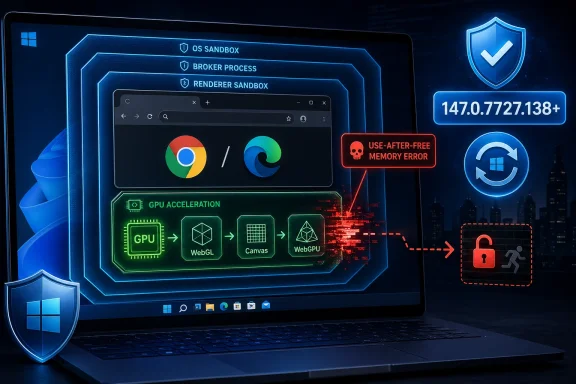
Google and Microsoft disclosed CVE-2026-7333 on April 28, 2026, a high-severity use-after-free flaw in Chromium’s GPU component that affects Google Chrome before version 147.0.7727.138 and can potentially let a remote attacker escape the browser sandbox through a crafted HTML page. The short version for Windows users is simple: if Chrome, Edge, or another Chromium-based browser is part of your daily workflow, the browser update is the security boundary. The more uncomfortable version is that modern browser risk now lives exactly where desktop users least expect it — in acceleration layers designed to make the web feel native. CVE-2026-7333 is not just another entry in the endless scroll of Chrome CVEs; it is a reminder that the GPU process has become one of the web’s most consequential attack surfaces.
For years, the browser security model has been sold in reassuring layers. A malicious page lands in a renderer. The renderer is sandboxed. The sandbox limits access to files, credentials, devices, and the operating system. Even when attackers achieve code execution inside the rendering engine, the story is supposed to end inside a well-contained box.
CVE-2026-7333 points at the part of that story that has always been messier. The GPU process exists because the modern web is graphically ambitious: video, WebGL, Canvas, WebGPU, composited scrolling, animations, hardware decoding, and increasingly desktop-class app interfaces. That machinery cannot be treated as decorative plumbing anymore. It is part of the browser’s security perimeter.
A use-after-free bug is one of the classic memory-safety failures: software continues to use an object after it has already been freed. In the right circumstances, an attacker can influence what occupies that freed memory and turn a crash into controlled behavior. When that flaw sits in a component involved in inter-process graphics handling, the result can be more serious than a tab crash.
That is why the phrase “sandbox escape” matters. A browser bug that merely compromises a tab is bad. A browser bug that can help break out of the tab’s confinement changes the threat model, especially when paired with another vulnerability that first compromises the renderer. CVE-2026-7333 is the sort of flaw defenders treat as chainable, even if public exploitation has not been established.
The version numbering creates a small but important wrinkle. The CVE text says Chrome prior to 147.0.7727.138 is affected, while Google’s stable-channel language lists 147.0.7727.137/138 for Windows and Mac. In practice, Windows fleet owners should not argue with the higher number. If the installed build is below 147.0.7727.138, treat it as needing the update.
That distinction is especially relevant because browser patching often looks deceptively complete in enterprise dashboards. A device may have received an update payload but not restarted the browser. A user may have left Chrome running for days with the relaunch prompt minimized into muscle memory. A managed endpoint may show the right package staged while the vulnerable process is still alive.
The old desktop patching ritual — install, reboot, verify — has been replaced by something more slippery. Browsers update continuously, but they also run continuously. The fix does not fully exist for the user until the patched browser process is actually running.
That isolation cuts both ways. Moving risky graphics work out of the renderer improves security architecture, but it also creates a powerful process that must parse, manage, and synchronize complex inputs from less trusted parts of the browser. The GPU process is not a passive bystander. It is a privileged helper in a world where web content constantly asks the machine to draw, decode, animate, and compute.
The attack surface has expanded because the web has expanded. A plain HTML page is no longer plain in any meaningful sense. It can trigger media pipelines, shader paths, canvas operations, font rendering, image decoding, GPU command buffers, and multiple layers of IPC. “Crafted HTML page” sounds quaint; in 2026, it can mean a carefully choreographed workload designed to push edge cases across graphics and memory-management boundaries.
This is why GPU bugs keep showing up in browser advisories with uncomfortable language attached. They sit at the intersection of performance and privilege. Browsers need the GPU to make the web fast. Attackers like the GPU because fast paths are often complicated paths, and complicated paths are where memory lifetime mistakes survive.
That does not mean every Chrome version number maps one-to-one to Edge’s release train. Microsoft packages Chromium fixes into Edge builds on its own cadence, with Edge-specific versioning and enterprise channels. But for defenders, the operational rule is straightforward: a Chromium GPU sandbox-escape issue is not “a Chrome problem” just because Google’s blog post is the first advisory in the chain.
This is where many Windows shops still undercount browser risk. They inventory Windows cumulative updates. They monitor Defender signatures. They track Office builds. But browsers, especially multiple Chromium-based browsers installed side by side, often become a separate mini-ecosystem of updater services, per-user installs, enterprise MSIs, stale portable builds, and unmanaged developer machines.
Edge helps by being integrated into the Windows management story, but integration is not magic. If Edge Stable, Extended Stable, Beta, Dev, or third-party Chromium browsers are present, each one needs policy, telemetry, and verification. Attackers do not care which browser a user thinks is the default. They care which vulnerable executable can be launched.
This is not necessarily a contradiction. Vendor severity and CVSS scoring measure overlapping but different things. Chrome’s internal severity judgment considers exploitability, architecture, mitigations, and the role a bug plays in likely exploit chains. CVSS is a standardized scoring model that can rate a sandbox escape extremely harshly because it changes security scope and can affect the whole system.
For admins, the practical reading is this: do not let the word “High” make the patch feel optional. A remotely reachable browser flaw requiring only user interaction — visiting or rendering attacker-controlled content — is already in the danger zone. Add potential sandbox escape, and the urgency rises.
The absence of an NVD score at the time of the initial enrichment is also not reassuring. NVD analysis often lags vendor publication, especially when new CVEs arrive in volume. Waiting for every database to harmonize its metadata is a poor patch strategy when the vendor fix is already available.
Modern web delivery makes “interaction” cheap. Malvertising, compromised legitimate sites, poisoned search results, phishing links, embedded content, and federated authentication flows all create opportunities to put hostile content in front of a browser. Even careful users interact with the web all day. That is the browser’s job.
This does not mean CVE-2026-7333 is known to be exploited in the wild. The public record around this disclosure does not establish active exploitation. But defenders should separate two questions: whether exploitation is confirmed today, and whether the vulnerability class is attractive enough to patch as if it could be chained tomorrow.
A GPU sandbox escape is attractive because it can play the second act in an exploit chain. The first act compromises a renderer or otherwise gains a foothold inside the browser’s lower-privilege environment. The second act uses a flaw like this to cross a boundary. Security teams do not need a public proof of concept to understand why that matters.
A CPE entry can identify Google Chrome as vulnerable below a fixed version. It can also express that the application runs on major desktop platforms. But Chromium is not a single product in the field. It is an engine embedded in Chrome, Edge, Brave, Opera, Vivaldi, Electron applications, WebView-like surfaces, enterprise wrappers, and internal tools.
Not every Chromium-derived product is automatically vulnerable to every Chrome CVE in the same way. Build flags, component versions, exposed features, sandboxing choices, and patch backports all matter. But the reverse mistake is more dangerous: assuming a vulnerability does not matter because the CPE list names Chrome and your organization’s users mostly run Edge.
This is where asset management must become browser-aware. Security teams should know which Chromium-based browsers are installed, which update channels they use, whether auto-update is enabled, and whether users can install per-profile copies outside managed software deployment. They should also track apps that embed Chromium frameworks, because those may not follow Chrome’s rapid update cadence.
CPEs are useful for scanners and compliance systems. They are not a substitute for understanding the browser supply chain on Windows endpoints.
The GPU stack is especially difficult because it spans browser code, graphics abstractions, operating-system APIs, and vendor drivers. It is full of asynchronous work: objects created in one context, referenced in another, released later, and synchronized across process boundaries. That is fertile ground for lifetime bugs.
The industry answer is gradually shifting toward memory-safe languages and stronger compiler-assisted protections, but browsers cannot be rewritten overnight. Chromium is a massive, performance-sensitive project with platform-specific code paths and deep dependencies. The result is a long transition period in which old vulnerability classes remain relevant even as mitigations improve.
That makes patch velocity part of the security architecture. If the codebase cannot eliminate every use-after-free bug before release, the next best defense is finding them quickly, paying researchers, shipping fixes fast, and getting users onto patched builds before exploit developers can weaponize the details.
A detailed Chromium bug can be a roadmap. It may include crash traces, reproduction steps, component notes, commit links, and enough context for a skilled exploit developer to work backward. Publishing that before the update has reached most users would help attackers more than defenders.
The downside is that enterprise security teams must often act with incomplete information. They know the component, the class, the affected version, and the broad impact, but not the exploit mechanics. That can make risk briefings feel vague: “GPU use-after-free, crafted HTML, possible sandbox escape” is not the same as a full technical teardown.
Still, this is the normal rhythm of browser security. First comes the patch. Then comes broad deployment. Later, when the ecosystem has moved, the details may open up. The defender’s job is not to wait for the postmortem; it is to make sure the postmortem describes a bug their fleet already fixed.
For managed Windows environments, this is where policy matters. Chrome and Edge both provide enterprise controls for update cadence, relaunch notifications, and deadlines. Those settings are often softened to avoid interrupting users. CVE-2026-7333 is the kind of bug that argues for firmer defaults.
There is a trade-off. Force relaunch too aggressively and users lose work, complain, or learn to distrust IT prompts. Delay too long and a patched vulnerability remains exploitable in memory across the estate. The answer is not permanent emergency mode, but a tiered policy that treats high-impact browser security fixes differently from routine feature updates.
Security teams should also verify the process version, not just the installed package version. On Windows, inventory data can lag reality. The vulnerable browser may be the one still running, not the one listed in the software catalog. That distinction matters when the exploit path is a web page open in a live session.
The important behavioral change is to stop treating the relaunch prompt as cosmetic. Browser updates are not like app-store polish releases. Many are security repairs for code that processes untrusted content every minute the browser is open.
Users who leave Chrome running for weeks are not unusual. They are the norm. Tab restoration, cloud profiles, password managers, and session sync have made relaunches less painful than they used to be, but the habit of postponing them remains strong. That habit is now part of the risk surface.
The same applies to secondary browsers. Many users update their default browser but forget the one they keep around for banking, testing, work portals, or compatibility. Attackers do not need the browser you love. They need the browser you forgot.
The downside is concentration. A serious Chromium flaw can have a blast radius across browsers, platforms, and embedded runtimes. Even when downstream vendors patch quickly, the ecosystem does not update as one organism. Chrome may move first, Edge shortly after, smaller browsers later, and embedded Chromium applications on a schedule known only to their vendors.
This creates a patch gap that attackers can study. Once a Chromium vulnerability is public, every downstream product becomes a timing question. Has it merged the fix? Has it shipped a build? Has the user installed it? Has the process restarted? Each “yes” must happen before the risk meaningfully declines.
The web once had diversity at the engine layer: Trident, Gecko, WebKit, Presto, Blink. Today’s Windows desktop is far more Chromium-heavy. That simplifies compatibility and developer targeting. It also means defenders must think of Chromium as shared infrastructure, not just a browser brand.
Sandbox escapes are force multipliers. They can turn a renderer compromise into something with broader system consequences. They can make a phishing page more than credential theft. They can give exploit chains the missing step between “code execution in a constrained process” and “meaningful access on the endpoint.”
That does not mean panic. The patch is available, and modern browsers have multiple layers of mitigation. But it does mean the correct response is measured urgency, not passive acceptance of the next background update window.
The most mature organizations will not treat this as an isolated emergency. They will use it to test browser update observability, relaunch enforcement, Chromium inventory, and exception handling. The point is not merely to close CVE-2026-7333; it is to learn whether the next GPU or WebGPU bug can be closed faster.
Source: NVD / Chromium Security Update Guide - Microsoft Security Response Center
 The Browser Sandbox Is Only as Strong as Its Most Privileged Helper
For years, the browser security model has been sold in reassuring layers. A malicious page lands in a renderer. The renderer is sandboxed. The sandbox limits access to files, credentials, devices, and the operating system. Even when attackers achieve code execution inside the rendering engine, the story is supposed to end inside a well-contained box.CVE-2026-7333 points at the part of that story that has always been messier. The GPU process exists because the modern web is graphically ambitious: video, WebGL, Canvas, WebGPU, composited scrolling, animations, hardware decoding, and increasingly desktop-class app interfaces. That machinery cannot be treated as decorative plumbing anymore. It is part of the browser’s security perimeter.
A use-after-free bug is one of the classic memory-safety failures: software continues to use an object after it has already been freed. In the right circumstances, an attacker can influence what occupies that freed memory and turn a crash into controlled behavior. When that flaw sits in a component involved in inter-process graphics handling, the result can be more serious than a tab crash.
That is why the phrase “sandbox escape” matters. A browser bug that merely compromises a tab is bad. A browser bug that can help break out of the tab’s confinement changes the threat model, especially when paired with another vulnerability that first compromises the renderer. CVE-2026-7333 is the sort of flaw defenders treat as chainable, even if public exploitation has not been established.
Chrome’s April Patch Was Big, but This Bug Is the One Windows Admins Should Circle
Google’s April 28 stable-channel update moved Chrome to 147.0.7727.137/138 on Windows and macOS, and 147.0.7727.137 on Linux. The release included 30 security fixes, with CVE-2026-7333 listed as a high-severity use-after-free issue in the GPU component. Google’s release notes also show a $16,000 reward attached to the report, a signal that this was not a trivial finding.The version numbering creates a small but important wrinkle. The CVE text says Chrome prior to 147.0.7727.138 is affected, while Google’s stable-channel language lists 147.0.7727.137/138 for Windows and Mac. In practice, Windows fleet owners should not argue with the higher number. If the installed build is below 147.0.7727.138, treat it as needing the update.
That distinction is especially relevant because browser patching often looks deceptively complete in enterprise dashboards. A device may have received an update payload but not restarted the browser. A user may have left Chrome running for days with the relaunch prompt minimized into muscle memory. A managed endpoint may show the right package staged while the vulnerable process is still alive.
The old desktop patching ritual — install, reboot, verify — has been replaced by something more slippery. Browsers update continuously, but they also run continuously. The fix does not fully exist for the user until the patched browser process is actually running.
The GPU Process Has Become the New Front Door
The GPU component used to sound like something only gamers and graphics developers needed to worry about. In Chromium, it is central infrastructure. It brokers access to graphics APIs, accelerates rendering, participates in compositing, and helps isolate complicated driver-facing operations from the rest of the browser.That isolation cuts both ways. Moving risky graphics work out of the renderer improves security architecture, but it also creates a powerful process that must parse, manage, and synchronize complex inputs from less trusted parts of the browser. The GPU process is not a passive bystander. It is a privileged helper in a world where web content constantly asks the machine to draw, decode, animate, and compute.
The attack surface has expanded because the web has expanded. A plain HTML page is no longer plain in any meaningful sense. It can trigger media pipelines, shader paths, canvas operations, font rendering, image decoding, GPU command buffers, and multiple layers of IPC. “Crafted HTML page” sounds quaint; in 2026, it can mean a carefully choreographed workload designed to push edge cases across graphics and memory-management boundaries.
This is why GPU bugs keep showing up in browser advisories with uncomfortable language attached. They sit at the intersection of performance and privilege. Browsers need the GPU to make the web fast. Attackers like the GPU because fast paths are often complicated paths, and complicated paths are where memory lifetime mistakes survive.
Microsoft’s Role Is Not Secondary for Windows Users
The user-facing source here is the Microsoft Security Response Center, and that matters for a Windows audience. Microsoft Edge is Chromium-based, and Microsoft tracks Chromium vulnerabilities through its own update guide because the same underlying engine issues can matter to Edge users even when the original disclosure comes from Chrome.That does not mean every Chrome version number maps one-to-one to Edge’s release train. Microsoft packages Chromium fixes into Edge builds on its own cadence, with Edge-specific versioning and enterprise channels. But for defenders, the operational rule is straightforward: a Chromium GPU sandbox-escape issue is not “a Chrome problem” just because Google’s blog post is the first advisory in the chain.
This is where many Windows shops still undercount browser risk. They inventory Windows cumulative updates. They monitor Defender signatures. They track Office builds. But browsers, especially multiple Chromium-based browsers installed side by side, often become a separate mini-ecosystem of updater services, per-user installs, enterprise MSIs, stale portable builds, and unmanaged developer machines.
Edge helps by being integrated into the Windows management story, but integration is not magic. If Edge Stable, Extended Stable, Beta, Dev, or third-party Chromium browsers are present, each one needs policy, telemetry, and verification. Attackers do not care which browser a user thinks is the default. They care which vulnerable executable can be launched.
The CVSS Number Says “Critical” Even When Chromium Says “High”
One of the more confusing parts of CVE-2026-7333 is the severity split. Chromium labels the issue high severity. CISA’s ADP scoring assigns a CVSS 3.1 base score of 9.6, which lands in critical territory, with network attack vector, low complexity, no privileges required, user interaction required, changed scope, and high confidentiality, integrity, and availability impact.This is not necessarily a contradiction. Vendor severity and CVSS scoring measure overlapping but different things. Chrome’s internal severity judgment considers exploitability, architecture, mitigations, and the role a bug plays in likely exploit chains. CVSS is a standardized scoring model that can rate a sandbox escape extremely harshly because it changes security scope and can affect the whole system.
For admins, the practical reading is this: do not let the word “High” make the patch feel optional. A remotely reachable browser flaw requiring only user interaction — visiting or rendering attacker-controlled content — is already in the danger zone. Add potential sandbox escape, and the urgency rises.
The absence of an NVD score at the time of the initial enrichment is also not reassuring. NVD analysis often lags vendor publication, especially when new CVEs arrive in volume. Waiting for every database to harmonize its metadata is a poor patch strategy when the vendor fix is already available.
“User Interaction Required” Is Not Much Comfort on the Web
The CVSS vector includes user interaction, which can sound like a mitigating factor. In browser exploitation, it usually means the victim must visit a page, open a link, view a compromised site, or be driven through some web-delivered path. That is not the same as asking the user to run an unknown executable with administrative privileges.Modern web delivery makes “interaction” cheap. Malvertising, compromised legitimate sites, poisoned search results, phishing links, embedded content, and federated authentication flows all create opportunities to put hostile content in front of a browser. Even careful users interact with the web all day. That is the browser’s job.
This does not mean CVE-2026-7333 is known to be exploited in the wild. The public record around this disclosure does not establish active exploitation. But defenders should separate two questions: whether exploitation is confirmed today, and whether the vulnerability class is attractive enough to patch as if it could be chained tomorrow.
A GPU sandbox escape is attractive because it can play the second act in an exploit chain. The first act compromises a renderer or otherwise gains a foothold inside the browser’s lower-privilege environment. The second act uses a flaw like this to cross a boundary. Security teams do not need a public proof of concept to understand why that matters.
The CPE Confusion Is a Symptom of a Larger Inventory Problem
The NVD change history attached to this CVE shows a vulnerable Chrome CPE combined with Windows, Linux kernel, and macOS operating-system CPEs. That has already prompted the familiar question: are we missing a CPE here? The better question is whether CPE metadata can ever fully express how Chromium risk actually lands on endpoints.A CPE entry can identify Google Chrome as vulnerable below a fixed version. It can also express that the application runs on major desktop platforms. But Chromium is not a single product in the field. It is an engine embedded in Chrome, Edge, Brave, Opera, Vivaldi, Electron applications, WebView-like surfaces, enterprise wrappers, and internal tools.
Not every Chromium-derived product is automatically vulnerable to every Chrome CVE in the same way. Build flags, component versions, exposed features, sandboxing choices, and patch backports all matter. But the reverse mistake is more dangerous: assuming a vulnerability does not matter because the CPE list names Chrome and your organization’s users mostly run Edge.
This is where asset management must become browser-aware. Security teams should know which Chromium-based browsers are installed, which update channels they use, whether auto-update is enabled, and whether users can install per-profile copies outside managed software deployment. They should also track apps that embed Chromium frameworks, because those may not follow Chrome’s rapid update cadence.
CPEs are useful for scanners and compliance systems. They are not a substitute for understanding the browser supply chain on Windows endpoints.
Memory Safety Is Still the Browser War’s Unfinished Business
Use-after-free bugs are not new, and that is precisely the problem. Browser vendors have spent years layering mitigations over unsafe languages, complicated object lifetimes, and enormous legacy codebases. Site isolation, sandboxing, partition allocators, MiraclePtr-style protections, control-flow defenses, and fuzzing have all made exploitation harder. They have not made memory safety disappear.The GPU stack is especially difficult because it spans browser code, graphics abstractions, operating-system APIs, and vendor drivers. It is full of asynchronous work: objects created in one context, referenced in another, released later, and synchronized across process boundaries. That is fertile ground for lifetime bugs.
The industry answer is gradually shifting toward memory-safe languages and stronger compiler-assisted protections, but browsers cannot be rewritten overnight. Chromium is a massive, performance-sensitive project with platform-specific code paths and deep dependencies. The result is a long transition period in which old vulnerability classes remain relevant even as mitigations improve.
That makes patch velocity part of the security architecture. If the codebase cannot eliminate every use-after-free bug before release, the next best defense is finding them quickly, paying researchers, shipping fixes fast, and getting users onto patched builds before exploit developers can weaponize the details.
Delayed Bug Details Are a Feature, Not a Cover-Up
Google’s release notes repeat the standard warning that access to bug details and links may stay restricted until most users are updated, and may remain restricted if the bug affects a third-party library used elsewhere. This frustrates researchers and admins who want complete technical detail on day one. It is also a rational policy for a browser with billions of users.A detailed Chromium bug can be a roadmap. It may include crash traces, reproduction steps, component notes, commit links, and enough context for a skilled exploit developer to work backward. Publishing that before the update has reached most users would help attackers more than defenders.
The downside is that enterprise security teams must often act with incomplete information. They know the component, the class, the affected version, and the broad impact, but not the exploit mechanics. That can make risk briefings feel vague: “GPU use-after-free, crafted HTML, possible sandbox escape” is not the same as a full technical teardown.
Still, this is the normal rhythm of browser security. First comes the patch. Then comes broad deployment. Later, when the ecosystem has moved, the details may open up. The defender’s job is not to wait for the postmortem; it is to make sure the postmortem describes a bug their fleet already fixed.
Enterprises Should Treat Browser Relaunches as Security Events
The most common failure mode for Chrome patching is not that Google fails to ship an update. It is that the last mile depends on user behavior. A browser can download an update quietly and still remain vulnerable until the user relaunches. In a world of persistent tabs, long-running SaaS sessions, and laptops that sleep rather than reboot, that delay can stretch.For managed Windows environments, this is where policy matters. Chrome and Edge both provide enterprise controls for update cadence, relaunch notifications, and deadlines. Those settings are often softened to avoid interrupting users. CVE-2026-7333 is the kind of bug that argues for firmer defaults.
There is a trade-off. Force relaunch too aggressively and users lose work, complain, or learn to distrust IT prompts. Delay too long and a patched vulnerability remains exploitable in memory across the estate. The answer is not permanent emergency mode, but a tiered policy that treats high-impact browser security fixes differently from routine feature updates.
Security teams should also verify the process version, not just the installed package version. On Windows, inventory data can lag reality. The vulnerable browser may be the one still running, not the one listed in the software catalog. That distinction matters when the exploit path is a web page open in a live session.
Home Users Have the Same Problem, Just Without the Dashboard
For individual Windows users, the advice is less elegant but more direct. Open Chrome’s About page, let it check for updates, and relaunch when prompted. Do the same for Edge through its About Microsoft Edge page. If Brave, Opera, Vivaldi, or another Chromium-based browser is installed, check it as well.The important behavioral change is to stop treating the relaunch prompt as cosmetic. Browser updates are not like app-store polish releases. Many are security repairs for code that processes untrusted content every minute the browser is open.
Users who leave Chrome running for weeks are not unusual. They are the norm. Tab restoration, cloud profiles, password managers, and session sync have made relaunches less painful than they used to be, but the habit of postponing them remains strong. That habit is now part of the risk surface.
The same applies to secondary browsers. Many users update their default browser but forget the one they keep around for banking, testing, work portals, or compatibility. Attackers do not need the browser you love. They need the browser you forgot.
The April Advisory Shows Why Chromium Monoculture Cuts Both Ways
Chromium’s dominance is one of the great double-edged swords in desktop security. On the positive side, Google’s security investment benefits a large ecosystem. Bugs are found, rewarded, fixed, and propagated through projects that would struggle to maintain a browser engine alone. A single upstream fix can improve security for hundreds of millions of users.The downside is concentration. A serious Chromium flaw can have a blast radius across browsers, platforms, and embedded runtimes. Even when downstream vendors patch quickly, the ecosystem does not update as one organism. Chrome may move first, Edge shortly after, smaller browsers later, and embedded Chromium applications on a schedule known only to their vendors.
This creates a patch gap that attackers can study. Once a Chromium vulnerability is public, every downstream product becomes a timing question. Has it merged the fix? Has it shipped a build? Has the user installed it? Has the process restarted? Each “yes” must happen before the risk meaningfully declines.
The web once had diversity at the engine layer: Trident, Gecko, WebKit, Presto, Blink. Today’s Windows desktop is far more Chromium-heavy. That simplifies compatibility and developer targeting. It also means defenders must think of Chromium as shared infrastructure, not just a browser brand.
The Sandbox-Escape Phrase Should Change Patch Priorities
Not all browser CVEs deserve the same operational response. A low-severity UI spoofing issue and a high-severity memory bug in a privileged process should not compete equally in the patch queue. CVE-2026-7333 belongs near the top because it implicates a boundary that defenders depend on when other browser bugs occur.Sandbox escapes are force multipliers. They can turn a renderer compromise into something with broader system consequences. They can make a phishing page more than credential theft. They can give exploit chains the missing step between “code execution in a constrained process” and “meaningful access on the endpoint.”
That does not mean panic. The patch is available, and modern browsers have multiple layers of mitigation. But it does mean the correct response is measured urgency, not passive acceptance of the next background update window.
The most mature organizations will not treat this as an isolated emergency. They will use it to test browser update observability, relaunch enforcement, Chromium inventory, and exception handling. The point is not merely to close CVE-2026-7333; it is to learn whether the next GPU or WebGPU bug can be closed faster.
The Concrete Moves Windows Defenders Should Make Now
CVE-2026-7333 is narrow in its description but broad in its operational implications. The fix is a browser update, yet the lesson is about visibility, relaunch discipline, and the growing importance of graphics code in the browser threat model.- Confirm that Google Chrome on Windows is updated to 147.0.7727.138 or later, and verify that users have relaunched into the patched build.
- Check Microsoft Edge and other Chromium-based browsers separately rather than assuming Chrome’s update status covers the endpoint.
- Treat GPU, Canvas, WebGPU, and graphics-pipeline memory bugs as higher-priority browser patches because they often sit near important sandbox boundaries.
- Review enterprise browser policies for relaunch deadlines, update suppression, and users who can install unmanaged browser copies.
- Do not wait for NVD scoring or complete bug details when the vendor advisory already identifies a sandbox-escape-class issue with a fixed build.
- Include embedded Chromium applications and developer tools in follow-up inventory work, especially on engineering and administrator workstations.
Source: NVD / Chromium Security Update Guide - Microsoft Security Response Center
