

Google and Microsoft disclosed CVE-2026-7354 on April 28, 2026, describing a high-severity out-of-bounds read and write flaw in ANGLE that affects Google Chrome before 147.0.7727.138 and could let a remote attacker attempt a browser sandbox escape through a crafted HTML page. The short version is simple: this is not just another rendering bug in the endless Chromium conveyor belt. It sits in the graphics translation layer that modern browsers use to make the web feel native, and that makes the blast radius more interesting than the one-line advisory suggests. For Windows admins, the right response is neither panic nor indifference; it is disciplined browser patching with an eye on every Chromium-based client in the estate.
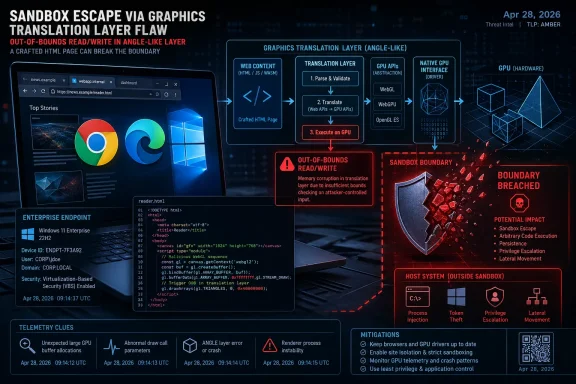
CVE-2026-7354 lands in ANGLE, the Almost Native Graphics Layer Engine, which is one of those infrastructural projects most users never hear about and most browsers cannot comfortably live without. ANGLE translates web graphics calls into platform-specific graphics APIs, smoothing over differences between Direct3D, OpenGL, Vulkan, Metal-adjacent paths, and the reality that the web has to run on everything from corporate laptops to gaming rigs.
That translation role is why the vulnerability matters. A flaw in a browser’s JavaScript engine is easy to classify in the public imagination: bad code runs in the browser. A flaw in the graphics compatibility layer is more subtle, because the browser is mediating between hostile web content and complex GPU-facing code that was never designed for the tidy threat model of a static document viewer.
The disclosed description says the bug is an out-of-bounds read and write in ANGLE. In plain English, that means code in the component could access memory outside the region it was supposed to use, potentially reading data it should not see or writing data where it should not write. That is the kind of primitive exploit developers look for when trying to move from a crash into something more consequential.
The advisory language says a remote attacker could “potentially perform a sandbox escape” with a crafted HTML page. That phrasing is important. It does not say a user must install software, open an attachment, or authenticate to a service. It says the attack surface is the web page itself, with user interaction scored as required because the target must be induced to visit or render attacker-controlled content.
In 2026, that is about as mainstream as an attack surface gets. The browser is the workstation shell for a large share of business computing. If the web graphics stack becomes part of a sandbox escape chain, the bug is no longer merely about animations, WebGL demos, or game-like pages; it becomes a route around one of the browser’s most important containment boundaries.
CVE-2026-7354 is interesting because the public description points toward that second act. The phrase “sandbox escape” does not mean automatic full-device compromise by itself, and the available public information does not establish active exploitation in the wild. But it does mean the bug belongs in the category of vulnerabilities that can turn a browser compromise from noisy containment into meaningful host impact.
That distinction matters for patch triage. Enterprises often sort browser CVEs by whether they are remote code execution, privilege escalation, information disclosure, or denial of service. Browser advisories do not always map cleanly onto those buckets because the browser itself is a constellation of cooperating processes, broker services, GPU pathways, IPC mechanisms, and policy layers.
The CISA-ADP scoring attached to the CVE gives it a CVSS 3.1 base score of 8.8, with network attack vector, low complexity, no privileges required, user interaction required, and high confidentiality, integrity, and availability impact. That score is severe without crossing into the maximalist “everything is on fire” territory that too often drains meaning from vulnerability management.
Still, the combination of low attack complexity and sandbox-escape potential should get attention. A sandbox is only useful if the browser’s support machinery stays inside the lines. Graphics code has historically been a productive place to look for those line-crossing mistakes, because it processes attacker-supplied inputs at speed and interfaces with lower-level platform capabilities.
The practical risk is not that every malicious web page suddenly owns every machine. The practical risk is that attackers who already know how to exploit one browser bug may now have another component to examine for chaining. In the modern exploitation market, the chain is the product.
ANGLE is part of the bargain that made that web possible. Developers write to web graphics interfaces, and the browser maps those calls onto whatever the host platform can best support. On Windows, that often means Direct3D somewhere in the chain. On other platforms, the route differs, but the mission is the same: take web content and make it run efficiently across a chaotic hardware and driver universe.
That bargain carries security costs. Every compatibility layer is also an interpretation layer. It accepts untrusted inputs, performs validation, translates states, allocates buffers, tracks resources, and hands work to other subsystems. A mistake in bounds checking inside that machinery can become more valuable than its bland component name implies.
Out-of-bounds read and write flaws are especially uncomfortable because they straddle two worlds. The read side can expose memory, leak pointers, or help bypass exploit mitigations. The write side can corrupt data structures, alter control flow, or destabilize assumptions that other layers rely on. Alone, either class can be serious; together, they are a red flag for exploitability research.
This is why “it is only a graphics bug” is the wrong instinct. Graphics is not ornamental anymore. In the browser, graphics is a privileged, performance-sensitive, deeply integrated subsystem that has to process hostile content without becoming hostile to the host.
The versioning detail is more than trivia. The NVD entry for CVE-2026-7354 identifies Google Chrome versions before 147.0.7727.138 as affected, while Google’s own release note shows platform-specific stable builds in the 147.0.7727.137/138 range. That creates the kind of ambiguity admins know too well: scanners, vendor advisories, browser self-reports, and package repositories may not all express the fixed state in exactly the same way on day one.
Microsoft’s role is equally important for WindowsForum readers because Edge is Chromium-based, ships as a managed enterprise browser, and often sits beside Chrome on the same endpoint. Microsoft’s Edge security release notes show an April 30, 2026 stable release, version 147.0.3912.98, that incorporates the latest Chromium project security updates. Microsoft’s Security Update Guide also tracks the CVE under the Edge/Chromium umbrella.
That two-day spacing is normal but operationally meaningful. Chromium fixes land in Chrome, then downstream Chromium consumers integrate, test, package, and publish their own builds. Edge is not Chrome with a different icon; it has its own release train, enterprise controls, policies, and update channels. But for vulnerabilities inherited from Chromium, the patch race is coupled.
For admins, that means “Chrome is fixed” is not a complete sentence. The question is which Chromium-based browsers are present, which channels they are on, which update mechanisms govern them, and whether the deployed build actually contains the Chromium fix. Chrome Stable, Edge Stable, Extended Stable, portable browsers, embedded WebView runtimes, and third-party Chromium derivatives do not all move at the same speed.
This is the recurring tax of browser monoculture. Chromium’s shared code base gives the web enormous compatibility advantages, but it also means a serious bug in a common component becomes a coordination exercise across vendors. The monoculture is not absolute, but in enterprise Windows fleets it is often close enough to shape risk.
That is helpful as a starting point, but a CVE page is not an exploit narrative. It will not tell you whether the bug is trivially weaponizable, whether mitigations make exploitation fragile, whether the issue requires a particular GPU backend, whether only certain driver families are attractive targets, or whether the most realistic use is as one link in a multi-bug chain.
Google’s linked Chromium issue is access-restricted, which is standard practice while a majority of users are still updating or while related third-party code remains exposed elsewhere. That opacity frustrates defenders, but it is not sinister. Publishing a detailed recipe before the patch has saturated the installed base would mostly help the wrong audience.
The result is the familiar defender’s dilemma: act before complete technical detail exists. Vulnerability management teams often prefer proof, exploit code, affected function names, and platform-specific testing. Browser security rarely grants that luxury. By the time all the details are public, the prudent patch window has already closed.
That is why the advisory’s verbs deserve close reading. “Allowed a remote attacker to potentially perform a sandbox escape” is cautious language, not marketing language. It signals seriousness without claiming confirmed exploitation. The absence of an “exploit in the wild” statement should reduce panic; it should not reduce the priority of patching internet-facing client software.
A good security program does not need every CVE to be a catastrophe before it moves. It needs a sane default for high-severity browser bugs in exposed components: validate the fixed versions, push updates aggressively, watch for regression reports, and verify that the fleet actually converged.
Edge is the built-in corporate default in many Microsoft 365 environments. Chrome is still common wherever Google Workspace, developer preference, or legacy standardization made it the internal browser of record. Brave, Vivaldi, Opera, and other Chromium-based browsers may appear in unmanaged pockets. Electron applications bring Chromium-derived rendering into desktop software, though individual app exposure depends on whether and how they incorporate affected code.
CVE-2026-7354 is specifically described against Google Chrome and tracked by Microsoft for Chromium-based Edge, so it would be sloppy to declare every Chromium-adjacent application vulnerable without evidence. But it would be equally sloppy to assume only the browser icon on the taskbar matters. Shared components and embedded runtimes have a way of turning “browser vulnerability” into “client platform vulnerability” for the purposes of asset management.
Windows admins should also pay attention to WebView2, even if this particular CVE’s public records focus on Chrome and Edge. WebView2 updates are tied to the Edge runtime in many deployments, and organizations that rely on WebView2-heavy apps need confidence that the runtime update channel is healthy. The enterprise impact of a Chromium security fix can be felt through applications users do not think of as browsers at all.
The scanning story can be messy in the first few days after a Chromium release. Some vulnerability scanners key off CPEs and version strings from NVD. Some read installed application inventory. Some inspect file versions. Some rely on vendor plugins that lag the advisory. When a fixed Chrome release uses adjacent patch versions across platforms, false positives and false negatives are not theoretical.
That is why the best operational answer is layered verification. Check the browser’s self-reported version, validate endpoint management inventory, compare against vendor release notes, and spot-check file versions where necessary. If a scanner says Chrome is still vulnerable on a machine that reports 147.0.7727.138, investigate the scanner logic before opening a war room.
User interaction may mean visiting a crafted page, clicking a link, opening a malicious ad frame, following a phishing lure, previewing content in a web app, or browsing to a compromised legitimate site. That is not the same as requiring a user to disable security settings, run a downloaded executable, approve an admin prompt, and ignore five warnings. It is the normal behavior the browser exists to perform.
A crafted HTML page is not exotic. Attackers can deliver one through phishing, watering-hole compromise, malicious advertising, compromised content management systems, fake authentication portals, or links embedded in collaboration tools. The security boundary being tested is precisely the one that allows untrusted web content to be rendered safely.
Enterprises sometimes comfort themselves with web filtering, DNS controls, email security, and endpoint detection. Those controls matter, but they are not substitutes for browser patching. A browser sandbox escape is valuable partly because it can happen in the messy overlap between legitimate web use and attacker-controlled content. Blocking the obviously bad domains does not eliminate the risk from compromised good ones.
The better framing is this: user interaction makes exploitation less automatic than a wormable network service, but it does not make it rare. Browsers are interaction machines. If the exploit path begins with “convince a user to view a web page,” the attacker’s job is not easy, but it is well within the normal playbook.
But “quickly” is not “instantly.” Google published the Chrome stable update on April 28. Microsoft’s Edge stable security update incorporating the latest Chromium security updates appeared on April 30. In normal circumstances, that is a short and acceptable gap. In a zero-day firefight, it would feel much longer.
There is no public indication that CVE-2026-7354 is being exploited in the wild at the time of this writing. That matters. It means defenders can treat this as a high-priority routine security update rather than an emergency incident unless their own telemetry says otherwise. But it also highlights why browser update channels need to be boringly reliable before a crisis hits.
Edge’s enterprise update controls can be a blessing or a trap. Deferral policies, update rings, and controlled rollout groups are essential for managing regressions, especially in regulated environments or fleets with brittle web apps. The danger comes when a policy designed for monthly feature comfort accidentally slows a high-severity security fix.
The same is true for Chrome’s enterprise controls. Staged rollouts protect stability, but security teams need a way to accelerate updates when the advisory warrants it. The right posture is not “always update every browser everywhere immediately” regardless of business impact. The right posture is to have a fast lane that can be activated without inventing process during the incident.
For CVE-2026-7354, the fast lane should be used sensibly. Push the fixed browser builds to pilot rings quickly, watch for graphics, printing, video, and web app regressions, then widen deployment. The affected component’s graphics role makes regression monitoring more important than usual, but not important enough to justify drifting for weeks.
For unmanaged users, the browser’s “About” page remains the simplest update trigger. Chrome and Edge both check for updates there and typically require a restart to complete installation. In enterprise environments, the version number should come from management tooling, not from asking users to self-report screenshots.
A browser that has downloaded an update but not restarted is still an operational problem. Many users keep browser sessions alive for days or weeks. Tabs become a second desktop, and the restart button becomes an object of negotiation. Security teams need policy and messaging that make browser restarts normal rather than exceptional.
The restart problem is especially acute for remote and hybrid workers. A laptop can be compliant in the morning inventory snapshot and still running old browser processes in the afternoon. Endpoint tools that distinguish installed version from running version are valuable here. So are user prompts that explain the risk without sounding like boilerplate.
The other practical control is reducing unnecessary browser diversity. There are good reasons to support multiple browsers in an enterprise, but every supported Chromium derivative adds a patch channel. If a browser is not managed, inventoried, and updated, it is not a browser standard; it is an unmanaged execution environment with a nice address bar.
Security operations may see the CVE and assign severity. Desktop engineering owns browser deployment. Network security owns web filtering. Identity teams worry about session theft after compromise. Application owners worry that a browser update could break internal web apps. Users just want their tabs back.
A sandbox escape bug cuts through those silos. If exploited successfully as part of a chain, it can turn web content into host-level consequences. That makes it relevant to endpoint detection, privileged access, credential protection, and incident response. It is not merely a “browser team” ticket.
This is also why exploit-in-the-wild status should not be the only trigger for action. By the time a CVE lands in the known-exploited bucket, attackers have already demonstrated operational use. That status is invaluable for emergency prioritization, but it is a lagging indicator. High-severity browser sandbox issues deserve faster treatment because the browser is already exposed to the internet by design.
The real organizational test is whether patching a browser can happen faster than patching a server. In many companies, server patching has mature maintenance windows, ownership, rollback plans, and compliance reporting. Browser patching is treated as background hygiene until a crisis proves otherwise. That is backwards. The browser is one of the most aggressively attacked applications in the enterprise.
Every new capability arrives with a justification. Users want performance. Developers want portability. Hardware vendors want acceleration. Browser makers want feature parity. Enterprises want web apps that replace thick clients. The result is a browser that is both a document viewer and a hardware broker.
That does not mean the industry should retreat from web graphics. It means defenders must stop treating rendering components as second-tier risk. A memory safety flaw in a graphics layer can matter as much as a bug in a scripting engine if it gives attackers the primitive they need.
Memory safety is the background drumbeat here. Chromium has invested heavily in sandboxing, fuzzing, exploit mitigations, safer languages in selective areas, MiraclePtr-style protections, and process isolation. Those investments help. They are also evidence of how hard the problem is. Large C++ code bases that parse complex untrusted inputs at high speed will continue to produce dangerous edge cases.
The browser security model is therefore a race between engineering discipline and platform ambition. CVE-2026-7354 is one lap in that race. It will be patched, the details will eventually become clearer, and another bug will replace it on the dashboard. The pattern is the story.
CVE-2026-7354 will probably not be remembered as the defining browser vulnerability of 2026, and that is precisely the point. Most serious client-side risk now arrives as a steady cadence of high-severity flaws in shared components, patched under partial information, across browsers that update faster than many organizations can comfortably track. The winners will not be the teams that panic hardest when a CVE mentions sandbox escape; they will be the ones that built a browser update muscle strong enough to make this kind of advisory routine.
Source: NVD / Chromium Security Update Guide - Microsoft Security Response Center
 The Browser Bug Is Really a Graphics Stack Story
CVE-2026-7354 lands in ANGLE, the Almost Native Graphics Layer Engine, which is one of those infrastructural projects most users never hear about and most browsers cannot comfortably live without. ANGLE translates web graphics calls into platform-specific graphics APIs, smoothing over differences between Direct3D, OpenGL, Vulkan, Metal-adjacent paths, and the reality that the web has to run on everything from corporate laptops to gaming rigs.That translation role is why the vulnerability matters. A flaw in a browser’s JavaScript engine is easy to classify in the public imagination: bad code runs in the browser. A flaw in the graphics compatibility layer is more subtle, because the browser is mediating between hostile web content and complex GPU-facing code that was never designed for the tidy threat model of a static document viewer.
The disclosed description says the bug is an out-of-bounds read and write in ANGLE. In plain English, that means code in the component could access memory outside the region it was supposed to use, potentially reading data it should not see or writing data where it should not write. That is the kind of primitive exploit developers look for when trying to move from a crash into something more consequential.
The advisory language says a remote attacker could “potentially perform a sandbox escape” with a crafted HTML page. That phrasing is important. It does not say a user must install software, open an attachment, or authenticate to a service. It says the attack surface is the web page itself, with user interaction scored as required because the target must be induced to visit or render attacker-controlled content.
In 2026, that is about as mainstream as an attack surface gets. The browser is the workstation shell for a large share of business computing. If the web graphics stack becomes part of a sandbox escape chain, the bug is no longer merely about animations, WebGL demos, or game-like pages; it becomes a route around one of the browser’s most important containment boundaries.
The Sandbox Is the Prize, Not the Door
Modern browser exploitation is increasingly a two-act play. First, an attacker compromises a renderer or gains some foothold inside a highly restricted browser process. Then the attacker needs a second weakness to break out of that constrained environment and touch the operating system, user files, credentials, tokens, local services, or other processes.CVE-2026-7354 is interesting because the public description points toward that second act. The phrase “sandbox escape” does not mean automatic full-device compromise by itself, and the available public information does not establish active exploitation in the wild. But it does mean the bug belongs in the category of vulnerabilities that can turn a browser compromise from noisy containment into meaningful host impact.
That distinction matters for patch triage. Enterprises often sort browser CVEs by whether they are remote code execution, privilege escalation, information disclosure, or denial of service. Browser advisories do not always map cleanly onto those buckets because the browser itself is a constellation of cooperating processes, broker services, GPU pathways, IPC mechanisms, and policy layers.
The CISA-ADP scoring attached to the CVE gives it a CVSS 3.1 base score of 8.8, with network attack vector, low complexity, no privileges required, user interaction required, and high confidentiality, integrity, and availability impact. That score is severe without crossing into the maximalist “everything is on fire” territory that too often drains meaning from vulnerability management.
Still, the combination of low attack complexity and sandbox-escape potential should get attention. A sandbox is only useful if the browser’s support machinery stays inside the lines. Graphics code has historically been a productive place to look for those line-crossing mistakes, because it processes attacker-supplied inputs at speed and interfaces with lower-level platform capabilities.
The practical risk is not that every malicious web page suddenly owns every machine. The practical risk is that attackers who already know how to exploit one browser bug may now have another component to examine for chaining. In the modern exploitation market, the chain is the product.
ANGLE Became Critical Because the Web Became Hardware-Hungry
There was a time when browser security could be explained mostly through scripts, plug-ins, and parsers. That era is long gone. The web now expects GPU acceleration, video pipelines, 3D rendering, advanced canvas workloads, machine-learning-adjacent APIs, hardware-backed media features, and enough visual polish to make a local application feel ordinary.ANGLE is part of the bargain that made that web possible. Developers write to web graphics interfaces, and the browser maps those calls onto whatever the host platform can best support. On Windows, that often means Direct3D somewhere in the chain. On other platforms, the route differs, but the mission is the same: take web content and make it run efficiently across a chaotic hardware and driver universe.
That bargain carries security costs. Every compatibility layer is also an interpretation layer. It accepts untrusted inputs, performs validation, translates states, allocates buffers, tracks resources, and hands work to other subsystems. A mistake in bounds checking inside that machinery can become more valuable than its bland component name implies.
Out-of-bounds read and write flaws are especially uncomfortable because they straddle two worlds. The read side can expose memory, leak pointers, or help bypass exploit mitigations. The write side can corrupt data structures, alter control flow, or destabilize assumptions that other layers rely on. Alone, either class can be serious; together, they are a red flag for exploitability research.
This is why “it is only a graphics bug” is the wrong instinct. Graphics is not ornamental anymore. In the browser, graphics is a privileged, performance-sensitive, deeply integrated subsystem that has to process hostile content without becoming hostile to the host.
Chrome Moved First, Edge Followed the Chromium Clock
Google’s stable desktop update on April 28 moved Chrome to 147.0.7727.137 or 147.0.7727.138 on Windows and Mac, and 147.0.7727.137 on Linux, with the customary staged rollout over days or weeks. The same release included 30 security fixes, with CVE-2026-7354 listed as one of the high-severity issues reported through the Chromium security process.The versioning detail is more than trivia. The NVD entry for CVE-2026-7354 identifies Google Chrome versions before 147.0.7727.138 as affected, while Google’s own release note shows platform-specific stable builds in the 147.0.7727.137/138 range. That creates the kind of ambiguity admins know too well: scanners, vendor advisories, browser self-reports, and package repositories may not all express the fixed state in exactly the same way on day one.
Microsoft’s role is equally important for WindowsForum readers because Edge is Chromium-based, ships as a managed enterprise browser, and often sits beside Chrome on the same endpoint. Microsoft’s Edge security release notes show an April 30, 2026 stable release, version 147.0.3912.98, that incorporates the latest Chromium project security updates. Microsoft’s Security Update Guide also tracks the CVE under the Edge/Chromium umbrella.
That two-day spacing is normal but operationally meaningful. Chromium fixes land in Chrome, then downstream Chromium consumers integrate, test, package, and publish their own builds. Edge is not Chrome with a different icon; it has its own release train, enterprise controls, policies, and update channels. But for vulnerabilities inherited from Chromium, the patch race is coupled.
For admins, that means “Chrome is fixed” is not a complete sentence. The question is which Chromium-based browsers are present, which channels they are on, which update mechanisms govern them, and whether the deployed build actually contains the Chromium fix. Chrome Stable, Edge Stable, Extended Stable, portable browsers, embedded WebView runtimes, and third-party Chromium derivatives do not all move at the same speed.
This is the recurring tax of browser monoculture. Chromium’s shared code base gives the web enormous compatibility advantages, but it also means a serious bug in a common component becomes a coordination exercise across vendors. The monoculture is not absolute, but in enterprise Windows fleets it is often close enough to shape risk.
The CVE Record Is Useful, but It Is Not the Whole Truth
The public CVE record for CVE-2026-7354 is still relatively sparse. NVD publication came on April 28, with later enrichment adding CPE data and change history. CISA-ADP supplied the CVSS 3.1 vector and mapped the weakness to CWE-125 for out-of-bounds read and CWE-787 for out-of-bounds write.That is helpful as a starting point, but a CVE page is not an exploit narrative. It will not tell you whether the bug is trivially weaponizable, whether mitigations make exploitation fragile, whether the issue requires a particular GPU backend, whether only certain driver families are attractive targets, or whether the most realistic use is as one link in a multi-bug chain.
Google’s linked Chromium issue is access-restricted, which is standard practice while a majority of users are still updating or while related third-party code remains exposed elsewhere. That opacity frustrates defenders, but it is not sinister. Publishing a detailed recipe before the patch has saturated the installed base would mostly help the wrong audience.
The result is the familiar defender’s dilemma: act before complete technical detail exists. Vulnerability management teams often prefer proof, exploit code, affected function names, and platform-specific testing. Browser security rarely grants that luxury. By the time all the details are public, the prudent patch window has already closed.
That is why the advisory’s verbs deserve close reading. “Allowed a remote attacker to potentially perform a sandbox escape” is cautious language, not marketing language. It signals seriousness without claiming confirmed exploitation. The absence of an “exploit in the wild” statement should reduce panic; it should not reduce the priority of patching internet-facing client software.
A good security program does not need every CVE to be a catastrophe before it moves. It needs a sane default for high-severity browser bugs in exposed components: validate the fixed versions, push updates aggressively, watch for regression reports, and verify that the fleet actually converged.
Windows Fleets Have More Chromium Than They Think
The obvious targets are Chrome and Edge. The less obvious problem is inventory accuracy. Windows endpoints accumulate browsers through user choice, developer tooling, OEM images, side-loaded enterprise applications, and line-of-business software that quietly embeds web rendering components.Edge is the built-in corporate default in many Microsoft 365 environments. Chrome is still common wherever Google Workspace, developer preference, or legacy standardization made it the internal browser of record. Brave, Vivaldi, Opera, and other Chromium-based browsers may appear in unmanaged pockets. Electron applications bring Chromium-derived rendering into desktop software, though individual app exposure depends on whether and how they incorporate affected code.
CVE-2026-7354 is specifically described against Google Chrome and tracked by Microsoft for Chromium-based Edge, so it would be sloppy to declare every Chromium-adjacent application vulnerable without evidence. But it would be equally sloppy to assume only the browser icon on the taskbar matters. Shared components and embedded runtimes have a way of turning “browser vulnerability” into “client platform vulnerability” for the purposes of asset management.
Windows admins should also pay attention to WebView2, even if this particular CVE’s public records focus on Chrome and Edge. WebView2 updates are tied to the Edge runtime in many deployments, and organizations that rely on WebView2-heavy apps need confidence that the runtime update channel is healthy. The enterprise impact of a Chromium security fix can be felt through applications users do not think of as browsers at all.
The scanning story can be messy in the first few days after a Chromium release. Some vulnerability scanners key off CPEs and version strings from NVD. Some read installed application inventory. Some inspect file versions. Some rely on vendor plugins that lag the advisory. When a fixed Chrome release uses adjacent patch versions across platforms, false positives and false negatives are not theoretical.
That is why the best operational answer is layered verification. Check the browser’s self-reported version, validate endpoint management inventory, compare against vendor release notes, and spot-check file versions where necessary. If a scanner says Chrome is still vulnerable on a machine that reports 147.0.7727.138, investigate the scanner logic before opening a war room.
The User-Interaction Requirement Is Not a Comfort Blanket
The CVSS vector for CVE-2026-7354 includes user interaction. In vulnerability dashboards, that field often causes a downgrade in urgency. In browser security, it should be interpreted with more realism.User interaction may mean visiting a crafted page, clicking a link, opening a malicious ad frame, following a phishing lure, previewing content in a web app, or browsing to a compromised legitimate site. That is not the same as requiring a user to disable security settings, run a downloaded executable, approve an admin prompt, and ignore five warnings. It is the normal behavior the browser exists to perform.
A crafted HTML page is not exotic. Attackers can deliver one through phishing, watering-hole compromise, malicious advertising, compromised content management systems, fake authentication portals, or links embedded in collaboration tools. The security boundary being tested is precisely the one that allows untrusted web content to be rendered safely.
Enterprises sometimes comfort themselves with web filtering, DNS controls, email security, and endpoint detection. Those controls matter, but they are not substitutes for browser patching. A browser sandbox escape is valuable partly because it can happen in the messy overlap between legitimate web use and attacker-controlled content. Blocking the obviously bad domains does not eliminate the risk from compromised good ones.
The better framing is this: user interaction makes exploitation less automatic than a wormable network service, but it does not make it rare. Browsers are interaction machines. If the exploit path begins with “convince a user to view a web page,” the attacker’s job is not easy, but it is well within the normal playbook.
Microsoft’s Edge Story Is Better Than It Used to Be, but Timing Still Matters
One of Microsoft’s more successful security transitions over the last decade has been moving Edge onto Chromium while keeping enterprise controls wrapped around it. That gave Windows admins a browser with broad web compatibility, Microsoft identity integration, Group Policy and Intune management, Defender SmartScreen, Application Guard’s legacy in the broader security conversation, and a release process that can absorb Chromium fixes quickly.But “quickly” is not “instantly.” Google published the Chrome stable update on April 28. Microsoft’s Edge stable security update incorporating the latest Chromium security updates appeared on April 30. In normal circumstances, that is a short and acceptable gap. In a zero-day firefight, it would feel much longer.
There is no public indication that CVE-2026-7354 is being exploited in the wild at the time of this writing. That matters. It means defenders can treat this as a high-priority routine security update rather than an emergency incident unless their own telemetry says otherwise. But it also highlights why browser update channels need to be boringly reliable before a crisis hits.
Edge’s enterprise update controls can be a blessing or a trap. Deferral policies, update rings, and controlled rollout groups are essential for managing regressions, especially in regulated environments or fleets with brittle web apps. The danger comes when a policy designed for monthly feature comfort accidentally slows a high-severity security fix.
The same is true for Chrome’s enterprise controls. Staged rollouts protect stability, but security teams need a way to accelerate updates when the advisory warrants it. The right posture is not “always update every browser everywhere immediately” regardless of business impact. The right posture is to have a fast lane that can be activated without inventing process during the incident.
For CVE-2026-7354, the fast lane should be used sensibly. Push the fixed browser builds to pilot rings quickly, watch for graphics, printing, video, and web app regressions, then widen deployment. The affected component’s graphics role makes regression monitoring more important than usual, but not important enough to justify drifting for weeks.
The Version Number Is the Control Plane
The most concrete defensive action is version verification. Chrome should be at or beyond the fixed 147.0.7727.138 threshold where applicable, with attention to platform-specific release numbering. Edge Stable should be at Microsoft’s April 30 fixed line, version 147.0.3912.98, or later. Anything older deserves scrutiny.For unmanaged users, the browser’s “About” page remains the simplest update trigger. Chrome and Edge both check for updates there and typically require a restart to complete installation. In enterprise environments, the version number should come from management tooling, not from asking users to self-report screenshots.
A browser that has downloaded an update but not restarted is still an operational problem. Many users keep browser sessions alive for days or weeks. Tabs become a second desktop, and the restart button becomes an object of negotiation. Security teams need policy and messaging that make browser restarts normal rather than exceptional.
The restart problem is especially acute for remote and hybrid workers. A laptop can be compliant in the morning inventory snapshot and still running old browser processes in the afternoon. Endpoint tools that distinguish installed version from running version are valuable here. So are user prompts that explain the risk without sounding like boilerplate.
The other practical control is reducing unnecessary browser diversity. There are good reasons to support multiple browsers in an enterprise, but every supported Chromium derivative adds a patch channel. If a browser is not managed, inventoried, and updated, it is not a browser standard; it is an unmanaged execution environment with a nice address bar.
Exploit Chains Love the Gaps Between Teams
CVE-2026-7354 sits at the seam between browser engineering, graphics subsystems, endpoint management, vulnerability intelligence, and user behavior. That is exactly where exploit chains thrive. Each team owns a piece of the risk, and none sees the whole thing unless the organization has deliberately built that view.Security operations may see the CVE and assign severity. Desktop engineering owns browser deployment. Network security owns web filtering. Identity teams worry about session theft after compromise. Application owners worry that a browser update could break internal web apps. Users just want their tabs back.
A sandbox escape bug cuts through those silos. If exploited successfully as part of a chain, it can turn web content into host-level consequences. That makes it relevant to endpoint detection, privileged access, credential protection, and incident response. It is not merely a “browser team” ticket.
This is also why exploit-in-the-wild status should not be the only trigger for action. By the time a CVE lands in the known-exploited bucket, attackers have already demonstrated operational use. That status is invaluable for emergency prioritization, but it is a lagging indicator. High-severity browser sandbox issues deserve faster treatment because the browser is already exposed to the internet by design.
The real organizational test is whether patching a browser can happen faster than patching a server. In many companies, server patching has mature maintenance windows, ownership, rollback plans, and compliance reporting. Browser patching is treated as background hygiene until a crisis proves otherwise. That is backwards. The browser is one of the most aggressively attacked applications in the enterprise.
The Graphics Attack Surface Keeps Expanding
The larger lesson from CVE-2026-7354 is not that ANGLE is uniquely unsafe. It is that the web platform keeps absorbing capabilities that used to belong to native applications, and the security model has to keep stretching around them. WebGL, WebGPU, accelerated canvas, video decode, conferencing, remote desktops in a tab, and browser-based productivity suites all demand more from the graphics stack.Every new capability arrives with a justification. Users want performance. Developers want portability. Hardware vendors want acceleration. Browser makers want feature parity. Enterprises want web apps that replace thick clients. The result is a browser that is both a document viewer and a hardware broker.
That does not mean the industry should retreat from web graphics. It means defenders must stop treating rendering components as second-tier risk. A memory safety flaw in a graphics layer can matter as much as a bug in a scripting engine if it gives attackers the primitive they need.
Memory safety is the background drumbeat here. Chromium has invested heavily in sandboxing, fuzzing, exploit mitigations, safer languages in selective areas, MiraclePtr-style protections, and process isolation. Those investments help. They are also evidence of how hard the problem is. Large C++ code bases that parse complex untrusted inputs at high speed will continue to produce dangerous edge cases.
The browser security model is therefore a race between engineering discipline and platform ambition. CVE-2026-7354 is one lap in that race. It will be patched, the details will eventually become clearer, and another bug will replace it on the dashboard. The pattern is the story.
The April 2026 Patch Tells Admins Where to Look First
The immediate response to CVE-2026-7354 should be concrete, not theatrical. The advisory is serious enough to justify accelerated browser updates, but the public record does not support claims of active exploitation or a standalone mass-compromise event. Treat it as a high-priority client patching problem with special attention to Chromium inventory.- Google Chrome installations should be updated to 147.0.7727.138 or later where that build applies, and Linux deployments should be checked against the fixed stable release line published for that platform.
- Microsoft Edge Stable should be updated to 147.0.3912.98 or later, reflecting Microsoft’s April 30 stable release that incorporates the latest Chromium security updates.
- Vulnerability scanners should be validated against actual browser versions because early CPE enrichment and platform-specific build numbers can create confusing results.
- Browser restarts should be enforced or strongly prompted, because an installed update does not fully protect users who continue running old browser processes.
- Security teams should inventory unmanaged Chromium-based browsers and embedded runtimes rather than assuming Chrome and Edge are the only relevant software on Windows endpoints.
- The lack of a public exploit-in-the-wild statement should shape incident response tone, not patch priority.
CVE-2026-7354 will probably not be remembered as the defining browser vulnerability of 2026, and that is precisely the point. Most serious client-side risk now arrives as a steady cadence of high-severity flaws in shared components, patched under partial information, across browsers that update faster than many organizations can comfortably track. The winners will not be the teams that panic hardest when a CVE mentions sandbox escape; they will be the ones that built a browser update muscle strong enough to make this kind of advisory routine.
Source: NVD / Chromium Security Update Guide - Microsoft Security Response Center
